“Amazon is taking legal action against more than 1,000 people it says have posted fake reviews on its website.
The US online retail giant has filed a lawsuit in Seattle, Washington. It says its brand reputation is being damaged by “false, misleading and inauthentic” reviews paid for by sellers seeking to improve the appeal of their products.It comes after Amazon sued a number of websites in April for selling fake reviews.
Amazon says the 1,114 defendants, termed “John Does” as the company does not yet know their real names, offer a false review service for as little as $5 (£3.24) on the website Fiverr.com, with most promising five-star reviews for a seller’s products.”
About time too, I think this is a good idea to help ensure the integrity of feedback as much as possible.
There have been several reviews over the last few weeks. Below are the links. Over the next few weeks there will be more reviews covering new smartphones and the brand new Chord Mojo which has taken the audio world by storm.
Apple iPhone 6S Plus incl Apple Watch review (continuously updated) – Now 14 Parts
Welcome to the BlackBerry Priv, BlackBerry’s first android phone costing around £579 sim free when it becomes available to buy next month.
This really looks like a gorgeous piece of hardware. Have a look at the hands on video and then leave a comments as to whether this is the ultimate android smartphone.
Sometimes, you need a Genius from an Apple Store or just a light bulb moment. Or both.
So let’s quickly recap and makes some sense of the above statement. The iPhone 6S Plus was available to hold in your hands on the 25th September. The first 2 – 3 weeks for mew were taken up with an unpleasant experiment of using iCloud Photos and iTunes Match and the need to spend evenings trying to fix the mess. In the end I am not using either of those options from Apple.
iCloud Photos is flawed. It wants to sync your entire library on each device. You can have a save space option or full resolution. What you can’t do it select which albums to sync, which for large photo libraries would make sense. Also, if you go out and snap 300 photos, even if you delete 270 and delete them in the iPhone’s recently deleted folder, it appears it still uploads 300 photos taking up time and unnecessary bandwidth. iTunes Match offered me a lower quality bit rate recording then my original song. So whilst not a massive drop in bitrate it was enough. In addition, iTunes Match first sync was causing issues that I have already documented in previous posts.
So I am using iCloud though for everything else including iCloud Photostream. I have resorted to backing up to Google Photos in high resolution too.
Now that left me with one nagging issue. Notifications on the iPhone 6S Plus and Apple Watch. The default behaviour works as follows. Place the Apple Watch on your wrist and no notifications will sound on your iPhone. Your Apple Watch can vibrate (tap) or make a ping. It only has one sound for notifications whereas on your iPhone different apps can make different sounds. This became annoying as it I was working at my desk, it was potentially easier to decide whether to react to a notification purely based on its sound. Even if you don’t agree that makes sense, it would have had been great to have a toggle in the settings somewhere to give you that option.
This option seemed non existent. Nobody knew the answer, not even Apple support, but then during another conversation there was a eureka moment. Whilst wearing the Apple Watch, if you want to stop notifications on the watch, but hear them on your iPhone, go into the Apple Watch iPhone app, go to DO NOT DISTURB, switch mirror iPhone to OFF. Then on your Apple Watch, in settings or using the Glance Screen settings, tap DO NOT DISTURB. Remember to reverse this if you want your watch to notify you again. Mirroring DO NOT DISTURB on your iPhone is a good thing especially as it means both devices at the preset time will switch to this option.
A solution is a solution even if its a bit long winded.
Today I’m looking at three different phones each with unique selling points. All 3 phones have different rear cameras too.
The Apple iPhone 6S Plus is 12mp and has OIS. The Huawei G8 is 13mp and also has OIS. The Motorola Moto X Style has a huge 20mp rear camera but no OIS. The shots were taken at sunset and within minutes of each other.
They are all random shots and all in auto. I am going to collate each cameras photos together so you can appreciate the style of each phone. I have also added some commentary. These were the first shots. No retakes.
iPhone 6S Plus
Auto HDR works really well dealing with the sun. Fairly natural shots with HDR working well. No surprises really.
Difficult lighting in the above shot but well exposed.
Good colour reproduction above.
Again just a good shot above.
Notice how close the field of view is with the iPhone. Relevant for comparing to the other phones.
Motorola Moto X Style
The photos below are from the Moto X Style. My thanks to Clove Technology for supplying the X Style for this comparison and also full review.
I really like the quality of the photos from the X Style. Auto HDR works really well too.
A good shot by the X Style with the sun although there is glare.
With the wider field of view the X Style captures more of the scene. Another good shot.
Again a reasonable shot, although not quite as good as that from the 6S Plus, but still good.
Again the wider field of view captures the whole supermarket into this shot. Good capture.
The bus had just driven passed as captured on the 6S Plus shot and then a cyclist whizzed passed. When I went to view the shot taken, the X Style said it had a better shot of the one I had taken. WTF. I had only captured one, but the camera had sneakily taken another as shown below. Very useful feature IMO.
Huawei G8
Unlike the other phones it doesn’t have auto HDR so you have to manually select this. And the G8 takes artistic HDR shots as you will see below. Where there is an HDR version I have included it. The shot below has good colour reproduction.
–
Now a normal and HDR version. Notice the artistic effect.
Ð
So do you like the HDR shot? I am not too impressed with the normal shot. There is too much shadow.
Again a normal and HDR version.
8
I actually like the artistic HDR version but I accept not everyone will prefer this style of shot.
One more from the Huawei G8.
Conclusion
From the 3 different cameras, whilst the Huawei G8 photos are ok, they are not at the level of the Motorola X Style or iPhone 6S Plus, but then there is a price differential between these phones. The Huawei G8 and Moto X Style cost £350 and the iPhone has a £250 plus premium on top. Of course there is more to a phone than just the camera, but what do you think about these photos?
Have a look at the DxOMark Mobile ratings for smartphones. (http://www.dxomark.com/Mobiles) In first place is the Sony Xperia Z5, followed by the Samsung S6 Edge, Google Nexus 6P, LG G4, Samsung Note 4, Moto X Style, Sony Xperia Z3+, iPhone 6 Plus , iPhone 6 and then the iPhone 6S in 10th place.
The only phones I have not used are the Z3+ and Nexus 6P. I have used the Z3 Compact though. All I can say is that DxOMark scorings in my opinion are a nonsense.
I would place the S6 Edge Plus/Note 5/LG G4 near the top followed by the iPhone 6S Plus. Depending if video or photo was more important to you could tweak the results marginally one way or another. I would then place the Sony phones below all of the above and all the older iPhones. The Moto X Style takes good photos overall too.
Now in my testing the Z5 doesn’t take poor shots, it is just not at the same standard unless you switch to manual modes and take full control of the shooting parameters. Well, if I use third party apps with the iPhone 6S Plus same thing happens too – incredible shots. But that is not real world usage.
So how would YOU rank the phones scored by DxOmark?
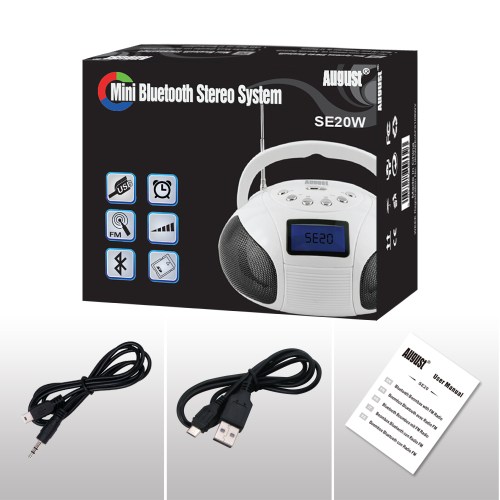
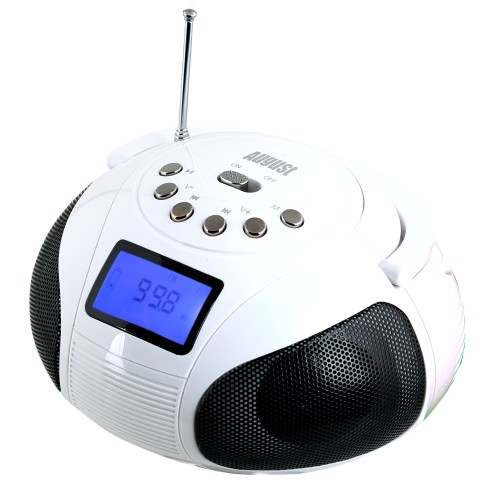
Welcome to my review of the August SE20 Mini Radio and Portable Stereo System.
The August SE20 is a rather cute device with lots of versatility and a new release from August International. The specifications are –
Specifications
– Bluetooth V3.0 + EDR
– Speakers: 2 x 3Watts
– Frequency Response: 80Hz – 18KHz
– Separation: 40dB(1KHz)
– S/N: 70dB
– USB and SD card port: up to 16GB card or USB in FAT format
– File format: MP3
– Battery: Rechargeable Li-ion 3.7v 800mAh
– Working Time: Over 7 hours
– Charging Time: 3 hours
– Charging voltage: DC 5V
– Dimensions: 150 x 125 x85mm
– Weight: 320g
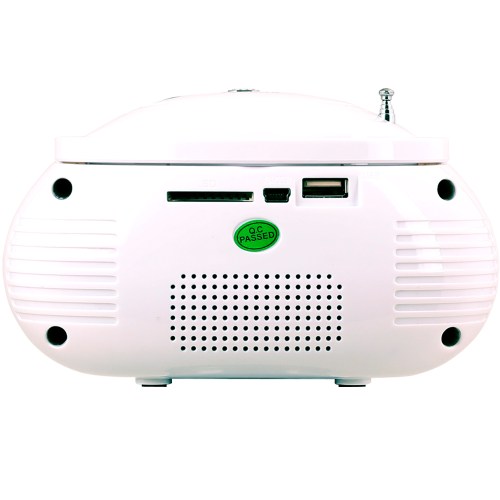
The rear has the connections for the SD, mini USB/DC5V and usb connections.
Key Features/Usage
– Play Music Wirelessly from Bluetooth Devices
– Handle for carrying it from room to room
– FM Radio with 12 Channel presets available
– 2 x 3W Speakers – Delivers powerful sound
– SD Reader, USB port and AUX In – Play your tunes from any other device
– FM Radio with 10 Pre-set Channels – Quickly tune to your favourite stations
– Internal Li Ion Battery – Over 7 hours playback between charges
– Track control panel gives you the freedom to adjust the volume and play/pause tracks direct from the speaker.
– 24 Clock Functions
Sound Quality
The FM Radio was able to pick up radio stations really easily and sounded good too. Switching modes is simply. Just press the M for Mode. Pairing via bluetooth was a breeze too. The SE20 allows you to control the volume, tracks and play / pause of the connected device which is really handy.
Conclusion
The August SE20 is a cracking little device which offers many ways to connect devices via bluetooth, SD card or USB. It also doubles up as a clock and FM radio all for around £34.95, although at time of writing it is on offer at Amazon UK for £20.
Welcome to my review of the August EP650 Bluetooth stereo headphones. This is the last August Bluetooth I am reviewing and as the expression goes, I have left the best to the last. Out of all 3 this is my personal favourite. More on why later. First the key specifications.
Specifications
– Bluetooth V4.0 with aptX® Technology
– Operating Range: Up to 10m
– Frequency Response: 60Hz – 20KHz
– Speaker Output: 30mW
– SNR: ≥85dB
– Distortion: ≤1.0%
– Battery: 3.7V/220mAh Built-in Li-ion Battery
– Working Time: 10 Hours
– Charging Time: 2 Hours
– Standby Time: 30 Days
– Weight: 235g
– Dimensions: 176.6 x 188.6 x 71mm
Key Features/Usage
The August EP650 Bluetooth Wireless Headphones are packed with all the functionality of the smaller EP636’s which I reviewed a few days ago. The EP650 improve upon the EP636 with more comfort due to the 12mm ear piece cushions and padded headband. In addition the headphones features apt-X and can connect to non bluetooth devices with a standard 3.5mm audio cable (provided). The retail price is normally £67.95, but there is currently an offer on Amazon UK saving nearly £30.
Other key features include –
– Microphone for Hands-Free Calls
– Bluetooth Range up to 10m
– NFC Ready – Tap to Connect
– 11 hours Battery Life
– Adjustable Headband
The August EP650 have larger cushions than the smaller EP636’s and consequently are really comfortable. Add in APT-X for better sound quality and the ability to use a 3.5mm audio cable (provided) for non bluetooth devices or when the battery has gone flat and you have a really versatile good quality headphone.
In terms of call quality, these sounded ok. The caller at the other end had no issue hearing me. I listened to a large number of tracks and a range of musical genres from classical, jazz, blues, pop and more. The EP650’s lean slightly towards the bass which reduces the sound stage and slightly overpowers the treble. The 650’s are best described a fun and comfortable headphone to listen too. During quiet classical pieces you can hear a slight hiss.
Conclusion
The August EP650’s are available in a range of colours and at their price point, comfort, quality and versatility offer good value for money. Recommended.
Let’s start off with another change of heart. iCloud Photos and iTunes Match is binned forever. Neither works for me and are both pointless and a PITA.
I am never going to use iTunes Match. It provides a copy of my music at a lower bitrate than what I have encoded. It once again uses my broadband which is not as fast as using a cable.
Apart from the sync issues of iCloud Photos, I kept getting a phantom photo that was always waiting to upload. I thought I had solved this by finding the single photo that was the culprit, deleting it, but only for the problem to resurrect itself a few days later. Turning off iCloud Photos didn’t solve the phantom photo. Also, if you turn off iCloud Photos on your Mac you need to reboot your Mac for the changes to work.
So I to remove the phantom photo. I wiped my iPhone clean and started again as a fresh device. Another PITA. However, I now have a solid phone which gives me up to 2 days battery life.
Despite all of the above the iPhone is a joy now to use, except the Apple Watch is actually annoying me over how it is designed to notify you. Basically, whilst wearing the Apple Watch, with your iPhone screen off, you won’t hear any notifications of any kind except if you receive a telephone call. Now you can set the Apple Watch to make a ping or taptic vibration, but the ping is just the same sound and impossible to differentiate between the different app notification tones. There is no option as far as I can see to allow the iPhone to makes sounds even if watch is on your wrist. I have missed several taps on my wrist and consequently the notification. Apart from that the Apple Watch is good, not brilliant. Sometimes Siri is slow to respond and apps can take an eternity to load. The Apple Watch is despite its flaws a stunning piece of kit.
I am also in the process of testing the iPhone 6S Plus for low light and the results are astoundingly amazing, much better than any review I have read recently. I am hoping to have this test completed over the next week or so.
For your chance to win a pair of these headphones see comment at the end of this review.
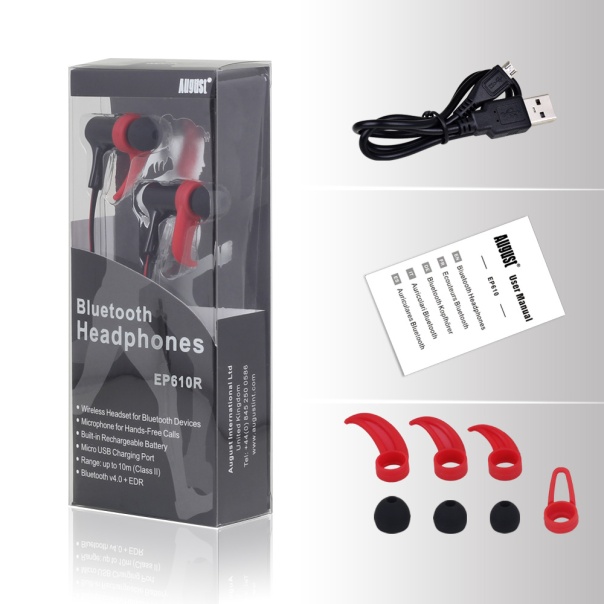
Welcome to my review of the August EP610 In-Ear Bluetooth Stereo Sports Headphones.
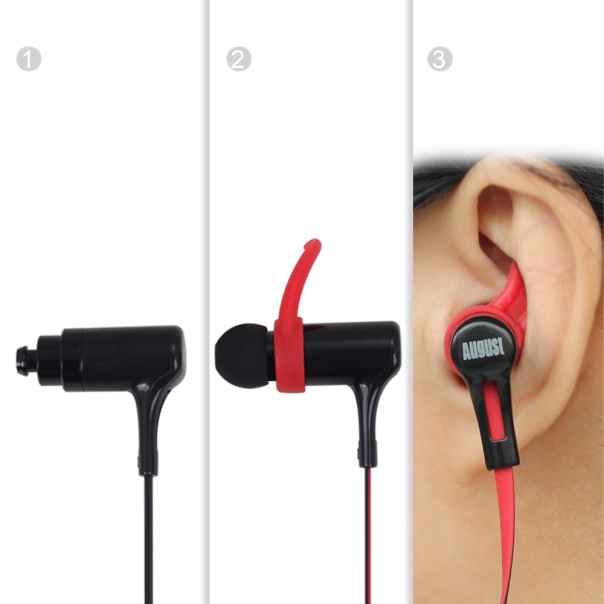
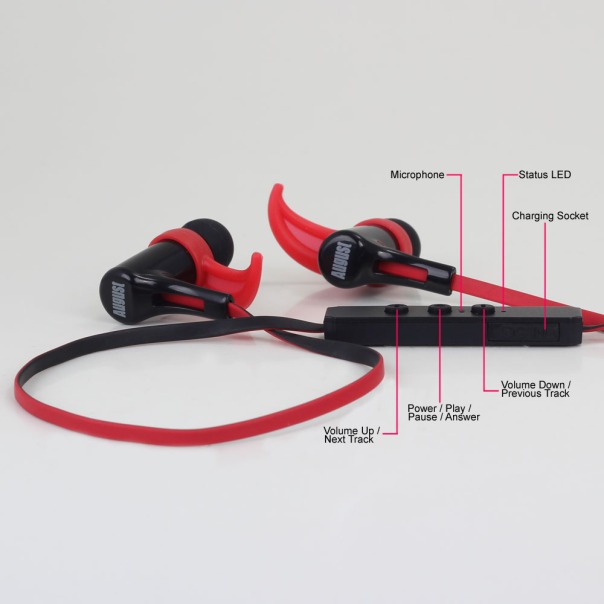
The August EP610 have been designed to be lightweight, yet provide extra grip along with incredible as a sports utility products on the market. The weight it kept down by using plastics. The August EP610 earbuds come in 3 sizes and with 4 stabilizers to help you adjust them to your ear shape. The in-ear controls allow you to answer phone calls and adjust the volume. The EP610 retail on Amazon at £27.95.
Specifications
– Bluetooth Version: v4.0
– Frequency Response: 200Hz~20kHz
– Output Power: 10mW x 2
– SNR: ≥ 80dB
– Distortion: ≤1% At 1KHz
– Battery: 40mAh x 2 Polymer Lithium Batteries
– Working Time: Up to 5 Hours
– Charging Time: Approx. 1 Hour
– Standby Time: 180 Hours
– Produce Weight: 15g
Key Features
– Wireless Earphones for Bluetooth Devices
– Microphone for Hands-Free Calls
– Built-in Rechargeable Battery
– Micro USB Charging Port
– Bluetooth Range up to 10m
– Bluetooth v4.0
– 5 hours battery life
Sound Quality/Usage
My ears are different to yours. As is the next person. That’s why it was good to see August had supplied different ear buds and 4 different size stabilisers. Whilst the in-ears look big, they are so comfortable and only 15g in weight.
Call quality was ok and playing music provided an enjoyable listen.
For the music test, I listened to several different genres over hours and hours. Below are my findings from a selection of 5 tracks.
“The Sound of Yo-Yo-Ma, The Score – Oh My Love, Ellie Goulding – On My Mind, The Martian – Movie – Emergency Land, Cassandra Wilson – Come On in my Kitchen”.
Across the music spectrum everything was reasonable and not over played. However, I did notice a slight background hiss which was more noticeable in quieter tracks and classical music.
Conclusion
Just shows how far technology is moving forward. In-Ear Bluetooth headphones for £27.95, and currently on offer at Amazon too. This price 2-3 years ago would not have been possible versus the quality. Not only that the August EP610 sound reasonable and are comfortable. Recommended.


















 Gavin's Gadgets & Photography