Why are we crazy about smartphone cameras?

Take a look at the tweet below from Steve Litchfield.

Was this snapped on a Lumia 950, a Samsung Galaxy S7, an iPhone SE, LG G5 or HTC 10 or something just as good. NO. It was taken on a cheap and nasty smartphone that has no emphasis on the camera. It also comes with a processor so weedy its too embarrassing to mention it. The Marshall London is all about the world’s loudest smartphone speakers and the headphone audio.

But take a look at the photo. Once shared on social media where most shots end up, should we really be obsessing over the photo quality?

Food for thought.

Back in the Day the Moto RAZR was King – Motorola Teases New Phones

Lenovo released an advert yesterday reminding everyone of the successful RAZR flip phone and then teasing the unveiling of Motorola’s next… something… that’s all about reliving the Razr’s incredible success in the mid-2000s.

The big unveiling is on the 9th June 2016. It is quite likely that the new phones are going to be very thin, rumoured just over 5mm. Don’t ask about the battery!

Below is the advert.

Android Apps are coming to Chrome OS – Editorial

On the second day of Google I/O, Google announced that the entire Google Play Store would be present and Chrome OS and Chromebooks. All the apps and games would run on Chromebooks.

Yesterday I said the following – “ultimately Google is moving towards a vision where the Google Cloud, Artificial Intelligence and Virtual Reality control your life.”

I also mentioned “Android Instant Apps – this allows Google load and run specific parts of Android apps on devices without downloading and installing the whole app first. Apps are made in modules by developers for this to happen.”

Now merge both of these together and the Chromebook becomes a super fast, super powerful and on demand computer. If you have used a Chromebook already, you will already know it is super fast, nimble and can already manage 95% of all day to day tasks.

Provide a platform to use apps on demand and via the cloud as you need each part, and its a match made in heaven. Now this is likely 12-24 months away, but the Google Play store will arrive on Chromebooks by later this year.

I do wonder if Google have just pulled off a masterstroke against Microsoft and their cloud and Apple. Personally I would like everyone to succeed as well as someone like Amazon. As they say, competition is healthy.

Google I/O Keynote Speech – Highlights, Extras and My Thoughts

Google I/O opened yesterday with a 2 hour keynote speech. Lots of items got discussed but ultimately Google is moving towards a vision where the Google Cloud, Artificial Intelligence and Virtual Reality control your life.

Key Highlights

– Google Assistant – An ongoing two way assistant to help you with everything.

– Allo – New messaging app for Google Assistant baked right in and that learns more over time.This is a great person to person or group messaging app. You can preregister for this app too.

– Duo – A new video calling app, which works well even over low bandwidth. Again you can preregister for this app as well.

– Virtual Reality arrives on Android using the “Daydream” standard. This was big news as Daydream will include loads of new features to make VR a top notch experience. This means that phones running Daydream will have a built-in VR interface for navigation, VR versions of Google apps and the latency and performance will be managed by Daydream to provide a great VR experience across devices. Google is providing manufacturers with open source reference platforms for a new level of VR headset and one-handed motion controller

– Android N – The final version not only downloads in the background but it actually installs itself too, without the need for you to reboot your phone. More features on Android N were made available along with a new beta.

– Android TV – support for picture in picture, HDR, live recording and new apps and extra Google cast functionality in more TV’s and devices.

– Google Home – This is Google’s response to Amazon’s Echo. Acknowledgement was made at the great job Amazon had accomplished with Echo too. Google Home goes further becoming the digital controller for music, lights , devices and more. Plus its a speaker and can control other speakers, play video on your TV and much much more. Google Home is Google’s response to HomeKit and Siri as well.

– Android Wear 2.0 – A huge update, probably bring to catch up with the Apple Watch whilst adding some new features like a new material design, app launcher, keyboard with gestures and handwriting input, and watch complications.

– Android Auto – A new feature will be the fact you will be able to run the Android Auto interface natively on a phone or tablet and not rely on a dedicated smart computer or radio in your car.

– Chrome OS – Google Play Store and Android apps will be able to run on Chrome OS. The Android Instant Apps initiative could be a method used to help support Chrome OS even more.

– Android Instant Apps – this allows Google load and run specific parts of Android apps on devices without downloading and installing the whole app first. Apps are made in modules by developers for this to happen.

Ultimately I see this as the future where you will be able to log on to any piece of hardware and have your entire app, games, media, personal data streamed via the cloud as you need it. This will be supported by Google AI and VR.

Apple iPhone 6s vs HTC 10 vs Samsung Galaxy S7 vs LG G5 – Camera Night Shots

Daylight was disappearing fast and before you knew it, it was pitch black in the haunted graveyard of the Church of St Michael & All Angels, Princetown, Dartmoor, UK.

Fortunately I was not afraid as I was armed with 4 of the latest and top flagship smartphones to protect me from the ghosts and spirits.

The task was simple, take a number of shots using the 4 smartphones to decide a clear winner. There were a few surprises on the way with this test too. With all the phones I shot in auto and where available pro modes. I have shown the exif data with each shot, and if you want to pixel peep, you can click on each photo to explore the full size photo.

Each photo has the exif data and time taken. The photos are in order of time. Please be patient as there are 25 shots in total to view.

HTC 10 – Auto – 1/25 ISO 500 – 9.23pm

The HTC 10 produced a very realistic shot in terms of how dark it was at the time and the colours and white balance.

HTC 10 - Auto - 1/25 ISO 500 - 9.23pm

LG G5 – Auto 1/13s ISO 350 – 9.24pm

Oodles of detail from the G5. Great shot.

LG G5 - Auto 1/13s ISO 350 - 9.24pm

LG G5 – wide – auto – 1/15s ISO 550 – 9.24pm

With just a little light the wide angle lens on the G5 does a good job.

LG G5 - wide - auto - 1/15s ISO 550 - 9.24pm

Samsung S7 – Auto – 1/13 ISO 200 – 9.24pm

These dusk to darkness shots are excellent from the S7.

Samsung S7 - Auto - 1/13 ISO 200 - 9.24pm

HTC 10 – 1/6s ISO 100 – 9.26pm

A cracking shot from the HTC 10. I really like this.

HTC 10 - 1/6s ISO 100 - 9.26pm

HTC 10 – 1/2s ISO 100 – 9.26pm

A great shot again from the HTC 10.

HTC 10 - 1/2s ISO 100 - 9.26pm

Samsung S7 – Pro Mode – 0.5s ISO 50 – 9.26pm

The difference of 0.5 seconds. A good shot from the S7.

Samsung S7 - Pro Mode - 0.5s ISO 50 - 9.26pm

LG G5 – Manual mode – wide – 2s ISO 50 – 9.27pm

The 8mp 135º wide angle lens of the G5 looks amazing but pixel peeping reveals its weaknesses.

LG G5 - Manual mode - wide - 2s ISO 50 - 9.27pm

LG G5 – Manual mode – wide – 2s ISO 50 – 9.27pm

It wasn’t daylight but at 2 second shutter even with the wide lens, a great picture is captured.

LG G5 - Manual mode - wide - 2s ISO 50 - 9.27pm

Apple iPhone 6S – f/17 ISO 640 – 9.28pm

An average shot from the iPhone 6S, but not at the same league as the other phones.

Apple iPhone 6S - f/17 ISO 640 - 9.28pm

Apple iPhone 6S – 1/17s ISO 400 – 9.29pm

Once it got too dark, the iPhone 6S was really struggling as this is evident when you pixel peep.

Apple iPhone 6S - 1/17s ISO 400 - 9.29pm

Apple iPhone 6S – 1/17s ISO 640 – 9.29pm

So with the ISO increased, the photo looks brighter but its still falls short compared to the other phones.

Apple iPhone 6S - 1/17s ISO 640 - 9.29pm

Samsung S7 – Pro Mode – 1s ISO 50 – 9.30pm

A vivid and sharpened shot from the S7, but one that look good.

Samsung S7 - Pro Mode - 1s ISO 50 - 9.30pm

Samsung S7 – Pro Mode – 2s ISO 50 – 9.30pm

One extra second shutter time from the S7 shot above and it looks too bright. But lots of detail.

Samsung S7 - Pro Mode - 2s ISO 50 - 9.30pm

HTC 10 – 1s ISO 100 – 9.32pm

A good photo from the HTC. Lots of detail.

HTC 10 - 1s ISO 100 - 9.32pm

HTC 10 – 1s ISO 100 – 9.34pm

An average shot with the HTC 10. I had thought I had pushed a 2 second shutter, the max in pro mode, but the exif data only shows 1 second.

HTC 10 - 1s ISO 100 - 9.34pm

LG G5 – Auto – 1/9 – Night mode activated – 9.36pm

A wide angle lens shot again, lots of noise and artefacts.

LG G5 - Auto - 1/9 - Night mode activated - 9.36pm

LG G5 1/9s ISO unknown AUTO – 9.36pm

Like the wide angle shot above, in auto mode at night, the G5 activated some photo mode to obtain the best shot.

LG G5 1/9s ISO unknown AUTO - 9.36pm

LG G5 – Manual mode – 5s ISO 50 – 9.37pm

The G5 is doing a good job again this late at night.

LG G5 - Manual mode - 5s ISO 50 - 9.37pm

LG G5 – Manual mode – 8s ISO 50 – 9.37pm

Wide lens at 8 seconds shutter is not enough to stop noise and artefacts.

LG G5 - Manual mode - 8s ISO 50 - 9.37pm

Apple iPhone 6S – 1/17s ISO 1250 – 9.37pm

Very high ISO and a loss of detail from the iPhone 6S.

Apple iPhone 6S - 1/17s ISO 1250 - 9.37pm

Samsung S7 – 1/10s ISO 1000 Auto – 9.37pm

In this shot the S7 made the photo appear not as dark as it really was. Lots of noise and artefacts in this shot. At ISO 1000 this is to be expected.

Samsung S7 - 1/10s ISO 1000 Auto - 9.37pm

LG G5 – Manual mode – wide – 8s ISO 50 – Edited WB – 9.37pm

With a bit of fun with the white balance I created the shot below.

LG G5 - Manual mode - wide - 8s ISO 50 - Edited WB - 9.37pm

Samsung S7 – Pro mode – 4s ISO 50 – 9.38pm

As it became near pitch black, the street lamp just outside of the perimeter of the church wall played havoc with the white balance. Not very good and the processing is all over the place.

Samsung S7 - Pro mode - 4s ISO 50 - 9.38pm

Samsung S7 – Pro mode – 8s ISO 50 – 9.38pm

Again when it got very dark the S7 just failed to cope with the white balance as above but there is detail in this shot despite noise and processing.

Samsung S7 - Pro mode - 8s ISO 50 - 9.38pm

In terms of ranking the Apple iPhone 6S comes last. When it was pitch black except for a nearby street lamp, the S7 lost control of the white balance. So that left the G5 and HTC 10. Very close call and sometimes in between pitch black and dusk the S7 did a good job.

Also, if any of the shots from the iPhone were shared to twitter or social media, nobody would be any the wiser.

So in terms of the HTC 10, LG G5 and Samsung Galaxy S7 its a close call. The G5 has more pixels and up to a 30 second shutter speed. It also has the amazing wide angle lens. The HTC 10 has the largest pixels and at times it shows. And the the Samsung Galaxy S7 with its f/1.7 and fast focussing is superb until it gets pitch black.

So who is your winner?

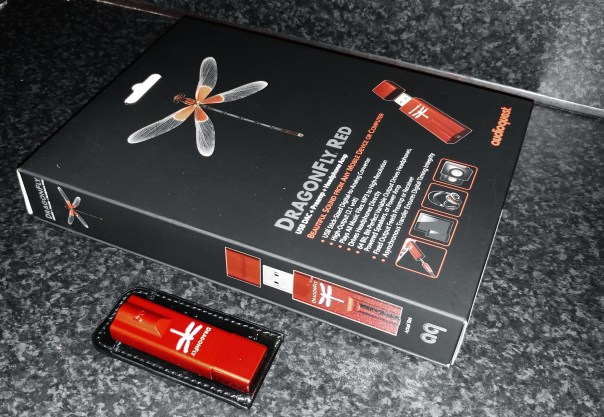
Audioquest Dragonfly RED – The Latest & Greatest DAC the size of a USB stick – review

C360_2016-05-01-17-34-52-092

Welcome to my review of the Audioquest Dragonfly Red. The Dragonfly Red is a USB DAC, Preamp and Headphone amplifier all squeezed into the size of a USB memory stick.

The Key Specification

– USB Stick-Sized Digital-to-Analog Converter
– Plays all music files: MP3 to high-res
– Compatible with Apple and Windows PCs, as well as iOS and Android mobile devices (requires Apple Camera Adapter or Made for Android/OTG adaptor)
– Drives headphones directly
– Fixed output feeds preamp or AV receiver
– Asynchronous transfer ensures digital timing integrity
– High output (2.1 volts) drives almost all headphones, including power-hungry models
– 32-bit ESS 9016 DAC with minimum-phase filter
– Bit-perfect digital volume control
– Firmware upgradeable

The Sound Quality and Experience

For the purposes of this review I tested the Dragonfly Red using my iPad, Samsung Galaxy S7 and Macbook. Headphone used were Oppo PM-3, Dunu Titan 5, Sony XBA-1, Sennheiser HD598se and Audio Technica M50x.

All three source components had no issues functioning with the Dragonfly Red. To use with the iPad I needed to use the Apple Camera adapter and with the Samsung Galaxy S7 an OTG adapter. Samsung include an OTG adapter in the box which is handy.

Also worth noting on the S7, to get the best experience you must use an app called USB Audio Player Pro. If you listen to the S7 using other music services/apps they don’t connect to the digital direct drive volume so at max levels the volume may not be high enough. With UAPP the volume is immense.

When using portable devices or your smartphone, the Dragonfly Red does drain the battery of your device faster than normal. This is to be expected as its needs power from somewhere. However, unlike other portable DAC/Headphone amps that have an built in battery, it never goes flat or needs recharging.

I listened to a number of different genres – dance, classical, jazz, rock and blues. I found the Dragonfly Red provided oodles more power and control than using the source components own headphone jack. Also the layering and delicacy of the music was lovely at times. This was more noticeable with classical and jazz genres. The soundstage improved too with the DAC. Overall the music was clearer, more defined, better layered and provided a decent lift in quality.

Conclusion

A remarkable piece of kit from Audioquest. Top notch sound quality bundled in such a small package. Recommended.

For more information and the latest deals on Amazon UK, click HERE.

Android Pay comes to the UK – details and how to install

Google has announced that Android users in the UK will be able to safely and securely pay from their devices using the operating system’s tap and pay functionality.

MasterCard and Visa debit and credit cards will be supported from a variety of banks including, but not limited to, the Bank of Scotland, First Direct, Halifax, HSBC, Lloyds Bank, M&S Bank, MBNA, and Nationwide Building Society.

Natwest have stated that they are not supporting Android Pay yet, but an announcement is imminent.

Now just as Google made the announcement that Android Pay was live in the UK, Google changed their mind. So don’t panic. Natwest have already told me their announcement was imminent and its the start of Google I/O. So expect to see some action over the next day or so!

To install Android Pay, click Google Play Store Link to Android Pay and install the app.

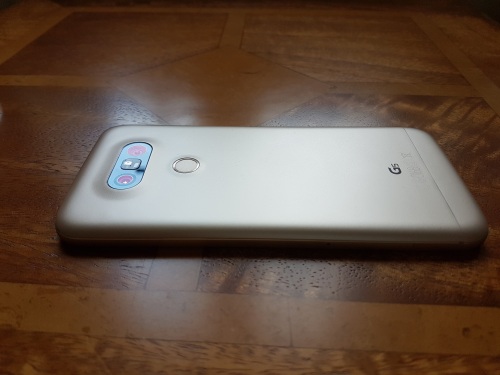
LG G5 – 26 Part Mammoth Review – The modular phone becomes a reality – With all the LG Friends & Modules

20160514_072747

Welcome to my review of the LG G5.
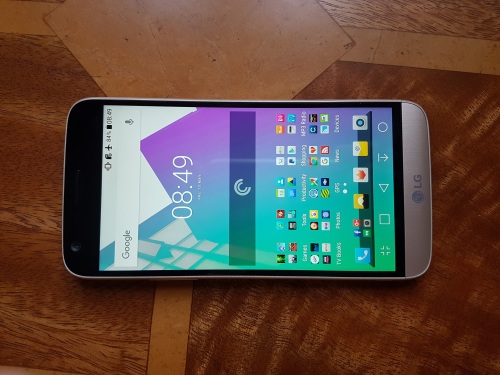
20160514_072714

This review has been written after spending 1 month with the LG G5. It has also had a firmware update during this time. Before this review I have published several ongoing posts with guest posts from readers Mark and Mat.

UPDATE – February 2017 – I have now re-reviewed the LG G5 running android nougat. Click HERE.

LG G5 – Can you manage without an app drawer

LG G5 – First Shots from the Camera

LG G5 – My fav shots so far with comments

LG G5 – First Impressions

LG G5 – How to get 10 hours screen on time

LG G5 – More shots from the camera

LG G5 – Shots from London Docklands with Comments

LG G5 – One Week later

LG G5 – How to unlock the bootloader

LG G5 – 2 Weeks Later

LG G5 – First Minor update

LG G5 – What I like about the G5 camera so far

LG G5 – Time Lapse and 360 Cam footage

LG G5 – highlights from the weekend

Mat shares his photos and views on his new LG G5

Camera Decisions – LG G5 vs Samsung Galaxy S7

How I see the pros and cons of the LG G5 and S7

LG G5 vs Samsung S7 – Another camera comparison

Mark shares his views on why he picked the S7 over the G5

LG G5 vs Huawei P9 – camera comparison

Hardware and Design

LG decided to be bold and create a modular phone. A phone where the bottom end detaches and allows for other components to be fitted. So far there is a HiFi Plus and Cam Plus module. What comes next is anyones guess. LG also created LG Friends for the G5. Some of these Friends also work with other android phones and iOS. In fact the HiFi Plus module is also able to work with iOS, android and other OS’s in standalone mode.

I have all the modules and friends. I swap the HiFi DAC on and off regularly and there are absolutely no signs of wear and tear. None whatsoever. So the initial web reports on build quality must have been a faulty first batch. The G5 is made from metal and then painted to hide the antenna lines. Once again the internet reacted to such a scandal. Well, don’t believe everything you read as these publications need visitors to feed their advertising revenue. Nothing wrong in this, but you need to be objective. So lets start with facts. The G5 is the only flagship phone that doesn’t show my fingerprints like there is no yesterday. The Samsung S7 is a disaster for fingerprints. There are also no scratches or marks on my G5 after one month. So LG got something right!

In reality, if you put a case on any phone, it looks no different from another phone.

LG G5 Modules, Friends and Accessories. Below are all the links to the individual reviews –

LG G5 BCK-5100 Hybrid Battery Dock Charger review

LG Cam Plus – review

LG 360 Cam review

LG 360 VR review

LG HiFi Plus review – and reviewed with the S7

LG Tone Platinum HBS-1100 Bluetooth Headset review

The Key Specficiations

– Screen IPS LCD capacitive touchscreen, 16M colors, 5.3 inches (~70.1% screen-to-body ratio)
– Resolution 1440 x 2560 pixels (~554 ppi pixel density)
– Protection Corning Gorilla Glass 4
– Always-on display
– LG UX 5.0 UI
– OS Android OS, v6.0.1 (Marshmallow)
– Chipset Qualcomm MSM8996 Snapdragon 820
– CPU Dual-core 2.15 GHz Kryo & dual-core 1.6 GHz Kryo
– GPU Adreno 530
– MEMORY Card slot microSD, up to 200 GB (dedicated slot)
– Internal 32 GB, 4 GB RAM
– CAMERA Primary 16 MP (f/1.8) + 8 MP (f/2.4), laser autofocus, OIS (3-axis), LED flash,
– Features Geo-tagging, touch focus, face/smile detection, panorama, HDR
Video 2160p@30fps, 1080p@30fps, HDR, stereo sound rec., check quality
– Secondary 8 MP, f/2.0, 1080p@30fps, 135º wide angle
– Audio – 24-bit/192kHz audio
– COMMS WLAN Wi-Fi 802.11 a/b/g/n/ac, dual-band, Wi-Fi Direct, DLNA, hotspot
– Bluetooth v4.2, A2DP, LE, aptX HD
– GPS Yes, with A-GPS, GLONASS, BDS
– NFC Yes
– Infrared port Yes
– Radio FM radio
– USB v3.0, Type-C 1.0 reversible connector, USB On-The-Go
– Sensors Fingerprint, accelerometer, gyro, proximity, compass, barometer, colour spectrum for camera
– Fast battery charging: 83% in 30 min (Quick Charge 3.0)
– Active noise cancellation with dedicated mic
– MP4/DviX/XviD/H.264/WMV player
– MP3/WAV/FLAC/eAAC+/WMA player
– BATTERY Removable Li-Ion 2800 mAh battery
– Stand-by Up to 400 h (3G)
– Talk time Up to 20 h (3G)
– Display Contrast ratio: 1855:1 (nominal), 2.905 (sunlight)
– Dimensions – 149.4 x 73.9 x 7.7 mm (5.88 x 2.91 x 0.30 in)
– Weight 159 g (5.61 oz)

Phone Basics

The G5 comes with LG’s latest UI launcher version 5 which has no app drawer. LG added the app drawer back in an update after a week. However, I never bothered to use the app drawer until I decided to install Nova Launcher after 3 weeks. LG launcher does have optional themes but these do not theme the entire phone UI like the Samsung Galaxy S7 themes. I would recommend either installing the Google Now launcher or Nova.

Screen viewing angles are good. Sunlight visibility can be awkward at times. Cellular and WiFi signal strengths were excellent. The G5 in my testing is better at finding signal than the S7. At times the S7 had no signal whereas the G5 had 2 bars whilst on the same network.

The G5 moves to nano sim and USB Type C with Quick charging 3. With the fast charging provided, the G5 charges blisteringly fast. Unlike every other flagship, the G5 has an infra red blaster for controlling your TV, DVD, air conditioner and much much more. Battery life averaged 4-5 hours screen on time based on my setup which included location settings on high and with a connected wearable. With Quick Charge 3 and user swappable batteries power will never be an issue with the G5.

The rear fingerprint scanner/power button works quickly and accurately. The G5 has the option of an always on display. This is useful as it displays icons of all your notifications without the need of turning the phone on. However, its hard to view in bright light.

Camera

The cameras on the LG G5 are brilliant. It comes with a 8mp front camera and 2 rear lenses. A standard 16mp f/1.8 and a 8mp f/2.4 135 degree wide angle lens. The wide angle lens is phenomenal. You can get shots as shown below from it –

St Michael's & All Angel Church, Princetown #wideangle #LGG5

Around and inside Foggintor Quarry #lgg5 #snapseededits

The wide angle lens is so wide at 135 degrees you can capture the whole scene with ease. It also means you don’t have to worry about not having enough room to step back further to capture the entire scene. Below the whole harbour in one shot.

Milbay Harbour, Plymouth #lgg5wide

Of course the standard 16mp lens is just as awesome and has no issues capturing kids and pets.

What a tongue #George #Dartmoor#lgg5

The 16mp lens shoots at 16:9 and provides oodles of detail and the ability to crop and crop.

Yellow Daffodil #lgg5

In fact if you want to see more photos from the G5, head over to my dedicated Flickr album where there are 100 shots to view – Click HERE.

The LG camera interface is similar to the LG G4. You have 3 shooting options. Simple (touch screen to shoot), Auto and Manual. Unlike the LG V10, the G5 has no manual controls for video which is disappointing. In Auto mode you have mode options auto, popout, multi view ,snap, panorama, slo mo and time lapse. Pop out is pointless IMO. See my Flickr album for samples. All the other modes work well. The 8mp from camera is good and offers a sliding scale of beautification. Other settings include photo ratio (16:9, 4:3 and 1:1) video resolution (4K, FHD at 30fps and HD), HDR Auto, 9 filters, timer, voice control, OIS on or off, Electronic Video stabilisation on or off and grid lines. You can also select the 16mp or 8mp wide angle lens or if you zoom in and out it switches on the fly. Manual mode allows RAW capture. Flash has another option over auto called R. Reduced flash. You can also have a histogram showing. Other manual controls are for white balance, manual focus, EV, ISO (50-3,200), Shutter speed (1/3200 to 30 seconds) and AE-L. As mentioned above there are no manual controls for video which means videos can be over exposed sometimes and there is no option to reduce the exposure or anything.

The G5 can record video at 4K and the results are superb with proviso mentioned above. Photo image quality from all 3 lenses are excellent.

Audio Quality

The G5 has an option for adding a HiFi DAC module. But without this it is still a great phone for audio quality. The single bottom firing loudspeaker is really loud. Bluetooth audio is better than all current flagships as it has APT-X HD. This is the Hi Res 24bit bluetooth codec from Qualcomm. With APT-X HD enabled headphones the results are fantastic. The wired audio from the top mounted headphone jack is also good quality and has a much louder output than that of the Samsung S7.

The Extra Experience with the Modules

Of course the G5 currently has 2 modules that replace the bottom section. The HiFi Plus DAC provides 32 bit sound. This DAC is really good, see links above for review. It improves the sound quality a lot and can power many headphones. It also provides a louder loudspeaker. The cellular antennas are also inside this along with the mic. The other module is the Cam Plus. Again see review links above. If you are going to be out all day taking photos this improves the photo taking experience.

Of course, more modules could arrive and add more functionality. As to if and when and what only time will tell.

Conclusion

The LG G5 is a real workhorse. It has many unique features and functions over the competition and is one of my favourite phones to date. Currently it is on sale at Amazon UK for £449 which makes it great value.

More information and the latest pricing on Amazon UK – Click HERE.

More information and the latest pricing on the LG Friends and modules on Amazon UK – Click HERE.

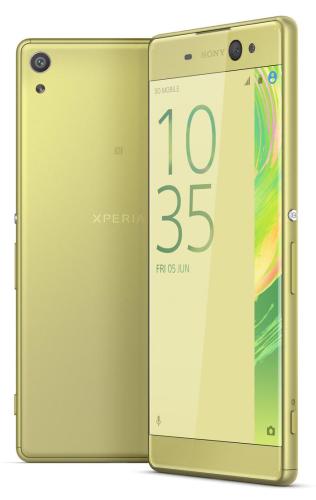
Sony announces the Sony Xperia XA Ultra – Full Details

1 ultra

Sony has announced a new “Ultra” phone for 2016, the Sony Xperia XA Ultra.

Key Specs

– Operating System Android 6.0 Marshmallow
– Display 6-inch 1920×1080, Mobile BRAVIA engine 2,Super Vivid mode
– Processor MediaTek MT6755 oct-core ,64-bit
– Storage 16GB, Expandable microSD up to 200GB
– RAM 3GB,
– Rear camera 21.5MP with Exmor RS
– Hybrid autofocus, HDR
– Front camera 16MP with Exmoor R, 88-degree wide angle lens,Flash, OIS,Autofocus, HDR
– Charging micro-USB
– Battery 2700 mAh
– Connectivity Wi-Fi, Bluetooth 4.1, NFC, GPS
– Miracast, Google Cast, DLNA
– Waterproofing None
– Dimensions 165.1 x 78.7 x 7.6 mm
– Weight 189.9 g
– Colours White, black, lime gold

Disappointingly the XA Ultra only comes with 16gb storage. It does however like the HTC 10 feature a front camera with OIS. However, Sony have opted for a 16mp front camera. The rest of the phone is a middle of the road device, just a big 6 inch phone.

Source

Apple releases new firmware updates – details and a warning if you have the iPad Pro

Apple releases software updates for all its hardware yesterday, including iPhones, iPads, Apple Watch, Apple TV, Mac’s and more.

iOS 9.3.2 – This is mainly about bug fixes. The main points –

– Ability to use Night Shift while Low Power Mode is activated.
– The Game Center bug has now been fixed.
– iPhone SE bluetooth audio issue where some Bluetooth accessories could experience audio-quality issues when paired to iPhone SE is fixed.
– Fixes an issue looking up dictionary definitions which previously could fail.
– Addresses an issue that prevented typing email addresses when using Japanese Kana keyboard in Mail and Messages
– Fixes an issue for VoiceOver users using the Alex voice, where the device switches to a different voice to announce punctuation or spaces
– Fixes an issue that prevented MDM servers from installing custom B2B apps

However, according to Macrumors.com iOS 9.3.2 is causing problems for some 9.7-inch iPad Pro owners, with multiple MacRumors readers and Twitter users reporting issues shortly after installing the update over the air. Affected users are seeing an “Error 56” message that instructs them to plug their devices into iTunes. So it might be worth holding fire for a few days before updating your iPad Pro.

watchOS 2.2.1 – this software update is all about making your Apple Watch run smoother by fixing a number of annoying bugs.

tvOS 9.2.1 – like other updates this is all about bug fixes.

iTunes 12.4 iTunes 12.4 introduces new interface tweaks including a new media picker that allows users to quickly switch between Music, Movies, TV shows, and more. Next there is a persistent sidebar . This interface tweak makes it easier to switch between different categories of content. The menus interface has also been simplified.

OS X 10.11.5 – this is all about bug fixes.

Seems Apple had a lot of bugs to fix across all its devices!