LG G5 Friends – The LG Cam Plus – Detailed Review with FULL Specifications

image

Welcome to my review of the LG Cam Plus. This is my first review of one of the modules/friends for the LG G5. The LG Cam Plus costs £69.00 and is available from Clove Technology.

The Key Specifications / Features

– Comfortable Shooting Grip
– Traditional camera experience
– Physical keys: intuitive camera on/off, zoom, shutter, and record keys; autofocus with a half-press of the shutter key
– Burst Mode will become available with later firmware update
– USB USB 2.0 Type-C
– Battery Li-ion 1,200 mAh
– Charging time less than 200 minutes
– Voltage 5 V ±10%, 9 V ±10%
– Current Consumption 25 mA (no Charging), 1 mA (Power Off)
– Charging Consumption 500 mA
– Output Consumption 500 mA
– Audio Speaker and digital MIC
– Sound Pressure 1 m sound pressure 60 dB ↑ (100%) *based on a full charge
– Antenna GSM/CDMA, WCDMA, LTE™
– LED Battery indicator
– Operating Temperature -20 °C – 40 °C
– Dimensions/Weight 73.9 mm X 61.4 mm X 15.9 mm / 55.4 g

What is it like to use?

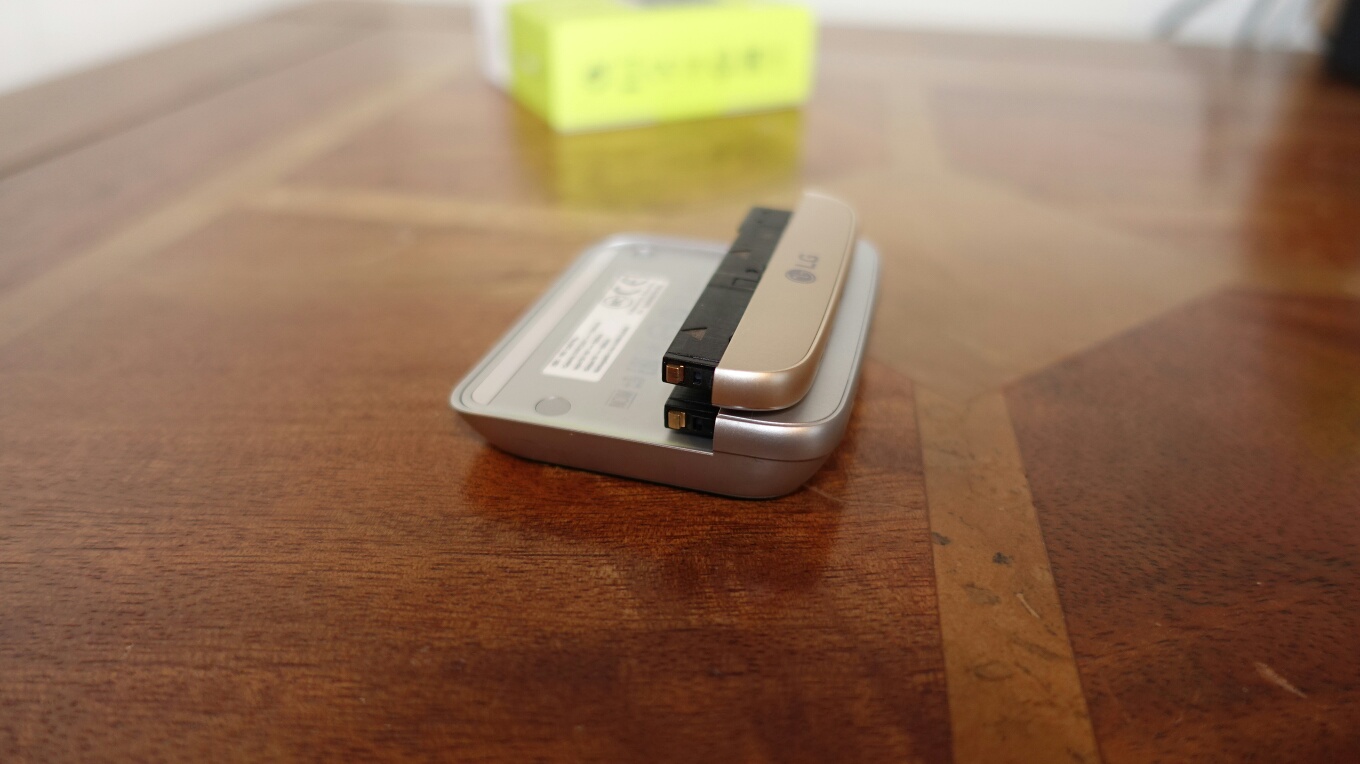
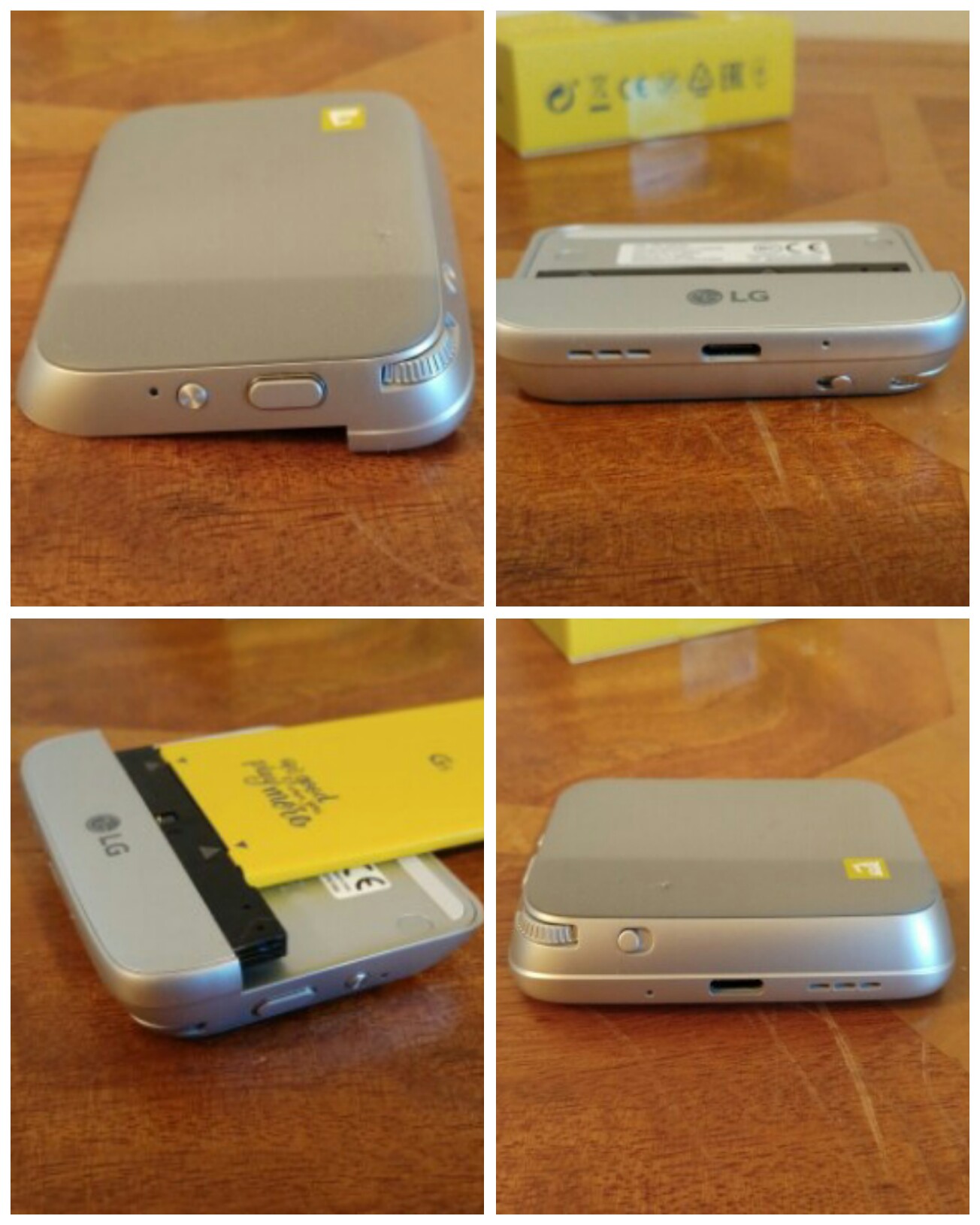
The LG Cam Plus replaces the bottom chin of the LG G5. It is slightly longer as you can see from the photos and it is also only available in silver. It also means the G5 is no longer flat and if you have a case for your phone it won’t fit now. I don’t use a case for my G5. The design seems tough and durable so far and it doesn’t show any fingerprints.
image

My LG G5 is gold. In all honesty the different colour finishes do not matter but it would have been nicer if it had been available in matching colours. The LG B & O HiFi Plus module is black.

The LG Cam Plus contains a 1,200mAh battery, the antenna for GSM/CDMA,WCDMA and LTE, audio speaker and digital mic. It is recharged using your LG G5 USB Type C cable. LG claim it takes less than 200 mins to recharge the battery. From flat I found it took about 2 hours. There is a LED light than is red while recharging and turns green when fully charged. The LED is also there to notify you when the battery is under 10%. Connecting the USB Type C cable to the Cam Plus first fast charges the G5 and then the module. Whilst the power lead is connected to the Cam Plus you cannot use the keys on it.

So how does it all work. Simply remove the bottom off your G5 by pressing the button. Take the battery off. Removing the bottom chin and the battery are so simple BUT make sure you have read the manual that explains the technique. Connect the battery to the Cam Plus and connect the module to the LG G5. Power on your G5. I wish the G5 didn’t have to power off each time you swap module. However, it does this as each module has its own firmware which will receive updates to improve it. With the Cam Plus connected the weight increases by about 50g. The firmware is controlled via the LG Friends Manager and Cam Plus app.
image

Here’s the crazy part. The Cam Plus contains the cellular antenna, mic and loudspeaker. These improve upon the G5. The larger enclosure of the module helps the loudspeaker sound. I have done several Skype calls with and without the module. With the module fitted the calls were clearer. Plus you can use the 1,200mAh battery to keep the G5 charging while on a long Skype call. Video recordings using the mic also highlighted the improved audio.

So what is the grip section like to use as a camera. It is not the most natural grip to hold. I have no idea how the LG videos show it being used one handed. It is possible but I do recommend 2 hands. However, with 2 hands in action it is a lot better to use. There is a button that you slide to instantly activate the camera and sliding it again reverts back to the G5 home screen. There is a 2 way shutter button that works very well and a button for video recording. You can take photos while video recording. There is a leaflet in the Cam Plus box stating that burst mode will come soon via a firmware update. So for the time being you have to use the on screen shutter button for burst mode. The other control is a zoom scroll wheel which zooms in and out of the shot effortlessly going between the 16mp and 8mp wide lens. The 1,200mAh battery only works when the camera is being used. It very slowly adds charge back into the G5. It stops charging after about 5 mins of not using the camera grip. However, it is very useful to have power slowly put back in the phone as the camera does like to drain the G5. I took a 20 min time-lapse and noticed the camera grip had turned off, probably after the 5 min mark and probably because it didn’t detect any movement on the grip keys. Hopefully a future firmware update will change this.

The small print. With the Cam Plus connected USB OTG and USB Audio does not function. Again will this might change with a firmware update.

Conclusion

I take a lot of photos. I have found the Cam Plus handy to have for this purpose. It is a breeze swapping off and on again. I also like the fact the battery level of the phone is being maintained despite snapping loads of photos.

Available from Clove Technology.

Which headphone should you buy? Reviews on In Ear, Bluetooth, Noise Cancelling, Full Size and More

Below are all the reviews I have written covering headphones, amps and DACs. Reviews due soon include the new Audioquest Dragonfly Red Headphone/DAC, LG Tone Platinum (the first bluetooth headphones with APT-X High Definition/Hi-Res) and the LG HiFi Plus B&O Headphone/DAC designed for the LG G5 but also works with anything else in its standalone mode.

Digital Audio Players

iBasso DX80 review including using it with a Chord Mojo

Pioneer XDP-100R review

Headphone Amps/DACS

Cayin C5 Portable Headphone amplifier review
Chord Mojo – First Impressions
Fiio E12 – master review
Fiio Q1 – DAC and Amp review
HiFiMeDIY Sabre Android USB DAC review
iBasso D-Zero MK2 Headphone Amp DAC review
Little Dot MKIV Tube Headphone Amplifier review
Oppo HA-1 Headphone DAC review
Oppo HA -2 Portable Amplifier and DAC review

In-Ear Headphones

August EP610 Bluetooth Headphones – review
Dunu Titan 5 In Ear headphones review
Lindy IEM-50X Hi-Fi In Ear Headphone review
Sony XBA-1 In Ear Headphones review
Sony XBA-H1 Headphone Review

Bluetooth and or Noise Cancelling Headphones

AKG K845 Bluetooth Headphone review
August EP610 Bluetooth Headphones – review
August EP636 Bluetooth Headphones – review
August EP650 Bluetooth Headphones – review
Lindy Cromo NCX-100 Active Noise Cancelling Headphones review
Lindy BNX-60 Wireless Bluetooth Noise Cancelling Headphones – review
Philips Fidelio M1BT Headphone review
Plantronics BackBeat Pro bluetooth headphones review
Samsung Level One Pro – Hi-Res (UHQ) Bluetooth Headphones review
Sony MDR-1RNC – Noise Cancelling Headphone review
Sony SBH80 Bluetooth headphones review

On Ear and Over Ear Headphones

Audio Technica M50x headphone review
Audio Technica ATH-AD900x Headphone review
Logitech UE Headphones – 3 part Master review
Oppo PM-3 Headphone review
Oppo PM-2 Headphones – First Impressions after 100 hours
Oppo PM-2 Headphone review 
Sennheiser HD518 Headphone review
Sennheiser HD598se Headphone review
Ted Baker Rockall Headphone review
V-Moda Crossfade M100 headphone review

Headphone Cable

Atlas Cables – Zeno cable review
Fiio RC-HD1 Headphone cable review

Bluetooth Speaker Systems, MIDI systems and Soundbars

August SE20 Portable Bluetooth Mini System – review
Evolve Audio Soundbar SB-2501 review
Tascam Trackpad US-2×2 Review

If you are buying anything on Amazon, please use the link below. This will help support Gavin’s Gadgets with all the running costs and more and won’t be any different in cost. Thanks in advance.

GavGadgets@Amazon

Help Gavin’s Gadgets while you shop on Amazon at no extra cost! It’s Simple – PLS RT

Its a Bank Holiday Weekend in the UK. That means it will rain, sleet or even snow. So should you need to buy anything on Amazon, head over by using the respective links below. This helps by contributing towards the running costs of Gavin’s Gadgets.

The best part is that it also costs you nothing extra!

Amazon UK – CLICK HERE

Amazon US – CLICK HERE

Have a good weekend.

Tesco goes Hi-Tech and launches its own channel on IFTTT

Via Tesco Labs –

From today you’ll be able to do some simple actions with Tesco online too.

We’ve created our own channel on IFTTT with two triggers and a single action. You can now trigger any other action on IFTTT if the price of a Tesco product changes or if it goes below a certain price. On the action side you can use any of the triggers to add a specified item into your basket.

To get started you just need to have an IFTTT account and add the Tesco channel. When you set it up you’ll have to sign in to your Tesco Groceries account to prove who you are but then you should be away.

This might sound really complex but its not. Below are some examples. I use IFTTT to tweet when my weather station detects more than 0.2mm of rain per hour. When this happens, it sends a tweet to my Weather Twitter account to state it has started raining.

1 tesco

How to Win in America – Chinese Company LeEco opens for business in the USA in style

At a ribbon-cutting ceremony held on Thursday in San Jose, LeEco established a new 80,000 square foot facility that will serve as the company’s North American headquarters. The new facility will be capable of supporting up to 800 employees and will also serve as the home, dubbed the LeFuture AI Institute, for LeEco’s move into the autonomous vehicle market.

LeEco issued a press release –

“Silicon Valley is critically important to our global growth strategy,” said LeEco Chairman and CEO Yueting Jia. “Silicon Valley is known for its unique talent and culture of innovation and inspiration, which aligns perfectly with LeEco’s mission to bring extraordinary experiences to people everywhere. We’re looking forward to sharing our vision of one connected ecosystem with U.S. consumers – where users can create a seamless, premium connected experience across all of our lifestyle products.”

LeEco is certainly trying to make a bold statement here. Not only will it be offering its wide range of products from phones and TV and more, but it will be also able to state how it uses America labour to design its products. Smart move in my book.

Source

Apple opens up Apple Music even further – details

Apple has provided more detailed information for developers on how to take advantage of the new Apple Music API introduced in iOS 9.3.

In a document titled Apple Music Best Practices for App Developers, Apple summarizes how third-party iOS apps can integrate with Apple Music, including some of its functionality in their apps.

Specifically, the Apple Music API will allow develoePrs to directly control Apple Music playback as well as determining if a user is currently a member, determine which country the user’s account is based in, queueing up songs for playback, and reading playlists already in a user’s music library and creating new playlists with a title and description.

Developers can also participate in the Apple Music Affiliate Program, earning a one-time commission if a user signs up for a paid Apple Music account using their app.

Is Apple becoming the new Google? As revenue drops, will Apple look at new ways to open up and gain new users?

Source / More Info

Good news for FitBit vs Jawbone – details

Fitbit scored a victory in a trade dispute against Jawbone this morning.

The judge ruled that some of the Jawbone patents at the heart of the dispute were invalid. Jawbone had been seeking to block Fitbit from importing its products into the U.S. based on the patent claims, but after today’s ruling, that looks less likely.

The fitness and health market is a big market and one where more battles are sure to be fought over time.

Source

Three UK launches “dial” – a smartwearable from will.i.am – full specs

image

Three UK have launched “dial” produced by will.i.am.

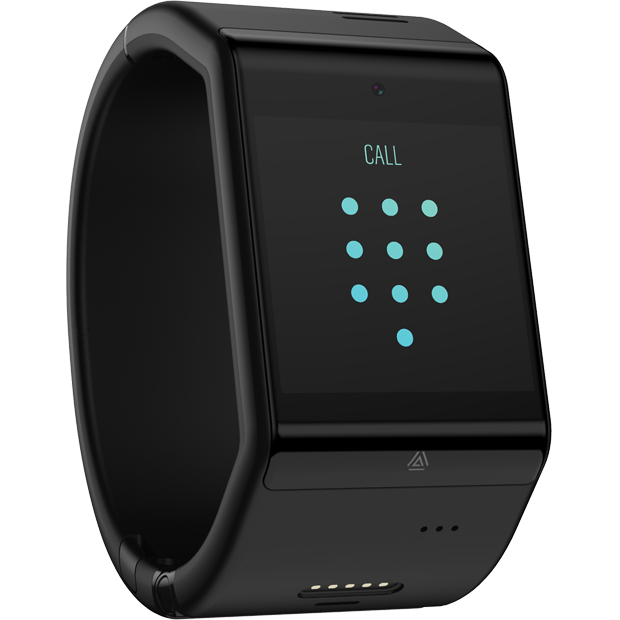
This is dial, a voice-enabled smartcuff design from i.am+ the fashionology, tech company founded by musician and entrepreneur will.i.am. Available exclusively on Three UK.

To buy this you will need a plan with prices starting at £22 per month with a £49 upfront fee, or £25 per month with a one-off, £19 payment. That’s right it needs a SIM card.

The dial is operated by voice. It allows free music streaming too. It comes in black or white with 32gb storage. Other features include People, Calendar, Time,  Maps, Health tracking, texts, calls and email. It has a 2mp camera for taking photos. Its powered by an operating system called AneedA.

Hopefully other apps will be available soon.

A contract for a wearable device? Not sure how this will sell.

NASA’s Curiosity Mars Rover at Naukluft Plateau in 360 degrees VR

There is so much decent 360 degrees Virtual Reality footage available on YouTube and this is another good example.

Explore this Mars panorama in 360-degrees by moving the view with your mouse or mobile device. This mid-afternoon, 360-degree panorama was acquired by the Mast Camera (Mastcam) on NASA’s Curiosity Mars rover on April 4, 2016. The scene is presented with a color adjustment that approximates white balancing, to resemble how the rocks and sand would appear under daytime lighting conditions on Earth.