Category Archives: Reviews

How’s the iPhone 6S Plus and Apple Watch going?

Let’s start off with another change of heart. iCloud Photos and iTunes Match is binned forever. Neither works for me and are both pointless and a PITA.

I am never going to use iTunes Match. It provides a copy of my music at a lower bitrate than what I have encoded. It once again uses my broadband which is not as fast as using a cable.

Apart from the sync issues of iCloud Photos, I kept getting a phantom photo that was always waiting to upload. I thought I had solved this by finding the single photo that was the culprit, deleting it, but only for the problem to resurrect itself a few days later. Turning off iCloud Photos didn’t solve the phantom photo. Also, if you turn off iCloud Photos on your Mac you need to reboot your Mac for the changes to work.

So I to remove the phantom photo. I wiped my iPhone clean and started again as a fresh device. Another PITA. However, I now have a solid phone which gives me up to 2 days battery life.

Despite all of the above the iPhone is a joy now to use, except the Apple Watch is actually annoying me over how it is designed to notify you. Basically, whilst wearing the Apple Watch, with your iPhone screen off, you won’t hear any notifications of any kind except if you receive a telephone call. Now you can set the Apple Watch to make a ping or taptic vibration, but the ping is just the same sound and impossible to differentiate between the different app notification tones. There is no option as far as I can see to allow the iPhone to makes sounds even if watch is on your wrist. I have missed several taps on my wrist and consequently the notification. Apart from that the Apple Watch is good, not brilliant. Sometimes Siri is slow to respond and apps can take an eternity to load. The Apple Watch is despite its flaws a stunning piece of kit.

I am also in the process of testing the iPhone 6S Plus for low light and the results are astoundingly amazing, much better than any review I have read recently. I am hoping to have this test completed over the next week or so.

August EP610 In-Ear Bluetooth Stereo Sports Headphones – review

For your chance to win a pair of these headphones see comment at the end of this review. 
Welcome to my review of the August EP610 In-Ear Bluetooth Stereo Sports Headphones.

EP610R_acc_1000

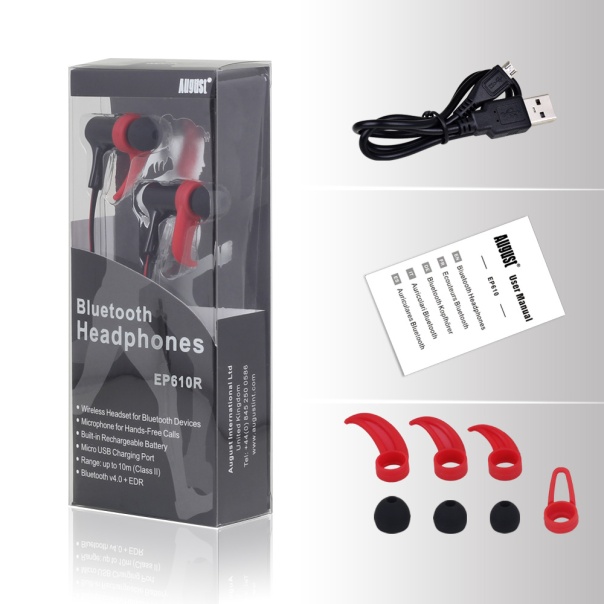
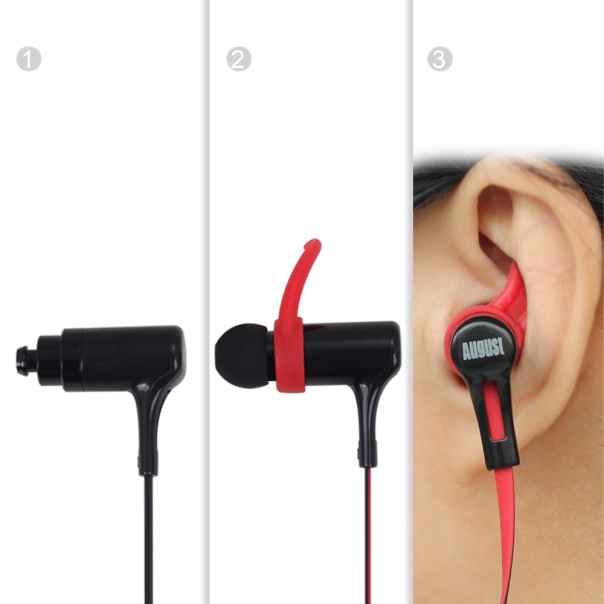
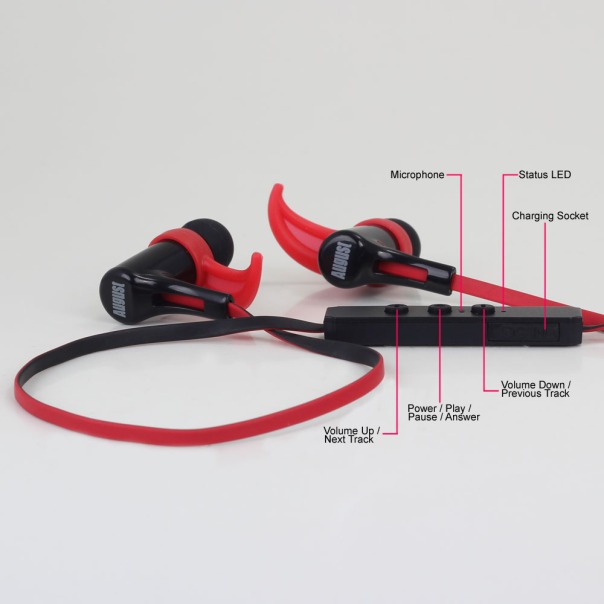
The August EP610 have been designed to be lightweight, yet provide extra grip along with incredible as a sports utility products on the market. The weight it kept down by using plastics. The August EP610 earbuds come in 3 sizes and with 4 stabilizers to help you adjust them to your ear shape. The in-ear controls allow you to answer phone calls and adjust the volume. The EP610 retail on Amazon at £27.95.

EP610R_adorn_1000

Specifications

– Bluetooth Version: v4.0
– Frequency Response: 200Hz~20kHz
– Output Power: 10mW x 2
– SNR: ≥ 80dB
– Distortion: ≤1% At 1KHz
– Battery: 40mAh x 2 Polymer Lithium Batteries
– Working Time: Up to 5 Hours
– Charging Time: Approx. 1 Hour
– Standby Time: 180 Hours
– Produce Weight: 15g

Key Features

– Wireless Earphones for Bluetooth Devices
– Microphone for Hands-Free Calls
– Built-in Rechargeable Battery
– Micro USB Charging Port
– Bluetooth Range up to 10m
– Bluetooth v4.0
– 5 hours battery life

Sound Quality/Usage

My ears are different to yours. As is the next person. That’s why it was good to see August had supplied different ear buds and 4 different size stabilisers. Whilst the in-ears look big, they are so comfortable and only 15g in weight.

Call quality was ok and playing music provided an enjoyable listen.

For the music test, I listened to several different genres over hours and hours. Below are my findings from a selection of 5 tracks.

“The Sound of Yo-Yo-Ma, The Score – Oh My Love, Ellie Goulding – On My Mind, The Martian – Movie – Emergency Land, Cassandra Wilson – Come On in my Kitchen”.

Across the music spectrum everything was reasonable and not over played. However, I did notice a slight background hiss which was more noticeable in quieter tracks and classical music.

EP610R_functions_1000

Conclusion

Just shows how far technology is moving forward. In-Ear Bluetooth headphones for £27.95, and currently on offer at Amazon too. This price 2-3 years ago would not have been possible versus the quality. Not only that the August EP610 sound reasonable and are comfortable. Recommended.

For your chance to win these click here. It’s free to enter too. 
August EP610 In-Ear Bluetooth headphones deal at Amazon UK

August EP636 Bluetooth Stereo Headphones with NFC and Mic – Review

Welcome to my review of the August EP636 Bluetooth headphones.

EP636B_3_1000

The Specification

– Bluetooth v 4.0 + NFC
– Operating Range: Up to 10m
– Frequency Response: 80Hz – 20KHz
– DSP: CVC6.0 Noise and Echo reduction
– Speaker Output: 20mW
– SNR: ≥90dB
– Distortion: ≤1.0%
– Battery: 195 mAh Built-in Li-ion Battery
– Working Time: 14 hours
– Charging Time: 2.5 hours
– Standby Time: 480 hours
– Charge port: Micro USB
– Weight: 126g
– Dimensions: 165.7 x 161.5 x 50mm

Over the course of this week I will be reviewing 2 other bluetooth headphones from August International, the EP50 and in ear EP610. I will also be reviewing their Portable Radio with Bluetooth Speaker SE20.

As some of you will know, I love headphones and have owned and reviewed many pairs. To catch up on any previous reviews click here – https://gavinsgadgets.com/review-links/headphoneampsdac-reviews/ .

EP636B_overview2_1000

The August EP636 Bluetooth headphones are one of the new releases from the company. In the box you get the headphones and micro usb lead. Pairing the headphones is easy. You can either pair in the usual manner of use the inbuilt NFC. Once connect you can use the controls on the headphones to take calls, control your track list and volume. I have the black version, but they are available in 3 other colours. The headphones retail at £34.95 although at the moment there is a special price on Amazon UK, making these a real bargain.

The Sound Quality

Before I cover the music quality, I tested these for call quality. The calls were clear and the caller at the other end had no issue hearing my voice. It is really handy having all the necessary controls on the headphones as per my photos.

For the music test, I listened to several different genres over hours and hours. In fact, I am listening to the headphones as I type this review. Below are my findings from a selection of 5 tracks.

“The Sound of Yo-Yo-Ma, The Score – Oh My Love, Ellie Goulding – On My Mind, The Martian – Movie – Emergency Land, Cassandra Wilson – Come On in my Kitchen”

The August EP636 have a distinct musical quality. Firm bass, clearish vocals and mids. Actually, considering their price, I was somewhat surprised at how good they sounded for £34.95 and how much bass they could produce given their physical size. The sound stage is not very wide, slightly closed in to be honest. In terms of comfort, these fitted well and were not heavy. In fact, I used them for a run with my dogs and they stayed on my head no problem whatsoever.

EP636_All-colors1_1000

Conclusion

I really like these headphones. Good sound quality and bass and superb value for money. There is also a choice of colours too.

August EP636 Bluetooth Wireless Stereo NFC Headphones with Microphone deal at Amazon UK

Apple iPhone 6S Plus – Photography Special – Video and Photos – Part 1

Today I will be looking at some photography options with the iPhone 6S Plus that I have achieved so far. I will also list the apps I use as well. Many of these apps are available on android too. All the photos shown are available to view full size if you click on the photo. Where possible, when I have mentioned any accessories I have made them active links to Amazon.

First up is the problem you get when shooting buildings and the walls aren’t straight. Now the best solution for this is something like Adobe Lightroom 6. See how the walls of the church are slightly warped.

Straightening the building using iOS -

Now using an app called SKRWT, you can fix this and make it look a lot better.

Straightening the building using iOS -

Now what about shooting in RAW format. The default camera app on the iPhone does not permit this. But I use Camera+ which has so many features both from shooting to editing, it really is a great app. It also has 3D Touch enabled. So below is a macro shot in RAW. Note the file size is up to 7 x larger than normal shots. If you view the full size version of the berries the amount of detail is huge.

Wow Red berry fruit #rawformat #unedited #iphone6splus #macro

Again using Camera+ macro mode you can get really close up. So the flower shot first, then the macro.

Pink Pink Macro Flowers #macro #unedited #iphone6splus

Pink Pink Macro Flowers #macro #unedited #iphone6splus

What about using something like an Olloclip lens attachment for macro. This is what you get. Notice the bokek.

Wild Thing #macro #unedited #setof4 #iphone6splus

The Olloclip 4 in 1 does wide, fisheye and 2 levels of macro. I also have the Olloclip Macro Pro kit. Whilst these lenses are fun, the quality is poor. They are best used for macro if anything at all. First you can’t use a case or screen protector, and the photos goes soft on the edges. But they are great fun. Below was a photo taken in fisheye mode and then straightened using SKRWT. More info , click here Olloclip 4-in-1 Lens

Exeter High Street - Fish Eye #olloclip #iphone6splus

The Olloclip softens the photos too much in wide mode on the edges. FYI the version for the iPhone 6/6 Plus according to Olloclip works with the new 6S and 6S Plus. Details on Amazon Olloclip 4-in-1 Lens

My recommendation is to use Camera+ for macros with a small tripod. For wide shots use the standard pano mode. You can get photos like this. For this shot below I only took half a panorama as it was not necessary to move across the whole screen. Sometimes 3 or 4 frames are just enough.

Believer Forest #panoramic #iphone6splus

However, sometimes the full panoramic is ideal and this is where the iPhone works really well.

Stunning Panorama over Dartmoor #iPhone6SPlus

In terms of apps, I use the default Photos app. The editing is non destructive. From within the Photos app editing I can access my following apps – afterlight, adobe photoshop express, camera+ and diptic. Also in the Photos app I can import a photo into VSCO Cam or use an app called ViewExif to view the exif details. So apart from the apps mentioned I also have installed Slow Shutter, Flickr, Playmemories, Photogene, Color Splash Pro, Snapseed, Nightcap Pro, Cameratamo, Phoster, Camera360 and Waterlogue.

I do use Live Photos and really like it. Sadly at the moment, I can’t share this with any of apps or services other than within the Apple eco system. I hope this changes soon. However, I do turn it off when I know the shot will make no difference with Live Photos enabled. But it does make moving through the camera roll a bit exciting.

iMovie is used to finish off videos and add photos if needed.Talking about video the video capture is absolutely stunning. 4K, 1080p and other modes like timelapse work so well. I have created a few videos. Ignore the iMovie editing on the timelapse video at the start, that was my fault cutting a frame too agressively at the very beginning. So first up a 4K recorded clip, in 1080p and then a timelapse.

First up time lapse mode. For the 360 degree movement I use Veho VCC-360
on my tripod. My phone is attached to the Veho using a ShoulderPod S1 Grip
.

Then 4K video with a sweep at the end of the view from the summit of Staple Tor. This had no post processing in iMovie.

The best accessory I have used with all my phones is the ShoulderPod S1 Grip as this is the most rock solid way to attach your phone to a tripod!

Anyway that is all for Part 1. If you have any tips or apps or any accessories you like using please leave a comment.

All the Reviews from the last 30 days – iPhone 6S Plus, LG G4, Honor 7, Huawei Watch and more incl accessories

In the last 30 days I have written and published over 10 reviews. For ease I have included the reviews below along with the links.

Apple iPhone 6S Plus incl Apple Watchhttps://gavinsgadgets.com/2015/10/07/apple-iphone-6s-plus-the-review/

Huawei G8https://gavinsgadgets.com/2015/10/06/huawei-g8-first-impressions-of-huaweis-mid-market-flagship/

Samsung Note 5 Dual Simhttps://gavinsgadgets.com/2015/09/22/samsung-note-5-dual-sim-first-impressions/

Honor 7https://gavinsgadgets.com/2015/10/05/honor-7-review/

Huawei Watchhttps://gavinsgadgets.com/2015/09/21/huawei-watch-my-review/

Huawei Mate S https://gavinsgadgets.com/2015/09/18/huawei-mate-s-my-review/

Acer Liquid Jade Shttps://gavinsgadgets.com/2015/10/08/acer-liquid-jade-s-review/

Acer Iconia One 8 Tablethttps://gavinsgadgets.com/2015/09/28/acer-iconia-one-8-tablet-review/

Samsung S Health app (Google Play version) – https://gavinsgadgets.com/2015/09/23/samsung-s-health-app-works-in-all-android-devices-but-is-it-any-good/

Suaoki 40W 8A 5 Port Compact USB Chargerhttps://gavinsgadgets.com/2015/09/29/suaoki-compact-40w-8a-5-port-high-usb-charger-review/

Motorola Moto X Playhttps://gavinsgadgets.com/2015/10/01/motorola-moto-x-play-review/

LG G4 – 4 month reviewhttps://gavinsgadgets.com/2015/09/24/lg-g4-4-month-review-the-ultimate-package/

LG G4 – main reviewhttps://gavinsgadgets.com/2015/06/04/lg-g4-the-review-all-26-parts/

Sony Xperia Z5 Compact – 23mp Camera Testhttps://gavinsgadgets.com/2015/10/08/sony-xperia-z5-just-how-good-is-the-new-23mp-camera-see-for-yourself/

Acer Liquid Jade S – review 

Welcome to my review of the Acer Liquid Jade S smartphone. 


Basics

The key specifications –

– MediaTek Octa-core 1.50 GHz
– 5″ (1280 x 720) screen
– 13 Megapixel (Rear Camera) f/1.8, 5 Megapixel (Front Camera)
– 2 GB RAM, 16 GB storage (nearly 12gb available)
– 7.78mm thin
– Gorilla Glass 3
– LTE 150Mbps
– Dual sim
– Micro SD support up to 32gb
– Android 4.4.4 (software OTA arrived for lollipop 5.1 after a few days)
– Bluetooth 4.0
– NFC excluded
– 120g weight

The Acer Liquid Jade S was kindly loaned to me for this review. Removing the Acer Liquid Jade S from its box and I thought for a moment the battery needed to be fitted as it felt too light. In fact, the battery was inside the phone, it just weighs a mere 120g. It is also narrow and thin at 7.78mm and with its 720p 5 inch screen a good phone sized phone. Being so thin did have an impact on battery life, with the end result of just making it through a working day. However, the plastic back did feel a little slippery and with the power button on the top, not an easy position to keep reaching especially with the back being so slippery.

After reviewing a few Acer devices a pattern emerges with the same mix of apps added. The Liquid Jade S is no different. It includes Acer’s BYOC (bring your own cloud) suite of apps, Acer NAV (a rebadged TomTom) and a whole range of extra apps, some of which are more bloatware than anything else. It does include a FM radio, a torch light app and polaris office 5. Otherwise it is stock android, albeit android 4.4.4. NFC is not included. Now I mentioned it came with android 4.4.4 but after a few days lollipop 5.1 OTA arrived at a download size of 0.9mb. However, you need a micro SD card in the phone to download and then install it.

Other extras include DTS HD Premium sound, with further EQ adjustments. These can be used with headphones and the loudspeaker. On screen gestures exist, 4 in total eg. drawing a Z opens the music app. L unlocks. There is also an option for a scheduled power on and off.

The 720p is clear and bright with good viewing angles. Call quality was reasonable and cell signal seemed ok too.

So apart from its thinness at 7.78mm and weight at 120g and overall smallish profile, what else is special about the phone?

Camera and Audio

Now let’s talk about the camera. The rear camera is a 13mp with an impressive f/1.8. The camera app includes a whole range of shooting modes from HDR, panorama, beautification, best shot, bright magic, smile shutter, picture with sound, multi angle view, presentation, dual shot and gourmet. Then you have scenes from auto, landscape, night, portrait. You can shoot with 4 different effects – mono, sepia, negative and aqua. You can operate the camera via voice control as well. Video offers a time lapse mode too with 1, 2, 5 and 10 second intervals. Fine tuning is available for ISO, white balance, saturation, contrast, colour and exposure. If you want to be in the photo as well, a timer with 5, 10 or 15 seconds delay is available. Video electronic stabilisation is available too, with 1080p recordings. Other options are also available, however I must admit the camera app is not laid out as logically as I would have liked, nor is it quick to switch between different modes. So let’s take a look at some camera samples.

IMG_20150930_145843

IMG_20150930_145730

IMG_20150930_145333

IMG_20150930_151135

IMG_20150930_150427

IMG_20150930_150154

IMG_20150930_145940

IMG_20150930_145856

I thought some of the camera shots looked slightly over exposed, and there is soft focus on the edges of some the photos in places. Low light and macro shots were a struggle. What do you think? Tap on each photo and select full resolution.The front camera also slightly over exposed shots.

The loudspeaker is on the rear and can be easily covered by accident. It sounds tinny and is not the loudest out there. The sound via headphones was quite reasonable. USB Audio is not supported.

Conclusion

The Acer Liquid Jade S is an unusual phone and bucks the trend in many ways with its slim and light weight design. With its recommended retail price of £199, it finds itself with tough competition that offers more and often for less money too.

Acer Liquid Jade S deals at Amazon UK

Sony Xperia Z5 Compact – Just how good is the new 23mp camera – See for yourself!

Sony smartphone sensors appear on all the best flagship phones from Apple and Samsung and then appear on a whole load of other phones.

With the new Sony Xperia Z5 range, Sony has used a new 23mp sensor. So just how good is the sensor? Reader “Whitehartmart” kindly sent in some sample Z5 Compact photos from his phone. So have a look at the photos below and decide for yourself. I have uploaded the full res shots in to the post. If necessary click on photo, then select full size in the options.

DSC_0006

DSC_0012

DSC_0015

DSC_0011

DSC_0008

DSC_0016

DSC_0013

DSC_0005

So what do you think of the camera samples from the Sony Xperia Z5 Compact?

Thanks again to Whitehartmart for the photos.

Apple iPhone 6S Plus – The Review

I have written many posts covering my views on the new iPhone 6S Plus and Apple Watch, so for ease I have created this post whereby all further sections will now appear as well.

Panoramic Shot from the iPhone 6S Plus

Stunning Panorama over Dartmoor #iPhone6SPlus

Part 1 – Day 1 Experience plus Rose Gold plus Apple Watchhttps://gavinsgadgets.com/2015/09/26/the-apple-iphone-6s-plus-day-1-experience-photos-and-views-on-rose-gold-and-apple-watch/

Part 2 – Camera First Lookshttps://gavinsgadgets.com/2015/09/27/just-how-good-is-the-camera-on-the-apple-iphone-6s-plus-my-results/

Part 3 – Apple iPhone 6S Camera vs S6 and LG G4https://gavinsgadgets.com/2015/09/28/photos-from-the-iphone-6s-plus-more-opinions-on-the-camera-quality/

Part 4 – More photos with the iPhone 6S Plus and my views https://gavinsgadgets.com/2015/10/01/more-photos-from-the-apple-iphone-6s-plus-and-views/

Part 5 – iTunes Match and iCloud Warningshttps://gavinsgadgets.com/2015/07/02/warning-icloud-music-library-and-apple-music-details-to-be-aware-of/

Part 6 – Apple iPhone 6S Plus – Time Lapse testhttps://gavinsgadgets.com/2015/10/02/apple-iphone-6s-plus-my-time-lapse-test/

Part 7 – iCloud – it really doesnt workhttps://gavinsgadgets.com/2015/10/02/apple-icloud-surely-it-just-works-editorial/

Part 8 – iOS 9 and iPhone Data Usage warning plus fixhttps://gavinsgadgets.com/2015/10/03/warning-check-your-iphone-running-ios-9-for-data-usage-details-and-fix/

Part 9 – Shooting with Sun Glare on the iPhone 6S Plushttps://gavinsgadgets.com/2015/10/04/apple-iphone-6s-plus-shooting-with-sun-glare-tips/

Part 10 – 2 week review of the iPhone 6S and Apple Watch https://gavinsgadgets.com/2015/10/06/apple-iphone-6s-plus-icloud-apple-watch-part-3-the-lows-highs-and-findings/

Part 11 – iPhone 6S Plus Photography special with details on apps

Apple iPhone 6S Plus – Photography Special – Video and Photos – Part 1

Part 12 – Apple iPhone 6S Plus and Apple Watch update

How’s the iPhone 6S Plus and Apple Watch going?

Part 13 – Camera Shootout – iPhone 6S Plus vs Moto X Play vs Huawei G8

Camera Shootout – Apple iPhone 6S Plus vs Huawei G8 vs Motorola Moto X Style

Part 14 – Syncing and Notifications – solved

That “Syncing” Feeling – Notifications between the iPhone and Apple Watch – SOLVED

Part 15 – Extreme Low Light – Photography Special Part 2

Apple iPhone 6S Plus – Extreme Low Light – Photography Special Part 2

Apple iPhone 6S Plus – iCloud, Apple Watch – Part 3 – The Lows, Highs and Findings

It will be nearly two weeks with the iPhone 6S Plus and Apple Watch. It has been 2 weeks of jubilation and frustration, but there is light at the end of the tunnel.

The Lows

iCloud Photos and iTunes Match. Apple senior support had to remote access my macbook to resolve the mess left by iTunes Match. iCloud Photos had a mind of its own, and has taken nearly 2 weeks to get in sync. In fact, I nearly decided to go back to Google Photos but gave it one more chance. Again it took Apple senior support to help resolve the issues initially with iCloud Photos.

The issues I had with the iCloud services drove my mad, to the point a few days in that I wondered if I had made a mistake switching my main phone from the LG G4 to the iPhone 6S Plus.

High mobile data usage. WiFi assist is a great feature, but again I think my upload speed at home meant it was uploading 4K video using my mobile internet and wifi. Consequently my first week with the phone used 2.5gb, which is normally what I use per month. By default, this setting is left on. It is worth noting this could happen. I also noticed at the Apple store Plymouth, the genius employees were deactivating this on 3 phones while I was there.

The Findings

Fortunately, when matters get crazy frustrating, I have patience and try to find what the rules/parameters software and hardware work to. My conversations with Apple senior support where also about trying to establish the rules and parameters of what does what under given circumstances.

If you are going to use iCloud for the very first time like myself, make sure you have fast internet for both upload and download speeds. My upload is slow and I do believe this contributed to the issues I had. Thinking back when I uploaded my music to Google Music it took 6 weeks. I also have to remember that I have used Google for years and years continuously so it has all my data already and knows what I do and when I need it. Apple, iCloud and Siri are on a learning curve, the data needs time to upload and sort itself out. Sometimes, it appears as if the cloud isn’t doing anything, and that may be the case as its having a coffee break. But it does start again and once my library was stored correctly future uploads are fine.

The Highs

I am pleased I gave iCloud Photos another go. It all works dandy now. Changes appear instantly across any Apple devices, and if I use my Chromebook and go to http://www.icloud.com I have access to my photos there as well. In fact, despite Apple refunding my iTunes Match subscription I am thinking about giving it a go again, but this time after my Apple Music trial has expired. When I switch iTunes Match on again, I will do this at a place with a fast upload speed to avoid any time out issues.

The phone itself is a wonderful piece of technology. iOS 9 is a bit of a learning curve for me as there are a lot of new ways of doing stuff and features but it is so good to use. 3D Touch, Apple Pay, the camera and all the apps are superb. The camera is not the best at one single aspect eg still shots goes to the LG G4, but as an overall package across all the different modes it is consistent and a decent shooter and always only takes a single shot to get that perfect shot. The Photos app allows for non destructive editing which syncs the edits across several devices. The features of the Photos app are excellent too. The iPhone is the only phone that has a burst mode that can take 999 shots in one go. In fact, I am not sure my DSLR could manage that many and then save them in such a short time either. So with 4K video, decent photos, you can use iMovie to create a slick movie in seconds. I miss not having iMovie on other non Apple phones.

Apple Pay really does just work. Raise your phone and near a terminal, your credit card image appears automatically, hold the Touch ID button and voila. All of one second. So far I have used it at MacDonalds, Costa Coffee and Marks and Spencers. I actually have used the phone once and the Apple Watch for the other 2 purchases.

And finally apps. A year ago if anyone had asked me I would have said android and iOS were equal when it came to apps. In fact android had some advantages due to its sharing options. With iOS 9, Touch ID and 3D Touch and gaming on iOS in my brief time with the 6S Plus, my view is swinging to iOS having an advantage. Apps feel and run smoother on the iPhone. In fact the whole user experience of the iPhone 6S Plus is a joy to use. Even Apple Maps has not failed me yet for car directions and even walking.

Link all of the above with the Apple Watch, iPad, MacBook and any other Apple eco system component and the benefits of continuity and handoff occur.

Now, in case you’re wondering if I am ditching android all together, this is not the case. I have several devices on test at the moment along with several reviews too. I also use a BlackBerry Curve daily, as this is a work issued phone.

Honor 7 Smartphone – my review

Welcome to my review of the Honor 7 smartphone.


Basics
Screenshot_2015-09-24-07-17-54

Screenshot_2015-09-24-07-18-05

The key specifications of the Honor 7 are –

– 20 MP rear and 8 MP front camera f/2.0
– 5.2 inch 1080p HD display, metallic body, ceramic blasting
– 3100 mAh battery, Smart Power 3.0, Reverse Charging
– Kirin 935, 64 bit OctaCore CPU with up to 2.2 GHz, revolutionary heat dissipation design
– 4G LTE Bands: 3/7/20 (works with all UK 4G networks)
– Dual sim arrangement with option for second sim or micro SD card up to 128gb.
– Good clear loudspeaker
– Super fast fingerprint sensor
– Emotion EMUI v3.1
– 3GB ram
– Smart Key – configurable to 3 actions and or apps

The Honor 7 used for this review was kindly loaned to me in which time I have undertaken a number of tests.

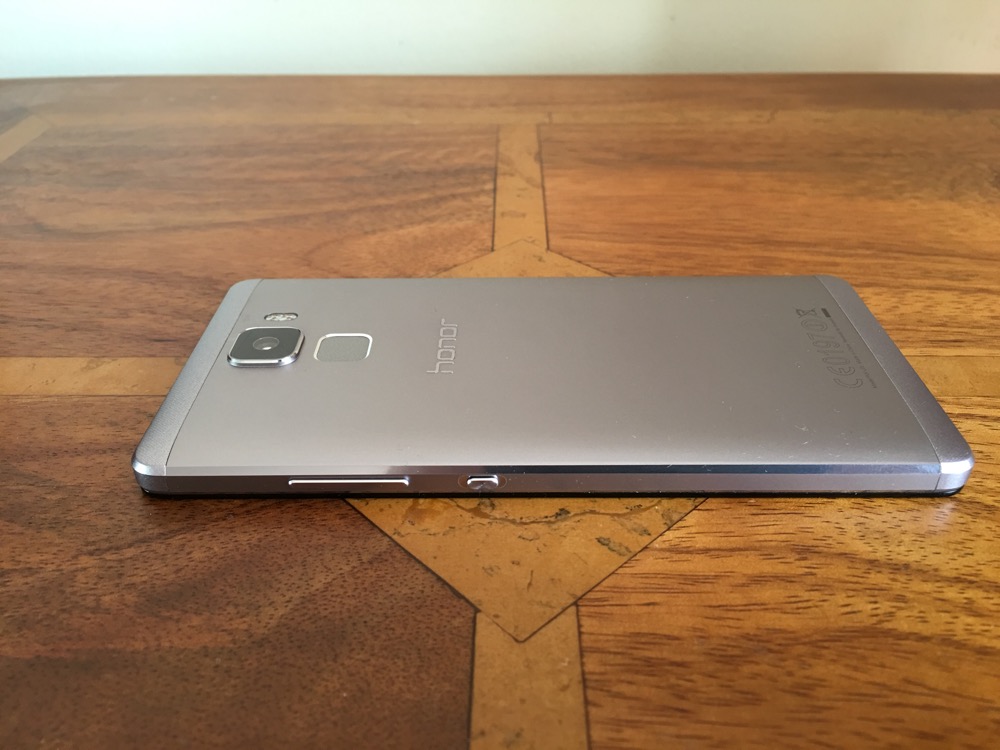
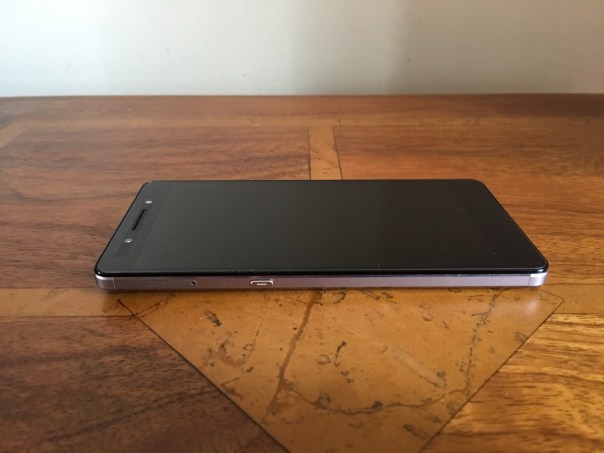
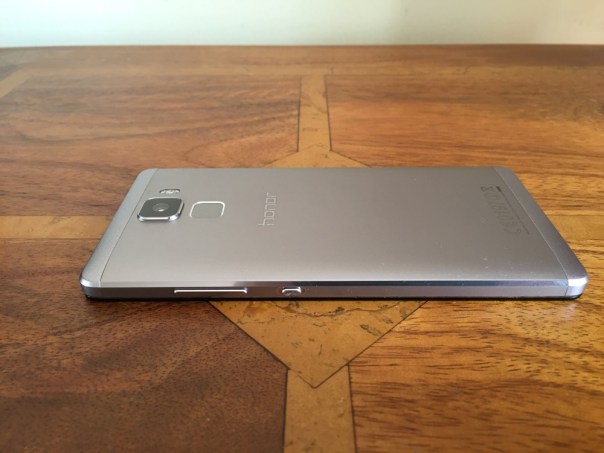
First impressions are fantastic. Open the box, lift the phone and it feels so premium with it metallic unibody finish. And then you start to use it and it really becomes a joy to use. There are so many neat touches I will try and cover them all.

Basics – cellular signal and reception is excellent on the Honor 7. It seems to be a trait of Honor devices. It is a shame with mobile payments starting to take off, that NFC is not included. Call quality was also good. Honor also have their Signal+ and WiFi+ options present in this phone.

Grip – the rear has a slightly curved back and edges which helps with holding the phone.

Smart Key – on the left side is a key you can configure to do 3 different things. Press, double press, long press. You can leave each option to do nothing. Options includes ultra snapshot, voice recording, torch and screen shot or launching whichever app you required. I had screenshot, camera and Google search.

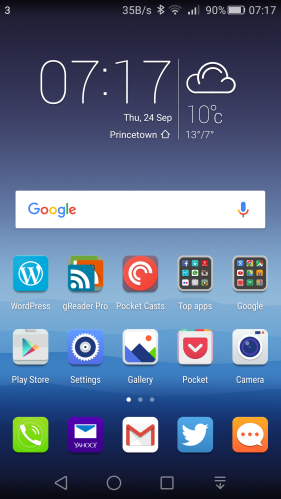
EMUI 3.1 – This is the custom launcher Honor install. I really like it. The main difference with this custom launcher is the removal of the app drawer. Think iPhone with folders or apps on home screens. There are many many themes available for EMUI to change the look as required. Of course, if EMUI is not to your liking then you can install another launcher eg. Nova or Google Now.

Screen – the screen is a 5.2 inch 1080p screen with good viewing angles.

Processor – the phone comes with Honor’s in house processor and 3gb ram. AnTuTu produces a score of 50,000 and the 3gb ram keeps everything running smoothly.

Extras –

– Its a dual sim. Only one sim has 3g and 4g. The second sim can only manage data at 2g. However, the first sim does 4g on all the UK bands. The dual sim management works well. You can select which sim is the default for data, calls and messages. Also when using 2 sims as I did, you can have 2 signal strengths showing in the status bar as well as both network names and the network speed.

– On screen menu buttons can be reconfigured and an extra menu for the notifications screen is available.

– To conserve battery there is an option for Protected apps (apps to be allowed to run in the background), Notification Manager (control apps that are allowed to be in the notification centre), Battery saving modes. If you are installing a lot of apps, you might find apps stop working in the background. It is important to make sure you setup the apps you want to run in the background. Also the phone reminds you of apps that are draining battery. This can become a nuisance.

– Fingerprint sensor that allows up to five fingers to be stored. Once unlocked the fingerprint sensor can be used a a touch panel. You can go back to previous view, back to home with a touch and hold, take photo, answer a call, stop an alarm, slide up to show the recent apps and slide down to display the notification centre. The fingerprint sensor is lightning quick to unlock.

– Voice Wakeup – by speaking at any time, “Dear Honor, where are you”, the phone plays this creepy music with a voice that gets louder whilst saying “I’m here”. You can also use the voice control to call contacts are other functions are available.

– Motions – You can flip to mute, pickup and reduce call volume, double touch to turn on, draw 4 different letters to launch an app e.g. draw a C to launch the camera.

– Glove mode. This is also available.

All the above extras are user configurable. So you could turn them all off or turn on just the features that you want.

Battery life – The standout feature for me was the battery life. I often got 5.5 hours screen on time. The worst day was only 5 hours screen on, and my best day was 6 hours 2 mins screen on time. This was with location on high, wifi and bluetooth on and connected to my FitBit Charge HR.

Camera and Audio

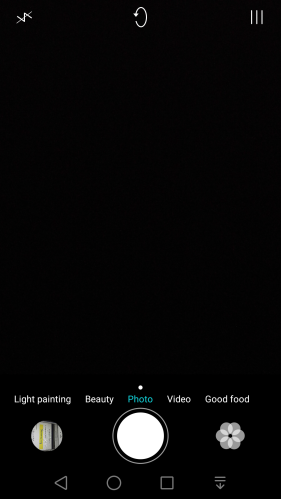
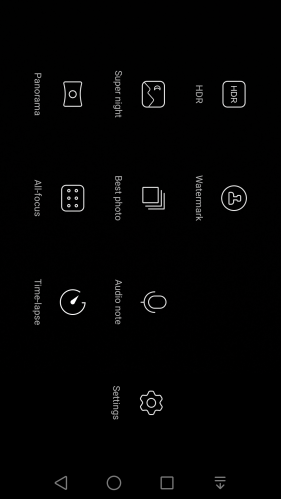
The camera app includes many options with shooting modes good food, video, photo, beauty, light painting (car light trails, light graffiti, silky water, star track), HDR, watermark, super night , best photo, audio note, panorama, all focus and time lapse. Within the settings you can turn on voice control, object tracking, adjust ISO, white balance, exposure, saturation, contrast, brightness and more. There is no manual mode and no raw options.
wpid-wp-1443357669911.png

wpid-wp-1443357675625.png

Camera sample shots below –

Random shots taken with the Honor 7

Above, fog had arrived on Dartmoor. A difficult shot in terms of focusing, but the Honor 7 did an okay job.


Random shots taken with the Honor 7

This turned out better, with the orange colour popping.


Random shots taken with the Honor 7

Not so impressed here. A bit over exposed and looking washed out.


Random shots taken with the Honor 7

And now a macro of the flower.


Random shots taken with the Honor 7

Again, over exposed slightly, but a fair amount of detail. The Honor 7 does have optical image stabilisation which might have assisted here.


Random shots taken with the Honor 7

Reasonable shot this time.


Random shots taken with the Honor 7

My overall thoughts on picture quality is that the Honor 7 is average is good light and can produce some ok photos, but struggles in lower light with image quality unless using super night. Some of these fancy modes like super night mode or light painting are fun to use and work surprisingly well, but tripods are needed for these to achieve a decent image.

Now to the audio. The loudspeaker pumps out volume at around 90db and is clear too. I had nearly 5,000 songs on my 128gb micro SD card and the Honor 7 had no issue managing that number of songs. However, the sound produced by the default music app was a little sharp in the treble when using headphones despite having good left and right separation. Using Poweramp app did help a little. USB Audio is not supported

Conclusion

The Honor 7 is a strong offering. Good quality build, lots of features, satisfactory camera and strong battery life. It represents good value for money and it is a shame NFC is not included which is needed for Android Pay.

Honor 7 4G UK Dual SIM-Free Smartphone deal at Amazon UK