Tag Archives: Review

LG Tone Platinum HBS-1100 Stereo Bluetooth Headset – Review – The Worlds First with APT-X High Definition

image

Welcome to my review of the LG Tone Platinum HBS-1100 Bluetooth Headset. This is the world’s first pair of headphones/headset that comes with the new APT-X High Definition Codec.

This means you can listen to 24 bit Hi-Fi / Hi-Res Sound with LG G5. At the moment the LG G5 is only only smartphone that comes enabled with the revolutionary Qualcomm® apt-X™ HD codec.The aptX™ HD Audio Codec delivers CD-like quality audio over Bluetooth that faithfully reproduces the full audio bandwidth and minimizes latency by significantly reducing the bit rate without affecting sound quality.

LG state that “now no wires are truly a thing of the past as you can bask in the sheer superiority of a 24 bit audiophile experience in total wireless comfort.”

Note that the APT-X HD codec comes as standard with the LG G5. You do not need the LG Hi-Fi Plus module.

Key Specifications

– Bluetooth Version 4.1
– Supported Bluetooth Profiles Headset (HSP), Hands-Free (HFP), Advanced Audio Distribution (A2DP),
Audio/Video Remote Control (AVRCP)
– Talk Time Up to 11 hours
– Music Play Time Up to 10 hours
– Standby Time Up to 17.3 days
– Charging Time Less than 2 hours
– Operating Range 33 ft.
– Dimensions 6.0″ (W) x 7.04″ (H) x 0.5″ (D)
– Weight 2.05 oz.
– Call & Play/Pause Buttons Inline on side of headset
– Available Colours – Black, Silver, Gold
– Sound Profile Harman Kardon® Platinum Sound
– Tone & Talk™ Support – Support for Android and Apple® Devices
– Audio Speaker Optimization Technology Balanced Armature Speaker Technology
– Qualcomm® aptX compatibility Qualcomm aptX / Qualcomm aptX HD
– In the Box – LG TONE PLATINUM Bluetooth Stereo Headset (HBS-1100),Micro USB Charging Cable (AC Adapter Not Included), Extra Ear Gels (Small and Large), User Manual, Quick Start Guide, & Warranty Card

The LG Tone Platinum Bluetooth headset is fairly slim made with an anodized brushed aluminum alloy trim. LG has used a Balanced Armature design as the sound module to minimise distortion and reproduce the sound accurately. The headset also offers noise cancelling dual microphones for clearer calls even in the noisiest environments. In testing these worked really well. Calls were exceptionally clear. LG added Voice Command to handle incoming calls.

image

image

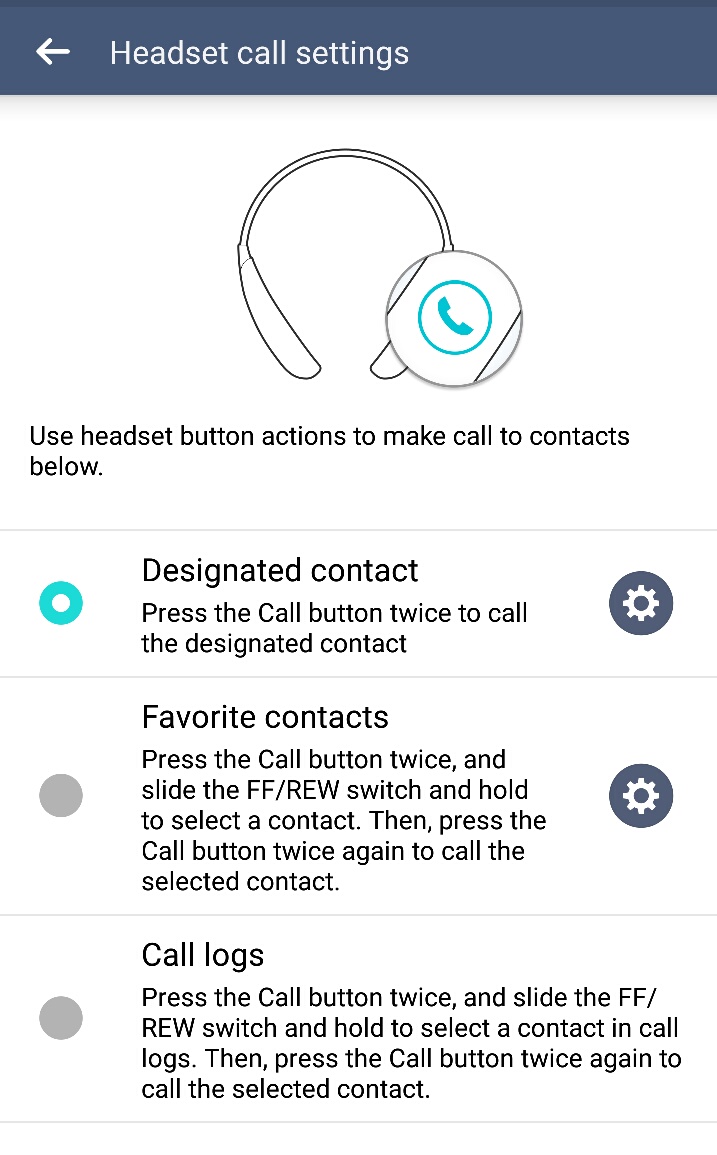
Tone & Talk app has been enhanced to support Voice Memo and Find Me via any Android smartphone (version 4.1 and higher). The LG Tone app adds a lot of extra functionality and makes this headset easier to use.
image

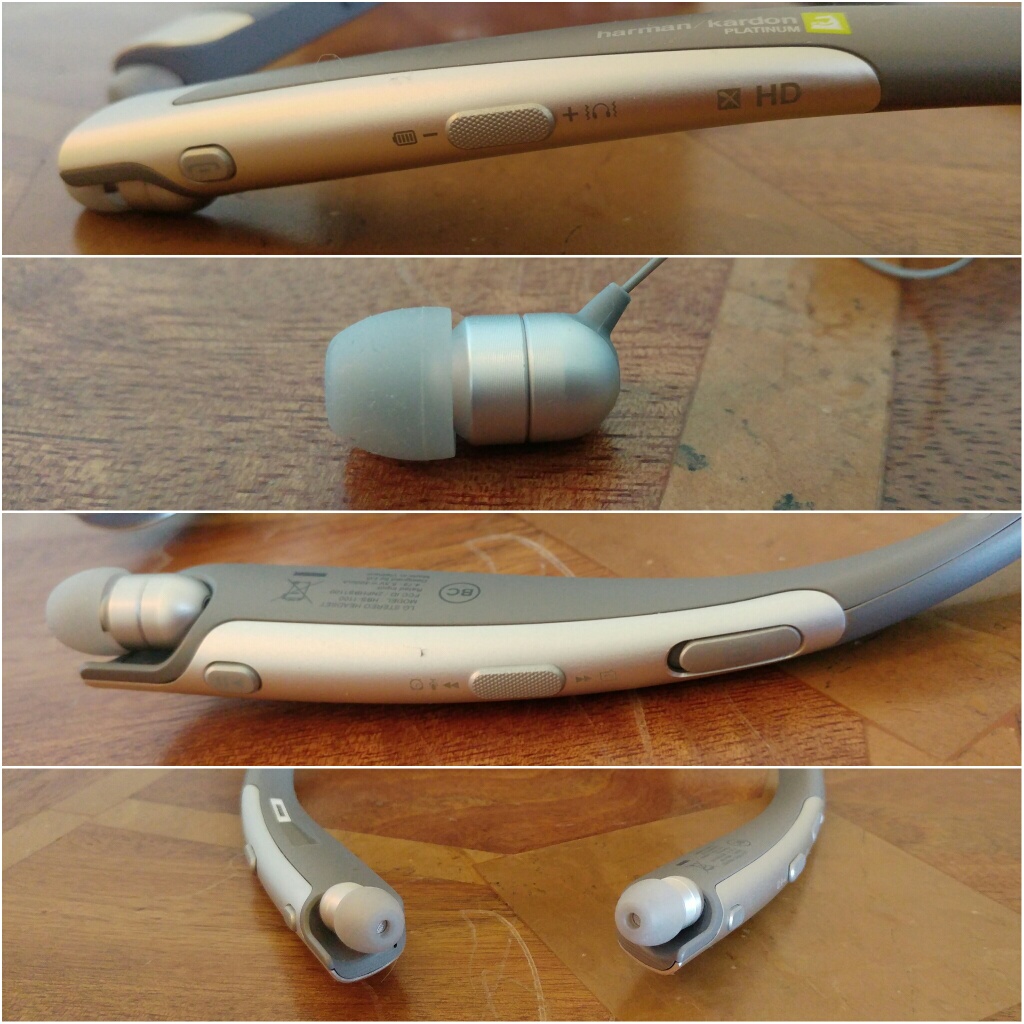
The other controls on the headset are everything you expect and more. Controls for music, calls, volume, cable retraction and more as shown in the photos.

The Sound Quality

This is the part that matters most. Does the new APT-X HD codec work? In my testing it really does work and really well. It also sounds better than Samsung’s proprietary UHQ codec found on the new Samsung Galaxy S7.

As this is created by Qualcomm more headphones are due later on this year featuring this new codec which will undoubtedly become the new audio wireless standard.

LG’s decision to use balanced armature over a dynamic driver is a statement in itself. Balanced armatures tend to reproduce sound fairly naturally with delicate mids and treble.

I have listened to loads of different genres and all were faithfully reproduced. It is hard to believe these are wireless headphones. The Tone Platinum are not bass heavy. But if the track has bass it digs deep too. Classical and vocals were wonderful. Playing flac songs and again the sound quality was excellent.

My current favourite Bluetooth headphones are Plantronics BackBeat Pro. These deliver huge amounts of bass and impact. A lot of people will listen to these are even prefer them on a quick listen. These are over ears and massive so have the ability to deliver such impact. However, over a longer listening period the LG Tone Platinum will triumph. Ear fatigue is non existent and the overall quality is way above the Plantronics.

Another bonus is that the in ear canals are comfortable even after lengthy usage.

Conclusion

Qualcomm’s APT-X HD is the real deal. The LG Tone Platinum are fantastic as a headset from a feature count, superb for phone calls and more and sound brilliant with your music.

For the latest pricing on Amazon UK – Click HERE

LG G5 Friends – LG 360 Cam – Review

image

Welcome to my review of the LG 360 Cam, one of the LG G5 Friends. The LG 360 Cam is available from Clove Technology and costs £199.

image

The Key Specification

– Bluetooth V4.1
– Wi-Fi 802.11 b/g/n
– USB Type 2.0 Type-C
– Battery 1200 mAh
– Optics 13 MP, 206° x 2 (Dual Fisheye Lens)
– Max. Video Res 2560 x 1280 (30fps)
– Max. Photo Res 5660 x 2830 (16M)
– Image / Video File Format Still Image : JPEG / Video : MP4 (MPEG-4 AVC/H.264, Audio : AAC 5.1Ch)
– Capturing Spherical / Half-spherical image & video
– Sound 3 Mics
– External SD Card Up to 2 TB
– Dimensions/Weight 40 mm x 97 mm x 25 mm / 76.7 g

The LG 360 Cam features compact spherical 13mp cameras that can shoot at a max of 206 degrees x 2 (dual fisheye lens)to create a 360 degree photo or video. 2K Video support and 5.1 channel audio is supported too. The LG 360 CAM is compatible with Youtube and Google Street View app. You can directly publish 360 video and photo taken by the LG 360 CAM to Youtube and Google Street View.

Hardware

The hardware is brilliant. The LG 360 Cam is charged via USB Type C. It takes micro SD cards up to 2 TB too. The protective case acts as a stand as shown. It also has a tripod screw mount built in. The hardware controls are simple too. Power on button is on the side. LED indicator for showing you which mode – 360 or 180 degrees. Press front button to take a photo, or press and hold for video. You can control it without the LG 360 Cam software or with it. With the cam manager software you get far more options and controls.

Software

The LG 360 cam manager software is superb. The main splash screen gives you access to the camera controls, gallery and settings.

wp-1462255646225.png

The gallery shows you what is sitting on the 360 Cam micro sd card and what is on the LG G5. You can download and delete content from the 360 Cam with ease. The settings menu give you access to a range of useful information and the firmware updates.

wp-1462255653225.jpg

The LG 360 Cam has its own app which can also be accessed via the LG Friends Manager. Connection is via WiFi Direct and is really quick. The LG 360 Cam has a lot of options as shown below.

image

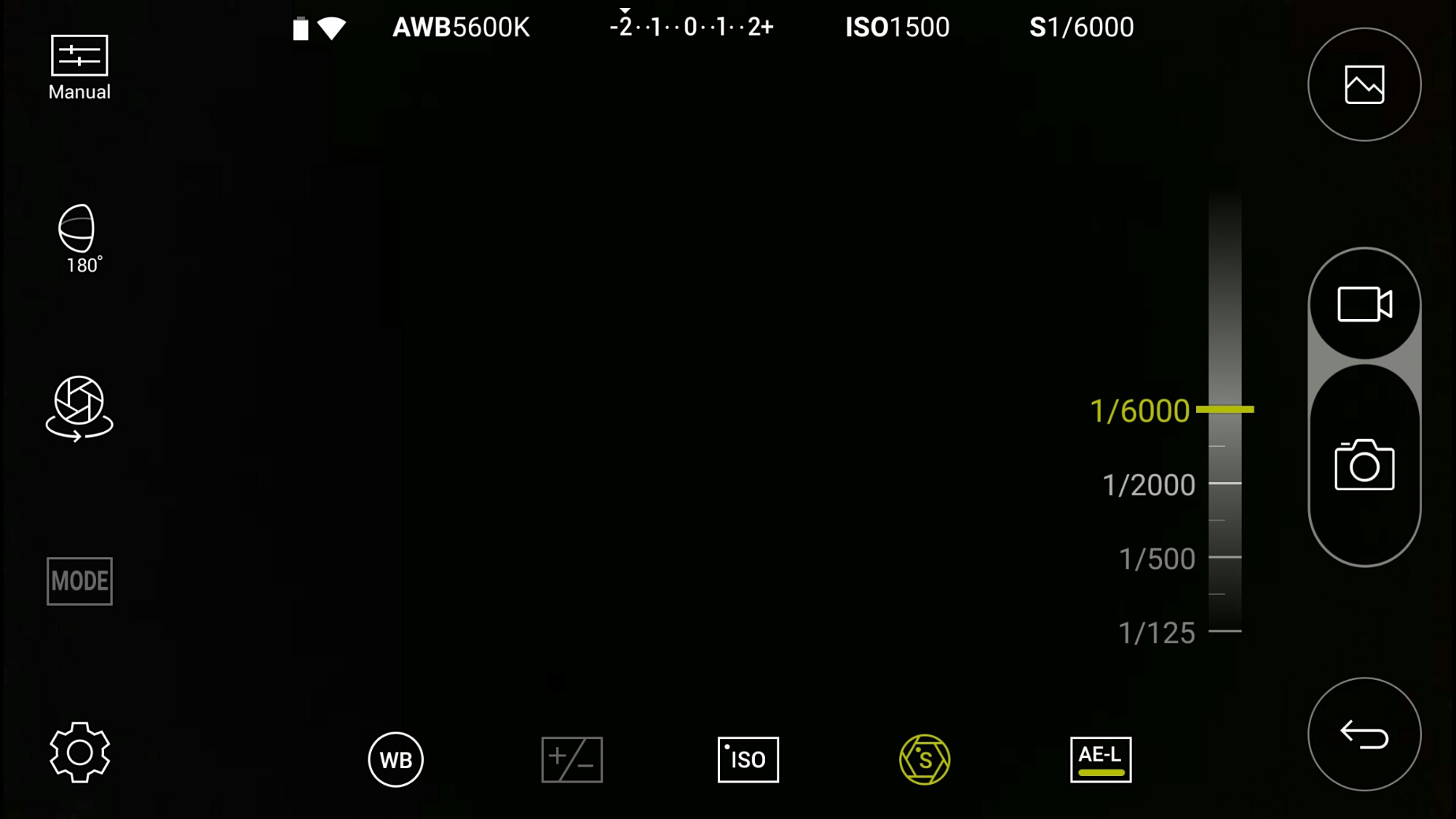
Look above. That’s right. This is manual mode. The LG 360 Cam has an excellent manual mode. Here you can see the faster shutter speed is 1/6000.

image

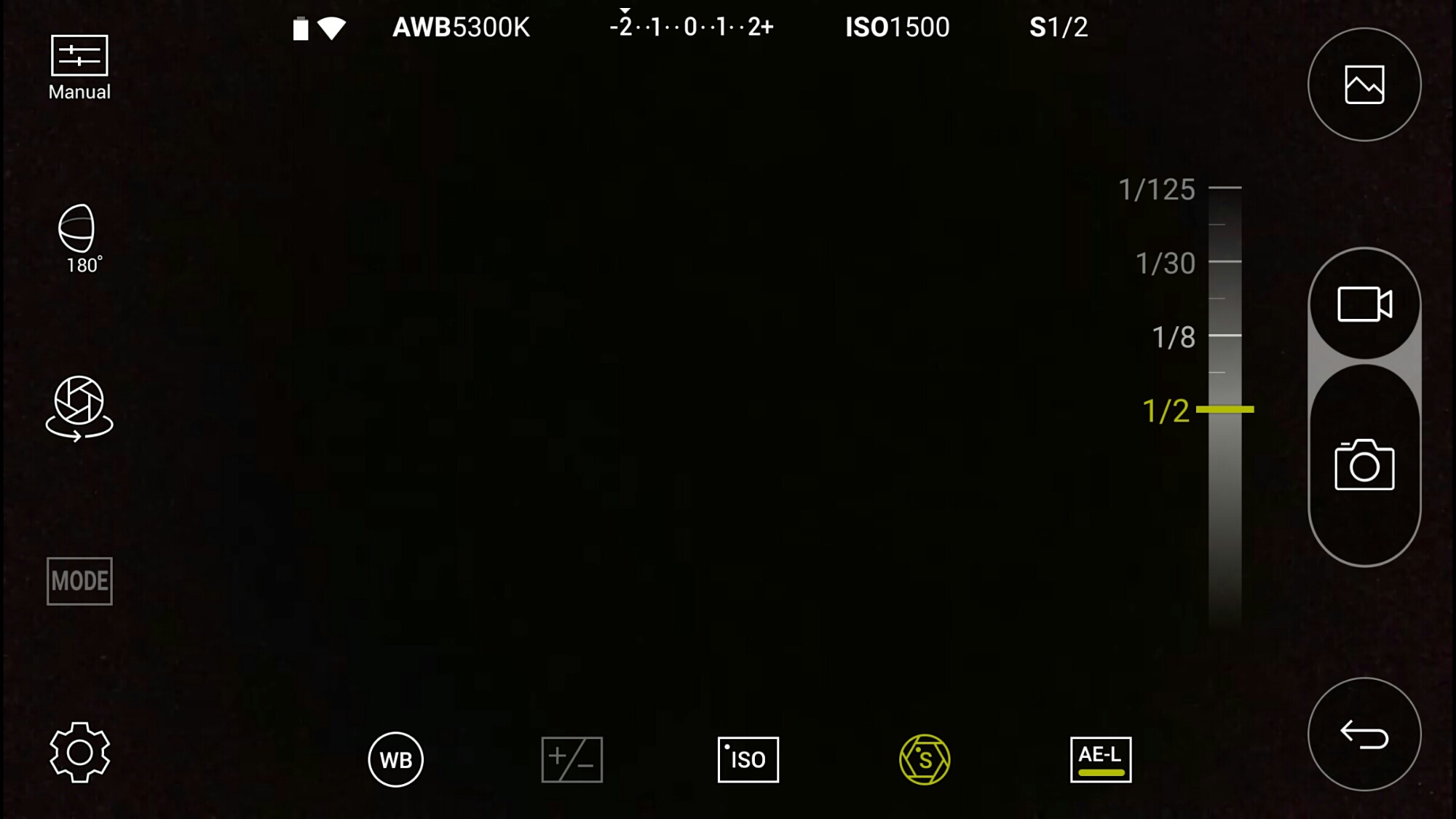
And the slowest shutter speed is 1/2 second. Other options include exposure, white balance and ISO.

image

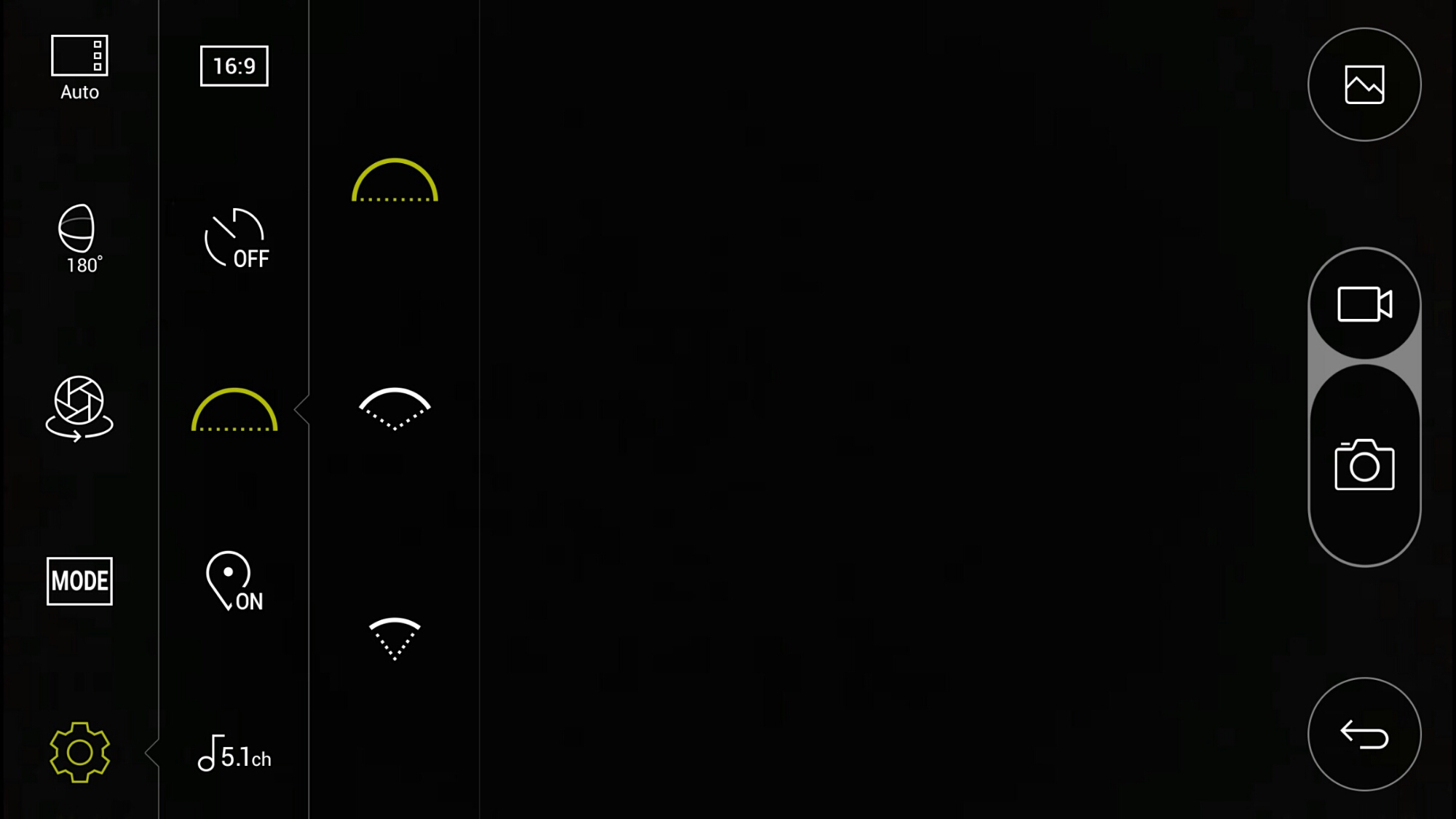
If taking photos at just 180 degrees instead of the full 360 degrees, you can alter the field of view angle. I have photo examples of the difference this makes below.

image

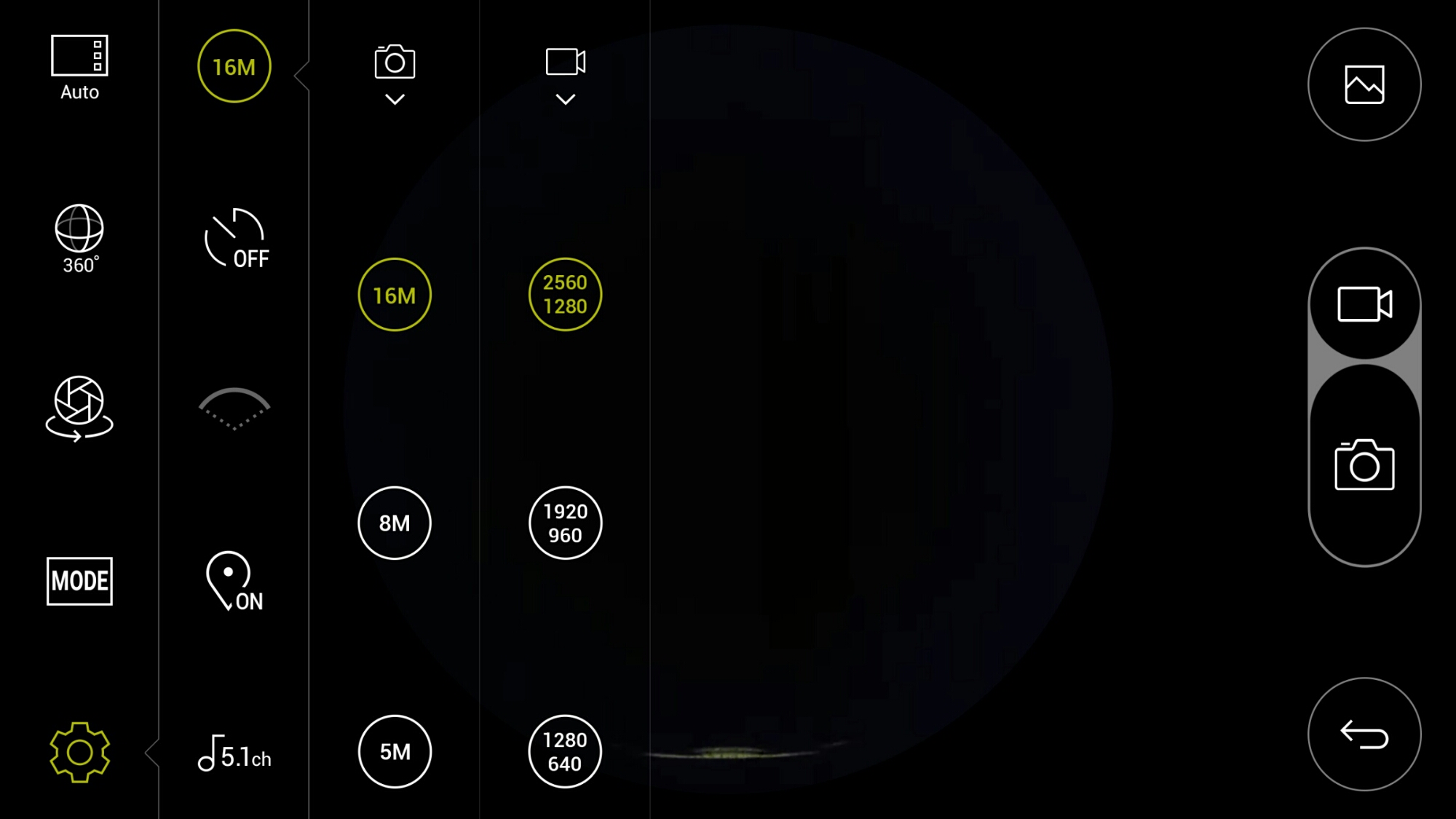
In terms of settings for video and photo quality, there are plenty of options. As standard it records in 5.1 Channel surround sound audio. You can change this to 2 channel stereo.

image

There are also a choice of scenes/modes as shown.

When using the 360 cam manager it is great being able to see what you are recording. If you are standing more than 50 feet approx away approx from the device or if your line of site is blocked, you may not be able to see what you are filming on the screen but you will still be able to control it. On the second video below, I hid behind a wall so I was not in the footage, but I could still operate it.

Playing the footage back on the LG G5, you can either view in 360 degrees or use the select split screen mode. This shows video from each side of the cameras split 50/50 on screen. Rather cool. You can also connect the LG 360 VR glasses and see the footage in a whole new way!

Example Footage

First up is a 360 video of my village, Princetown, Dartmoor.

Another example down by the river.

Below are photos from the LG 360 Cam in 360 degrees and lower using the options in the camera app.

image

Next using the 360 cam in 180 degrees you have 3 different wide settings. Below are 3 shots starting with the widest field of view down to the narrowest.

image

image

image

Conclusion

The LG 360 Cam is a decent product and well thought out and consequently is recommended. Using this with the LG 360 VR glasses creates a whole new world.

If you are interested in the LG 360 Cam this is now available fromClove Technology.

LG 360 Cam – Watch my 360 VR video and photo footage

I have been testing the LG 360 Cam which is one of the LG G5 Friends. I got my LG 360 Cam from Clove Technology who have this in stock as this post goes live.

I have been using the LG 360 Cam along with the LG 360 VR. The experience is far better than I had expected. The LG 360 Cam has many features which will be covered off in my review. For this post I will show you a 180 degree photo below.

Just for info the LG 360 Cam can be used with other Android devices and the iphone and iPad.

20160423_140525

The real gem comes with snapping 360 photos and videos. I will be sharing the 360 degrees photos and more videos in my main review, so for today see a 360 VR 40 second video of my local village – Princetown, Dartmoor. You will need VR glasses to view this back or something similar like LG 360 VR, Samsung Gear VR or even Google Cardboard. The other option is using a compatible browser and the latest YouTube apps on iOS and Android. If you have a Windows Phone its lol unlucky.

The LG G5 allows you to split the screen during playback and have the front camera playing on the left and the rear on the other side of the screen. This looks rather neat.

And don’t forget if you’re interested in any of the LG G5 Friends or any of smartphone or accessory head over to Clove Technology.

LG G5 – Views after One Week

Drake Building, Tamar Science Park, Plymouth #lgg5wide

I have now had the LG G5 for one week. The phone is a revelation. It is so enjoyable to use I no longer have the Samsung S7 Edge.

I love the design and feel of the G5. In gold it looks good. USB Type C connector. Infra Red Blaster. Great cameras. Modules. Did I say great cameras. Very loud loudspeaker. Lovely bluetooth audio quality. The single let down is the screen brightness. It doesn’t go high enough when needed. May a software fix is required to fix this problem,

Milbay Harbour, Plymouth #lgg5wide

The wide angle lens makes capturing a scene previously impossible, now possible. The entire harbour in one shot captured above.

The first shot of Drake Building produces such dept.

Duke of Cornwall Hotel, Plymouth #lgg5wide

You can step really close to the hotel to capture this shot.

Everything on the G5 works really well from hardware and software. And then there is the modules and friends which are all about to come into stock. I am really looking forward to the LG Cam Plus and B&O HiFi DAC. I like the concept that I can make my G5 better or different with these modules.

And now LG is teasing more options with these modules, including a GamePad, Printer, Projector and more. See below.

LG G5 – First Impressions

Tavistock Town Hall #lgg5 #wide

Welcome to my first impressions of the LG G5 which I have now used for 3 days solid. This is a retail unit.

I must admit that I was nervous about receiving the LG G5 due to all the horror stories on the web with regards to build quality issues and other negativity being bantered around.

I have a gold LG G5 which was the colour I least wanted but upon opening the LG G5 box, I was immediately drawn by how beautiful it looks. The front glass has a slick feel. The next aspect that struck me was how much easier the G5 was to hold and operate versus the Samsung Galaxy S7 Edge. I now realise that if I was to go back in time, I would not get the S6 Edge but the standard S7. Now just mentioning the build quality, a really don’t see what the fuss is about. The G5 looks good, feels good in the hand and only longer term testing will reveal how well it fairs over time.

So I first charged the G5, then switch it on and setup the phone with around 150 apps/games. I restored my phone using NFC and the Tap & Go option when you first turn the phone on. Quick Charge 3 is super fast.

My eyes were shocked to see such a garish looking home screen on the G5. A dreadful wallpaper and a 4 x 4 grid that looked so cartoonish. As my apps restored more and more home screens appeared as there is no app drawer. I then spent 10 mins or so creating folders and eventually had all my apps neatly on 1 screen.

wp-1460748832798.png

Since creating the above home screen, I have changed the wallpaper for one of the included black wallpapers and used a white background for all the folders. This looks so much better. I have also now got 5 menu items on the bottom bar which makes using the G5 a breeze. I have downloaded Nova Launcher initially, but now have uninstalled it as I am happy with the LG setup.

What a tongue #George #Dartmoor#lgg5

LG really need to think long and hard about the choice of default wallpapers as first impressions do make a difference. The default wallpaper IMO is dreadful.

So what did I notice next. Well simply the lack of bloatware and apps installed by LG. When compared to the S7, the G5 has a fraction of apps installed from day 1.

I was curious to see how easy it was to remove the bottom chin and then remove the battery. After reading the instructions, it was a relatively simple process. The battery removal from the chin part feels super aggressive but still is easy enough.

Around and inside Foggintor Quarry #lgg5 #snapseededits

I was dying to test the camera out and over the course of the weekend managed to snap tons of photos.

Flying the Flag #HSBC #historic #Tavistock #lgg5 #wide

I have included a few within this post and if you scroll back at the earlier posts you will see more examples from the LG G5 camera. I tested both the 16mp and wide angle lens. I tested macro, action shots and as many other types of photos as possible. The output from both lenses is excellent in terms of quality and file sizes. It is possible to crop a lot thanks to the 16mp lens. Now with my S7 Edge, I used 16:9 ratio meaning 9.1mp. The G5 wide angle is 8mp. Yet the average photo file sizes from the G5 was larger than those from the S7. The wide angle photos seem to add a lot of drama to a scene but do need to be used wisely and not all the time.

The G5 has an Infra Red Blaster. I can control my TV, DVD and so much more. It’s really useful.

Next tests involved testing the headphone jack, bluetooth audio and loudspeaker. I had read various reviews that the headphone volume output was weak. Well that’s not the case with my G5. It is louder than the S7, more powerful and dynamic too. The loudspeaker is so loud you can feel the air being pushed out the speaker grills. Bluetooth audio is exceptional. And this is the quality without the HiFi DAC module!

The G5 is very fluid in operation. Scrolling. Opening apps. Typing on the default keyboard. Really fluid.

So that leaves my first thoughts on the battery. 4.5 hours SOT is my average so far. This is with every social media app running, 4 email accounts, connected to my Gear S2 via bluetooth (S Health is also installed on the G5 which feels weird not being a Samsung phone). This is about 90 minutes less than my SOT that I achieved for the S7 Edge. The S7 Edge has a much better SOT and on a few days with the S7 Edge reached 10 hours SOT.

However, the biggest disappointment is the G5’s screen brightness. At times its not bright enough. Sunlight visibility is readable but only just at times. LG have clearly reduced the brightness to conserve the battery but I think its too aggressive. The S7 Edge by comparison is readable with ease in any lighting. Now LG claim the G5 can crank the brightness up to 800 nits. I have seen this happen but it eats battery at this level. Thank goodness for Quick Charge 3 and replaceable batteries! Despite the screen brightness, the screen is a joy to look at.

So overall I am thoroughly enjoying the G5, more than the S7 Edge. However, the screen brightness is my biggest gripe and I hope LG can change brightness scale in a future software update.

LG G5 – My favourite shots from the Camera with commentary

Below are a selection of photos I took yesterday from the LG G5 with some commentary. To view the full size, click on photo and select original or full size.

Around and inside Foggintor Quarry #lgg5 #snapseededits

The above shot of Foggintor Quarry is superb. I have taken many shots with different phones of this place, but the wide angled lens of the G5 captured the walls too. Edited in snapseed with HDRScape filter.

Foggintor Quarry #16mp #normal #lens #lgg5

Above is the quarry with the normal 16mp lens. You can see my 3 dogs just before they jumped in for a swim. This is not edited in any way. In the past I used panoramic mode to capture the inside of this quarry, but the wide lens does a much better job.

Church of St Michaels #Princetown #lgg5 #wide

Take my local church and shoot it with the wide lens again. The effect is dramatic.

St Michael's & All Angel Church, Princetown #LGG5

Same church taken the day before but using the normal lens to give you an idea of the difference. This was the very first shot from the LG G5.

George sprinting with happy face #lgg5

So I tried some action shots with my dogs. Above is George. This is a cropped shot. Having 16mp worth of detail is great for something like this.

George sprinting again #lgg5 #wide #burstmode

Again another action shot using burst mode. But with the wide angle lens. Note how the clouds look as if they are moving inwards.

National Park Visitor Centre #lgg5 #normal #16mp

National Park Visitor Centre. Normal lens. Crisp and a good quality shot.

National Park Visitor Centre #lgg5 #wide

That wide angle lens on the G5 is something else. Look how much more was captured in the frame. Now this shot did curve the buildings more than shown, so using VSCO Cam app on the G5, I made a few adjustments and then edited in snapseed using HDRScape.

Drive out of Princetown #bothlenses #lgg5

Using both lenses to create the above shot. Not that excited about this mode.

Fury - She's looking pretty #lgg5

High quality shot using the normal lens of Fury. I like this one.

Tiggy showing off her teeth #lgg5

Cropped close up of Tiggy. This photo was originally too dark, so I had to raise the brightness and shadows.

So above is a small selection of the photos that I have snapped over the last couple of days. I found the wide angle lens to be wonderful. Not only that but the 8mp wide angle lens actually had a lot more detail than expected with file sizes around the 4mb. The Normal 16mp lens produced file sizes around 7mb.

Based on the full range of photos I have taken with the G5, I am able to write up my views on this camera versus the Samsung Galaxy S7 camera. This hopefully will be live tomorrow. But all I will say at this point is the G5 and S7 are so different its actually great news for consumers to have such choices.

LG G5 – First shots from the camera

St Michael's & All Angel Church, Princetown #LGG5

The first 2 photos I took with my retail LG G5 are above and below. HDR got triggered automatically as I was shooting partially at the sun.

The shot above is the standard shot from the G5 using the normal 16mp lens. And below is the wide angled shot.

St Michael's & All Angel Church, Princetown #wideangle #LGG5

How do I feel about the wide angle shot. Blew my socks off wonderful. I have snapped my local church hundreds of times and this shot ranks as one of my favourite versions. I love the way its draws you into the church.

Now I already have lots to say about this phone. You’ll have to wait until Monday. But just to quench some rumours and clear some facts up:

1. Build quality on my gold finished G5 is excellent.
2. It is a damn load more comfortable and easier to hold than my Samsung Galaxy S7 Edge
3. Camera – more tests required but very pleased so far
4. Loudspeaker – much louder than S7 Edge
5. Headphone Output – rumoured to be quiet. Significantly louder than my S7 Edge with 4 pairs of headphones.
6. Bluetooth Audio – Better than anything I have heard so far
7. G5 home launcher with no app drawer. Piece of cake to manage with and actually is easier to use. See previous post with all 150 apps on one page.

Are there some annoyances. Yes. Those will be revealed on Monday along with everything else discovered by Sunday night.

Amazon Kindle Oasis – My Thoughts

Amazon has just announced their new luxury Kindle E-Reader called the Kindle Oasis.

oasis

oasis 3

The key features are –

– Amazon’s thinnest and lightest Kindle – read comfortably for hours
– All-new ergonomic design with buttons for effortless page turns
– Longest Kindle battery life ever – no need to recharge for months as the included removable leather charging cover boosts battery life
– Choose from a black, merlot or walnut removable cover
– High-resolution 300 ppi display – reads like the printed page
– Adjustable front light – provides ideal brightness, day or night

New—Designed to feel as light as paper, Kindle Oasis is over 20% lighter and 30% thinner on average than any other Kindle. The handgrip tapers to an ultra-thin 3.4 mm display so you can read comfortably for hours.

New—Kindle Oasis combines our strongest cover glass and a featherweight frame infused with metal using structural electroplating, ensuring it is lightweight while also resilient enough to take it with you everywhere you go.

New—A tapered ergonomic handgrip shifts the centre of gravity to your palm, to rest in your hand like the spine of a book. Perfectly balanced for one-handed reading, Kindle Oasis lets you lose yourself in your story.

New—Comfortably turn the page with either the touch display or dedicated page turn buttons located on the front of the handgrip. Whether you choose to read with your left or right hand, Kindle Oasis automatically rotates the page orientation to match.

The Kindle Oasis costs £269.99 for the Wi-Fi model and £329.99 for the Wi-Fi and 3g model. That is a lot of books just for the price of the reader. But for some reason, it is tempting me. I am wondering if I purchased this it would start my passion for reading books again.

What about yourself?

For more information on the Kindle Oasis click HERE.

HTC 10 – My First Thoughts and Opinions vs the Competition – Plus discount codes

htc10

HTC announced their new flagship the HTC 10. Full specs can be found on HTC’s website – click HERE.

Firstly, I thought HTC did a rather clever job of announcing the new flagship without a big live event. In fact, at 1pm UK time, all the content just appeared on HTC’s website along with a 13 min introduction video to the new flagship and what makes it special.

At the same time, all the major website also released all their content on the HTC 10 along with first impressions. Full reviews are likely to follow soon as well.

So instead of reproducing the same content as every other website, I am going to discuss the high and low points of the HTC 10 and then provide my thoughts re the competition.

HTC 10 – My First Impressions

A typical unibody slab of metal from HTC which will help it feel and look premium in the hand. The effort HTC’s went to task to simplify the software with Google will mean this phone will be super fast to use. However, for some and probably me included this could also mean a boring phone with no added extra software perks. The next stand out feature is the Hi-Res Audio and Hi-Res Headphones. This is for playback and recording via the microphones. This is really excellent if you like your music. The loudspeaker setup is a tweeter at top and bass/subwoofer at the rear. This should sound reasonable. 12mp rear camera f/1.8 1.55 microns pixel size, with OIS, two tone flash and laser auto focus. To me this sounds like the Nexus 6P rear camera but with OIS. Expect good photos. The front 5mp camera has OIS too. The rest of the specs are all run of the mill for a flagship phone. Apart from Airplay support built in. Unusual for an android phone. Due to all the software optimisations with Google, battery life should be one day. Handy Quick Charge 3 is included. Another claim to fame is the HTC 10 holding the top rating for its camera with DxOmark. I also liked that the HTC 10 had adoptable storage.

HTC 10 vs The Competition

Nexus 6P – I would pick the HTC 10 over the Nexus 6P. That is unless you wanted to ensure fast and quick firmware updates directly from Google. The HTC 10 should have better cameras and audio.

Samsung Galaxy S7 – Whilst the HTC 10 has larger pixels in its rear camera, the S7 has a f/1.7 vs a f/1.8 for the HTC 10. Both rear cameras are 12mp. Personally the S7 would be my choice for camera due to its incredibly fast focus. The S7 is also water and dust resistant. If selfies are your thing, then maybe the HTC 10 would be a better option. The HTC 10 gets the thumbs up from me on the audio front and the fact it has adoptable storage. On paper I still think the S7 Edge looks more premium. It also has a better screen and battery. Whilst Samsung include lots of extra apps, some are really useful and add extra functionality.

Xiaomi Mi 5 – HTC 10 has the camera and audio edge. The Mi 5 features an IR blaster and is a lot cheaper. But it is not as readily available world wide.

LG G5 – I still think the 16mp rear camera on the G5 is my preferred choice over the 12mp HTC 10. Whilst the G5 doesn’t offer a front camera with OIS it does offer a higher resolution at 8mp. The 8mp wide angled rear camera is unique. Audio quality will be better on the HTC 10, even with the G5’s DAC module potentially. However, bluetooth audio on the G5 should be better than the HTC 10 due to the G5 supporting APT-X High Definition codec. The G5’s modules offer something different to the HTC 10. The HTC 10 is far more premium looking. An IR Blaster is still included with the G5 and not present on the HTC 10.

Huawei P9 – I think the P9 will have a tough time competing against the HTC 10 except for the fact the P9 at launch will be £100 less in price. The P9 also has a unique dual rear camera lens setup. But these lenses do not feature OIS meaning blurrier shots will happen more frequently.

iPhone 6S – Apart from the iOS vs android debate, I really think the HTC 10 beats the iPhone in audio and camera, at least from a specs point of view.

Microsoft Lumia 950 – Whilst the camera on the 950 may be respectable I believe the HTC 10 would be a better all around option.

Conclusion

It is worth remembering these are my initial thoughts. I have yet to see the HTC 10 in person and like everything the specs may look good, the promotional material may shine, but does the phone deliver on what it promises! Time will tell but it really does look like HTC have delivered a decent offering this year.

If you order directly from HTC there are discount codes available as follows –

– USA – Code – HTC1008 – Saves $100 – Price reduced to $599 from $699
– Canada – Code HTCCA1008 -Saves $100 – Price reduced to $899 from $999
– UK – Code – HTC10 – Takes 10% off. New price is £512.99 from £569.99 – Also selecting Express Shipping instead of standard, makes shipping free.