Category Archives: Reviews

Items in the Review Process – Plus Special Offer

There are a number of devices/gadgets currently undergoing the review process. These include the following –

LG G5 BCK-5100 Hybrid Battery Charger & Portable Battery – Now available from Clove Technology

LG 360 VR – Now available from Clove Technology

LG 360 Cam – Now available from Clove Technology

Piper NV Smart Security System – Details and available from Amazon

Other items expected soon which will be reviewed include the remaining LG G5 Friends – LG Cam Plus, HiFi DAC, LG Rolling Bot and the LG Tone Platinum. – Full details – LG G5 Friends

Special Offer – I bought yesterday a 4 pack of USB Type C cables with different sizes. (1 x 10cm cable,2 x 100cm cable, 1 x 200cm cable) Tested and certified to USB Type-C standards and with the 56k ohm resistor. Available at Clove

None of the Clove Technology links are affiliate referral links. I just like using them and have done for many years. It is really good to see that they have stock of the latest devices and gadgets, so do have a look at all their other items 🙂

There are a few other items/phones/audio/gadgets undergoing the review process too 🙂

And don’t forget if you’re buying anything on Amazon, use the link below. Helps Gavin’s Gadgets towards the site running costs and at no extra cost to yourself!

AMAZON LINK

LG G5 – Views after One Week

Drake Building, Tamar Science Park, Plymouth #lgg5wide

I have now had the LG G5 for one week. The phone is a revelation. It is so enjoyable to use I no longer have the Samsung S7 Edge.

I love the design and feel of the G5. In gold it looks good. USB Type C connector. Infra Red Blaster. Great cameras. Modules. Did I say great cameras. Very loud loudspeaker. Lovely bluetooth audio quality. The single let down is the screen brightness. It doesn’t go high enough when needed. May a software fix is required to fix this problem,

Milbay Harbour, Plymouth #lgg5wide

The wide angle lens makes capturing a scene previously impossible, now possible. The entire harbour in one shot captured above.

The first shot of Drake Building produces such dept.

Duke of Cornwall Hotel, Plymouth #lgg5wide

You can step really close to the hotel to capture this shot.

Everything on the G5 works really well from hardware and software. And then there is the modules and friends which are all about to come into stock. I am really looking forward to the LG Cam Plus and B&O HiFi DAC. I like the concept that I can make my G5 better or different with these modules.

And now LG is teasing more options with these modules, including a GamePad, Printer, Projector and more. See below.

LG G5 – More camera shots from my trip to London Docklands with commentary

Below are a selection of photos snapped whilst I was in London Docklands the other day along with commentary for each photo.

Don't look down - View from Emirates Cable Car #lgg5

The above shot was snapped whilst travelling in the Emirates Cable Car than runs from Royal Victoria to North Greenwich in London Docklands. I cannot remember if I used the wide lens or not for this photo.

O2 Arena - View from the Emirates Cable Car

Again snapped whilst inside the cable car, and made B&W using VSCO Cam preset B3.

The River Thames - View from the Emirates Cable Car #lgg5wide

The above shot is using the wide lens. Apart from the cable car glass reflection, its a superb shot. It was a really sunny day.

Scenic views of the River Thames and Emirates Cable Car #London

Wide lens again. This is the landing bay at Royal Victoria.

Emirates Cable Car Landing #London

Above with the standard 16mp lens. Loads of detail and the colours are accurate to what my eyes were seeing too.

The Crystal, Royal Victoria, London

Again using the 16mp lens on the G5. This building is called The Crystal at Royal Victoria, London Docklands.

The Crystal, Docklands #lgg5wide

The wide angle lens creates the above shot. Not for everyone due to the excessive curves.

Emirates Cable Cars gliding downwards, Docklands #lgg5

Wide angled and cropped. The G5 wide angle lens still has enough detail for crops.

Emirates Cable Cars , Docklands #lgg5

Again wide lens and cropped with a filter applied. I just wanted to show the distance the cable car travelled.

Canning Town Station #red #lgg5

Canning Town station is not attractive. So using Camera360 magic colours (red) filter, I jazzed it up.

Red Construction Cranes , Canning Town, London #lgg5

A building site is not very attractive, but again, used Camera360 and the magic colours red filter. This is using the 16mp lens.

Sunrise at Canning Town, London #lgg5wide

Again wide and not too warped. This was taken at sunrise.

Canning Town Fly Over, London #lgg5

Just a road in Canning Town with lots of building work. Edited in Photo Express using the Pinhole effect.

Paddington Station, London #lgg5

And finally Paddington Station London. Using the 16mp lens which did a great job.

All in all I was very impressed with the shots from the G5 camera.

LG G5 – Recent shots from the G5’s cameras

Below are a selection of different shots from the G5’s camera taken over the last couple of days.

image

Above a lovely wide shot of a farmer mucking the field.

image

In this shot I prefer the jump lens as shown above.

image

Above a lovely macro of a dafodill.

image

Above shot of Postbridge Bridge and the original clapper bridge using the wide lens.

image

Again the 8mp wide lens. Produces a lovely shot.

image

Another 8mp wide shot but cropped inn and still there is plenty of detail.

image

Just for fun. Inside a train carriage. Wide.

image

Above 16mp lens. Not everything needs the wide lens.

The more I use the G5 the more I enjoy the phone.

LG G5 – How to get 10 hours screen on time? Battery Re-Charging Timings?

So I have now had the retail version of the LG G5 for 4 days.

During this period I have wondered how the 2,800mAh battery will perform versus the Samsung Galaxy S7 Edge. The S7 Edge has a larger battery at 3,600mAh along with an amoled screen versus the LCD of the LG G5. The S7 Edge can reach 6 hours screen on time with ease. This normally starts happening after 3 days from installing all your apps. During this time the phone learns which apps to optimise.

So over 3 days have now lapsed on the LG G5. So how do you get 10 hours screen on time? Answer with 2 batteries 🙂

That’s cheating of course, but actually it isn’t because the G5 does feature a removable and user swappable battery. But that does mean you can reach 5 hours screen on time with relative ease, providing you do one or two things. The most important improvement in battery life is made by switching off the always on display. Personally I like this feature but it uses 1% of battery per hour, so over 24 hours that is 24%, and that is nearly one quarter of your battery. In my book that is too much. The next step is to head over to the settings app, select battery, battery usage and then look at which apps haven’t being optimised in the list that you can pull up.

Mid way through the day yesterday, I turned off the always on display and the difference was fantastic. I went from expecting just over 4 hours screen on time to actually reaching 5 hours screen on time.

So what about recharging times. I wanted to test my current Quick Charge 2 portable battery pack.( I haven’t got a QC 3 pack yet which should be faster than QC2). So how fast was the recharge. From 5% to 60% took 20 minutes. 25 mins longer and the battery had reached 80%. The last 20% took another 30 mins to charge to full. So in total Quick Charge 2 took 1 hours 15 mins.

I will test Quick Charge 3 later this week using the official charger and an Anker QC3 device.

LG G5 – First Impressions

Tavistock Town Hall #lgg5 #wide

Welcome to my first impressions of the LG G5 which I have now used for 3 days solid. This is a retail unit.

I must admit that I was nervous about receiving the LG G5 due to all the horror stories on the web with regards to build quality issues and other negativity being bantered around.

I have a gold LG G5 which was the colour I least wanted but upon opening the LG G5 box, I was immediately drawn by how beautiful it looks. The front glass has a slick feel. The next aspect that struck me was how much easier the G5 was to hold and operate versus the Samsung Galaxy S7 Edge. I now realise that if I was to go back in time, I would not get the S6 Edge but the standard S7. Now just mentioning the build quality, a really don’t see what the fuss is about. The G5 looks good, feels good in the hand and only longer term testing will reveal how well it fairs over time.

So I first charged the G5, then switch it on and setup the phone with around 150 apps/games. I restored my phone using NFC and the Tap & Go option when you first turn the phone on. Quick Charge 3 is super fast.

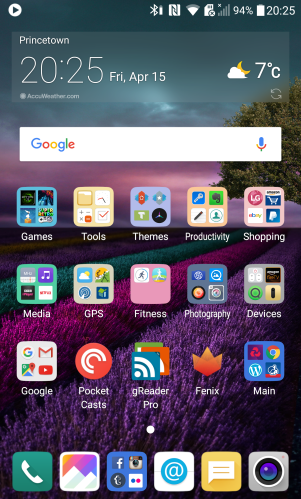
My eyes were shocked to see such a garish looking home screen on the G5. A dreadful wallpaper and a 4 x 4 grid that looked so cartoonish. As my apps restored more and more home screens appeared as there is no app drawer. I then spent 10 mins or so creating folders and eventually had all my apps neatly on 1 screen.
wp-1460748832798.png

Since creating the above home screen, I have changed the wallpaper for one of the included black wallpapers and used a white background for all the folders. This looks so much better. I have also now got 5 menu items on the bottom bar which makes using the G5 a breeze. I have downloaded Nova Launcher initially, but now have uninstalled it as I am happy with the LG setup.

What a tongue #George #Dartmoor#lgg5

LG really need to think long and hard about the choice of default wallpapers as first impressions do make a difference. The default wallpaper IMO is dreadful.

So what did I notice next. Well simply the lack of bloatware and apps installed by LG. When compared to the S7, the G5 has a fraction of apps installed from day 1.

I was curious to see how easy it was to remove the bottom chin and then remove the battery. After reading the instructions, it was a relatively simple process. The battery removal from the chin part feels super aggressive but still is easy enough.

Around and inside Foggintor Quarry #lgg5 #snapseededits

I was dying to test the camera out and over the course of the weekend managed to snap tons of photos.

Flying the Flag #HSBC #historic #Tavistock #lgg5 #wide

I have included a few within this post and if you scroll back at the earlier posts you will see more examples from the LG G5 camera. I tested both the 16mp and wide angle lens. I tested macro, action shots and as many other types of photos as possible. The output from both lenses is excellent in terms of quality and file sizes. It is possible to crop a lot thanks to the 16mp lens. Now with my S7 Edge, I used 16:9 ratio meaning 9.1mp. The G5 wide angle is 8mp. Yet the average photo file sizes from the G5 was larger than those from the S7. The wide angle photos seem to add a lot of drama to a scene but do need to be used wisely and not all the time.

The G5 has an Infra Red Blaster. I can control my TV, DVD and so much more. It’s really useful.

Next tests involved testing the headphone jack, bluetooth audio and loudspeaker. I had read various reviews that the headphone volume output was weak. Well that’s not the case with my G5. It is louder than the S7, more powerful and dynamic too. The loudspeaker is so loud you can feel the air being pushed out the speaker grills. Bluetooth audio is exceptional. And this is the quality without the HiFi DAC module!

The G5 is very fluid in operation. Scrolling. Opening apps. Typing on the default keyboard. Really fluid.

So that leaves my first thoughts on the battery. 4.5 hours SOT is my average so far. This is with every social media app running, 4 email accounts, connected to my Gear S2 via bluetooth (S Health is also installed on the G5 which feels weird not being a Samsung phone). This is about 90 minutes less than my SOT that I achieved for the S7 Edge. The S7 Edge has a much better SOT and on a few days with the S7 Edge reached 10 hours SOT.

However, the biggest disappointment is the G5’s screen brightness. At times its not bright enough. Sunlight visibility is readable but only just at times. LG have clearly reduced the brightness to conserve the battery but I think its too aggressive. The S7 Edge by comparison is readable with ease in any lighting. Now LG claim the G5 can crank the brightness up to 800 nits. I have seen this happen but it eats battery at this level. Thank goodness for Quick Charge 3 and replaceable batteries! Despite the screen brightness, the screen is a joy to look at.

So overall I am thoroughly enjoying the G5, more than the S7 Edge. However, the screen brightness is my biggest gripe and I hope LG can change brightness scale in a future software update.

LG G5 – First shots from the camera

St Michael's & All Angel Church, Princetown #LGG5

The first 2 photos I took with my retail LG G5 are above and below. HDR got triggered automatically as I was shooting partially at the sun.

The shot above is the standard shot from the G5 using the normal 16mp lens. And below is the wide angled shot.

St Michael's & All Angel Church, Princetown #wideangle #LGG5

How do I feel about the wide angle shot. Blew my socks off wonderful. I have snapped my local church hundreds of times and this shot ranks as one of my favourite versions. I love the way its draws you into the church.

Now I already have lots to say about this phone. You’ll have to wait until Monday. But just to quench some rumours and clear some facts up:

1. Build quality on my gold finished G5 is excellent.
2. It is a damn load more comfortable and easier to hold than my Samsung Galaxy S7 Edge
3. Camera – more tests required but very pleased so far
4. Loudspeaker – much louder than S7 Edge
5. Headphone Output – rumoured to be quiet. Significantly louder than my S7 Edge with 4 pairs of headphones.
6. Bluetooth Audio – Better than anything I have heard so far
7. G5 home launcher with no app drawer. Piece of cake to manage with and actually is easier to use. See previous post with all 150 apps on one page.

Are there some annoyances. Yes. Those will be revealed on Monday along with everything else discovered by Sunday night.

HTC 10 – The reviews are out

All the HTC 10 reviews have appeared from a number of tech websites. My HTC 10 is due shortly and likely at the same time as the Huawei P9. However, my first focus will be putting my LG G5 retail unit through its paces, now that this has now arrived.

I have a special treat for the G5 camera (weather permitting) so stay tuned.

So the reviews from Engadget, Pocketnow. Mobilegeeks, Android Authority and many more all seem to summarise that they really like the HTC 10. Clearly there is some love left for the company.

Below is a review from Pocketnow.

HTC 10 – Just how good is the camera? – Shots from the Camera

HTC have just released the HTC 10, its new flagship. The main focus was world class cameras. Both the front and rear cameras have optical image stabilisation.

So what are the photos like? Well Grryo in conjunction with HTC, got a load of photographers to use the HTC 10 and snap a range of photos.

HTC 1

All the photos seem ok. Nothing dramatic but nothing wrong with them either.

HTC 2

Obviously pro photographers were used, so the shot should look good as well.

HTC 3

Low light is shown and again this looks reasonable.

HTC 4

I will be receiving my HTC 10 shortly so will put this through its paces. If you want to see more of these shots then head over to Grryo.