Category Archives: Apple

WWDC 2016 – Wow – My Thoughts on the New Betas , Features and Keynote Speech

Apple held their WWDC 2016 Keynote Speech yesterday. It was great to see a mix of employees present on stage. It was also apparent that Apple had tons of stuff to try and get through.

Highlights included a whistle stop tour of iOS 10, macOS, tvOS, and watchOS.

watchOS 3 seemed to address many of the complaints of the current firmware with considerably faster running apps, new watch faces, improved ways to respond and a tweaked user interface. The activity app became more social too. All in all, the Apple Watch just became far more polished and potentially easier to use.

iOS 10 – so much to cover, new features across the board from Photos (RAW photo editing is also possible now), Maps, iMessages and more. Siri suddenly became more useful and functional. The lock screen got spruced up. API’s galore for developers including access to Siri and iMessage. Lots of new gloss too. BUT some of the more interesting changes were those not discussed. A high level take is Apple opening up the platform more than it ever has done.

Apple apps can be uninstalled. These include – Calculator, Calendar, Compass, Contacts,FaceTime,iTunes Store,Mail, Maps, Music,Notes, Podcasts, Reminders, Stocks,Tips,Videos,Voice Memos, Watch, Weather, Game Center – That’s a big list. Of course, as these Apple apps now appear in the App Store, it means Apple can provide quick updates to the core apps without a new firmware.

macOS – this also had lots of new features, the biggest with Siri integration, Apple Pay on the web which also features in iOS 10, universal clipboard and many more.

tvOS – lots of changes here from support for 4 game controllers, a dark theme, single sign on for all the different web services and lots more.

In fact, the list of changes is huge. My concern is how is everybody going to learn how to use all these new features and will it make Apple products harder to understand. Apart from that, the Apple software for the future looks exciting and provides a glimpse of what new hardware could be released to accommodate all these changes.

So what are your thoughts?

The 3.5mm Headphone Jack is History – Moto Z removes it as will other new phones – Editorial & Details

Moto Z

Lenovo just held a press event where it launched several new phones including the new Moto Z. One feature quietly not glossed on was the fact there was no headphone jack. Instead sound came via the USB port.

Motorola aren’t the first manufacturer to omit the 3.5mm headphone jack and certainly won’t be the last. Using the USB Type C port for audio will emit a higher quality sound.

Apple are rumoured to remove this 50+ year old analogue part in the next iPhone.

So is it a disaster. Hardly. For years I have used the USB port to take audio from my phones and into a dedicated DAC to obtain the best possible sound quality. Audeze already sell the EL-8 that come with an Apple lightning connector to plug in to the lightning port. And there are other companies that have ditched the headphone jack connector on their headphones too.

The Moto Z does come with a USB Type C headphone adapter so you can still use all your old headphones.

So why the change. Well as I mentioned the headphone jack is old tech and is 50+ years old now. 24 bit sound can be obtained or higher from the USB Type C socket. 24 bit bluetooth Hi Res sound is now possible. So you can now connect Hi Res Bluetooth headphones and drop the wire altogether. Or if the device has Qi Wireless charging , you could use the USB Type C connector whilst charging.

This change will upset many people at first. Life changes so people will move on eventually and forget the past.

And lets not forget if you have no headphone jack, that is one less hole to let water in!

Motorola Moto 360 Sport & Apple Watch – Review by Ian

Today, Ian reviews his Moto 360 Sport and compares it to his Apple Watch.

From Ian-

It’s been awhile since I’ve looked at Android Wear, I was an early adopter of the LG watch and Samsung Gear Live.

For the last year my Tag Heuer has been put away and My Apple Watch Sport has been my daily driver. But It’s a real love hate relationship. love the build, notifications and changeable straps. Hate the user interface and slow apps, the only one that I find useful is Heartwatch.

Motorola Moto 360 Sport Review photos - review on http://gavinsgadgets.com

So to the Moto 360 Sport, love the round screen and the amount interesting Watch faces. I can also live with the flat tire for the ambient light sensor. Android Wear on IOS is better than expected, provides me with the ability to change watch faces and all my notifications work as they do on my Apple Watch., but on a bigger screen. The downside is no third party apps.

The Moto 360 sport does come pre installed with Moto Body, a running app and also has integrated GPS. I did take it out for a run and compared to Runkeeper on the iPhone. Seemed to take ages to get a satellite lock, compared to my iPhone, the other data and reading from heart rate sensor was comparable to the iPhone with my chest strap. The Moto 360 Sport uses a ‘hybrid’ display, which combines a traditional LCD screen with reflective panel so reading in the sun is an ease, but can seem a little washed out compared to the Apple Watch.

Motorola Moto 360 Sport Review photos - review on http://gavinsgadgets.com

Overall an interesting alternative to the Apple Watch, really like the round screen, but the integrated rubber strap is not nice, picks up dust like you won’t believe. May look at the Huawei watch next or a dedicated Sports watch like the Garmin Fenix 3.

More info and the latest deals on Amazon UK – Click HERE.

HTC 10, Xiaomi Mi Max, LG G5, Samsung Galaxy S7 Edge, MS Lumia 950 and more – check out the latest on these phones

There have been many review recently published and many more coming soon. Below is a highlight of the reviews of all the smartphones recently published.

Apple iPhone 6S Plus – review

HTC 10 review

LG G5 – And All The Modules – review

LG V10 review

Microsoft Lumia 950 XL Review

Samsung Galaxy S7 Edge – The Experience

Xiaomi Mi Max review

Xiaomi Mi Max with MIUI v8

Phone Accessory Reviews

Samsung Gear S2 and Gear S2 Classic review

Samsung Lens Cover – Closer Look at the Telephoto Lens

Samsung Lens Cover for S7 and S7 Edge review

Audio Reviews

iBasso DX80 with Chord Mojo – review

Pioneer XDP-100R – review

Chord Mojo – Review

Dragonfly Red – review

Fiio Q1 review

Oppo PM-3 Headphones – review

Security

Miguard A105 Security System

Netatmo Welcome – review

Piper NV HD Security System

WWDC 2016 – Apple names the date – What to Expect?

macbook-pro-wwdc-2016-780x460

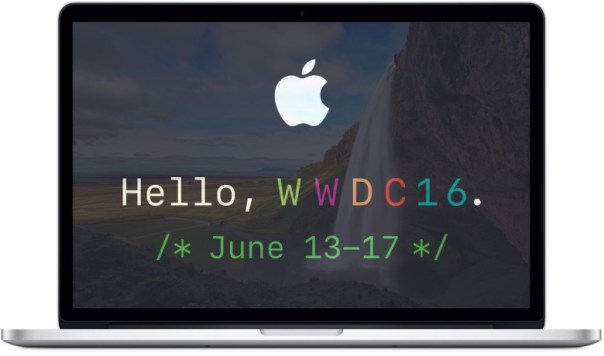
Apple has finally begun sending out invitation to its World Wide Developer Conference 2016 keynote, which is on June 13.

The event kicks off at 10 a.m. Pacific Time in the Bill Graham Auditorium in San Francisco.

I am looking forward to this keynote speech as it will offer glimpses into the changes and improvements expected with the next version of iOS, watchOS, tvOS and OS X.

Apple’s Keynote announcement are always slick presentations, and I expect this keynote will be just as good as previous ones.

Source – Cultofmac

The Next Tech Addicts Podcast is Live – with Gareth, Jay, Sam and I

wp-1460657590183.jpg

Tech Addicts Podcast is back again with new episode starring Gareth Myles, Jay Garrett, Sam Pullen and I. Tech Addicts is released every 2 weeks.

To listen to the latest episode subscribe by searching “Tech Addicts” within your favourite podcast app, iTunes or use the URL “mobiletechaddicts.libsyn.com/rss” to add directly.

Alternatively, just click listen via the embedded player below.

Have fun listening!

Pebble announces Pebble Core, Time 2 & Pebble 2 – My Views

1 peb

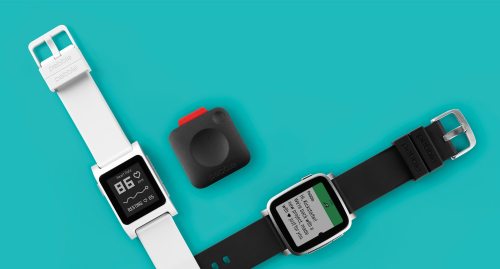
Pebble announced the Pebble 2 ($99), Time 2 ($129) and Pebble Core ($69). The Pebble 2 goes looks like the original Pebble but this time adds a heart rate monitor. The Time 2 has a colour display with 50% more display and a battery that lasts up to 10 days. The Time 2 is currently only available in steel.

New to the table is the Pebble Core. Pebble has a Pebble Core for Runners and a Pebble Core for Hackers. The running version clips to clothing, and allows you to leave your phone at home as it has a sim card. You can stream spotify for example. The hackers version is a keychain computer that acts as a magic button for any command. Pebble also said Amazon’s Alexa voice will be added soon.

So what do I think. On paper these are ugly looking watches, especially the Pebble 2. But they are cheap and offer a range of functionality at this price. Pebble also seems to have cult status. The Pebble Core could become something useful and a just $69 is like a new iPod Shuffle with a modem.

Cheekily, it launched a Kickstarter campaign for each device. The target was $1m. As of typing this post it has smashed $1m and stands just under $5m.

So no matter what I think, Pebble has a niche market, a niche product already funded by a Kickstarter.

More information at Pebble Kickstarter

Apple iPhone 6S – Camera comparisons with the Samsung S7 & LG G5

My wife and I were out yesterday in Widecombe in the Moor on Dartmoor. This is a beautiful place and if you happen to visit, make sure you pop into the Cafe on The Green for some tasty grub.

During our visit to Widecombe my wife took photos using her iPhone 6S and I was snapping away with my LG G5 and Samsung Galaxy S7. So whilst the photo viewpoints don’t always match, the conditions were identical, and this provided some great photos to compare. I also thought the photos taken were more realistic to a normal day trip, rather than trying to take photos in a prepared format.

Widecombe Village Green

First up is the shot from the iPhone 6S below. I actually prefer the iPhone 6S shot here. Look at all the clouds and sky. Slightly better exposed and more natural and realistic to the scene.

Widecombe Village Green #iPhone6S

Below is from the LG G5 using the wide lens. Dramatic as always from the wide angle.

Widecombe Village Green #LGG5wide

Below is the shot from the Samsung S7. Deep saturated colours. Some may prefer this screen look. Good contrast too.

Widecombe Village Green #SamsungS7

St Pancras Church Shots

First up a 3 shots from the iPhone 6S. These shots are the Church and graveyard are close calls in terms of accuracy to the scenes themselves.

St Pancras Church Tower - iphone6S

St Pancras Church views - iphone6S

Last Views #iPhone6S

Below 3 shots from the LG G5. Some really great snaps from the G5.

St Pancras Church Tower  #LGG5

St Pancras Church Courtyard #LGG5

Opposites Attract #SamsungS7

Below are 3 shots from the Samsung S7. Sharp and saturated. Still great looking photos.

St Pancras Church Tower #SamsungS7

Deathly Views #SamsungS7

St Pancras Church, Widecombe in the Moor #SamsungS7

So now the remainder of the shots are by myself using the LG G5 and Samsung S7.

Macro and Flower.

Below are the 2 shots from the LG G5. The G5 does a good job, but not as good as the S7. The wind was blowing slightly when taking these shots and the ones from the S7.

Red Flower #LGG5

Red Flower crop #LGG5

Below are the 2 shots from the S7. The S7 is the clear winner here. Stunning. Oodles of detail.

Red Flower crop #SamsungS7

Red Stunner #SamsungS7

The Church House

Below are 2 shots from the LG G5. One normal and the other wide. Too close to call between the 2 phones. Some areas the extra resolution means there is more detail to crop with the G5.

The Church House #LGG5

The Church House v2 #LGG5wide

Below is the shot from the S7. A very good shot but not as much detail as the G5, but excellent nonetheless.

The Church House #SamsungS7

Final shot from the LG G5, using the wide lens to capture the Cafe on the Green restaurant.

This is to highlight why the G5 is ideal for visiting places. The wide lens can capture the scene in a unique way.

Inside.

Inside the Cafe on The Green #LGG5wide

And outside.

The Cafe on The Green #LGG5wide

Overall all 3 phones did a great job. The iPhone is still a decent contender against the LG G5 and Samsung S7 in good lighting. The S7 did a better job with close and macro shots than the LG G5. And the LG G5 takes wonderful wide angle shots.

So what do you think? You can tap on each photo to view the full size version.

Apple Watch – Looking for a new strap in my local Apple Store

Yesterday, I happened to be in Exeter, Devon. Fortunately, Exeter has an Apple Store, and I always like have a peek inside.

Apple really know how to merchandise their products properly. It is always a pleasure to browse and admire the Apple hardware and accessories.

This time however, I was shopping for a new Apple Watch strap for my wife. Her strap needed replacing. A few months ago, I had bought a red leather third party strap. The good news is that at the time of purchase it looked rather nice, but the bad news is that its worn rather poorly and started to cause skin irritations on my wife’s wrist.

This time my wife wanted an official Apple Watch strap to avoid the pitfalls of the third party strap experience. Apparently, according to the sales person in Apple Exeter store there are a total of 52 different official Apple Watch strap combinations.

image

Two straps caught my wife’s attention. The royal blue woven nylon strap and the mint sport band. The woven nylon strap looks considerably better on the wrist than off. However, in the end the mint sport band was my wife’s favourite. Plus she liked the fact there was a matching mint Apple case for her iPhone 6S. Photo above of mint band.

Payment was via Apple Pay which when used for payment inside the Apple Store is not capped in transaction value.

Google I/O Keynote Speech – Highlights, Extras and My Thoughts

Google I/O opened yesterday with a 2 hour keynote speech. Lots of items got discussed but ultimately Google is moving towards a vision where the Google Cloud, Artificial Intelligence and Virtual Reality control your life.

Key Highlights

– Google Assistant – An ongoing two way assistant to help you with everything.

– Allo – New messaging app for Google Assistant baked right in and that learns more over time.This is a great person to person or group messaging app. You can preregister for this app too.

– Duo – A new video calling app, which works well even over low bandwidth. Again you can preregister for this app as well.

– Virtual Reality arrives on Android using the “Daydream” standard. This was big news as Daydream will include loads of new features to make VR a top notch experience. This means that phones running Daydream will have a built-in VR interface for navigation, VR versions of Google apps and the latency and performance will be managed by Daydream to provide a great VR experience across devices. Google is providing manufacturers with open source reference platforms for a new level of VR headset and one-handed motion controller

– Android N – The final version not only downloads in the background but it actually installs itself too, without the need for you to reboot your phone. More features on Android N were made available along with a new beta.

– Android TV – support for picture in picture, HDR, live recording and new apps and extra Google cast functionality in more TV’s and devices.

– Google Home – This is Google’s response to Amazon’s Echo. Acknowledgement was made at the great job Amazon had accomplished with Echo too. Google Home goes further becoming the digital controller for music, lights , devices and more. Plus its a speaker and can control other speakers, play video on your TV and much much more. Google Home is Google’s response to HomeKit and Siri as well.

– Android Wear 2.0 – A huge update, probably bring to catch up with the Apple Watch whilst adding some new features like a new material design, app launcher, keyboard with gestures and handwriting input, and watch complications.

– Android Auto – A new feature will be the fact you will be able to run the Android Auto interface natively on a phone or tablet and not rely on a dedicated smart computer or radio in your car.

– Chrome OS – Google Play Store and Android apps will be able to run on Chrome OS. The Android Instant Apps initiative could be a method used to help support Chrome OS even more.

– Android Instant Apps – this allows Google load and run specific parts of Android apps on devices without downloading and installing the whole app first. Apps are made in modules by developers for this to happen.

Ultimately I see this as the future where you will be able to log on to any piece of hardware and have your entire app, games, media, personal data streamed via the cloud as you need it. This will be supported by Google AI and VR.