All posts by Gavin Fabiani-Laymond

Unknown's avatar

About Gavin Fabiani-Laymond

President, CEO & Editor of https://gavinsgadgets.com Reviews & News of Technology

Atlas Cables – The new Atlas Cable Zeno review- Upgrade in Style

image

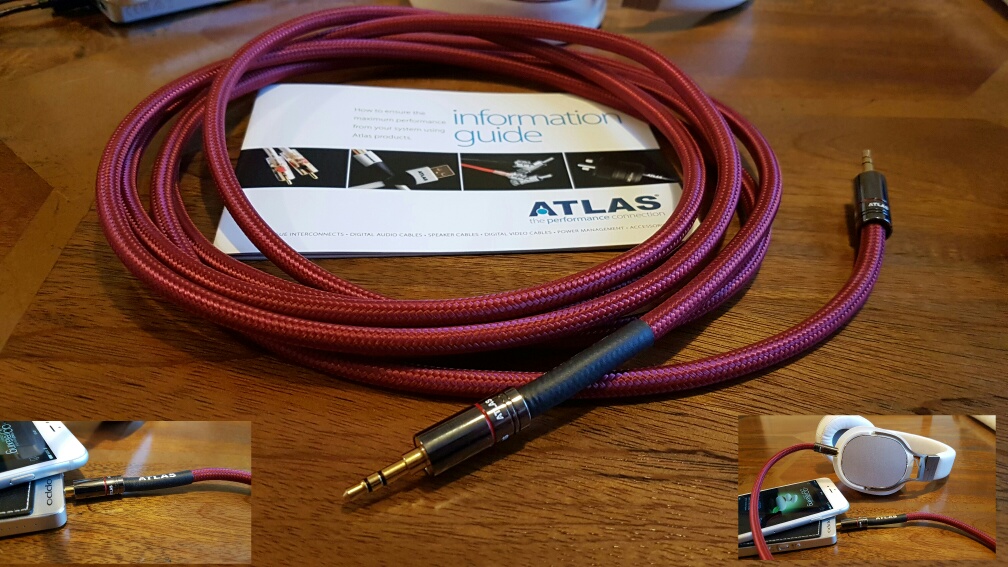
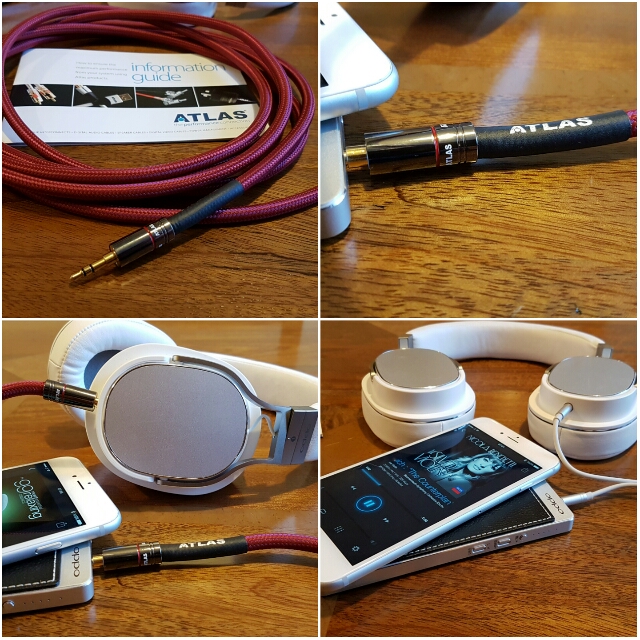
Atlas Cables are researched and designed in Scotland. Not only that, they are actually assembled by hand in Scotland. The new Zeno cable is assembled using ohno continuous cast copper conductors which are covered in fluorinated ethylene propylene low temperature deposition dielectric to protect the integrity of the ohno continuous copper material. This is then wrapped inside a protective soft PVC inner liner and finished with a tangle-free fabric outer jacket. Metik non-solder crimp plugs promises to provide signal consistency from socket to socket. If you look at the photos you can see how substantial the cable looks. 

Atlas Cables Zeno range is the new “high-performance” replacement headphone cable.  For my review, I decided to replace the standard headphone cable of the Oppo PM-3 headphones with Atlas Zeno. The cable comes in various lengths and different options are offered for the end terminations depending on what type of headphone connector you use for your specific headphones eg.  2.5mm, 3.5mm, 6.3mm and 4-pin XLR mini. I have a 3m length cable which costs £175. You can also get brand specific teminations eg  Sennheiser, OPPO, Sure, AKG, Audeze, AudioQuest, HiFiMan, Ultrasone and many more. 
image

Sound Quality

So the Atlas Zeno cable looks the business but does it sound the business?

Answer, yes it does. The difference is not night and day different and it also depends on the quality of the music file and amplification being used. I initially used my iPhone 6S Plus and Oppo HA-2. Then I tried several other amps/DAC combos as well as other phones including the Samsung Galaxy S7 Edge with the Oppo HA-2. 

My findings using it in a portable setup – the Atlas Zeno improved the sound stage and smoothed out the treble. Instruments became clearer. As I moved to FLAC recordings the before and after became more noticeable. A sort of veil lifted from the music. Moving to some dedicated audio equipment, and the Atlas Zeno became right at home. As a cable, it’s fairly bulky to be used on the move outdoors, but otherwise it’s ideal. At £175 for the 3m length this may seem expensive. However, if you are going to upgrade the loudspeaker cable there is no point doing it in half measures. 

Conclusion 

I beautifully built customisable cable which ensures you get the best possible sound delivery from your source to headphones. Recommended. 
Samsung Galaxy S7 Edge – My Review update

Just an update on the status of my review on the Samsung Galaxy S7 Edge. I had planned having this ready for Monday but Samsung have let me down. Their courier of choice doesn’t post at the weekends so the extra pieces I wanted to include with my review won’t arrive until Monday. 

So what are these extras? Well firstly the Samsung Gear S2 smartwatch and secondly the Samsung Level One Pro Bluetooth headphones. I also have the Gear VR which will form part of the overall review. 

You might ask why the Samsung Level One Pro headphones. Well these are enabled with Samsung’s Hi-Res Bluetooth codec which is better than APT-X. The Samsung Music app (just updated for the S7) includes an option for UHQ music upscaling. I do recommend using this setting at all times. The UHQ option is for wired headphones and any headphones that support the UHQ Bluetooth codec which include the Level One Pro headphones. 

I have already published many posts on the camera so the other aspects I wanted to explore fully is the sound quality. This is via the loudspeaker, headphone jack and USB Audio. I have already spent hours testing the headphone audio using loads of different types of headphones. I have also used several USB DAC Amps. And to complete the test I have also used several android music apps. So my last part was to see what difference using the Hi-Res Bluetooth codec makes to the audio nirvana.  

I have tested, owned and reviewed all the previous Samsung Gear smart watches. Just use the menu to find them. So I only thought it right to include the Gear S2 in my review of the Edge. And not forgetting the Gear VR. 

So my review is likely to take a slightly different angle to many other reviews and explain the Samsung Galaxy S7 Experience. Because that is what really matters nowawadays. 

The experience is what iOS iPhone users shout about. Well let’s see what Samsung can achieve! 

Stay tuned for a roller coaster of a journey !

Huge Easter Sale offers on Amazon? Shop & Help Gavin’s Gadgets at no extra cost to Yourself

If are buying anything on Amazon UK or Amazon US, head over using the respective links below. This helps contribute towards the running costs of Gavin’s Gadgets. It also costs you nothing extra while you shop.

Amazon are running special deals right now for Easter, so don’t forget to have a look at what is on offer. I missed a tasty deal on a pair of Sony MDR-1ABT headphones, normally £280-£299, but were on offer at £139! This was the lowest price ever.

Amazon UK – CLICK HERE

Amazon US – CLICK HERE

Thanks in advance.

HTC Vive VR – Details of Where to Test it in the UK

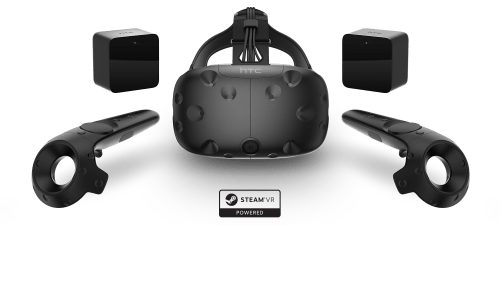
HTC have one of the best virtual reality headsets currently available costing £689. You will also need to make sure you have powerful hardware to drive the HTC Vive VR headset.

160212-Vive-VTwo-Family-Dynamic_no background

However, until you have experienced the world of virtual reality through one of these headsets, you have no idea what you are missing. Whilst the Samsung Gear VR is superb for £100, it is not a patch on the HTC Vive VR headset.

The good news is that you can now test drive the HTC Vive VR at select locations in the UK. These are –

– Overclockers UK, Newcastle-under-Lyme
– Currys PC World, Leeds (Birstall)
– Currys PC World, Reading
– Currys PC World, Tottenham Court Road
– Scan Computers International Ltd, Bolton

For more information on locations and the HTC Vive VR, head over to HTC’s Website.

Samsung Galaxy S7/Edge – How to change the DPI without root in less than 5 mins

Sometimes little tricks are hidden in plain sight.  This neat trick, courtesy of XDA Developers is superb as it changes the DPI of the Samsung Galaxy S7 and S7 Edge from 640 to 540 without any rooting or complex scripts.

What’s more once this has been completed it stays this way even through software updates and soft resets.

So this is the easy way without any complex code, rooting or using ADB –

– Download Nova Launcher, you do not have to set it as a default, just launch it to access the home screen.
– Go to the Widget Selection window by long pressing on the homescreen and selecting Widgets.
– Choose the “Activities” widget by holding it down and dropping it on a homescreen.
– After the list populates scroll down to “Settings” and then choose .DisplayScalingActivity (it should be the 4th one). It will create a new icon on your desktop.
– Select the icon to open the menu and make your selection from standard or condensed
– Reboot on the confirmation window and go back to your normal launcher after the reboot.

And that is it.

Source – XDA Developers

Samsung Galaxy S7 Edge – Shooting in RAW – Editorial

  
This is my final part of the S7 Edge camera review. In this part I will cover off using the Pro Mode and RAW images. 

The above shot is full auto with HDR activated. I then took the same shot in the Pro mode and extracted the RAW image into Adobe Lightroom on my Mac to see whether the RAW image could be improved. After a few quick edits and conversion to a jpeg I achieved the shot below. 

  
Is this better than full auto. Not sure to be honest. What do you think?

I then tried using 3 raw images with 3 different EV exposures. -2, 0 and +2. The aim to combine them in Lightroom using the HDR option. Sadly, Lightroom would not perform this merge as it produced an error message data not available in images to perform HDR merge. 

My next option was using another Mac app, Photomatix 5 HDR. For this I combined 3 raw images with different exposures. This was a non runner as the boat name running along the edge was not aligned. This was despite the S7 Edge being on a tripod. This was very disappointing as this app produces amazing images. 

So was the effort of shooting in raw worth it? No in my opinion. Just use a normal jpeg and edit in snapseed or similar and create this shot below. 

  
So at the moment I cannot see any benefit in using RAW with this Phone. 

On Monday, my full review of the S7 Edge will be live. This will include by audio findings and my view of the S7 Edge “experience”. 

Samsung Galaxy S7 Camera – Testing the dual pixel focus system at 70mph

Samsung claim the dual pixel focus system is super fast. In my tests this is certainly the case. So how does it do at 70mph. 

The below shots are shot behind a windscreen too. 

  
The new multi million pedestrian and cyclist bridge built over the M5 that cost far too much money and a bridge that isn’t used that often. 

  
The road sign is in relative focus. So a few shots at very high speed that seem to work well. I did take several more of the same sections and they all were similar in focus. 

 
The final shot was a typical sunny day. This is where the 12mp shows its weakness. A 16mp sensor from the Note 5 or similar would reveal more detail when cropped. 


Just as an update in case you missed the fix from yesterday, but predominately my S7 Edge camera was failed yesterday and wouldn’t take any photos until I discovered the solution. If you get this error message it should be because you have Smart Stay optioned enabled. This can be found in the main settings app, under Display, Smart Stay. Toggle this off for the time being until Samsung releases a fix for the conflict. If you turned Smart Stay off, and are still getting problems can you please get in touch.

Samsung Galaxy S7 Edge – Camera Shootout – All 7 Parts Plus My Final Verdict on the S7 Camera

Below are links to all 8 parts of my Samsung Galaxy S7 Edge camera review, comparison and shootout with the Apple iPhone 6S Plus.

Part 1 – Samsung S7 Edge vs Apple iPhone 6S Plus

Part 2 – Burst, Macro and Auto Mode Shots

Part 3 – Handling the Sun, Panoramic, Macro and Selective Focus

Part 4 – Random Camera Shots to Admire

Part 5 – Apple iPhone 6S Plus vs Samsung Galaxy S7 Edge – Night and Low Light using the best apps on each platform

Part 6 – More Random Shots from the S7 Edge Camera

Part 7 – Shooting and Fast Focusing at 70mph

Part 7a – Handheld Night Shots

Next week will be a post on RAW quality along with my ultimate review including the audio quality. Due to the issues with the camera failing, my final views will be postponed until next week. This will allow me time to examine raw quality too.

Update – Shooting in RAW