Over the weekend, I installed the alpha build from Xiaomi of MIUI v8. Despite being alpha and not a beta, this is a public version and so far has been stable with few bugs.
MIUI v8 brings some welcome improvements to the MI Max. Also installing this new version was as easy as heading off to the Mi Forums, downloading the update on my Mi Max and running the installer app. No data was lost during installation.
Anyway, enjoy my video below, detailing the some of the new features.
So it’s been nearly a week with the Microsoft Lumia 950 XL and I am starting to form some opinions of this phone. I also have the dock to review and test. Thanks to Steve Litchfield from @AA_WP for the loan.
The hardware is reasonably well specified but so is most other hardware nowadays. I have a red leather back cover, which looks very smart, but without this extra cost, the 950 XL is just too plastic.
The Windows Store for apps and games is dismal at best, but we all know that by now. So if the official app is not available you will be hunting for a decent third party option or not bother with an app, and use the web browser instead. You may be lucky and a universal app arrives though.
The highlight of the phone so far is the camera quality. I have taken some more photos.
The above photo is extremely accurate to the actual colours.
Again, very well balanced shot.
Vivid true to life colours with the shot above.
Difficult lighting but a great shot.
Unusual shot, but superb result.
The white flowers are handled well and again overall a good shot. Some of the above photos were also snapped with a Samsung Galaxy S7, so have a look at the other posts today.
Whilst the 950 XL takes marvellous photos, I am getting frustrated by the processing or saving messages while it either saves or post proceses the finishing touches. There should be an option to complete this task without slowing down the phone so you can’t take another photo until this has finished.
I am also experiencing the odd bug and this is again a nusiance.
It has been 24 hours since the Xiaomi Mi Max arrived. It is an absolute beast. Currently, I am running the Chinese rom as the official global rom is not available. This meant side loading Google Play Services which was a fairly simple affair once I used the correct apk installer. I have now installed around 100 apps/games from the Google Play Store.
One of the drawbacks of using the Chinese rom is despite selecting English in the language settings, Chinese text does appear in certain apps and menus. This hasn’t stop me setting up the FM Radio channels, the Mi Remote (infra red blaster) for my TV and a lot more. The loudspeaker is mono, goes fairly loud and sounds quite good. Headphone audio is excellent. My Sennheiser HD598se were powered with relative ease.
Battery life is wonderful. Full brightness. Everything on. And still loads of juice left at the end of the day. Every phone should have a 4,850mAh battery! Viewing media on the 6.44 inch screen is fantastic too.
So what about the camera? Well below are some samples I snapped yesterday. Click on each photo if you want to pixel peep at the original.
Whilst perfect conditions for taking photos. I felt the shots were good. Just look how vivid the colours are on the telephone box, yet the sky is the correct shade of blue.
Shot of my village centre.
Now this is my local church. HDR was off.
But with HDR on, the shot is vastly improved.
The Mi Max has tap to focus. So I tried focusing on the graveyard in the distance and it worked.
So now I focused on one of the bars. And it worked again. So far I have been impressed by the camera.
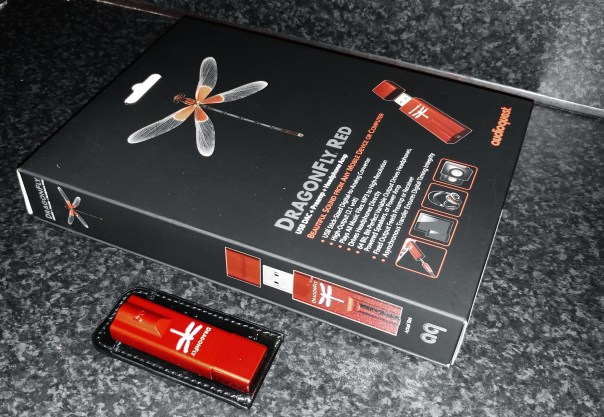
Welcome to my review of the Audioquest Dragonfly Red. The Dragonfly Red is a USB DAC, Preamp and Headphone amplifier all squeezed into the size of a USB memory stick.
The Key Specification
– USB Stick-Sized Digital-to-Analog Converter
– Plays all music files: MP3 to high-res
– Compatible with Apple and Windows PCs, as well as iOS and Android mobile devices (requires Apple Camera Adapter or Made for Android/OTG adaptor)
– Drives headphones directly
– Fixed output feeds preamp or AV receiver
– Asynchronous transfer ensures digital timing integrity
– High output (2.1 volts) drives almost all headphones, including power-hungry models
– 32-bit ESS 9016 DAC with minimum-phase filter
– Bit-perfect digital volume control
– Firmware upgradeable
The Sound Quality and Experience
For the purposes of this review I tested the Dragonfly Red using my iPad, Samsung Galaxy S7 and Macbook. Headphone used were Oppo PM-3, Dunu Titan 5, Sony XBA-1, Sennheiser HD598se and Audio Technica M50x.
All three source components had no issues functioning with the Dragonfly Red. To use with the iPad I needed to use the Apple Camera adapter and with the Samsung Galaxy S7 an OTG adapter. Samsung include an OTG adapter in the box which is handy.
Also worth noting on the S7, to get the best experience you must use an app called USB Audio Player Pro. If you listen to the S7 using other music services/apps they don’t connect to the digital direct drive volume so at max levels the volume may not be high enough. With UAPP the volume is immense.
When using portable devices or your smartphone, the Dragonfly Red does drain the battery of your device faster than normal. This is to be expected as its needs power from somewhere. However, unlike other portable DAC/Headphone amps that have an built in battery, it never goes flat or needs recharging.
I listened to a number of different genres – dance, classical, jazz, rock and blues. I found the Dragonfly Red provided oodles more power and control than using the source components own headphone jack. Also the layering and delicacy of the music was lovely at times. This was more noticeable with classical and jazz genres. The soundstage improved too with the DAC. Overall the music was clearer, more defined, better layered and provided a decent lift in quality.
Conclusion
A remarkable piece of kit from Audioquest. Top notch sound quality bundled in such a small package. Recommended.
For more information and the latest deals on Amazon UK, click HERE.
Welcome to my review of the Huawei P9. The Huawei P9 is Huawei’s flagship phone that for the first time is available from all UK networks. The P9 is by far the best Huawei / Honor phone I have used from the software, hardware and cameras.
The Key Specifications
– Screen 5.2-inch IPS LCD, 2.5D glass, 1920×1080 resolution (423ppi)
– Cameras – Dual 12MP (colour & monochrome), ƒ/2.2 lens, Leica certified
– 8MP front camera
-Battery – 3000mAh capacity Non-removable
– Processor Huawei Kirin 955 Quad-core 2.5GHz
– 3GB or 4GB RAM
– 32 or 64GB internal storage
– microSD slot
– Dimensions – 145mm x 70.9mm x 6.95mm
– Weight – 144g
Hardware and Design
If you buy a phone just based on looks then the Huawei P9 is a winner for you. It is beautifully made. The phone is only 6.95mm thick and still comes with a 3,000 mAh battery and the twin Leica branded rear lenses do not protrude.
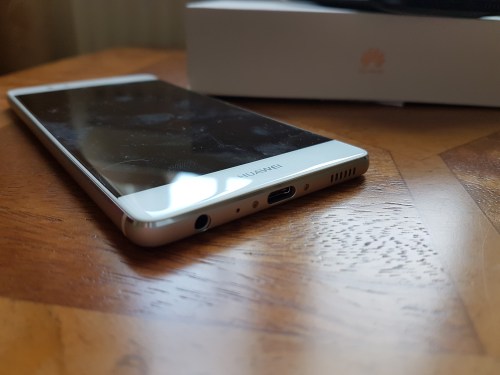
The phone has the fingerprint sensor on the rear along with the two lenses, two tone flash and laser auto focus. The right edge has the power and volume buttons. The bottom edge house the USB Type C connector, 3.5mm headphone jack, mic and loudspeaker. The left edge houses the nano sim card/micro SD card. I have the 3gb ram/32gb P9. The model number is EVA-L09. This specific version does have NFC. Some of the models sold in different countries have 4gb ram and sometimes don’t have NFC so it is worth checking before you buy. Any official UK model should have NFC which is important as android pay is about to go live.
Software and Phone Basics
Huawei still use EMUI, this time as version 4.1. I installed the Running theme which I felt looked the least offensive. You will either love or hate EMUI. EMUI like many other phones does not include an app drawer which really in my book doesn’t matter. If you want to change the launcher just install Google Now or Nova Launcher.
Some of the software features provided by the P9 include WiFi Direct, Data Traffic Management, NFC, Tethering, Link+ (WiFi+, Signal+, Roaming+, Link+), Normal or Easy Home layouts, Themes, Colour temperature display adjustments, LED notifications, Fingerprint gestures (show notification panel, browse photos, Floating dock (icon appears on screen so you can easily access back, home etc), motion controls (flip to mute, pick up to reduce volume, raise to ear to speak, knuckle screenshot, knuckle gestures used to draw a letter to open camera, designated app, music or weather), One handed UI (shift screen, mini keyboard), Voice control, smart cover options, smart headset control when using Huawei Music app, Gloves mode and Huawei ID. So the kitchen sink of options!
Call quality is excellent on the P9 as are most of the other cellular and connectivity options. This is a strong point for the P9. However, I did notice that if the WiFi signal was weak, it did not automatically reconnect unless you selected the WiFi network manually.
The 1080p panel offers decent viewing angles and is readable in the sun. Battery life is excellent on the P9. I always got to the end of the day with ease. The combination of the 1080p screen and a 3,000mAh battery really helps. The Kirin processor seems to play most games reasonable well. Occasionally there was some stuttering/lag.
Camera and Audio
This is where Huawei made all the focus during the P9 launch. On the rear you will find 2 lenses with LEICA branding. The lenses are not made by LEICA, merely endorsed by LEICA who helped co-engineer and worked with Huawei on the development and processing aspects.
What I initially discovered is the P9 for very fast action shots in burst mode was not fast enough. Future testing improved this slightly. However, I don’t think the shutter speed goes fast enough for very fast shots. However, the shot of George does actually look cool and you get a sense of his speed.
cof
The P9 colour reproduction is outstanding at times. It can produce such real life like images that are better than the S7 or G5. The menu is incredible.
mon
What you have with the rear lenses is one monochrome lens and the other a standard lens. The concept is that together more light and depth data can be gathered.
cof
The P9 has loads of camera modes but one of them is a refocus mode. After taking the above photo, you can tap anywhere on the shot to create a focus point and then adjust the f stop from f/16 to f/0.95. You can create and save as many different refocused images from one image too.
The Huawei camera app is one of the best available. Features includes, filters, 14 shooting modes (beauty, beauty video, light painting, watermark, monochrome, HDR, night shot, slow mo, photo, video, panorama, time-lapse, document, audio note), film modes (standard, vivid colours, smooth colours), camera grid options (grid, phi grid, fibonacci spiral left, fibonacci spiral right), Timer, audio control, touch to capture, smile capture, object tracking, ultra snapshot and image adjustments. The P9 also has a Pro mode which gives you options from focus points, ISO(50-3,200), Shutter speed (1/4000 to 30 seconds), EV, AF-S, AF-C and Manual Focus and AWB. The max photo resolution is 12mp. The max video resolution is 1080p at 60fps.
I have created a dedicated Flickr album for the P9 – Click HERE. Jonathan Morris has created an open Google Photos Gallery which has over 14 different people contributing photos from their P9 phones. Click HERE.
My opinion on the P9 camera is that with some care and skill it is possible to snap some great shots. The monochrome mode is superb and works well. Some of the special light painting modes are unique to the android phones e.g. silky water. In fact the light painting modes includes car light trails, light graffiti, silky water and star track. The P9 is the only flagship phone to offer such options. RAW capture is equally impressive. Video recording is just average and there is no 4K option. The lack of OIS will mean you will end up with a few blurred shots from time to time. The front facing camera is reasonable too with plenty of beauty options to knock 10 years off your age! A weakness of the P9 is low light shots with people or movement. However, static shots using the night, light painting, monochrome or Pro modes produce stunning photos.
The headphone quality is reasonable with Dolby DTS provided. The output is loud, but not of the highest audio quality available. Bluetooth is ok too. The loudspeaker is average but acceptable.
Conclusion
When you consider everything you get in this phone, it is quite remarkable. At an official retail price of £450 there are plenty of other options available that might be more appealing. But when you consider several places are now offering the P9 at less than £400, this becomes a more viable option. Even more appealing Vodafone is offering this at £300 on Pay as You Go and is unlockable after 30 days. At this price it becomes a great option and unique.
Huawei are soon to be selling the larger version of the P9, the P9 Plus. This is slightly improved as it has a 5.5 inch AMOLED screen, not IPS. It also has 4gb ram and 64gb rom, Infra Red Blaster, 3,400 mAh battery, stereo speakers and Press Touch screen technology.
For more information on the Huawei P9 and the latest pricing on Amazon UK click HERE.
Yesterday I published the very first photos from the HTC 10. Later on I took my 3 labradors out on Dartmoor and attempted to see what the HTC 10 could achieve. Don’t forget, click on each shot to see the full size.
Below is a shot of George shaking his head. The movement is frozen fairly well.
Next up is the 2 girls Fury and Tiggy. This was part of a burst, all of which were fine.
One more from the above burst, this time with just Tiggy.
Another shot below from a burst sequence. The HTC 10 choose a decent shutter speed for this. Again ALL of the burst shots were in focus.
The photo below of George smiling is part of the burst shot above.
The photo below is a 4:3 pic cropped to create a pano style of photo of Princetown.
The photo below is the from the same image as above, just cropped differently.
Now this is just a single shot, ie. burst mode wasn’t used. I did crop the 4:3 slightly to 16:9. What was interesting was watching how the HTC 10 took the shot. I actually focused in on George and then took the photo. This was all very fast but impressive.
Again cropped and not pin sharp, but look at Tiggy’s boots 🙂 She’s jumped into a muddy bog and went back in after this shot to be totally covered in thick smelly bog mud.
It is very early days with the HTC 10. But so far I am fairly pleased with the results. I also have the LG G5, Apple iPhone 6S, Samsung Galaxy S7 and Huawei P9. The crazy thing is all the phones offer something different to each other!
When it comes to fitness, Garmin was never the name that jumped up at me as the company to go and look at their product range.
I have owned around 13 different fitness / wearable devices and reviewed most of them too. Click HERE to read some of the previous reviews from Pebble, Samsung, Fitbit, LG, Xiaomi, Huawei, Acer and more.
And then I had some private conversations on Twitter with @paulgarner. Paul and I were chatting about fitness devices and he explained I should take a look at some of the Garmin devices as they were way better than any Apple Watch or Fitbit.
So last weekend, I visited Cotswolds Outdoors. They stock a large range of Garmin watches and fitness devices. Also quite handy was the sales person had excellent product knowledge of the different devices. One of the Garmin watches is called the Tactix Bravo. This watch includes live altitude tracking. This is handy when jumping out of a plane so you can check you altitude on the fly. Apparently the military use this model. It also looked amazing. However, I had decided if I was going to get a watch as opposed to a fitness device, it would have to be the new Fenix 3 HR or Forerunner 735XT.
However, I didn’t want to leap in at £350 – £500 in cost with the Fenix 3 HR or 735XT, so I opted for the new Garmin Vivoactive HR which retails for £209. It comes in 2 strap sizes – medium or X-Large. I needed the X-Large. The X-Large strap is perfect and after wearing the Vivoactive HR for 12 hours (6 hours in the evening, 6 hours sleeping) I am impressed at just how comfortable it is.
So what is special about the Garmin Vivoactive HR? Garmin state the following –
– GPS is integrated
– Its a smart watch with a sunlight-readable colour and touchscreen display – always on display
– Built-in-GPS sport apps, running, cycling, golf, swimming and activity tracking
– Elevate wrist based heart rate gives you heart rate all day and night – no additional strap required
– Receive smart notifications and smart coaching on your Vivo Active HR from Garmin Connect, when paired with your phone
– Syncs with Garmin Connect app to upload activities.
– Rechargeable battery: 8 days (watch/activity tracking mode) or 13 hours (GPS mode)
After some extensive research I also discovered that the Garmin Connect app is one of the best I have seen. It also integrates with MyFitnessPal. The level of detail and data collected is fantastic. I will cover more of this off in the review. Setting up is a breeze. This is done using the touchscreen display. There are also 2 hardware buttons as well. The setup uses Bluetooth Low Energy. After pairing, a firmware update was downloaded and installed. And then it stopped syncing with my LG G5. Grrrr. I thought I was going insane as nothing I was doing would get the device to sync. It turns up Garmin had planned maintenance on their servers for an hour yesterday. All seems ok now.
I had a brief look at the Garmin Store. Here there are several downloadable options from watch faces, apps, widgets and a few other items. I did install a few intelligent and customisable watch faces, but so far have now decided to stick with the traditional digital clock face.
I have turned on notifications and received a few whatsapp messages. These were displayed in full. I need to explore this option in more depth.
So what made me pick this over other brands? It works in the swimming pool. You certainly can’t take an Apple Watch or Samsung Gear S2 in the swimming pool, let alone get live activity and heart rate tracking. The display is highly readable in sunlight. Only needs recharging weekly. If I use the GPS function, this might mean charging every 4 days. If I don’t need the GPS, the battery life is 8 days with tracking and heart rate in operation 24 hours a day for 8 days. It tracks so many different activities too e.g. running, skiing, cycling and more. I had read it was comfortable to wear.
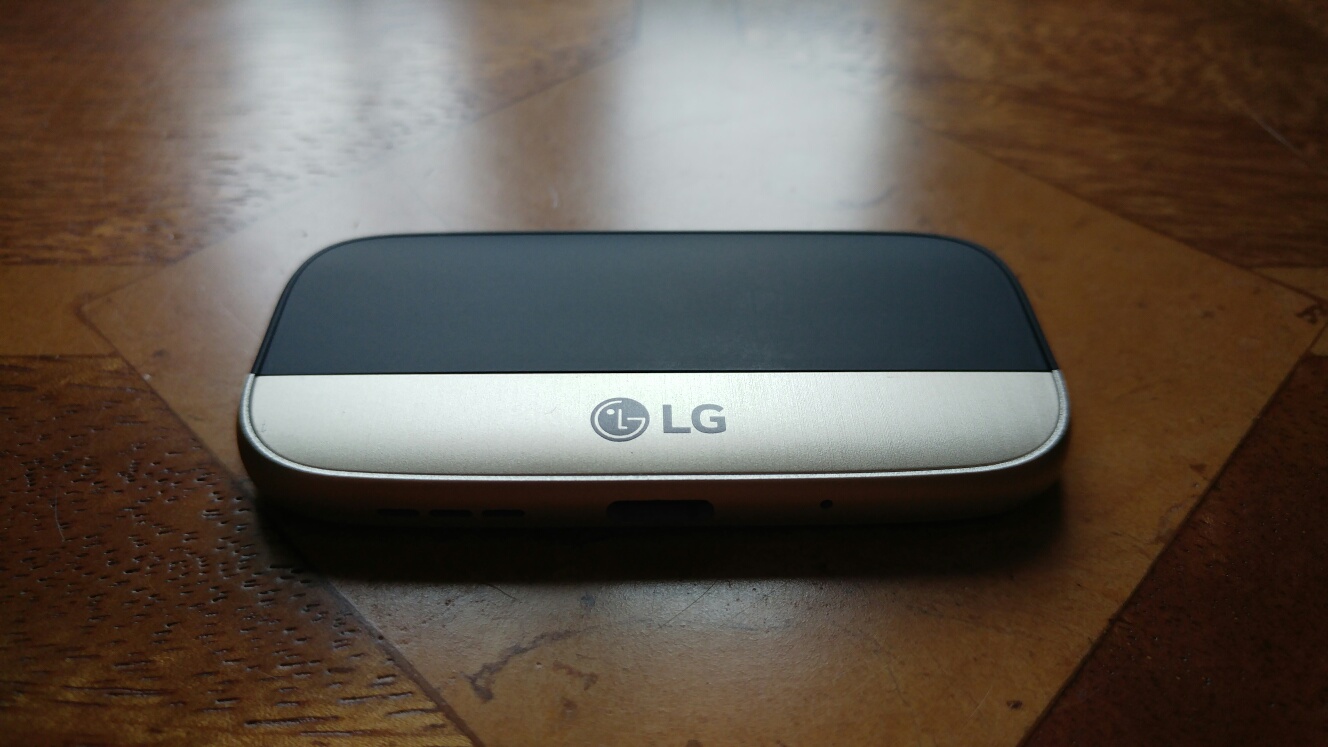
Welcome to my review of the LG HiFi Plus with B&O Play. This is one of the LG G5 Friend modules. The LG HiFi plus costs £149 and is available from Clove Technology.
Key Specifications
– USB 2.0 Type-C
– Voltage 5 V ± 10%
– Current Consumption 220 mA (with earphone jack), 3 mA (without earphone jack)
– Headphone Jack 3.5mm
– Audio 32bit HiFi DAC(Digital to Audio Converter) and Amplifier
– Sound Pressure 1 m sound pressure 60 dB ↑ (100%) *based on a full charge
– Antenna GSM/CDMA, WCDMA, LTE™
– Operating Temperature -20 °C – 40 °C
– Dimensions/Weight 73.9 mm x 43.9 mm x 7.4 mm / 23.6 g
– Compatibility – other Android OS, iOS, Mac OS and Windows OS devices
– Model number – AFD-1200
In the Box
In the box you get the LG HiFi plus with a protective cover, shown below connected to the original bottom section of my LG G5. You also get a leather looking slip case and a short sized 10cm USB Type C cable to micro USB to allow you to connect it to various other phones, computers, iPhones and such like. That’s right it can be used in standalone mode with android, iOS, Mac Os and Windows devices.
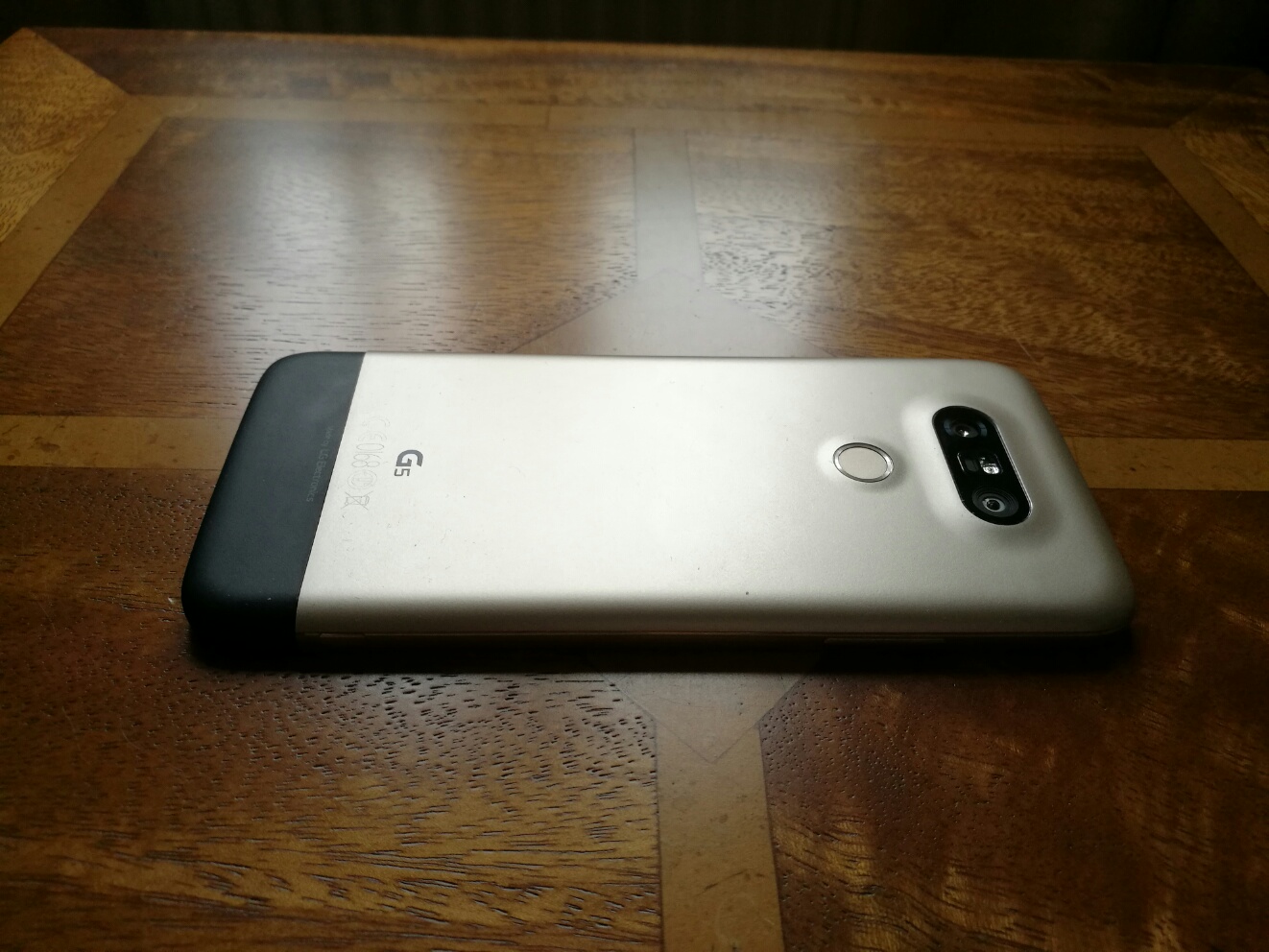
The pictures above show the module connected to my LG G5 which is gold in colour. The module adds about double the length of the original bottom section. The other aspect worth noting is that with this module connected, none of your cases will fit. However, I have ordered a silicone case on eBay that is made to fit with this module. When it arrives I will update this post regarding its quality and fit.
First Set-up Procedure
First connect the HiFi module to your G5. Power on. Head over to the LG Friends Manager app. Download the extra software as shown. Now when you connect headphones to the HiFi module, a message pops up on screen saying “HiFi Dac Starting up”. This takes a second. And that is it.
Now head over to the sounds and notification and you will see an extra menu has appeared as shown below.
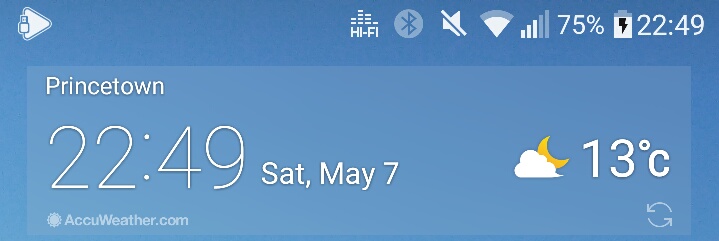
You also get a HiFi symbol in the status bar.
The neat part is the original bottom section of your G5 can be clipped into the cover of the HiFi Dac as shown below.
The module also contains all the cellular antennas and mic. I also noticed that the loudspeaker was louder too. So much so I wouldn’t bother with a Bluetooth speaker.
The Sound Quality
For this test I used the following headphones – Audio Technica m50x, Sennheiser HD598se, Dunu Titan 5, Sony XBA-1 and Oppo PM-3. A complete mix of headphones from open and closed back, planar magnetic, in ear dynamic and in ear balanced armature headphones.
I used a mixture of music genres from dance, pop, jazz, classical, opera and more. I streamed from Google Play Music and Amazon Prime Music. I listened to music on my micro SD card using USB Audio Player Pro app which instantly recognised the HiFi module as a USB DAC.
Quite simply, EVERY headphone played through the LG HiFi module sounded the BEST it ever had. Incredible and such a pleasure to re-experience all my music again.
I was asked how does the HiFi DAC compare to the APT-X HD codec with the other LG Friend, the LG Tone Platinum. Well the HiFI DAC sounds better although the LG Tone Platinum is still very good. To read my review of the LG Tone Platinum, click HERE.
But of course the HiFi DAC can be used standalone with anything practically and in my tests with my Macbook, iPad Air and other android phones it worked a treat too.
Using the LG HiFi DAC with the Samsung Galaxy S7
I downloaded the LG HiFi Manager app from the Google Play store. This app is only used to updated the firmware. You don’t need this app installed for the LG HiFi DAC to work. Anyway, connected to my Samsung Galaxy S7 the LG HiFi DAC sounded really good too. Streaming Google Play Music whilst the output volume was loud it was not as loud as that from the LG G5. Using USB Audio Player Pro app the output volume is considerably louder. Or as loud as you can manage! I also have the new Audioquest Dragonfly Red DAC. This suffers from really poor headphone volume when using apps like Google Play Music on the S7. USB Audio Player app works fine with the Red.
This does illustrate the LG have manufactured a great little DAC that works fantastically as a module for the LG G5 but also works just as well in its standalone mode.
Conclusion
This module makes the LG G5 an audio nirvana. It is staying permanently connected to my G5.Highly recommended. In stock and available from Clove Technology.
Yesterday I provided a few shots from the Huawei P9 camera. Today I have included a few more, this time using some of the more specialised modes from the P9 camera. For each photo, to view full size, click on it and select original or full size.
Below is a shot of my local church. This is taken as a base mark to compare the quality with all the other phones I have tested, as each phone always has to capture this landmark.
And now the same church but just using the monochrome lens.
The standout points from the church photos is the realistic translation of colours. Monochrome looks superb too. The level of detail is excellent. However, the monochrome version is too dark for my liking.
Shot of an exposed roots from a tree. Colour accuracy was excellent.
Below another example of colour versus using the monochrome lens.
In this example I don’t think the monochrome lens adds anything special to the shot.
Special mode – Silky water. Stunning ability to create silky water. I used a 1 min exposure for this one. But this was snapped using the special silky water mode, so no skill is required. Mount on a tripod and wait.
The P9 also allows you to refocus after the shot and below is an example.
And another refocus shot. Just look at the bokeh.
But I bet you’re wondering how the Huawei P9 compares to the LG G5 and Samsung Galaxy S7. Well that will be my next article amongst many others coming soon, along with new device reviews. So stay tuned.
But before we go, I could really do with your help. So should you need to buy anything on Amazon, head over by using the respective links below. This helps by contributing towards the running costs of Gavin’s Gadgets.
The best part is that it also costs you nothing extra!
So I have the Huawei P9 in the house and have started to test the camera. What I have seen so far is impressive whilst snapping photos.
The colour accuracy is excellent and the monochrome lens take some cracking photos. I will push the boundaries of this dual lens Leica branded setup and have some more posts. The church shot came out really well. This was plain auto mode.
Inside Domino’s Pizza and they have stools to sit while you wait for your food. This is taken using the monochrome lens.
cof
Above is the pizza menu to illustrate the colours snapped by the Huawei P9.














 Gavin's Gadgets & Photography