So it’s been nearly a week with the Microsoft Lumia 950 XL and I am starting to form some opinions of this phone. I also have the dock to review and test. Thanks to Steve Litchfield from @AA_WP for the loan.
The hardware is reasonably well specified but so is most other hardware nowadays. I have a red leather back cover, which looks very smart, but without this extra cost, the 950 XL is just too plastic.
The Windows Store for apps and games is dismal at best, but we all know that by now. So if the official app is not available you will be hunting for a decent third party option or not bother with an app, and use the web browser instead. You may be lucky and a universal app arrives though.
The highlight of the phone so far is the camera quality. I have taken some more photos.
The above photo is extremely accurate to the actual colours.
Again, very well balanced shot.
Vivid true to life colours with the shot above.
Difficult lighting but a great shot.
Unusual shot, but superb result.
The white flowers are handled well and again overall a good shot. Some of the above photos were also snapped with a Samsung Galaxy S7, so have a look at the other posts today.
Whilst the 950 XL takes marvellous photos, I am getting frustrated by the processing or saving messages while it either saves or post proceses the finishing touches. There should be an option to complete this task without slowing down the phone so you can’t take another photo until this has finished.
I am also experiencing the odd bug and this is again a nusiance.
I reviewed the Official Samsung Lens cover a few days ago. Click HERE to recap.
I was asked by OneTwelve in the comments to see how much zoom vs loss of quality could be achieved with the telephoto lens. And then try and see what the quality would be like from video frame grabs. If you aren’t aware, if you record a 4K video, you can extract 8mp photos. All the frame grabs were taken from the 4K Telephoto footage shown below.
So below is a photo without any lenses attached. This is to provide a perspective of the whole scene.
And now 4K video with no lens attached.
Attaching the telephoto lens and the clock tower is much closer now, but there is softness around the edge of the photo.
And below is 4K video with the telephoto lens attached. As mentioned above, I extracted 8mp photos from this 4K video.
Before I show some 4K frame grabs, lets see what the telephoto lens can do just snapping normal photos. First up a photo with digital zoom at 4 x zoom.
And now with 8 x zoom with the telephoto lens. Impressive really.
Ok, now to extracting frames from the 4K video with the telephoto lens. This is 2 x digital zoom.
Below is a 4K video frame grab, telephoto lens attached at 4 x digital zoom.
Below is 4K frame grab at 8 x digital zoom with telephoto lens attached. Now the quality has dropped and is not as good as just simply taking a photo rather than frame extract.
Finally just to show what the wide angle lens does. No zoom. Just a photo. Notice how much more of the scene is captured. Refer to the first photo for comparison. The S7 was in exactly the same spot when snapping this wide angle photo.
Overall the telephoto lens does a reasonable job. Photo quality is ok and video reasonable. There is softening on the edges but I am happy with this.
Yesterday I published my review of the Official Samsung Lens Cover for the Samsung Galaxy S7 and S7 Edge.
So today, I thought I would share a selection of shots taken with these lenses. Post processing was done using Snapseed or Camera360. With all the photos below, if you want to see the full size, just click on the photo and select original.
The cow was a long way off in the distance. So I used the telephoto lens and cropped the shot afterwards.
Below is a shot taken with the wide angle lens using the panoramic mode on the S7. I really like this shot. Probably best to view this one a large screen if you can.
Both photos below snapped using the wide angle lens.
The photo below is snapped with the telephoto. Brings the action much closer.
Finally a shot with the wide angle. Quite dramatic too.
Apple has finally begun sending out invitation to its World Wide Developer Conference 2016 keynote, which is on June 13.
The event kicks off at 10 a.m. Pacific Time in the Bill Graham Auditorium in San Francisco.
I am looking forward to this keynote speech as it will offer glimpses into the changes and improvements expected with the next version of iOS, watchOS, tvOS and OS X.
Apple’s Keynote announcement are always slick presentations, and I expect this keynote will be just as good as previous ones.
Asus announced the Asus Zenbo, a robot for the home. It will retail at $599 which according to the CEO of Asus is unbelievable value.
My wife watched the video below from Asus and simply said “Does it do the ironing? Does it go up stairs? So it suggests a recipe, but what if you havent got the ingredient? Does it get it for you? With all these questions, the answers are no it doesn’t.
But have a look at the video below and tell me does it do enough for YOU to want one?
Welcome to my review of the Samsung Protective Lens Cover for the Samsung Galaxy S7 and S7 Edge.
Below is a photo of the wide angle lens fitted to my S7.
And below is the photo showing the size of the telephoto lens.
The Samsung Protective Lens Cover is a beautiful accessory from Samsung. For starter the actual case without the lenses attached is wonderful. Great grip in the hand, solid protection and a raised back to aide with the grip when taking photos.
Each lens is made of glass and fitted to a metal body. For storage the lens fits inside a plastic barrel. Both barrels screw together. The packaging shows both barrels screwed together. Be careful, as the two barrels unscrew with ease.
Samsung stated in the instructions NFC doesn’t work with the case fitted. That is not true. I have used Android Pay with no issues. What won’t work is NFC with a lens fitted. Well surely that’s obvious!
I can also confirm Qi Wireless charging also works with the case fitted.
Image quality is excellent from these lenses. Sometimes there is a little softening at the edges, but who cares as overall these are best add on lenses I have used. The lenses screw on beautifully to the rear of the case too.
So let’s have a look at image quality.
Here is a shot of my local church without any lenses attached.
And now with the wide lens attached.
And now with the telephoto lens attached.
With all these photos, if you click on them you can view the original and pixel peep to your hearts content.
I even used the telephoto in burst mode.
The telephoto lens is prone to lens flare quite easily. This can be prevented by placing your other hand near the lens to block the offending light source. The telephoto lens brings the action closer and would be ideal for portraits too.
Below is a shot from my LG G5 wide angle lens as a comparison. This was not shot on the same day but does clearly illustrate the differences. The G5 wide angle has more fish eye effects.
I have taken over 60 photos with these lenses. You can view many more at my dedicated Flickr album. Click HERE. If you want to see wide angle shots from my LG G5, there are many located in my LG G5 Flickr album. Click HERE.
Conclusion
Probably one of the best accessories I have ever bought. If you like your photogrpahy and have a S7 or S7 Edge, the Lens Cover is a superb addition. The lens cover case has also been one of the key driving factors in my decision to keep the Samsung S7 and part with the LG G5.
More information and the latest deals on Amazon UK – Click HERE.
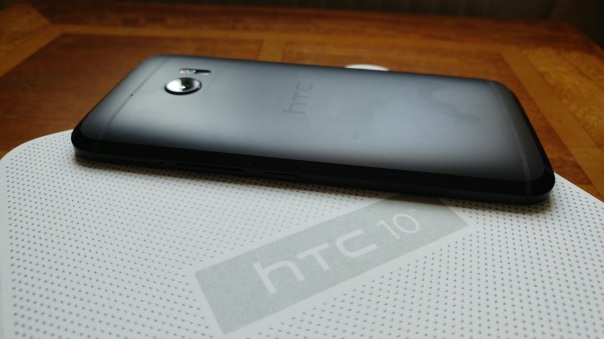
The HTC 10 is made from a solid piece of aluminium. Based on the crazy YouTube stress tests, the HTC 10 is also one of the strongest handsets available, as it survived loads of bend tests. ie. it doesnt bend. Like all aluminium phones it is slightly slippery although not as bad as other phones I could mention.
Call quality was excellent and the recipient to my calls had no issue hearing me clearly. I did notice on the cellular reception the odd occassion whereby the signal strength was one or two bars less and other times when the 4g signal was stronger than my other phone running on the same network.
I had no issues with WiFi, Bluetooth but I could not send via DLNA photos to my old Sony TV as some protocol was missing with the HTC 10. My Samsung S7 and LG G5 for example could easily send wirelessly any photo. Using a Chromecast was the solution in this case.
The screen is a high quality QHD panel. Visibility in bright sun was average. Viewing angles were good too. Battery life has varied from anything to 3 to 4.5 hours screen on time. I do run a demanding setup, location services always on high, 4 email accounds pushing email, a connected smartwatch, 2 twitter acounts, facebook, flickr, 120 apps and a lot more. You get the picture, everything is on NFC, WiFi, Bluetooth and push services and notifications everywhere.
With a Snapdragon 820 and 4gb of ram the HTC 10 flies. In addition HTC has worked hard to remove bloat and duplicated apps. There is a really great feeling of fludidity using the HTC 10. The fingerprint scanner has been perfect everytime. Not one missed reading!
HTC Sense UI has consequently been toned down with the HTC 10. You still have extensive theming options and now a Freestyle mode. This is where you place small images anywhere on the screen and associate an app with this. Looks arty, in practice is not as useful unless you only every want quick access to half a dozen apps. For some people, I can see this being popular, but its not for me at all.
Audio
This is why you bought the HTC 10. Even if you didn’t you are in for a treat. 24bit 192khz Hi-Res sound as standard. Hi-res mics as standard too. That means recorded audio is at FLAC standard. The Loudspeaker arrangement is a tweeted on the top front of the phone and the bass comes out the bottom edge to provide Hi-Fi quality sound. The quality is definitely there, but sometimes I missed the higher output volume of previous HTC Boomsound speakers. Listening to podcasts or playing games, that extra speaker fidelity became noticeable for the better.
The real magic is connected wired headphones. The HTC 10 has volume, superb audio quality and the voltage to really deliver magical sound to your headphones. I connected my Sennheiser HD598se, Oppo PM-3, Dunu Titan 5 and Sony XBA-1. They all sounded the best I have ever heard them from any smartphone! Whats more the incredible sound is produced for everything you listen to from YouTube, Tidal, Spotify and more. The HTC 10 also has scale with the music. So for example, if you are listening to a classical track and it suddenly explodes with drums, the HTC 10 amp explodes with it. The underlying audio leans to a slightly warmer side but in a good way. I really “love” the audio from the phone.
Camera
Normally this is where HTC phones have not been as good as their competitors, but now with the HTC 10 it is time to rejoice. The camera is really good. The rear camera has huge pixels at 1.55 microns. And Optical Image Stabilisation with laser autofocus. The front facing camera also has large pixels, OIS and autofocus. Not only that but the mics for recording are hi-res, so you get flac audio with your recordings. The HTC Camera app has been redesigned and at first it feels alien to use. However, after a short space of time, it became second nature. There is a Pro Mode (manual) which offers shutter speeds up to 2 seconds. Camera modes include auto, pro, panorama, hyperlapse, Zoe camera and time lapse. 4K video recording is available too.
The burst mode is effective as well. In terms of image quality, I really liked the output. The post processing isnt as heavy as say the Samsung S7 and consequently I preferred many of the photos of my dogs from the HTC 10 vs the S7. I do think the photos lean towards a warmer tone and in auto ,the low light shots ISO levels are far too high, althought the end result is acceptable. In Pro mode, night shots are much better as you can force the ISO at 100. Occassionally when focusing up close the HTC 10 would fall over. Other than that, its a camera you can rely on.
Camera Samples
The HTC 10 produced some brilliant shots. George has a wicked smile! Snapped in burst mode.
Sheep crossing the road. I love the atmosphere of this shot.
Accurate colours with this photo of the tree and landscape.
Panoramic shots worked well too. Superb sky.
The large pixels really helped with the night shot of my local church.
Video Review
To compliment the written review, I have also produced a video below.
Conclusion
The best smartphone from HTC in ages with excellent audio, a decent camera, slick UI all wrapped in a premium metal unibody design. Recommended.
Over the weekend I decided to use take the Microsoft Lumia 950 XL on a hike with my 3 labradors across Dartmoor.
I would learn how to use the camera as I walked through the rugged terrain of Dartmoor. If I am being honest, the camera app is really easy to use and most of these shots below were taken in auto. I did notice how readable the screen was in the bright sunlight. Actually, the lighting was particularly hazy so I was unsure how the shots would turn out. I also had my Samsung Galaxy S7 with me and after comparing shots from both phones, it was the Lumia 950 XL that took the better quality photos. Part of the magic is the Lumia’s Rich Capture Mode that performs some nifty post processing on each photo shot. This does mean the odd saving message, especially when using burst mode.
Anyway, below are some of the shots snapped from the weekend.
I really like this one of George. He was runninig really quickly and sort of cornering at the same time.
The overall balance and colours of this photo are absolutely spot on.
Another high speed shot and beautifully balanced with accurate colours.
Merrivale stones captured in all its glory. Perfect true to life shot again.
The shade and sun along with the clouds are captured brilliantly.
And finally a shot of my local church.
The Microsoft Lumia 950 XL impressed me with the image quality over the weekend. Also, I have been viewing photos that other people have snapped using RAW which looked mighty amazing. So now, I will attempt to see if I can get close to some of their masterpieces and hope to bring you some of my handy work in a future post.
If you have any questions on the Microsoft Lumia 950 XL please let me know.
Welcome to my review of the Piper NV Smart Security Alarm with HD Camera. The Piper NV system costs £229.
I have now had the Piper NV for over one month before writing this review to try and see how it performs over this period.
Key Specifications
The Piper NV is a device that lets you manage and connect with your home. For starters the camera is a 180 degree HD affair. You can set the device up to capture video and send it to your phone when doors are opened and more. Notifications are customisable. You can add home automation accessories to Piper to control lights and appliances remotely, with no monthly fees or contracts. The HD camera is excellent quality and I could see everything with ease.
Setting up the Piper was as easy as downloading the app, create an account, run the setup and connecting via wiFi. There are customisable security modes: home, away and vacation. The Piper NV includes motion, sound detection, a high quality microphone and a super loud 105db siren.
With the camera you have options to pan, tilt, zoom and split screen while watching live or recorded video with pan, tilt and zoom capabilities. You can even split your screen into four independent viewing zones. On top of all that there is two-way audio.
What makes Piper NV more useful is support for Z-Wave home automation accessories. I linked up some Z-wave window and door sensors into the app and system. You can connect up to 5 Pipers.
So apart from Z-wave support the Piper NV system also support IFTTT integration. Using IFTTT I was able to get the Piper to automatically arm or disarm according to three factors:
1. Geolocation – e.g. if I was on my way home, then Piper could disarm
2. Time – e.g. at a certain time it could disarm or arm.
3. Connection to Wi-Fi – e.g. if I left home with my smartphone the Piper would arm itself
But auto arm and disarm isn’t the only IFTTT recipe. The options are only as limited as your skill with IFTTT.
During the month, the app got updated. This provide the app with a fresh new theme and provided a more streamlined experience due to –
· More intuitive layout with three tabs – Dashboard, Events and Rules
· Security modes have been simplified to ‘Armed Away’, ‘Armed Stay’ and ‘Disarmed’
· Piper View – view a live feed of all Pipers that you have linked
· Panic Slider – trigger the blaring siren directly from the dashboard
· Wireless accessory drawer – quickly see the status of every wireless accessory you have connected
· Faster app start-up
· Enhanced setup experience
If the power goes, the device does have battery back up. Also Piper offers cloud storage for up to 100 snippets of recorded events at no additional charge. That’s really cool.
One aspect which would impact the service would be if Piper NV servers were out of action. This would be the same for most other systems too.
Because I live on Dartmoor which is rural and has low internet speeds, I did notice a time delay of 10 seconds from sending an audio message to the message being pumped out of the Piper NV. A faster internet connection will improve this situation.
Final Thoughts
Overall this is a versatile security system and without any monthly charges. Recommended.
More information and the latest deals on Amazon UK – Click HERE.







 Gavin's Gadgets & Photography