Category Archives: Wearables

Good news for FitBit vs Jawbone – details

Fitbit scored a victory in a trade dispute against Jawbone this morning.

The judge ruled that some of the Jawbone patents at the heart of the dispute were invalid. Jawbone had been seeking to block Fitbit from importing its products into the U.S. based on the patent claims, but after today’s ruling, that looks less likely.

The fitness and health market is a big market and one where more battles are sure to be fought over time.

Source

Three UK launches “dial” – a smartwearable from will.i.am – full specs

image

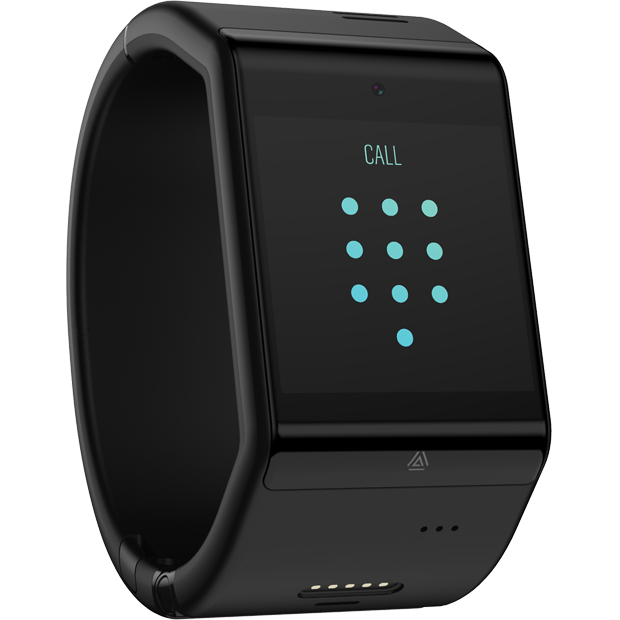
Three UK have launched “dial” produced by will.i.am.

This is dial, a voice-enabled smartcuff design from i.am+ the fashionology, tech company founded by musician and entrepreneur will.i.am. Available exclusively on Three UK.

To buy this you will need a plan with prices starting at £22 per month with a £49 upfront fee, or £25 per month with a one-off, £19 payment. That’s right it needs a SIM card.

The dial is operated by voice. It allows free music streaming too. It comes in black or white with 32gb storage. Other features include People, Calendar, Time,  Maps, Health tracking, texts, calls and email. It has a 2mp camera for taking photos. Its powered by an operating system called AneedA.

Hopefully other apps will be available soon.

A contract for a wearable device? Not sure how this will sell.

MODE watch bands for Android Wear

Finally, Google has launched MODE watch bands to make changing and customising your Android Wear watch without any effort. The concept with the Google method is that the strap pin stays on the watch. The strap has a quick release mechanism.

Such a simple idea and one that couldn’t come soon enough!

Watch the video below for more info or head over to Google.

Samsung Gear S2 and S2 Classic – review

image

Welcome to my review of the Gear S2 and the Gear S2 Classic. The watches are virtually identical apart from the fact the Gear S2 Classic (on right) uses a standard 20mm leather watch strap and has a fancier rotating front bezel. The other aspect of these smart watches is that they work on all android phones from android 4.4 upwards and soon on iOS.

The Key Specifications

– IP68
– 250 mAh battery
– RAM 512mb, 4gb rom with 1.9gb storage free
– Bluetooth 4.1, NFC, WiFi
– Sensors – Acc, Gyro, Heart Rate Monitor, Barometer, Ambient Light
– OS Tizen
– Exynos 3250
– Gear S2 – 42.3 x 49.8 x 11.4 mm
– Gear S2 Classic – 39.9 x 43.6 x 11.4 mm
– Wireless Charging Dock included

image

On the side you have a back button and an apps button. The mode of operation is simple. Either touch the screen and/or rotate the circular bezel. So by gently turning the bezel you can scroll through long emails, zoom in on a map or skip a track during playback. The large watch bezel is so easy to rotate too. The Gear S2 is my favourite smart watch to date. In terms of ease of use it is way ahead of the Apple Watch. I also prefer it to Android Wear. Android Wear does not have a single watch that correctly uses the heart rate monitor for fitness. Now some of you are shouting the Gear S2 doesn’t have any third party app developer support. Maybe so, but neither does it matter. Running apps on a watch is crazy. The heavy processing should be done on your phone. The Apple Watch has very few third party apps worth talking about and being honest they only send data back to the phone app. Also Apple Watch apps are slow to use. So what matters is what the watch does out of the box, not what it might do next year. Next year there will be an advancement in tech, so more will be possible. I can state the Gear S2 does exactly what it says on the tin. Unlike previous Gear watches, the Gear S2 works with all android phones that have android 4.4 and above. iOS support is due later this year.

So using S Health you can stay fit and focused, get heart rate readings and more. The S Health app on the phone is extremely extensive. However, it is worth noting there is no way to export the health data outside of S Health.

The Gear S2 has a decent range of watch faces plus you can buy in the Galaxy Gear app store more apps and watch faces. The watch faces are customisable along with watch complications. You also have watch widgets which again are selectable. The included watch faces in my opinion are extensive enough.

image

So by swiping the screen to the right or rotating the round bezel, shows your notifications. You can reply to messages using voice, emojis or type a reply with the on screen keyboard which uses T9 for speed. Swiping or rotating the bezel in the other direction you get access to a selection of widgets. You can add or remove the widgets to your liking. The included apps on the Gear S2 are messages, email, phone, timer, stopwatch, S Health, Settings, Schedule, Alarm, S Voice, Nike Running, Music Player (300 songs limit, you connect bluetooth headphones to the Gear S2), Bloomberg, CNN, Gallery, Find My Phone, Maps, Voice Memo and World Clock. Via the Gear S2 phone app you can re-arrange the layout of the apps. The Gear S2 concept works on apps around the edge which you can select by tapping the icon or rotating the bezel. To go to the next page of apps you can either swipe left or right, or select next page.

S Health links into the the Samsung S Health app. The S Health app on the Gear S2 can track your activity from running, walking, cycling, hiking, elliptical training, exercise bike, step machine and treadmill. The Gear S2 can read your heart rate every hour, or every 10 mins or not at all. You can also use the S Health watch up to track water and caffeine intake. However, the Gear S2 does not have built in GPS. It uses the GPS connection from your phone.

In terms of third party apps, the Gear app store includes apps from Fit Evolution,Uber, Line, KLM, eBay, Golf Navi, ESPN, WSJ, Live Soccer, Watchmaster. Samsung have extra apps you can install including Calculator, Find My Car and News Briefing. There are also a number of watch faces. But the app store is not that extensive.

image

With the Gear S2 Classic you can fit standard 20mm watch straps. I got a brown crocodile leather strap for £7 from Amazon. I think it makes a massive difference to the look and smartness of the Gear S2 Classic. I have provided all the links to the Amazon straps at the end of the article.

image

With the standard Gear S2 you have to buy Samsung straps. Samsung have a range of designer straps by Mendini. I got this one below which costs around £30.

image

Conclusion

Personally, I really like the Gear S2. It does exactly what is says on the tin and no more. Is this watch for you? It all depends on what you want your smart watch to do!

Amazon UK Links

iStrap 20mm Replacement Brown Crocodile Leather strap

Official Samsung Mendini Sports Strap

Samsung Gear S2 and S2 Classic Smart Watch

Amazon US Links

Click Here to Buy via Amazon USA
Pebble feels the pressure from competition

“Pebble head Eric Migicovsky has confirmed that the group will be saying goodbye to around a quarter of its workforce due to financial challenges.

Speaking to Tech Insider about the move, Migicovsky said that Pebble has managed to raise around $26 million over the last eight months, adding that the group has done well from private investors.

Despite Pebble’s seemingly high numbers, the company head has emphasized how important being careful with product planning has proven recently. Even though money is coming in, Pebble has had to let go of 40 employees.”

Not a good day for Pebble. I do wonder if they have the market collateral to compete against Apple, Samsung, Jawbone, Fitbit and others.

More at Talk Android.

HTC Vive VR – Details of Where to Test it in the UK

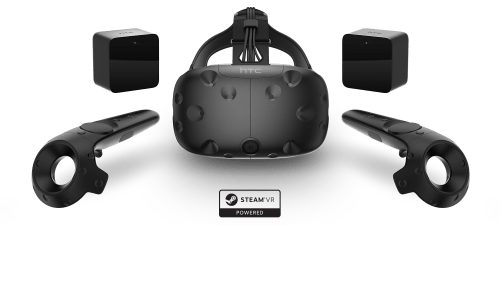
HTC have one of the best virtual reality headsets currently available costing £689. You will also need to make sure you have powerful hardware to drive the HTC Vive VR headset.

160212-Vive-VTwo-Family-Dynamic_no background

However, until you have experienced the world of virtual reality through one of these headsets, you have no idea what you are missing. Whilst the Samsung Gear VR is superb for £100, it is not a patch on the HTC Vive VR headset.

The good news is that you can now test drive the HTC Vive VR at select locations in the UK. These are –

– Overclockers UK, Newcastle-under-Lyme
– Currys PC World, Leeds (Birstall)
– Currys PC World, Reading
– Currys PC World, Tottenham Court Road
– Scan Computers International Ltd, Bolton

For more information on locations and the HTC Vive VR, head over to HTC’s Website.

HTC’s revenue is dropped again – So its shares rose 10%

So HTC’s revenue dropped again to a mere $129 million, thats over 50% lower than revenues for February 2015.

And yet their share price rose 10%. Is the stock market bonkers?

Well actually HTC’s shares rose on the news that its partnership and new fitness products with Urban Armor sold well and the new HTC Vive VR headset was off to a strong start.

From the leaked rumours of the new HTC 10, I cannot see this flagship saving the day, so it is quite likely we will see HTC shift its future more towards the wearables/fitness sector and Virtual Reality later on. Virtual Reality is still several years off from becoming the norm, despite its coolness.

So do you think there is a future with HTC in the next 12 months?

All Latest Reviews from Gavin’s Gadgets – Phones, Headphones, Apps, Cameras and More

Below are all latest reviews that have published on Gavin’s Gadgets. There are plenty more reviews in the pipeline including the Samsung Galaxy S7, LG G5, new headphones, app reviews, Netatmo Welcome, Netatmo Wind Sensor, and much much more.

If you have a product that you would like me to review, please get in touch.

App Reviews

ProCamera + HDR for iOS – review

Note Tapper for Apple Watch – review

HeartWatch for iOS – review

HeartWatch 2 for iOS – review

Audio / Personal HiFi / Headphone reviews

Pioneer XDP-100R – DAP – review

iBasso DX80 plus using with Chord Mojo – review

Chord Mojo – review

Lindy BNX-60 – Bluetooth Headphones review

Ted Baker Rockall Headphones – review

Sony MDR-1RNC – Noise Cancelling headphones – review

Tascam Trackpad US 2×2 – Review

Connected / Security devices- Reviews

Fake TV – review

miGuard A105 DIY Security System review

The new Apple TV – review

The Apple Watch – One Month Review

Smartphone / iPad Pro – reviews

Asus Zenfone Zoom – review

LG V10 H960 – review

Sony Xperia Z5 Compact – review

Apple iPad Pro, Smart Keyboard, Pencil – review

Motorola Moto X Style – review

Huawei G8 – review

Heartwatch 2 for iOS – My favourite Apple Watch just got a massive update – mini review 

It was only about a week ago and I reviewed Heartwatch for iOS. Click HERE to recap on the mini review. 

CoverShot

And just like that along comes Heartwatch 2 for iOS and what a huge update it is. 

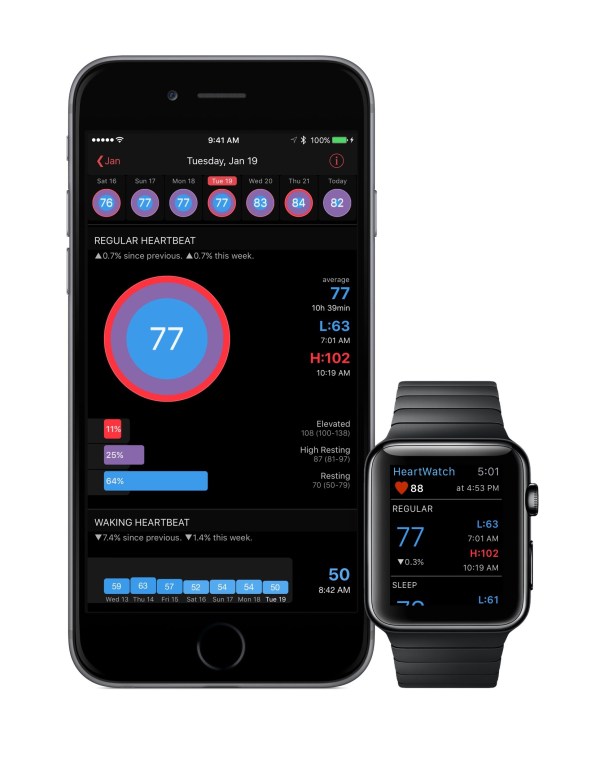
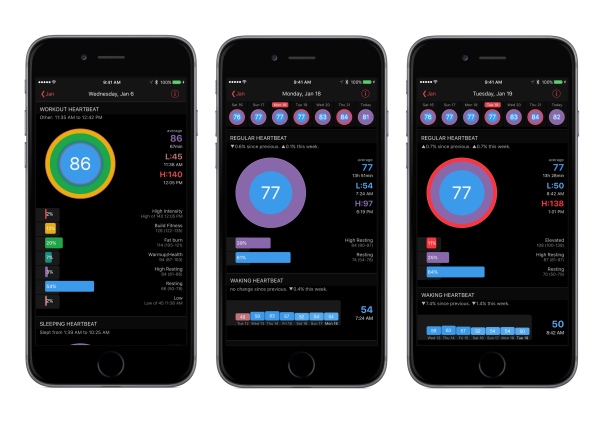
HeartWatch 2 introduces heart badges. These are a simple glanceable graphic that lets you quickly see how your heart is doing for different types of events. The colours represent time in zones overlayed with an average.

For regular heart rate readings, the ideal is to have a completely blue badge. The bigger the red ring around the badge, the more time spent with an elevated heart rate. Even though averages can appear to be similar, the badge shows a clear picture of how your heart has really been tracking and alerts you about excessively high or low readings.

PhoneBadges

For workouts, you can easily see the zonal makeup of your workout at a glance.

If you own an Apple Watch there is now an intelligent complication. When your iPhone detects a new high heart rate, it displays it on your Watch face. This links in to the fast Watch app. No spinning cursor. No waiting. Press the complication and an instant background update has you seeing your latest heart rate and a summary of your day.

You can also capture key HealthKit measurements just by saying them, take notes about your day and track sleep. Even take your waking pulse.

The watch app changes how it looks when you are working out to help you stay in your training zone. Just start your workout as usual using your favourite app. Your readings are big & colour keyed by zone. Red is intense, yellow is fitness, green is fat burning, aqua is health etc. You’ll never see “Measuring…” again.

Whether you are looking for heart rate irregularities or checking on your workout progress, HeartWatch makes things very easy via a 12 week big picture.

If you aren’t too concerned about sleep cycles and phases, and just want an idea of how you slept, HeartWatch analyses restless vs basal energy captured by the Watch whilst asleep and shows your “battery charge” for last night and the trailing week. It even overlays this over your heart rate readings for easy cross reference.

Then of course there are all the features from version 1 along with notifications. This app really adds a lot of value if you own an Apple Watch.

To read more about Heartwatch 2 for iOS head over to the Apple App Store.

Control your lights using your Apple Watch – How to – Editorial

Back in January 2015, I reviewed the Belkin WeMo Smart Light Bulbs starter kit. If you never read this review, I really think its worth a read. Click HERE.

As a quick refresh Belkin advertise the features of the WeMo Smart Light Bulbs as

– WeMo LED Lighting Starter Set includes 2 x WeMo Smart LED Light Bulbs (B22) and 1 x WeMo Link
– Connect up to 50 WeMo Smart LED Light Bulbs and control them individually or as a group.
– The set works with the entire family of WeMo products.
– Modular system. You can add additional WeMo LED Light Bulbs easily, any time
– Turn lights on, off, dim or create custom schedules.
– Simply plug WeMo Link into a central outlet in your home, replace your old light bulb with a WeMo LED bulb, and download the free WeMo app to any smartphone or tablet
– WeMo keeps you connected to your home lighting anywhere you are over Wi-Fi, 3G, or 4G networks
– Bright, warm light similar to a 60W incandescent bulb. WeMo Smart LED Bulbs have a 23 year life expectancy

Well, I have had these WeMo bulbs in my lounge now for over a year. They are as superb as they day I got them. In fact, they have got better since there have been many firmware updates to help improve their reliability. At some point in time, Belkin has stated it will be supporting Apple’s HomeKit which will mean Siri integration. At the moment this is not possible so you have to use the official WeMo app to control the lights. However, this app does not have an Apple Watch application.

So how do you control the lights from your Apple Watch. Simply download 2 apps. IFTTT and Do Button by IFTTT. You then set up IFTTT and then Do Button by IFTTT. So download and install IFTTT app, and go and connect WeMo lighting as a channel in IFTTT. IFTTT gets permission from WeMo via the WeMo app. It is all a very simple process and you get clear on screen instructions from the respective apps. The whole process takes a minute or less. Then using the Do Button app create quick one button commands. In my case, I have grouped the 2 lights in the lounge, so I have 4 quick button commands. Turn lighting group on, turn lighting group off, dim to 10% and dim to 50%.

The Do Button app for IFTTT appears on your Apple Watch. You now can open its app, or have it as a Glance. Just press the big green button for the first 3 options you setup in Do Button for IFTTT. The Apple Watch app only displays your top 3 Do commands.

It really is super cool to dim your lights from your Apple Watch. When Belkin support HomeKit you will be able to ask Siri , “dim lights etc…”. At the moment only Philips Hue lights support HomeKit and Siri.

IFTTT is a very powerful application that links so many services and apps. I use it for a number of other connected devices and services. For example, when my Netatmo Weather station detects rain more than 0.1mm, it sends a tweet to the Princetown Weather Station Twitter feed, that rain has been detected.

IFTTT is a free app and cross platform so go give a try and see what more you can do with the current apps and services on your phone!

More information of the Belkin WeMo range – click HERE.