Category Archives: Reviews

Gmail vs Samsung Email app

I decided to try both email apps on my Note 4 to see which one I preferred. It didn’t take long to decide to deactivate the Gmail app. But why?

There’s this rumour that stock android and it’s apps are the best way to go. Well in some circumstances that is the case. Google recently added the option to add non Google email accounts within its Gmail app and this works as advertised.  The pros of using the Gmail app is email can be deleted in the notification area and with an android wear watch and your Gmail email gets sorted into different folders eg. social, primary,  promotions and updates. But that’s as far as the pros go.

So now let’s see why you will be using Samsung’s email app.

1) Signatures – these can have active links, editable with a number of styles, fonts and with the Note 4 you can use the S-Pen to add your signature.

2) Email layout – simple inbox style with choice of standard or conversation views making managing email easier especially if you get lots. Combined inbox for all your emails. You also get a priority inbox which shows only priority contacts email regardless of which email account they used.

3) Email sync options are more advanced with much Samsung’s email app offering more sync timing options. The Gmail app only has a max sync time of 1 hour. Samsung email has every 4 hours and once a day and for each email account you can setup a different peak time sync schedule, even selecting which days of the week thst are to be used.

4) In Gmail not all url’s are show as a tapable link. Samsung’s email app doesn’t have this issue.

5) New emails have a word formatting option. See screen shot.
image

6) If you use a Samsung smart watch like the Gear S which has an email app of its own, the wearable uses the Samsung email app data/settings from the phone.

Overall the Samsung email app provides a more consistent, comprehensive and complete experience and in turn highlights the weaknesses of Google’s own Gmail app. However, if you only have one Gmail email account then the Gmail app maybe all your ever need.

27 Smartphones Reviewed – Latest Samsung, Apple, HTC, Sony, Motorola, Nokia and more

Below are all my reviews covering 27 Smartphones.

Tablets

Samsung Galaxy NotePro 12.2 – 9 Part Review

Apple Phones

Apple iPhone 6 Plus – 24 Part Review

BlackBerry Phones

BlackBerry Passport 10 Part Mammoth review

Android Phones

Samsung Note Edge – 14 Part Review

Samsung Note 4 – 17 Part Review

LG G3 review – 31 Part Review

Samsung Galaxy K Zoom – 26 Part Review

Samsung Galaxy S5 – 17 Part Review

HTC One M8 – 11 Part review

Sony Xperia Z1 Compact review

Samsung Note 3 review

LG G Flex

Sony Z Ultra views and Camera Samples

Motorola Moto X review

Motorola Moto G review

Sony Xperia Z1 Review

Huawei Ascend P6 Review

HTC One

Samsung Galaxy S4 Zoom Review

Sony Xperia Z Tablet

Samsung Note 2 review

Windows Phone

Nokia Lumia 1520 review

Nokia Lumia 820 review

Nokia Lumia 1020 review

Nokia Lumia 925 review

Nokia Lumia 620

Other

ZTE Open Review – Firefox OS

Reviews Galore – Wearables, Weather Stations, Balls, Headphones, Cases, Gloves and More

Below are reviews on a range of accessories.  If you want to read some smartphone reviews click here.

Clothing

Touchscreen Gloves Review

Camera Lenses

Shoulderpod S1 smartphone rig review

Sony QX10 and QX100 – 13 Part master review

Olloclip 3 in 1 Lens review for iPhone 5

Glif+ for iPhone 5 review

Wearables

LG G Watch R – review

Samsung Gear S – 9 Part Review

LG G Watch – review – android wear

Samsung Gear Neo Impressions

Samsung Gear Fit review

Samsung Gear review

Pebble Smartwatch review

App Enabled Accessories

Mipow Playbulb review

Imperihome Pro review

Netatmo Urban Weather station – 5 Part review

Moga Ace, Moga Pro and Moga Pro Power Game Controller Reviews

Sphero Ball review

Brando Shopping Gala NFC Ring review

Headphones, Speakers and Amps/DACS

Philips Fidelio M1BT Headphone review

AKG K845 Bluetooth Headphone review

Sony SBH80 Bluetooth headphones review

Sony XBA-H1 Headphone Review

Logitech UE Headphones – 3 part Master review

Audio Technica ATH-AD900x Headphone review

Fiio E12 – master review

Cables, Power and Connectors

Samsung Wireless Charging Pad

Brando Shopping Momax Universal Power Plus Battery Charging Kit review

Brando Shopping Portable Power Supply review

Brando Shopping OTG Desktop Connection Kit for Samsung Galaxy S4, Note 2 and Note 3 review

Brando Shopping Short Lightning Cable review

Bluetooth iPad Mini case review

Cellz Ultra Thin Slide Out Bluetooth Keyboard for iPhone 5/5S review

Cellz Power Battery case iPhone 5/5S review

Screen Protection

Brando Shopping Screen Protection review

Cellz Tempered Glass for iPhone 5/5S

Cases

Brando Shopping iPhone Armband case review

Brando Shopping iPhone 5/5S Leather Back Case review

Brando Shopping iPhone 5 / 5S Aluminism Bumper review

Brando Shopping Momax Smart Coat Case for Note 3 review

Trident iPhone 5 case review

Cellz Leather Flip case review

Cellz Premium Metal Bumper for iPhone 5/5S review

Misc

Cellz Non Slip Mat review

USB Fridge Review

USB Rollup Drum Kit

Fight – Samsung Note Edge vs Samsung Note 4

image

If you listened to my latest podcast “Gav & Dave’s Tech Podcast Xmas 2014 Special available here you would have heard my final review thoughts on the Note Edge and it’s crowning as the best phone overall for 2014. And without a doubt it really is something special.

But I constantly get asked is it really that much better than the Note 4 and the extra premium it carries. Well, in this comparison below which based on my current experiences of both phones I am going to tell you why you would buy the Note 4 over the Edge and vice versa.

So let the fight commence –

Round 1 – Battery – my Note 4 usage got me 25 hours and 6 hours screen on time. Really acceptable for myself as a power gladiator. The Edge failed me badly with 10-11 hours usage and 3 hours screen on time. Sometimes it got 12 hours and 3.5 hours screen on time. My wife suggested getting a spare battery. But that would mean charging the phone and a spare battery every day. This is imo the single biggest reason to buy a Note 4 over the Edge.

Round 2 – Design – The Note Edge kills the Note 4 in this department. Side by side the Edge so wins this one . Like beauty and the beast.

Round 3 – Software – nearly identical but the Edge has that panel with software controls and it really does make a difference in usability and operation. Edge wins here marginally.

Round 4 – In Hand comfort and grip. Note 4 wins simply because 2 identical sides are easier to hold and the Edge doesn’t really work for people who hold their phone in their left hand, despite the Edge’s left handed mode. However, I never found the Edge uncomfortable to hold.

Round 5 – after market accessories. The unusual shape of the Edge and less sales volumes will reduce the number of accessories available. Heck,  even Samsung’s Gear VR only works with the Note 4. Third party cases are nicer and more extravagant with the Note 4. I have a lovely leather bespoke case from Noreve for my Note 4 arriving soon. There are cases for the Edge , I have 2 official flip Samsung cases for it. Both are for sale for £20 btw but the extra features of this case add to the lower battery life. IMO the Note 4 wins this one.

Round 6 – Development – tricky one as the Edge is newer so less third party developers and development at present. But less doesn’t mean worse and some of the options could get very exciting. But the Note 4 is still ahead in this department.

Conclusion – Despite all the above rounds the Note Edge is a winner so long as you can accept the lower battery life. If you can’t then go for the bland but extremely functional and capable Note 4. Either way both of these phones are astonishing once you have taken the time to set them up properly.

Update – I will be honest with you I couldn’t accept or cope with the lower battery screen on time and standby so went back to a Note 4 on Xmas Eve. But I so miss the Edge’s style and design. Really in a league of its own. If Samsung in future firmware updates substanitally improve the battery life times with the Note Edge I would buy it again in a flash.

WOW 24 Smartphone Camera Shootout – Featuring Samsung Note Edge, Note 4, iPhone 6 Plus, HTC, Sony, Motorola, Nokia, BlackBerry and many more

Not sure about which phone or brand takes the best photos, then have a look at this super sized collection of photos from all the best and latest smartphones and some budget phones as a comparison.

Samsung Note Edge – https://www.flickr.com/photos/gavinfabl100/sets/72157647404207644/

Samsung Note 4 – https://www.flickr.com/photos/gavinfabl100/sets/72157648796796660/

Apple iPhone 6 Plus – https://www.flickr.com/photos/gavinfabl100/sets/72157647679181549/

BlackBerry Passport – https://www.flickr.com/photos/gavinfabl100/sets/72157648520943848/

LG G3 – https://www.flickr.com/photos/gavinfabl100/sets/72157645618979801/

Samsung Galaxy K Zoom – https://www.flickr.com/photos/gavinfabl100/sets/72157644532639249/

HTC One M8 – https://www.flickr.com/photos/gavinfabl100/sets/72157643265004874/

HTC One M7 – https://www.flickr.com/photos/gavinfabl100/sets/72157644039700054/

Samsung S5 – https://www.flickr.com/photos/gavinfabl100/sets/72157643875623354/

Samsung Note 3 – https://www.flickr.com/photos/gavinfabl100/sets/72157644034132513/

LG G Flex – https://www.flickr.com/photos/gavinfabl100/sets/72157644114354349/

Samsung S4 Zoom – https://www.flickr.com/photos/gavinfabl100/sets/72157644039495565/

Apple iPhone 5S – https://www.flickr.com/photos/gavinfabl100/sets/72157644035336913/

LG Nexus 4 – https://www.flickr.com/photos/gavinfabl100/sets/72157644039660933/

Sony Z1 Compact Z1 – https://www.flickr.com/photos/gavinfabl100/sets/72157644028694521/

Sony Xperia Z1 – https://www.flickr.com/photos/gavinfabl100/sets/72157644039246935/

Sony Z Ultra – https://www.flickr.com/photos/gavinfabl100/sets/72157644083052095/

Sony QX100 – https://www.flickr.com/photos/gavinfabl100/sets/72157644035811453/

Sony QX10 – https://www.flickr.com/photos/gavinfabl100/sets/72157644035335185/

Huawei Ascend P6 – https://www.flickr.com/photos/gavinfabl100/sets/72157644028833151/

Nokia Lumia 1520 – https://www.flickr.com/photos/gavinfabl100/sets/72157644035105534/

Nokia Lumia 1020 – https://www.flickr.com/photos/gavinfabl100/sets/72157644035516523/

Nokia Lumia 925 – https://www.flickr.com/photos/gavinfabl100/sets/72157634991010769/

Nokia Lumia 620 – https://www.flickr.com/photos/gavinfabl100/sets/72157644083348093/

To see the sets in one indexed page click here – https://www.flickr.com/photos/gavinfabl100/sets/

So which phone is your winner?

The Ultimate Setup – using SideSync between Samsung Note 4 and Galaxy Tab S

image

Currently,  I chilling on the sofa with 2 of my labradors keeping me company, while my other labrador has stretched out on the other sofa.

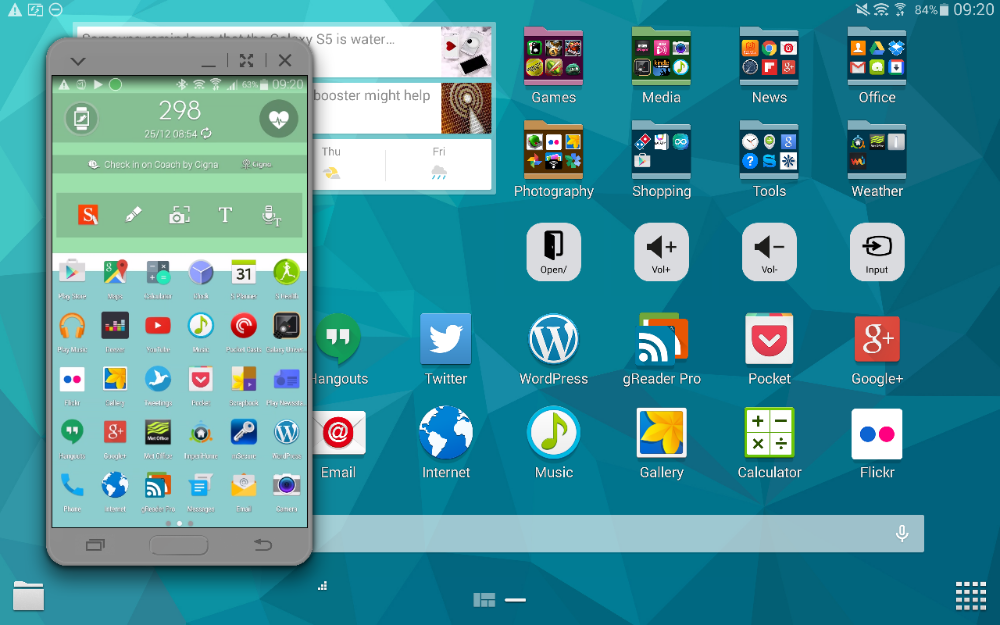
I have my Samsung Note 4 somewhere nearby (not sure exactly where) but by using Samsung’s SideSync app and multitasking I can operate my Note 4 completely.  I’ve sent messages using 5 different messaging apps from my Note 4 but using the Tab S.

Above you can see the phone overlayed but you can minimise as required to a little circle which sits on top of whatever app your using.  You can bring it back instantly.  You’re also notified on the Tab S of any notifications and more. You can control the Note 4 totally seeing exactly what you are doing too.

I also transferred some photos between the devices instantly.

Rather neat.

Samsung Note Edge – 14 Part Review

image

Below are all the posts written on the Samsung Note Edge.

Samsung Note Edge – Impressions after 4 hours

Samsung Note Edge – Night Clock mode

Samsung Note Edge – Impressions after half a day

Samsung Note Edge vs Note 4 – photo comparisons of their screens

Samsung Note Edge – camera samples

Samsung Note Edge – first battery figures

Samsung Note Edge – my home screens and edge panels

Samsung Note Edge – benchmarks and more

Samsung Note Edge – part 3 and battery stats

Samsung Note Edge – how to buy one from Samsung at £665

Samsung Note Edge – from dusk to darkness camera shots

CNN adds support for Edge Panel – details

Samsung Note Edge selective focus and general update incl battery

For the final part, I recorded my views in my Xmas Special podcast, “Gav & Dave’s Tech Podcast”.

Gav & Dave’s Tech Podcast – Xmas Special with final Samsung Note Edge views

Bon Voyage to my Samsung NotePro 12.2

I have written a fair amount about the Samsung Galaxy NotePro 12.2. This is Samsung’s largest tablet with a 12.2 inch screen along with the S-Pen stylus. And what a spec beast it is too, with more options than the kitchen sink.

Link to 12 part review of the Samsung NotePro 12.2 – https://gavinsgadgets.com/2014/12/17/samsung-notepro-12-2-master-9-part-review/

This tablet cost £650 new. Recently the price was slashed with the NotePro available a few months ago for under £400, a saving of £250. Samsung now are selling the tablet for £350. So you get a lot of tablet now for your money.

I decided in a moment of madness, that it would be nice to try a different tablet. So I used the PSCForum to place an advert and waited to see if there was any interest. And boom, within a few hours it was sold and paid for.

So what next I wondered? In the end I noticed a few good deals on the Samsung Tab S tablets. More on my first thoughts on the Tab S in the next post for today.