Category Archives: Reviews

Sony Xperia Z2 – more second thoughts

I’ve had the Sony Xperia Z2 for nearly 4 days, thanks to Clove Technology.

In this time, I’ve reacquainted myself with the Z2 after my initial time with it at release. I’ve also owned the Z1 and Z1 Compact, and without a doubt I think the Z2 is the best yet from Sony mainly due to the best screen that doesn’t feature the pre applied Sony screen protector. Also the profile size and comfort in the hand has been tweaked rather well.

So how has the Z2 performed during the time I’ve had it so far. Rather admirably to be honest. The loudspeakers are reasonable so if you did want to listen to a podcast the stereo speakers are acceptable. The screen is fine too although sunlight was a struggle to see anything on the screen. The headphone sound output was stunning. Sony really excel here with their sound quality. Sony also feature events. So for example when you plug in headphones, or connect to a Bluetooth device or plug the charger in, you can configure it to then carry out another action.

There is also a selection of Sony software from tools, media, and even aTV remote. In addition if if you have other Sony devices like a TV or Playstation then the Z2 becomes even more useful as the devices work well together in an Eco system.

The Z2 is slab like with a more pronounced rectangle shape. This means it’s not the most comfortable phone to hold, but it is one of the better looking designs so long as you like larger bezels on the front of your phone. But then the larger bezels also help provide the IP68 waterproof rating. Also, as the phone has a dedicated two stage hardware camera button, you can take photos and film video underwater.

Talking about the camera, this is by far the best incarnation of the 20.7mp sensor Sony has achieved. The shots are good, with some fun camera modes and some more serious options for photographers. Moving targets were easy to capture. Auto mode was super fast. There is an option to start the camera using the hardware camera button and take a photo immediately. On some situations the photos possessed too much noise and processing artefacts. Low light shots on still objects were okay.

I was trying to think how I would rank this against the HTC One M8 and Samsung Galaxy S5. For me personally, the S5 is the best option but even though all these phones run google android they couldn’t be more different in the user experience. So ultimately, it depends on what YOU want and what matters most to YOU.

My thanks again to Clove Technology. For all your smartphone needs head over to them. Click here..
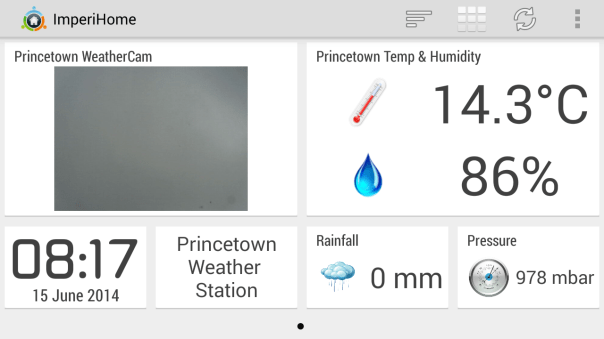
Imperihome App for Android

Screenshot_2014-06-15-08-17-57

I have recently been trying a number of apps to integrate my weather station, located in Princetown, with my other internet connected devices. I encountered several technical issues, but these have been resolved by using a fantastic app called Imperihome, currently available only on android. Link to Google Play Store – https://play.google.com/store/apps/details?id=com.imperihome.lite . For once iOS users are currently left out but I believe there will be an iOS version by year end. Imperihome provide a free (lite) version for you to try out but it won’t be long before you will be looking to buy the pro version for a few pounds or dollars.

As you can see from screen shot above, I have created a dedicated dashboard, customised it to my liking for the purpose of showing information from selected sections of my connected home. For the purpose of the above dashboard, this includes parts of my Netatmo Weather station and IP Camera. The IP Camera is used to view the sky and take a snapshot at the time I request the information. This updates as required. I have also customised the text labels and layout.

If you jump to my dedicated weather page here https://gavinsgadgets.wordpress.com/weather/ you will see graphs produced by Imperihome providing further information on the actual weather recorded. An example is as below –
wpid-screenshot_2014-06-15-06-46-48.png

But back to Imperihome. For sharing my weather information, I have created a dedicated page (dashboard) with Imperihome. However, if you head over to Imperihome’s website http://www.imperihome.com/ you will see you can connect so much more and create additional dashboards or a list view with many connected devices including Netatmo, an MJPegIP Camera, Eco Devices, Koubachi, Vera, Zibase, Zipabox, eedomus, IPX800 v3, Lightmanager. You can even integrate Imperihome with Tasker app. Imperihome also comes with tablet enabled views and the customisation is endless.

So what do all the above systems mean this app can control – Switches, Sensors, Dimmers, Shutters,IP cameras,Thermostats,Locks and Scenes. Basically you can control you whole house. There is more. Options for –
-Voice recognition
-NFC Tags actions
-Support for Samsung’s multi-window
-Shortcuts to launch scenes, start voice recognition, and watch camera from Android launcher
-Sony Smartwatch 2 integration
-Tablet optimized landscape layout that matches the “wall mounted tablet” use case
-Different layouts fully customizable
-Place holders for smart widgets
-Automatic wake-up using camera move detection

I have to say, I have downloaded and bought many apps in my time. I would estimate in the region of 2,000 apps/games in the last 10 years, but by far the most useful and intelligent app is Imperihome. If you head over to their website, you will see screenshots for many other applications, from plant maintenance, home security, home automation and so much more.

Imperihome is highly recommended.

Gav & Dave’s Tech Podcast is live – Episode 17 Mid Year Special – Please RT

As you know, I co-host a weekly podcast with David from UKMobileTech called Gav & Dave’s Tech Podcast. It is a light hearted tech podcast broadcast bi-weekly. To subscribe click here for iTunes or copy and paste this link into your favourite podcast app.

Episode 17, our mid year special, is now live for your listening pleasure.

Sony Xperia Z2 – second impressions – part 2

As I said yesterday, I have a Sony Xperia Z2 courtesy of the Clove Technology – http://www.clove.co.uk. The latest firmware got installed 2 days ago, and I have been out and about snapping a few photos. These are the full resolution to give you an idea what it is capable of shooting in good light. All the below where in auto mode.

20140614_082626

This was inside a department store.
DSC_0032

DSC_0039

DSC_0040

And now the below shot is using manual at 20mp. Notice much better clarity.

DSC_0041

All these photos took less than a second to take. The quality is not too bad at all. It is not the best but the Z2 does seem to be able to take a shot regardless of the conditions and also has a number of fun camera modes.

So what do you think of these shots?

Sony Xperia Z2 – Second Impressions

I have a Sony Xperia Z2 courtesy of the Clove Technology – http://www.clove.co.uk.

I wanted to give the Z2 another shot since I used it close to first release, and since then it has had several firmware updates. I also knew that a new one was just about to hit, firmware 17.1.1.A.0.438 which got installed late last night.

So my second views of the phone so far is that it feels a lot smoother moving from apps and more refined. Despite its large bezels, which don’t really matter, it is one of the few phones that in the hand look premium. The large flap for charging via traditional micro usb is an annoying, but it is one of the few phones with an IP68 rating, which makes it waterproof. However, I do have a magnetic usb charging cable that attaches to the side of the phone, which means no opening any flaps.

The screen is so much better than previous phones, but in bright sunlight I was struggling to see the content.

I am going to see how the camera fairs since the last firmware. Before applying the update, photos are super quick to capture, photographing kids and dogs is a total breeze. In fact in less than a few minutes I had 60 shots of my dogs in motion, all excellent.

I tried a few other shots, the fake bokeh effects, and the crazy burst mode. The burst mode takes in about a second, 30 photos before you press the shutter and 30 photos after you have pressed the shutter.

What I have noticed with the photos I took prior to the firmware update last night, is that the photos look great on the phone screen, even looked ok projected on to my TV screen, but zoom in and you see a lot of noise and artefacts in the pixels. But then, you have that shot of the dog leaping in the air. So I suppose it depends what is important to you – pixel quality or capturing that magic moment.

As I said, I will bring you more updates over the coming week.

And thanks again to Clove Technology – http://www.clove.co.uk – for all your smartphone needs.

Samsung Galaxy K Zoom – review – update in the heat / full res photo samples

Just a warning – this post might take a little longer to display the photos as they are the full res. Click on them to reveal full resolution.

I was in Bristol yesterday and it was 25 degrees with intense sunlight and consequently the K Zoom got hot in my pocket. It also discharged the battery considerably quicker and whilst in my shirt pocket which meant that from 8am to 5pm the battery dropped to 25%. Bear in mind I only took 20 photos, and for the rest of the day was in a training course, only looking at the phone screen a few times during the day. Clearly heat impacts the battery!

Below are 4 photos taken yesterday. I would like your views on them please, good or bad or indifferent.

20140613_091627_Richtone(HDR)

20140613_091634_Richtone(HDR)

20140613_134142

20140613_154144_Richtone(HDR)

Samsung Galaxy K Zoom – Pre Order Fiasco

20140612-190538-68738883.jpg

I received an email from Samsung with an offer to pre order the Galaxy K Zoom and get a free case worth £20.

So I clicked on the link in the email and ordered the phone. I’ve had the phone nearly two weeks and no free case has arrived. I have called several times to Samsung customer support. Whilst the staff are friendly and even the supervisors and being honest with the situation, the fact remains I still don’t have a free case.

So what has happened. Well Samsung’s ordering system failed to acknowledge the free case in the order. According to Samsung, it is a right mess as there are no cases to give to customers. And no cases apparently got sent to any customers who pre ordered.

Well, actually that’s not true as I know of one person who did get the free case. I explained to Samsung that I knew of one person who did get the free case. They were speechless. An even bigger mess although at least they have admitted there is a problem. But on the whole 66 customers who pre ordered the phone don’t have their free cases.

So Samsung offered me a £20 estore voucher. I declined as most items are overpriced on the store anyway. I said how about a free spare battery or £20 refunded in to my bank. They are considering both these options. Personally, a free spare battery would be most useful and probably save Samsung’s face from further embarrassment.

In the meantime, I know that Samsung are trying to source cases. So if you are reading this and can produce a £20 case for the K Zoom, let me know and I will put you in touch with Samsung HQ.

Samsung Galaxy K Zoom – review part 8 – stutter time

All had been going well with the Samsung Galaxy K Zoom apart from some day 1 teething problems.

Well I had the pleasure the other day of taking the train from Exeter to London Paddington and then commuting across the sauna of the London Underground. In fact the train to London was too hot as well.

Anyway, I decided to listen to a few podcasts, and then play a few songs. My music is stored on the memory card. I was using the default Samsung music player. After about 20 minutes the track started stuttering. I was surprised by this behaviour so forwarded to the next track and then the next. Same problem.

The stuttering was only cured by performing a soft reset.

The battery life for the duration of my day trip to London held up really well. How by 11.39 PM and down to 34%.

Don’t call Samsung support if you have the Galaxy K Zoom

The Samsung Galaxy K Zoom really is a niche device.

How niche?

Well twice I’ve phoned Samsung support and on the first call not only did they not know or even have heard of the phone, it wasn’t even listed in their computer so they had to call me back.

And that was even after I gave them the model number as well.

The second call was the same affair.

Now if you ring Samsung and have a S5 there is a dedicated extension!

However, both times Samsung support did call me back once they worked out how to resolve the problem.

Now for those that pre ordered the K Zoom with the offer of the free case which has not arrived nearly two weeks after phone arrived, I should have the answer tomorrow from Samsung as to where these free cases are.

Samsung Galaxy K Zoom – review – update

Another day another discovery on the K Zoom.

Unlike the Samsung Galaxy S5, I kept the default Samsung keyboard as it worked really well, plus the numbers row doubled up as shortcut text when long pressed.

However, the K Zoom default Samsung keyboard is awful. I am waiting for Swiftkey to release their official version with emoji support, but it is not there yet. So I installed the official Google Keyboard. And oh my, it really works so well on the K Zoom. Swyping across the keyboard one handed is a breeze and it is so accurate. Make the user experience so much better.

That’s it for now.

More tomorrow.