Tag Archives: Review

LG G5 – Shooting in Wide Angled Mode and Correcting in Photoshop

25686785134_3f644ef77e_o

Above is the full sized version photo from the LG G5, using the wide angled lens. Thanks to Richard Yates for permission to use photo for this article and for taking such a smashing shot!

I really love the super wide shots from the G5. They seem to add such a different dynamic and wrap you into the the whole scene really well.

However, not everyone will like the warped walls so what can you do about it?

Well using either Adobe Lightroom or Photoshop on the mac or PC you can spend a little time and adjust the photos perspectives with relative ease. If you want to try and adjust the perspective on your mobile phone apps like SKRWT and VSCO Cam on iOS and android allow you to adjust the perspectives.

However, I do find the best adjustments are made using professional apps like Adobe Lightroom or Photoshop. Anyway, I imported the photo into Adobe Lightroom for mac and made a few quick adjustments are created the new version below. I also tweaked the photo just a tad more to make it stand out further.

LGG5WidePhotoshopped

Now which version do you prefer. I am leaning towards the edited photo, but I must admit to liking the original too.

LG G5 – My First Impressions

lgg5

Across the internet there are many “reviews” already being penned based on pre production hardware. However, if you want to gain a glimmer of an idea what the LG G5 is like, then pop into any mobile phone store where you should be lucky enough to find a demo LG G5 on display.

Today, I wanted to share my initial first impressions which obviously could change over the next few weeks and months. I had my S7 Edge with me as a comparison too. Photos were taken on both phones and I already have an idea as to the pros and cons of each phones camera. But there is always more to a phone than its camera.

My personal phone is coming from Clove Technology who have a good deal on the LG G5 which includes free B&O H3 headphones worth £149.

So moving on to my first impressions based on using the titan (grey) finish LG G5.

Hardware

The hardware comes across as a fairly typical smartphone. I liked the look of the 2 rear cameras section which were flusher than I expected. The G5 felt comfortable to hold and grippy enough that I might skip a case. The modular slot section. This felt tough at first to remove, but once I gotthe hang of it, it wasn’t too difficult. I had been asked by a few people whether there was a gap or line where the bottom bit comes off. No there wasn’t , but it I ran my finger over the back, I could feel the seam.

Thank goodness LG kept the infra red blaster on the G5. This is fantastic and a useful feature for me.

Software UI

When I turned on the LG G5, it felt fairly sparse. LG seem to have tamed down the software although you still get the brighter coloured UI. Personally, this has never bothered me. There are other launchers should this not be to your liking.

The Camera

Lots of new modes and options available. These will get covered in more depth in my main review. However, unless the final software changes, I noticed there were no manual controls for video. This is disappointing since the LG V10 had excellent manual controls available for video. That’s the downside, the plus side is the camera quality. Based on very early findings the picture quality is excellent. Even in low light. Burst speed is on par with the iPhone 6S Plus burst mode. The 2 cameras. Having a 16mp normal lens and a 135 degree wide angle lens is extremely superb and opens up a world of options. More in my main review but I honestly thought it would be a bit of a gimmick, but actually it seems useful and fun.

The photo quality of the G5 on the shots taken looked fantastic. They were better than those I took with the S7. However, as to which is better is going to be a fascinating comparison for a dedicated post.

Conclusion

Early days but the LG G5 really is an interesting phone – add on modules and friends, superb camera and more. I can’t wait to test more of its features over time. As to how it compares against the Samsung Galaxy S7 Edge and Huawei P9, well only time will tell.

Samsung Level One Pro Headphone review – Bluetooth Hi-Res Headphones

image

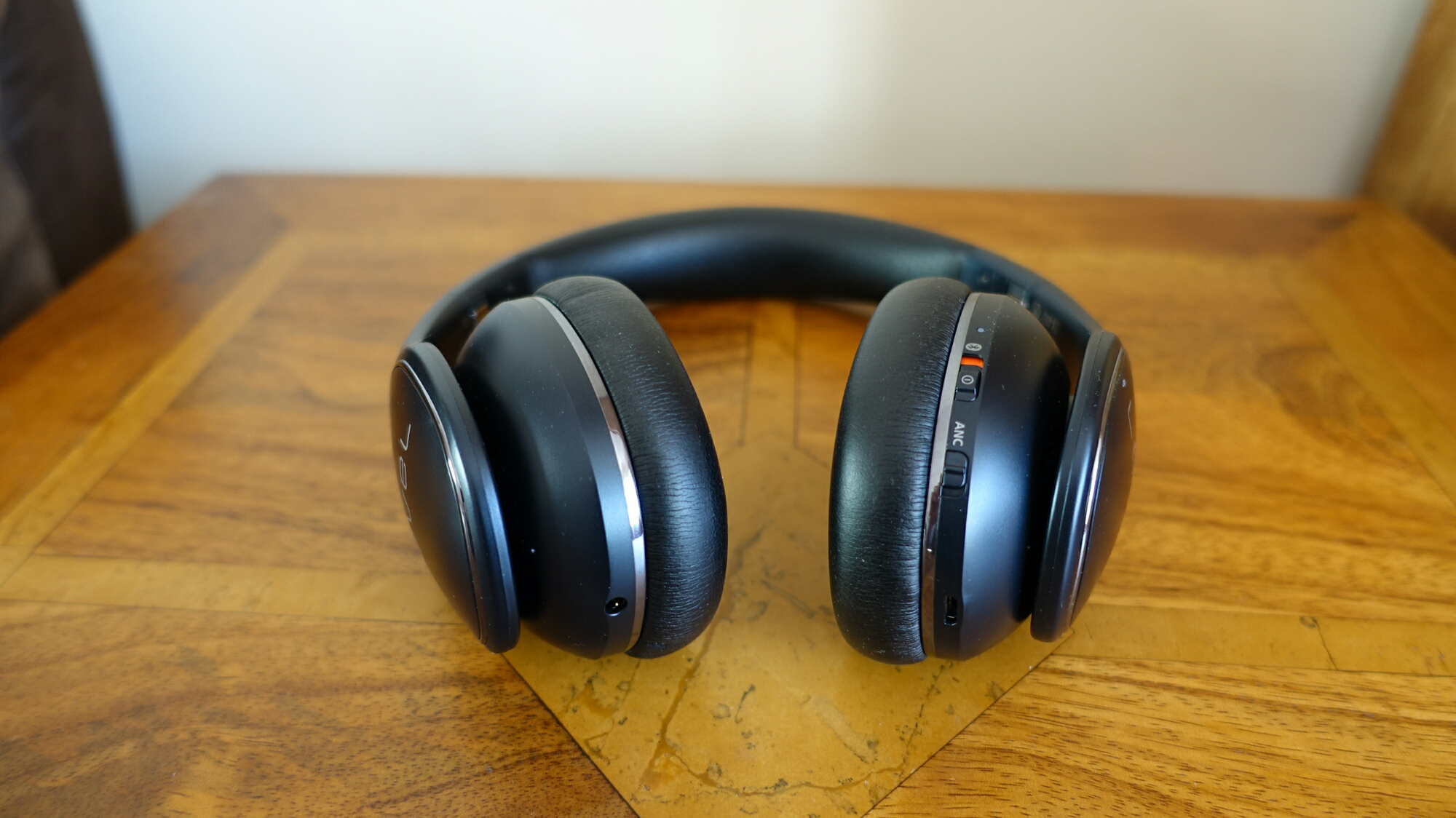
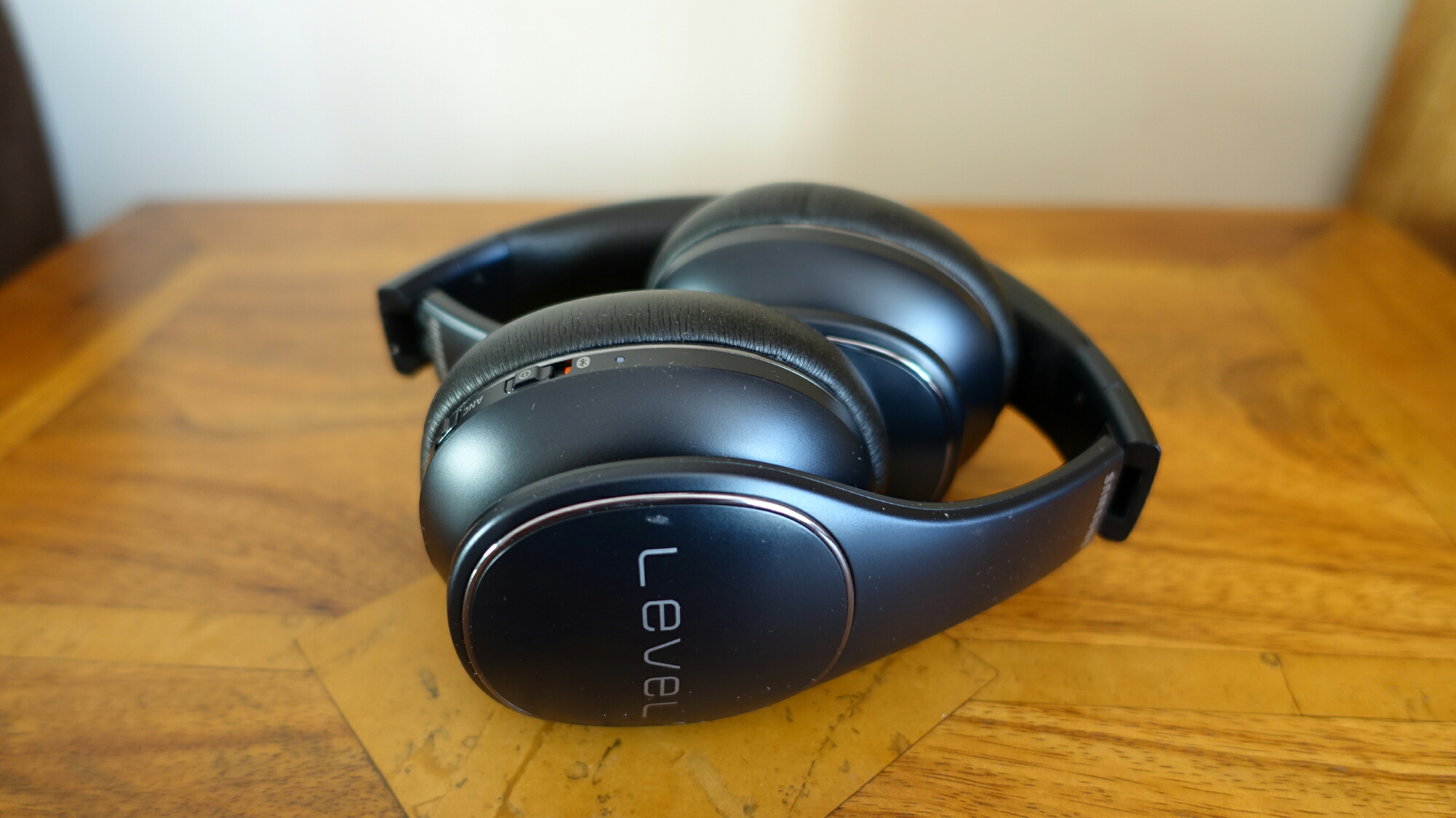
Welcome to my review of the Samsung Level One Pro Headphones.

The Level One Pro headphones are available in 2 colours, black and white and cost £230.

image

The Key Specifications

– Bluetooth 4.1
– A2DP, AVRCP, HSP, HFP
– Multipoint
– Bluetooth Smart Touch Control (Play/Pause, Song Movement, Volume Up/Down, Talk-In Mode(Listening ambient sound with music), Call Receiving, Call Rejection)
– 40mm Speakers with Dual-Layered Diaphragm(UHQ Audio Support)
– In the Box – Carrying Pouch, Audio Cable, micro USB Cable
– Up to 10 Hrs (Bluetooth Mode with ANC), Up to 20 Hrs (Bluetooth Mode without ANC), Up to 18 Hrs (Wired Mode with ANC), Unlimited Listening Time (Wired Mode without ANC)
– 161.9 x 184.6 x 74.1 mm
– 236 g
– UHQ-BT is compatible with selected devices starting from Galaxy S6 Edge+ and Galaxy Note5
– Sharing – The Level On Wireless Pro lets you stream your tunes to a friend via the unique Sound With Me function.

image

The Basics

The Level On Wireless Pro provide studio-quality sound, Active Noise Cancellation using 4 built-in microphones, two on each earpiece and offer Hi-Res Bluetooth and Wired Hi-Res sound using Samsung’s UHQ codec. For this you need these headphones and a compatible Samsung phone. At the moment this includes the S6 Edge+, Note 5 and S7 and S7 Edge.

UHQ works at 96 khz/24 bit. CD quality is 44.1 kHz / 24 bit. If you have MP3’s at a lower bitrate the UHQ will upsample the tracks.

Operation is using the touchpad on the right headphone. Slide up and down for volume, left or right to skip tracks, tap to play/pause, press and hold middle for talk through. It really is a breeze to use.

Comfort. The Level One Pro are very comfortable to wear and for extended periods too. They fit on the ears.

The Sound Quality

The first thing that will strike you about these headphones is that they are not bass boom boxes. Samsung state these are studio headphones and they really are! These are the first bluetooth headphones I have used that provide Hi-Res Bluetooth sound. Does it make a difference. Yes it does. Does it beat a high quality wired setup. No. Does it get close. 85% close.

So as these are studio based headphones, they are rather flat in sound reproduction. They only reproduce what is available and accurately. So crap in, crap out.

Then Samsung add their Ultra High Quality audio codec that works at 96 kHz /24 bit. The Samsung Music app also upscales non hi-res tracks. You can switch this option on or off. With UHQ on you also gain the benefit of all the other sound alive features. This includes the equaliser, surround sound, tube amp pro (this simulates the soft timbre of a tube amplifier which I quite like) and concert hall. Samsung also feature adapt sound that performs a hearing test on each ear, which then in turn provides a custom music profile. This is really effective.

So what’s my verdict on the sound quality. These are good quality music headphones. I didn’t suffer fatigue. However, they are not always exciting to listen too. The other consideration is the extra bandwidth UHQ requires. If you start doing other activities on your phone, drop outs and glitches will occur occasionally using the UHQ. With UHQ turned off this doesn’t happen. This may mean a software update is required on the S7 to fix this but at the moment it is a consideration.

Another consideration is that as soon as you want to watch a YouTube video or something similar , you need to turn off UHQ, due to the fact peoples voices are out of sync.

My long term set of bluetooth headphones is the Plantronics BackBeat Pro. They have tons more bass and subwoofer type bass but with great mid and treble. At times you might think there is an earthquake happening whilst listening to these. They Plantronics are a lot heavier and larger. They don’t fold like the Level One Pro. However, if I gave both headphones to you to compare, most would choose the Plantronics. Far more fun and engaging. However, over an extended listening period, the Level One Pro would win as ear fatigue is minimal. Plus the sound is more accurately reproduced.

Conclusion

At the end of the day, as good as the Level One Pro headphones are, I just cannot enjoy listening to them, so sadly I cannot recommend them wholeheartedly. In addition the music drop outs and glitches are frustrating. For some people, the studio type sound will be perfect!


Atlas Cables – The new Atlas Cable Zeno review- Upgrade in Style

image

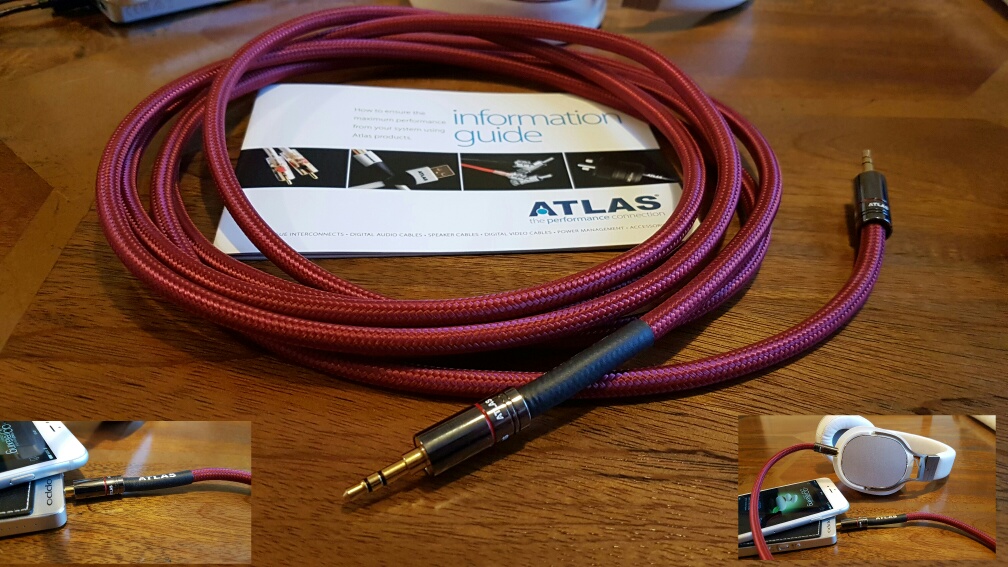
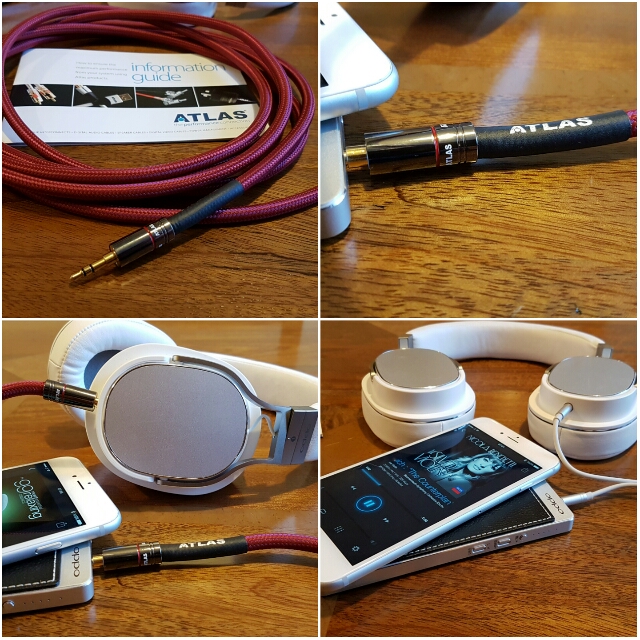
Atlas Cables are researched and designed in Scotland. Not only that, they are actually assembled by hand in Scotland. The new Zeno cable is assembled using ohno continuous cast copper conductors which are covered in fluorinated ethylene propylene low temperature deposition dielectric to protect the integrity of the ohno continuous copper material. This is then wrapped inside a protective soft PVC inner liner and finished with a tangle-free fabric outer jacket. Metik non-solder crimp plugs promises to provide signal consistency from socket to socket. If you look at the photos you can see how substantial the cable looks. 

Atlas Cables Zeno range is the new “high-performance” replacement headphone cable.  For my review, I decided to replace the standard headphone cable of the Oppo PM-3 headphones with Atlas Zeno. The cable comes in various lengths and different options are offered for the end terminations depending on what type of headphone connector you use for your specific headphones eg.  2.5mm, 3.5mm, 6.3mm and 4-pin XLR mini. I have a 3m length cable which costs £175. You can also get brand specific teminations eg  Sennheiser, OPPO, Sure, AKG, Audeze, AudioQuest, HiFiMan, Ultrasone and many more. 
image

Sound Quality

So the Atlas Zeno cable looks the business but does it sound the business?

Answer, yes it does. The difference is not night and day different and it also depends on the quality of the music file and amplification being used. I initially used my iPhone 6S Plus and Oppo HA-2. Then I tried several other amps/DAC combos as well as other phones including the Samsung Galaxy S7 Edge with the Oppo HA-2. 

My findings using it in a portable setup – the Atlas Zeno improved the sound stage and smoothed out the treble. Instruments became clearer. As I moved to FLAC recordings the before and after became more noticeable. A sort of veil lifted from the music. Moving to some dedicated audio equipment, and the Atlas Zeno became right at home. As a cable, it’s fairly bulky to be used on the move outdoors, but otherwise it’s ideal. At £175 for the 3m length this may seem expensive. However, if you are going to upgrade the loudspeaker cable there is no point doing it in half measures. 

Conclusion 

I beautifully built customisable cable which ensures you get the best possible sound delivery from your source to headphones. Recommended. 

Samsung Galaxy S7 Edge – My Review update

Just an update on the status of my review on the Samsung Galaxy S7 Edge. I had planned having this ready for Monday but Samsung have let me down. Their courier of choice doesn’t post at the weekends so the extra pieces I wanted to include with my review won’t arrive until Monday. 

So what are these extras? Well firstly the Samsung Gear S2 smartwatch and secondly the Samsung Level One Pro Bluetooth headphones. I also have the Gear VR which will form part of the overall review. 

You might ask why the Samsung Level One Pro headphones. Well these are enabled with Samsung’s Hi-Res Bluetooth codec which is better than APT-X. The Samsung Music app (just updated for the S7) includes an option for UHQ music upscaling. I do recommend using this setting at all times. The UHQ option is for wired headphones and any headphones that support the UHQ Bluetooth codec which include the Level One Pro headphones. 

I have already published many posts on the camera so the other aspects I wanted to explore fully is the sound quality. This is via the loudspeaker, headphone jack and USB Audio. I have already spent hours testing the headphone audio using loads of different types of headphones. I have also used several USB DAC Amps. And to complete the test I have also used several android music apps. So my last part was to see what difference using the Hi-Res Bluetooth codec makes to the audio nirvana.  

I have tested, owned and reviewed all the previous Samsung Gear smart watches. Just use the menu to find them. So I only thought it right to include the Gear S2 in my review of the Edge. And not forgetting the Gear VR. 

So my review is likely to take a slightly different angle to many other reviews and explain the Samsung Galaxy S7 Experience. Because that is what really matters nowawadays. 

The experience is what iOS iPhone users shout about. Well let’s see what Samsung can achieve! 

Stay tuned for a roller coaster of a journey !

Samsung Galaxy S7 Edge – Camera Shootout – Part 2

Yesterday, I published part 1 of my Samsung Galaxy S7 Edge camera comparison which involved comparing the S7 Edge photos to those from the Apple iPhone 6S Plus.

So today I am going to look at shots taken on the S7 Edge and add some commentary. If you won’t to view the originals, click on the photo and select full size. Don’t forget to allow a bit of time for all the shots to appear.

Burst Shots

The two photos below are from a burst photo. Each vehicle was a separate burst. I actually ended up performing this test on 6 different cars but the results were identical. I wanted to see how many shots of the vehicle I could capture as a car drove passed in the frame of the S7 Edge. Worst case was 14 in focus shots of the vehicles up to 19. That’s right all the burst shots for each vehicle were in focus. As you can see it is not a bright day either. Really impressive.

High Speed Bursts #SamsungS7Edge

High Speed Bursts #SamsungS7Edge

Macro

The close up of the leaf is superb. Not much more to say other than if you recall yesterday was a day of strong winds so quick focusing was really needed!

Scenes around St Michael's Church, Meeth, Devon #SamsungS7Edge

Random Shots of St Michael’s Church, Meeth, Devon

Some random shots of the church. The colours are a little over saturated, except the gravestone was really that green!

Scenes around St Michael's Church, Meeth, Devon #SamsungS7Edge

Scenes around St Michael's Church, Meeth, Devon #SamsungS7Edge

Scenes around St Michael's Church, Meeth, Devon #SamsungS7Edge

Scenes around St Michael's Church, Meeth, Devon #SamsungS7Edge

Bull & Dragon Pub

The Bull & Dragon Pub is next door to the church literally. Here is the sign against a backdrop of awkward sky lighting. I like this photo.

Bull & Dragon #SamsungS7Edge

Overall some good shots from the S7 Edge camera.

Samsung Galaxy S7 Edge – First Impressions – Updated

You have read all the glossy reviews, now for some reality. This is my first impressions on the Samsung Galaxy S7 Edge.

First up, the phone came free with the Gear VR. Both the phone and VR box were inside a larger box, which when opened revealed that the inside panels of the box were black. The phone and VR boxes were wrapped in black wrapping paper, creating a wow moment. The envelope that was inside the box was black too.

I have the black S7 Edge. Let’s not beat around the bush. It is gorgeous. The QHD screen is excellent. And the camera takes some cracking shots when it works. There is lag sadly. This is when pressing the home button, it doesn’t always register. Inserting my 200gb Sandisk micro SD caused the phone to collapse. While it was indexing the card for several hours, the phone was unusable. Anyway, I had my main sim in the S7 Edge along with 30 core apps. I had taken a number of photos and then I got the error message shown at the end of the article, that is the camera force closed when launching it.

So I performed a hard reset and started again and all seemed well. So my wife and I had a go with the Gear VR. It says not to wear glasses and instead use contact lenses. Well, as both of us don’t use contact lenses, we found that the lens adjustment gauge on the Gear VR was not enough to create a clear sharp view. This meant the VR experience became average at best. This is a real shame as even based on my experience which was not pin sharp, the wow factor was huge. My wife and I used the Gear VR with bluetooth noise cancellation headphones. I am certain the Gear VR will help Samsung sell loads of these phones.

And then just when I thought everything was working smoothly, I got the same camera force close camera error message. Nothing I tried worked, so I could see another hard reset was going to occur. So I took my sim card out of the S7 Edge and put it back in my iPhone 6S Plus. I also soft reset the S7 Edge and voila it worked again. So maybe there is something wrong with Three UK and / or using my Three Signal Booster? See update at end for actual reason.

Now not wishing to beat the S7 Edge into submission, this is day 1 firmware and hopefully will receive updates to quash the bugs.

So how does it compare to the iPhone 6S Plus. Well android feels liberating and clumsy. iOS has Touch ID that is so well implemented into many apps and makes using these apps much faster and easier on iOS than android. There is no mobile payments option for the S7 Edge yet if you’re in the UK. Then with iOS you have force touch, integration of iMessage and FaceTime and much more with slicker and better designed apps. However, it is not all one sided. There are aspects of android that make iOS seem behind. Let’s not beat around the bush here, the S7 Edge camera is much better than the iPhone camera. iOS has many third party camera apps that squeeze even more performance out of the phone. Android at the moment has no compatible apps that work with the S7 Edge or add any extra benefits. Then again, the S7 Edge camera app is feature rich. And when you look at the basics, the S7 Edge has a much better screen to the point whereby I don’t need to use my reading glasses as much.

So for me there are some amazing highs but also some frustrations especially with the camera app force closing.

Update – I have since discovered that the S7 Edge camera does not like to save photos to a micro sd card and this is an issue several people are having. The solution is to save photos to the internal memory until Samsung hopefully release a fix.

Update 2 – Samsung have confirmed the camera problem is effecting a number of devices.

Shot on an Apple iPhone 6S Plus – Video and Photos using the best iOS Apps

My goal at the weekend was to take my iPhone 6S Plus and record video and snap a range of photos. In addition, I wanted to use the best iOS Photography and Camera apps that I have discussed over the last month along with a few other apps that I have yet to review. I didn’t use Nightcap Pro as it wasn’t needed for this video, but it is definitely an app to include in any collection.

So the apps used were –

– Default iPhone Camera app
– ProCamera+ HDR
– Filmic Pro
– iMovie
– SnapStill
– Photos for iOS

All footage was captured hand held, that is no tripod was used. The more dramatic looking landscape photos were taken using ProCamera+. The photos below were taken with ProCamera+ and are unedited.

Dramatic view of Dartmoor #Princetown #iphone6splus

Dramatic Princetown #Dartmoor #WintersDay #iphone6splus

The default camera was used to shoot in 4K video and take burst photos of my labradors. Filmic Pro was also used for video recording. Below is a burst shot using the default camera app.

Fury & George out for a sprint on Dartmoor #Princetown #iphone6splus

Next I examined the content, and using the default Photos app I shortened the video clips to just have the action and remove any boring aspects. With some of the photos of the dogs, especially Fury (black) and Tiggy (brown) I used the Photos app again to brighten the shadows as the 2 dogs looked too dark.

I then imported everything into iMovie on the iPhone 6S Plus and produced the following 90 second video.

Now there is an importance to why I created this video. I am going to use this as the video to compare the new flagship phones. This will include the Samsung Galaxy S7 Edge, LG G5 and others. The aim is to use the respective flagship phone to edit and master the movie just like I did on the iPhone 6S Plus and see how the final result compares!

Fiio Q1 Portable DAC and Headphone Amplifier – review

Welcome to my review of the Fiio Q1 Portable DAC and Headphone amplifier.

  
The Key Specifications

– Weight 100 g
– Dimensions 97mm x 56mm x 13.1mm
– Audio Input Micro USB/3.5 mm Jack
– Headphone output 3.5 mm stereo jack
– Volume Control TOCOS Potentiometer
– Bass Boost Switch
– Recommended Headphne Impedance 16~150 Ω (Recommended)
– Power Input DC5V 1A recommended
– Battery Capacity 1400 mph, Battery Life >30 h
– Output Power >190 mW (32 Ω/THD+N<1%),>75 mW (150 Ω/THD+N<1%) Charge Time ≤ 4 h
– THD+N <0.005% (1 kHz), Output Impedance < 0.3 Ω
– Frequency Response 20 Hz~20 kHz
– SNR ≥107 dB
– Input Sensitivity 4.3 V (GAIN=L),1.5 V (GAIN=H) Max Input Level >4 Vrms
– Crosstalk ≥75dB(1 kHz) Channel Imbalance 0.2 dB
– Gain AUX IN:-7dB/4.5dB
– USB IN:-3.5dB/8dB
– Bass Adjustment Range 0/5dB
– MAX output voltage 7.2 Vp-p, MAX Output Current >75 mA


The Hardware

The Fiio Q1 costs £59.99. And for £59.99 you get a beautifully constructed brushed aluminium AMP/DAC. Comparing this to the iBasso D-Zero MK2 that I reviewed recently, the fit and finish on the Q1 is streaks ahead. Inside the box you get a micro USB cable, a tiny right angle 3.5mm to 3.5mm cable, a silicone mat to stop the device scratching when stacked. The Q1 has a 1,400mAh battery that provides 15 hours of playback.

The Audio Quality and Sound Experience

The Q1 uses a Texas Instruments PCM5102 DAC chip and a Maxim MAX 97220 for amp section. This means 24/95k decoding is possible from most codecs delivering around 190mW load into 32ohms. OTG support as a DAC is not officially supported but does work using apps like Onkyo and USB Player Pro. Using the usb camera connection adapter from Apple, I was able to use the Q1 with my iPhone 6S Plus. Another benefit for me is that because it uses micro USB, I can use my special red coloured Lavri Lightning Camera Connection Cable (shown in photos under official Apple CCK). The sound produced by the Q1 is fairly neutral with some warmth. Treble is slightly bright but not too bright. The Q1 also has a bass boost button which is ideal for some bass lacking headphones. Even if your headphones have decent bass, sometimes the bass boost can provide a slightly lift that adds some drama to the music. Fiio recommend headphones up to 150 ohms. I would say that is fairly accurate but again if you use 100 ohm or lower headphones you will gain some more benefit from this little baby.

Comparing the Q1 to the iBasso d-zero MK2 that I reviewed last week, the Q1 is better built and looks classier but when it comes to the music in my opinion the iBasso is another league. This becomes more apparent the longer you listen to the iBasso. However bear in mind the cost difference. The Fiio Q1 costs £59 and the iBasso D-zero MK2 is £99. 

Conclusion

Say again, just £60 for this little amp/dac from Fiio. The Fiio Q1 pound for pound offers amazing value. Sure its not as refined as some £100-£500 devices but for most people this will be good enough to get them enjoying their music that little bit better than before.

More info and deals on FiiO Q1 DAC and Headphone Amplifier

More info and deals at Amazon US