The 5:2 Blood Sugar Diet – Week 3

Welcome to my journey on the 5:2 Blood Sugar Diet, week 3. Prior to starting the 5:2 BSD Diet, I completed the 8 week Blood Sugar Diet on the 10th September 2016, which allows 800 calories a day for 8 weeks. The diet is genius as it has the capability to reverse type 2 diabetes and or lower blood sugar levels, lower blood pressure and lose a lot of weight in 8 weeks.

To recap my 8 week journey on the 8 week Blood Sugar Diet, Click HERE.

So what is the 5:2 Blood Sugar Diet? Well, it is the same Mediterranean style diet as the 8 week Blood Sugar Diet, but no calorie counting for 5 days, and 2 days at 800 calories.

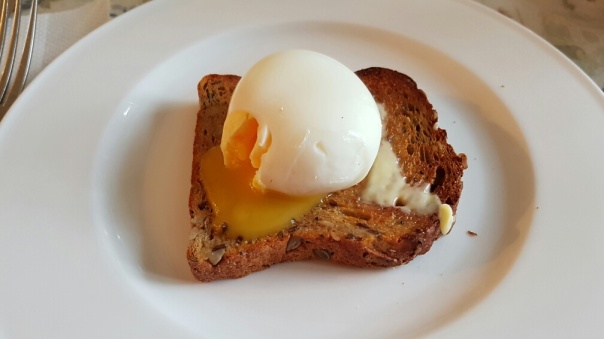
I am still enjoying the same delicious breakfast, egg on hi-lo bread. The bread is from Sainsburys and is high in protein and only 5g of carbs per slice. I am using real butter on the toast. To create the perfect egg on toast, I am using my beloved Andrew James Egg Boiler. Link at the end of the post. I love starting the day this way!

wp-1472280231381.jpg

To recap, on the 8 week blood sugar diet results, I lost 2st 4lbs, dropped my blood sugar levels to normal, reduced by blood pressure to normal, lost 3 inches off my neck and 4.5 inches off my waist.

So my journey has moved to the 5:2 Blood Sugar Diet plan. This is the results from week 3. My plan is now to try and lose 7 stone, bringing my total weight loss when I reach my goal at 9 stone weight loss, or 45% off my start weight. Wish my luck!

So how did week 3 go? Well my blood sugar and pressure levels are still normal. Sadly, I gained 1 lb in weight, (I weigh now 19st 6.5lbs), although my neck and waist stayed the same this week. So now I have lost 3.5 inches off my neck and 5 inches off my waist. My diet slipped a little on a few days this week due to work taking me out of my normal routine.

If you have any questions or tips, do leave a comment.

Useful Links (Amazon)

The 8 Week Blood Sugar Book – by Dr M Mosley
The 8 Week Blood Sugar Diet Recipe Book
The Essential Blood Sugar Diet Recipe Book
Fast Exercise – Dr M Mosley
Andrew James Soup Maker – 7 in 1 – soups, smoothies, ice crusher and more
Andrew James Egg Boiler (I use this for my eggs, see photo at top)
FitBit Trackers
A wide choice of digital weighing scales

Night Time Camera Shootout – Honor 8 vs Apple iPhone 7 Plus – The Gloves are OFF!

Last night I took my Honor 8 and Apple iPhone 7 Plus and tested low light to the extreme. At the start of the camera shootout it was already dark. At the end, I couldn’t see a thing, not even my feet. The only light that spilled into the graveyard was from a street lamp outside of the church. Plus the odd ghost or two that got captured accidentally!

So let’s get started.

7.26pm, a test shot of my local church in auto using the iPhone 7+.

iPhone 7 Plus - Auto default camera 7.26pm, 1/4s, ISO 125

The level of darkness is accurately portrayed here by the iPhone. 1/4s and ISO 125.

7.23pm, 3 mins earlier, and not as dark, the Honor 8 in auto mode shows us what is can produce below.

Honor 8, auto, 7.23pm, 1/17s , ISO 1600

The Honor 8 opts for a shutter speed of 1/17s and an ISO of 1600. Every minute made a difference in these photos. At around 7.50pm it was pitch black in the church graveyard, so the available light was vanishing super fast.

However, all is not lost with the Honor 8, as the default camera app has lots of shooting modes, one of which is night mode. Just for clarity, with all of the photos, a tripod was used. Night mode is brilliant. The Honor 8 calculates how many seconds you need to take the low light/night shot and as the seconds countdown you get to see your photo develop on the screen.

Honor 8, 7.24pm, Night mode, ISO 100, 14 seconds

The Honor 8 opted for ISO 100 and a 14 second exposure above. However, it doesn’t look like what my eyes could see. In some ways, the auto shots are more natural, even if the detail is not as strong. However, at the end, I took 3 of the Honor 8 photos and edited them in Lightroom mobile app which improved the final result.

Back to the iPhone 7 Plus. Unfortunately, the Apple default camera app does not have a special night mode, so you have to look at third party offerings. I tried 3 apps last night, ProCamera+, ProCam 4 and Nightcap Pro. ProCam 4 did a really good job and also shoots in RAW. Once the light became non existent, that is , it was near pitch black, Nightcap Pro provided the magic.

iPhone 7 Plus, 7.26pm, ProCam app, 1/4s, ISO 400

So at 7.26pm, ProCam in its night mode opted for 1/4s exposure and an ISO 400. For a comparison, the shot below was snapped with Nightcap Pro.

iPhone 7 Plus, 7.28pm, 1/3s, iSO 400, Nightcap Pro app

At 7.28pm, and less light than the shot above, Nightcap Pro opted for 1/3s and ISO 400.

So back to the Honor 8 below.

Honor 8, night mode, 7.37pm, ISO 200, 15s

Using the night mode in the Honor 8 camera app, this was a 15s exposure with an ISO 200. The lighting around the tombstones is too bright versus what my eyes were seeing.

Honor 8, Night mode, 7.38pm, ISO 200, 18s

The shot above is also from the Honor 8 using night mode. ISO 200 and an 18s exposure. Again the brightness and colours are over the top versus what my eyes could see. However, as you will see below, Lightroom mobile improves this shot with a few quick edits.

Even darker now, and back to the iPhone 7 Plus. There is no point using the default camera on the iPhone. It is too dark unless flash is used, and I hate using flash. So the rest of the iPhone photos are taken with ProCam 4 or Nightcap Pro.

iPhone 7 Plus, 7.40pm, ProCam app, 1/17s, ISO 1600

The above iPhone 7 Plus shot is taken with ProCam 4 at 7.40pm. With a 1/17s and ISO 1600. Whilst the shot looks dark, it is a perfect match to what I could actually see, and I really like the atmosphere captured.

iPhone 7 Plus, ProCam app, 7.40pm, 1/4s, ISO 1250, telephoto lens

The shot above is at 7.40pm again, but using the telephoto lens with ProCam 4 app. 1/4s and ISO 1250. Again, I really like this photo as it captured the atmosphere and the actual light and darkness.

It’s now 7.46pm. Switching to Nightcap Pro on the iPhone 7 Plus, produced the shot below.

iPhone 7 Plus, 7.46pm, nightcap pro app, 55s, ISO 3200

Nightcap Pro used a 55 second exposure. ISO 3200. Moving back to the Honor 8 below.

Honor 8, night mode, 7.48pm. Last shot before too dark, 51s, ISO 200

The shot above, taken on the Honor 8 at 7.48pm was the last shot from the Honor 8. A minute later the photo quality degraded too much (although it still captured something legible). Remember at 7.48pm I couldn’t see my shoes as it was so dark. The Honor 8 used its night mode and a 51s exposure and an ISO 200. The Honor 8 night mode seems to artificially enhance the lighting and colours, so again I tweaked the photo in lightroom. Edited shot at the end.

So now its game over with the Honor 8 as its pitch black practically. All that is left is the iPhone 7 Plus and Nightcap Pro app. Its 7.52pm.

iPhone 7 Plus, 7.52pm, nightcap pro app, 107s, ISO 3200

The shot above is a 107 second exposure. This could have been as long as I wanted, as Nightcap Pro allows for crazy long exposure times. Not bad at all. Now in case you have any doubt as to how dark it was, below is a shot from the iPhone using the default camera app.

iPhone 7 Plus 7.52pm - Actual Darkness

As you can see above, it was crazy dark and the fact both the Honor 8 and iPhone 7 Plus were able to capture anything is a testament to just how good both cameras performed. The Honor 8’s night mode seemed to artificially alter the brightness and colours, but as you will see below, a quick edit of the white balance which can be done in any photo editing app, makes the final shot better.

As mentioned above, some of the Honor 8 night mode photos seemed unnatural due to the extreme colours versus what my eyes could see. So say hello to Lightroom mobile app, and you now have some improved shots. The main edit was the white balance in all of the shots below.

Honor 8 - Lightroom mobile enhanced shots

The above shot is one of my favourite of the camera shootout. Another quick edit in Lightroom mobile and another Honor 8 shot is improved below.

Honor 8 - Lightroom mobile enhanced shots

One more edited photo. This was so dark but again a quick edit in lightroom to improve the final result.

Honor 8 - Lightroom mobile enhanced shots

So my time with the ghosts in the church graveyard was plenty, plus I couldn’t see where to walk anymore without a torch. I hope you enjoyed the above comparison and more importantly, which shot is your favourite and from which phone.
Apple iPhone 7 Plus – Using Third Party Camera Apps

One of the perks of using iOS is the range of third party apps, and the speed at which many get updated to work with the new iPhone 7.

So for this post, I am looking at two apps. Procam 4 and Adobe Lightroom. Procam 4 has been updated to support both the iPhone and iPhone 7 Plus. There are tons of options on Procam 4, but for today I am looking at the new 3D Mode.

Stone on a Fence #3D Mode #ProCam4 #iphone7plus

Using the 3D Mode is similar to the Portrait mode on Apple’s on camera app, except it can saved as a GIF, a JPEG + GIF or VIDEO + GIF. It is more suited for people but it worked fine with a stone on a fence.

The next 2 photos were both shot in raw, using ProCam 4.

Power On #iphone7plus #raw #lightroom #procam4

Vacated #iphone7plus #telephoto #raw

In terms of editing raw photos, Procam 4 does offer basic editing options. A free option is snapseed app. However, from my time with Adobe Lightroom for iOS, its raw editing options are the best. After my 30 day trial finishes, it will cost my just over £8 a month if I want to carry on using it. This will give me access to Adobe Lightroom on all my devices along with cloud sync.

The raw images from the iPhone 7 Plus do allow for some superb editing.

In terms of video, Filmic Pro just got updated to support the iPhone 7 and 7 Plus and the results using this app are superb too. Unfortunately, with the loss of the headphone jack, I am having to use the lightning adaptor to 3.5mm to plus my Rode Mic into, meaning I am unable to charge my iPhone whilst shooting video, unless I buy the Belkin audio adaptor for £34.99. Hmmmm.

Honor 8 – First Shots from the Dual Lens Camera!!

Honor 8 hardware

My Honor 8 smartphone arrived yesterday in sapphire blue. After I have spent some more time testing it, I will publish my review, but I will just say this for now, it is an incredible stunning piece of hardware. In the flesh it just screams premium and quality and makes me wonder why anyone would buy anything else based on looks alone. The Honor 8 packs a ton of decent hardware specs and many neat software extras, all of which I will cover off in more depth in my main review.

In the meantime, these are the first photos from the camera.

Delicious Healthy Food #Honor8

The above shot is taken in wide aperture mode. With wide aperture mode, you can set the focus point and change the f stop. This adjusts the bokeh. Once you have snapped the photo, you can re edit the focus point and f stop.

Delicious Healthy Food #Honor8

If you want your food to pop, then use Good Food mode.

Church of St Michael & All Angels - Spooked #Honor8

Auto mode and using an inbuilt filter. It really was that foggy!

Dartmeet - Long Exposure #Honor8

The Honor 8 has lots of different camera modes, making it a competent shooter. This is one of the light painting modes, called Silky Water. This makes light work of creating silky water.

Bellever Tor, Dartmoor #honor8

Road to Bellever Tor, shot in auto. I love the colour accuracy of this shot.

It's Cows grazing in the morning sun #Honor8

Shot directly in to the sun. In auto and a great result.

Taunton Station #Honor8

Another auto shot. Again I am really pleased with the result.

So what do you think of these photos?

More info and the latest pricing on Amazon – Click HERE.

Tech Addicts Podcast – The Next Episode is Live – Pixel, Oppo & Bluedio

wp-1460657590183.jpg

Tech Addicts Podcast is back again with new episode starring Gareth Myles, Jay Garrett and myself. Tech Addicts is released every 2 weeks.

To listen to the latest episode subscribe by searching “Tech Addicts” within your favourite podcast app, iTunes, Google Play Music Podcasts or use the URL “mobiletechaddicts.libsyn.com/rss” to add directly.

Or listen below using the in-built player. Have fun listening!

Apple iPhone 7 Plus – Camera Review – Part 1

So how good is the camera on the Apple iPhone 7 Plus? Is it worth upgrading just for the camera on the Apple iPhone 7 Plus? What’s my view versus the Samsung Galaxy S7/S7 Edge and Note 7? Read on for all the answers …

Firstly, let’s take a look at the photos I have snapped with the iPhone 7 Plus in a multitude of conditions. As before, if you want to view the original photo, click on it, select original or full size.

Low Light Conditions

Around Princetown at Night - Low Light Photography from the Apple iPhone 7 Plus

Around Princetown at Night - Low Light Photography from the Apple iPhone 7 Plus

Around Princetown at Night - Low Light Photography from the Apple iPhone 7 Plus

So the above 3 photos are a selection of photos testing the low light capabilities. The second shot uses the telephoto lens. Shortly after snapping the above church shots, darkness really started to set in. At this point, when I selected the 2x zoom for the telephoto lens, the iPhone actually decided to override my choice and used the wide angle lens. It did this as it knew the f/1.8 of the wide angle lens would produce a better result, even though it was using digital zoom. The results from the digitally zoomed photos were still excellent. At the end of the article is a link to the flickr album set where you can view more photos from all of the scenes shown.

Just to up the ante, I used a third party app, nightcap pro that allows awesome night shots, light trails, stars, meteors and more. This is the beauty of iOS with the wide selection of third party camera apps on offer that push the boundaries of what is possible with the camera. There are some exciting options in development too which I am testing.

The low light photos from the iPhone 7 Plus are excellent. When I tried this test with the Samsung S7, the white balance was all over the place. The S7/S7E/Note 7 can produce sharper shots in low light compared to the iPhone 7 and with less noise, but I actually prefer the iPhone photos as they are better balanced overall.

Daylight Conditions

Okehampton Castle ruins #iphone7plus

Okehampton Castle ruins #iphone7plus

The photos above are shot into the sun as is the photo below. The two photos above show the results with the wide angle lens and then the telephoto lens. The 2 x optical zoom on the telephoto lens makes a huge difference and I love the option to use this lens as the quality is so much better than using digital zoom.

Okehampton Castle ruins #iphone7plus

One of my favourite type of shots is shooting into the sun, with the sun caught between the tree branches. I was pleased with the result here.

All Saints Church #Okehampton #iphone7plus

Above is another great shot from the iPhone. Nicely balanced but based on my time with the S7/S7E/Note 7 I do think the dynamic range from these Samsung phones is better. However, the final post processed from the iPhone appears in my mind to be more realistic and natural. The Samsung post processing goes for a heavier saturated and contrasted shot.

Flowers & Close Up

Flowers & Fruit #iphone7plus using the wide and telephoto lenses

The above shot is just using the normal wide angle mode. The new portrait mode is in beta, so I won’t be testing this until it is out of beta. However, from results shown over the internet from other people, used correctly, the portrait mode is fantastic and makes the 7 Plus even more compelling.

Flowers & Fruit #iphone7plus using the wide and telephoto lenses

Now just be switching the the telephoto lens, the berries become even more appetising.

Flowers & Fruit #iphone7plus using the wide and telephoto lenses

Flowers & Fruit #iphone7plus using the wide and telephoto lenses

The above shots are with the wide and then the telephoto lens. Again you can see the difference the telephoto lens makes to getting closer to the flower.

Flowers & Fruit #iphone7plus using the wide and telephoto lenses

Above, another shot with the telephoto lens.

Action Shots

In the 3 shots below of my labradors, it is worth noting the weather conditions were not the best for this type of action shot. The UK weather at the moment is dreadful. After taking these photos, Dartmoor had 33.4mm of rain in 4 hours. So not only was it overcast when snapping these, there was also a light mist too.

Happy dogs playing on Dartmoor- George , Fury and Tiggy in hot pursuit #iphone7plus

Happy dogs playing on Dartmoor- George , Fury and Tiggy in hot pursuit #iphone7plus

Happy dogs playing on Dartmoor- George , Fury and Tiggy in hot pursuit #iphone7plus

What you will see from the above 3 photos, which have all been marginally cropped to a 16:9 format, are some good photos considering the weather conditions. The iPhone 7 Plus was able to capture my dogs running extremely fast.

Happy dogs playing on Dartmoor- George , Fury and Tiggy in hot pursuit #iphone7plus

The above shot if you look closely has spots of mud on the photo. This was caused my Fury (black labrador) running so fast through the mud, that she was kicking it up as she went along 🙂

So how do these action photos compare to the Samsung S7/S7E/Note 7? Well the Samsung phones have a slightly faster focus system, meaning more of the action sequences would have been snapped in focus. The Samsung faster focus system has benefits across all types of shooting photos as well. However, once again I prefer the post processing from the iPhone 7 Plus. It did a better job distinguishing my dogs and their 3 different colours, light, brown and black. Same story as all the other shots really, I prefer the post processing from Apple. But like everything in life, there are pros and cons with each choice of phone.

Shooting in RAW

I took several shots in RAW using ProCam 4 and Adobe Lightroom for iOS. Editing on the iPhone 7 Plus using snapseed and Lightroom showed how much more data the iPhone 7 Plus captured using RAW. For a special show I would always take on in RAW as well as using the standard camera app. There are 3 samples shots from RAW in my Flickr Album. Link at the bottom of the article.

Final Verdict

The Apple iPhone 7 Plus camera is a marked improvement from the iPhone 6 Plus. The 2 x optical zoom of the telephoto lens opens up many more options to photography without the need of carrying add on lenses. The new portrait mode is another benefit. Third party developers are already looking to add their software prowess to stretch the boundaries even further.

The telephoto lens is usable is all shooting modes too ie video, time lapse, panorama and more.

Compared to the Samsung S7/S7E/Note 7 it boils down to 2 key differences. Maybe 3. First is the fast focusing system from Samsung is faster than the iPhone 7 Plus. This will produce benefits in certain scenarios. The Samsung phones post processing leans more to a heavier saturated and contrasted shot. In certain scenarios these will make photos pop on the screen to stand out even more. However, so far I am preferring the more natural, realistic post processing coming out of the iPhone 7 Plus. This is a personal opinion/choice. Should you move from a Samsung S7/S7E/Note 7 to the iPhone 7 Plus? Personally, you really need to get a grip if you are even thinking about this! A phone is not just about the camera, it is about everything else. The phones are different, each has pros and cons. When it comes to very low light/night shots the Samsung phones have the slight edge using the default camera app. However, switch to a number of impressive iOS third party apps, and the advantage switches to iOS. Once again pros and cons.

Overall, I am very pleased with the camera results on the iPhone 7 Plus. Add this to everything else on offer and its a compelling device.

Part 2 will focus of video and will be live in due course.

Useful Links
My Apple iPhone 7 Plus Flickr Album
Apple iPhone 7 / 7 Plus Cases on Amazon
Apple iPhone 7 / 7 Plus Screen Protectors on Amazon

BlackBerry DTEK50 Smartphone – My Review – Secure & A Huge Hit

Blackberry DTEK50 review

Welcome to my review of the BlackBerry DTEK50. My review covers off all aspects of the phone from the camera, the audio, the security and much more.

It is in two parts. The written part below and then complemented and finished with the video review embedded below.

My thanks to Clove Technology for sending the BlackBerry DTEK50. The BlackBerry DTEK50 costs £265.

The Key Specification

– Android 6.0.1 and at time of review 6th September 2016 security patch (the latest)
– Snapdragon 617 processor, adreno 405 GPU
– Micro SD support up to 2TB
– 3gb RAM, 16gb storage
– 5.2 inch IPS 1080p screen, 424 PPI
– Sunlight visible with sunglasses
– Bluetooth 4.2 LE
– 802.11 b/g/n 2.4 GHz, 802.11 a/n 5GHz, 802.11 ac 5GHz
– Micro USB, Nano SIM
– Cameras – Rear 13mp, Front 8mp
– Battery – 2,610 mAH
– Quick Charge 2
– 147 x 72.5 x 7.4 mm
– Weight 135g
– BlackBerry security – latest security patches and OS enhancements without considerable delay.
– BlackBerry Intelligent Keyboard – Learns and provides word suggestions as you type, that include up to 3 languages of your choice.
– Customisable BlackBerry Convenience Key – Provides quick access to your most used applications and more
– BlackBerry launcher and apps, DTEK Security
– Stereo Speakers

Phone Basics

The BlackBerry DTEK50 is built by Alcatel, and based on the Idol 4. However, if I had to choose between the two, I would pick the DTEK50 every time. The DTEK50 has been customised by BlackBerry. It has a super grippy back and has BlackBerry’s commitment to the latest security updates. It also features BlackBerry’s DTEK security suite, keyboard, launcher and productivity apps including the BlackBerry Hub. See video below for more details.

Blackberry DTEK50 review

The screen is a lovely 5.2 inch IPS affair at 1080p, offering 424 PPI. Viewing angles are good and the brightness is excellent. In fact the auto brightness is too high, so I often controlled the brightness manually and at the lowest setting. This did mean, it was rather bright at night time. Sunlight visibility is the best I have used in ages. With my polarised sunglasses on, holding the phone in portrait mode, the screen was 100% readable. So crystal clear it was a joy. However, in landscape mode, I couldn’t read the screen with my sunglasses on, unless I removed them.

Call quality was reasonable, reception was excellent. Battery life was stellar too. 4 hours screen on time on average but with hardly any drain when left in standby. I did a 8 hour overnight test. The battery did not lose anything at all! Not even 1%.

The BlackBerry launcher is fantastic too. It allows custom icon packs which 100s available on the Google Play Store. On the home screen, swiping up on an app opens up the app widget. The launcher also allows for a wide selection of shortcuts. More details on the video review.

Audio

The DTEK50 has stereo speakers that sound superb. Lovely clarity and good volume. Brilliant for podcasts, gaming, watching YouTube videos and more. Headphone audio via the 3.5mm headphone jack was better than normal. Bluetooth audio was excellent. The phone has MAXX audio which adds to the whole enjoyment and quality. See video for more details.

The Camera

The rear camera is 13mp, with a dual tone LED flash, phase detect auto focus (PDAF), fast focus lock, HDR, 6-element f2.0 lens, 4x digital zoom, continuous & touch to focus, face detection, image stabilisation, panorama, burst, live filters, multi-frame low light enhancement and 1080p HD video recording at 30 fps.

The front camera is 8mp, 8 f2.2, 1.125um pixel size, 84° wide angle/field of view lens, image & video stabilisation, 1080p HD video recording at 30 fps, selfie flash and a wide selfie mode.

All the shots below are unedited unless I mention otherwise, and on full auto.

First up is sunrise on Dartmoor. This shot made Flickr Explore. Superb photo.

Sunrise over Dartmoor #BlackBerry #DTEK50

A cropped photo, but otherwise unedited of George. Great detail.

Hypnotic Eyes - George poses for the camera Shot on a #BlackBerry #DTEK50

Some local cows grazing on Dartmoor. Good colours.

BlackBerry DTEK50 camera shots on Dartmoor

Foggintor Quarry. The DTEK50 did a fab job of this. Realistic colours.

BlackBerry DTEK50 camera shots on Dartmoor

My three dogs were running, but the DTEK50 did a good job capturing them. There is an option in the settings to focus before each shot before taking the photo.

BlackBerry DTEK50 camera shots on Dartmoor

The DTEK50 has manual controls. I used these to take this shot. Don’t forget to view the video to learn more about all the manual options.

BlackBerry DTEK50 camera shots on Dartmoor

Now the below shot has been edited in snapseed using the HDR scape filter to show you what is possible. I love this version.

Inside Foggintor Quarry #dartmoor #blackberry #dtek50

If you look at my flickr album, Click HERE, there are 30 photos from the DTEK50 including the ones above. What I have found is the phone has consistently taken decent photos, way better than I expected. The front camera also takes good photos.

The Review Part 2 – Video Review

Conclusion

The BlackBerry DTEK50 is the best budget/mid range phone I have experienced to date. Excellent audio and camera, great form factor and design along with the latest security updates and BlackBerry’s apps and services make this a strong recommendation!

My thanks to Clove Technology .

The 5:2 Blood Sugar Diet – Week 2

Welcome to my journey on the 5:2 Blood Sugar Diet, week 2. Prior to starting the 5:2 BSD Diet, I completed the 8 week Blood Sugar Diet on the 10th September 2016, which allows 800 calories a day for 8 weeks. The diet is genius as it has the capability to reverse type 2 diabetes and or lower blood sugar levels, lower blood pressure and lose a lot of weight in 8 weeks.

To recap my 8 week journey on the 8 week Blood Sugar Diet, Click HERE.

So what is the 5:2 Blood Sugar Diet? Well, it is the same Mediterranean style diet as the 8 week Blood Sugar Diet, but no calorie counting for 5 days, and 2 days at 800 calories.

I am still enjoying the same delicious breakfast, egg on hi-lo bread. The bread is from Sainsburys and is high in protein and only 5g of carbs per slice. I am using real butter on the toast. To create the perfect egg on toast, I am using my beloved Andrew James Egg Boiler. Link at the end of the post. I love starting the day this way!

wp-1472280231381.jpg

To recap, on the 8 week blood sugar diet results, I lost 2st 4lbs, dropped my blood sugar levels to normal, reduced by blood pressure to normal, lost 3 inches off my neck and 4.5 inches off my waist.

So my journey has moved to the 5:2 Blood Sugar Diet plan. This is the results from week 2. My plan is now to try and lose 7 stone, bringing my total weight loss when I reach my goal at 9 stone weight loss, or 45% off my start weight. Wish my luck!

So how did week 1 go? Well my blood sugar and pressure levels are still normal. I lost 1/2 lbs in weight, (I weigh now 19st 5.5lbs), my neck and waist stayed the same this week. So now I have lost 3.5 inches off my neck and 5 inches off my waist.

If you have any questions or tips, do leave a comment.

Useful Links (Amazon)

The 8 Week Blood Sugar Book – by Dr M Mosley
The 8 Week Blood Sugar Diet Recipe Book
The Essential Blood Sugar Diet Recipe Book
Fast Exercise – Dr M Mosley
Andrew James Soup Maker – 7 in 1 – soups, smoothies, ice crusher and more
Andrew James Egg Boiler (I use this for my eggs, see photo at top)
FitBit Trackers
A wide choice of digital weighing scales

Beats Solo Wireless 3 – The New Headphones with Apple’s W1 Chip – My First Impression

Beats Wireless Solo 3 with Apple's new W1 chip

My Beats Solo 3 Wireless headphones arrived yesterday. I was very excited to open the box and test these for a number of reasons. Firstly, the packaging and presentation is first class. When you open the box, the headphones themselves are folded inside a protective case. Lift the case out and you get the cables and extras that come with the headphones.

Beats Wireless Solo 3 with Apple's new W1 chip

The second reason was to see what difference the Apple W1 chip made to the bluetooth process, setup, sound and real world usage.

Beats

I had watched the videos from Apple showing how the AirPods that also have the W1 chip, just connect by opening the protective case. I honestly did not believe it would work “magically” as shown, but the Beats Solo 3 Wireless headphones did just connect to my iPhone 7 “magically”. I simply pressed the power on button on the headphones, a big notification instantly appeared from the bottom of my iPhone asking if I wanted to connect. I tapped “connect”. And that was it. The first connection was over in a second. Not only that it named the Beats “Gavin’s Beats Solo 3” as you can see.

Beats Wireless Solo 3 with Apple's new W1 chip

Not only does it pair instantly, every time I have turned it on and off and on again, it connects like a bullet. But it doesn’t stop there. Now that I have paired it to my iPhone, it is now paired to my Apple Watch, iPad and MAC using iCloud. So neat.

Beats Wireless Solo 3 with Apple's new W1 chip

So what do these £249 on ear headphones sound like? Well, not £249 headphones IMO. More like £150 headphones but I am still burning these in. Over the last hour, they have improved a lot. At the moment they do not sound as good as my Sennheiser Momentum Wireless 2.0 or B & O Beoplay H5 headphones. They have improved since the last hour and I am listening to them as I type this and I am noticing better mids and treble occurring. Once I have burnt these in for 50 hours, I will let you know my final thoughts on the audio quality. However, it is worth remembering part of the pricing is paying for the Beats branding and the Apple W1 processor and included technology.

The headphones have controls on the left earcup to activate Siri, take and receive calls, control your music and volume. They feature dual beaming microphones for clearer calls. Siri worked perfectly, but I need to test voice calls to see how they perform. One feature of these headphones is the 40 hour battery life from one charge, and the quick charge option that gives 3 hours playback after a 15 min charge from a low battery.

So have Apple invented bluetooth. No. But they have made the experience amazing. This is by far the quickest and easiest pair of bluetooth headphones I have ever paired, used and connected. Also, the signal has not dropped, not even once, not even for a blink of an eye.

My final thought is this – “Why are you wasting your energy, plugging headphones into a 3.5mm headphone jack or lightning port?”. Wireless is the future and the future is now!

Bluetooth Headphones on Amazon

Apple iPhone 7 Plus – Low Light Camera Photography – My Camera Shots

Last night I visited my local church and took a number of photos on my Apple iPhone 7 Plus. 

Compared to the shots I took last year on my Apple iPhone 6S Plus the iPhone 7 Plus camera is considerably better. I was really pleased with the results from the 7 Plus. 

I also used the telephoto lens and for the last photo with the light trails an app called Nightcap Pro. 

As usual to pixel peep, click on each photo and then select original. 

Around Princetown at Night - Low Light Photography from the Apple iPhone 7 Plus

The first shot is of the church. It is actually darker than it looks. Lots of detail in this photo.

Around Princetown at Night - Low Light Photography from the Apple iPhone 7 Plus

Now using the telephoto lens. The optical zoom is superb. Again lots of detail.

Around Princetown at Night - Low Light Photography from the Apple iPhone 7 Plus

It really is darker than it looks. But here is another shot in auto above.

Around Princetown at Night - Low Light Photography from the Apple iPhone 7 Plus

Now using the telephoto lens. Despite how dark it was, the telephoto lens did get used by the iPhone 7 Plus. Some noise appearing now, but it really is a vary natural looking shot.

Around Princetown at Night - Low Light Photography from the Apple iPhone 7 Plus

Now its even darker, not that you can tell from the above shot. I decided to use my tripod, and selected a 3 second timer. With a timer, the iPhone 7 Plus took a 10 shot burst automatically. This was one of the shots from the burst.

Around Princetown at Night - Low Light Photography from the Apple iPhone 7 Plus

Even darker now. This is shot before the fancier one below.

Around Princetown at Night - Low Light Photography from the Apple iPhone 7 Plus

And finally, light trails. I used Nightcap Pro app to create this shot. This was using the apps light trails mode. This was a 11.34 second exposure.

Overall, despite how dark it was when taking these photo, the iPhone 7 Plus took some superb shots. My takeaway is just how realistic and natural the photos appear.

More to come.