Category Archives: Tech News

Google starting to pass the blame to ISP for poor YouTube experience

Google has started informing people who they should blame when YouTube videos streaming fail to stream smoothly.

A new pop-up bar appears “Experiencing interruptions? Find out why” . Clicking on the bar takes users to Google’s semi new Video Quality Report page, which provides information on internet service providers, including details on video streaming performance. The page also offers a comparison between other ISPs in your area, and it ranks providers as either “HD Verified,” “Standard Definition,” or “Lower Definition” based on the average performance they achieve on YouTube.

So would you change provider based on the performance of video streaming? Or have you already?

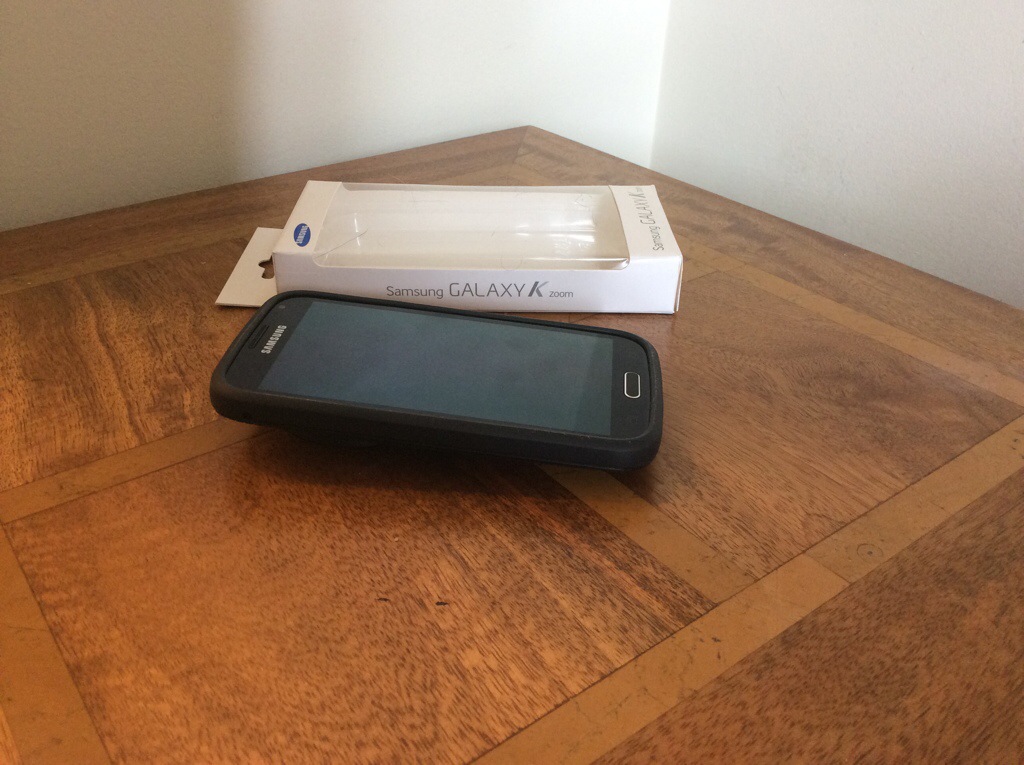
Samsung Galaxy K Zoom – official Samsung Protective case

20140707-184522-67522415.jpg

A few days ago, I showed you a few cases from eBay that I had for the K Zoom. Well finally, I have from Samsung their official protective cover case. It costs £20 so is not cheap but it is so much better than the previous 2 cases I had.

First up, the case seems to make the K Zoom seem slimmer. Not by much but every little bit helps. Second the edges are grippy rubber. The zoom lens is slightly protected by the case due to it covering the very edge of the mechanism. The same protection is offered for the screen. The power and volume buttons are covered, but the 2 way camera button is uncovered. All other cut outs for the other parts of the phone are exactly aligned.

20140707-185031-67831672.jpg

I will say this is the best case you can get for the K Zoom. Well, it is if the Samsung ever get more in stock!

LG G Watch – immediate first impressions

20140707-185437-68077340.jpg

It’s BIG but surprisingly comfortable. Compared to the Samsung Gear and Samsung Gear 2 smart watches I’ve owned already, I prefer the style of the LG G Watch. I am so pleased I didn’t choose black as that probably would have been too heavy looking. But you may disagree.

Setting up was a breeze. Download the Android Wear app from the Google Play store and install on your phone. Next charge the watch. It has a magnetic piece that aligns over the entire back of the watch. So it just snaps into place and is held together via magnets. Next with the supplied micro USB cable plug it in and charge away. You have to select your language on the watch and confirm pairing with your phone and that is it.

I’ve been very busy with my day job, so at the moment I’ve not had much time to configure it further. I do like the fact that it’s powered by OK Google commands which on the whole work so far well. I’m trying a few tricks out, like when I get within 10 metres of home, the hall light turns on.

It’s really early days so I will give it a week or so and update you further with my views.

Nokia Lumia 930 arriving in 9 days – full specs and info

20140707-195358-71638279.jpg

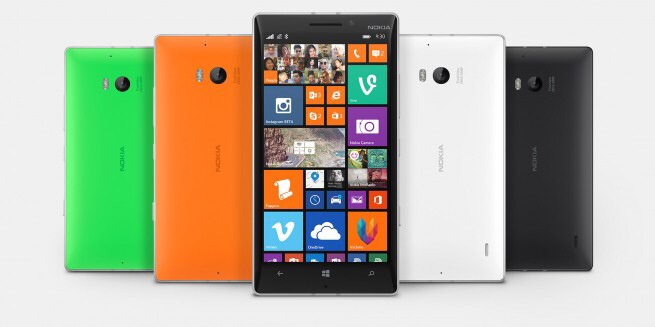
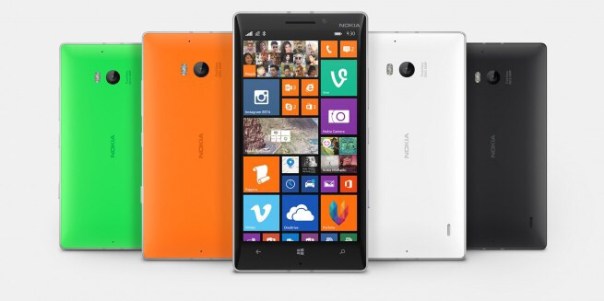
Lumia 930 will be available in the UK from 17th July incorporating the latest Microsoft 8.1 software and Lumia services.

It has a crystal clear 5-inch OLED display and the device uses PureBlack screen technology. Equipped with a high capacity 2420 mAh battery and built-in wireless charging.

The camera has a class-leading 20MP PureView camera with optical image stabilisation and high quality ZEISS optics ensures that capturing and reliving amazing images and videos is quick and easy.

The enhanced Nokia Camera app with Living Images makes it easy to add movement and emotion to static pictures and the addition of other free imaging apps such as Nokia Storyteller, Nokia Creative Studio and Nokia Refocus lets you bring even more levels of creativity to any picture.
With four high-performance microphones and Rich Recording, the Lumia 930 captures HD video like never before, with incredible directional audio and support for 5:1 surround sound capture and playback.

A 2.2 GHz Qualcomm Snapdragon 800 quad-core processor ensures that experiences such as Xbox gaming, image capturing and video processing, are faster, smoother and richer than ever before.

SensorCore technology brings low power motion sensing, helping you track your activities all day long with minimal power use – perfect for apps such as Bing Health and Fitness and external wearable monitors.

Integrated features including single swipe notifications in the Action Centre, the new Microsoft Enterprise feature pack, Microsoft Office, OneDrive, Nokia Camera, and HERE Maps and Drive+, all work seamlessly to make the Lumia 930 a great tool for productivity, work and play.

Wireless charging functionality together with a wireless charger will come as standard in the sales pack of the Lumia 930. In addition, Microsoft will run an exciting promotional offer – from the 17th until the 31st July all Lumia 930’s purchased from participating retailers will include a free additional wireless charger, the outstanding MD-12 speaker plus a voucher for £20 of free apps from the Windows store. Altogether, this promotional offer is worth around £130 RRP.

The Lumia 930 will go on sale with UK retailers from the 17th of July and will be available from Vodafone, EE, Phones4U, O2, Carphone Warehouse, Tesco and Amazon. It will also be widely available across other UK High Street and online retailers such as Clove Technology in a range of vibrant colours including bright orange, bright green and black. Phones4U will stock the Lumia 930 exclusively in white.

Tech specs summary:-

– Lumia 930 Operating System – Windows Phone 8.1
– HERE location services -Free global HERE Maps and HERE Drive+;Free HERE Transit available in the Store
– Display – 5” Full HD OLED, 1920×1080; 441ppi; 16:9; Sculpted Gorilla Glass 3; 3 column home screen, Sunlight Readability, Super Sensitive Touch for glove and nail usage
– Battery 2420 mAh battery, integrated wireless charging
– Processor – 2.2 GHz quad-core Qualcomm Snapdragon 800 processor
– Main Camera – PureView 20 MP with Optical Image Stabilization, Resolution: 1920×1080. Includes Nokia Camera. Dual LED flash, ZEISS optics
Front Facing Camera, HD 1.2 MP wide angle
– Memory – 2 GB RAM, 32 GB internal memory; 7 GB free OneDrive cloud storage

Samsung Gear Fit heavily reduced to $99

Before Google announced android wear, and prior to the first release of wearable hardware, Samsung launched ahead with its own plans, releasing two generations of smart watches and the Gear Fit, fitness band.

Well Amazon as of yesterday we’re selling the Gear Fit for a low price of just $99.

The wearable market place is heating up now Google has entered the ring. Just need Apple to go public with its plans.

Shoulderpod S1 – Smartphone Rig/Tripod Mount – Review

s1 box  download

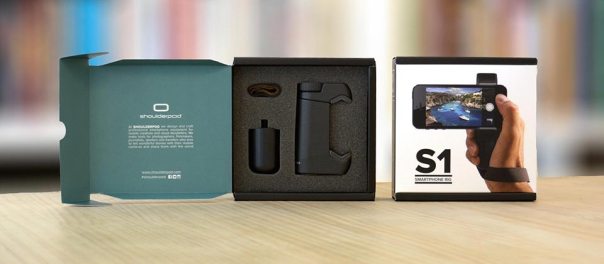
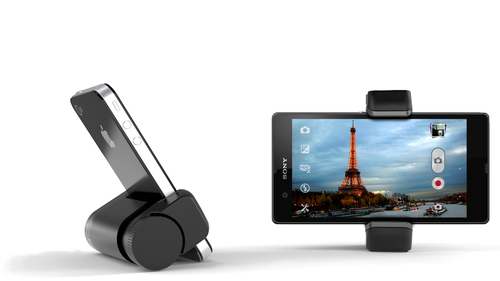
The Shoulderpod S1 ,http://www.shoulderpod.com/shoulderpod-s1/, is the first smartphone rig/mount that I have used that secures my smartphone properly to my tripod. No wobbles, no more phones falling off my tripod in the wind. The most recent photos on my flickr account were taken using the S1. The shots are on my flickr account photostream https://www.flickr.com/photos/gavinfabl100/ . The Shoulderpod S1 costs Euro 29.90 which in my mind is excellent value as it has 3 different uses – a tripod mount, stand and film maker grip. Opening the box you are met with chunky pieces of apparatus which gives the immediate impression of quality. Compared to my previous mounts, the S1 is leaps ahead in terms of strength, construction and desgin. It really is on a different league to my previous equipment.

Shoulderpod_S1_adjustable_smartphone_rig

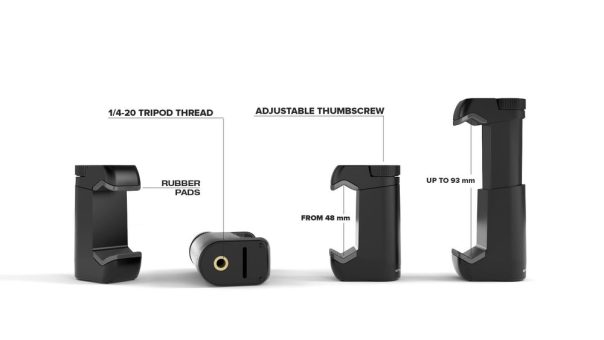
The S1 main tripod attachment piece is adjustable as shown above and comes complete with rubber inserts to protect your phone. It also fits a large number of phones too.

Shoulderpod_S1_professional-smartphone-rig_tripod_mount_galaxy

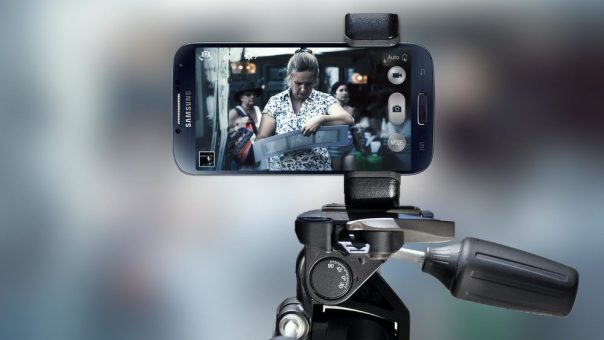
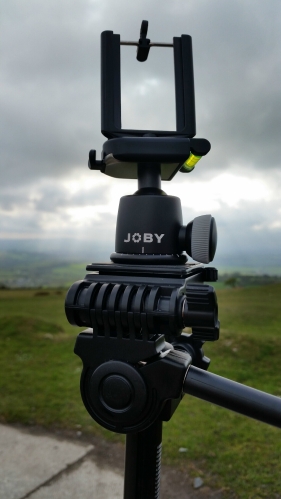
When attached to my tripod it provides a strong and secure fit. No longer are the strong winds on Dartmoor an issue. Or having the phone at an angle on the tripod is just as safe as being horizontal now.
Shoulderpod_professional_smartphone_rig_expandable_concept

Apart from the tripod mount, you can use it in the film maker grip mode, using the supplied strap. In fact, being a bit creative you can hang the strap over a branch to take that special shot. In addition, once you have finished taking your photos, just attach the weighted bottom piece and use it as a stand as shown.

s1 download

The Shoulderpod S1 is so much better than my previous setup as shown below. with my old clamp, it was simply spring loaded with just a few areas lightly holding the phone to the clamp. Sometimes, this would mean the phone could fall out of the attachment. With the S1, you turn the thread screw at the top to widen the arms, and then turn the knob in the other direction to secure. This provides a superb clamped fit.

IMG_0220

I have been using the Shoulderpod S1 for a while now and I am still just as impressed by it, as I was on the first day I received it.

Recommended!

Samsung Galaxy K Zoom – cases

photo 1
If you are lucky enough to have a Samsung Galaxy K Zoom, you are also unlucky in that accessories for this device are scarce at the moment.

You can buy a £2-3 wave silicone style case as shown quite easily but in my opinion it is ugly. There are now a few more styles, a yellow back style that provides less protection and when in stock Samsung have their fake leather looking case. The official fake leather Samsung case is in transit, and photos will follow shortly. There are other styles coming soon along and hopefully spare batteries which for a camera phone are needed.

photo 2
The yellow back case shown , is more stylish than the black silicone case but does offers less protection. The top and bottom of the case is open and the buttons are exposed as opposed to the black silicone wave style where everything is covered and offers a lot of protection. Also, this case is too slippery. So even though the black case looks ugly it provides better grip and protection.

One other style of case made by Araree is Autopop, where even the lens is covered on the K Zoom, and pops open when you activate the camera.

Hopefully, I will be able to get hold of a number of different styles and do a quick comparison between them.

Samsung Galaxy K Zoom – battery tips

I know some of you are having some battery issues with the K Zoom. So the obvious solution is turn it off.

No seriously there are a few things you can do which will help.

1) Turn off S-Voice from settings and make sure it is unmapped from home button and all listening modes.

2) Don’t forget to setup the power saving mode and the ultra power saving mode. Best to do it now, and not when needed. Also, after using ultra saving power mode, I find it best to soft reset phone. I only use ultra power saving mode, and when phone is at 5%. It would be handy if this happened automatically.

3) Network bands – I’ve restricted my K Zoom to 3G mode only. Handy as I’m with Three UK. That’s WCDMA. If you are not with 3, then don’t have have LTE selected as it drains the battery fast. If you need LTE for any reason, turn it on and then off again when finished. Choose another mode eg GSM/WCDMA.

4) Bluetooth and wifi. Keep Bluetooth off when not needed. Wifi doesn’t impact that much if left on.

5) Tap left soft key for running apps. Close all on a regular basis, minimum daily.

6) If the phone feels hot, battery fades too. So soft reset it. This re regulates the phone. Clearly a bug fix needed here.

7) If you have used GPS, turn back location services to power saving mode or off. High mode for location services will drain battery faster.

8) I have push email running for one gmail account. You can restrict frequency but again it’s up to you.

9) Soft reset phone daily. You should not have to do this, but it’s the one clear way to ensure smooth operation.

10) Use Nova or Apex Launcher but with a max of 2 home screens.

Clearly, the K Zoom needs a software update, but once you’ve tweaked it to get a better battery life, then you just accept its weaknesses as there is no other phone with a 10 x optical zoom. And in all honesty, whilst I wish I didn’t have to soft reset as much it’s no deal breaker.

In App Game Purchases – Finally Electronic Arts gets whipped by the ASA

The Advertising Standards Authority has ruled that Electronic Arts game Dungeon Keeper, is not really Freemium and therefore banned it advertising it this way.

The in app purchases were deemed to be too aggressive and produced a game that was not really free in any way. In fact £70 options for in app purchases is a total rip off in my opinion. For that I would rather buy a PS4 game.

Full details of the ASA ruling can be found here http://www.asa.org.uk/Rulings/Adjudications/2014/7/Electronic-Arts-Ltd/SHP_ADJ_258907.aspx#.U7QpvmK9KSP