As you know, I co-host a weekly podcast with David from UKMobileTech called Gav & Dave’s Tech Podcast. It is a light hearted tech podcast broadcast bi-weekly. To subscribe click here for iTunes or copy and paste this link into your favourite podcast app.
Episode 25 is now live for your listening pleasure.
This is an Anniversary Special. So enjoy 🙂
Our photo contest. First up is Dave’s shot of his dog.
Next is mine of the Merrivale Stones on Dartmoor.
Neither shot has been edited. Both taken using an iPhone 6 Plus. So choose your winner!
Over the last 10 days I have written many posts covering my thoughts on the BlackBerry Passport. Below are the links to all the review sections. In addition, Episode 25 of Gav & Dave’s Tech Podcast, live tomorrow, will cover off my final thoughts on this piece of hardware. Link for podcast http://www.gdtpodcast.com or head over to your favourite podcast app or iTunes.
Apple SVP of Internet Software & Services Eddy Cue told Billboard that more than 81 million customers ‘experienced songs’ from U2’s Songs of Innocence album either through plays or streams over iTunes, iTunes Radio, or Beats Music where the album was exclusively available to users. The Apple exec added that 26 million full downloads of the album were measured by Apple. Cue also shared that U2’s music had previously been purchased by 14 million customers through iTunes since 2003.
I call that a success for U2! I personally enjoyed the album.
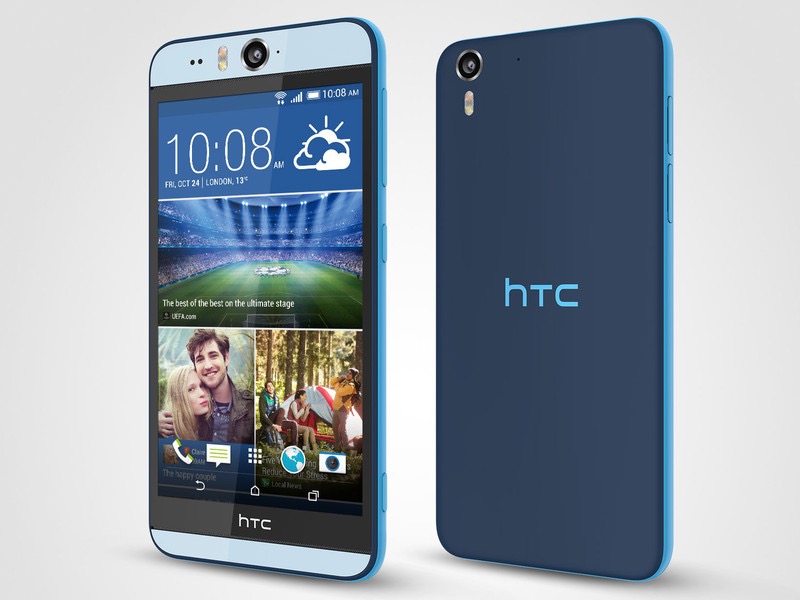
2 nights ago HTC launched 2 new pieces of hardware. The standalone RE camera and the Desire Eye. The Desire Eye had a 13mp front and back along with true tone flash units on the front and back.
HTC also released quietly a new version in China of the HTC One M8, the One M8 Eye. You guessed a One M8 without the 4mp Ultrapixel, but simply a 13mp lens. However, unlike the Desire Eye it did not feature an upgrade to the front camera.
I must admit, the Desire Eye looks like a good piece of kit.
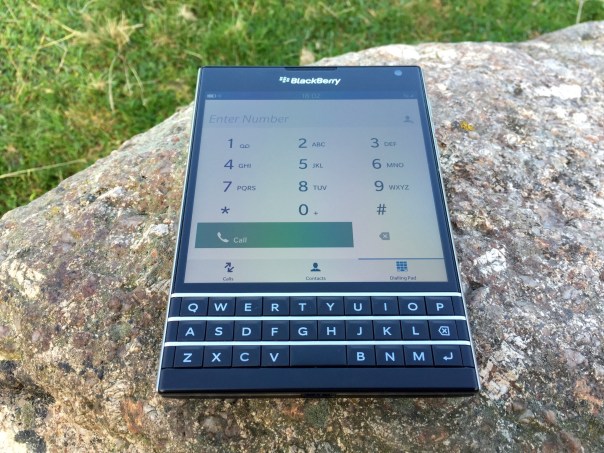
Today, I am going to look at the keyboard, notes and the settings. First up is the note taking app which does more that just take notes.
You can add photos, files, voice recordings and more, and also share with ease.
So how does the keyboard work entering text in this situation. I was going to attach some more screen shots and photos, but if you really want to see how crazy clever and complex the Passport keyboard is, look at this instructional video from BlackBerry. In fact, this should be mandatory to watch for all Passport owners.
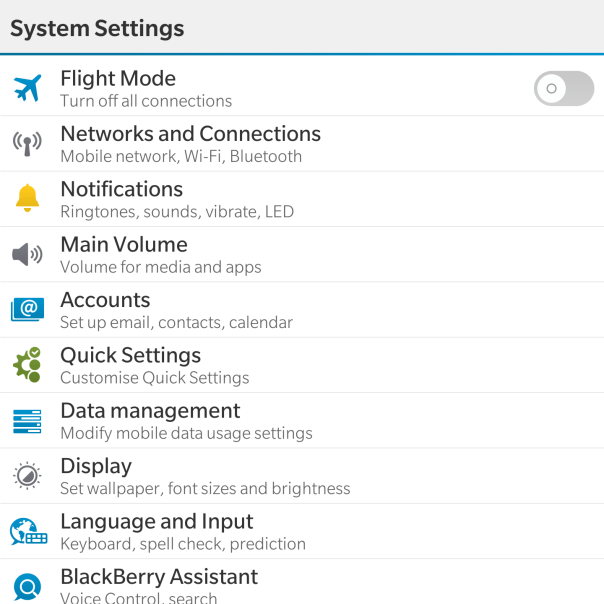
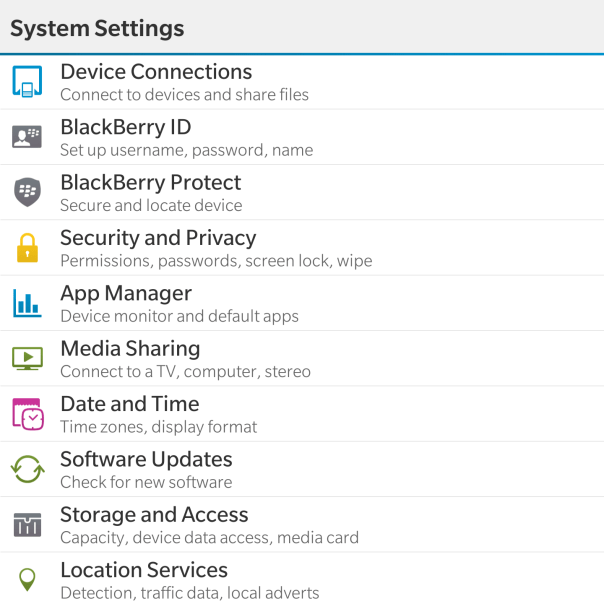
Moving on from the keyboard, lets have a close look at the settings app.
Now as the Passport features top of the range hardware it should come as no surprise that the settings menu is rather comprehensive.
With the Networks and Connections settings is options for Mobile Network (mode, data switch), WiFi, Bluetooth, VPN, NFC, Mobile Hotspot and Internet Tethering.
Within the Notifications, Main Volume, Accounts and Quick Settings there are no surprises really. Just your standard affair of options for controlling these parameters. Data Management displays data usage, setup for data limits, options to show a setting for email resizing and whether to download images automatically in emails. In fact most of the options are self explanatory and even provide text under the headings to assist you.
For my final thoughts so far, don’t forget to listen to the next episode due out on Sunday of “Gav & Dave’s Tech Podcast”.
Samsung have released so far 2 videos promoting the features of the Note 4. In my mind, these are excellent as they are not knocking the competition but highlighting in a clever manner particular aspects of the phone.
This is the body of the email I received from Apple this morning.
“Thank you for using two-step verification to protect your Apple ID and the data you store with iCloud.
This is a reminder that starting tomorrow, app-specific passwords will be required to access your iCloud data using third party apps such as Microsoft Outlook, Mozilla Thunderbird or other mail, contacts and calendar apps.
If you are currently signed in to a third party app using your primary Apple ID password, you will be signed out automatically when this change takes effect. You will need to generate an app-specific password and sign in again.
To generate an app-specific password:
Sign in to My Apple ID (https://appleid.apple.com)
Go to Password & Security
Click Generate App-Specific Password”
This will be fun as I have no idea how many apps this affects.
HTC held a press event last night and revealed 2 new pieces of hardware, the Desire Eye and RE camera. Then they announced that the RE camera software would work on android and iOS devices. That was after telling the audience HTC’s Zoe app was out of beta and available on the Google Play store and downloadable by all phones not just HTC handsets. And the iOS version was due out soon!
So the HTC Desire Eye is a 5.2-inch smartphone similar to One M8 specs except it’s in a flat polycarbonate body, a 13-megapixel camera front and back with decent dual tone flash on both sides. It is also water resistant with boomsound and advanced noise reduction.
The HTC RE camera, looks like a periscope miniaturised or an inhaler is a handheld camera with a 16-megapixel Sony DSC sensor and a 146-degree field of view. It then connects to Android or iOS phones via a dedicated app. It can of course shoot on its own.
The main aspect of HTC’s event is the fact it was opening up its software to iPhones and all android phones. Maybe HTC is trying to create a photo social network and of course raise its brand awareness. Whatever it’s long term plans, it’s good to see the company to start to think outside of the box, and away from just selling hardware.
So what did you think about the event, new software path and the Re camera and Desire Eye?






 Gavin's Gadgets & Photography