Category Archives: Apple

Apple iPhone 6s vs HTC 10 vs Samsung Galaxy S7 vs LG G5 – Camera Night Shots

Daylight was disappearing fast and before you knew it, it was pitch black in the haunted graveyard of the Church of St Michael & All Angels, Princetown, Dartmoor, UK.

Fortunately I was not afraid as I was armed with 4 of the latest and top flagship smartphones to protect me from the ghosts and spirits.

The task was simple, take a number of shots using the 4 smartphones to decide a clear winner. There were a few surprises on the way with this test too. With all the phones I shot in auto and where available pro modes. I have shown the exif data with each shot, and if you want to pixel peep, you can click on each photo to explore the full size photo.

Each photo has the exif data and time taken. The photos are in order of time. Please be patient as there are 25 shots in total to view.

HTC 10 – Auto – 1/25 ISO 500 – 9.23pm

The HTC 10 produced a very realistic shot in terms of how dark it was at the time and the colours and white balance.

HTC 10 - Auto - 1/25 ISO 500 - 9.23pm

LG G5 – Auto 1/13s ISO 350 – 9.24pm

Oodles of detail from the G5. Great shot.

LG G5 - Auto 1/13s ISO 350 - 9.24pm

LG G5 – wide – auto – 1/15s ISO 550 – 9.24pm

With just a little light the wide angle lens on the G5 does a good job.

LG G5 - wide - auto - 1/15s ISO 550 - 9.24pm

Samsung S7 – Auto – 1/13 ISO 200 – 9.24pm

These dusk to darkness shots are excellent from the S7.

Samsung S7 - Auto - 1/13 ISO 200 - 9.24pm

HTC 10 – 1/6s ISO 100 – 9.26pm

A cracking shot from the HTC 10. I really like this.

HTC 10 - 1/6s ISO 100 - 9.26pm

HTC 10 – 1/2s ISO 100 – 9.26pm

A great shot again from the HTC 10.

HTC 10 - 1/2s ISO 100 - 9.26pm

Samsung S7 – Pro Mode – 0.5s ISO 50 – 9.26pm

The difference of 0.5 seconds. A good shot from the S7.

Samsung S7 - Pro Mode - 0.5s ISO 50 - 9.26pm

LG G5 – Manual mode – wide – 2s ISO 50 – 9.27pm

The 8mp 135º wide angle lens of the G5 looks amazing but pixel peeping reveals its weaknesses.

LG G5 - Manual mode - wide - 2s ISO 50 - 9.27pm

LG G5 – Manual mode – wide – 2s ISO 50 – 9.27pm

It wasn’t daylight but at 2 second shutter even with the wide lens, a great picture is captured.

LG G5 - Manual mode - wide - 2s ISO 50 - 9.27pm

Apple iPhone 6S – f/17 ISO 640 – 9.28pm

An average shot from the iPhone 6S, but not at the same league as the other phones.

Apple iPhone 6S - f/17 ISO 640 - 9.28pm

Apple iPhone 6S – 1/17s ISO 400 – 9.29pm

Once it got too dark, the iPhone 6S was really struggling as this is evident when you pixel peep.

Apple iPhone 6S - 1/17s ISO 400 - 9.29pm

Apple iPhone 6S – 1/17s ISO 640 – 9.29pm

So with the ISO increased, the photo looks brighter but its still falls short compared to the other phones.

Apple iPhone 6S - 1/17s ISO 640 - 9.29pm

Samsung S7 – Pro Mode – 1s ISO 50 – 9.30pm

A vivid and sharpened shot from the S7, but one that look good.

Samsung S7 - Pro Mode - 1s ISO 50 - 9.30pm

Samsung S7 – Pro Mode – 2s ISO 50 – 9.30pm

One extra second shutter time from the S7 shot above and it looks too bright. But lots of detail.

Samsung S7 - Pro Mode - 2s ISO 50 - 9.30pm

HTC 10 – 1s ISO 100 – 9.32pm

A good photo from the HTC. Lots of detail.

HTC 10 - 1s ISO 100 - 9.32pm

HTC 10 – 1s ISO 100 – 9.34pm

An average shot with the HTC 10. I had thought I had pushed a 2 second shutter, the max in pro mode, but the exif data only shows 1 second.

HTC 10 - 1s ISO 100 - 9.34pm

LG G5 – Auto – 1/9 – Night mode activated – 9.36pm

A wide angle lens shot again, lots of noise and artefacts.

LG G5 - Auto - 1/9 - Night mode activated - 9.36pm

LG G5 1/9s ISO unknown AUTO – 9.36pm

Like the wide angle shot above, in auto mode at night, the G5 activated some photo mode to obtain the best shot.

LG G5 1/9s ISO unknown AUTO - 9.36pm

LG G5 – Manual mode – 5s ISO 50 – 9.37pm

The G5 is doing a good job again this late at night.

LG G5 - Manual mode - 5s ISO 50 - 9.37pm

LG G5 – Manual mode – 8s ISO 50 – 9.37pm

Wide lens at 8 seconds shutter is not enough to stop noise and artefacts.

LG G5 - Manual mode - 8s ISO 50 - 9.37pm

Apple iPhone 6S – 1/17s ISO 1250 – 9.37pm

Very high ISO and a loss of detail from the iPhone 6S.

Apple iPhone 6S - 1/17s ISO 1250 - 9.37pm

Samsung S7 – 1/10s ISO 1000 Auto – 9.37pm

In this shot the S7 made the photo appear not as dark as it really was. Lots of noise and artefacts in this shot. At ISO 1000 this is to be expected.

Samsung S7 - 1/10s ISO 1000 Auto - 9.37pm

LG G5 – Manual mode – wide – 8s ISO 50 – Edited WB – 9.37pm

With a bit of fun with the white balance I created the shot below.

LG G5 - Manual mode - wide - 8s ISO 50 - Edited WB - 9.37pm

Samsung S7 – Pro mode – 4s ISO 50 – 9.38pm

As it became near pitch black, the street lamp just outside of the perimeter of the church wall played havoc with the white balance. Not very good and the processing is all over the place.

Samsung S7 - Pro mode - 4s ISO 50 - 9.38pm

Samsung S7 – Pro mode – 8s ISO 50 – 9.38pm

Again when it got very dark the S7 just failed to cope with the white balance as above but there is detail in this shot despite noise and processing.

Samsung S7 - Pro mode - 8s ISO 50 - 9.38pm

In terms of ranking the Apple iPhone 6S comes last. When it was pitch black except for a nearby street lamp, the S7 lost control of the white balance. So that left the G5 and HTC 10. Very close call and sometimes in between pitch black and dusk the S7 did a good job.

Also, if any of the shots from the iPhone were shared to twitter or social media, nobody would be any the wiser.

So in terms of the HTC 10, LG G5 and Samsung Galaxy S7 its a close call. The G5 has more pixels and up to a 30 second shutter speed. It also has the amazing wide angle lens. The HTC 10 has the largest pixels and at times it shows. And the the Samsung Galaxy S7 with its f/1.7 and fast focussing is superb until it gets pitch black.

So who is your winner?
Audioquest Dragonfly RED – The Latest & Greatest DAC the size of a USB stick – review

C360_2016-05-01-17-34-52-092

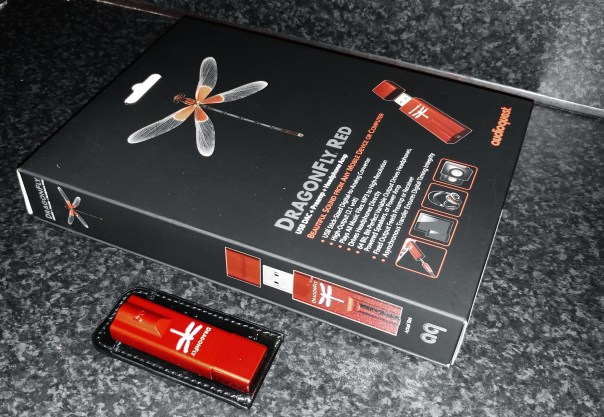
Welcome to my review of the Audioquest Dragonfly Red. The Dragonfly Red is a USB DAC, Preamp and Headphone amplifier all squeezed into the size of a USB memory stick.

The Key Specification

– USB Stick-Sized Digital-to-Analog Converter
– Plays all music files: MP3 to high-res
– Compatible with Apple and Windows PCs, as well as iOS and Android mobile devices (requires Apple Camera Adapter or Made for Android/OTG adaptor)
– Drives headphones directly
– Fixed output feeds preamp or AV receiver
– Asynchronous transfer ensures digital timing integrity
– High output (2.1 volts) drives almost all headphones, including power-hungry models
– 32-bit ESS 9016 DAC with minimum-phase filter
– Bit-perfect digital volume control
– Firmware upgradeable

The Sound Quality and Experience

For the purposes of this review I tested the Dragonfly Red using my iPad, Samsung Galaxy S7 and Macbook. Headphone used were Oppo PM-3, Dunu Titan 5, Sony XBA-1, Sennheiser HD598se and Audio Technica M50x.

All three source components had no issues functioning with the Dragonfly Red. To use with the iPad I needed to use the Apple Camera adapter and with the Samsung Galaxy S7 an OTG adapter. Samsung include an OTG adapter in the box which is handy.

Also worth noting on the S7, to get the best experience you must use an app called USB Audio Player Pro. If you listen to the S7 using other music services/apps they don’t connect to the digital direct drive volume so at max levels the volume may not be high enough. With UAPP the volume is immense.

When using portable devices or your smartphone, the Dragonfly Red does drain the battery of your device faster than normal. This is to be expected as its needs power from somewhere. However, unlike other portable DAC/Headphone amps that have an built in battery, it never goes flat or needs recharging.

I listened to a number of different genres – dance, classical, jazz, rock and blues. I found the Dragonfly Red provided oodles more power and control than using the source components own headphone jack. Also the layering and delicacy of the music was lovely at times. This was more noticeable with classical and jazz genres. The soundstage improved too with the DAC. Overall the music was clearer, more defined, better layered and provided a decent lift in quality.

Conclusion

A remarkable piece of kit from Audioquest. Top notch sound quality bundled in such a small package. Recommended.

For more information and the latest deals on Amazon UK, click HERE.

Apple releases new firmware updates – details and a warning if you have the iPad Pro

Apple releases software updates for all its hardware yesterday, including iPhones, iPads, Apple Watch, Apple TV, Mac’s and more.

iOS 9.3.2 – This is mainly about bug fixes. The main points –

– Ability to use Night Shift while Low Power Mode is activated.
– The Game Center bug has now been fixed.
– iPhone SE bluetooth audio issue where some Bluetooth accessories could experience audio-quality issues when paired to iPhone SE is fixed.
– Fixes an issue looking up dictionary definitions which previously could fail.
– Addresses an issue that prevented typing email addresses when using Japanese Kana keyboard in Mail and Messages
– Fixes an issue for VoiceOver users using the Alex voice, where the device switches to a different voice to announce punctuation or spaces
– Fixes an issue that prevented MDM servers from installing custom B2B apps

However, according to Macrumors.com iOS 9.3.2 is causing problems for some 9.7-inch iPad Pro owners, with multiple MacRumors readers and Twitter users reporting issues shortly after installing the update over the air. Affected users are seeing an “Error 56” message that instructs them to plug their devices into iTunes. So it might be worth holding fire for a few days before updating your iPad Pro.

watchOS 2.2.1 – this software update is all about making your Apple Watch run smoother by fixing a number of annoying bugs.

tvOS 9.2.1 – like other updates this is all about bug fixes.

iTunes 12.4 iTunes 12.4 introduces new interface tweaks including a new media picker that allows users to quickly switch between Music, Movies, TV shows, and more. Next there is a persistent sidebar . This interface tweak makes it easier to switch between different categories of content. The menus interface has also been simplified.

OS X 10.11.5 – this is all about bug fixes.

Seems Apple had a lot of bugs to fix across all its devices!

Apple iPhone SE – It’s killing the competition 

Having held the iPhone SE when it first came out, I initially thought it was a fake phone. I didn’t think the screen looked real and it felt so small. Ten minutes later and still playing around with the Apple Store demo I began to relive the joys of a small powerful phone that fits in every pocket and is a breeze to use one handed. 

However, at the moment my phone of passion is torn between the LG G5, Samsung Galaxy S7 and the HTC 10. The Huawei P9 has some love but not at the same level. 

Consequently as I like phones I also tend to know all the people in my location and surroundings that sell them.  News on the front line is Apple’s affordable iPhone SE is killing it sales wise. Rose gold has up to a 20 days wait. So why is it so popular. Well it’s one of the cheapest iPhones available. And that does make a difference. It is also the only non big screen decent phone available. Sony has the Z5 Compact but it’s not an iPhone. 

This explains why Apple has been caught by surprise with sales of the iPhone SE. People prefer usability and a lower price over a larger cumbersome sized phone. I myself got rid of my S7 Edge for a smaller S7. Life is so much easier with a smaller physical phone. 

LG G5 Friends – LG 360 Cam – Review

image

Welcome to my review of the LG 360 Cam, one of the LG G5 Friends. The LG 360 Cam is available from Clove Technology and costs £199.

image

The Key Specification

– Bluetooth V4.1
– Wi-Fi 802.11 b/g/n
– USB Type 2.0 Type-C
– Battery 1200 mAh
– Optics 13 MP, 206° x 2 (Dual Fisheye Lens)
– Max. Video Res 2560 x 1280 (30fps)
– Max. Photo Res 5660 x 2830 (16M)
– Image / Video File Format Still Image : JPEG / Video : MP4 (MPEG-4 AVC/H.264, Audio : AAC 5.1Ch)
– Capturing Spherical / Half-spherical image & video
– Sound 3 Mics
– External SD Card Up to 2 TB
– Dimensions/Weight 40 mm x 97 mm x 25 mm / 76.7 g

The LG 360 Cam features compact spherical 13mp cameras that can shoot at a max of 206 degrees x 2 (dual fisheye lens)to create a 360 degree photo or video. 2K Video support and 5.1 channel audio is supported too. The LG 360 CAM is compatible with Youtube and Google Street View app. You can directly publish 360 video and photo taken by the LG 360 CAM to Youtube and Google Street View.

Hardware

The hardware is brilliant. The LG 360 Cam is charged via USB Type C. It takes micro SD cards up to 2 TB too. The protective case acts as a stand as shown. It also has a tripod screw mount built in. The hardware controls are simple too. Power on button is on the side. LED indicator for showing you which mode – 360 or 180 degrees. Press front button to take a photo, or press and hold for video. You can control it without the LG 360 Cam software or with it. With the cam manager software you get far more options and controls.

Software

The LG 360 cam manager software is superb. The main splash screen gives you access to the camera controls, gallery and settings.

wp-1462255646225.png

The gallery shows you what is sitting on the 360 Cam micro sd card and what is on the LG G5. You can download and delete content from the 360 Cam with ease. The settings menu give you access to a range of useful information and the firmware updates.

wp-1462255653225.jpg

The LG 360 Cam has its own app which can also be accessed via the LG Friends Manager. Connection is via WiFi Direct and is really quick. The LG 360 Cam has a lot of options as shown below.

image

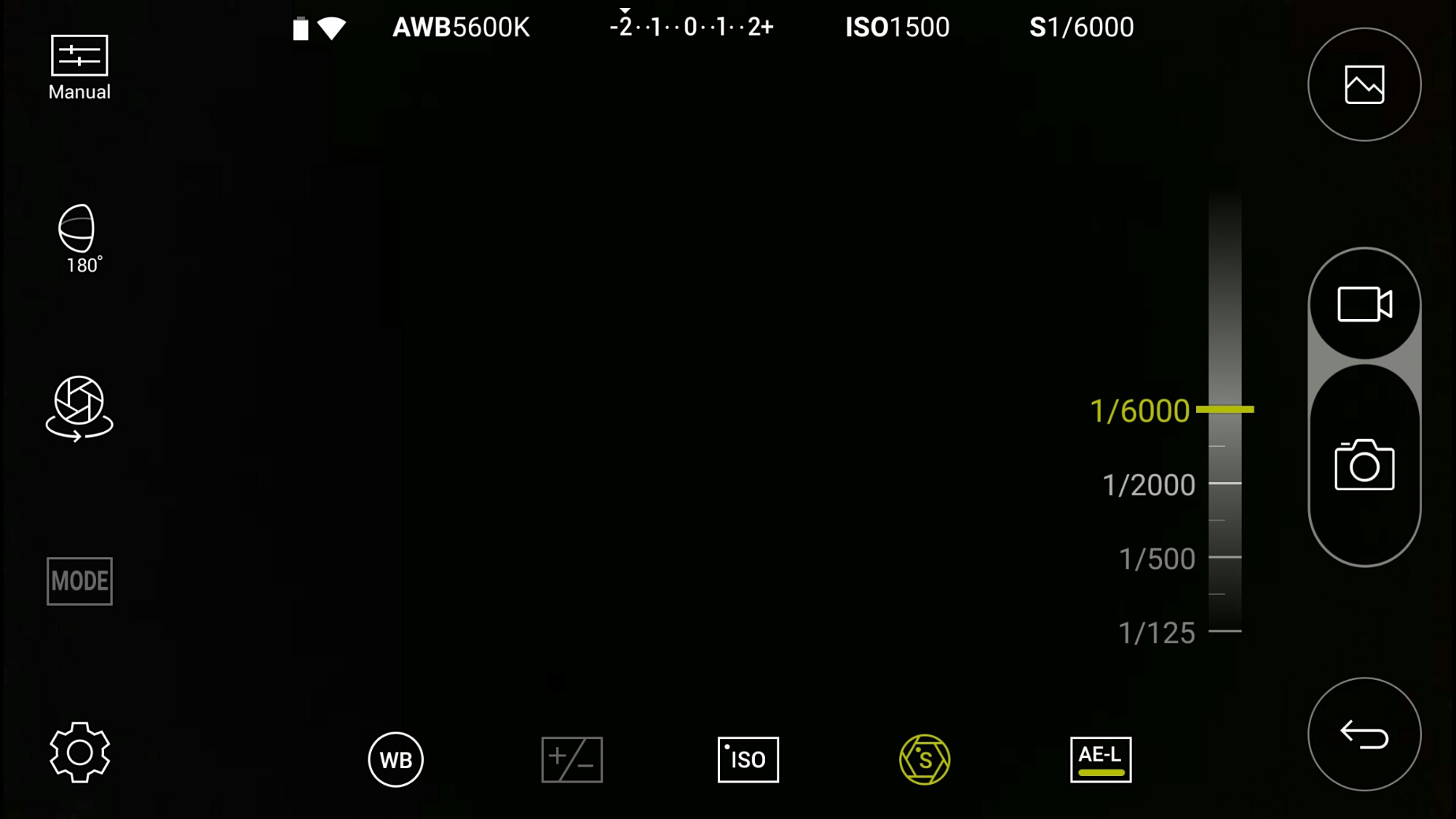
Look above. That’s right. This is manual mode. The LG 360 Cam has an excellent manual mode. Here you can see the faster shutter speed is 1/6000.

image

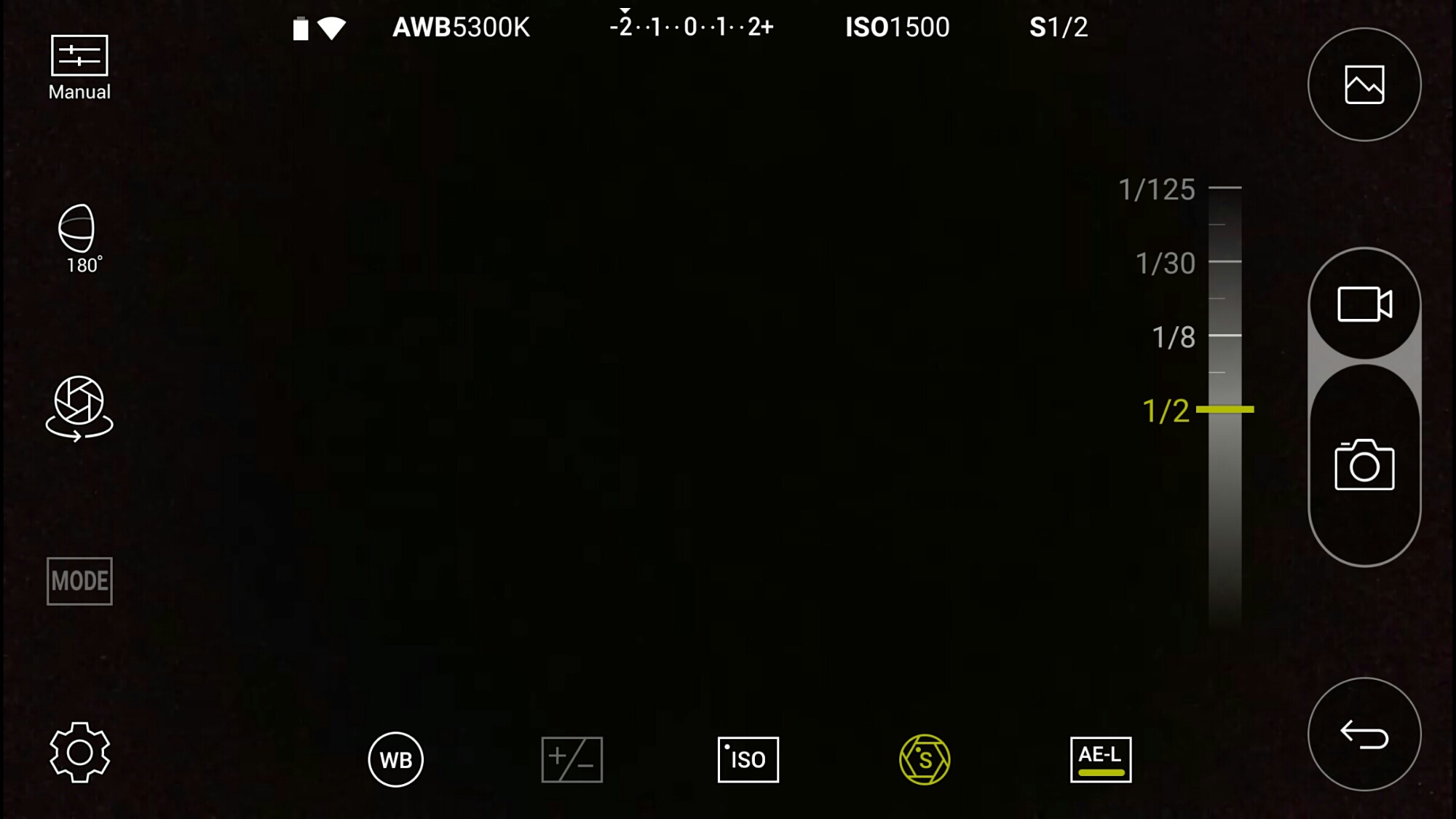
And the slowest shutter speed is 1/2 second. Other options include exposure, white balance and ISO.

image

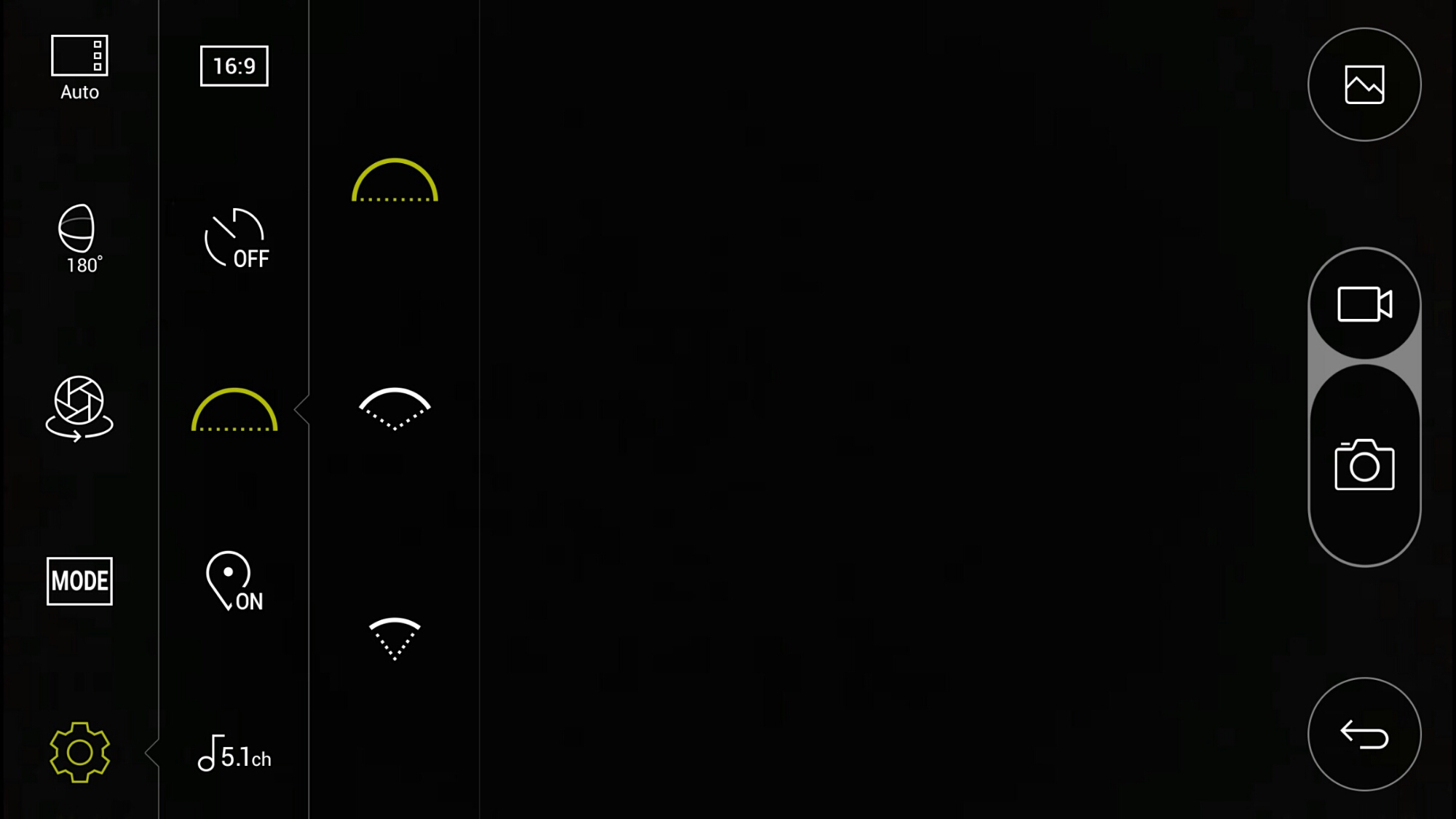
If taking photos at just 180 degrees instead of the full 360 degrees, you can alter the field of view angle. I have photo examples of the difference this makes below.

image

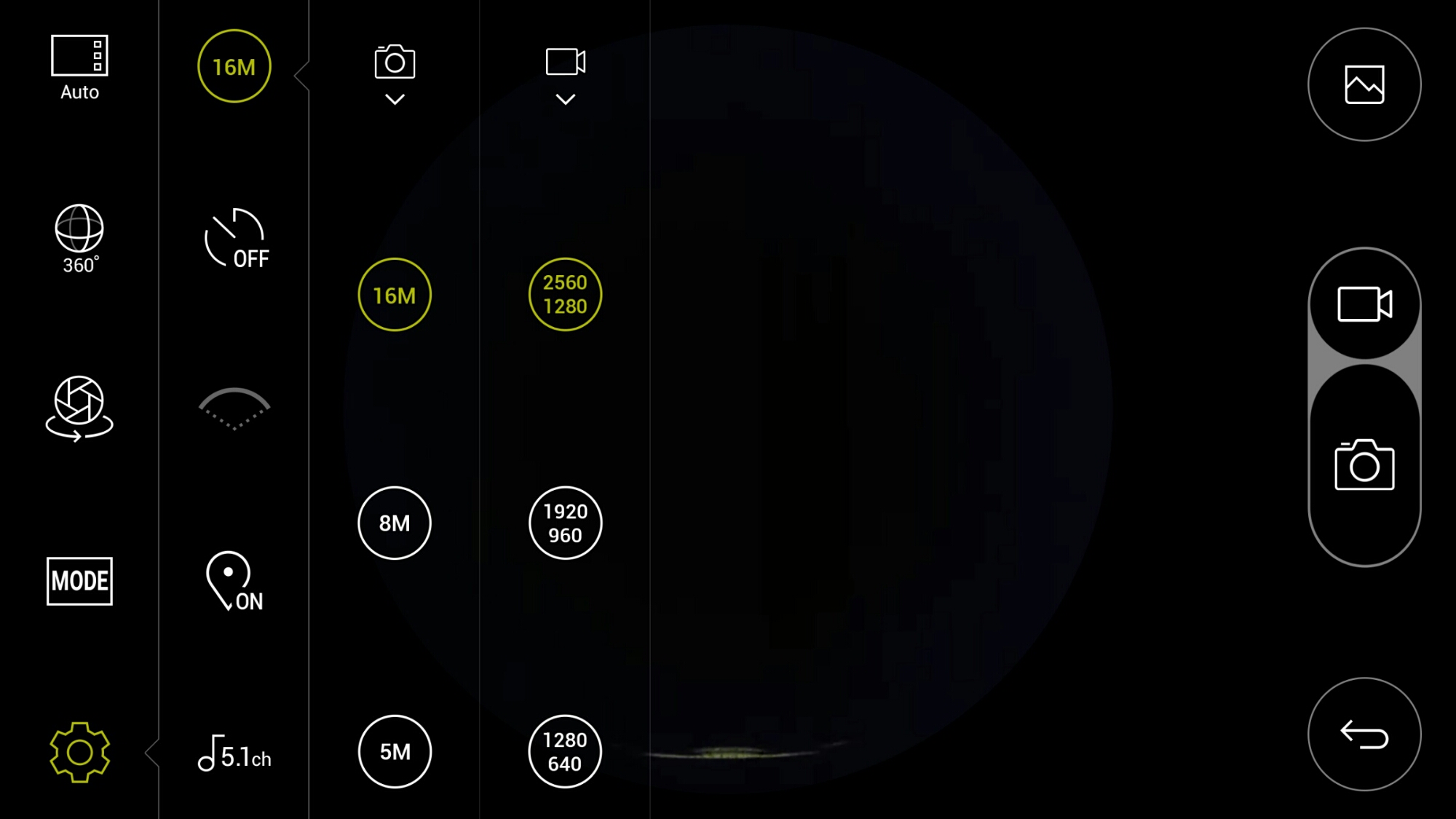
In terms of settings for video and photo quality, there are plenty of options. As standard it records in 5.1 Channel surround sound audio. You can change this to 2 channel stereo.

image

There are also a choice of scenes/modes as shown.

When using the 360 cam manager it is great being able to see what you are recording. If you are standing more than 50 feet approx away approx from the device or if your line of site is blocked, you may not be able to see what you are filming on the screen but you will still be able to control it. On the second video below, I hid behind a wall so I was not in the footage, but I could still operate it.

Playing the footage back on the LG G5, you can either view in 360 degrees or use the select split screen mode. This shows video from each side of the cameras split 50/50 on screen. Rather cool. You can also connect the LG 360 VR glasses and see the footage in a whole new way!

Example Footage

First up is a 360 video of my village, Princetown, Dartmoor.

Another example down by the river.

Below are photos from the LG 360 Cam in 360 degrees and lower using the options in the camera app.

image

Next using the 360 cam in 180 degrees you have 3 different wide settings. Below are 3 shots starting with the widest field of view down to the narrowest.

image

image

image

Conclusion

The LG 360 Cam is a decent product and well thought out and consequently is recommended. Using this with the LG 360 VR glasses creates a whole new world.

If you are interested in the LG 360 Cam this is now available fromClove Technology.

Apple opens up Apple Music even further – details

Apple has provided more detailed information for developers on how to take advantage of the new Apple Music API introduced in iOS 9.3.

In a document titled Apple Music Best Practices for App Developers, Apple summarizes how third-party iOS apps can integrate with Apple Music, including some of its functionality in their apps.

Specifically, the Apple Music API will allow develoePrs to directly control Apple Music playback as well as determining if a user is currently a member, determine which country the user’s account is based in, queueing up songs for playback, and reading playlists already in a user’s music library and creating new playlists with a title and description.

Developers can also participate in the Apple Music Affiliate Program, earning a one-time commission if a user signs up for a paid Apple Music account using their app.

Is Apple becoming the new Google? As revenue drops, will Apple look at new ways to open up and gain new users?

Source / More Info

Apple launches CareKit for iOS – full details

Apple has launches its 3rd medical framework called CareKit.

CareKit allows users to collect medical data that can be shared with physicians and other carers to provide an accurate log of symptoms and signs to assist with diagnosis and treatment.

Four CareKit apps are now available –

– Glow Nurture is a pregnancy tracker that allows an expectant mother to log progress and obtain information on what to expect when. The app is free, but a subscription is required to unlock full functionality.

– Glow Baby takes over from Nurture when the baby is born, tracking everything from feed schedules to growth charts, and is likewise a freemium app.

– One Drop is a diabetes management app that provides one-touch logging of glucose, food, meds and activity. It also syncs data from Bluetooth-enabled handheld blood glucose monitors, and provides reminders when meds are due. It’s a free app, with Apple Watch support.

– Start is a depression-management app which provides testing and progress-tracking to help determine the effectiveness of meds. It also provides meds reminders and side-effect logging. The app is free.

CareKit also integrates with hospital records systems like Epic and Cerner.

What Apple is doing with CareKit framework is truly excellent and currently leaves iOS in a class of its own when it comes to this area of integration onto a mobile operating system.

Source

Highlights of the Apple’s Q2 Earnings call – Plus Editorial

So Apple held their Quarter 2 earnings call last night.

Below are the key highlights –

– 51.2 million iPhones sold vs 61 million sold the year before
– Mac sales 4.03 million down from 4.56 million from the year before
– 10.2 million iPads sold down from 12.6 million from the year before
– Quarterly revenue of $50.6 billion / net income of $10.5 billion /$1.90 per diluted share.
– Apple Music revenue up from £11m paying subscribers in Jan to £13m in April.
– Apple makes more money from its services than selling macs. App Store, iTunes and iCloud services have increased 35% from last year
– Apple Pay income not significant enough to declare figures.

Is it doom and gloom that sales have declined around 13%. Not at all. Apple also still has $233,000,000,000 in cash.

Lets repeat again what Apple sold despite the decline. It sold over 51 million iPhones, 4 million macs, 10.2 million iPads along with accessories and Apple Watches. And the net income is still $10.5 billion. That is still one hell of a result.

Pocket Casts for iOS – Details of the Big Update

The developers of the superb Pocket Casts app have been working on a huge update for iOS. The android version has been updated ages ago and includes many features not found on the iOS version.

In a recent blog post, Shifty Jelly the developers explained what has happened with Pocket Casts for iOS and why it has been delayed by several months.

Fast forward to September and things seemed to be tracking well. Both Pocket Weather and Pocket Casts were cruising along, and we felt fairly confident in our estimates. So we did what any tech company does in this case, we published a blog post. In it we (foolishly, in hindsight) said we’d ship both Pocket Casts and Pocket Weather before 2015 was done. There was a real buzz at Shifty Jelly, this was going to be an awesome set of releases!

After the holiday period, we regrouped in January. Jeff would spend as much time as he could give us working on version 5.2, which added a dedicated full screen iPad interface, and I went back to work on Pocket Casts.

I’m working on it full time now, 5 days a week. When will it be out? When it’s ready. I’m sorry. It is however being worked on today, and tomorrow, and every day after that until it’s ready. It’s our core focus, our singular mission. So if you’ll excuse me, I need to get back to coding.

So basically the app is being worked on full time and will be ready when its ready. As they say, better late than never. For the full transcript hit the source link below.

Source – Shifty Jelly

Whoops! Chinese Government shuts down iTunes Movies and iBook stores

In its biggest move yet to regulate Apple in China, the Chinese government has forced Apple to shut down its iBooks Store and iTunes Movies in the country — just six months after the services were first made available.

While the government initially approved the launch, the State Administration of Press, Publication, Radio, Film and Television reportedly changed its mind and demanded that Apple shutter the service.

Cultofmac.com reported the above that the Chinese Government got tough with Apple again. Selling in China is a potential goldmine for Apple but the government really want ultimate control and censorship. Maybe the Chinese people will create an uprising of protests against their government? To me this is not only about state control but the state wanting a share of the profits too!