Category Archives: Android

LG G5 Friends – The LG Cam Plus – Detailed Review with FULL Specifications

image

Welcome to my review of the LG Cam Plus. This is my first review of one of the modules/friends for the LG G5. The LG Cam Plus costs £69.00 and is available from Clove Technology.

The Key Specifications / Features

– Comfortable Shooting Grip
– Traditional camera experience
– Physical keys: intuitive camera on/off, zoom, shutter, and record keys; autofocus with a half-press of the shutter key
– Burst Mode will become available with later firmware update
– USB USB 2.0 Type-C
– Battery Li-ion 1,200 mAh
– Charging time less than 200 minutes
– Voltage 5 V ±10%, 9 V ±10%
– Current Consumption 25 mA (no Charging), 1 mA (Power Off)
– Charging Consumption 500 mA
– Output Consumption 500 mA
– Audio Speaker and digital MIC
– Sound Pressure 1 m sound pressure 60 dB ↑ (100%) *based on a full charge
– Antenna GSM/CDMA, WCDMA, LTE™
– LED Battery indicator
– Operating Temperature -20 °C – 40 °C
– Dimensions/Weight 73.9 mm X 61.4 mm X 15.9 mm / 55.4 g

What is it like to use?

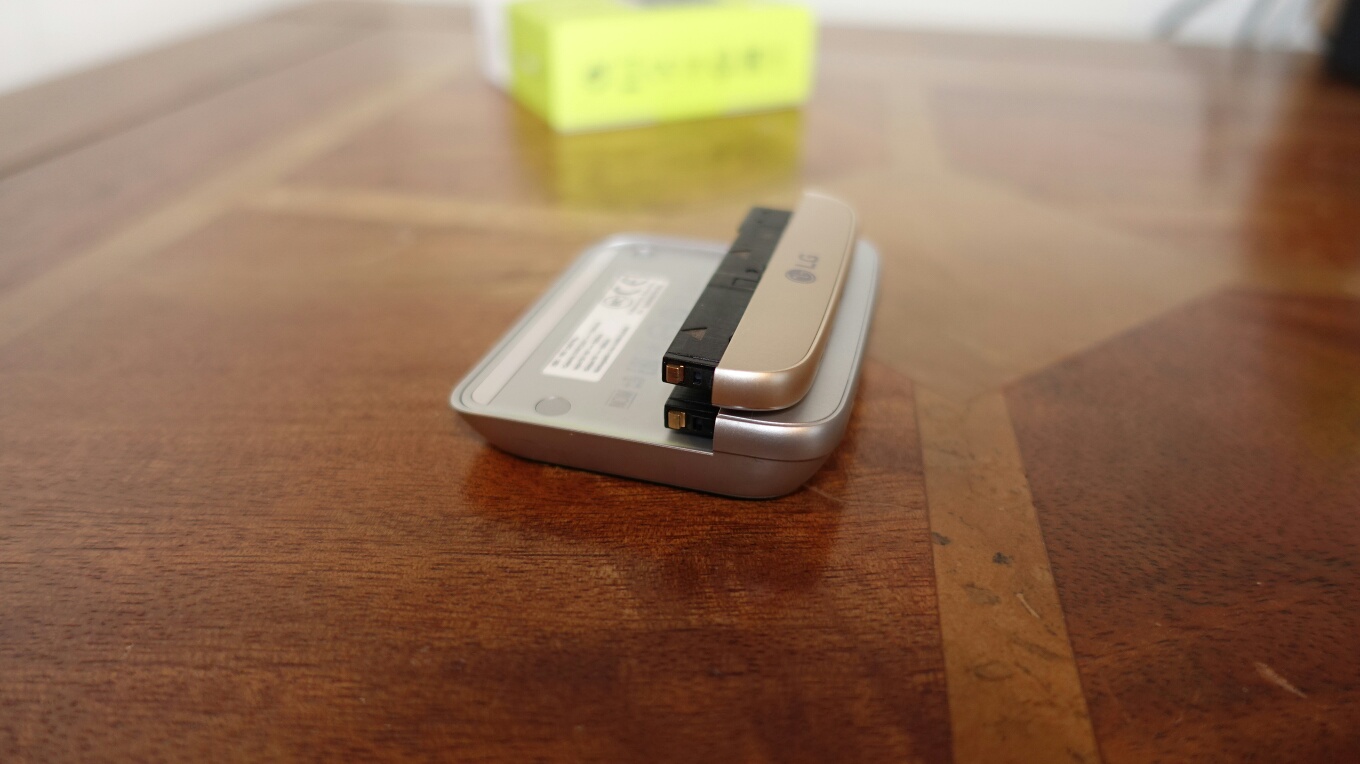
The LG Cam Plus replaces the bottom chin of the LG G5. It is slightly longer as you can see from the photos and it is also only available in silver. It also means the G5 is no longer flat and if you have a case for your phone it won’t fit now. I don’t use a case for my G5. The design seems tough and durable so far and it doesn’t show any fingerprints.
image

My LG G5 is gold. In all honesty the different colour finishes do not matter but it would have been nicer if it had been available in matching colours. The LG B & O HiFi Plus module is black.

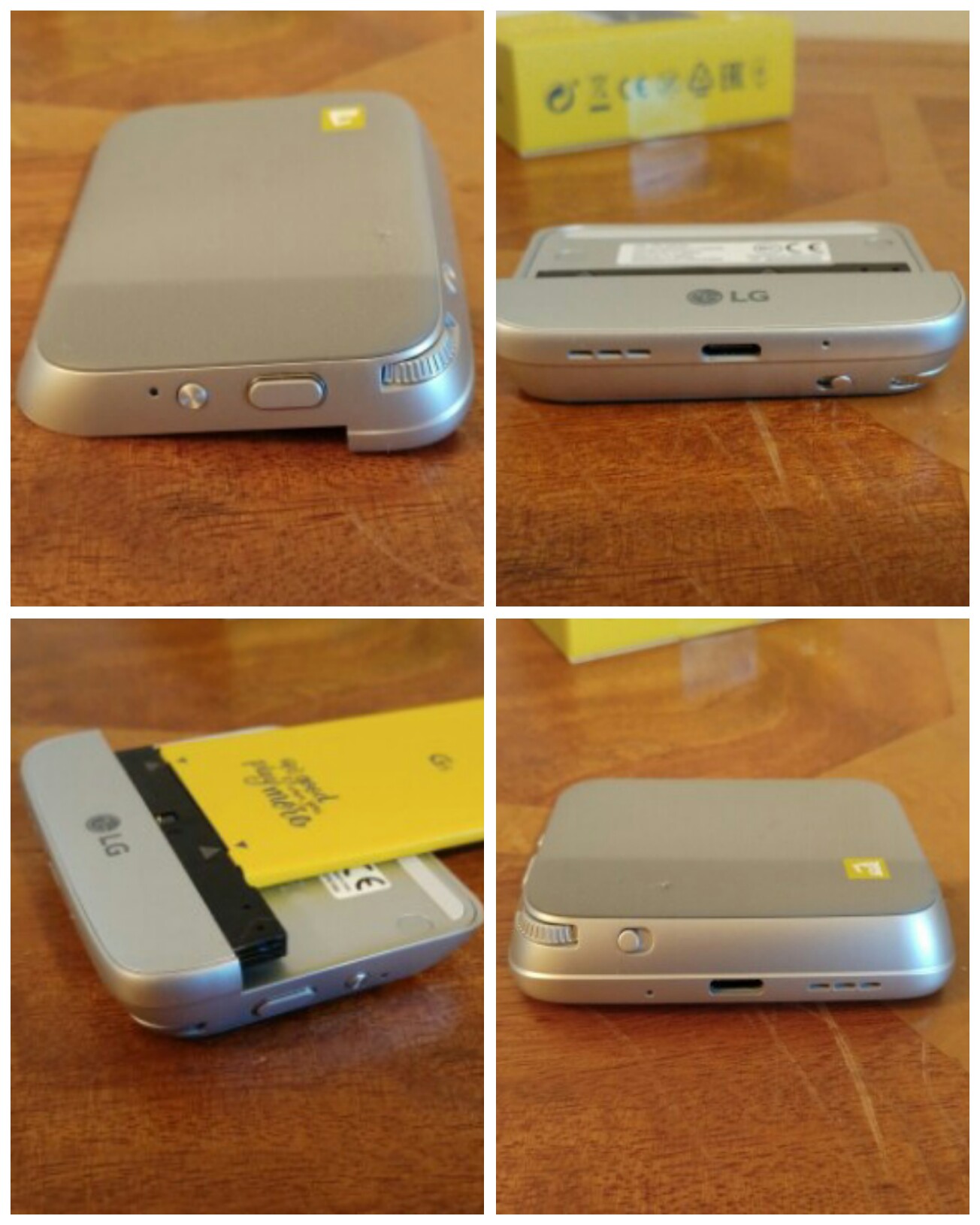
The LG Cam Plus contains a 1,200mAh battery, the antenna for GSM/CDMA,WCDMA and LTE, audio speaker and digital mic. It is recharged using your LG G5 USB Type C cable. LG claim it takes less than 200 mins to recharge the battery. From flat I found it took about 2 hours. There is a LED light than is red while recharging and turns green when fully charged. The LED is also there to notify you when the battery is under 10%. Connecting the USB Type C cable to the Cam Plus first fast charges the G5 and then the module. Whilst the power lead is connected to the Cam Plus you cannot use the keys on it.

So how does it all work. Simply remove the bottom off your G5 by pressing the button. Take the battery off. Removing the bottom chin and the battery are so simple BUT make sure you have read the manual that explains the technique. Connect the battery to the Cam Plus and connect the module to the LG G5. Power on your G5. I wish the G5 didn’t have to power off each time you swap module. However, it does this as each module has its own firmware which will receive updates to improve it. With the Cam Plus connected the weight increases by about 50g. The firmware is controlled via the LG Friends Manager and Cam Plus app.
image

Here’s the crazy part. The Cam Plus contains the cellular antenna, mic and loudspeaker. These improve upon the G5. The larger enclosure of the module helps the loudspeaker sound. I have done several Skype calls with and without the module. With the module fitted the calls were clearer. Plus you can use the 1,200mAh battery to keep the G5 charging while on a long Skype call. Video recordings using the mic also highlighted the improved audio.

So what is the grip section like to use as a camera. It is not the most natural grip to hold. I have no idea how the LG videos show it being used one handed. It is possible but I do recommend 2 hands. However, with 2 hands in action it is a lot better to use. There is a button that you slide to instantly activate the camera and sliding it again reverts back to the G5 home screen. There is a 2 way shutter button that works very well and a button for video recording. You can take photos while video recording. There is a leaflet in the Cam Plus box stating that burst mode will come soon via a firmware update. So for the time being you have to use the on screen shutter button for burst mode. The other control is a zoom scroll wheel which zooms in and out of the shot effortlessly going between the 16mp and 8mp wide lens. The 1,200mAh battery only works when the camera is being used. It very slowly adds charge back into the G5. It stops charging after about 5 mins of not using the camera grip. However, it is very useful to have power slowly put back in the phone as the camera does like to drain the G5. I took a 20 min time-lapse and noticed the camera grip had turned off, probably after the 5 min mark and probably because it didn’t detect any movement on the grip keys. Hopefully a future firmware update will change this.

The small print. With the Cam Plus connected USB OTG and USB Audio does not function. Again will this might change with a firmware update.

Conclusion

I take a lot of photos. I have found the Cam Plus handy to have for this purpose. It is a breeze swapping off and on again. I also like the fact the battery level of the phone is being maintained despite snapping loads of photos.

Available from Clove Technology.
LG Stylus 2 arrives on O2 – Complete with a DAB Radio and Stylus

1 LG stylus

O2 has announced it is going to be carrying the LG Stylus 2.

The LG Stylus 2 is the first smartphone with a DAB radio support. Naturally using the DAB radio means listening to your favourite music radio shows without using your data allowance.

Currently the LG Stylus 2 is an O2 exclusive in the UK. It is available from £19 a month, or PAYG for £219.99.

The key specs –

– 5.7-inch HD display
– 1.2GHz quad-core processor
– 1.5GB ram
– 16gb internal storage
– 3,000mAh removable battery
– Android 6.0
– 13MP main shooter, 8MP front-facing camera

More at O2

LG G5 – Using the wide lens for a Time Lapse – Plus Another 360 degree video – Footage

One of the features of the LG G5 camera app is the time lapse mode. Switching to the time lapse mode reveals options to select the time period between each photograph taken. You can also select on which lens to use, that is the wide or standard 16mp.

For this test, I reduced the standard 15 seconds down to 10 seconds and use the wide lens.

The time lapse video is 2 mins long and using the wide lens produces a max resolution of 1080p. Enjoy.

In addition, I recorded another 1 min video using the LG 360 Cam. This is in stock now at Clove Technology. I thought I would include this video as it gives a different perspective to the area that I was filming in with the time lapse as well. I also managed to remove myself from the footage 😉

Fenix and Twitter reach a solution – details

A few days ago, I reported that the best third party Twitter app on android (my view) had reached its 100,000 token limit and had to be pulled from the Google Play store.

This seemed like a nightmare scenario.

However, good news is to be reported. The developer of Fenix and Twitter have reached some form of private agreement and Fenix has returned.

This is a new direction for Twitter supporting a developer. Lets hope Twitter look to support other developers going forward.

Source

What I like about the LG G5 camera so far – And what setting must be used for the G5

I have been using the G5 for over 2 weeks now and I am really starting to find out how to get the most from its camera. I also have the LG Cam Plus connected permanently.

I will review the LG Cam Plus separately but its extra 1,200 mAh battery does make a difference to the battery performance as you would expect. The Cam Plus extra battery seems to get triggered when you use the G5’s camera thus slowly adding more juice. After a certain amount of time of not using the camera, its stops recharging the main battery.

In terms of using the G5 camera this is what I like about it and why I prefer it over the S7 camera. Take a look at the photo below. I am about 15 feet away from the start of this shot. To view full size, click on each photo and select full size or original.

Playing in the bog

And now look at the cropped version and the amount of detail still retained below. I had tried to take this type of photo with the S7 and crop afterwards, but its a total non runner due to lack of pixels. To shoot 16:9 on the S7 requires dropping the resolution down to 9.1mp. The G5 main camera is nearly double at 16mp.

Zooming in on George having fun

The main 16mp camera takes excellent photos. The 8mp wide camera also takes excellent photos and with loads of detail too. Photos from the wide lens possess a lot of depth and make clouds look like they are moving.

MODE watch bands for Android Wear

Finally, Google has launched MODE watch bands to make changing and customising your Android Wear watch without any effort. The concept with the Google method is that the strap pin stays on the watch. The strap has a quick release mechanism.

Such a simple idea and one that couldn’t come soon enough!

Watch the video below for more info or head over to Google.

ZTE Nubia X8 – A Chinese Powerhouse – Should other manufacturers worry?

1 ZTE-Nubia-X8

ZTE Nubia X8 has got leaked and it looks like it is going to be a monster of a smartphone based on the specs. Specs could include a 4K 6.4-inch screen, Snapdragon 823, 6GB RAM, 128 or 256GB internal storage. Other specs are all top of the line from metal build, slim bezels and a fingerprint scanner.

And here lies my point. Are these specs for specs sake? Will this phone get full worldwide support on all the network bands. Will this phone get software and security updates and for how long? What if you damage the phone? 4K screen and 6gb ram. This might be needed for Virtual Reality but really isn’t needed for anything else.

But then there is the other side of the coin. If Chinese manufacturers can keep pushing ahead with inventions will their be a new “Apple” brand but from China? It is not impossible but it will take a mammoth task to beat Apple at marketing and world wide distribution!

Source – pocketnow.com

The LG G5 review – 2 weeks later

I am now into my second week of the LG G5 and will start to put pen to paper to document my thoughts on the LG G5.

I want my review to include at least 4 of the LG G5 Friends so that I can provide a FULL experience. I also want to wait until the first firmware which is due very soon, to see if any of the small bugs are fixed and also what new features are added. (new features are coming).

The G5 uses USB Type C and that meant having to make sure I had enough cables and USB Type C adapters. Now that I have a wide selection and more devices using USB Type C, I just cannot look back at micro USB. It feels so primitive. It is the same feeling after using Apple’s lightning cable.

So it is at this point in time, if you have anything you want included in the review, please let me know. I already have been asked about GPS performance.

Are Chromebooks about to become awesome? – Editorial

Several tech websites are reporting that Google is about to introduce some new updates to Chrome OS to allow around 1 million android apps to work on Chromebooks. This is likely to be introduced at Google I/O.

Is this happens, the Chromebook will become the most compelling laptop type device in ages. I have used several Chromebooks and for 95% of my workflow they worked beautifully. Super fast and cheap and easy to wipe clean and pass on to another person too. And with just a few of my android apps a Chromebook would take on a new lease of life.

Would android apps working on a Chromebook make you re-evalate purchasing one?