All posts by Gavin Fabiani-Laymond

Unknown's avatar

About Gavin Fabiani-Laymond

President, CEO & Editor of https://gavinsgadgets.com Reviews & News of Technology

Apple TV has arrived – Which storage option to buy 32gb or 64gb? – Opinion

apple-tv-hero-select-201510

Just like that at around lunchtime in the UK, the new Apple TV became available to order. Two storage options are available – 32gb or 64gb. So which do you buy? Apple states –

“If you plan to use your Apple TV primarily to stream films, TV programmes and music, or to play a few apps and games, you’ll probably be fine with 32GB of storage. If you plan to download and use lots of apps and games, choose the 64GB configuration.1 Keep in mind when making your decision, that some apps, when in use, do require additional storage.”

Another factor is the price. £129 and £169 respectively. The 3rd generation is available for £59. In fact, if you have a 2nd generation it is worth more second hand than the 3rd generation as you can jailbreak it and extend its functionality.

£129 or £169 is rather pricey too. Also note there is no HDMI cable in the box. Make sure you get the latest type with HDMI v2.0. With this new box there is no optical out socket.

So what makes the Apple TV worth the extra. Its the first new Apple TV box for years. It has a new remote control, Siri integration and apps. Is it worth buying? Hard to say at the moment as apps have not appeared yet and Siri will need testing.

For me I still want to be able to login to my iTunes US account, stream without buffering and see how good the new apps and games. I will pass some feedback in due course on my experience.

What are your thoughts?

Apple iCloud – Some Extra Balance

Yesterday, I posted an article cursing iCloud Photos and iTunes Match. I thought it only fair to add some balance of my views, covering the rest of Apple’s iCloud services plus to offer some feedback from your own experiences.

Firstly, with regards to using iCloud for anything else, I have no qualms. It all works rather smoothly and that is a reassuring position. So that includes contacts, calendar, notes, reminders, pages and all the third party apps using iCloud.

Most of the feedback agreed with the previous paragraph. With regards to iCloud Photos the opinions varied from, “its a life saver and works really well for me” and “it seems for large libraries it can be problematic”. If it works for you, then it is one less service to worry about as iCloud is tightly integrated into iOS 9.

So despite one month of issues, I now have a smooth iPhone 6S Plus and really am enjoying using it.

FINALLY – Apple iCloud Photos & Photo Syncing – One Month later and Resolved

I had a plan, a master plan to use all Apple’s Cloud services with my new iPhone 6S Plus. It was an ill conceived plan as I realise now, but the light at the end of the tunnel finally arrived at 10pm last night.

Back tracking, my saga using iCloud Photos and iTunes Match has not been a fun affair and it most certainly just didn’t work. Since receiving my 6S Plus on 25th September I have had nothing but a nightmare experience with iCloud Photos and iTunes Match.

I have several Apple support incident numbers and have lost many an hour of my spare time with the support staff at Apple. Apple have remote accessed by MacBook Pro so many times too.

I had decided last week to permanently not use iCloud Photos sync, and a few weeks before that, unravelled the mess iTunes Match had created. Well actually Apple support resolved the chaos caused by iTunes Match. I do think part of the problem is my 0.5mbit upload speed being too slow for Apple’s servers but I can’t be the only person with a slowish upload speed in the world. Anyway, I still had My Photostream and iCloud Photo Sharing enabled but finally relented and turned these off after updating to iOS 9.1 on Wednesday.

Yesterday and Saturday, I took some photos. Cut a long story short, my iPhone 6S Plus would not import photos into the mac using a lightning cable. The Photos app would register the iPhone but show grey outline boxes instead of the pictures, and then the iPhone would disappear from Photos, yet remain showing as connected in iTunes. So 3 hours on the phone to a senior Apple support person, various tests done to eliminate what was causing the problem, and it turns out it was my iPhone that was the culprit. So I wisely insisted to the Apple support guy that I did a manual back up of my iPhone to iTunes on my MacBook. Note if you use homekit and the health app, YOU MUST ENCRYPT your backup to save this data. In fact, even though I use iCloud Backup, it is worth doing a manual backup to iTunes on your mac once a week as the backup to your mac is more comprehensive and can save the health and home kit data, whereas iCloud Backup doesn’t save the health and home kit data. (the backup most be encrypted to save this data).

The phone was put in to recovery mode, a new firmware was downloaded and installed. The phone was then restored as a new phone, a few camera shots taken, then tested to see if sync worked, and it did. Good news. Hard reset phone and started again, this time restoring from the backup on my MacBook. This took 12 hours to complete. BUT the iTunes restore is pure genius. Everything is reinstated, including app data in full with just a few passwords in some apps and Viewranger GPS needed the maps redownloaded. Other than that it was restored perfectly.

So after 12 hours restoring, a quick test taking some photos, tried a sync with the cable, and it didn’t work. Grrrrrrr.

Then I had a thought. I noticed there were photos in the camera roll and this would have been different to the iPhone setup as a new iPhone, and maybe something had corrupted the camera roll, so I deleted all these 60 photos. Took a new shot, tried to sync and voila it worked. And repeated the test and it continued to work. So what this meant was the wiping my phone, spending 12 hours restoring was not necessary. All I had needed to do was to have deleted the photos in the camera roll. I put this corruption down to iCloud Photos and My Photostream doing something it shouldn’t.

Oh well, it now just works now!

If I do get any more issues, I will either just use Photosync app to wirelessly transfer photos or ask Apple to look at replacing my iPhone for another. I don’t wont to spoil the enjoyment of the iPhone any more with support calls etc, as it really is superb to use. My advice, just don’t use iCloud Photos. For my sanity, I am now using Google Photos as a backup solution.

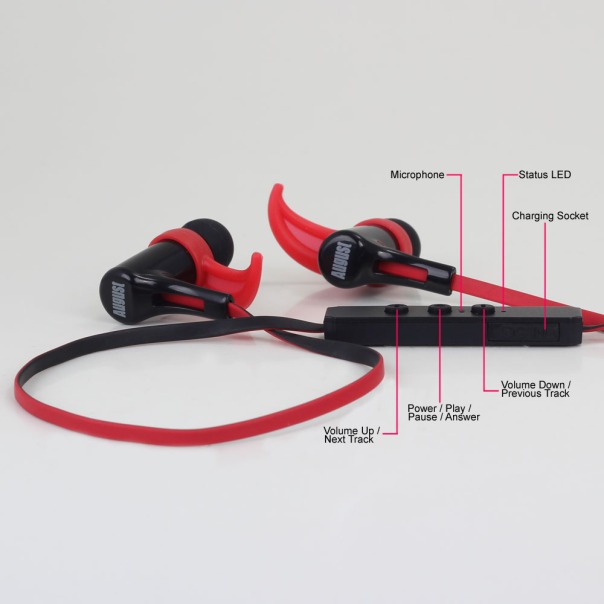
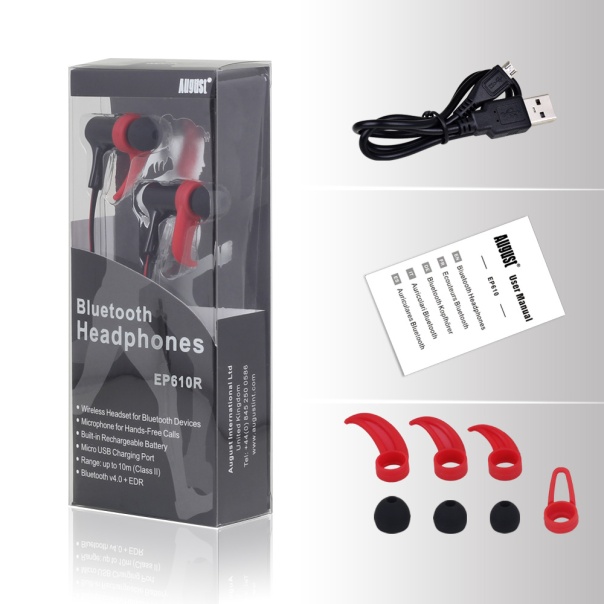
Free Prize Draw from Gavin’s Gadgets – win a pair of August EP610 Bluetooth In-Ear Headphones

EP610R_functions_1000

EP610R_acc_1000

It is time for a free prize draw. The rules are simple. You have 2 ways to enter only.

1) Head over to my review of the August EP610 in ear headphones, link below –

August EP610 In-Ear Bluetooth Stereo Sports Headphones – review

– Leave a comment in the review page. Comments are moderated if you haven’t posted before. Don’t worry, I will see them and approve accordingly. 

AND/OR 

Share the review URL on twitter and tweet “I’ve entered the free #AugustEP610 headphone giveaway, read URL for details”.

When you tweet it is imperative to use a hashtag as shown above. Without it I will miss your Twitter entry. 

Winner will be picked at random. One entry per person but 2 chances to win. That is you can leave a comment and tweet. Postage will be covered. If item is prohibited in your country, do not apply. After 10,000 people have shared a winner will be drawn.

Remember to tell your friends, share the review link and tweet with “I’ve entered the free #AugustEP610 headphone giveaway, read URL for details “

Apple iPhone 6S Plus – Panoramic and Sun Shots

Yesterday around 5.30pm and slightly onwards I took a few photos with my iPhone 6S Plus, one of which was shot directly into the sun.

First up in a panoramic shot which is one of the iPhone’s strengths. Hard to believe but nearly all day it was heavy rain and thick fog. And then around 4pm it all cleared to reveal below. Mind you it was cold with a north west bitter wind too. To reveal the full size version, click on photo and select original.

Beautiful but cold - Dartmoor at 6pm Today

And now for the sun shot.

Beautiful sunset on Dartmoor tonight

USB C to USB A and USB C to USB C cables – Link to Good Value cables

If you are buying or have bought a new USB C type device eg Nexus 5X or Nexus 6P, you might want a few spares and especially USB C to USB A. Well below is a link to some that I have found on Amazon at reasonable pricing.

USB Type C Cable, Rankie® Hi-speed Micro USB 3.1 Type C to Standard Type A USB 3.0 Data Cable for Apple New Macbook 12 Inch, Nokia N1, Tablet, Mobile Phone and Other Type-C Supported Devices 3.3ft/1m

Is TalkTalk ruined after its 3rd Cyber Attack? – Detailed Viewpoint & Editorial

Unless you have been hibernating you would have read about TalkTalk and that it has been a victim of a Cyber attack for the 3rd Time.

Reports are already pouring in about money disappearing from people’s bank accounts, strange calls trying to obtain money and more.

If you want to learn more about the actual incident, click on the link to the BBC News at the end of this article.

Now for my thoughts on this situation and the potential outcome.

The facts are alarming on Cyber attacks. I don’t mean to scare you BUT over 50% of small businesses have suffered a Cyber attack last year. We all hear about the big name companies, but small companies are being targeted like never before. Why? Easy prey as their computer systems are not locked down enough. So with the stats so high for small companies, it comes as no surprise of complacency by even larger ones.

TalkTalk is going to need a lot of money to recover from this incident. Here’s why –

1) It will need to investigate how exactly the breach occurred, and for the third time and remove and crypto lock, virus, trojan or more.

2) It will have to investigate to see whether an employee was part of a crime that aided the hackers.

3) It will to allow for example £10 per customer in costs in contacting them and advising of the incident.

4) Remedies will need to be put in place (which will cost) to change and improve systems

5) PR and Marketing – costs for managing this will need to be allowed for

6) Brand – loss of brand reputation

The above are just a small example of problems TalkTalk are going to face. In reality, the brand is being destroyed. I personally believe this is not a maybe but a possibility and that TalkTalk may never survive this Cyber attack.

Source – BBC News – http://www.bbc.co.uk/news/uk-34615226

Apple News and Gavin’s Gadgets

Apple News went live with iOS 9.1 in the UK and Australia. I took this opportunity to get the website approved for Apple News. Now you can find gavinsgadgets.com in Apple News.

Warning. In my own testing to see how it performed, Apple News did not seem to retrieve the newest posts, so to be honest I would stick to your favourite method of reading my website.

Click on this link to add Gavin’s Gadgets straight into Apple News – https://apple.news/Tu9tdW_qTR9eB1NYhdNQ65g

Note – from what I can tell, Apple News is about 12 hours behind minimum any posts that are published. That’s not ideal at all. 

The Chord Mojo – The Game Changer has Arrived – First Impressions


Chord Electronics is a UK audio company based in Kent. Chord has been making high end quality audio products for many years. Last week they announced their new Chord Mojo, their most affordable product to date and likely to be one of their most successful products. So what is the Chord Mojo? Chord Electronics state –

“Chord Electronics is proud to introduce Mojo, the ultimate DAC/Headphone Amplifier for your smartphone. Simply connect Mojo to your iPhone, Android phone, PC, or Mac, plug in your headphones and you can experience crystal clear audio the way you would hear it in the recording studio.”


Key Features

-Mojo was designed for the music loving Smartphone owner.
-It is powerful, but small and comfortable to carry.
-It works with your iPhone, Android or Windows phone… Also DAPs.
-Mojo is also compatible with your Mac, PC, or Linux computer.
-Mojo has three digital inputs – USB, Coaxial, and Optical.
-Mojo charges in just 4 hours to provide up to 10 hours use.
-You can use any pair of headphones with Mojo, from 4Ω to 800Ω.
-With two 3.5mm analogue outputs you and a friend can listen too!
-Mojo plays all files from 32kHz to 768kHz and even DSD 512.
-Mojo is fully automatic and remembers its last used settings.
-Its case is precision machined from a single solid block of aluminium.
-Mojo is entirely designed and manufactured in Great Britain.
-Output Power @ 1kHz
-600 ohms 35mW
-8 ohms 720mW
-Output Impedance: 0.075 ohms
-Dynamic Range: 125dB
-THD @ 3v – 0.00017%

So we can all read the specs and features and so on, BUT the key point is how does the Chord Mojo perform and does it sound any good! Answer it is a magical, breathtaking product that blows the competition away when it comes to musicality, sound quality and tonal reproduction. At its price point of £399, there is nothing anywhere near this and likely up to and slightly over £1,500 that competes. Chord sell the Hugo, a bigger version of the Mojo for £1,400, and yet the Mojo according to those that are lucky enough to own both reproduces 97% of what the Hugo achieves. Some say its better.

  
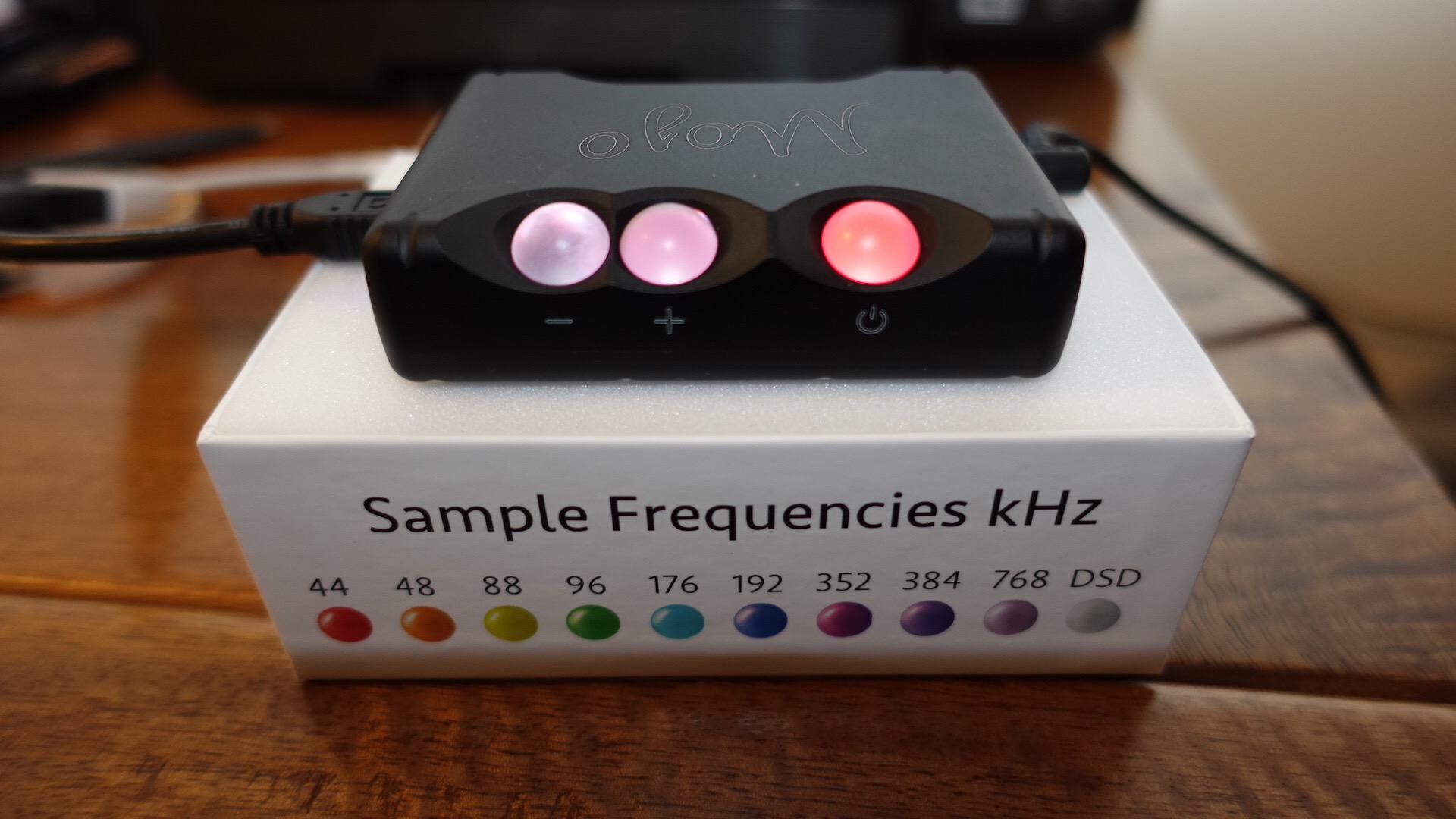
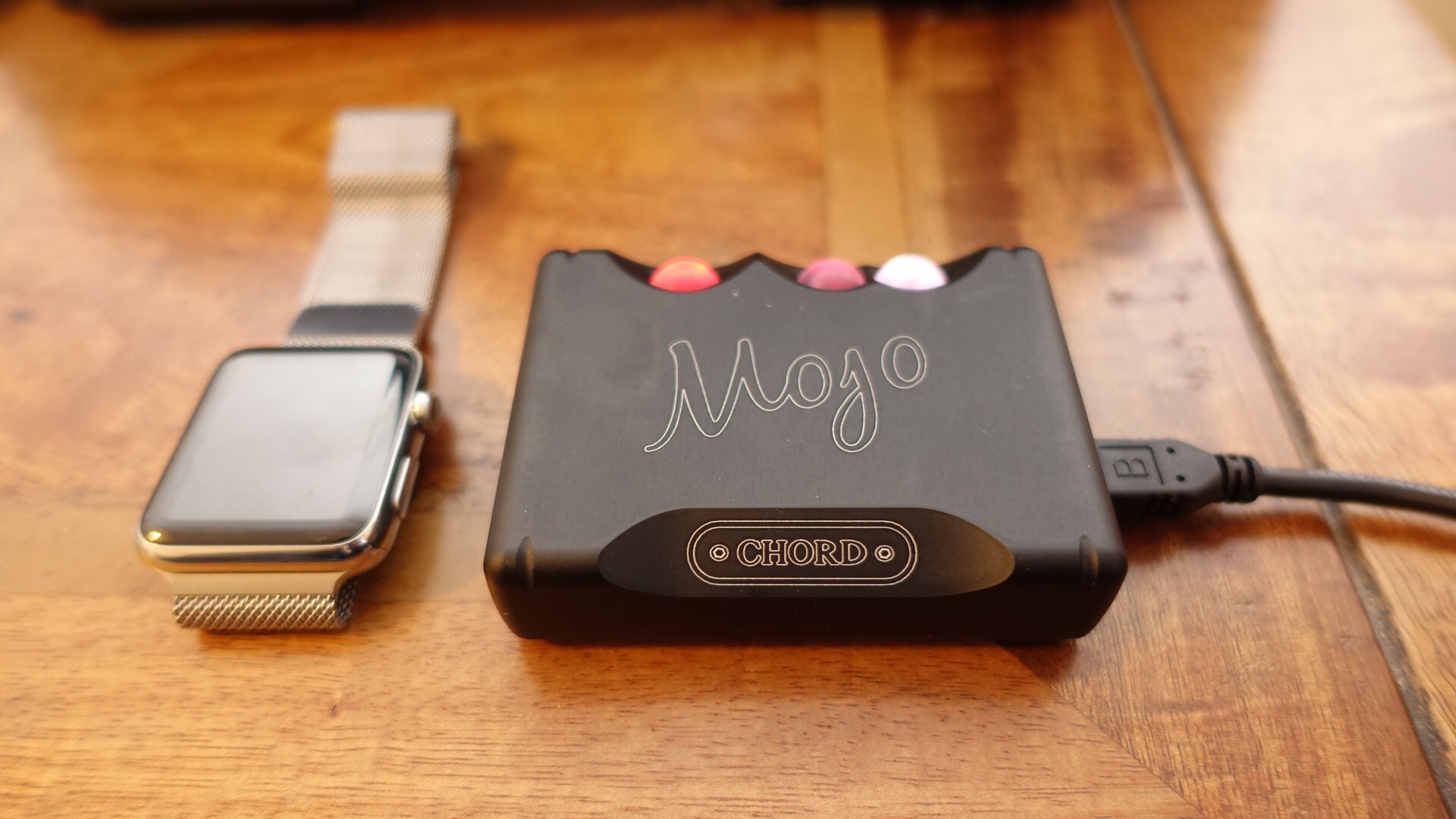
I have been listening to the Mojo with Sony MDR-1RNC, AKG K702 and ATH-M50x headphones and I have never heard my headphones sound so good. Period! The Mojo is funky with its coloured balls that change colours yet its built like a rock. A stunning piece of engineering. I am not listening to high end FLAC or DSD tracks just normal MP3 encoded music to achieve this wonderful sound. For the record, the Mojo is not a review unit/loan. I consider the Mojo the single best electronic purchase I have ever made. That list includes phones, cameras, tablets, audio equipment, gadgets and more.

My recommendation would be to stop buying the next best smartphone, and start enjoying your music collection all over again!

Chord Electronics Mojo Headphone Amplifier / DAC information and deal at Amazon UK