Tag Archives: Review

Joby Ballhead and the Sony QX10 / QX100

image

The Sony QX10 and QX100 lenses are a unique piece of kit. 

Both lenses received a welcome firmware update which added extra functionality.

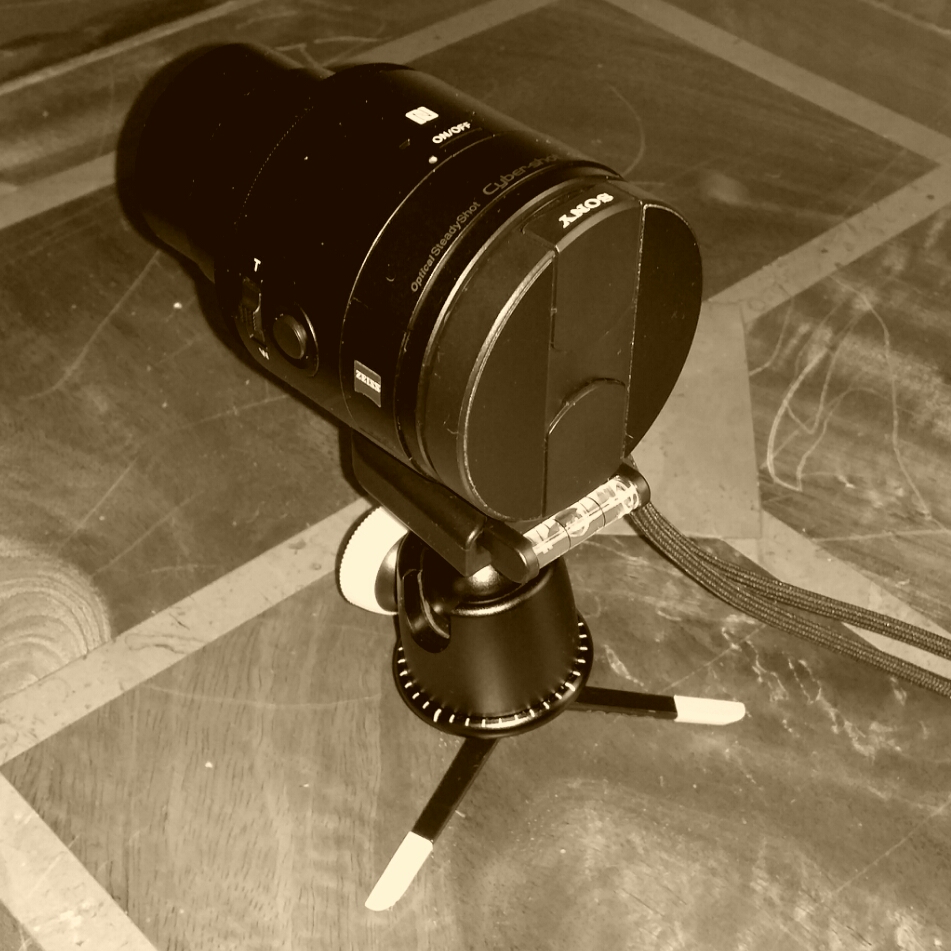
When mounted on a tripod the hardest thing is to have a level lens.  Well a solution I use is by Joby. The Joby Ballhead attaches to your tripod and then the QX10 or QX100 attach to it.  The ball head is fully adjustable and tightens firmly.  You can also use it with a full size camera. 

What’s special about this piece apart from the bullet proof build is it has a spirit level to ensure you have a level lens.  This provides a much easier and faster way to level the photo without adjusting the tripod legs.

Available from Joby

Cellz Mobile Accessories and Tempered Glass for iPhone 5/5S

Cellz are an accessory part of the Cellz Group Ltd based in Hong Kong. In addition to selling accessories, they are also responsible for the manufacture too. I have added them in the Shopping section of my blog for quick reference in the future.

Over the next week, I will have a selection of accessories that I bought for my iPhone 🙂 .

First up, and one of the first things I do with any new phone is fit a screen protector. But I’ve learnt tempered glass protectors are the way to go.

Cellz sell the Rootacase Tempered Glass Film of iPhone 5/5S.

Applying this glass protector means no bubbles, high resistance against soiling, no rainbow effects or silica gel, anti fingerprint coating too as it has an oleophobic coating. It comes in a sturdy plastic case to protect it from being broken in transit, and is so easy to install. Once on, you can’t really tell if it’s fitted. It currently is £7.20 with free shipping to the UK.

Rating 9/10.

20140207-084437.jpg

Samsung Galaxy Gear – if only

The Samsung Galaxy Gear is a great combination with the Note 3.

The attention to detail by Samsung is remarkable high in places. For example, the charging cradle piece, when it charges , it shows the battery level. It then turns the Gear screen off again. But it you lift Gear with charging cradle fitted, the battery icon and percentage appears again. Also the cradle has NFC for the first time setup.

But the charging cradle which clips over front and rear of the Galaxy Gear is also my pet hate. It would have been a lot nicer just to have a micro USB port built into the rear of the Gear. That way you wouldn’t need the special piece of charging it.

And what happens if you were to lose it ?

I’ve also found battery life improves all the time. One week is easily possible if motion option is turned off, otherwise 2-3 days is realistic.

Sony QX10/QX100 Hub lenses – firmware update v2 – details and changes – updated

Sony is offering upgrades for the Sony QX10 and QX100 hub lenses.

Improvements after version 2 firmware upgrade –

-ISO Setting added
-The QX10 has a ISO 3200 from just 1600, and the QX100 moves to ISO 12800 support from just 3200.
-Movie Recording size changed: MP4 1440 x 1080(30p) to MP4 1920 x 1080(30p)
-Shutter Speed Priority Shooting mode added (DSC-QX100 only)

For the QX10 head over to the Sony Asia download page or click here for direct access. . Select downloads, computer system and the appropriate file will be downloaded.

For the QX100, head over again or click here for direct access. Then select downloads and follow the instructions dependant on your PC operating system.

These are really important updates and now make these hub lenses even more fantastic.

The process takes about 10 mins for each lens.

Brando Shopping – Short Lightning Cable review

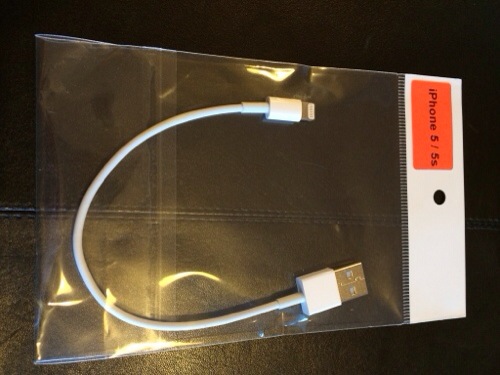
Brando Shopping sell a short lightning cable which is ideal when you don’t won’t long lengths of cable getting in the way. I so prefer this shorter length of cable.

Features
USB 2.0
Lightning Connector
Useful / fashion / convenient and durable
Charge and sync at the same time
Designed for iPhone 5s
Perfect for travel
Length: 21.5cm long
Weight: 4 grams

Compatible Models
iPad Air
iPad mini with Retina display
iPad 4
iPad Mini
iPhone 5
iPhone 5c
iPhone 5s
iPod Touch 5G

Available from Brando Shopping

20140119-093305.jpg

Brando Shopping – Screen Protection – review

Brando Shopping sell a range of screen protection, from the classic screen protector to Tempered Glass Protector.

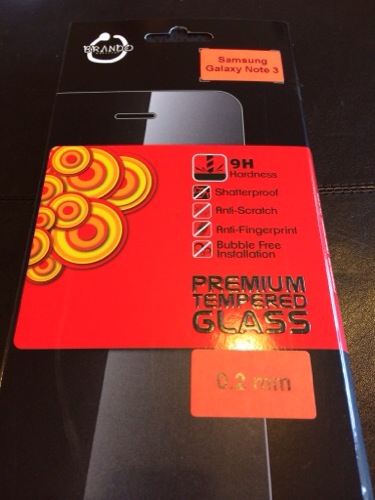
Brando Workshop 0.2mm Premium Tempered Glass Protector, is designed 33% slimmer yet still provides extremely high protection for your phone display screen. It really is super slim design and offers the LCD a “nude” yet durable protection. Tempered glass protects LCD from scratches, shock or any kind of damages while maintaining touch screen’s sensitivity. It is extremely easy to install, no residue if removed. The ultimate screen protector for your LCD.

Brando Shopping also provide a range of ultra clear protectors and mirrored style too. I’ve used their screen protectors for over 10 years on so many devices I’ve lost count.

20140119-092649.jpg

20140119-092656.jpg

The tempered glass protector is shown above fitted to my Note 3 but if you look at the bottom left hand side it looks like I left smudges. I had several attempts at installing this to get it straight, but I am still keeping this one fitted as in use with the screen on you don’t notice it. I have had no issues with S-Pen either. Superb idea.

At some point in the future I will fit the ultra clear protector by Brando, but based on my earlier devices these have always worked a treat.

20140119-093000.jpg

Samsung Galaxy Gear – review update

I have had the Gear a bit longer and thought I would just provide some additional feedback.

Initially, as much as l loved using the Gear with my Note 3, I just couldn’t stand wearing a watch on my wrist and consequently I was going to sell it. But the functionality of it in the end won and therefore have kept it. And here’s why.

Battery – normally a days use will drop the battery anywhere by 30-55% but never any further. I don’t charge it overnight simply because it only takes 30-40mins to recharge. So I recharge just before I go to bed, unplug and switch off ready for my 5am start.

Convenient. I can have the Note 3 in a different room or even upstairs. If somebody calls me I can accept the call on my Gear. The same for a text message. I just use S Voice to dictate a reply and send it. Obviously the Note 3 doesn’t need to be upstairs. It could just be nearby.

Notifications. I have selected which notifications I want to receive on my Gear. It means it becomes very discreet checking them and deciding which ones are worth responding or even reading.

Pocket for Gear app – in the car I select my clipped news items from my Gear and they are read aloud via my Note 3. Really love the text to speech aspect of this Gear app.

Apps – there are a number of apps on the Gear which just make life a little easier. Like the timer when cooking.

Camera – even the camera works rather well. It’s fine for sharing on social media.

So all in all it’s proving a heady accessory for the Note 3.

And the other day I was trying to send wireless a photo from my Note 3 to my TV but it wasn’t working. I tried many different things even switching off Bluetooth which disconnected my Gear. I realised the fault was with my TV. I hadn’t changed the wireless settings for my new router. Anyway, I forgot to switch Bluetooth back on, and for the next hour I thought my Gear was not functioning properly until I realised my error. But in that hour it felt unnatural not to be monitoring my notifications via the Gear.

Talk about a turnaround. And here’s the next part. Normally I get withdrawal symptoms and need to move to the latest piece of tech. And for some reason the Note 3/Gear combo leaves me very content.

Brando Shopping – Simplism Aluminism Bumper Style for iPhone 5s – review

When I ordered these accessories my iPhone 5S was the best thing since sliced bread, but now I have the Samsung Note 3 and some fantastic iPhone accessories. Oh the irony.

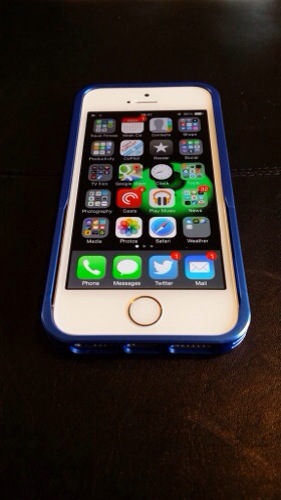
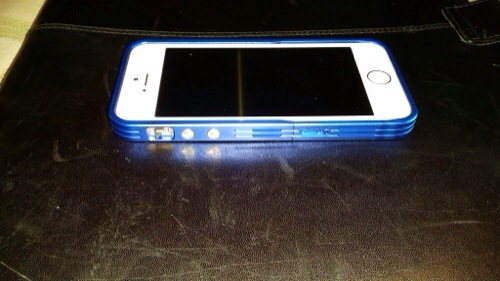
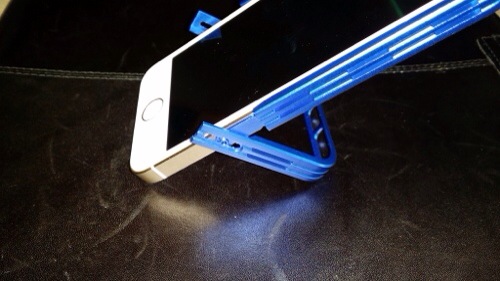
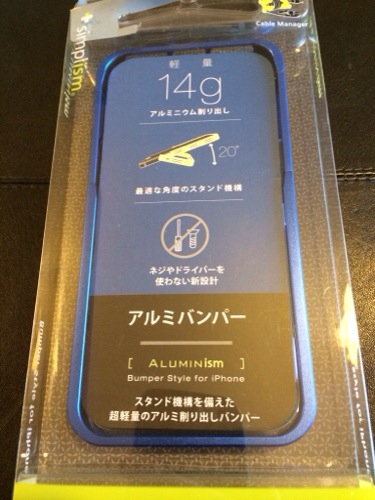
Anyway, I ordered this bumper case from Brando Shopping and as cases go I really like this one. It’s a aluminium bumper with a difference as it offers a 20% stand viewing angle. And all without removing the case from the iPhone. You have to be careful when sliding the iPhone into position but it didn’t harm my phone at all. However, I would not want to be constantly moving the iPhone in and out. But it sure does look lovely.

Key Features
Aluminum bumper offers protection and solid grip
High precision machined aluminum construction
No screws or tools needed
Access all functions without removing bumper
iPhone slides in for easy installation
20 degree angle, self-standing feature
Can connect lightning connector with stand deployed
Quality anodized aluminum in 5 different colors
Eco-friendly Cable Manager
5 Colours Available

Available Colours
Silver
Black
Green
Red
Blue

Compatibility
iPhone 5s
iPhone 5

Available from Brando Shopping

20140119-090625.jpg

20140119-090630.jpg

20140119-090635.jpg

20140119-091351.jpg

Brando Shopping – Momax Samsung Galaxy Note 3 Smart Coat Replacement Back Case – review

Brando Shopping are selling the Momax Samsung Galaxy Note 3 Smart Coat Replacement Back Case for the Samsung Note 3.

This case doesn’t have the smart view window setup of the official Samsung case but it does display enough info to be useful. It is also a much nicer design and finish. It also acts as a stand for watching films or just for sitting on your desk at a viewable angle. It also feels lighter. This is my favourite case for my Note 3 out of the official S View Premium, cheap silicone and Spigen SGP Armour.

At $23 it is a lot cheaper than the official Samsung case.

Available from Brando Shopping

20140119-085027.jpg

20140119-085038.jpg

20140119-085045.jpg

20140119-085051.jpg

Samsung Galaxy Gear – review impressions

image

The Galaxy Gear in mocha grey arrived a few days ago and I have been trying to get a sense of its usefulness.

It certainly splits opinions as to its looks. Some say it’s too big and bulky and looks butt ugly. Others are amazed by it. It’s fairly light despite its bulk. Other comments were over attention to detail. The screws on the Gear and not tightened into the same position. Other watches at this price point would not be like this!

Also there was an ongoing debate on twitter as to whether it’s really a watch as the time is not displayed permanently. When you lift your arm the accelerometer triggers the display to show you the time or chosen clock face.

Putting all that aside it comes in a typical Samsung box with the watch, charger, watch cradle with NFC, quick start guide and warranty leaflets.

I completely missed the fact that to NFC pair the Gear to the Note 3 that the watch cradle needed to be attached so I ended up manually downloading the Galaxy Gear Manager app and using bluetooth to pair the devices.

From the Gear Manager you can completely configure the watch complete with whatever face clocks required and the types of notifications you would like it to receive.
image

image

Some of the clock faces include shortcuts to apps and other functions. I like a plain face with the day of the month enabled in the clock options. They are a few more clock faces to download in the Samsung App store along with actual apps you can run on the Gear.

image

There are many settings that greet you when you open the Gear Manager.
image

And then there is a whole section just for notifications.
image

And then third party notifications. So for example I have twitter and Google Now selected.
image

Each of the included apps on the Gear has settings.

image

So it all seems very complicated at first. And it is. I didn’t grasp what was happening where and why but as day 1 progressed everything started to fit into place. Day 1 involved involved taking a number of photos with the Gear, asking S Voice to call a contact and then have a conversation using the Gear, all very James Bond 007 style. If the Gear and the Note 3 become separated the Note 3 locks. You can also double press the power key for S Voice which is marginally better than on the Note 3. For whatever Siri faults are on the iPhone, it is better than S Voice. However S Voice on the Gear is much better than on the Note 3 itself. I also had tons of notifications arriving. I had the Gear on vibrate but there are tones to select and different volumes. There is also a brightness and screen off delay settings. You can wake up the Gear display just by looking at the Gear. The accelerometer activates screen with the correct motion. I was dubious as to whether this function would work as well as described but it does. The other neat motion based function that works really well, is say I get a new tweet notification and pick my Note 3 up, the Gear will open the Note 3 twitter app at the notification. Rather neat.

I am still working out how notifications work between the Gear and the Note 3. For example, if I delete an email notification on the Gear it only removes the Note 3 notification and the email app shows a number badge of 1 email still. Opening the app shows the email as read. It is understanding the chemistry between notifications and the respective apps that will improve the operation. However, you still need to remove the notifications off the Gear and there’s no global delete yet.

So how easy is the interface? Actually very straight forward. With the clock showing, swipe down from edge to edge for camera, swipe up edge to edge for phone dialler. Two finger tap beings up Bluetooth and battery level status, volume and brightness adjustment. Swiping across to the left brings up the notifications, and contacts if you go the other way. Keep swiping to scroll through all the other apps. The menu does loop so you don’t have to go all the way backwards again. For every app that has a notification you can delete individual notifications or select all within that app. But you can’t at the moment do a global delete all app notifications as mentioned above. I have used S Voice to find a contact, dictate a text message and send it perfectly. To go backwards, just swipe down. Two finger holding on the display beings up recent apps and you can swipe away any you wish to close. The Gear will take a max of 50 photos after which you will need to delete them off the phone. After each photo , the Gear will transfer them to your phone. You can record 3 video clips in a row, after which the camera app closes to maintain optimal performance. The camera has a macro mode option. You can alter the order of apps and move apps in to the app folder or just have one app per whole screen. In the app folder 4 apps are shown per page.

Talking of apps some companies have released Galaxy Gear specific apps. I have installed the following.

Ebay for Galaxy Gear – works same as main app but only able to browse your activity.

Pocket – flick thru your articles. Hit play and the articles are read aloud through the Note 3. I really like this operation.

Zite – flick through headlines. Tap on article and it opens on phone. Not sure of usefulness of this but it’s different.

Camera 360 – adds some effects and frames for the Gear camera. A worthy extra.

Sample low light shot. I have created another post with some additional camera samples. You can remove the Galaxy Gear watermark as well.
image

So with all this activity what’s the battery like. Well from 8am to 7pm it knocked the battery to 50% meaning I would need to charge to overnight. With lighter usage maybe a second day is possible, but one full day is not unreasonable.

Is it worth £299. No. But who else sells a smart watch that can make calls, has a camera and speaker built into the strap? Will I keep it. Yes.