Tag Archives: hands on

Asus Zenfone Zoom – First Impressions and Camera Samples – Review Part 1

  
The Asus Zenfone Zoom has arrived. This phone is special. It has a 3 x optical zoom lens which operates without any moving external parts. The whole mechanism is internal. See video below. 

So what’s inside the box? The photos below show the contents of the box. I like the fact it comes with a lanyard that attaches securely to the phone. You also get a pair of headphones, quick start guide, UK adapter and micro USB cable. 

  
The key specifications are –

The other specifications –

– Display – 5.5-inch 1080p Full HD, 403ppi, IPS LCD
– Corning Gorilla Glass 4
– Processor – 64-bit 2.5GHz Quad-core Intel Atom Z3590 CPU
– Graphics – PowerVR G6430 GPU
– RAM – 4GB LPDDR3
– Internal Storage – 64GB eMCC Flash or 128GB eMCP Flash
– External Storage – microSD (up to 128GB)
– Cameras – Rear – 13MP Panasonic SmartFSI sensor with a 10-element Hoya 3x optical zoom lens, aperture ranges from f/2.7 to f/4.8
– 5MP front-facing camera
– Software – Android 5.1 with ASUS ZenUI
– Connectivity Wi-Fi 802.11a/b/g/b/ac
– Bluetooth 4.0+ EDR
– NFC
– micro-USB
– Battery – 3000mAh non-removable Li-Polymer – comes with a rapid charger
– Dimensions – 158.9 x 78.84 x 11.95mm
– Weight – 185g
– Build – aluminium body with a removable leather back cover for accessing the micro SD and Micro SIM slots

So you’re wondering what the picture quality is like. Below are the first shots of the camera. The below photo is taken in HDR mode.  Edit – Curse! These were literally the very first shots below, and later on when back home I realised in the camera app settings the picture quality was set on medium, not high. The difference on the high setting is noticeably better.

  
Let’s zoom in optically 3 times. We now see this. 

  
As the above shot is optically zoomed in it is still possible to crop the photo and still get a crispy crop. 

There are a multitude of shooting modes including manual which allows for a 32 second shutter time. 

Night mode takes a really dark scene and brightens it up a lot. This was pitch black practically. I have used the night mode on several shots last night and was impressed with the results. 

  
Don’t worry my review will examine the camera in more depth. I will also be preparing a 3 way camera shootout with the iPhone 6S Plus and LG V10. 

So starting up the Asus Zenfone Zoom for the first time takes you through a number of sign in pages including redeeming 100gb of Google Drive storage, free for 2 years. About 20 apps needed updating plus another 25 of Asus own apps/ZenUI apps. A 63mb firmware update was available which was for stability updates. After everything had updated I had 55gb free of the 64gb storage. The Asus Zenfone Zoom also has a micro SD card slot. This phone has plenty of space of saving video and photos.

The Asus skin appears to be incredibly customisable. Icons can be resized on the fly and more. I have downloaded and installed a more cleaner theme so far. I ran AnTuTu which produces a score of 59,160.

In terms of design, the Zenfone Zoom is well built and looks great. As a camera phone it has a dedicated 2 stage physical camera button, which also launches the camera. There is another physical button for recording just video. The volume keys act as zoom buttons.

I must admit there is a lot to learn on this phone as Asus provide plenty of extras. The camera app is extensive too with many modes including manual as mentioned above.

So my plan is to test this more throughly at the weekend and next week start posting more thoughts. This should work out quite nicely, as I should be receiving the LG V10 UK version around Tuesday or Wednesday.

Huawei Mate S – My review

Welcome to my review of the Huawei Mate S.

image

image

image

image

Basics and Interface

Specifications

– Display 5.50-inch 1080p, 73.9% screen to body ratio, Gorilla Glass 4
– Processor – HiSilicon Kirin 935, CPU Quad-core 2.2 GHz & quad-core 1.5 GHz,GPU Mali-T628 MP4
– RAM 3GB
– OS Android 5.1.1 with Emotion UI 3.1
– Storage 32GB, 64GB or 128gb with Force Torch only on 128gb
– Rear Camera 13-megapixel, 8mp front camera, OIS dual LED flash
– Battery capacity – 2700mAh
– Dimensions 149.8 x 75.3 x 7.2 mm (5.90 x 2.96 x 0.28 in)
– Weight 156 g (5.50 oz)
– Dual SIM or SIM plus up to 128gb micro sd card
– Fingerprint sensor, Accelerometer, gyro, proximity, compass
– Wi-Fi 802.11 b/g/n, hotspot
– Bluetooth v4.0, A2DP
– GPS Yes, with A-GPS, GLONASS/ Beidou (market dependant)
– NFC Yes
– Radio FM radio
– USB microUSB v2.0
– Extras – Active noise cancellation with dedicated mic, Xvid/MP4/H.265/WMV player, MP3/eAAC+/WAV/Flac player, Photo/video editor, Document editor

Let’s cut straight to the chase. The Huawei Mate S is a gorgeously made and great looking phone from whichever angle you glance at it. As this is manufactured by Huawei, the phone reception, in fact all the radios WiFi, Bluetooth, NFC and cellular are excellent at picking up and signal as well as clear voice calls. The Mate S is configured with a dual sim arrangement, which can use the second nano sim as a micro SD card slot unto 128gb. It is also dual 4G LTE. There are 3 versions, Standard 32gb grey or champagne colours, Premium 64gb which adds gold/pink colours and luxury is the 128gb Force Touch model which is finished in Prestige Gold. Just to be clear, the Force Touch is only available in the 128gb model. Pricing is 649 euros, 699 euros and even more for the Force Touch 128gb version! That is expensive. Viewing angles are excellent. AnTuTu scored 50,000 which is respectable. So does it live up to the premium flagship status? Read on!

Below is a video of me showing off the build of the Huawei Mate S.

The Fingerprint sensor is the fastest I have ever used. Totally instant. It uses the second generation sensor which gives 100% faster recognition speeds and sensitivity. Once unlocked you can use the fingerprint sensor to take photos, stop alarms, show notification panel or browse photos. It becomes a mouse pad. The interface skin is Emotion UI v3. See screen shots. This provides a host of features and no app drawer too. The phone has a wealth of settings, more than you could ever dream of. Click on the gallery of screen shots below to reveal all the options.

Force Touch – I spent time using this model as well as the 32gb version which I had for much longer. Huawei really have not got a clue what to do with this technology apart from weighing small fruit on the screen or zooming in on photos. In the Huawei press conference, they did mention they were hoping developers would create great uses and apps for this technology. Below is a short video of me using Force Touch.

Audio

I tested the loudspeaker, it is extremely clear but not very loud around 84db. I think Huawei went for quality over quantity. The headphone output is excellent and the phone plays back FLAC files with no issues. APT-X is supported along with USB Audio.

Camera

The 13mp camera is a 4 colour RGBW image sensor, with 1.2 degrees Optical Image Stabilisation, Sapphire Glass Protected but what really counts is the image quality. First let’s look at the camera app interface. As you can see a full range of modes from manual, auto, HDR, panorama, light painting modes, and more. The longest shutter speed is 8 seconds in manual mode. Supernightmode can take up to a minute. Colour reproduction was good. Panoramas were around 8mb in size and well stitched. The camera worked well except for low light shots. In a restaurant I photographed my friends opposite with the LG G4, iPhone 6 Plus and the Mate S. The best shot was by the G4, then iPhone 6 Plus and a really noisy shot by the Mate S. But if you can live with this weakness, the other shooting modes do make for a comprehensive camera app. The supernight mode is freaky good.

Below are screen shots from the camera app showing all the options. Click on a photo to open up the gallery.

I have uploaded around 20 shots to my dedicated Flickr album. Click here https://flic.kr/s/aHskj289sE
image

The colour reproduction is excellent. The Mercedes below was taken with the filter on prior to the shot.

image

image

image

The flower on the table is using the Supernight mode. Phone was on a mini tripod for this shot.

Wet leaves #Huawei #MateS

Another supernight mode shot.

Brandenburg Gate, Berlin #Supernightmode #Huawei #MateS

Using the light painting mode, you can have some fun.

Light painting #Huawei #MateS

image

Timelapse Mode

Part of the default camera app, below is a time lapse recording. Really good quality again.

Conclusion

The Huawei Mate S is the expensive flagship from Huawei. It is impeccably built. Gorgeous to look at. It does a lot really well but in my opinion is let down by the camera in lowish light. At flagship pricing it needs a flagship camera at the levels of the LG G4 or Samsung Galaxy S6. The camera modes like supernight mode and light painting make off for this deficit. At the end of the day, it really depends what YOU want from your phone.

Exclusive – Huawei Mate S – Hands On Photos and Specs

image

Later today, Huawei will be holding a press conference to reveal the new Huawei Mate S.

But like all good things, leaks occur and the Mate S is no different.

image

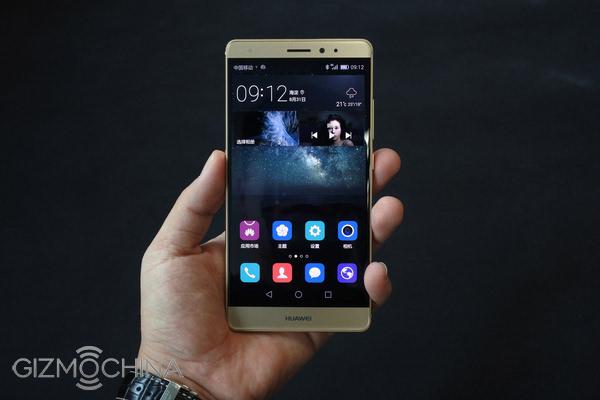
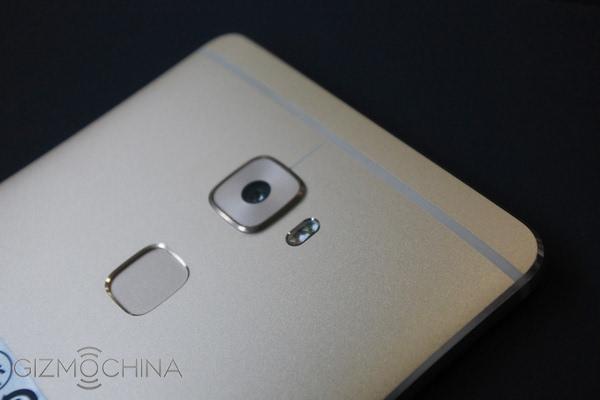
Huawei Mate S looks similar to the Mate 7, but  is even more premium in design and thinner. It has a 5.5 inch full HD 2.5D screen, integrated all-metal body, a Hisilicon kirin 935 processor, 3GB RAM and 64GB ROM, and support external microSD card up to 128GB,  13-megapixel rear camera, 8-megapixel front camera, a rear fingerprint scanner, 2700mAh battery, dual Nano SIM card with Cat.6 class LTE network.

image

Later today I will have a full hands on with the Mate S and provide my own feedback. If Gizmochina have any of the specs or missed anything out I will correct this in my post later.

For more photos and information head over to Gizmochina.

Source – Gizmochina

LG G4 – The Review updated plus All 15 Posts – Updated

20150517_071347

20150517_071457

Since my review of the LG G4, I have included several other posts. All the links are noted below. I have also included a link to the special LG G4 Flickr album set. Once thing I have noticed with the G4 is its overnight battery strength which has been consistent. Generally on a 6 hours period overnight the battery drops from 100% to 98%, just a mere 2%. Its screen on time for a charge is 4 to 4.5 hours.

Anyway here are all the links to all the posts. The action shots are a must view post. Using burst mode I was able to snap some amazing motion shots. Also worth noting is the burst mode shots were 7.9mb in file size over 3 times the size of a burst shot from the Samsung Galaxy S6 Edge.

LG G4 – Photos from Today – https://gavinsgadgets.com/2015/05/25/lg-g4-some-photos-from-today/

Shooting in difficult conditions – https://gavinsgadgets.com/2015/05/24/lg-g4-shooting-in-difficult-conditions/

More Thoughts on the G4’s F/1.8 Camera – https://gavinsgadgets.com/2015/05/21/lg-g4-more-thoughts-on-that-f1-8-camera/

LG G4 – Shoot like a Pro – Some tips and examples

LG G4 – More Camera Samples – https://gavinsgadgets.com/2015/05/21/lg-g4-more-camera-samples/

LG G4 – Incredible action shots – https://gavinsgadgets.com/2015/05/19/lg-g4-camera-action-shots-wow/

LG G4 – The Review – updated – https://gavinsgadgets.com/2015/05/17/lg-g4-the-review/

Happy Families – Life on Dartmoor – View the photo featured by Flickr in Explore – https://gavinsgadgets.com/2015/05/17/taken-by-the-lg-g4-happy-families-life-on-dartmoor-and-now-featured-by-flickr/

LG G4 – Colour Spectrum Shots – https://gavinsgadgets.com/2015/05/16/lg-g4-colour-spectrum-sensor-camera-shots/

LG G4 – More camera shots – https://gavinsgadgets.com/2015/05/16/lg-g4-more-camera-shots-2/

LG G4 – Manual Mode at Night – https://gavinsgadgets.com/2015/05/15/lg-g4-manual-mode-camera-shots-at-night/

LG G4 – First looks at the camera – https://gavinsgadgets.com/2015/05/15/lg-g4-first-looks-at-the-camera/

LG G4 – The arrival – https://gavinsgadgets.com/2015/05/15/lg-g4-its-arrived/

LG G4 – Launch Report with First Impressions and Specific Testing – Video and Photos too – https://gavinsgadgets.com/2015/04/28/my-hands-on-with-the-lg-g4-plus-first-impressions/

Link to my LG G4 Flickr Album set with around 30 photos from the LG G4 – https://www.flickr.com/photos/gavinfabl100/sets/72157652876197995

My Hands On with the LG G4 – Plus First Impressions including camera vs Samsung Galaxy S6 Edge and much more

image

So here you have the LG G4 in the black leather finish. The G4 still has a removable back cover and micro SD card slot as you can see below.

image

And below some other leather finishes. In my mind the wine and brown leathers feel nicer than the black and blue. LG uses genuine leather so over the months and years of ownership the stains and marks will be yours to admire forever. Of course, if the back gets too dirty just change the cover !

image

image

image

image

image

Above is the metallic and ceramic white finishes. The ceramic felt good in the hand despite being a ceramic finish. In fact the G4 is great to hold from a comfort and ergonomic point of view due to the slightly curved back and materials used.

So the million dollar question. How good is the camera. Well, below is a shot from the G4.

image

Now from the Samsung Galaxy S6 Edge.

image

Personally I felt the S6 Edge took a better shot. I also tried other shots which I haven’t being able to share, and again in all of them I felt the S6 Edge took the better shot. However, check out my video below of all the settings in the camera.

The manual control options are extensive and shooting in raw is also possible. The G4 will be able to take more advanced type shots than the S6 Edge like light trails for example.

I copied across some music to the G4 and connected my bluetooth Plantronics BackBeat Pro headphones. The G4 produced a powerful sound and clearly apt-X was present. Obviously I will need more time to evaluate properly. The loudspeaker was on the rear and was reasonable but nothing special. Qi Wireless charging is supported to.

The screen. The new QHD Quantum panel looked brighter than that found on the G3. It also is meant to work much better in sunlight with better contrast levels. I compared it to the S6 Edge and without auto brightness on, it had similar levels.

I have left you a selection of shots from the UI v4. To be honest it doesn’t look anything special and unlike the S6 Edge and HTC One M9 there are no theming options.

In conclusion, the LG G4 is an upgrade to the G3. I am not convinced yet based on my limited time that it is the best smartphone out there, so I’m hoping with a proper test of the G4 I can decide where to rank it. The leather and slight curve finish looked good. Some people will love the camera and removable battery and micro SD.

So for now have a look at the UI photos.

image

image

image

image

image

image

image

image

image

Specifications –

Screen – 5.5in Quad HD (2560 x 1440) IPS Quantum Display, screen is also visible in bright light
Dimensions – 75.3 x 149.1 x 8.9 mm
Battery – 3,000mAH removable battery
Storage – 32gb expandable with micro SD card
RAM – 3gb
Rear Camera – 16 Mp sensor f/1.8.3 shooting modes: Normal, Simple and Manual. Settings for ISO, exposure, white balance, shutter speed, slow synch flash and shooting in RAW. Dual Flash and LED Focus
Front Camera – 8mp
OS – Android Lollipop 5.1 with LG UX v4
Power – Wireless and Faster Charging supported (wireless via folio cases) (faster charging not quick charging 2)
Processor – Snapdragon 808

image

lg-g4-leak26