Category Archives: Reviews

Nexus 6P – Just how good is the camera? – Camera Samples

The Nexus 6P is the first Nexus phone to have a decent camera. The camera has large pixels, 1.55 microns but does omit optical image stabilisation. Google commented that OIS was not required with such large pixels.

Whilst in my testing, the lack of optical image stabilisation has not been an issue for many of the shots, I do believe it would make a difference still especially in low light. I also believe the software could be further enhanced over time to make the camera a fair bit better all round.

Anyway, some random shots from the Nexus 6P.

Photo 1 – Plenty of fog, but a good shot despite the conditions.

Random selection of Nexus 6P camera samples

Photo 2 – The Famous Church Shot – A very good shot

Random selection of Nexus 6P camera samples

Photo 3 – Olives and More – Good detail

Random selection of Nexus 6P camera samples

Photo 4 – Tesco Tavistock – A really grim day but good definition on the sign

Random selection of Nexus 6P camera samples

Photo 5 – Leaves – a reasonable amount of bokeh

Random selection of Nexus 6P camera samples

Photo 6 – Cheese – Again lots of detail

Random selection of Nexus 6P camera samples

Photo 7 – Tesco – Zooming in on the Tesco sign reveals good detail again

Random selection of Nexus 6P camera samples

Just some background when taking these photos. I took these all hand held and as fast as possible. Overall, I like the quality of the Nexus 6P photos. However, HDR+ takes too long to save photos and the battery life gets zapped when taking photos.

Sony Xperia Z5 Compact – review

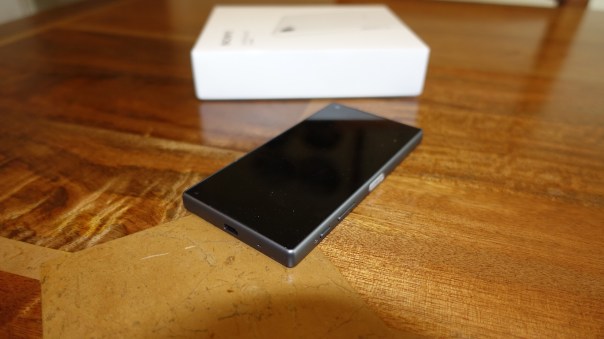
IMG_0237

Welcome to my review of the Sony Xperia Z5 Compact. The Z5 Compact is a solid feeling design, that is water and dust proof, has a dedicated 2 stage hardware camera button and incorporates some of Sony’s high end audio tech. It also got awarded by Dx0Mark the number spot for smartphone cameras over the iPhone, LG G4, Samsung Note 5 and more. The sensor is the Z5 Compact is the new 23mp sensor from Sony.
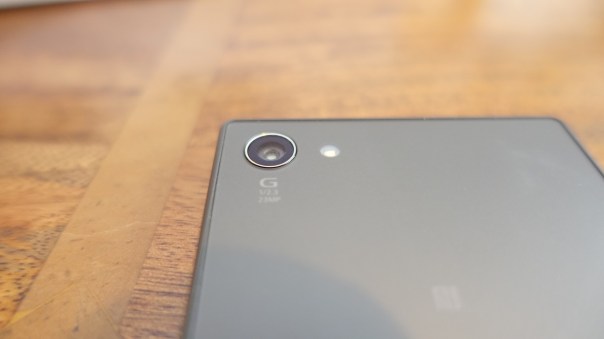
IMG_0238

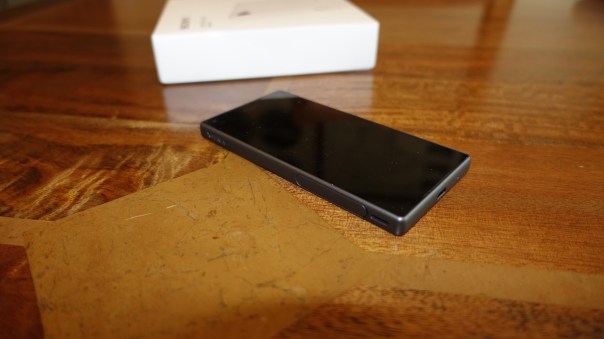
IMG_0236

The new Z5 Compact also incorporates a fingerprint sensor in the power button which is located on the side.
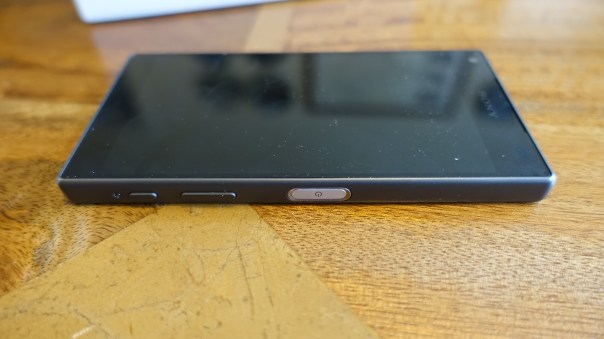
IMG_0239

Basics

Key Specification –

– Networks – GSM, HSPA, LTE
– Dimensions – 127 x 65 x 8.9 mm
– Weight 138 g
– Nano-SIM
– IP68 certified – dust proof and water resistant over 1.5 meter and 30 minutes
– Screen – IPS, 4.6 inches 720 x 1280 pixels, 323 ppi
– Multitouch – up to 10 fingers
-Protection – Scratch-resistant glass, oleophobic coating, Triluminos display,X-Reality Engine
– Android OS, v5.1.1 planned upgrade to v6.0
– Chipset – Snapdragon 810, GPU Adreno 430
– Card slot – microSD, up to 200 GB
– Internal -32 GB, 2 GB RAM
– Camera – Primary 23 MP, 5520 х 4140 pixels, phase detection autofocus, LED flash,
– Video 2160p@30fps, 1080p@60fps, 720p@120fps, HDR, check quality
– Secondary – 5.1 MP, 1080p, HDR
– Loudspeaker – stereo speakers
– 3.5mm jack with High-Res audio
– Communications – WLAN Wi-Fi 802.11 a/b/g/n/ac, dual-band, Wi-Fi Direct, DLNA, hotspot
Bluetooth v4.1, A2DP, apt-X
– GPS- A-GPS, GLONASS/ Beidou (market dependant)
– NFC Yes
– Radio FM radio with RDS
– USB microUSB v2.0 (MHL 3 TV-out), USB Host
– Sensors -Fingerprint, accelerometer, gyro, proximity, compass, barometer
– Battery – Non-removable Li-Ion 2700 mAh battery

The Sony Z5 Compact is water and dust proof. It even has a lanyard hook. The fingerprint sensor is located on the power button on the side of the phone and this worked perfectly. The 720p screen is fantastic. Sharp and crisp. Good viewing angles too. Call quality was ok too. Sony include several apps – Amazon Shopping, AVG Protection, Dropbox, Facebook, File Commander, FM Radio, Email, Calculator, Kobo Books, Lifelog, Live screen streaming, Movie Creator, News from Sociallife, OfficeSuite, Playstation, Privilege Plus, PS Video, PSN, Sketch, Smart Connect, Spotify, Track ID, Twitter, Vine, Xperia Lounge and What’s New. The Z5 Compact has many options from glove mode, connecting a Dual Shock Controller and playing your Playstation games on your phone, screen mirroring, casting screen, media servers, themes, tap to wake up and one of the best power managements options to give you 2 days or more battery life. Another unusual feature present in the Z5 Compact is the two way camera hardware shutter button.

Obviously being the compact phone in its range with high end specs too, makes the Z5 Compact rather unique in the android world where most phones are just getting larger and larger. The Z5 Compact has a Snapdragon 810 processor and whilst this caused problems with overheating in previous phones, it hasn’t caused any issues with the Z5 Compact. The phone when pushed very hard does get warm, sometimes very warm but the heat levels were under control, and I have not had any heat warnings either.

AnTuTu scored a respectable 64,000.

Camera and Audio

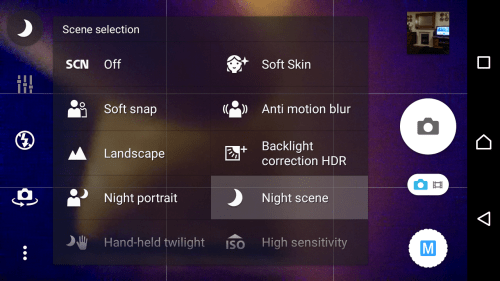
The Sony camera app contains a multitude of options but in reality it is more auto biased. In manual mode you only have a few file size options. Full, 8, 3 or 2mp. You can only select scenes at 8mp. ISO is not controllable at full resolution only 8mp, nor are some other settings. So really manual is not a proper manual mode like that on the LG G4, it is an extension to the superior auto mode.
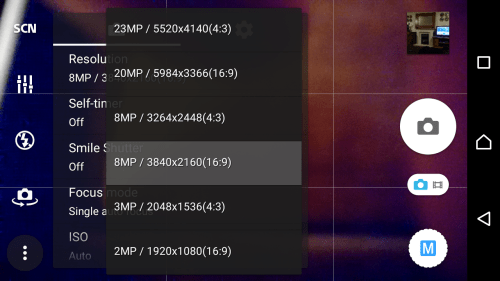
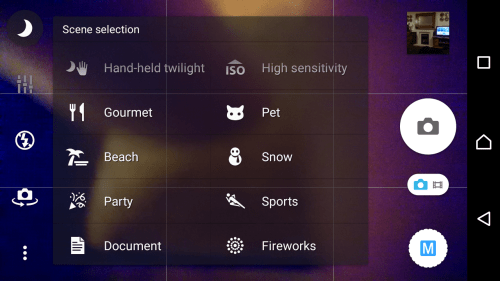
Screenshot_2015-10-31-07-13-02

Screenshot_2015-10-31-07-12-03

Screenshot_2015-10-31-07-11-52

There are scenes for every occasion and a selection of camera modes, with some freaky cool Artificial Reality modes and more. There are more modes available for download in the Google Play store too. BUT there is no burst mode! That is really an oversight. I had to download Timeshift Burst which takes 30 shots in a second or two. It was able to grab some fancy action shots, but the quality was poor.
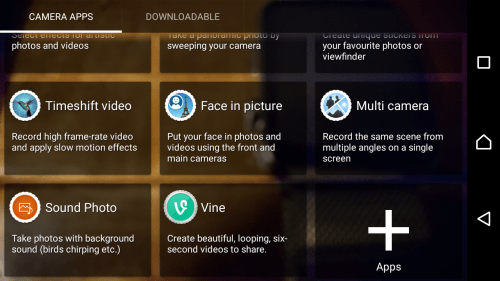
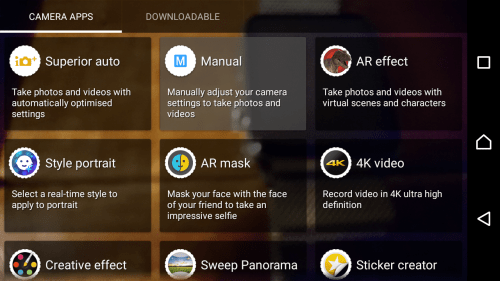
Screenshot_2015-10-31-07-09-33

Screenshot_2015-10-31-07-09-20

The camera app also allows for other adjustments dependant on file size and mode used. On the flash front you get auto, fill flash, torch, red eye and off. Other options include face recognition, smile shutter, timers, microphone on or off, brightness, colour, quick launch, grid lines, touch capture, white balance, EV, ISO up to 3,200 in some modes, focus type and volume key. Don’t forget there is a 2 stage camera hardware button. Pressing this always launches superior auto mode. Pressing the app icon, launches the last used mode along with the last used settings. There is no raw option or other manual controls like shutter speed. 

So let us take a look at the picture quality. My observations are that superior auto does a reasonable job. In good light it takes good shots and macros are good too. Superior Auto can shoot at 23mp.  In manual mode, you have a few more options. However in lower light it is best to shoot in 8mp manual and if necessary select the night scene required. Superior Auto is not terrible, it just seems to bias towards higher ISO settings which means more noise in the shots. The sensor does get impacted by bright flare, so it is necessary to place your hand slightly to block the bright light. This is easy to do as you can hold phone in one hand and use the hardware button to take the shot and use the other hand to block the offending light. There is a rumour that Sony is overhauling the camera app soon. I really hope so! The firmware update that’s just arrived has improved the camera slightly. Video at 1080p is excellent as the electronic image stabilisation works very well. At 4K it’s not as steady.  The front camera produced average only shots but does have tons of AR type modes from adding animal faces, making your lips reds or even creating a mysterious look. This gave me glowing blue eyes! You really can have some fun with the camera options. So how would I rank the camera versus the competition now that I have used the Z5 Compact for a few weeks? The Note 5 and LG G4 are ahead of the Z5 Compact across all the different modes (video/stills) and they have full manual controls. However, the Z5 Compact is the first camera sensor from Sony that I would be happy to use daily.

DSC_0022

The above shot is at night of the visitors centre in Princetown.

DSC_0019

Even more challenging is the local church as their is no lights to help focus.

My Bone #Tiggy #HappyDog #SonyZ5Compact

Above a portrait of one of my dogs Tiggy.

Below are 3 of the photos using Timeshift Burst.

Timeshift Burst examples from #SonyZ5Compact

Timeshift Burst examples from #SonyZ5Compact

Timeshift Burst examples from #SonyZ5Compact

Greenery Macro #SonyZ5Compact

Above just some random close up of a plant.

Below are random shots of my local church.

Scenes around the Church of St Michaels and All Angels, Princetown #SonyZ5Compact


Scenes around the Church of St Michaels and All Angels, Princetown #SonyZ5Compact

Scenes around the Church of St Michaels and All Angels, Princetown #SonyZ5Compact

Scenes around the Church of St Michaels and All Angels, Princetown #SonyZ5Compact

Below is a frame from the Timeburst Shift mode.

Doggies charging around on Dartmoor #SonyZ5Compact #TimeshiftBurstMode


Beautiful views around Staple Tor, Dartmoor #SonyZ5Compact

Beautiful views around Staple Tor, Dartmoor #SonyZ5Compact

If you want to see all 25 shots taken with the Sony Xperia Z5 Compact, click HERE.

The audio is rather decent. Front stereo speakers that whilst not HTC Boomsound levels are ok. And on the front! Sony’s music app has audio settings DSEE HX (upgrades the quality of compressed music to near Hi Res Audio quality), Clear Audio+, Sound Effects (EQ, Surround, S Force Front Surround for the loudspeaers, ) noise cancellation (with certain Sony headphones) and more. All these audio functions work really well to provide a good quality output via headphones. I would recommend in ear canal type headphones and with certain Sony headphones you can even have active noise cancellation. The music app also includes options to stream music from your home network, podcasts and incorporates Spotify.

Summary

The Sony Z5 Compact is an ideal one handed device, offering tons of functionality and options galore. With its smaller size it becomes unique in the world of android phones. If I had one wish, it would be for Sony to refine and simplify the camera app, so its auto mode was the best in class by making it simpler, and then have a proper manual mode with raw and shutter support.

My thanks go to Clove Technology for supplying the Sony Z5 Compact.

Nexus 6P – Camera Sample – The Famous Church Shot

With nearly every smartphone test, I take a photo or two of my local church. This serves another purpose as it allows for comparisons with previous tested/reviewed phones on picture quality using the church as the reference. Obviously, weather conditions can play a part, but it still provides a reasonable guide.

So below, in spooky fog, the Church of St Michaels and All Angels, Princetown, taken by the new Nexus 6P. I thought the quality was excellent in this shot, despite the fog and rain!

Random selection of Nexus 6P camera samples

Nexus 6P – More Impressions – Mini Rant

So another day with the Nexus 6P and I am rapidly falling out of love with this phone.

– AnTuTu scored 44,500. No apps were running. So I rebooted phone. AnTuTu scored 60,000. These scores are with 170 apps installed.

– As I have the 128gb model, I wanted my music sitting on the phone. Nothing worked until I rebooted phone and mac. I also had to re-install android file manager. This worked.

– I also wanted around 1gb of my favourite photos on the phone. Android File Manager wouldn’t copy the photos across. No matter what I tried, nothing worked.

– USB Audio does not seem to work. This is a disaster for me. I don’t understand why Google would have killed this function. However, bluetooth audio is really good. Update – apparently USB C removes the need for OTG so I am testing another option and will update this post again shortly.

– The camera. The weather has been horrific so I have only tried some indoor shots. The 1.55 microns do make a difference but not for every shot. HDR+ is slow saving.The Google Camera app is too basic IMO and whilst it can take some good shots, they are not class leading. Why no OIS? With OIS the camera could have been a class leader!

– Battery so far is average at best.

– USB C cables are a PITA. All my adapters, special micro usb connectors, nothing works.

That’s all. I will be spending the weekend with the Sony Xperia Z5 Compact so that I can finish my review for Monday.

I will try to take some photos with the Nexus 6P, assuming I haven’t sent it back!

And finally, if if you are buying anything on Amazon UK, please use the link below. This will help support Gavin’s Gadgets with all the running costs and more and won’t cost you anything extra either. Thanks in advance. Don’t forget to use the link if you buy any bargains on Black Friday or for Christmas etc..

GavGadgets@Amazon

Nexus 6P – First Impressions

IMG_0743

So my Nexus 6P 128gb Frost White arrived yesterday. It is a big device.

IMG_0741

From left to right, Huawei G8, Nexus 6P, iPhone 6S Plus, Sony Z5 Compact and a BlackBerry. I do wonder if we have lost the plot on screen sizes now?

The Nexus 6P has stereo front speakers and a new USB C cable.

IMG_0748

IMG_0749

I was disappointed to find only 111gb free of the 128gb model. Clearly despite being hardcore android the firmware is large. As a comparison the 128gb iPhone 6S Plus has 113gb free out of the box but does include loads more apps.

Screenshot_20151105-180431

Despite the space available, I can’t see myself running out any day soon. So what do I like and what don’t I like ?

As first impressions, the frosted white is fantastically beautifully amazing choice of colour. I am so pleased I didn’t opt for aluminium or black. There are 2 cables in the box, one is USB C to USB A but so short it is a joke. The USB C to USB C cable is an ideal length. Suddenly, I realised I have no compatible cables and charging in the car and around the house is an issue until I get more USB C cables. I found a good selection of USB Type C Cables and Adapters on Amazon

The phone feels premium but is not that comfortable to hold as it is big. The Nexus 5X was much easier and more comfortable to grip in the hand. The fingerprint sensor works really well, but when the phone is face up on the table, its no use at all. Apple and Samsung and even Sony have the sensor is a more suitable location.

The camera. I have tried some random shots just to get an idea of its standard. It takes good shots but as to how good the quality of the camera is will only be established after I have had and more time and dry weather to take more photos. So far it took 3 indoor low light shots to get 1 shot to be better than that from the iPhone 6S Plus. My iPhone only needed one shot to get it right first time. The Sony Z5 Compact also only needed one shot. However, don’t read too much into this at the moment, as I need to understand the quirks of the phone and I will also see what can be achieved using third party camera apps. More soon.

Screen. I don’t like the screen. It feels muted except for watching films etc when it looks great. Add to the fact there are stereo speakers and it is a lovely media player. I will test for audio quality later as well.

And before I sign off, the highlight of the phone is its running pure android. That is a benefit to ensure you get the latest updates to the firmware, but it is also bland. Huawei’s EMUI and Xiaomi’s skins do add a lot of extra features. So it ultimately boils down to what your preferences are.

Sony Xperia Z5 Compact – Superior Auto vs Manual – You Decide! – UPDATED with Results

This is a simple test. Below are several shots of the same church using Superior Auto Mode is 23mp and 8mp and also manual mode is 23mp and 8mp variations. Except the order is all mixed up. No cheating by looking at exif data allowed. So name your top 3.

Before we get to the test shots, this is manual mode, 8mp, backlight scene. It is a cracking shot too.

Haunted #SonyZ5Compact #Atmospheric

Right onto the test. I am going to label each photo 1 to photo 6. All you have to do is say which is best, or name your top 3. I am going to say this that IMO, I believe the best shot was taken in Superior Auto.

As you all have had a chance to ponder which is which, here we go with the results. If you haven’t read this yet, just have a look at how good superior auto mode performs. Photo 1 and Photo 2 are Superior Auto Mode, 23mp and 8mp respectively. All the others are manual, trying little tweaks here and there. However, my first choice is Photo 1. What this goes to show is we all have difference reasons for liking a particular shot or shots, but also Superior Auto mode does a good job now.

Photo 1

Testing Superior Auto vs Manual Mode on the #SonyZ5Compact  see article at http://gavinsgadgets.com for more info

Photo 2

Testing Superior Auto vs Manual Mode on the #SonyZ5Compact  see article at http://gavinsgadgets.com for more info

Photo 3

Testing Superior Auto vs Manual Mode on the #SonyZ5Compact  see article at http://gavinsgadgets.com for more info

Photo 4

Testing Superior Auto vs Manual Mode on the #SonyZ5Compact  see article at http://gavinsgadgets.com for more info

Photo 5

Testing Superior Auto vs Manual Mode on the #SonyZ5Compact  see article at http://gavinsgadgets.com for more info

Photo 6

Testing Superior Auto vs Manual Mode on the #SonyZ5Compact  see article at http://gavinsgadgets.com for more info

And while you deciding on which shots are the best, here is a photo from one of the many artificial reality modes.

Rumours of a Dangerous Predator on Dartmoor #SonyZ5Compact

A big thanks to Clove Technology for sending the Z5 Compact.

Sony Xperia Z5 Compact – Camera shots from the 23mp sensor

Everybody seems obsessed nowadays with the camera quality from a smartphone. With the Sony Z5 Compact this is even more the case as DxOmark gave it the number 1 rating out of every smartphone. So is the camera really that good?

Well, these are some random shots I have taken over the weekend. These were just quick snaps. Some low light shots as well at the end. If you want to see full size, click on the photo. So are these amazing quality photos?

Finally just a quick thanks to Clove Technology who sent the phone. Currently comes with a free pair of headphones.

DSC_0022

The above shot is at night of the visitors centre in Princetown.

DSC_0019

Even more challenging is the local church as their is no lights to help focus.

My Bone #Tiggy #HappyDog #SonyZ5Compact

Above a portrait of one of my dogs Tiggy.

Below are 3 of the photos using Timeshift Burst.

Timeshift Burst examples from #SonyZ5Compact

Timeshift Burst examples from #SonyZ5Compact

Timeshift Burst examples from #SonyZ5Compact

Greenery Macro #SonyZ5Compact

Above just some random close up of a plant.

Below are random shots of my local church.

Scenes around the Church of St Michaels and All Angels, Princetown #SonyZ5Compact

Scenes around the Church of St Michaels and All Angels, Princetown #SonyZ5Compact

Scenes around the Church of St Michaels and All Angels, Princetown #SonyZ5Compact

Scenes around the Church of St Michaels and All Angels, Princetown #SonyZ5Compact

So what do you think? For some extra background behinds these photos, these are the very first shots I took from the camera so I have not even looked at the manual options yet.

Below are shots from my second attempt at using the camera.

Doggies charging around on Dartmoor #SonyZ5Compact #TimeshiftBurstMode

Beautiful views around Staple Tor, Dartmoor #SonyZ5Compact

Beautiful views around Staple Tor, Dartmoor #SonyZ5Compact

If you want to see all 25 shots taken with the Sony Xperia Z5 Compact, click HERE.

My thanks again to Clove Technology.

The new Apple TV – First Impressions plus Reviews of Apple TV Games

The new Apple TV arrived today and was ready waiting for when I got home from work. The new Apple TV replaces my 2nd generation Apple TV.

Setting up was a breeze. It asked if I wanted to use my iPhone to set up and copied the settings across. However, I decided to start again and proceed with a manual set up as I have both a UK iTunes account and a US iTunes account. The US iTunes account enables me to watch US TV shows and films normally well ahead of the UK releases and also provides a wider selection of media.

This is where the 4th generation Apple TV scores highly in my book. It allows you to log in to iCloud, Game Center with whichever account you want, and then with the iTunes/App Store account you can add more than one account which is what I have done. So I have my UK and US accounts added and can switch on the fly by going into the settings, accounts and select whichever option I require.

For the initial installation, I used my UK iTunes account as I have all my apps associated with this account. It showed 30 apps/games already available for Apple TV. I have decided install the following games – Crossy Road, Oceanhorn, Canabalt, Badlands, Asphalt 8, Jetpack Joyride, Edge Extended and 10 Pin Shuffle Pro Bowling. Apps I have added are YouTube, Flickr, Sky News, Netflix and YouTube. BBC iPlayer is not available yet but the BBC have stated a dedicated app is coming.

I have to say the set up process is a breeze and the layout is great. What is not so great is app discovery and there is no categories. Under app purchases, categories do exist, so I imagine it won’t be difficult for Apple to tweak the app discovery to include categories.

The new remote control is excellent. I would suggest not rushing to buy a MFI Game Controller until you have tried the new remote. Siri on the Apple TV is a bit hit or miss. I asked for the film “The Martians” and it kept coming up with “The Motions”. I then told Siri “You are dumb”. Siri replied “I tried my best”. I laughed out loud! But when it works it really works well but does need some improvement.

Within the settings app, there are loads of other settings which have loads of options for the quality of the audio and video. Neat.

Storage. Now you can buy the Apple TV with 32gb or 64gb storage capacities. To give you some idea of the space taken up by the games, Oceanhorn is top at 185mb, Asphalt 8 is 95mb, so based on that I cannot see the need for 64gb at all. Of course, the extra storage might be used to store films and TV shows which could burn up the space quickly, but seriously 32gb should be fine.

Wallpapers. The aerial wallpapers are beautiful and if opted to use, will need a download of 600mb per month. You can select how often to download these too.

So what are the games like to play?

Oceanhorn – on start up needed to download the game chapter. This took 2 mins. After that the remote was used and worked brilliantly.

Asphalt 8 – took 10 mins to download first part of game which clearly got deleted after playing. You turn the remote horizontal and go off racing. I thought the odd frame got missed, but seriously it was great fun to play. Each level took just over a minute to download.

Games – I have played quickly all the games installed and they all work really well. Canabalt was better on the big screen than my iPhone. Edge Extended applied itself superbly to the Apple TV. Crossy Road is just a ball of fun. Badlands is a good game and adapts nicely to the Apple TV.

So how does this compare to the Amazon Fire TV? Well voice control on the Amazon Fire TV is better and more accurate. Amazon Prime becomes a bonus with the Fire TV along with the content available, but when it comes to apps or more importantly games, I really believe Apple already has the edge and its only just launched.

My final thought. This is a brand new Apple TV which is all about the apps. Based on my initial experiences I do believe Apple has already got the edge on the gaming front, and the potential/future looks even more promising. If you have any other Apple devices, this new box is recommended.

Update – I have been playing Oceanhorn for a while now and this game does work well. In terms of other non gaming apps, there is a shortage versus other systems but I hope this gap is bridged as developers release new apps. If you already have an Apple TV, I don’t see the need to rush out and get one of these unless you like the idea of a new Apple TV and the ability to play games from your TV.

The Apple Watch – One Month Later – review 


I have had the Apple Watch since I received the new iPhone 6S Plus. I’ve not really dedicated a post covering the Apple Watch as I have had some teething problems with iCloud and iTunes Match. Fortunately, these all seemed resolved. So now I can spend some time talking about why I stayed using the iPhone and that has to do with the wider hardware and software Eco system. The hardware includes iPad, MacBook and the of course the Apple Watch. 

I think I was lucky to get the Apple Watch when watch OSv2 arrived, otherwise I reckon I would have been somewhat disappointed with the original firmware. I looked at the 3 Apple Watch models and choose the steel finish with the Milanese strap and a spare sports strap. I like the blue sports strap as its marginally more comfortable than the Milanese strap, but doesn’t look as posh. But now I never wear the blue sports strap. Should I wish to swap the band, Apple make this process so simple with the push to release mechanism. 

So what do I like about the Apple Watch. The attention to detail in the build. I like the look of it on my wrist. However, my wife and I were discussing the real need of the Apple Watch and we both agree it is not necessary to own. If you want to get fit, buy a Fitbit Charge HR for £100.

However, what I have found as the month has progressed is how I start to use it for small things and let it help me speed up some routines or processes that I would use my iPhone for. 

  
Some of the flash stuff I like using on my Apple Watch is taking phone calls usually when my hands are engaged and my iPhone is in a different room. There is a slight delay while it hands off the call to the watch. This is only a viable option in a quiet room as the volume is not very loud. However, background noise does seem to get partially removed which is a plus point. 


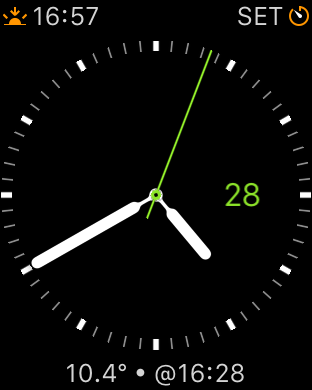
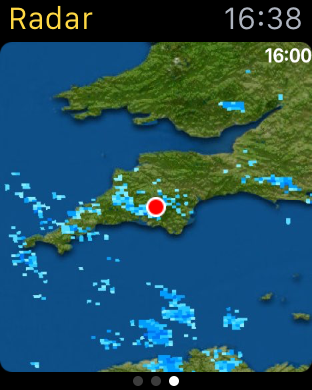
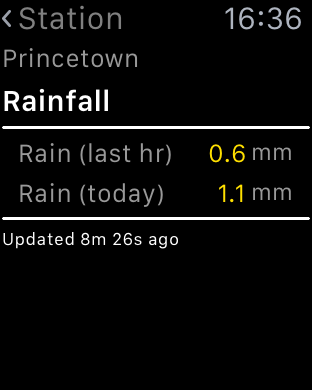
My weather station statistics can be displayed on my Apple Watch and even includes a complication. I can take measurements with Qardio Blood Pressure monitor, monitor my walks across Dartmoor using Viewranger GPS. Replying to notifications via voice is accurate. Sending heart beats to my wife or little hand drawings is silly but fun at the same time.  Using Hey Siri command, seems hit or miss.

  
The fitness aspect of the watch works as described and links nicely into the activity and health app. As apps develop with the new firmware I can see more clever stuff being possible on your wrist. However, less is more so it I don’t let all my notifications hit my wrist. The Taptic vibration is also a lovely aspect of the watch. 

  
But as I originally said,  it is not a must have item, just a cool and clever item to have. Maybe that’s why Apple are trying to steer its focus away from a tech need, and more a fashion need!

Regardless, I really like it for its style, apps and geek factor.

Apple iCloud – Some Extra Balance

Yesterday, I posted an article cursing iCloud Photos and iTunes Match. I thought it only fair to add some balance of my views, covering the rest of Apple’s iCloud services plus to offer some feedback from your own experiences.

Firstly, with regards to using iCloud for anything else, I have no qualms. It all works rather smoothly and that is a reassuring position. So that includes contacts, calendar, notes, reminders, pages and all the third party apps using iCloud.

Most of the feedback agreed with the previous paragraph. With regards to iCloud Photos the opinions varied from, “its a life saver and works really well for me” and “it seems for large libraries it can be problematic”. If it works for you, then it is one less service to worry about as iCloud is tightly integrated into iOS 9.

So despite one month of issues, I now have a smooth iPhone 6S Plus and really am enjoying using it.