Category Archives: Reviews

Pump-Audio Mix vs V2 In Ear Headphones Review & Comparison

dsc01835

Pump-Audio was originally founded in 2014 by entrepreneur Adam Blair. Today the company is quickly becoming known as a high quality headphone producer in the UK and across the World.

PUMP Headphones are specifically designed for lovers of dance music.

Today I am going to be reviewing the new and soon to be released Pump-Audio Mix In Ear headphones versus the current V2 In Ear Headphones.

Key Specifications

Pump-Audio Mix In Ear

– Weight: <15g
– 3.5mm gold connector jack
– In line microphone & volume control
– Frequency range: 12hz – 28khz
– Sensitivity: 102dB (+/- 3dB)
– Passive Noise Isolation
– Silicone and Memory Foam earbuds

Pump-Audio V2 In Ear

– Frequency range: 16hz – 24khz
– Sensitivity 102db (+/- 3db)
– Impedance 18 ohms
– Passive noise isolation
– Silicone and Memory Foam earbuds
– Weight <15g
– 3.5mm gold connector jack
– In line microphone

The Review

Conclusion

If you love dance music, the Pump-Audio Mix and V2 headphones dig deep with the bass but not at the expensive of the treble. As the new Mix headphones have a wider frequency range the extra top end is slightly more refined. The Mix also has volume controls on the in line remote over the V2. Recommended for dance music fans.

Useful Links

Pump-Audio
Pump-Audio on Amazon

Note – PS. Note these were a review sample supplied by Pump Audio

Huawei Mate 9 – More Superb Photos from the camera

The Huawei Mate 9 continues to impress and its camera is superb. Below are a range of photos.

Huawei Mate 9 – Light Trails Mode.

Night shots on Dartmoor - Shot on the Huawei Mate 9

Huawei Mate 9 – Night Mode – This really pulled extra light into the shot.

Night shots on Dartmoor - Shot on the Huawei Mate 9

Huawei Mate 9 – Church Shot – Auto mode.

Views around St Constantine Church - Shot on the Huawei Mate 9

Views around St Constantine Church - Shot on the Huawei Mate 9

Huawei Mate 9 – Church Shot – Monochrome mode.

Views around St Constantine Church - Shot on the Huawei Mate 9

Views around St Constantine Church - Shot on the Huawei Mate 9

Huawei Mate 9 – Newquay Views

Great views of Newquay - Shot on the Huawei Mate 9

Great views of Newquay - Shot on the Huawei Mate 9

Great views of Newquay - Shot on the Huawei Mate 9

Some stunning photos!

Useful Links

Huawei Mate 9 on Three UK – Click HERE.

Amazon UK – Click HERE.

Donations – https://www.paypal.me/gavinsgadgets

Huawei Mate 9 – First Impressions via VLOG

It has been a period of exciting new tech, and along with all the gadgets, came the new Huawei Mate 9, the official UK version. I picked my Huawei Mate 9 at Three UK from my local store on PAYG. My local store in Plymouth is so friendly and provides a great customer experience.

I will be providing a full detailed review of the Huawei Mate 9 soon but for the time being I filmed a first experience VLOG type video. I have taken lots of photos and video with the phone already and have been very impressed.

In the meantime, enjoy my first impressions video 🙂

Useful Links

Huawei Mate 9 on Three UK – Click HERE.

Amazon UK – Click HERE.

Donations – https://www.paypal.me/gavinsgadgets

Lenovo P2 – The £199 Smartphone with a 3 Day Battery and so much more – my detailed review

2f21b5e1-2a94-4493-a47d-8e6dca5e5be0

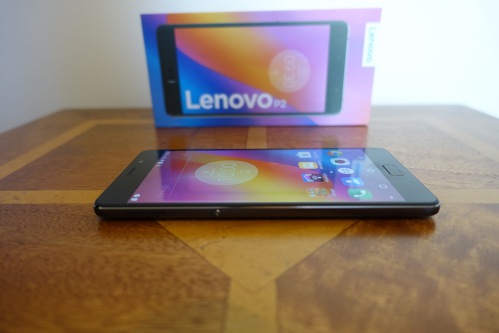
Welcome to my review of the Lenovo P2. The Lenovo P2 is available from Three UK on PAYG for £199.

First lets take a look at the key specifications.

The Key Specification

– 5,100mAh battery providing up to 3 days use
– Charge other devices – OTG cable in box and adapter
– 24W fast charging – 15 mins charge gives 10 hours of use
– Special Hardware Key slides to activate power saving mode
– 5.5 inch super amoled screen 1080p
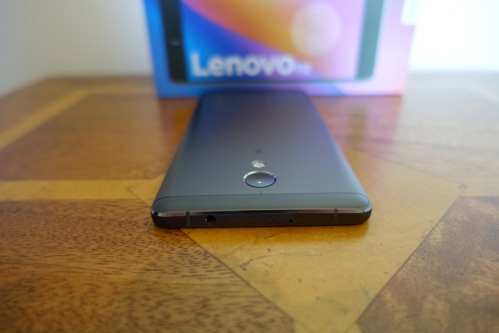
– Full metal unibody design in a profile of just 8.5mm thin
– Processor – Snapdragon 625, Andreno 506 GPU
– Connectivity – VoLTE (4G Super-Voice),3G ,Wi-Fi,GPS,Bluetooth® ,NFC, FM Radio
– 32gb rom, 4gb ram
– Micro SD cards up to 128gb
– Headphone Jack
– Micro USB, USB Audio, OTG
– Sensors – Accelerometer,Gyroscope,Ambient light,Proximity,Magnetometer
– Bands – GSM: 850/900/1800/1900 MHz, WCDMA: 850/900/2100 MHz,LTE: 800/900/1800/2600 MHz
– Dimensions – Height: 153 mm,Width: 76 mm,Depth: 8.5 mm
– Weight: 177 g
– Front Fingerprint sensor – special functions on sensor too
– Android Marshmallow
– Cameras – Rear – 13 MP, phase detection autofocus, dual-LED (dual tone) flash, Front 5mp

641e7dce-8322-4e72-9672-02ca7946975a

Phone Basics

The Lenovo P2 is incredible value for money. I have been so surprised by the phone that I really don’t know where to start. So let’s start at the beginning. Call quality is good. Sunlight visibility is average. It has a monster size battery at 5,100mAh. It manages 10 hours screen on time. So you could use it to charge your other devices too and still not run out of juice.

The loudspeaker is loud and clear. Headphone jack audio is loud and of average quality. I tested the headphone output using my Sennheiser HD598 CS which were powered just fine. Bluetooth is of reasonable quality. My AirPods sounded great with the Lenovo P2. USB Audio is present, and that was a surprise. It has a front facing fingerprint sensor and NFC.

With such a big battery it is handy to note that a 24W fast charger is included. If for some unbelievable reason you are likely to run low on juice or 3 days battery life is not enough, you can with the slide of a hardware switch on the side, turn on extreme power mode.

The Snapdragon 625 with the near stock launcher provides a smooth experience. Heavy CPU intensive games will skip the odd frame though. AnTuTu scored 65,000.

Camera. The camera took some crazy good photos. Below is a sample shot. For more samples check out the video review, which also details the camera app interface.

Church of St Michael - shot on the new #LenovoP2

Video Review

I strongly recommend you watch the video review as this has all the details on the camera quality with photo samples and video footage. You can also hear the loudspeaker test and a lot more. This is a really detailed video review!

Conclusion

The Lenovo P2 is highly recommended and is easily one of the best budget phones I have reviewed.

Useful Links

The Lenovo P2 on Three UK – Click HERE

Amazon UK – Click HERE

Donations – https://www.paypal.me/gavinsgadgets

Lenovo P2 – £199 of smartphone goodness and a 5,100mAh battery for 3 days use

I am currently putting the Lenovo P2 through its paces testing every aspect of this new phone that is available on Three UK for £199 on PAYG.

To give you some idea of what makes this phone special, take a look at the key specs –


The Key Specification

– 5,100mAh battery providing up to 3 days use
– Charge other devices – OTG cable in box and adapter
– 24W fast charging – 15 mins charge gives 10 hours of use
– Special Hardware Key slides to activate power saving mode
– 5.5 inch super amoled screen 1080p
– Full metal unibody design in a profile of just 8.5mm thin
– Processor – Snapdragon 625, Andreno 506 GPU
– Connectivity – VoLTE (4G Super-Voice),3G ,Wi-Fi,GPS,Bluetooth® ,NFC, FM Radio
– 32gb rom, 4gb ram
– Micro SD cards up to 128gb
– Headphone Jack
– Micro USB, USB Audio, OTG
– Sensors – Accelerometer,Gyroscope,Ambient light,Proximity,Magnetometer
– Bands – GSM: 850/900/1800/1900 MHz, WCDMA: 850/900/2100 MHz,LTE: 800/900/1800/2600 MHz
– Dimensions – Height: 153 mm,Width: 76 mm,Depth: 8.5 mm
– Weight: 177 g
– Front Fingerprint sensor – special functions on sensor too
– Android Marshmallow
– Cameras – Rear – 13 MP, phase detection autofocus, dual-LED (dual tone) flash, Front 5mp

My full review will be live soon, so if you have any questions please let me know either by leaving a comment below, or contacting me across social media.

Useful Links

Lenovo P2 on Three UK – Click HERE.

Amazon UK – Click HERE.

AirPods – Is Apple now the Number One Headphone Manufacturer in the World? – The Data is In!

AirPods

I recently reviewed the new AirPods from Apple. To read the review, Click HERE to find out why I was blown away by these and still am.

Tim Cook went on record to say AirPods were a runaway success and based on my views and others, it does not surprise me that these are so successful.

“Now according to a report by Slice, the AirPods made up 75% of all sales in the USA in December 2016. Before the launch on December 13, Beats occupied 24.1 percent of online revenue for wireless headphone sales, according to the report, with Bose following behind with 10.5 percent, then Plantronics and Jaybird with 7.8 percent and 7.45 percent respectively.

For the period after the launch, Apple suddenly became the dominant wireless headphones brand, moving from having no share at all to occupying 26 percent of the market. Revenue derived from Beats wireless headphones dropped down to a 15.4 percent market share during the same time, and though Jaybird and Plantronics dropped down to below 3 percent each, Bose managed to improve its standing to 16.1 percent.”

So it seems and comes as no surprise that out of nowhere, Apple is likely to soon be, if it isn’t already the number one headphone manufacturer in the world!

Source – Appleinsider

Apple Watch – Make it a Nike Style Apple Watch for under £20 – Comparisons

Apple Series 2 Nike TP Straps

Over Christmas I had time to experiment with different Apple Watch straps. I wanted to make my plain Series 2 watch more like the Apple Nike Watch. So I bought 2 different brand Apple Watch straps that claimed to look identical to the official versions.

Apple Series 2 Nike TP Straps

So what I did was go for a black/yellow finish and the same Nike looking style strap, but in a colour not offered by Apple officially. I picked the red/black finish.

My observations are the plastic used in the third party straps are not of the same quality as Apple original straps, but they do costs over £30 less. As the straps have holes, they are slightly lighter,  and they allow your skin breathe more.

To give you a better perspective, I have filmed a short video capturing more of the differences, comparisons with official Apple straps and showing the straps against some cases, for that perfect colour coordinated look.

Video Review

In my video review, I am hoping you get a better perspective of the different straps, the quality versus and Apple original strap and some colour coordination with some official Apple iPhone cases.

Conclusion

My little experiment in discovering Nike style Apple Watch straps was a huge success. I personally prefer the black/yellow mix although I at times I like switching back to the red/black strap. The Nike looking straps looks gorgeous!

Useful Links

iMiWell Black/Green Nike Style Apple Watch – Click HERE.
Elobeth Nike Red Style Apple Watch Strap – Click HERE.

Other colours and mixes of straps are shown on using above links.

Help support gavinsgadgets when you shop on Amazon UK – http://amzn.to/2i4YFEY
Donations – https://www.paypal.me/gavinsgadgets

Zecti 5 in 1 Collapsible Multi-Disc Light Reflector – My Review

71jtisu6aal-_sl1095_

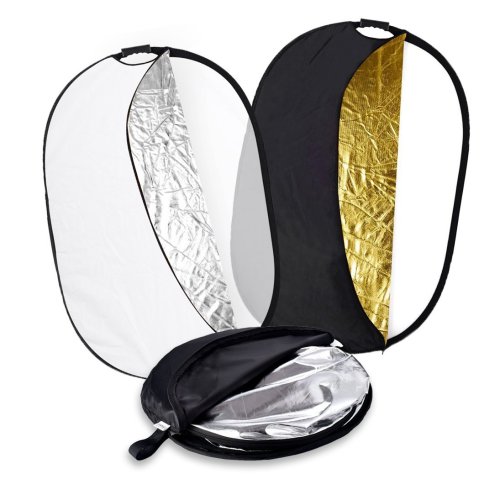
Welcome to my review of the Zecti 5 in 1 Collapsible Multi-Disc Light Reflector. The Zecti 5 in 1 Light Reflector costs £26.99.

The Key Features –

– The light reflector comes with different reflective surfaces that can be used to fill in, reflect, diffuse, absorb or soften light
– Made with durable and flexible galvanised steel frame
– Fairly easily spread and folded into small size and it is easy for you to carry it from one location to another
– Comes with an anti-slip handle which has a 1/4″ screw hole in the handle allow it to fit most of the standard reflector holders/tripods
– Choose from five colours translucent, gold, white, silver and black

61nm7gqa6tl-_sl1420_

In Use

The first time I unzipped the Zecti black carry/protective bag, I had a slight surprise as the reflector sprung open and was considerably larger than the small bag it had been stored in.

I like the fact is collapses into the bag for portability but it is a bit awkward trying to get it to fold initially. The 1/4 inch tripod screw mount is handy too.

To be honest the only way you can appreciate how compact this collapses and then how large it becomes is by watching the short video below. So now enjoy the video.

Video Review

Conclusion

I have always wanted light reflectors and I must admit the portability and flexibility of the Zecti 5 in 1 set is ideal. It is also competitively priced which is a bonus.

Useful Links

To save £4 on the light reflector use code HDKY7XLD. This will expire in a few weeks.

More information on the Zecti 5 in 1 Light Reflector – Click HERE.

Help Support the Channel when shopping on Amazon UK – http://amzn.to/2i4YFEY
Donations – https://www.paypal.me/gavinsgadgets

Converting all my house lights to a wireless setup using Philips Hue & Apple HomeKit – the highs and lows

For nearly 2 years my living room lights were all controlled via an app. These were the Belkin WeMo Smart Lights. These were on an Amazon Black Friday deal in December 2014. 
At the time, the Philips Hue lights were also discounted but they were nearly three times the price, so economics became the deciding factor. Belkin did promise to update the system to provide HomeKit but 2 years down the line they have renegaded on that promise or are asleep at the wheel!

So I decided to bit the bullet a few weeks ago, sell my Belkin WeMo Smart Light system, and acquire a few pieces from the Philips Hue system that work with Apple’s HomeKit and nearly all other systems on the market, including Amazon Echo and Samsung Smart Things. 

It is quite handy buying the lights around Christmas time, as often there are some decent deals available. If you are buying into the Philips Hue system make sure you buy the Philips Hue Hub v2 and upwards as this is when HomeKit support was added. If you have the original Hub, you can just go out and buy the newer version hubs. The same goes for the Hue lights. There are now 3 versions. Version 1 are the white bulbs that don’t change colours, version 2 added rgb colours and the brand new ones , version 3 go slightly brighter and have richer blues and greens. However, there is nothing wrong with version 2 or 1 bulbs as these work just fine. Also the extra brightness obtainable in version 3 bulbs is only possible with certain white hues. So buy the older versions and save some money. That is what I did. I decided I would not need every room to have colour changing bulbs.

So the first change I did was to place the Philips Hue version 2 bulbs into my living room. To use with Apple HomeKit is a simple setup. You will need two factor authentication on your iCloud account and for remote access either an iPad left in your home or an Apple TV 4th edition. Fortunately , I have two factor authentication already setup and the latest Apple TV. 

To start using Apple HomeKit, you simply open the Home app on your iPhone, search  for the bulbs, then scan the HomeKit code on the Philips Hue box or Hub sticker. You can add the bulbs first using the Philips Hue app, which I would recommend doing, as the app will update the firmware. So with HomeKit enabled, activating the lights using Siri is now live. So using Siri  via my Apple Watch or iPhone, I have full control of the lights, turning them on or off, setting a scene, adjusting the brightness or changing the colours. Now the real test became with my wife. Could she get used to using Siri to operate the lights or would she get totally p*ssed off with the technology. 

Once I had set up HomeKit on my iPhone, added some scenes and a few other settings, from the home app, I invited my wife into the HomeKit setup. She accepted on her iPhone 6S. So when she came into the room, I told her to ask Siri to turn on the lights using her Apple Watch. I then asked my wife to ask Siri to change the colour of the lights to a colour of her choice. She did this and was genuinely suprised at how cool and easy it was to operate the lights. This then gave me the go ahead to start changing more and more of the bulbs around the home, and include a few motion sensors and add some automation to the setup. 

Now in case you’re wondering, you don’t need Siri to operate the lights.  Flicking up on the iPhone to bring up the control centre, scroll left twice and your in the home scenes and accessories tab. Here you can turn the lights on or off, adjust the brightness or colours. 3D Touch is used on the icons. I will embed a video to show this and a load more options. You really should watch this video to see how Apple have produced such a great home application. 

So after nearly a month, I have automated the lights in the upstairs hall landing, master bedroom, living room, kitchen and dining room. If I leave the house or return home, certain sequences of lights turn on or off, at particular levels of brightness and colours. If I move around the house and trigger one of the motion sensors, certain lights are turned on or off.  The automated procedures are smart enough also to know that the lights only need come on after sunset as well (if you select this to occur). All this slick functionality is a joy to experience as a tech geek. Also being able to control the lights from the Apple Watch is cool. You don’t even need to use Siri on the Watch, as the home app with dock enables you to control the lights as needed. In the kitchen I added some Philips Hue light strips. These provide superb mood lighting. Green is the favourite colour with these. The light strips are hidden too. They have 3M sticky tape on the strip to secure them properly. If you buy version 1 light strips, these are not extendable. Version 2 can be extended. Version 1 strips do have changing colours though. I have used version 1 strips as they were long enough for my needs and saved money too.

Sounds like a dream doesn’t it. Well, it’s not quite that. These are the lows or things to think about. Unless you live alone, then the below points are not as important or relevant. If you change all the lights or a high percentage, you may not always have your iPhone or Apple Watch on you. My wife is a good example of this. So that means you really need to think about installing the Philips Hue switches in certain rooms to be able to manually control the lights just in case you haven’t got any Apple devices nearby. I would recommend having these switches in the main living areas e.g. Living room, kitchen and main hallway. I haven’t got these installed, so am trying to see if with the aid of motion sensors and automation processes I can avoid installing these. I might not be successful here, as my wife may not enjoy the inability just to walk into the living room and press a switch to turn the lights on which is simple and less effort sometimes. It’s all a fine balance. 

Like all uses of technology it has to make life simpler and more enjoyable. I believe I have reached that balance, but if I go the next step and change every single light bulb, I will need to also invest in the Philip Hue light switches. Problem is, going to the next level is very expensive. I also am very pleased with the moderate setup which adds automation, mood lighting and a certain cool factor. 

Just some final thoughts. I wish in the UK, that the Apple HomeKit hardware was more extensive. I imagine in the coming months there will be more products coming out though. However, I am prepared to wait patiently as Apple’s HomeKit system is the most secure available. This is really important point as I can tell you I don’t fancy my home lights and other internet connected devices being hacked. 

Useful Links

More information and the latest pricing on Philips Hue range of lights, sensors and switches – Click HERE.

My Top 5 Smartphones of 2016 & a message from me 

Can you believe that 2016 is nearly at an end. And what a year 2016 has been. World events have been seismic and so has the technology. 

So what are my top 5 phones for 2016? 

5th Place – Asus Zenfone Zoom – What a phone and what a clever piece of hardware. With 3 x optical zoom, this was a fabulous phone and camera. As Apple has shown, having optical zoom is so useful. 

4th Place – LG G5 – the phone that has every technical specification. Replaceable batteries, micro sd card slot, dual lens system with a super wide lens (so cool), one of the best Bluetooth music using HD APT-X and so much more. Just let down by its build quality versus its competition. If the LG V20 had been sold in the U.K., this would have replaced the G5.

3rd Place – HTC 10 – the phone that everyone forgot about, yet is the phone that has the best audio quality with a headphone jack, solid premium build and super fast. I was going to put the Google Pixel phone in 3rd, but the HTC 10 is a lot less to buy.

2nd Place – Honor 8 – with its dual lens system, infra red blaster, gorgeous hardware and £300 price point, sometimes even less, this is a killer choice and a deserved second place. 

1st Place – Apple iPhone 7 Plus. Apple was helped towards this win due to Samsung suffering a PR disaster with their faulty Note 7. However, IMO there isn’t a single phone on sale at the moment that can offer everything that the iPhone 7 Plus provides. Great camera. Superb audio. iOS 10 and the Apple eco system. For me using the Apple Watch, with an iPad Air,  MacBook Pro and AirPods is a dream setup. HomeKit integrates tightly and Siri for me works very well. 

To catch up on my reviews on all the above phones, and all the other top phones of 2016, click here REVIEWS . Using that link, you can also get to all my Bluetooth headphone reviews and more.

Now in case anyone thinks I am an Apple fanboy or sheep, this is not the case. I just want the best of what’s available. Prior to the iPhone I was using Samsung S7 as my main phone with every Samsung accessory possible. However, after going through a horrific Samsung customer service experience with my Note 7, I have vowed never to use anything with a Samsung logo on it. Following my  Note 7 saga I also sold every Samsung piece of hardware I owned. 

The Holidays 

As we are approaching the holiday period,  news and reviews will be slower. This will allow me to look at the website design and try and improve it in a few places. I will also spend more time with family and friends. So whatever you are doing at this time of year, enjoy the next few days if you can and I wish you a happy, healthy and prosperous new year! 

In the meantime,  if you are buying anything on Amazon UK, using my affiliate link helps me towards the increasing running costs of the website. The good news shopping via my link costs you nothing extra. 
Amazon Shopping
If you wish to make a one off dontation (thanks to everyone who has so far) please do so using my PayPal account. 

https://www.paypal.me/gavinsgadgets