Tag Archives: Samsung Note 4

Samsung shares horrifying list of potential Gear VR risks

Arstechnica examined the dangers of using the Samsung Gear VR headset. The dangers were provided by Samsung. Here goes –

“Before purchasing the Innovator Edition from Samsung’s website, you have to certify you’ve read a 1,000-word set of “Gear VR Product Use Warnings”

1) You should take a break of at least 10 to 15 minutes after every half-hour of use, Samsung warns, “even if you do not think you need it.” In addition, children under the age of 13 shouldn’t use the unit at all, and older children should be monitored by adults and play only for limited amounts of time to avoid adverse symptoms.

2) Stop using Gear VR immediately if you experience “seizures, loss of awareness, eye strain, eye or muscle twitching, involuntary movements, altered, blurred, or double vision or other visual abnormalities, dizziness, disorientation, impaired balance, impaired hand-eye coordination, excessive sweating, increased salivation, nausea, light-headedness, discomfort or pain in the head or eyes, drowsiness, fatigue, or any symptoms similar to motion sickness.

3) Prolonged use of the Gear VR and input devices (e.g. controllers) can make your muscles, joints, or skin hurt” or lead to “tingling, numbness, burning, or stiffness.

4) The risk doesn’t stop after you’re done using Gear VR either. Samsung’s warning compares some of these symptoms to those experienced after getting off a cruise ship, in that they “can persist and become more apparent hours after use. You could see “excessive drowsiness and decreased ability to multi-task” after using the Gear VR and shouldn’t drive, operate heavy machinery, or undertake “visually or physically demanding activities that have potentially serious consequences” until those symptoms go away.

5) Because the Gear VR requires “an unimpaired sense of motion and balance,” it shouldn’t be used “when you are tired, need sleep, are under the influence of alcohol or drugs, are hung-over, have digestive problems, are under emotional stress or anxiety, or when suffering from cold, flu, headaches, migraines, or earaches, as this can increase your susceptibility to adverse symptoms.” The Gear VR should always be used while sitting, far away from “other people, objects, stairs, balconies, windows, furniture” that can be bumped. It should also never be used when in a moving vehicle, which Samsung warns could increase the adverse symptoms.

6) Do not handle sharp or otherwise dangerous objects while using the Gear VR. Never wear the Gear VR in situations that require attention, such as walking, bicycling, or driving.”

7) Aside from affecting you, using the Gear VR can also affect the performance of the Galaxy Note 4 strapped inside in the short-term. When used for a long time in the Gear VR, the phone “may become hotter than normal,” leading to “degraded” application performance or outright termination”

Based on all of the above warnings, I’ve decided for the time being not to buy this product and wait to see the side effects suffered by those that use it first. I also don’t fancy my Note 4 being terminated!

Home screen options on the Samsung Note 4 – Touchwiz vs Nova

Many people don’t like Touchwiz on Samsung phones due to the lag it often introduces. On the Note 4 there really isn’t any lag. Below are 2 setups on my Note 4. First up are screen shots using Touchwiz. Then from Nova Launcher. Whenever you use a third party launcher you lose some of widgets like the monthly calendar and location widgets shown below that I really like.

image

image

image

image

image

The above screen is a left swipe on the Touchwiz home screen. You don’t get this when using Nova Launcher. Now below is Nova Launcher.

image

image

So which style do you prefer?

Samsung Note 4 – 17 Part – Master Review

Below are all the review posts covering the Note 4. Happy reading.

If you use the index, you will find reviews on over 20 other smartphones, wearables, headphones, case and much much more.

Part 1 – First impressions – https://gavinsgadgets.wordpress.com/2014/11/08/samsung-note-4-first-impressions/

Part 2 – Quick camera comparison – Note 4 vs iPhone 6 Plus – https://gavinsgadgets.wordpress.com/2014/11/07/samsung-note-4-vs-iphone-6-plus-camera-photo-comparison/

Part 3 – Note 4 Free Gifts by Samsung – https://gavinsgadgets.wordpress.com/2014/11/07/samsung-offers-a-number-of-free-gifts-and-limited-trials-with-note-4-and-note-edge-phones/

Part 4 – Sidesync and Note 4 – https://gavinsgadgets.wordpress.com/2014/11/08/oh-look-samsung-note-4-running-on-the-notepro-tablet/

Part 5 – Note 4 vs iPhone 6 Plus – Which took the best moon shot? – https://gavinsgadgets.wordpress.com/2014/11/09/samsung-note-4-vs-iphone-6-plus-which-moon-shot-is-best/

Part 6 – https://gavinsgadgets.wordpress.com/2014/11/10/samsung-note-4-thoughts-from-the-weekend/

Part 7 – https://gavinsgadgets.wordpress.com/2014/11/11/living-the-samsung-dream-note-4-gear-s-and-samsung-notepro-12-2-tablet/

Part 8 – Note 4 and Mont Blanc https://gavinsgadgets.wordpress.com/2014/11/11/this-is-magic-stuff-how-to-install-the-exclusive-mont-blanc-content-for-samsung-note-4-free/

Part 9 – https://gavinsgadgets.wordpress.com/2014/11/12/living-the-samsung-dream-note-4-gear-s-and-samsung-notepro-12-2-tablet-2/

Part 10 – https://gavinsgadgets.wordpress.com/2014/11/13/living-the-samsung-nightmare-note-4-gear-s-and-notepro-12-2/

Part 11 – https://gavinsgadgets.wordpress.com/2014/11/14/living-the-dream-samsung-note-4-gear-s-and-note-pro-12-2/

Part 12- Apt-x on the Note 4 – https://gavinsgadgets.wordpress.com/2014/11/15/does-the-samsung-note-4-have-apt-x-codec/

Part 13 – Useful Hidden Tips – https://gavinsgadgets.wordpress.com/2014/11/16/samsung-note-4-useful-hidden-stuff/

Part 14 – Public views – https://gavinsgadgets.wordpress.com/2014/11/17/samsung-gear-s-note-4-iphone-6-plus-views-from-the-wider-world/

Part 15 – Sunshine on the screen – https://gavinsgadgets.wordpress.com/2014/11/19/samsung-note-4-sunshine-and-the-screen/

Part 16 – Note 4 vs iPhone 6 Plus real life camera comparisons – https://gavinsgadgets.wordpress.com/2014/11/20/samsung-note-4-vs-iphone-6-plus-camera-comparison/

Part 17 – Camera Food Mode – https://gavinsgadgets.wordpress.com/2014/11/21/samsung-note-4-camera-update-and-food-mode/

Samsung Note 4 – Camera update and food mode

image

Beef Pie, mash and vegetables snapped using the food mode. Weirdly the Note 4 saved this shot in main memory instead of the external micro sd card.

Also, I realised that the photo comparison from yesterday really was a Note 4 win as the file size setting was on 6mp not 16mp. The iPhone 6 Plus was shooting at 8mp.  Now just imagine the extra detail that could have been available on the Note 4!

Samsung Note 4 vs iPhone 6 Plus – Camera Comparison – updated

Today I have about 7 or so shots from the iPhone 6 Plus and Samsung Note 4. These were taken by a friend of mine who wanted to test each phone to see which one they preferred. The photos are completely unedited. If you want to view the full resolution, click through on the photos to my Flickr account, change the size to full resolution and pixel peep to your hearts contention. All the shots were taken from both cameras standing on the same spot. You will notice the different field of views from each phone. Panoramic shots – the Note 4 had a much longer sweep enabling it to take a much wider canvas. The 6 Plus has exposure correction as it takes the panoramic photos, but sometimes this ruins the shot as the change is noticeable. Just looking at the snaps as is, which do you prefer? Or are they really about equal. With both phones, there were hardly any duff photos taken. As they both use Optical Image stabilisation, this seems to help getting better shots.

Viewing order – In every shot it is iPhone 6 Plus first, then Note 4. At the end there are 3 Note 4 shots that have not got an iPhone 6 Plus equivalent. If you wish to see all the photos head over to my Flickr page – https://www.flickr.com/photos/gavinfabl100/ . Remember these aren’t full size images, but scaled down to save some bandwidth for those on mobile devices.

Royal William Yard Views #iphone6plus #unedited

Royal William Yard Views #SamsungNote4 #unedited

Once again, iPhone 6 Plus first and then Note 4.

Royal William Yard Views #iphone6plus #unedited

Royal William Yard Views #SamsungNote4 #unedited

And again, iPhone 6 Plus first, then Note 4.

Royal William Yard Views #iphone6plus #unedited

Royal William Yard Views #SamsungNote4 #unedited

Remember, to view the full resolution of each, just click on photo to go to Flickr, then select largest file size to view full resolution shots. And with all these shots, my friend was standing in the same spot when snapping.

Royal William Yard Views #iphone6plus #unedited

Royal William Yard Views #SamsungNote4 #unedited

And again, iPhone 6 Plus first, then Note 4.

Royal William Yard Views #iphone6plus #unedited

Royal William Yard Views #SamsungNote4 #unedited

And again, iPhone 6 Plus first, then Note 4. Just look at the difference with the Note 4 capturing a much wider area.

Royal William Yard Views #iphone6plus #unedited

Royal William Yard Views #SamsungNote4 #unedited

Below is another shot of the above scene from the iPhone 6 Plus just to add as another comparison.

Royal William Yard Views #iphone6plus #unedited

Below are some shots from the Note 4 where there is no alternative from the iPhone 6 Plus.

Royal William Yard Views #SamsungNote4 #unedited

Royal William Yard Views #SamsungNote4 #unedited

Royal William Yard Views #SamsungNote4 #unedited

So the above shots are trying to represent a typical day out. Which shots do you prefer? 6 Plus or Note 4? Or is it a draw? 8mp vs 16mp in lovely sunny conditions! In all honesty, I think all of these shots are amazing.

Updated – I can’t believe this but the Note 4 was left with the camera file size at 6mp instead of 16mp. That really is incredible as that made the photos fairer but also showed the Note 4 could snap another 10mp worth of pixels as it’s max resolution is 16mp.

Samsung Note 4 – sunshine and the screen

It’s been really wet and dull weather for ages in my part of the world. But yesterday, the sun appeared in full blossom.

With brightness set on auto, and the sun beaming on to the Note 4 screen, I watched as the brightness level got cranked up high as well as contrast changes. This made the screen visible in direct sunlight and was rather impressive. As the contrast gets altered the screen colours do look a little odd too.

Samsung Gear S, Note 4 & iPhone 6 Plus – views from the wider world

On Friday I was at a social function. I was wearing my Gear S and had on me a Note 4, iPhone 6 Plus and BlackBerry Curve.

Nobody wanted to see the blackberry.  The Gear S reaction was really marmite.  It was either referred to as a prison tag or I want one.  There was no middle ground.  There wasn’t much interest in the iPhone 6 Plus mainly as everyone seemed to know what it was and that it was just another iPhone.  However,  people did comment that it was huge. Really huge.

Now to the Note 4. This caused the same reaction by everyone who agreed the screen was superb.  We were looking at photos and again I was informed I had an unfair advantage as everything looked better on my screen. People were dazzled by the specs on the Note 4.

Now I did demonstrate trying to give some balance that the iPhone was really easy to use but again there wasn’t much interest.

When I explained how the Gear S was also a phone,  there was disbelief in an amazed way from my table of people.

So there you have it. 

IPhone 6 Plus – just another iPhone.

Samsung Note 4 – that fabulous screen

Samsung Gear S – Prison escapee or  droolworthy ☺

Does the Samsung Note 4 have apt-x codec? Official update

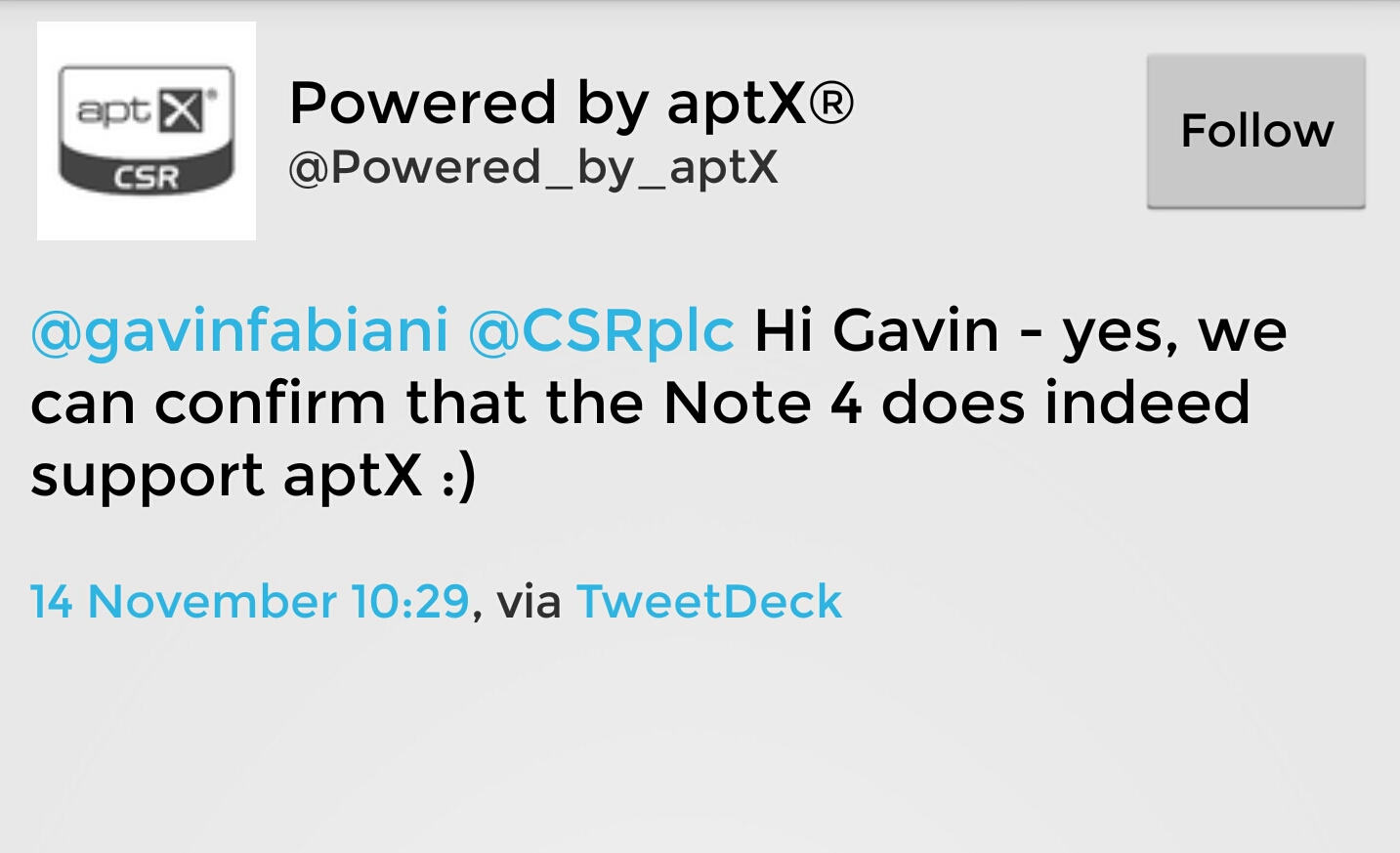
@Powered_by_aptX: @gavinfabiani @CSRplc Hi Gavin – yes, we can confirm that the Note 4 does indeed support aptX 🙂

image

This question has been asked in many forums without any solid answers. It is not mentioned on any Samsung literature but the high quality bluetooth music codec is included in the Samsung Note 4 as shown above and confirmed by CSR who developed the codec.

Living the dream – Samsung Note 4, Gear S and Note Pro 12.2.

So its another 24 hours later. This time I have used the S-Pen to write this entire post. t have managed to write this fairly easily on the Notepro and even easier on the Samsung Note 4. I am left with the original niggle from yesterday over the cell signal. Do I hope that Samsung eventually improve this with an update. I hope so, as I prefer the Note 4 over the iPhone. The 6 Plus is a nicer piece of kit. It just becomes less exciting to use overtime and isn’t as flexible as a device as I would personally prefer.

In terms of using the S-Pen it seems far simpler to use on the Note 4 if you are holding the Note 4 in the hand to the stylus. I will be honest though and say that using swipe is fastest method of data entry. However , using the pen is a lovely feeling.

I’ve realised that the Gear S battery is good for 2 days. It is without a doubt the best watch for my needs that I have used so far.

In terms of overall package the three devices are a good combination providing you need the pen. S Health is also excellent but the main problem is the competition are catching up.

Below is a sample note that you can create.

image