Tag Archives: First Impressions

Beats Solo Wireless 3 – The New Headphones with Apple’s W1 Chip – My First Impression

Beats Wireless Solo 3 with Apple's new W1 chip

My Beats Solo 3 Wireless headphones arrived yesterday. I was very excited to open the box and test these for a number of reasons. Firstly, the packaging and presentation is first class. When you open the box, the headphones themselves are folded inside a protective case. Lift the case out and you get the cables and extras that come with the headphones.

Beats Wireless Solo 3 with Apple's new W1 chip

The second reason was to see what difference the Apple W1 chip made to the bluetooth process, setup, sound and real world usage.

Beats

I had watched the videos from Apple showing how the AirPods that also have the W1 chip, just connect by opening the protective case. I honestly did not believe it would work “magically” as shown, but the Beats Solo 3 Wireless headphones did just connect to my iPhone 7 “magically”. I simply pressed the power on button on the headphones, a big notification instantly appeared from the bottom of my iPhone asking if I wanted to connect. I tapped “connect”. And that was it. The first connection was over in a second. Not only that it named the Beats “Gavin’s Beats Solo 3” as you can see.

Beats Wireless Solo 3 with Apple's new W1 chip

Not only does it pair instantly, every time I have turned it on and off and on again, it connects like a bullet. But it doesn’t stop there. Now that I have paired it to my iPhone, it is now paired to my Apple Watch, iPad and MAC using iCloud. So neat.

Beats Wireless Solo 3 with Apple's new W1 chip

So what do these £249 on ear headphones sound like? Well, not £249 headphones IMO. More like £150 headphones but I am still burning these in. Over the last hour, they have improved a lot. At the moment they do not sound as good as my Sennheiser Momentum Wireless 2.0 or B & O Beoplay H5 headphones. They have improved since the last hour and I am listening to them as I type this and I am noticing better mids and treble occurring. Once I have burnt these in for 50 hours, I will let you know my final thoughts on the audio quality. However, it is worth remembering part of the pricing is paying for the Beats branding and the Apple W1 processor and included technology.

The headphones have controls on the left earcup to activate Siri, take and receive calls, control your music and volume. They feature dual beaming microphones for clearer calls. Siri worked perfectly, but I need to test voice calls to see how they perform. One feature of these headphones is the 40 hour battery life from one charge, and the quick charge option that gives 3 hours playback after a 15 min charge from a low battery.

So have Apple invented bluetooth. No. But they have made the experience amazing. This is by far the quickest and easiest pair of bluetooth headphones I have ever paired, used and connected. Also, the signal has not dropped, not even once, not even for a blink of an eye.

My final thought is this – “Why are you wasting your energy, plugging headphones into a 3.5mm headphone jack or lightning port?”. Wireless is the future and the future is now!

Bluetooth Headphones on Amazon

Apple iPhone 7 Plus & Apple Watch Series 2 – First Impressions

Iphone 7 plus

When I got home last night, DPD had delivered my Apple iPhone 7 Plus Black and Apple Watch Series 2 Space Grey Sport with Black strap. I also picked up an Apple black leather case and a white sport band for the watch. In terms of finish, I chose black as opposed to jet black. The matte black looks cool.

I have been using android for ages and picking up the iPhone 7 Plus initially felt alien. My first problem was setting up the iPhone. I have 2 factor authentication on everything, and for some reason my SMS code was not appearing. 40 mins later, a plate of salmon and veg consumed, and voila, my SMS code arrived.

As you will know I had the Note 7 previously, so picking the iPhone 7 Plus up was a shock. The iPhone 7 Plus feels huge in comparison to the Note 7. However, based on the extensive drop tests by people on YouTube who have nothing better to do with their time, the extra bezels protects the iPhone a lot from damage.

Next up was the process on installing my essential apps first, then syncing my photos and music from my mac. Out of all the iPhones I have setup, the 7 Plus has been the fastest to sync everything across. Out of the 256gb, I only have 129gb free and I haven’t yet installed all my apps.

Now on to iOS 10. This is all new to me and I am on a learning curve. I am sure there are some bugs, in particular the iPhone 7 Plus was having some issues holding on to the mobile signal and kept showing every few minutes “no service”. This is worrying as I have a Three signal booster in the house. It should be maximum reception at all times. I will wait until I use the phone outside of my signal booster to see if it registers properly/differently on the Three network. I think this is a wifi bug as the connection held perfectly when I turned wifi off on the iPhone.

While the phone was syncing and downloading apps, I set up the Apple Watch series 2. It is faster than the original watch but not night and day faster. The Apple Watch is such a geeky piece of tech but also fun to use. Apple Pay on the watch is damn cool. Watch OS3 is such an improvement over the previous versions too.

I had a play with the camera, trying out some test shots and using some third party photo apps too. The camera shows a lot of promise. Is it better than the S7 or Note 7? I will answer that soon. In terms of audio, the iPhone 7 Plus is better than the S7 or Note 7 in every aspect – loudspeaker, wired headphones and bluetooth. I connected my Oppo PM-3 using the dongle to the lightning port, and the sound was excellent. Listening to music via my B & O Beoplay H5 over bluetooth was really superb too.

One thing I noticed is just how many more apps I have on iOS than android. Also gaming on iOS is so much smoother. The iPhone 7 Plus is so fast to use in real world usage. I will be testing my iOS game controller at some point as well.

I need to sort out my homes screen layout and folders in terms of positioning and content.Everything is not perfectly organised yet.

So my first 4 hours have been a mix of enjoyment, frustration, and learning the iOS way and getting used to the new home button!

All in all its a positive experience so far and I hope one that continues passed the honeymoon period.

Apple iPhone 7 and 7 Plus – First Impressions – incl audio, camera and that new home button

apple

The Apple iPhone 7 and 7 Plus went on sale officially this morning at 8am.

This year Apple has prevented walk-ins and opted for pre order online or reservations for pickup in a store. My local Apple Store in Plymouth opened a lot earlier than normal and allowed people to browse as well as collect their reservations.

Whilst my order won’t arrive for another for days, the calmness inside the Apple store was a far superior experience than the normal chaotic launches. The staff were able to spend the correct amount of time helping customers setup their new iPhone and run through all of the new features. Other staff were also on hand to help you with any product knowledge.

What was missing from the iPhone 7 counter was the iPhone 7 Plus in either black or jet black. However, the finishes were available in the smaller size iPhone 7. If I am being brutally honest, I cannot see any point in getting the jet black over black. Once a case is fitted to the back, it is impossible to tell the two apart and as the jet black is more prone to micro abrasions it makes more sense to go for the standard black. Also, both blacks will show fingerprints as well, although the jet black attracts fingerprints much faster. Both black colours disguise the antenna lines better than any of the other colours available.

Now what about the new home button. I honestly don’t understand what the fuss is about. It just works and I was not bothered about the way it now worked nor did I have any issue with its operation. The taptic feedback system works really well for me.

The screen. Both iPhone 7 screens look good but they are not as good as those from the Samsung Note 7.

Performance. Testing the iPhone 7 and 7 Plus is a joy. iOS 10 and the iPhone 7 and 7 Plus are so fluid and fast to use, but we all knew that anyway.

Now to the audio. I tested the loudspeaker with BBC Radio 4 for spoken voice and Beats 1 radio station for music. The loudspeaker is louder than previous but it is not as good as having traditional speakers integrated into the front of a smartphone. Next I paired by B & O Beoplay H5’s Bluetooth Wireless headphones and listened to a number of different genres. The iPhone 7 bluetooth audio is excellent, so are the B & O Beoplay H5’s headphones and I doubt whether Apple’s Airpods would sound better, although the AirPods are wirefree.

The camera. It works as advertised. The standard iPhone 7 now takes fabulous photos and the 7 Plus with the telephoto lens is equally as impressive. The telephoto lens does not have OIS though. The optical 2 x zoom really worked very well. However, software zoom introduced too much noise for my liking. Obviously, the lighting inside the Apple store is dreadful, but nonetheless it still is a test of what the camera can achieve. I used the telephoto lens for panaroma shots too. I noticed the phone needed me to slow down panning more when using the telephoto lens over the normal 12mp lens. I then tried burst shots of people walking inside the store, with and without the telephoto lens. None were really crispy sharp like those I took on the Samsung S7 or Note 7. I need to re-test the burst operation is better lighting to see how it performs before I pass judgement properly, but early testing seems to show that the fast focus system on the Note 7 and S7 really is king. However, the iPhone 7 offers many other options on the camera which need testing as mentioned. The camera did freeze on me too which was resolved by restarting the camera app.

Anyway, this is my first impression of the new iPhone 7 and 7 Plus. I intend to cover off a lot more over the next few weeks.

If you have received your new iPhone, do add a comment below on your experience so far.

Samsung Note 7 – First Impressions – Dual Sim – Duos – The Setup, Official Cases and More

Samsung Note 7 LED CASE

I have now setup my new Samsung Note 7 Duos (Duos is the dual sim Note 7) a few nights ago. I decided to try Samsung’s Smart Switch application which worked fairly well. The Smart Switch application allows you to transfer pretty much everything from one phone to another including phone logs, text messages, images, music, docs, apps and application data and much more. This can be information from the micro SD card as well. You can select whatever information you like to be transferred. Instructions are shown showing how you transfer data from an iPhone, android phone, windows phone, Samsung phone and BlackBerry.

Being dual sim, the sim tray is a hybrid version meaning you can either have 2 nano sims or one nano sim and a micro SD card.

SIM

Within the connection settings there is a sim manager option as shown above with some extra options for controlling both sims. You can also limit the number of notifications on the status bar to 3 so as to not interfere with the signal information.

The Note 7 does not have Touchwiz. Samsung calls the new interface Grace UI and it really is very polished.

Settings

Main settings menu shown above. You can now have themes, wallpapers, and icons for the Grace UI. I have a material dark theme applied.

Home screen

I am so pleased I picked the Black Onyx finish. This is by far the best option. It looks bad-ass.The Note 7 is beautiful from all angles and the Samsung really have excelled from a hardware and software point of view. Everything is tightly integrated and improved from the Samsung Galaxy S7. For example, the calendar widget can now be white or black and has a transparency slider. Everywhere across the email app and more there are neat touches that I will cover off in future posts.

I have 5 cases for the Note 7. 3 official and 2 third party options. The Samsung LED cover is shown in the top photo. This is super cool but does take more time to setup as you can design you own LED app icons. I recommend doing this too. Its fun and makes your LED notifications more personalised. The S View Standing case is also excellent using the always on display to show data in the window. I will cover off more on the cases in future posts.

So the Note 7 has an iris scanner, S Pen, Edge screen and the kitchen sink. The fingerprint sensor on the Note 7 is perfect. Better than the one on the S7. The iris scanner is a PITA. It took me ages to get my eyes learnt. And I have loads of failures when trying to unlock. I need more practice clearly! However, I can unlock via the fingerprint or iris as both are activated at the moment.

I did receive a 230mb software update yesterday as well. One last point, my dual sim Note 7 has the Exynos processor.

On paper the Note 7 is clearly a S7 Edge with a S Pen (stylus) with a premium price over the S7 Edge too. In reality it feels like a totally different device. I will be amazed if any other manufacturer can beat the Samsung Note 7 in 2016.

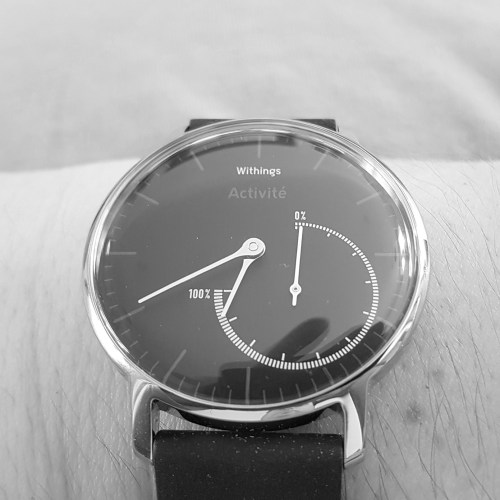
Withings Activite Steel – Swiss Activity Tracker – First Impressions

wp-1468432165320.jpg

Welcome to my first impressions of the Withings Activite Steel watch. The key features are –

– Automatic activity tracking – Steps, runs, swims (water resistant – 50m) and calories burned
– Sleep monitoring – Sleep cycle analysis (light and deep sleep) plus silent vibrating alarm
– Automatic synchronisation – Visualise trends and data on your smartphone with the free Health Mate app available on iOS and android
– Premium materials – Stainless steel, chrome hands, silicon sport strap
No charging – Up to 8-month battery life

The Withings Activite Steel smartwatch arrived yesterday. Photo above shows watch on my wrist. Settings up is a breeze. You download the Health Mate app, and follow the simple instructions. I was all setup within 5 mins. Syncing is done periodically during the day using Bluetooth Low Energy. This is an analogue, swiss style watch. The watch strap is easily removable with a built in slide pin. Withings sell leather straps made from quality Barenia leather from Haas Tanneries, the supplier of the finest French Haute Couture houses. Choice of black or tawny brown colours. A single leather strap is £100. The silcone strap is also replaceable with other colour straps. Withings sell a 3 pack of coloured silicone straps for £25. The colours are orange, plum and teal.

The watch has a dial for the hands and minute hands. The other dial moves from 0 to 100% of step target. On the app you set how many steps is you goal. The Health Mate app displays a whole range of data, more of which I will cover off in my review.

The first thing I noticed is the comfort of the strap. Next the watch size is smaller than expected. I think changing the strap for orange or black leather would be a better choice. I cannot believe this doesn’t need charging and lasts 8 months. This takes all the pain out of charging a tracker. My main issue is the watch costs around £139 but just doesn’t look expensive enough.

However, seeing the analogue dial move round felt far less stressful than having an actual number of steps travelled on the screen. Opening the health app does reveal step count and more.

More soon.

More info & latest pricing on Amazon UK

Sony MDR-XB950BT Bluetooth Headphones – Redefining Bass – First Impressions 

Nothing in life will prepare you for the Sony MDR-XB950BT headphones. Nothing!

The Sony headphones arrived about 3 days ago and I have been putting them through the paces in both Bluetooth and wired mode. 

Some basic specs – 

– Bluetooth with NFC

– 20 hours battery life

– Bass Boost button

– Foldable cups 

– Sensitivty 102 db/mW

– 40mm dynamic driver 

– Frequency range 3 – 28,000 hz with headphones cable, 20 -20,000 hz Bluetooth mode

The very first thing I wanted to do when I received these headphones was pair them to my Samsung Galaxy S7 and listen to the bass these headphones are meant to be able to produce. I think I swore when I first heard them. I then thought the bass boost button was left on, so I pressed it, and OMFG. The bass and sub bass was so extreme my teeth felt like they could rattle. I’ll be honest I don’t use the bass boost button as these headphones produce plenty without it. I do however press it and listen for a few minutes just to bring a smile to my face a few times a day.

Now you can also connect these via the supplied audio cable. Bluetooth turns off. So does the use of the bass boost button. But in wired mode these operate at a gut drawing level of 3 – 28,000 hz. They also sound better too in wired mode. And there is still epic levels of bass. 

Now the cons. I have listened to every genre. Some tracks collapse with the bass levels and sound wrong. But the majority are fine. In fact, in some cases having the extra bass or I should say sub bass adds a whole fun listening level. Some jazz and classical tracks really worked well with these. Some just got swamped with too much bass as the mids got lost. For example Michael Buble, Feeling Good has lots of depth and didn’t get ruined by the extra bass. With dance , rap or electronic music these are like being at a rave or club, and even better if you switch on the bass boost button!

These headphones aren’t for everyone, but I love them. They go against all the rules I believe in, but they add swagger to a lot of my music across many genres that for the times the bass becomes overpowering, I just skip to the next track or lower the bass in the equaliser settings. These are my first impressions, and I will evaluate these for a longer period and report back accordingly.

The question to ask yourself, are you brave enough to own a pair 🙂 

Available from Amazon UK – Click HERE.

OnePlus 3 – First Impressions – Updated with camera sample

image

The OnePlus 3 was meant to have arrived yesterday but the Royal Mail didn’t deliver it due to sickness. Or more likely not enough staff due to the football.

Anyway I collected it from my local sorting office this morning, opened the box , turned it on had a little play and immediately I am impressed by what I have seen. 

It’s currently downloading a firmware update and I have many tests to undertake.

Here’s a first shot (literally) of Tiggy. Cropped in but no other editing.

image

This and several other items are being reviewed next week so if you have any questions you would like me to answer please let me know.

For now if you are shopping on Amazon UK, you can help Gavin’s Gadgets are no extra cost to yourself by heading over using the link below. Thanks in advance.

Amazon UK Click HERE

Xiaomi Mi Max – First Impressions and Camera Samples

20160525_145852

It has been 24 hours since the Xiaomi Mi Max arrived. It is an absolute beast. Currently, I am running the Chinese rom as the official global rom is not available. This meant side loading Google Play Services which was a fairly simple affair once I used the correct apk installer. I have now installed around 100 apps/games from the Google Play Store.

One of the drawbacks of using the Chinese rom is despite selecting English in the language settings, Chinese text does appear in certain apps and menus. This hasn’t stop me setting up the FM Radio channels, the Mi Remote (infra red blaster) for my TV and a lot more. The loudspeaker is mono, goes fairly loud and sounds quite good. Headphone audio is excellent. My Sennheiser HD598se were powered with relative ease.

Battery life is wonderful. Full brightness. Everything on. And still loads of juice left at the end of the day. Every phone should have a 4,850mAh battery! Viewing media on the 6.44 inch screen is fantastic too.

So what about the camera? Well below are some samples I snapped yesterday. Click on each photo if you want to pixel peep at the original.

Views around Princetown, Dartmoor #Xiaomi #MiMax

Whilst perfect conditions for taking photos. I felt the shots were good. Just look how vivid the colours are on the telephone box, yet the sky is the correct shade of blue.

Views around Princetown, Dartmoor #Xiaomi #MiMax

Shot of my village centre.

Views around Princetown, Dartmoor #Xiaomi #MiMax

Now this is my local church. HDR was off.

Views around Princetown, Dartmoor #Xiaomi #MiMax

But with HDR on, the shot is vastly improved.

Views around Princetown, Dartmoor #Xiaomi #MiMax

The Mi Max has tap to focus. So I tried focusing on the graveyard in the distance and it worked.

Views around Princetown, Dartmoor #Xiaomi #MiMax

So now I focused on one of the bars. And it worked again. So far I have been impressed by the camera.

More soon on the Xiaomi Mi Max.

Microsoft Lumia 950 XL – First Impressions

Microsoft Lumia 950 XL - The end of an era

Despite the sad news coming out of the smartphone division of Microsoft, I now have a Microsoft Lumia 950 XL to evaluate along with the dock to connect to a screen via HDMI for the next few weeks, thanks to Steve Litchfield.

So, I powered up the Lumia 950 XL, entered my Windows credentials and shortly was asked if I wanted to restore from an earlier Windows Phone backup from an old device I had used previously.

This time, I choose new setup. I left the phone for a few hours to update and download a few apps.

The 950 XL I am testing has a gold edge and red leather back cover which really feels great in the hand and looks somewhat premium too.

Microsoft Lumia 950 XL - The end of an era

Live Tiles. Oh how I missed them. I don’t know what it is, but I really do like the live tiles interface. I also have had a little play with the camera and in my brief testing it does seem rather good. More over the weekend on the camera and other aspects next week.

Garmin Vivoactive HR – First Impressions

image

When it comes to fitness, Garmin was never the name that jumped up at me as the company to go and look at their product range.

I have owned around 13 different fitness / wearable devices and reviewed most of them too. Click HERE to read some of the previous reviews from Pebble, Samsung, Fitbit, LG, Xiaomi, Huawei, Acer and more.

And then I had some private conversations on Twitter with @paulgarner. Paul and I were chatting about fitness devices and he explained I should take a look at some of the Garmin devices as they were way better than any Apple Watch or Fitbit.

So last weekend, I visited Cotswolds Outdoors. They stock a large range of Garmin watches and fitness devices. Also quite handy was the sales person had excellent product knowledge of the different devices. One of the Garmin watches is called the Tactix Bravo. This watch includes live altitude tracking. This is handy when jumping out of a plane so you can check you altitude on the fly. Apparently the military use this model. It also looked amazing. However, I had decided if I was going to get a watch as opposed to a fitness device, it would have to be the new Fenix 3 HR or Forerunner 735XT.

However, I didn’t want to leap in at £350 – £500 in cost with the Fenix 3 HR or 735XT, so I opted for the new Garmin Vivoactive HR which retails for £209. It comes in 2 strap sizes – medium or X-Large. I needed the X-Large. The X-Large strap is perfect and after wearing the Vivoactive HR for 12 hours (6 hours in the evening, 6 hours sleeping) I am impressed at just how comfortable it is.

So what is special about the Garmin Vivoactive HR? Garmin state the following –

– GPS is integrated
– Its a smart watch with a sunlight-readable colour and touchscreen display – always on display
– Built-in-GPS sport apps, running, cycling, golf, swimming and activity tracking
– Elevate wrist based heart rate gives you heart rate all day and night – no additional strap required
– Receive smart notifications and smart coaching on your Vivo Active HR from Garmin Connect, when paired with your phone
– Syncs with Garmin Connect app to upload activities.
– Rechargeable battery: 8 days (watch/activity tracking mode) or 13 hours (GPS mode)

After some extensive research I also discovered that the Garmin Connect app is one of the best I have seen. It also integrates with MyFitnessPal. The level of detail and data collected is fantastic. I will cover more of this off in the review. Setting up is a breeze. This is done using the touchscreen display. There are also 2 hardware buttons as well. The setup uses Bluetooth Low Energy. After pairing, a firmware update was downloaded and installed. And then it stopped syncing with my LG G5. Grrrr. I thought I was going insane as nothing I was doing would get the device to sync. It turns up Garmin had planned maintenance on their servers for an hour yesterday. All seems ok now.

I had a brief look at the Garmin Store. Here there are several downloadable options from watch faces, apps, widgets and a few other items. I did install a few intelligent and customisable watch faces, but so far have now decided to stick with the traditional digital clock face.

I have turned on notifications and received a few whatsapp messages. These were displayed in full. I need to explore this option in more depth.

So what made me pick this over other brands? It works in the swimming pool. You certainly can’t take an Apple Watch or Samsung Gear S2 in the swimming pool, let alone get live activity and heart rate tracking. The display is highly readable in sunlight. Only needs recharging weekly. If I use the GPS function, this might mean charging every 4 days. If I don’t need the GPS, the battery life is 8 days with tracking and heart rate in operation 24 hours a day for 8 days. It tracks so many different activities too e.g. running, skiing, cycling and more. I had read it was comfortable to wear.

To read more about the Garmin range click HERE.