Tag Archives: Apple

ViewRanger – one cool piece of software

Viewranger GPS Trails and Maps is a cool app that will probably soon rank as my favourite app ever.
IMG_2176
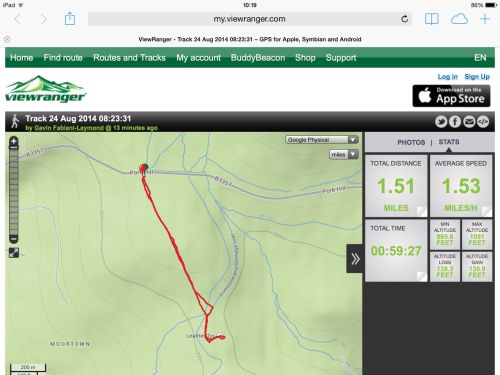
Above screen shot shows a track route that I walked and then shared. When the recipient opens the link the above is what they will see. They can also change the map overlay from Open Street Map to a number of drop down menu options and even change miles to kilometres. If you want to see the above shared map on your own computer or mobile phone then click below –

“I’m sharing my #walking trip with you. Total distance 1.52mi, http://my.viewranger.com/track/details/MTA4MjA1OA== . Via @ViewRanger”

ViewRanger is the complete offline mapping, navigation & guided trail service for Outdoor Enthusiasts. The app & free web tools will help you at every stage of your adventure, so it’s easy to plan trips, gives you peace of mind when you’re out on the trail and helps you to store & share your experiences. Perfect for exploring mountain ranges or simply days out in the countryside. In my case, ideal for exploring Dartmoor and the coastal paths.

ViewRanger was voted as one of the best apps in 2013 on “Google Play” .Used & trusted by over 150 Search & Rescue teams across Europe and the North America. And after using the app, I can see why this software is used by the search and rescue teams.

Now ViewRanger is just a glance away on Android wearables.
——————————-
FEATURES INCLUDED
● GPS mapped location, even without mobile signal
● Offline map mode* – store in advance using “Create Saved Map”
● Access to 10,000’s of route guides and trails
● Track recording – view your path on map to keep or share, even add Flickr photos
● Sports computer stats – view distance, speed, etc.
● Real time location sharing** – BuddyBeacon (requires data connection)
● Active Route Navigation***
● Powersave mode in the GPS settings
● Synchronises with web account for route planning, publishing and sharing.(http://my.viewranger.com)
● Share tracks via Facebook and Twitter
● Record a track, navigate and view track stats on Android Wear™
——————————-
FREE MAPS INCLUDED
● OpenStreetMap© & OpenCycleMap
● Bing Ariel Imagery, Ski map, Transport map
● GB Road Atlas from Ordnance Survey at 1:250.000, map for England, Wales & Scotland
Download Great Britain Ordnance Survey Explorer 1:25,000 & Landranger 1:50,000 maps via in-app purchase (ViewRanger Store). Licensed maps from other national mapping agency’s are also available for over 21 countries.

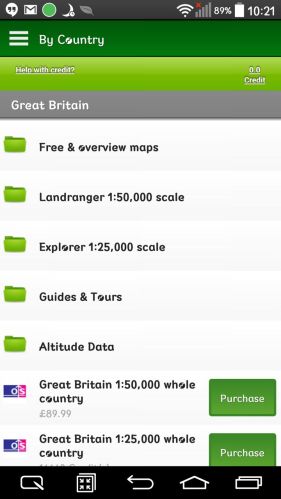
Below are some screen shots from the ViewRanger store giving you a tiny insight into the maps available. The app is free to download, and as mentioned above a number of the maps are free too. But the detailed Ordnance Survey maps are chargeable but well worth it if you walk off road.

IMG_2178

There are many ways to search for a map type, by country, type and so on.
IMG_2179

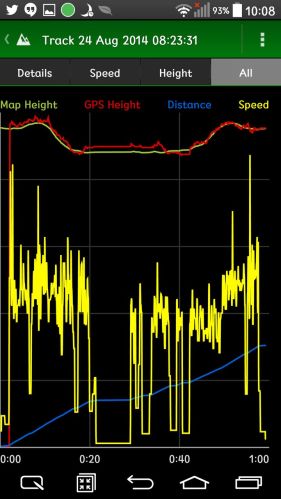
The track that I shared above provides the additional data as shown above and below. You can also see the detailed OS map screen shots below.

IMG_2181

IMG_2182

In use you can zoom in and out with ease. In fact there are many options including a live buddy share when walking.

IMG_2183

Another screen shot providing information on the route.

IMG_2184

I am only just beginning to learn how to use this app and service, but so far have been blown away at just how useful it is. For the first time, I have real time information on my Dartmoor wilderness walks.

The app is available on iOS and android. It is also available on Symbian but not on Windows Phone. I have tested the app on my LG G3 and my wife’s iPhone 5S. Very impressive on both.

Links –

Google Play store – https://play.google.com/store/apps/details?id=com.augmentra.viewranger.android

Apple App Store – https://itunes.apple.com/gb/app/viewranger-outdoors-gps-os/id404581674?mt=8

Apple’s insane attention to detail

Currently Apple has 2 betas running, one for iOS 8 and the other for its macs, OS X Yosemite. Yosemite with iOS 8 allows you to record what’s on your iPhone screen.

When using QuickTime in Yosemite to record the video of what’s on an iOS 8 device’s screen, the recording changes the battery, wifi and signal strength all to 100%.

Apple’s “It just Works” – A Load of Nonsense

I used to love my Apple products, from my first iPhone, the iPhone 4, iPad, Mac, iPod Touch and Classic, all seemingly working in harmony. And then there was the bounty of apps and great games. In app purchases did not exist.

Move forward to 2013 and 2014 and Apple devices are more complex in features, which in turn means there is more things to go wrong. My iPhone 5 for example would losse reception, never to reappear unless the phone was rebooted. My iPad Air battery life recently fell by 50%. And this is the tip of the iceberg.

Roll forward to the current time, and I was wondering why my parents iPhones and iPads weren’t allowing FaceTime or iMessages. My dad had everything configured correctly and my mum had somehow had all the settings for iMessage and Facetime switched off. She had no idea how that had happened. Anyway, with both parents on the same network, and everything all on, my mum could still not send my dad an iMessage. It kept going to send the text as an SMS. I advised them in many different ways, but in the end “it just didn’t work”.

The cure was for my dad to send an iMessage to my mum. And then for her to reply to that message. Somehow that corrected everything.

Regardless of the issues, Apple still have the best eco system and still manufacture some of the most desirable hardware. Lets hope iOS 8 improves matters and that the new iPhone has a long battery life.

Apple, Google, and the Hubris of Silicon Valley’s Hiring Conspiracy

Steve Jobs wouldn’t appear to have been an emoticon guy, but history will show that on at least one occasion, when words failed to convey his delight, he resorted to one. It was March 2007, and Jobs had received an e-mail from Eric Schmidt, then Google’s (GOOG) chief executive officer and a board member at Apple (AAPL). Schmidt wanted to let Jobs know that Google would terminate “within the hour” a recruiter who’d dared to contact an Apple employee in violation of a “do not call” policy between the companies. Schmidt abjectly apologized, adding: “Should this ever happen again please let me know immediately and we will handle. Thanks!! Eric.”

Jobs forwarded Schmidt’s groveling e-mail to an Apple subordinate. His cover note said, in its entirety, “:)”.

This telling material—and there’s oh, so much more of it—comes from the voluminous court record in the recently settled Silicon Valley hiring antitrust case. On April 24, Apple, Google, Intel (INTC), and Adobe Systems (ADBE) ran up the white flag in a class-action lawsuit filed on behalf of more than 64,000 programmers and engineers who accused the companies of conspiring not to raid one another’s workforces in the interest of stifling competition and suppressing wages.

A great article from Businessweek. Read the rest here – http://www.businessweek.com/articles/2014-05-01/tech-hubris-the-silicon-valley-antitrust-hiring-conspiracy

China Mobile and Apple finally ink a deal

20131223-122842.jpg

Negotiations can often be drawn out but this one certainly has been for many years. But now Apple can sell its iPhone to China Mobile’s 750m users.

The official statement released –

“Apple’s iPhone is very much loved by millions of customers around the world. We know there are many China Mobile customers and potential new customers who are anxiously awaiting the incredible combination of iPhone on China Mobile’s leading network. We are delighted that iPhone on China Mobile will support our 4G/TD-LTE and 3G/TD-SCDMA networks, providing customers with high-speed mobile service,” said Xi Guohua, China Mobile Chairman.
“Apple has enormous respect for China Mobile and we are excited to begin working together. China is an extremely important market for Apple and our partnership with China Mobile presents us the opportunity to bring iPhone to the customers of the world’s largest network,” said Tim Cook, Apple CEO. “iPhone customers in China are an enthusiastic and rapidly growing group, and we can’t think of a better way to welcome in the Chinese New Year than getting an iPhone into the hands of every China Mobile customer who wants one.”

Apple and China Mobile in business

20131209-105302.jpg

The Wall Street Journal is reporting that whilst China Mobile’s 4G services do not launch until the 18th, the carrier will open preorders for the iPhone from this Thursday, the 12th of December.

Analysts are expectantly awaiting the iPhone’s launch on the worlds-biggest carrier, with some estimating that the partnership will be attributable for about 38 million of Apple’s total iPhone sales in 2014.

This is the most important phone launch since the iPhone first became available in 2007 and has the potential to add significant profit to Apple’s bottom line.

Apple and China Mobile – in business

The Wall Street Journal has confirmed that Apple and China Mobile have finally reached a deal that will see the world’s biggest mobile carrier offering the iPhone on its network from 18th December 2013.

China Mobile, which has more than 700 million subscribers, is one of the last major carriers in the world that does not currently offer the iPhone, and this deal should bring a huge boost in sales to Apple.

To put this deal in perspective, this deal with China Mobile would give Apple access to a subscriber base that is seven times the size of Verizon Wireless, the U.S.’s largest carrier. Greater China, including Hong Kong and Taiwan, is Apple’s third biggest market after the U.S. and Europe in terms of revenue.

Apple’s iCloud Photostream limits have changed – full details and a few surprises too

If you have an Apple device and are using the iCloud Photostream, it is no longer restricted to 1,000 photos. See below for new information.

1) iCloud: My Photo Stream and iCloud Photo Sharing limits –
There is no limit to the number of photos you can upload to My Photo Stream over time, but iCloud limits the number of photos that can be uploaded within a given hour, day, or month to prevent unintended or excessive use.

2) My Photo Stream upload limits –
The My Photo Stream limits below are established based on anticipated upload patterns. Currently, My Photo Stream upload limits are as follows:

Uploads to My Photo Stream per hour: 1000 photos
Uploads to My Photo Stream per day: 10,000 photos
Uploads to My Photo Stream per month: 25,000 photos

If you exceed one of these limits, your uploads to My Photo Stream will be paused temporarily and you may see a notification message on your device. Your uploads will resume automatically after you no longer exceed one of the limits, such as in the following hour or on the following day.

3) iCloud Photo Sharing limits –

The current iCloud Photo Sharing hourly and daily limits are as follows:

Maximum combined number of photos and videos to share per hour: 1000
Maximum combined number of photos and videos to share per day: 10,000
These sharing limits are separate from the upload limits above. For example, in the same day you could upload 10,000 photos to My Photo Stream and then share those 10,000 photos or 10,000 other photos.

Some additional limits for shared photo stream usage:

Maximum shared streams an owner can share: 100
Maximum shared streams a user can subscribe to: 100
Maximum subscribers per shared stream: 100 (the number of subscribers on each shared stream)
Maximum number of photos per shared stream: 5000
Maximum number of comments per shared stream photo: 200 (a comment can be either a Like or a text entry)
Maximum characters per comment: 200
Maximum number of invites a shared stream owner may send per day: 200

Notes
There is no limit to the amount of photos you can upload to My Photo Stream over longer periods (such as several months or years). Photos uploaded to My Photo Stream or shared photo streams are not counted against your iCloud Storage. The photos that you upload to My Photo Stream are stored in iCloud for 30 days to give your devices plenty of time to connect to iCloud and download them.
The following image file types are supported for Photo Stream: JPEG, TIFF, PNG, and RAW.
The following video file types and file formats are supported for iCloud Photo Sharing: MP4 and QuickTime file types, and H.264 and MPEG-4 Video file formats. Videos can be up to 5 minutes in length.

When importing photos to an iPad using the Camera Connection Kit, photos are saved directly to Camera Roll. If Photo Stream is enabled and you are connected to a wireless network, you could potentially reach any of the limits listed above. To avoid this, disable Photo Stream when importing photos to iPad when using the Camera Connection Kit.

When importing large numbers of photos to either iPhoto or Aperture, you could potentially reach any of the limits listed above if you have selected Automatic Upload in the Photo Stream preferences. Both iPhoto and Aperture will pause uploading to Photo Stream when the maximum has been reached. Uploading will automatically restart at the next hour, day, or month, depending on which limit was reached.

Breaking news – Apple wins $290 million from Samsung in patent retrial

Samsung will be paying an additional $290 million in damages to Apple. A jury in California on Thursday said that the Korean smartphone manufacturer owed Apple $290 million for infringing upon its intellectual property. Apple had asked for $380 million in damages, so the jury’s reward is a good outcome.

Samsung had said that it should only pay an additional $52 million to Apple, so the jury’s verdict is a success for a Apple. Samsung has already paid $600 million to Apple after a jury found it guilty of patent infringement in 2012, which means that the total damages the company will have to pay to Apple will be $890 million for this patent case alone.

But will it matter to Samsung who makes a huge amount of money every day and now has market share.

Apple Keynote Speech Global Times

Later today in 11.5 hours, Apple will announce the new iPhone, iOS 7 and other new stuff. If you go to Apple a live link to the keynote speech is available.

In case you don’t know the start time in your country, below is a list of times.

07:00 AM – Hawaii​
10:00 AM – Pacific​
11:00 AM – Mountain​
12:00 PM – Central​
01:00 PM – Eastern​
06:00 PM – London​
07:00 PM – Paris​
09:00 PM – Moscow​
02:00 AM – Hong Kong (September 11th)
02:00 AM – Tokyo (September 11th)

A full summary will be provided afterwards. ​