The Huawei Mate 9 has many features within the default camera app. The default camera app is so extensive and also easy to use that there is no need to fork out on any other third party apps.
To prove this point, I gave my Mate 9 to my wife Ellie. Her challenge was to shoot a photo of star trails. She was actually out with a group of friends, all of which were using iPhones.
And she did. Completely unedited and shot using the star trails mode. This was a 13 min exposure. It is really cool shot. It was totally pitch black and a torch was needed to setup the tripod! Her friends were equally as impressed and at the same time disappointed at that their iPhone’s camera app couldn’t do the same.
In reality this would have looked so much better if the camera shutter had been left open for 2 hours.
So next time, when I’m feeling better (currently have man flu), I will attempt a long exposure myself.
Imagine being able to control your home automation systems and connected objects from a single and highly customizable interface as I have done above with several of my home devices. An app called Imperihome for android and iOS allows you to do this.
You could for example wall mount a tablet or use your smartphone to control your smart home the way you want and without any required modification on your current installation.
Systems that are linkable include –
– Logitech Harmony hub-based remotes (universal remotes)
– Musaic HiFi speakers (audio HiFi system)
– Fitbit (fitness and health devices)
– XeeConnect (connected car module)
– Sonos (audio HiFi system)
– Kodi (home theater software, formerly known as XBMC)
– LIFX connected bulbs (lighting system)
– Parrot Flower Power (plant sensor)
– Legrand EcoCompteur (energy consumption sensor)
– Myfox Home Control 2 (security and home control system)
– Philips Hue (lighting system)
– Vera, VeraLite (ZWave controller by Micasaverde / Vera Control) UI5, UI6 and UI7
– ZiBase (Multi-protocol controller by Zodianet)
– eedomus (ZWave controller by Connected Object)
– Fibaro Home Center 2 (home control system by Fibaro)
– IPX800 v3 / v4 (Relay controller by GCE Electronics)
– Eco-Devices (Teleinfo energy counter by GCE Electronics)
– Netatmo Weather Station and Thermostat and Welcome Camera
– Zipabox (Multi-protocol controller by Zipato) / Cameras and security features not yet supported
– Systems implementing the ISS API (ImperiHome Standard System)
– MJPEG, MPEG4, h264 IP cameras
– Withings – activity trackers, scales, blood pressure monitors
– Jawbone UP
And more systems are being added constantly.
Options include –
List View – Smartphone optimized portrait layout, ability to hide devices and groups, notion of favorite devices, grouped actions (all on/off)…
Dashboard View – Tablet optimized landscape layout that matches the wall-mounted tablet use case, different layouts fully customizable, place holders for smart widgets, automatic wake-up using camera move detection. The screenshot shown at the start is one of my dashboard views.
Highly Configurable – Devices icons animated and changeable with built-in or personal images, possible customization of sensors units, customizable refresh rates, ability to define a custom name for each device, export/import of your configuration…
Use Power of Your Device – Fast and responsive user interface, voice recognition, NFC Tags (android), shortcuts on Android launcher, Android Wear & Sony Smartwatch 2 integration… Works great on my Huawei Mate 9 for example.
Charts Module – Built-in, generic, compliant with several systems, configurable timeframes, integrated in the different views…
Third Party Integration – ImperiHome Control API (android), integration with Tasker, ImperiHome Standard System for home-made installations
Ultimately, you are only limited by your lack of imagination in many cases. I have used Imperihome for over 2 years and it has been vastly improved in that time. In the screenshot shown at the top I have linked in 4 different connected systems on to one dashboard. From the one dashboard I can see all my security camera footage, adjust all my Philips Hue lights from fading, on/off and colour changes, check all the data from my weather station and much more. Have a view of the video below too, to give you a better idea of what is possible.
Tech Addicts Podcast is back again with a new episode starring Gareth Myles, Jay Garrett, Leila Gregory, Brenda Arndt and myself. Tech Addicts is released every week. Twitter: @garethmyles ; @gavinfabiani ; @GadgetyNewsCom ; @JayGarrett ; @swanny ; @girlsngadgets ; @wildlime
To listen to the latest episode subscribe by searching “Tech Addicts” within your favourite podcast app, iTunes, Google Play Music Podcasts or use the URL “mobiletechaddicts.libsyn.com/rss” to add directly.
Apple iPhone, Services, Mac and Apple Watch Set All-Time Records.
“CUPERTINO, California — January 31, 2017 — Apple today announced financial results for its fiscal 2017 first quarter ended December 31, 2016. The Company posted all-time record quarterly revenue of $78.4 billion and all-time record quarterly earnings per diluted share of $3.36. These results compare to revenue of $75.9 billion and earnings per diluted share of $3.28 in the year-ago quarter. International sales accounted for 64 percent of the quarter’s revenue.
“We’re thrilled to report that our holiday quarter results generated Apple’s highest quarterly revenue ever, and broke multiple records along the way. We sold more iPhones than ever before and set all-time revenue records for iPhone, Services, Mac and Apple Watch,” said Tim Cook, Apple’s CEO. “Revenue from Services grew strongly over last year, led by record customer activity on the App Store, and we are very excited about the products in our pipeline.”
Our outstanding business performance resulted in a new all-time record for earnings per share, and over $27 billion in operating cash flow,” said Luca Maestri, Apple’s CFO. “We returned nearly $15 billion to investors through share repurchases and dividends during the quarter, bringing cumulative payments through our capital return program to over $200 billion.”
WOW – APPLE IS SURELY DOOMED (NOT).
Note the additional points below which are mind blowing TBH –
– 78.3 million iPhones sold with average price per iPhone up by $4 dollars. This was driven by the higher priced Plus models/higher storage options. This is also a new record for number of iPhones sold.
– China – sales decreased by 12% from this time last year
– 13 million iPads (19% drop) and 5 million MACs were sold (MACs returned to growth too)
– $7 billion made in services – huge number and this is only going to get bigger
– $4 billion in other services which includes Apple TV, Apple Watch, Beats products, iPod and Apple-branded and third-party accessories (8% decline)
– Apple Watch – best quarter for units and revenue – demand was so high they couldn’t keep up!
– AirPods – Apple still trying to catch up with demand!
– Enterprise – major partners with IBM, Cisco, SAP and many more
– HomeKit – best level of security – loads more products announced this month. Also Apple is unmatched when it comes to securing your home with HomeKit-enabled door locks, garage doors, and alarm systems
– Apple Pay transactional volume up 500%
Apple Watch, staying fit, being more active and New Year resolutions. Sound familiar.
My New Year resolution in 2017 was to continue my weight loss and improve my fitness. As you can see from the screen shot above, I have cleared all 3 activity rings on my Apple Watch every day this January, with just today to complete for the perfect month.
To recap, to clear the 3 rings, you need to first do enough calories to hit the calorie goal, exercise for 30 mins per day whereby your heart rate registers higher than just walking and stand for 1 min minimum in at least 12 hours per day. Apple’s method is slightly different from a few other fitness devices eg Fitbit which set a target of 10,000 steps per day. Apple’s approach is to ensure you stay more active during the course of the whole day and raise your heart rate to complete 30 mins exercise.
This year I decided to set a lower calorie target of just 400 calories per day. This meant if I was having a long day at work in meetings or driving or something else I had a higher chance of hitting this target. I don’t know about you, but if I had failed to hit the target one day during January, I could have easily given up. With a lower target, I am feeling more and more motivated and pleased that I am smashing my target. In reality, the lowest amount of calories burnt per day is 700. Every day I complete, makes me more motivated to complete the next day. I also like receiving the various achievements awarded in the activity app. After a successful day today, I will get my successful month award.
The next difficult part is completing 30 minutes exercise per day. The simplest solution I have found is to listen to some upbeat energetic music, and walk/jog on the spot at home. Sometimes, exercise minutes are registered when I walk my dogs but normally walking my dogs doesn’t translate into enough exercise minutes. Of course I could go to the gym, but with such a busy life and living on rural Dartmoor, going to a gym is not practical.
The final aspect of hitting the daily goals, is making sure you are sharing your progress with a suitable friend or two. This really helps maintain focus and adds a friendly competitive nature to the challenge.
Now if you don’t have an Apple Watch, all of the above still applies. Don’t set an unrealistic tough goal for each day. Set one that you know you will hit to keep you motivated and compete with friend or two.
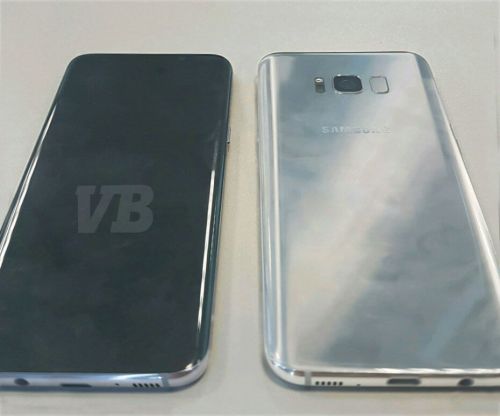
Evan Blass released information last night claiming the above is the new Samsung Galaxy S8.
So whats new about the Samsung Galaxy S8. For starters there will be 2 screen sizes, 5.8 and 6.2 inches QHD Super amoled screens as there are no navigation buttons. The display will incorporate these. The aspect ratio is 18:5:9, not 16:9. The processor with either be an Exynos or Snapdragon 835 depending on region. Both will have 10nm fabrication making them faster than last years models. They will feature a 3,000 or 3,500mAh battery, 4gb ram, 64gb storage, micro SD card support and USB Type C. The headphone jack is still present.
The camera is still 12mp f/1.7 on the rear and the front is upgraded from 5mp to 8mp f/1.7. Iris scanning , first seen on the explosive Note 7 will be present too. There will be a dock that makes it provide a desktop view to a screen, Bixby its own assistant with a hardware button to activate and force touch will be available on the screen.
However there are 4 problems –
– First is the price. This will be 100 euros more than last years S7 models.
– The Finger Print sensor is now on the rear but next to the camera. This is such a bad spot in terms of reachability
– The camera – no rear dual camera setup. Samsung have stuck to the same camera from last year, although it will have had some minor improvements. However, having used many dual lens camera setups, I believe this is the future and Samsung’s option is so last year.
– There is no Samsung logo on the body of the phone. That is because it is hard coded on the front screen, at the top with the words- SAMSUNG – WTF.
Finally, you will have to wait a long time for the S8. It won’t be available until later in April 2017.
Tech Addicts Podcast is back again with a new episode starring Gareth Myles, Jay Garrett, Leila Gregory, Brenda Arndt and myself. Tech Addicts is released every week. Twitter: @garethmyles ; @gavinfabiani ; @GadgetyNewsCom ; @JayGarrett ; @swanny ; @girlsngadgets ; @wildlime
To listen to the latest episode subscribe by searching “Tech Addicts” within your favourite podcast app, iTunes, Google Play Music Podcasts or use the URL “mobiletechaddicts.libsyn.com/rss” to add directly.
The Huawei Mate 9 is promoted having a hybrid zoom that is as good as an optical zoom. With this setup, you can go in point 1 increases of zoom from zero up to 6 x zoom. The next software update should make the zoom 10 times.
Anyway below are 3 shots.
First up, no zoom, just a normal shot taken in auto.
Next 2 x zoom, focusing on the church clock.
Up to 2 x zoom the shots are very good.
Finally the above shot is 6 x zoom.
It is worth noting these were all handheld and at dusk when the lighting was fading.
The Huawei Mate 9 is a beast of a phone. Its camera setup is rather unique too with a 20mp monochrome sensor and a 12mp RGB sensor.
I am still learning about what is possible with the Huawei Mate 9’s camera and trying to push it to its limits.
To celebrate its camera, I have put together a short video of photos captured over the last week. These were all shot in auto, except for 3 shots. Night and light trails were used for these 3 special photos.









 Gavin's Gadgets & Photography