Shoulderpod S1 – Smartphone Rig/Tripod Mount – Review

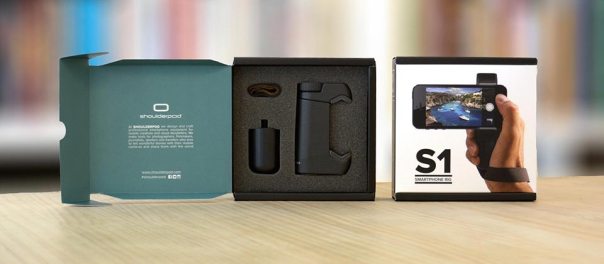
s1 box  download

The Shoulderpod S1 ,http://www.shoulderpod.com/shoulderpod-s1/, is the first smartphone rig/mount that I have used that secures my smartphone properly to my tripod. No wobbles, no more phones falling off my tripod in the wind. The most recent photos on my flickr account were taken using the S1. The shots are on my flickr account photostream https://www.flickr.com/photos/gavinfabl100/ . The Shoulderpod S1 costs Euro 29.90 which in my mind is excellent value as it has 3 different uses – a tripod mount, stand and film maker grip. Opening the box you are met with chunky pieces of apparatus which gives the immediate impression of quality. Compared to my previous mounts, the S1 is leaps ahead in terms of strength, construction and desgin. It really is on a different league to my previous equipment.
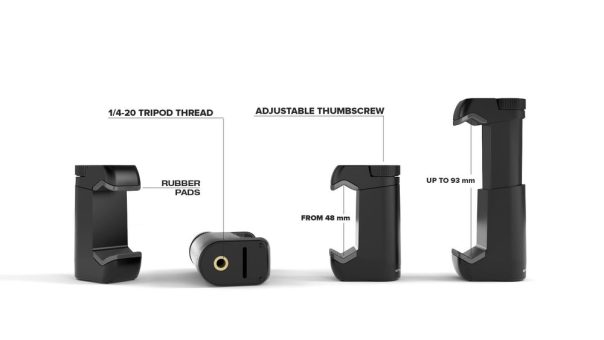
Shoulderpod_S1_adjustable_smartphone_rig

The S1 main tripod attachment piece is adjustable as shown above and comes complete with rubber inserts to protect your phone. It also fits a large number of phones too.
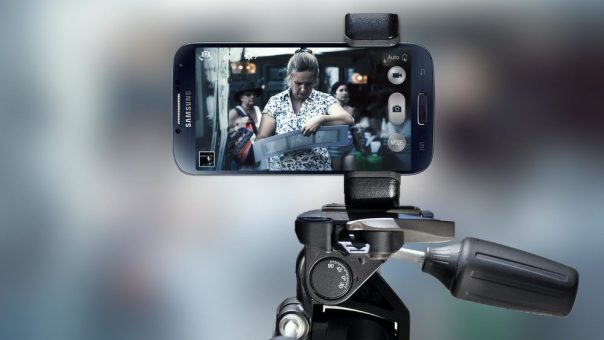
Shoulderpod_S1_professional-smartphone-rig_tripod_mount_galaxy

When attached to my tripod it provides a strong and secure fit. No longer are the strong winds on Dartmoor an issue. Or having the phone at an angle on the tripod is just as safe as being horizontal now.
Shoulderpod_professional_smartphone_rig_expandable_concept

Apart from the tripod mount, you can use it in the film maker grip mode, using the supplied strap. In fact, being a bit creative you can hang the strap over a branch to take that special shot. In addition, once you have finished taking your photos, just attach the weighted bottom piece and use it as a stand as shown.
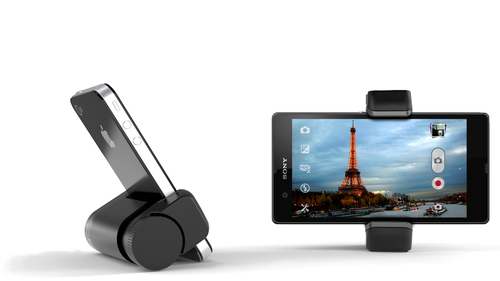
s1 download

The Shoulderpod S1 is so much better than my previous setup as shown below. with my old clamp, it was simply spring loaded with just a few areas lightly holding the phone to the clamp. Sometimes, this would mean the phone could fall out of the attachment. With the S1, you turn the thread screw at the top to widen the arms, and then turn the knob in the other direction to secure. This provides a superb clamped fit.
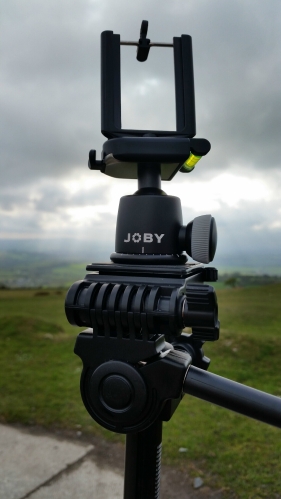
IMG_0220

I have been using the Shoulderpod S1 for a while now and I am still just as impressed by it, as I was on the first day I received it.

Recommended!

Samsung Galaxy K Zoom – cases

photo 1
If you are lucky enough to have a Samsung Galaxy K Zoom, you are also unlucky in that accessories for this device are scarce at the moment.

You can buy a £2-3 wave silicone style case as shown quite easily but in my opinion it is ugly. There are now a few more styles, a yellow back style that provides less protection and when in stock Samsung have their fake leather looking case. The official fake leather Samsung case is in transit, and photos will follow shortly. There are other styles coming soon along and hopefully spare batteries which for a camera phone are needed.

photo 2
The yellow back case shown , is more stylish than the black silicone case but does offers less protection. The top and bottom of the case is open and the buttons are exposed as opposed to the black silicone wave style where everything is covered and offers a lot of protection. Also, this case is too slippery. So even though the black case looks ugly it provides better grip and protection.

One other style of case made by Araree is Autopop, where even the lens is covered on the K Zoom, and pops open when you activate the camera.

Hopefully, I will be able to get hold of a number of different styles and do a quick comparison between them.

Samsung Galaxy K Zoom – battery tips

I know some of you are having some battery issues with the K Zoom. So the obvious solution is turn it off.

No seriously there are a few things you can do which will help.

1) Turn off S-Voice from settings and make sure it is unmapped from home button and all listening modes.

2) Don’t forget to setup the power saving mode and the ultra power saving mode. Best to do it now, and not when needed. Also, after using ultra saving power mode, I find it best to soft reset phone. I only use ultra power saving mode, and when phone is at 5%. It would be handy if this happened automatically.

3) Network bands – I’ve restricted my K Zoom to 3G mode only. Handy as I’m with Three UK. That’s WCDMA. If you are not with 3, then don’t have have LTE selected as it drains the battery fast. If you need LTE for any reason, turn it on and then off again when finished. Choose another mode eg GSM/WCDMA.

4) Bluetooth and wifi. Keep Bluetooth off when not needed. Wifi doesn’t impact that much if left on.

5) Tap left soft key for running apps. Close all on a regular basis, minimum daily.

6) If the phone feels hot, battery fades too. So soft reset it. This re regulates the phone. Clearly a bug fix needed here.

7) If you have used GPS, turn back location services to power saving mode or off. High mode for location services will drain battery faster.

8) I have push email running for one gmail account. You can restrict frequency but again it’s up to you.

9) Soft reset phone daily. You should not have to do this, but it’s the one clear way to ensure smooth operation.

10) Use Nova or Apex Launcher but with a max of 2 home screens.

Clearly, the K Zoom needs a software update, but once you’ve tweaked it to get a better battery life, then you just accept its weaknesses as there is no other phone with a 10 x optical zoom. And in all honesty, whilst I wish I didn’t have to soft reset as much it’s no deal breaker.

In App Game Purchases – Finally Electronic Arts gets whipped by the ASA

The Advertising Standards Authority has ruled that Electronic Arts game Dungeon Keeper, is not really Freemium and therefore banned it advertising it this way.

The in app purchases were deemed to be too aggressive and produced a game that was not really free in any way. In fact £70 options for in app purchases is a total rip off in my opinion. For that I would rather buy a PS4 game.

Full details of the ASA ruling can be found here http://www.asa.org.uk/Rulings/Adjudications/2014/7/Electronic-Arts-Ltd/SHP_ADJ_258907.aspx#.U7QpvmK9KSP

Google Nexus 9 Tablet specs and info

Thanks to @evleaks we have more information of the upcoming Nexus 9 tablet.

The Nexus 9 will be manufactured by HTC and will feature a silver aluminium unibody design. This alone sounds promising.

Other specs for the tablet, codenamed Volantis include an 8.9-inch display, a resolution of 2560×1600 pixels, 64-bit, 2.3 GHz Tegra K-1 quad-core processor, 5GB of RAM and 64GB of internal storage. The camera is likely to be either a 5 or 8mp affair.

Wearables – Google’s Android Wear Apps and Hardware are incoming fast

At Google I/O a few weeks ago, Android Wear Google’s wearable platform was announced in more detail. LG and Samsung have just released their android wear smart watches. But for these devices to work you first need to download the Android Wear app.

Link to Google Play Store – https://play.google.com/store/apps/details?id=com.google.android.wearable.app

Also, you will need the latest version of Google Play Services v5.0. Again this is available via the Play Store, but you should find your android phone has the latest version by now.

Next have a browse of the dedicated Android Wear section on the Google Play Store. Link https://play.google.com/store/apps/collection/promotion_30008f2_io_android_wear

And if you have not seen the new smartwatches, again have a look on the Play Store under devices. Or click here https://play.google.com/store/devices/collection/promotion_500013a_android_wear_gb

If you already have either of the above smart watches, expect software updates before Monday 7th July.

The LG G Watch review is incoming soon too.

Get ready for the Samsung Galaxy Mega 2

In the world of phablets, the Note 3 is surely at the pinnacle. However, other companies are making larger phones than Samsung now and slowly eroding its niche space.

In return, Samsung introduced a lower cost giant Galaxy Mega last year. Well, the Mega 2 is coming and it should feature a huge 5.9-inch display with 720p HD resolution, a 64-bit quad-core Snapdragon processor, 2GB of RAM, a 12-megapixel rear camera, a 5-megapixel front-facing camera and Android 4.4.3 KitKat.

So who wants one? Not me, far too big.

Google Glass arrives in the UK, and it’s already banned – crazy

Google is not having much luck with perception of its Google Glass. In the US, it has caused condemnation, worries about privacy and safety while driving.

Now it has arrived in the UK, the Vue movie theater chain in the UK and the Cinema Exhibitors’ Association trade group have announced a ban of the use of Google Glass inside their establishments.

Now what on earth do they think someone with Glass will do? Record a film? Well it just shows on pathetic these companies are in that they really don’t understand Glass. First, the recording quality will be dreadful and next the memory isn’t sufficient nor is the Glass battery.

Personally, I think the companies put out this statement to gain some free publicity at the expensive of Glass.