There are drop tests and scratch tests but they are all totally lame. Now watch something even more spectacular, the ultimate slam Smash Test.
Category Archives: Tech News
Samsung Galaxy Note 4 – Official S Charger Qi Wireless Kit – Review
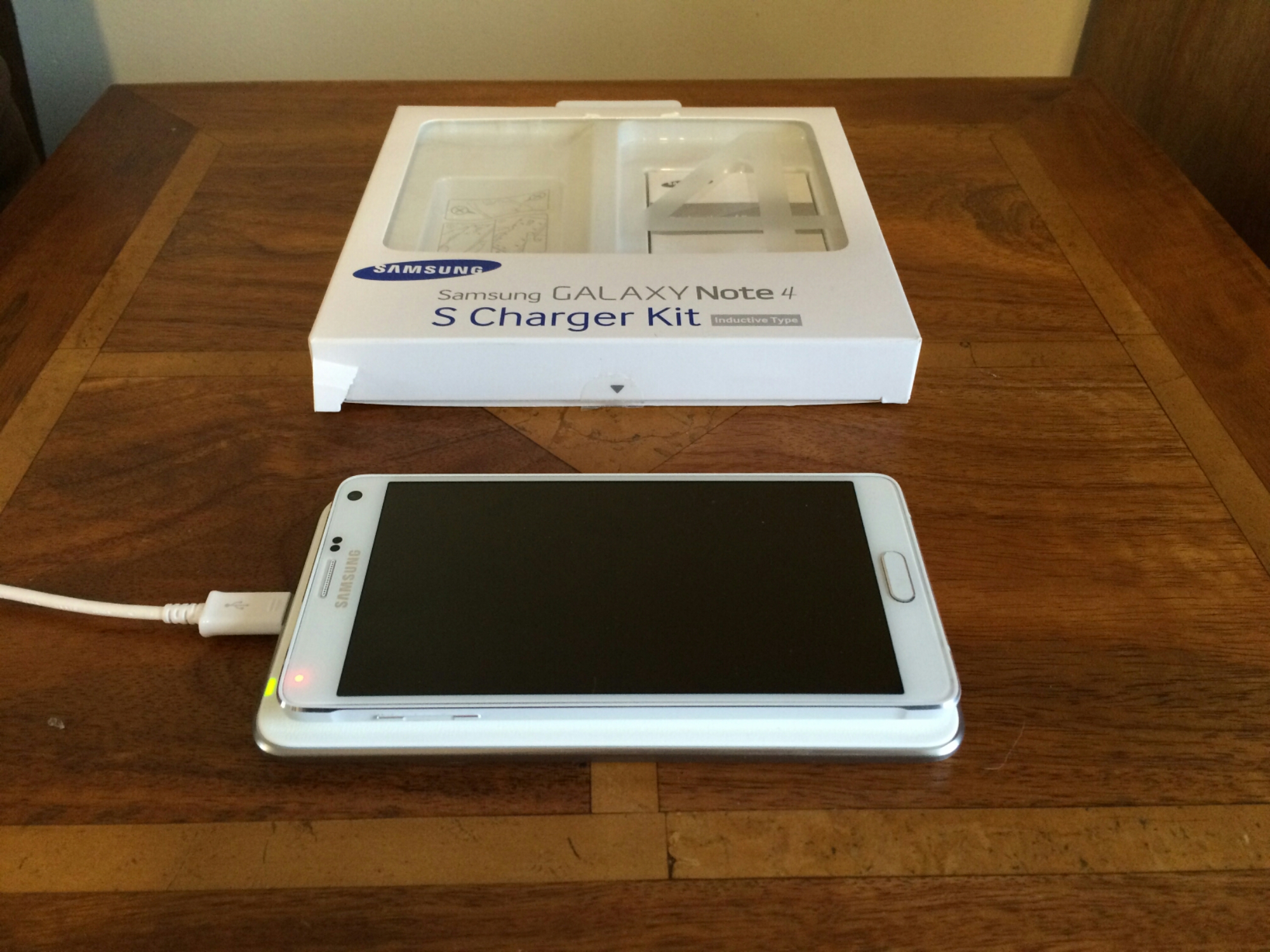
Qi Wireless Charging has not been my favourite option due to inconsistencies in products and implementation by manufacturers.
When I had my Samsung Galaxy S5, I bought the official Samsung Qi Wireless Kit which included the Samsung Qi back cover and charging pad. Let’s just say that this was a disastrous piece of kit and poorly implemented by Samsung. Apart from the back cover being thicker than the standard back cover, meaning existing cases won’t fit, the Samsung charging pad was temperamental and once it charged the S5, it turned off so by morning the S5 could be down to 80% battery. It had other issues too.
So, when I ordered the official Wireless Charging Kit for my Note 4, I was expecting to return it but to my surprise it actually is bullet proof in operation. In the box you get the charging pad and replacement back cover.
Firstly you remove the back cover and swap it for the Qi version. This adds additional thickness so once again your cases are likely not going to fit. Then plug your Samsung charger into the pad (actual mains charger is not supplied) and a LED light turns orange then green, and then goes off. Place the Note 4 on the pad, and the light turns green to notify you it is charging. The LED light does not turn off but to prevent it being too bright at night, I moved the Note 4 a little over the LED. The charging pad still had no issues charging the Note 4. In the morning, the Note 4 battery was at 100%. Also, I have never noticed huge heat issues with this combo. I have also used another Samsung charger (non adapter fast charger) and this also worked just fine with the charging pad. For once the official wireless charging kit did exactly what it said on the tin!
So as long as you don’t mind the additional thickness and weight, then there is nothing to lose. It is currently reduced on Amazon from £53 to £35. So Click Here for Special Offer on Amazon

What app shortages? Not on Nokia Lumia 830 – My Experience so far
Apparently Windows Phone has an app shortage.
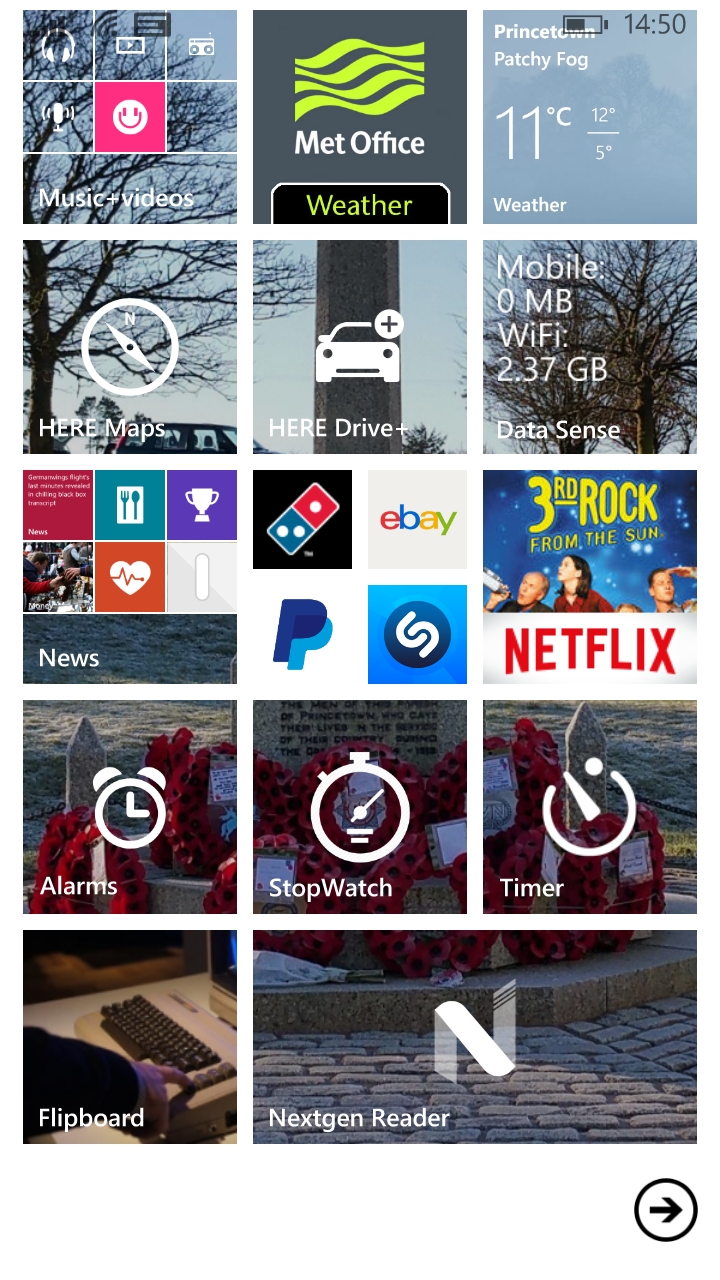
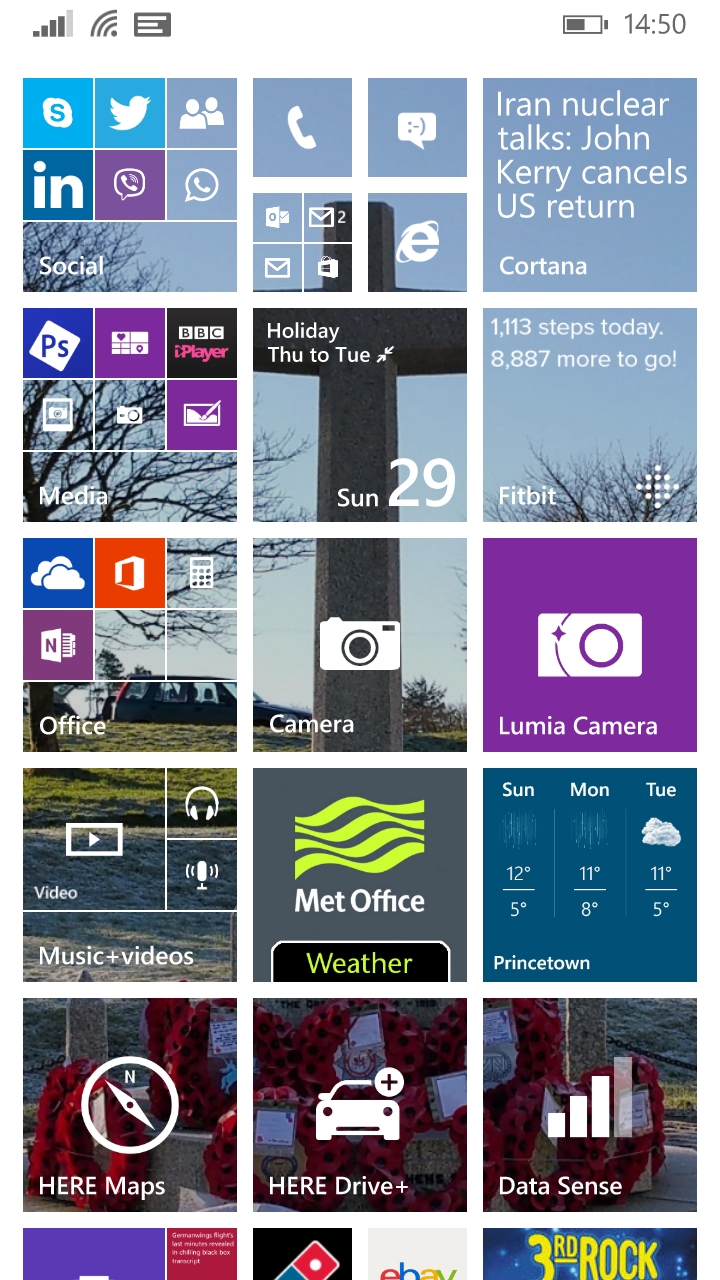
Well it does if you compare it to the quality and quantity that exist on android and iOS. However in reality it is possible to survive without the multitude of apps. Below are 2 screenshots from my Lumia 830 and as you should be able to see, it has plenty of apps installed. Actually I’ve installed over 70 apps so far, along with about 20 or so games. And that number is way above the normal amount. At the moment, I’m really only struggling with one app that is not available on the platform and that is from Belkin, the WeMo app. This app controls my lighting and plugs. Apart from that one missing app, I have a great setup.
I decided to try Windows Phone with a more upmarket handset following my recent usage with a Lumia 535 and other low cost options. Unfortunately, Microsoft is in a state of limbo while it completes Windows 10, meaning that there won’t be any “flagships” until Windows 10 is released. The Lumia 1020 is old in the tooth now and showing its age. The Lumia 930 is equally a bit old now, and the Lumia 830 seemed to fit the bill quite nicely. It is also on offer at Carphone Warehouse for £199 inclusive of delivery and if you complete the redemption form by 31st March 2015, you also receive a free FitBit Flex worth £79.99. The Flex will be for my wife, meaning the overall cost was somewhat of a bargain.
So these are the highlights so far. Qi charging is built in. I choose bright orange as my finish and I love it. So distinctive and totally sets it apart from any other phone. The loudspeaker is on the back of the phone. This is probably the worst place for a speaker, but it does go very loud. Audio quality via headphones is excellent as it Bluetooth music with the APT-X codec included. MixRadio is free music streaming and that is always a bonus! There is a podcast app which I need to explore further. A FM Radio is built in too.
I love the home screen on Windows Phone. My personal dashboard with everything accessible in a flash. The camera is superb. Lots of manual controls and plenty of tricks too from 4K Photo capture, after editing of HDR to control the level of HDR effect and a whole suite of photo editing options too. So whilst the app selection is weak, the installed base of services and apps has you covered for most circumstances. I will upload some camera shots later this week. Currently, it has been gale force rain and winds. However, in low light the Lumia 830 with its Carl Zeiss optics and Optical Image stabilisation has outperformed my Note 4. I have not been able to test other scenarios but I cannot wait to see how the Lumia 830 compares to the Samsung Note 4. Notifications actually work on the 830. The Glance screen works a treat too.
Google apps like drive and hangouts or Google+, as far as I can tell are a non starter. It was terribly slow accessing Google Drive documents using the web browser so clearly if you decide to use a Windows Phone the solution is to use Microsoft services like OneDrive. At least with OneDrive it is totally cross platform. I have worked out that to give up android, I would just need to copy my media and documents from Google Drive to OneDrive and only access Hangouts or Google+ from a PC. I would need to install the Belkin WeMo lights app on my wife’s iPhone.
As it was a gale yesterday, I spent all day Sunday exploring apps, alternative app options by third party developers and fine tuning the phone. Its battery life easily lasted a day! I was quite surprised by how many big name apps I have installed so far from including Amazon, Amazon Kindle, Natwest, Dropbox, Dominos Pizza, Viber, WhatsApp, Linkedin, Skype, Twitter, Flickr (Third Party), Adobe Reader, Adobe Photoshop Express, BBC iPlayer, YouTube (Third Party that allows downloads), Tunein Radio, Shazam, MetOffice, Netatmo, WordPress, FitBit, MyFitnessPal, Flipboard, Nextgen Reader, Camera360, eBay, FaceBook, Netflix, PayPal, Redlaser, Speedtest.net, Tapatalk and London Tube Map. The included suite of apps by Microsoft is extensive and that cover a multitude of sins. Now some of the apps listed are not as feature rich as their android or iOS equivalents, but none are crippled either. The biggest let down is not in apps but in games, even with Xbox Games. I have installed the following games AE Bubble, Cosmos Conquest, iBomber Defense, Jetpack Joyride, Lexiqo Word Puzzle, Microsoft Solitaire, Mirrors Edge, Plants vs Zombies, Cut the Rope Experiments, Sonic CD, Minecraft, Fruit Ninja, Red Bull Kart Fighter, Shuffle Party, Temple Run, Sudoku, Word Twist, Wordament, Zombie HQ, and Zombie Madness Pro. Those that like Candy Crush Saga will find it in the Windows Store. But some of these titles have been available on android and iOS for years and are not the latest instalments. But at least there are still games to play!
So I am saving the best to last. Cortana your own personal assistant. In my opinion, Cortana is superior to Ok Google and Siri. As an example, I am streaming music from MixRadio over bluetooth to my Plantronics BackBeat Pro Bluetooth headphones. A text message arrives on my phone. Cortana interrupts my music and tells me who has sent a text message and would I like it read out. So I say “yes”. Cortana reads the message and asks if I would like to reply. I dictate my reply and the response is sent. This is all done without touching the phone or any buttons on my headphones. Cortana is also reliable and fast. So have a look at my home screen tiles and once I have lived longer with the Lumia 830, I will update you with the positives and negatives.
And don’t forget to ask me any questions!
Samsung Note 4 – camera shots of the month
So far the Samsung Note 4 has been one of my longest owned smartphones, hitting the 4 month mark. Whether this remains to be the case is unknown, as I am currently testing a few other devices currently.
Anyway, here are some of my favourite photos taken with the Note 4 this month. Don’t forget to click on the photo to reveal the full resolution. And if you fancy looking over some more, there are over 160 photos on my Note 4 Flickr Album – https://www.flickr.com/photos/gavinfabl100/sets/72157648796796660/


The Hottest Reviews/Editorials – Oppo HA-2 & PM-2, Nexus 9, Samsung Galaxy A5, HTC One M9, Samsung Galaxy S6 & S6 Edge, Lumia 535, Acer Aspire 11& Iconia 8, Sony SBH80 & 50 more
If you have been busy over the last 10 days, don’t worry. Below are the reviews and special editorial pieces that have been published on Gavin’s Gadgets.
And stay tuned for more reviews over the next few weeks including HTC One M9, Samsung Galaxy S6 Edge 128gb, Official Samsung Galaxy Note 4 S Charger Kit, Oppo PM-2 Headphones, HTC Desire 820, Nokia Lumia 830 and the next episode of “Gav & Dave’s Tech Podcast”.
Tablets/Notebooks
Samsung Galaxy Tab S 10.5 Tablet review
Samsung Galaxy NotePro 12.2 – 9 Part Review
Acer V15 Nitro Windows 8.1 laptop review
Acer C720 Chromebook review
Acer Aspire Switch 11 review
Nvidia Shield Tablet – 7 Part review
Acer Iconia 8 Android Tablet review
Smartphones
Samsung Galaxy S6 and S6 Edge – Hands On
Yotaphone 2 – 4 Part review
Samsung Galaxy A5 review
Samsung Note Edge – 14 Part Review
Samsung Note 4 – 17 Part Review
BlackBerry Passport 10 Part Mammoth review
Apple iPhone 6 Plus – 24 Part Review
Amazon Fire Phone – 2 Part review
LG G3 review – 31 Part Review
HTC Desire Eye – 13 Part Review
HTC One M8 – 11 Part review
Acer S55 review – 6 Part Review
Honor Holly – 4 Part review
Honor 6 – 12 Part Review
Microsoft Lumia 535 review
Nokia Lumia 1520 – 6 Part review
Wearables/Virtual Reality Headsets/Fitness Trackers
Samsung Gear VR – Virtual Reality Headset – Review
FitBit Charge HR review
Acer Liquid Heap Smartband review
Samsung Gear S – 9 Part Review
LG G Watch R – review
Audio Reviews
Oppo PM-2 Headphones – First Impressions after 100 hours
V-Moda Crossfade M100 headphone review
Plantronics BackBeat Pro bluetooth headphones review
Fiio RC-HD1 Headphone cable review
Sennheiser HD518 Headphone review
Philips Fidelio M1BT Headphone review
AKG K845 Bluetooth Headphone review
Sony SBH80 Bluetooth headphones review
Sony XBA-H1 Headphone Review
Logitech UE Headphones – 3 part Master review
Audio Technica ATH-AD900x Headphone review
Oppo HA -2 Portable Amplifier and DAC review
Cayin C5 Portable Headphone amplifier review
Fiio E12 – master review
HiFiMeDIY Sabre Android USB DAC review
Little Dot MKIV Tube Headphone Amplifier review
The Internet of Things
Belkin WeMo Smart light Bulb starter kit review
Mipow Playbulb Rainbow review
Mipow Playbulb review
Editorials
Technology working in Harmony
HTC One M9 Camera vs Samsung Note 4
The Myths of High End Audio Blown Apart – Plus Photos of a £100,000 system
Nexus 9 – First Impressions
I received the Google Nexus 9 a few days ago. I will be writing a more detailed review shortly but in the meantime here are my initial thoughts.
This is the 16gb storage version. This had around 8gb storage free. I am not sure why the storage is so low, considering this is meant to be a “pure” Google build. It runs Lollipop.
The Nexus 9 is made by HTC. The Nexus 9 is a 8.9 inch Android Tablet with a 64-bit NVIDIA Tegra K1 2.3GHz, 2GB RAM. It weighs 426g and the battery is meant to last 9.5 hours. HTC’s trademark “Boomsound” front facing speakers are also present.
This is my first Lollipop device and pure Google Experience. Starting up for the first time, the new Lollipop setup menus seemed simpler and more logical. I was up and running in no time. I was excited by the fact that the processor was a Nvidia Tegra K1, meaning all the games I bought specifically for my Nvidia Shield Tablet would work on this tablet. Not so. Only T.E.C. 3001 worked and 3 other games had trouble running. Clearly these games needed updating. T.E.C. 3001 was absolutely brilliant on the Nexus 9, played using the Moga Pro Power Game Controller.
Battery. I need more time, but it does seem to zap juice under certain circumstances eg playing T.E.C. 3001. I will keep an eye out on actual run time to see if I can get around 9.5 hours. It is a shame this isn’t higher, especially as the tablet weighs 426g. It feels slightly heavier than other tablets I have used recently and yet it is lighter than say the Samsung Galaxy Tab S 10.5. But the illusion of weight does gives it a sturdy feel.
Smoothness. On the whole the Nexus 9 is a nimble affair. Typing on the on screen keyboard is very fast. I have experienced a few redraws of the home screen was pressing the home capacitive button.
And finally for now my lasting impression is those front facing Boomsound loudspeakers. The extra quality makes movies, YouTube and everything else a pleasure.
If you have any questions you would like answering for the main review, please let me know.
LG G4 – new photos get leaked of the upcoming flagship
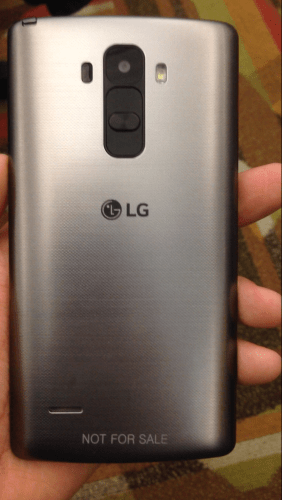
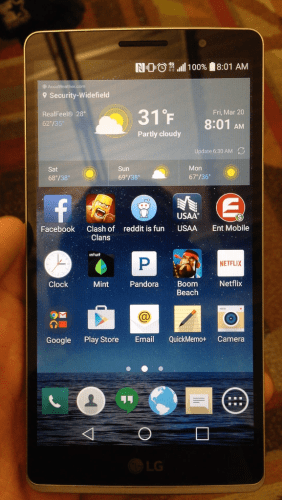
XDA user s3rv1cet3ch has leaked several photos of the new LG G4. I have included the best 2 shots. There are 2 more available on link below. Of interest is the possible stylus top left or maybe that’s a TV antenna. Otherwise it looks fairly similar to the LG G3.
Source – http://forum.xda-developers.com/showpost.php?p=59705281&postcount=8
Amazon offers new Cloud Storage Plans including unlimited storage
“Amazon on Thursday announced two new unlimited cloud storage plans for , enabling users to store an endless amount of photos, videos, movies, music, and files. Amazon users can choose either the Unlimited Photos Plan for $11.99 per year or the Unlimited Everything Plan for $59.99 per year, with a free three-month trial available for each plan for customers that want to try the service.” If you are a Prime member, you already get unlimited cloud storage. The lower-tier Unlimited Photos Plan allows for an unlimited number of photos to be stored on Amazon Cloud Drive, alongside up to 5GB of additional storage for videos, documents and other files. The more expensive Unlimited Everything Plan allows for unlimited storage of photos, videos, files, documents, movies and music with no restrictions. Amazon Prime members are already provided with an Unlimited Photos Plan at no additional cost.”
Good to see Amazon raising it game towards other offerings like Microsoft that also offer unlimited plans.
Source – macrumors.com
Fake Apple Employees try to sell Microsoft Products
Well, NelkFilmz, who are pranksters, tried telling Apple customers to go buy Microsoft products, whilst they were impersonating Apple Employees. Personally, I think this is a big fail by these guys and reinforces just how strong the Apple Brand really is.
Samsung Galaxy A5 – The Trendy Selfie Phone
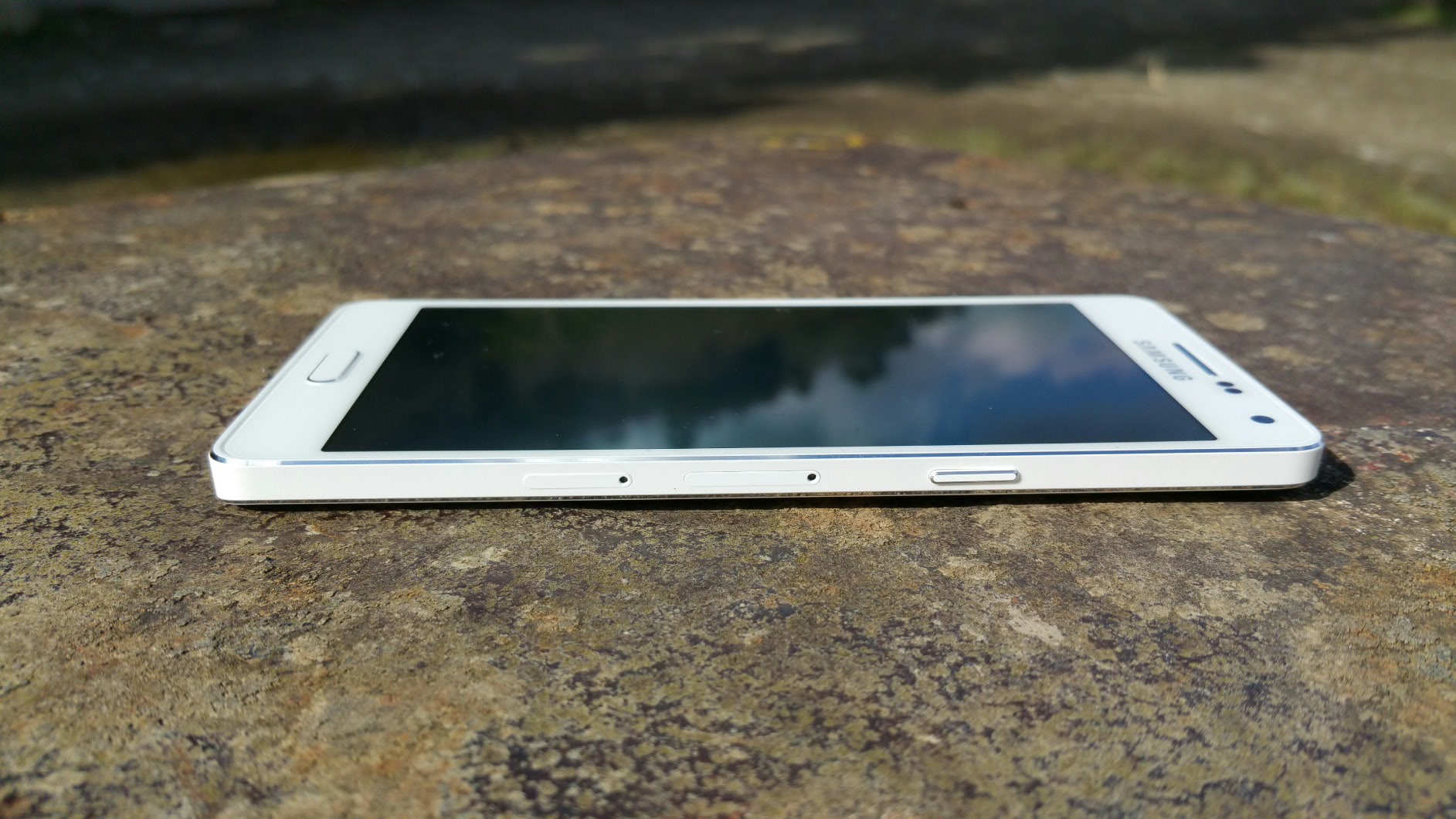
The Samsung Galaxy A5 is 6.7mm thin. It is a solid unibody design that looks gorgeous. Just look at the photos.

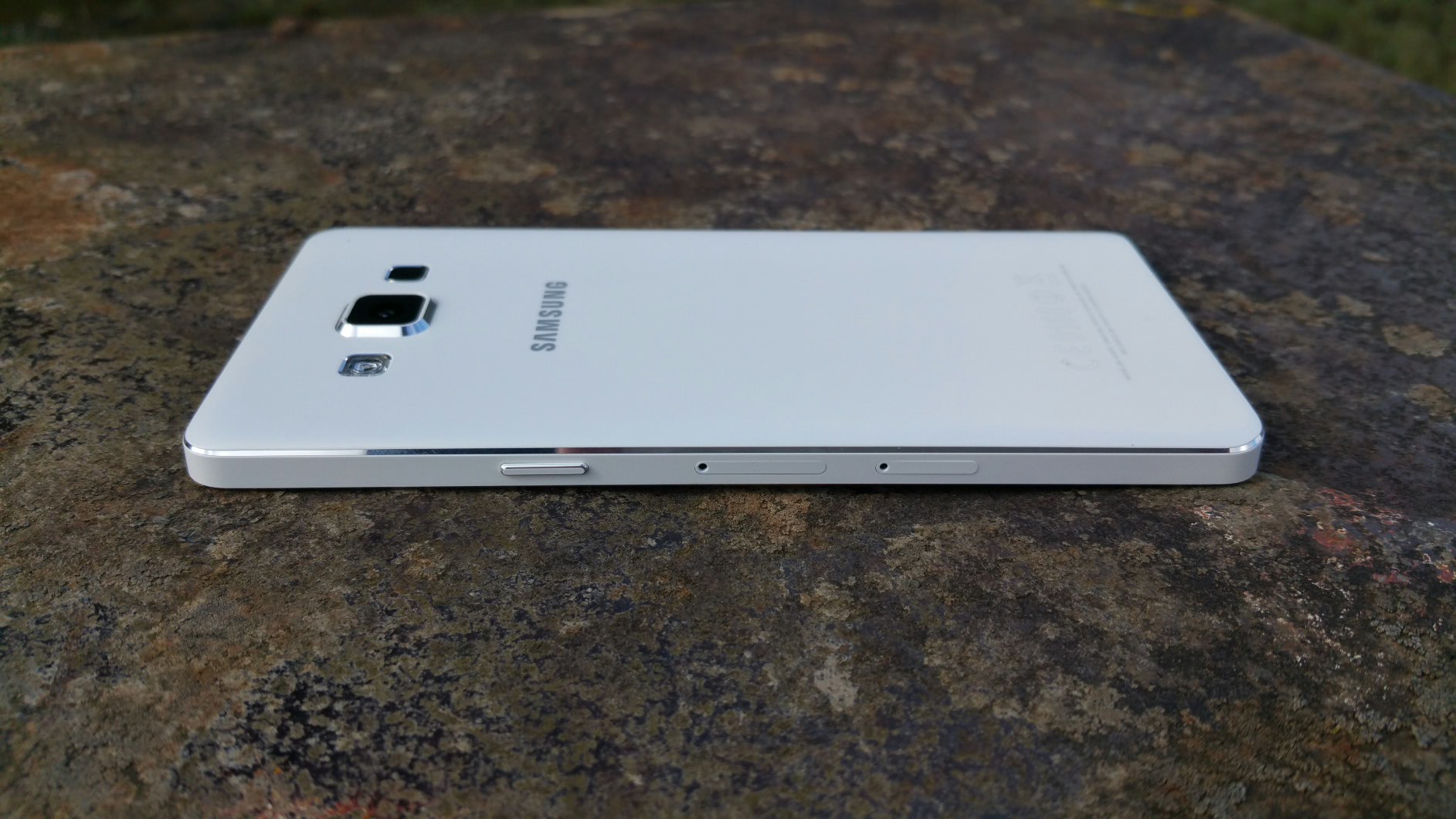
When Samsung announced the all new metal unibody Galaxy A5 along with the smaller A3, I was really keen to try the Galaxy A5 in particular. I had had a blast using the Samsung Galaxy Alpha but the A5 took the materials to the next level over the Galaxy Alpha. It’s a very solid phone, which doesn’t bend! At 6.7mm thin it fits in all my pockets, shirts and jeans with ease. I’m fact, I enjoyed using this phone so much due to its performance, size, camera and finish. Out and about with friends we spent hours taking endless selfies!
As this is a Samsung, the Galaxy A5 comes equipped with an lovely Super AMOLED display and Adaptive Display technology which as expected produces wonderful images.
The Galaxy A5 proved to be a hit taking selfies. The camera has a Wide Selfie (like a panoramic selfie), Palm Selfie (just hold your palm in front of screen to get 2 sec countdown), Animated GIF, Beauty Face Features (3 different adjustments – beautify, thinner cheeks, eyes) and Rear-Cam Selfie, which enabled me and my friends to capture great selfies in high resolution. Again using the Rear Selfie mode, you got a beep to say locked on to our faces, then countdown beeps before taking the selfie.

The Galaxy A5 was really quick at automatically detecting and focusing on a person’s face. In low light or outdoors my friends and I took some smashing photos. This phone has been clearly tuned for decent selfies and this really surprised me.
The Samsung Galaxy A5 comes with LTE Category 4 which is handy for quick uploads and sharing of photos and videos, to Twitter and other social media websites.

I thought the camera took some great photos too.


In some of the specialist modes like night mode and HDR, the 13mp resolution is dropped to 8mp.
One of my favourite features is Ultra Power Saving Mode. One evening, just before 11pm and with just a few percent battery remaining, I turned on Ultra Power Saving Mode which gave me enough juice for another 25 hours basic phone usage.
The key remaining specs are as follows –
Samsung Galaxy A5 Specifications
– Processor 1.2GHz Quad-Core Processor
– Display 5.0” HD Super AMOLED
– OS Android 4.4 (KitKat)
– Camera Rear: 13MP AF with LED Flash, Front: 5.0MP
– Camera Features – Wide Selfie, Rear-cam Selfie, Beauty Face
– Ultra Power Saving Mode
– Changeable Theme (Natural, Classic, Casual, Romantic),
– Private Mode, Multi Screen, Quick Connect
– Wi-Fi: 802.11 a/b/g/n
– Bluetooth: 4.0(BLE, ANT+)
– NFC (LTE version only)
– A-GPS/ GLONASS
– Sensors – Accelerometer, Proximity, Geo-magnetic, RGB ambient light, Hall Sensor
– Memory 16GB Internal memory + micro SD slot (up to 64GB)
– 2GB RAM
– Dimension139.3 x 69.7 x 6.7mm, 123g
– Battery 2,300 mAh
– Gorilla Glass 4
I tested the loudspeaker which is next to the camera on the rear. As the camera is slightly raised it doesn’t get muffled. It’s a clear loud sound. Headphones sound good via the headphone jack too. USB Audio is not supported.
Touchwiz now has themes which add a lovely bit of personalisation.
But the real takeaway for me and my friends was how solid, stylish and slim the all metal unibody design felt, the fast speed of operation, and how much fun is was to use the Galaxy A5 to snap selfies using the front or rear camera, and then share them quickly using 4G internet speeds.
To find out more on the Samsung Galaxy A5 and current offers head over to Amazon UK