Category Archives: Reviews

Apple iPhone 6S Plus – My Time Lapse Test

Below is a video produced from 3 separate time lapse clips recorded on the iPhone 6S Plus. It is worth noting that my tripod was shaking in the strong wind whilst recording the first clip. The optical image stabilisation was working overtime!

There are 3 clips in total merged together on the iPhone 6S Plus using iMovie iPhone app.

The middle clip is my favourite. Watch the boat appear and seemingly swerve at high speed. The first time lapse clip is filmed with a 360 degree rotating device mounted on the tripod.

Let me know what you think. The highest quality setting is 1080p.

More photos from the Apple iPhone 6S Plus and views

Below are some photos I snapped recently with the Apple iPhone 6S Plus. I am really loving the phone and with a bit of experimentation getting some really good photos, even in low light. Really low light is its weakness. But that’s when you need a flash.

I am also experiencing a major disaster with Apple’s iCloud service, iTunes Match, but more on that tomorrow, with hopefully some good news.

Right 4 photos, all random and all first shots. To see full size, just click on photo and select original size.

Cross the Line

Tiggy hides in the Grass, Dartmoor

Sunset over Princetown

Motorola Moto X Play – review 

Welcome to my review of the Motorola Moto X Play. 


Basics

The key specifications of the Motorola Moto X Play are –

– Water repellent nano coating
– Android 5.1.1 Lollipop – Motorola’s quick updates
– 1.7 GHz Octa-core CPU – Snapdragon 615, Adreno 405 @ 550 MHz GPU, Natural Language Processor, Contextual Computing Processor
– 21 MP camera – f/2.0 aperture & dual LED flash
– 5.5” Full HD display with Corning Gorilla Glass 3
– 2 GB RAM – keep all your apps open and running quickly
– High capacity 3630 mAh battery – keep working for longer
– Front facing bottom speaker
– 16GB internal storage (9gb available), micro SD up to 128gb
– Bluetooth 4.0 LE
– Weight 169g

The Motorola Moto X Play was kindly loaned by Clove Technology, https://www.clove.co.uk/motorola-moto-x-play ,for the purpose of this review. When Motorola announced the 3 new Moto X devices, this was the one I wanted to actually own. A 5.5 inch screen with a whopping 3,630 mAh battery plus a new 21mp camera. Plus the phone runs a near stock build of android along with some snazzy Motorola additions.

The snapdragon 615 processor provides a smooth performance. AnTuTu score was 36,000. The screen viewing angles are good, with average sunlight visibility. NFC is included so android pay will work with his phone.

Motorola includes an app called Moto Assist. This understands whether you’re at home, in the car, or in the office, adapting to your needs at that moment. Eg. reading your text messages aloud while you drive or even silencing your ringer and turning off the display at bedtime. The more I used this, the more is learnt and the more useful it became.

The other feature of the X Play is the colour and finish options. This phone can be customised in many different colours and trims.

Camera and Audio

Motorola has bumped at the camera on this year’s phone using a 21mp f/2.0 rear Sony Sensor. The from sensor is a respectable 5mp. The rear camera features closed loop processing, quick Launch, Phase Detect Auto-Focus (PDAF), Instant ON Video Stabilization, Tap anywhere to capture, Colour Correlated Temperature (CCT) flash with dual LEDs, 1080p HD video (30 fps),Slow motion video,4X digital zoom,Burst mode,Night mode,Auto HDR, Panorama and Drag to focus & exposure. Lots of features but what how good are the camera shots?

IMG_20150930_145909384

IMG_20150930_145823611

IMG_20150930_150217608

IMG_20150930_145813116

IMG_20150930_145806350

IMG_20150930_145233870

I really liked the shots from the camera and whilst low light produced some noise they were still acceptable. If you would like to pixel peep, just click on photo and select full size if needed.

The loudspeaker is mono and on the front and maxed at around 90db. It is loud and clear and enjoyable to use. Headphones sound equally loud and clear. USB Audio is supported.

Conclusion

The Motorola Moto X Play is great phone and a good price. The near stock build offers an enjoyable experience. I thoroughly enjoyed the audio quality from the front loudspeaker and the superb battery life makes a change from battery guzzling QHD displays.

If you are looking for the Motorola X Play or need to read the full detailed specs, then head over to the fine people at Clove Technology – https://www.clove.co.uk/motorola-moto-x-play

Apple news and low light camera results

So Apple announces that it sold a record 13m iPhones over the launch weekend up by 3m from last year. So it’s only natural that Wall Street responds with disapproval and disappointment and causes Apple’s share price to drop. Sometimes I do wonder if morons run Wall Street! 

At a time when Samsung and other phone companies are struggling to sell their phones, Apple had no problem whatsoever in shifting a record breaking number. I do suspect China played a big part in the sales figures. Also worth noting that the iPhone will go on sale in another 40 countries on 10th October. 

This year was the first year that Apple made buying the new iPhone a much easier process and in turn reduced the queue sizes. 

Now back to the camera and low light photos. Apparently for low light shots you get much better results if you switch off the live photo mode. I have not had time to test this thoroughly but will over the coming weeks. Also there are a number of third party apps that specialise in low light photography including Slow Shutter Cam and Nightcap Pro and I will see what difference these apps make. 

In the meantime, taken at dusk yesterday is the photo below. Unedited. Seems ok to me. 


Acer Iconia One 8 Tablet – review


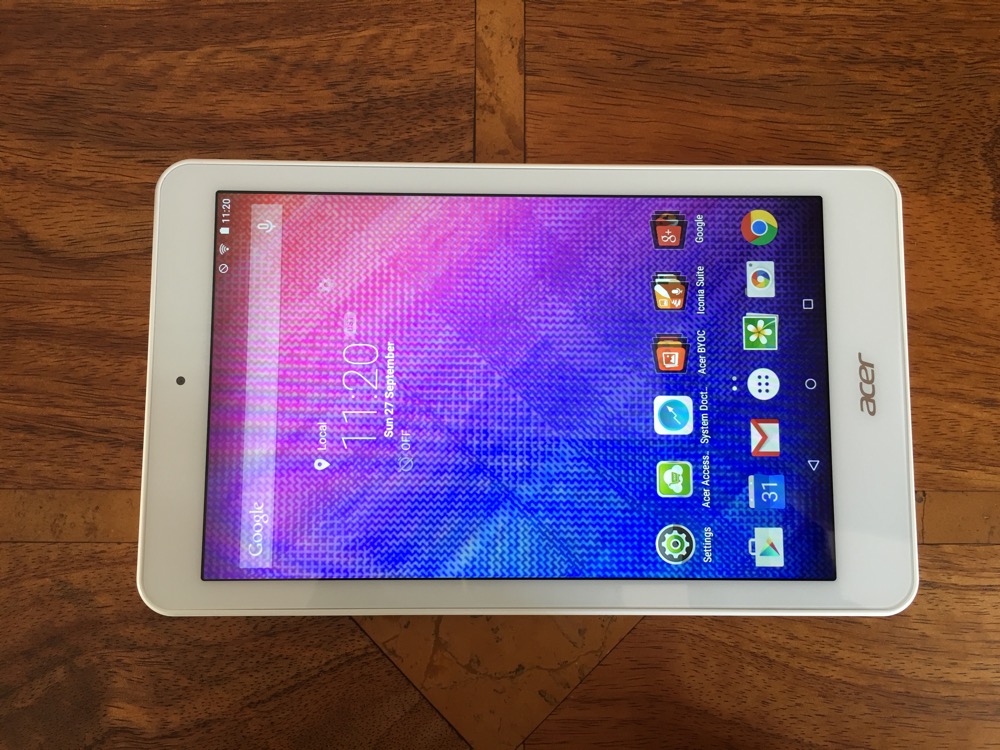
Welcome to my review of the Acer Iconia One 8 tablet review. This is a review unit provided by Acer PR which I have been using for over a month.

The Acer Iconia One 8 is a 8 inch screen tablet available in 6 fashionable colours from white, two different blues and pinks and black. The tablet runs android 5.0 with an Intel Atom 4 core CPU running at 1.8HGz. AnTuTu kicked in at 33,198.

It has 16gb storage with 1gb ram. The screen resolution is 1280 x 800. GPS is included as well as Bluetooth 4.0. It weighs 354g. Retails for around £125. The rear is has a perforated feel which makes it easier to hold. The button placement is slightly awkward as they are slightly recessed.

One of the quirks of the device is the touchscreen which features Precision Plus 3 technology. With an Acer Accurate Stylus you can write and sketch with the idea to feel like you are actually writing on on paper. Acer also state that you can even use thin-tipped objects like pencils to make notes. I didn’t try this as I did not have a single pencil at home!

Acer add a number of extra functions and apps, some of which are useful and others you may decide to park inside a folder. The Iconia suite includes EZ Note, EZ Snap, EZ Wakeup and EZ Gadget. The EZ Snap is a function when activated that allows you to capture screen shots with a 3 finger gesture. With 5 fingers you can wake up the tablet and launch your chosen app. EZ Gadget is a floating app with access to several tools – calculator browser, text memo and calendar. It stays in its own movable and resizable window on top of other apps. It is the size of 5 icons across, so remains fairly visible and easily accessible. A standard feature of Acer devices is BYOC. Bring Your Own Cloud. Activate these apps on all your other devices and you create your own private cloud solution for music, docs, photos, files and video. Neat.

The screen resolution is 1280 x 800 which is whilst not the highest available does have a benefit of up to 10 hours battery life. In real world usage I got around 7.5 hours. The 16gb storage has around 8gb free after I installed a few apps. Smoothness. 1gb ram is just enough to keep this tablet providing a relatively reasonable experience mainly because it has a near stock build of android. Storage is expandable with a micro SD card. There are front and rear cameras, but you won’t be buying this tablet to take photos. The front camera is 0.3mp! And the rear is slightly better if that helps. The loudspeaker produces a clear sound maxing out at around 83db.

After using the Acer Iconia One 8 for a month I have no real complaints and some of the extra features and apps added by Acer were useful and others not. Note taking by writing on the screen was novel! At the end of the day it is an android tablet for around £125.

Acer Iconia One B1-820 8-Inch Tablet Special Offer at Amazon UK

More Photos from the iPhone 6S Plus – plus opinions on the camera quality vs LG G4 and Samsung Galaxy S6

Well I have used the iPhone 6S Plus over the weekend and taken a number of photos now. Bit by bit I am beginning to see the strengths and weaknesses.

First the photos. Remember, clicking on each photo will bring you to my Flickr account. There you can view the full size.

Around the bottom of Cox Tor, Dartmoor

Goliath - The huge tors on Dartmoor

George and a Tor - scale, Dartmoor #iPhone6SPlus

Follow my leader - Cool waters on Dartmoor

The Chase - Tiggy & Fury dash through the water on Dartmoor

Stunning Panorama over Dartmoor #iPhone6SPlus

These all look amazing, except there are some limitations that I spotted. Despite near perfect weather, unless I got closer to my dogs, which in these shots I was unable, they are not as crystal clear, and cropping in closer does not help matters. The LG G4 would have nailed a shot like this and allowed me to crop in too without losing too much picture quality. However, the overall balance and picture reproduction is stunning. The panoramic shots are really impressive. The shutter speed of the 6S is super fast and even allows a burst of 999 shots. 4K video is better IMO than the LG G4 and just ahead of the S6. Lower light goes to the G4 and S6. The front selfie screen flash works very well. Live photos are superb. Just love the extra motion as I browse through the shots. Brings the moment back to life. The other aspect of the iPhone is reliability. It is so great at getting the shot correct first time every time.

Before I got this phone, IMO, the LG G4 had the best camera for stills. And I still believe it does with all the built in manual controls, RAW and its overall ability to find the light with its f/1.8 vs the iPhone 6S Plus f/2.2. However, the G4 loses out to video quality and other some other shots like panoramic. Of course, a phone is not always just about the camera!

The Apple iPhone 6S Plus – Day 1 experience – Photos and views on Rose Gold and Apple Watch

I was the unlucky one, my new iPhone 6S Plus did not arrive until the end of the day on Friday. And as I write this it is still no way near setup fully.

My plan is to remove Google from the iPhone and use all of Apple’s cloud services. This is not going as smoothly as I hoped yet. I have iCloud Photo enabled and and iTunes Match. All my photos are in the iCloud but not yet on my iPhone. That part of the sync has not finished. iTunes Match. My music has been matched successfully for 40% of my collection and is still trying to upload the rest. Except I have cloud error messages next to 50% of my music that failed to upload. Once the process has finished I will go into the settings and run an option to sort of repair the music library to see if that helps.

The main issue is the demand on the internet. I have uploads and downloads galore and without fibre speeds I am suffering. I might have to visit an Apple store one weekend and complete iTunes Match with a fast upload. My Apple Watch got turned on for the first time, but that needed a 515mb download. The Apple Watch is a complex beast compared to android wear but so far ahead of the curve.

Apple Pay. Both my Apple Watch and iPhone have been setup. This was the fastest part of everything.

I have already been asked how good is the camera. I do know the answer but I want to test it more across a number of situations. The main part to note is the rear camera has a f/2.2 versus say the LG G4 at f/1.8. The extra light the G4 allows at f/1.8 does make a difference for starters. However, the camera on the 6S Plus is lightning fast and the image processing is phenomenal. The front selfie camera is much better too. I have tested the front retina screen flash in different lighting and it really does adjust its tones dependant on the subject. Needless to say the 6S Plus camera is very good. Now is it better than the S6 or Note 5 or LG G4? I will answer that soon.
   
   
After this post goes live, I will upload some photos from the iPhone 6S Plus so do head back if you cannot see any snaps.

So far due to the late arrival on my iPhone and Apple Watch I have only added 3 home screens worth of apps. These are the ones that all needed passwords and or 2 step authentication so took longer to setup. I now have to go through my 2,000 or so apps and decide which ones to add to the phone. A lot of these are games and I have realised what great games I have missed playing while I have been stuck on android.

3D Touch. I have used it or I should say tried to use it but need more time to pass judgement.

So I am still in a setting up stage / discovery. I need to see what new apps have arrived both for the iPhone and Watch that I have not got and start to fine tune everything.

However, my overall takeaway despite being at an early stage is the user experience. OMG the screens and swiping down long lists just glide beautifully in any app. Even the official twitter app is leagues better on iOS because of this smoothness. Apps have integrated Touch ID and therefore offer a better experience and features. Touch ID is super fast now. And finally the 6S Plus battery is fantastic.

Rose Gold – my wife got a 6S in rose gold. It is a lovely colour and under different lighting looks beige sometimes, pinkish and shades of rose gold. However, I prefer the silver finish of my 6S Plus. In terms of size the 6S is a really good phone size phone but I wanted the 6S Plus for the better screen and optical image stabilization in the camera.

Honor 7 – First Impressions

I have had the Honor 7 smartphone 48 hours now, but really only got to use it fully and exclusively all day yesterday. I have installed over 50 of my apps and about 5 games. This is a review device from Honor PR.

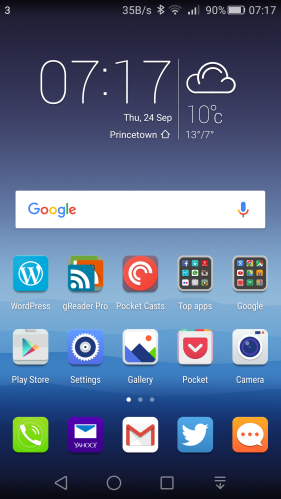
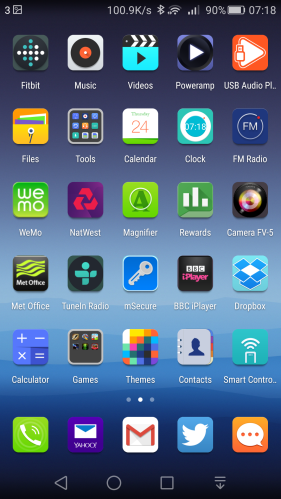
The Honor 7 runs Emotion UI which removes the android app drawer. This all your apps appear on the home screens and will require you to folders if you have many apps. Below are my 2 home screens.

Screenshot_2015-09-24-07-17-54

Screenshot_2015-09-24-07-18-05

I managed to snap a few more photographs yesterday, the first one using HDR due to the sun glare, and the second is a macro of pollination by a bee. I felt the photos were better than those I took yesterday.

The Historic Lloyds Bank Building, Penzance, Cornwall

The above shot is the historic Lloyds Bank building in Penzance, Cornwall. I really like the HDR effect produced by the Honor 7.

Pollination macro

Honor 7 – Just how good is the 20mp Sony Sensor? – Read on

So I have only just got the Honor 7, so snapped a few random shots in auto with the 20mp Sony Sensor.

See sample shots below –

Random shots taken with the Honor 7

Above, fog had arrived on Dartmoor. A difficult shot in terms of focusing, but the Honor 7 did an okay job.

Random shots taken with the Honor 7

This turned out better, with the orange colour popping.

Random shots taken with the Honor 7

Not so impressed here. A bit over exposed and looking washed out.

Random shots taken with the Honor 7

And now a macro of the flower.

Random shots taken with the Honor 7

Again, over exposed slightly, but a fair amount of detail. The Honor 7 does have optical image stabilisation which might have assisted here.

Random shots taken with the Honor 7

Reasonable shot this time.

Random shots taken with the Honor 7