Category Archives: Reviews

Happy Birthday “Gavin’s Gadgets” – One Year Old today

Gavin’s Gadgets celebrates it’s first birthday today.

In one year, I’ve written 1,700 articles and reviewed 23 phones/gadgets. Gavin’s Gadgets is viewed in 180 countries, and some that even I didn’t know existed. If you like podcasts, I also co-host a podcast with my friend Dave Rich from UKMobileTech. Details are on the about page, or search in iTunes or any podcast app for “Gav & Dave’s Tech Podcast”.

Don’t forget, you can catch up on the reviews using the reviews index page.

In addition weather for Princetown, Dartmoor is updated daily using my basic weather equipment.

And remember there are no adverts to distract you. All the views are my personal views and opinions.

So from me to you, thank you for visiting, following my blog, adding your comments and returning. And thank you to everyone that helped me along this journey. Here’s to another year!

A few more reviews – details

Just a quick heads up.

I have a Nokia Lumia 820 arriving soon which I’m looking forward to putting through its paces.

Headphones – following on from my review of the Logitech Ultimate Ears 6000 and Sony XBA-H1, I will be reviewing the Sennheiser Amperior soon. The Logitech UE 6000 and Sony XBA-H1 will also have a longer term update as well. I have used a wide selection of headphones, so please ask if you have a question or two.

Ballistic case – I will be looking at a Ballistics case for the iPhone 5/5S next week.

Apple Leather Case for iPhone 5S – report on long term usage on the red, cream, brown and blue cases. A quick reveal. The brown leather case isn’t that lovely light shade of brown anymore!

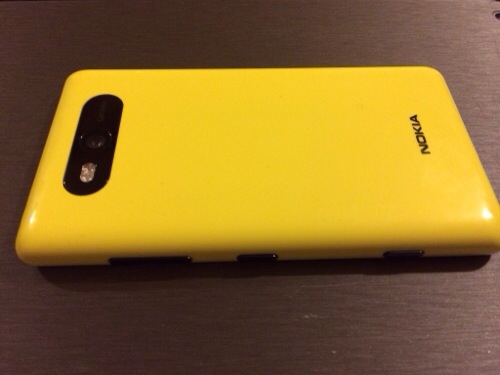
Nokia Lumia 820 – first impressions

20131205-222014.jpg

20131205-222025.jpg

I received the Nokia Lumia 820 is the post yesterday evening. I’ve only had a short time with it, but below are my first impressions.

It’s a fairly substantial feeling phone, both in terms of actual weight and feel in the hand. It’s very comfortable in the hand, approximately the same height as the iPhone 5S but wider. It’s has a 8mp Carl Zeiss camera, a removable back cover and battery and expandable storage with a micro SD card. In fact, at first glance I didn’t believe the back cover actually came off and had to watch a YouTube video revealing how the back cover was removed.

I took a few photos indoors in low light, and once again the Nokia optics perform rather admirably. The Lumia 820 is not in the same league as the 1020 but it did snap rather good photos despite the low lighting.

It’s style is similar to the Nokia Lumia 620, but larger with a better camera and 1gb ram. I don’t know what it is about the Lumia range but they feel tough and the only phone brand I would not protect with a case.

Next week I will post more thoughts of the Nokia Lumia 820.

Logitech Ultimate Ears 6000 – review impressions part 2

Following on from my first impressions yesterday, I’ve have had a bit more time listening to these. The official specifications are –

TECHNICAL SPECIFICATIONS

HEADPHONE TYPE:Around-the-ear
DRIVER DIAMETER:40mm
IMPEDANCE:50 Ohms DCR Powered Off, 1K Ohms Powered On
SENSITIVITY:97 dB SPL/mW Powered Off, 99 dB SPL/mW Powered On, 1KHz
FREQUENCY RESPONSE:20 Hz – 20 kHz
CONNECTION:3.5 mm (1/8 inch)
NOISE ISOLATION:10 dB
BATTERY TYPE:2 AAA batteries
BATTERY LIFE:Over 40 hours of listening on average

The specifications don’t grab you and say these headphones will rock. They need a fair amount of juice to be powered hence why they sound more dynamic and with increased bass with the noise cancellation switched on. I also found to achieve the bass slam and depth you really needed the iPhone volume in the higher end of the scales at around 66% of volume and above. There is still the slightly annoying hiss with noise cancellation.

I have done several tests with the noise cancellation. Let’s just say it removes the sound partially but not completely. The Bose QC15 are much better for this but then cost 3 times as much. However, the UE 6000 noise cancellation is better than not being there at all.

Despite feeling heavyish to hold, the headphones are comfortable even with extended listening periods. Their sound signature is rather uninspiring with the noise cancellation off, although for some tracks the sound balance is more accurate. With the noise cancellation on, the bass is far more prominent and the tracks comes alive. I feel at times the treble and vocals become too muffled. The presentation is fun with a bass line. The added bass can be a very good thing even on classical music but sometimes it can overpower the track. I’ve tried the full spectrum of music genres and these headphones can surprise you irrespective of genre.

My verdict is a fun sound, sometimes really good, sometimes the bass overpowers the track and sometimes the bass adds more enjoyment to the experience. The noise cancellation is ok, but does add a hiss which I did find annoying but not all the time.

But let’s put the above in context. These were originally £200. And at that price there were better options. Except now, they are not £200 and can be had for around £88 on Amazon. At £88 these are a good offering, not perfect for me, but for many will be excellent.

Logitech UE 6000 headphones – first impressions

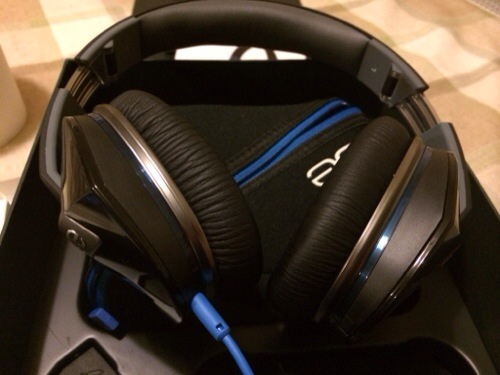
The Logitech Ultimate Ears 6000 are a noise cancelling pair of over the ears headphones made for iPhone, iPod or iPad.

20131203-202153.jpg

The first impressions you get of these headphones are the packaging. Some serious marks for such a well presented and stylish box. It opens to reveal a pouch for the manual, a soft zipped case which had the headphones inside, the wired cable, and a cool looking headphone splitter, allowing for an extra pair of headphones to connect to your iPod or iPhone or iPad. The wired cable also has the controls for your iOS devices.

You connect the wired cable, remove the battery plastic strip and voila. Slide the power button on and you have the UE 6000 ready to rock.

So the good part of these cans in that the noise cancellation works even when the 2 AAA batteries run out. And the fact that it uses batteries you need to make sure you have a spare pair if on a long journey.

Switching the power switch on does cut out a lot of background noise although not everything. The noisy dishwasher was considerably quieter. With the noise cancellation on, the cans had more punch and dynamics. The bass is excellent. But I have noticed a slight hiss when the noise cancellation is switched on. This might be a nuisance with quiet classical music. The UE 6000 are very comfortable on first impressions.

More impressions to follow shortly.

50X Super Long Range Telescope for iPhone 5s / i5 Photography

iFazz has launched its new compact telescope for the iPhone 5/5S.

20131121-185428.jpg

Weighing 785g it is some heavy weight and not really practical as such but may be a way of getting a decent photo of the moon. If you want an easier way to get a shot of the moon with your phone or camera follow these easy steps by Steve Litchfield over at All About Windows Phone .

Final thoughts on the Nokia Lumia 1020

I’ve had the Nokia Lumia 1020 for around 2 weeks courtesy of Nokia.

I really enjoyed the Lumia 1020. I preferred it over the Lumia 925 as I preferred the polycarbonate build over the Lumia 925 aluminium frame. I also loved having the top notch 41mp camera. I took some fabulous photos and having the immense detail has proven invaluable.

If I was being extremely nit picky I wished the phone camera software had a HDR mode. In fact, talking about modes for novices I think have some preset shooting modes eg waterfall, fireworks, action etc would be great. Once again in a relatively short space of time window phone apps have improved. Couple that with the new processors and upgrades to the operating system, and you have an alternative to android.

I don’t know why, but I actually prefer windows phone to android. As I mentioned yesterday, I’m looking forward to the Lumia 1520.

iOS Games updated for game controller support – details

iOS game controllers from Moga and Logitech have just been announced. So at present the list of games supporting these controllers is small, but expect the number of games to explode in a short period of time.

Moga has set up a page here which gets regularly updated with all games that support iOS. They also have a list for android games that support is android game controllers.

Logitech also has a page of compatible games, click here which seems to include extra games over the Moga. However, I’m sure the Moga will work with all these one too.

However, I’ve compiled a list too.

Airwings
Airwings Intergalactic
Asphalt 8
Aztec Antics Bouncing Ball
Bastion
Blastron
Bike Baron
Brothers of Violence 2
Bugdom 2
Call of Duty Strike Team
C.H.A.O.S.
Cro-Mag Rally
Dead Trigger 2
Death Worm
Fast & Furios 6 – The Game
Graalonline
GunnerZ
Ice Rage
Into the Dead
King Oddball
Lego The Lord of the Rings
Lilli
Limbo
Metalstorm Aces
Minigore 2 Zombies
Muffin Knight
Nanosaur 2
Neon Shadow
Nimble Quest
Nitro
Nucleus
Oceanhorn
Otto matic
Pacman
Paint it Black
Phoenix HD
Ravensword Shadowlands
Real Steel – World Robot Boxing
Scribblenauts Remix
Silverfish
Silverfish Max
Spiral Episode 1
Stealth Inc
Strikewing Raptor Rising
Super Lemonade Factory 1 & 2
Tennis in the Face
The King of Fighers i 2012
Touch Tanks 5 Online
Trials Xtreme 3
Trouserheart
The Walking Dead The Game

Moga Ace Power Game Controller for iOS – Review

Moga are well known for their android compatible game controllers. They have now brought out an official Apple approved and certified game controller for your iPhone 5C, 5, 5S and the latest generation of iPod Touch. It only works if you have iOS 7 installed as this has the new native game controller APIs installed.

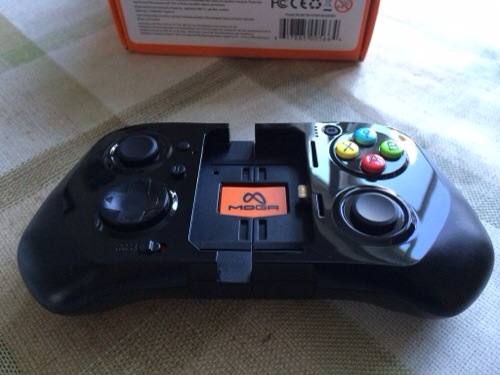
Scroll back a few articles to see my current list of games supported by the game controller. Also note, that it seems the list is growing very fast on a daily basis. Or to see all my articles on the Moga Ace Power click here. So what does the controller look like.
20131123-132508.jpg
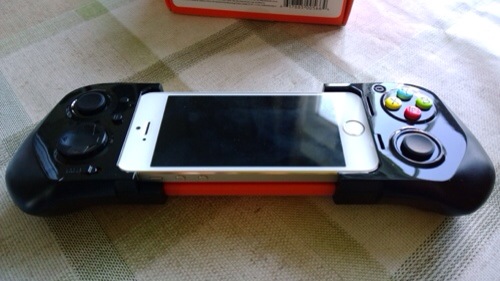
Here it is in its locked closed position. It then expands to fit safely and securely the Apple device. Shown below is the iPhone 5S.
20131123-132607.jpg

In the box is the controller, instructions, USB micro lead for charging it, and orange plastic inserts. By default the black plastic inserts are installed. This is for the 5S. If you have a 5C you need to remove all the inserts. If you have an iPod Touch you need to use the orange inserts which raise the iPod to be level with the lightning connector. So how does it all work. Well, you first charge the controller, insert your iPhone and lock the slider using the switch under the controller. And that is it since iOS 7 has game controller built in to the operating system, there is zero configuration needed. There is a front sliding switch to allow the Moga to charge your device. This obviously depletes the controllers battery but when it reaches 25% charge it won’t charge the iPhone any more. The Moga has a 1800mah battery. I haven’t been able to obtain conclusive battery life tests but will update this article in due course. The Moga features pressure sensitive and analog controls. In fact, if you use a PS3 controller or similar, you will be right at home with this. In addition there is a battery level button to reveal how much power is left in the controller. There is also a pause and lock button switch. As it uses the lightning connector, the sound is carried through via this method, which means and the right side of the controller is a headphone jack. You cannot use the headphone jack of the iPhone or camera as both are covered.

So the burning question. What is it really like. Well, if you read the reviews published already they only give the controller an average score and at first I was agreeing with that too. However, it was clear these reviewers didn’t spend much time with the controller, as after using it longer I realised it was better than my original thoughts. The Moga Ace Power does feel cheap plastic compared to its android Moga offerings. I have realised part of this feel is due to the sliding mechanism which makes it feel flimsier. Regardless it still gives the wrong impression in terms of quality and this is slightly disappointing especially as this cost £90. In reality, it works and so far exhibits no hardware failings. Once your iPhone or iPod is clamped in position, the whole controller becomes a solid piece and feels rather reassuring. In fact, the longer I have had the Moga the more I have grown to like its design. The list of the iOS games compatible with game controllers exceeds 50, but like everything in life some are better than others. Come love not money, I could not get Asphalt 8 to work. I wasn’t that upset. It is a great game ruined by in app purchases, as are a number of games nowadays. So like most things in life, a little exploration reveals that there are some fantastic games that work really well. And generally, these games have more depth too so end up being the sort of game that would benefit from a game controller. So when I nailed a good game, the experience was mesmerising. The potential is incredible. iOS has the best game selection out of any platform. And as developers fine tune their games to support native controllers the world is open to a new level of gaming. That is providing developers don’t ruin their games with in app purchases. Tim Cook did you hear me. Stop iOS games getting ruined by greedy developers !

To help you these are my favourite titles that I have enjoyed using the Moga Ace Controller – Aztec Antics, Bastion, Bike Baron, Dead Trigger 2, Death Worm, Galaxy on Fire 2 HD, Ice Rage, Limbo, Minigore 2 Zombies, Neon Shadow, Oceanhorn, Pacman, Silverfish and Strike Wing Raptor Rising. The only bug or fault is the back light dimming and then the phone locks. This is due to the fact that my iPhone was set to auto lock after 1 minute. And the controller on some games doesn’t prevent this.

The Moga Ace Controller works really well but will be even better as more games get optimised. I wish Moga had used a higher grade of plastic, but once the phone locked in, it does as mentioned before a solid piece. One other game controller available is the Logitech Powershell. This won’t be available in the UK for another few weeks, but doesn’t have the full range of controls like the Moga. Other game controllers are certain to be made available by other companies over time. But the key factor, is software updates by developers. The good news is that iOS 7 includes game controller support natively so it shouldn’t be too difficult for developers to implement. So using airplay and an Apple TV with your game controller you now have a complete console solution. You can see where the future is moving!

So should you buy it. My answer is yes “if” you play games. Despite the drawbacks of this new piece of tech being new, your iPhone or iPod takes on a new lease of life when it comes to games. It is so much better than using physical controls and not having your fingers cluttering the screen. Just be prepared to buy a few new games to get the most out of it until other mainstream titles get updated accordingly. And that may take anything from tomorrow to several months for the titles to get updated.

Update. I’ve noticed a rapid number of game updates all adding iOS game controller support and they seem to work really well with the Moga Ace controller.
All the latest reviews

It is often difficult to find the reviews of devices and accessories I have written about, so below is a quick way to find all the articles for the key reviews. Or use the top right search box to search for anything on my blog.

Nokia Lumia 1020 review

Netatmo Urban Weather Station Review

Sony XBA-H1 Headphone Review

Sony Xperia Z1 Review

Sony QX10/QX100 lens review

ZTE Open Review – Firefox OS

Huawei Ascend P6 Review

Nokia Lumia 925 review

HTC One

Samsung Galaxy S4 Zoom Review

Sony Xperia Z Tablet

Samsung Note 2 review

Nokia Lumia 620

Audio Technica ATH-AD900x Headphone review

Fiio E12 Headphone Amplifier

Olloclip 3 in 1 Lens review for iPhone 5

Trident iPhone 5 case review

Bluetooth iPad Mini case review

Glif+ for iPhone 5 review

USB Fridge Review

USB Rollup Drum Kit