Category Archives: Reviews

Gav & Dave’s Tech Podcast – Episode 23 is now Rocking – Please RT

As you know, I co-host a weekly podcast with David from UKMobileTech called Gav & Dave’s Tech Podcast. It is a light hearted tech podcast broadcast bi-weekly. To subscribe click here for iTunes or copy and paste this link into your favourite podcast app.

Episode 23 is now live for your listening pleasure.

LG G3 – Review – Highlights 9 weeks later

It seems a miracle that I still have the LG G3 after 9 weeks. Below are my key highlights of the device.

1) Design. Often overlooked but I really like the buttons on the back of the phone. The curved back. And the headphone jack on the bottom. All of these design choices make the phone despite its size so much more comfortable to hold. And being nearly all screen on the front makes such a great bold design statement.

2) Keyboard – not only is the LG keyboard adjustable in every way conceivable, it has themes and is accurate too. In landscape I pull the keyboard to split it which makes text entry simple. It is the first phone whereby I have not changed to swift key or something else.

3) LG launcher. It’s just clean and simple yet offers excellent customisation. The on screen menu buttons for example. Defaults to 3. But you can add up to 5 and change the order. So bringing down the notification shade can be done from the bottom menu. Simple idea but just works. And then you have Knock On and Knock Code.

4) Camera. It is as easy as the iPhone. It never fails to take a great shot. And truth be told it’s better most times than what can be snapped on the iPhone 5S. Maybe the iPhone 6 will change that balance. Yes the G3 has laser focus but it means it just works. I also like that fact it’s just press and shoot. It also has voice control which seems to work really well. I have at least 5 other camera apps installed but haven’t really used them. The default camera app just works really effectively.

5) QuickCircle case. This is one of the coolest cases for a phone I’ve seen at the moment.

6) Qi wireless charging built in. I’m not a mad person who says it’s the only way to charge a phone but at night, I simply rest the G3 on the qi stand and that’s it.

7) Screen. It’s a good screen and is ideal for my photography. I have tweaked the colour gamut in the screen accessibility options to make it more vibrant.

8) The infra remote software is detailed and offers more buttons than other default phone software provided by other companies.

9) FM Radio. Often overlooked but it’s handy at times.

And finally, it just works. I have had no issues with it whatsoever. LG have updated the firmware and for the life of me I cannot tell what’s been improved.

With all the new phones that have been announced and are still to be announced this month, I am still being held by the G3. Only the Note 4 or Note Edge are tempting me but after I realise I will lose certain features and it will be more uncomfortable to hold than the G3 due to the Note’s wider girth, I keep wondering maybe I’m best staying put.

Time will tell of course 🙂

LG G3 – review – Hello Genie and Google Voice Commands

I really thought I had covered off everything to do with the LG G3 but alas there is another world of operation when it comes to voice control.

LG has their own piece of software, activated from the lock screen simply by saying “Hello Genie”, in the settings quick toggles by switching voice on or from the home menu button swiping it to the left.

As a side point if you swipe straight up or hold the home button, Google Search/Now is activated. If you swipe the home menu button to the right quick memo is activated.

So what can the voice control manage on the LG G3? Sending emails, texting, schedule a new meeting, cancel a meeting and show meetings, tasks creation, show map of an areas or place, navigation to, browse a web page, create new memos, open apps, play music or an album or a song, turn settings on or off and find weather information. You can also look up info on a contact. I will come back in a minute to the finer points of this voice control.

Now let’s move on to Google Voice control. It is what you would expect on any other android phone. Once in the search screen you can use OK Google to start the voice operation. But it is not always on in the home screen. It works as advertised but does not add the granular control of the in built LG system.

With the LG voice control you have more finer control, similar to Siri on the iPhone. So for example, on the LG voice control I can ask it to move an appointment forward by an hour. More of a personal assistant.

As another example, if I asked Google Voice to turn off wifi it just brings me to the wifi settings. If I ask LG Voice to turn off wifi, it turns wifi off!

A word of warning, all of the above voice control operation is dead in the water if you haven’t got an internet connection.

Gav & Dave’s Tech Podcast – podcast update

The next episode of Gav & Dave’s Tech podcast is due out this Sunday.

However, due to the Apple Keynote speech a few days later on the Tuesday, Dave and I have decided to postpone the podcast for a week.

This means we will have all the latest gossip on all the new hotness that has been announced in the last few weeks. And there is a lot of new stuff to cover.

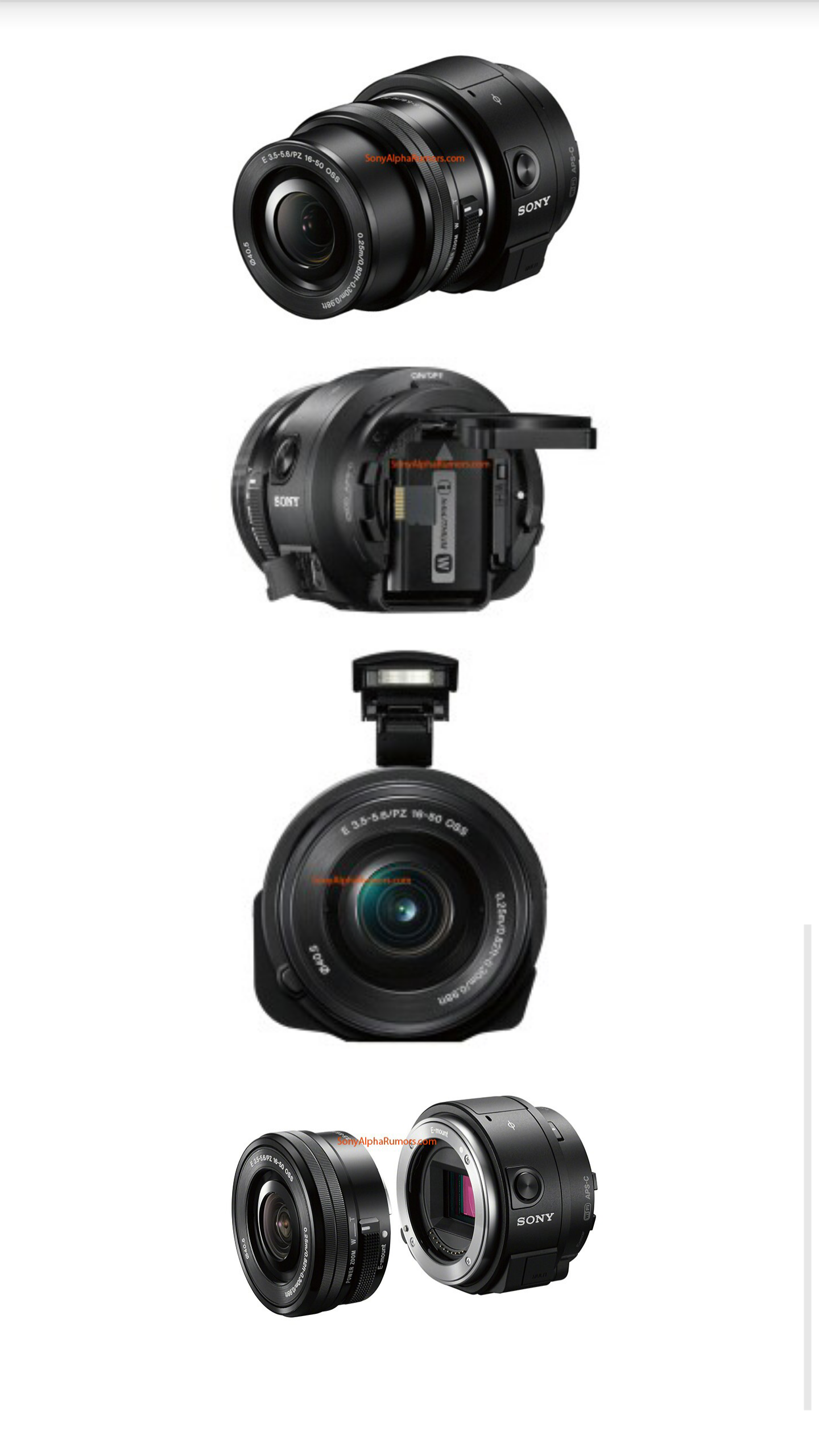
Sony about to announce groovy QX Lens- ILSE QX1-E

image

Sony is about to announce a new product in its QX hub camera accessory that will make your smartphone compatible with any of its E-Mount lenses usually reversed for its line of NEX camcorders and mirrorless shooters. The report comes from SonyAlphaRumors blog, which also shared the images. 

Unlike Sony’s QX10 & 100, reviewed on here under Reviews, Accesories, this hasn’t got a fixed lens but is an E-mount module. It has an APS-C sensor.

Seems a good way for Sony to lock in camera users to it’s smartphones as well.

20 Smartphone Camera Shootout / 20 Phones Reviewed / 50 Accessories Reviewed incl Wearables – The MASTER POST – Pls RT

Gavin’s Gadgets is just over 18 months old. And therefore I thought it would be appropriate to highlight all the content written within my blog. In fact there is over 2,500 posts.

1) First up over 20 smartphones have been reviewed, from all the current flagships of 2014, 2013 and budget offerings. Also some oddball phones like the Samsung Galaxy K Zoom. Link below –

https://gavinsgadgets.wordpress.com/review-links/

2) Next up is the Accessories / Wearables reviews. This covers smart watches, Gear Fit, camera smartphone accessories, app enabled accessories, headphones, cases, power and so much more. Probably around 50 reviews or so. Link below –

https://gavinsgadgets.wordpress.com/reviews-accessories/

3) We all like the cameras on our phones. But even it you’re not fussed have a look at this 20 phone camera shootout. It includes all the flagships from 2014 across 3 different operating systems. Link below –

https://gavinsgadgets.wordpress.com/2014/07/12/wow-20-smartphone-camera-shootout-iphone-5s-lg-g3-htc-one-m8-samsung-s5-k-zoom-note-3-sony-nokia-nexus-huawei/

I have one favour to ask you all. As you will have noticed there is no advertising so I take the full burden of the costs involved in running and producing the content and receive no income in return.

So please could you help me by recommending my blog to your friends. And if you want to throw a bucket of ice water over your head when you have done so, that is entirely optional.

A few of you have sent a small donation which was incredible and appreciated. If you wish to make a donation to my paypal, please use gavinfabl at gmail dot com. Just think of all the coffee I need at 3am whilst writing the next day’s posts 🙂

And finally, have a great day whatever you are planning and keep smiling.