Category Archives: Photography

Shot on an iPhone 7 Plus – Soussons Stone Circle and Forest on Dartmoor National Park

As with all UK weather, it was fabulous during the week and come the weekend, the rain and fog descended on Dartmoor. Snow is forecasted later this week too.

Anyway, below are photos taken on my iPhone 7 Plus of Soussons Stone Circle and in around the forest on Dartmoor National Park.

Happy Hounds #Soussons #dartmoor

Above, Tiggy is very happy to be in the lead. The shot is taken in Soussons Forest, Dartmoor.

Mystic Walks thru Soussons #dartmoor

There are so great trees too. With walkways in between.

Soussons Stone Circle #dartmoor

This is the Soussons Stone Circle, comprising of 25 stones. Dartmoor seems to have many sites with stone circles.

Logs #Soussons #dartmoor

Abandoned logs. Did someone forget to collect these? Also a great place to find beetles.

Happy Hounds #Soussons #dartmoor

George happy as always.

Happy Hounds #Soussons #dartmoor

Fury, she is doing the side step dance, somehow.

Soussons Forest #dartmoor

The weather was awful during the walk around Soussons. Rain, fog and strong winds. Fortunately, the trees provided some shelter, and it times like this you appreciate having a iPhone that is water resistant!

Sunset on Dartmoor – Shot on an Apple iPhone 7 Plus

Sometimes timing is everything as well as skill of course 🙂

The below shot captured the ponies grazing just as the sun was disappearing behind a Tor. A minute before the sun was too bright and a minute later the sun had vanished.

To help capture this shot, I used my iPhone 7 Plus and Adobe Lightroom mobile to snap it in raw. When I capture photos like this, I cannot see the need of carrying a DSLR!

Cracking sunset on Dartmoor

Zecti 70 inch Travel Tripod Review – Plus comparison with Zecti 55 inch Aluminium Tripod

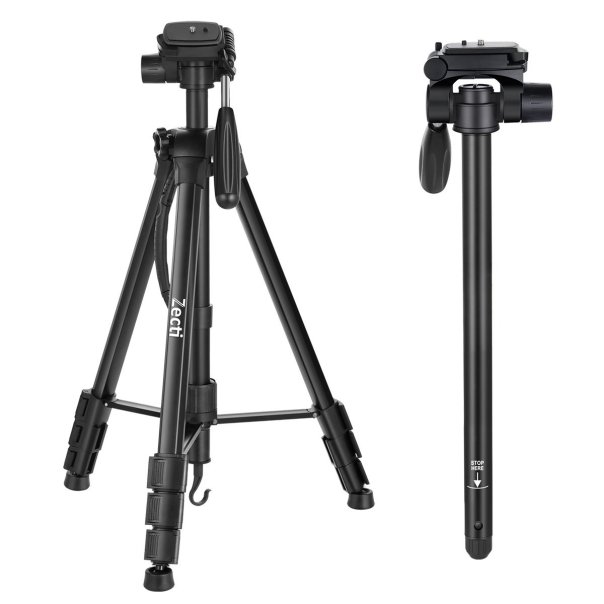
61buqhq9tml-_sl1200_

Zecti 70 inch travel tripod review plus a comparison with their 55 inch tripod. I am already using the 55 inch Zecti tripod on a near daily basis, so I decided to take a look at the bigger 70 inch version. This is a different design so in my main video review, I have also compared it to the 55 inch tripod.

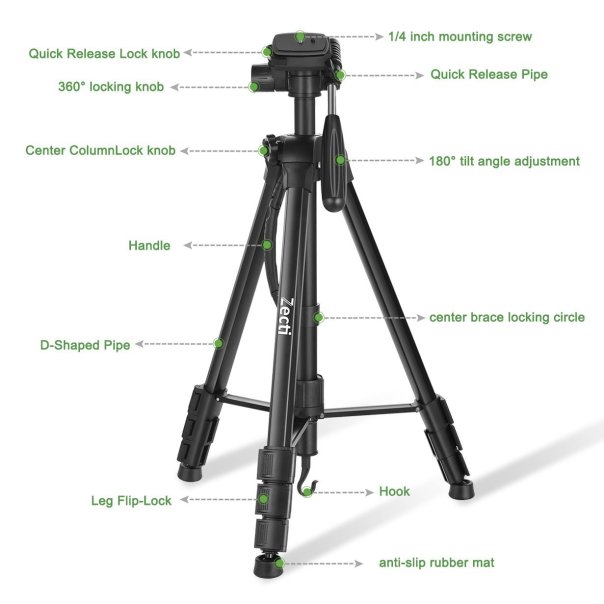
61pz-kbs3l-_sl1231_

The Key Features / Specifications

– Max. Height: 70 inch/176.5cm with column extended
– Min. Height: 21inch/54cm
– Folding Height: 22inch/57cm
– Converted to Monopod: 65inch
– Number of Leg Sections: 4
– Material: Aluminum Alloy+Plastic
– Leg Lock: Flip-lock
– Lateral Tilt Angle: 90 degree
– Tilt Angle: 180 degree
– Panning Angle: 360 degree
– Screw for camera: 1/4 inch
– Head Type: 3-Way Head
– Weight: 1.65kg/3.63lb
– Packing Size: 11.5*11.5*59.3cm
– Foot Type: Anti-slip Horseshoe Mat
– In the box – 1x Camera tripod, 1x User Manual, 1x Carrying Case
– 3-way Head with quick release plate are easy for you to install or remove most cameras camcorder DV and etc.
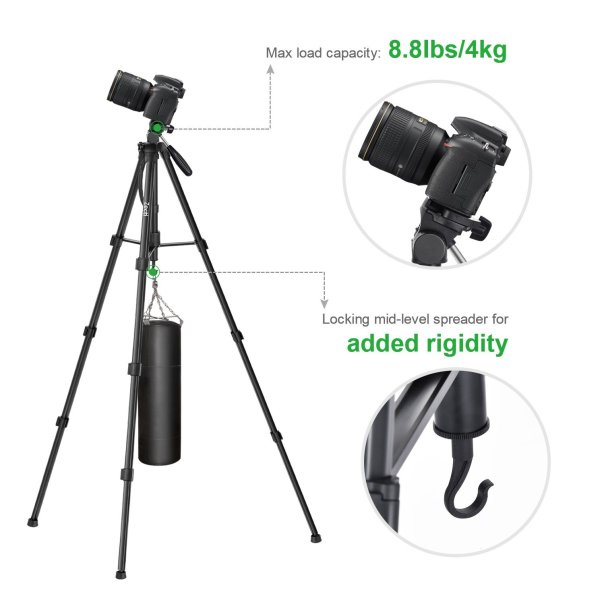
– The unique design of the horseshoe foot and bottom weight hook ensure an excellent stability of the tripod.
– Two in one design of the tripod allow you to convert the tripod between tripod and monopod easily.

7195ppepfgl-_sl1500_

Video Review

To really illustrate the tripod, I filmed a review which also included a comparison with the Zecti 55 inch tripod and Amazon Basic tripod. I also explain the difference in quality between the tripods and their respective features.

Conclusion

The Zecti 70 inch Travel Tripod is ideal if you need a quick release plate and the extra height. I am now using both of these tripods as they are lightweight and ideal for most of my photography.

Useful Links

Zecti 70 inch Travel Tripod
Full Range of Zecti products

619lhburmdl-_sl1200_

Huawei Mate 9 – More Superb Photos from the camera

The Huawei Mate 9 continues to impress and its camera is superb. Below are a range of photos.

Huawei Mate 9 – Light Trails Mode.

Night shots on Dartmoor - Shot on the Huawei Mate 9

Huawei Mate 9 – Night Mode – This really pulled extra light into the shot.

Night shots on Dartmoor - Shot on the Huawei Mate 9

Huawei Mate 9 – Church Shot – Auto mode.

Views around St Constantine Church - Shot on the Huawei Mate 9

Views around St Constantine Church - Shot on the Huawei Mate 9

Huawei Mate 9 – Church Shot – Monochrome mode.

Views around St Constantine Church - Shot on the Huawei Mate 9

Views around St Constantine Church - Shot on the Huawei Mate 9

Huawei Mate 9 – Newquay Views

Great views of Newquay - Shot on the Huawei Mate 9

Great views of Newquay - Shot on the Huawei Mate 9

Great views of Newquay - Shot on the Huawei Mate 9

Some stunning photos!

Useful Links

Huawei Mate 9 on Three UK – Click HERE.

Amazon UK – Click HERE.

Donations – https://www.paypal.me/gavinsgadgets

Zecti 5 in 1 Collapsible Multi-Disc Light Reflector – My Review

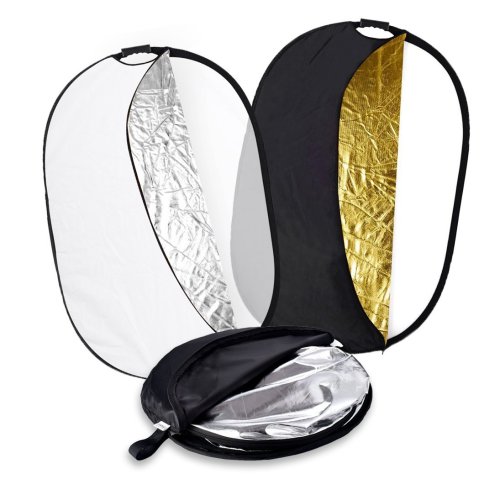
71jtisu6aal-_sl1095_

Welcome to my review of the Zecti 5 in 1 Collapsible Multi-Disc Light Reflector. The Zecti 5 in 1 Light Reflector costs £26.99.

The Key Features –

– The light reflector comes with different reflective surfaces that can be used to fill in, reflect, diffuse, absorb or soften light
– Made with durable and flexible galvanised steel frame
– Fairly easily spread and folded into small size and it is easy for you to carry it from one location to another
– Comes with an anti-slip handle which has a 1/4″ screw hole in the handle allow it to fit most of the standard reflector holders/tripods
– Choose from five colours translucent, gold, white, silver and black

61nm7gqa6tl-_sl1420_

In Use

The first time I unzipped the Zecti black carry/protective bag, I had a slight surprise as the reflector sprung open and was considerably larger than the small bag it had been stored in.

I like the fact is collapses into the bag for portability but it is a bit awkward trying to get it to fold initially. The 1/4 inch tripod screw mount is handy too.

To be honest the only way you can appreciate how compact this collapses and then how large it becomes is by watching the short video below. So now enjoy the video.

Video Review

Conclusion

I have always wanted light reflectors and I must admit the portability and flexibility of the Zecti 5 in 1 set is ideal. It is also competitively priced which is a bonus.

Useful Links

To save £4 on the light reflector use code HDKY7XLD. This will expire in a few weeks.

More information on the Zecti 5 in 1 Light Reflector – Click HERE.

Help Support the Channel when shopping on Amazon UK – http://amzn.to/2i4YFEY
Donations – https://www.paypal.me/gavinsgadgets

Flying and buying a drone – stuff retailers don’t tell you and should!

I recently attended a drone session and was left gobsmacked by what I learnt. Despite witnessing what a £4,500 DJI drone can do, which is flipping amazing, I came away from the event completely certain that I would NOT be buying a drone.

Why?

For starters, you need to be aware of the Drone Code. If you haven’t seen this then have a look here – http://dronesafe.uk/drone-code/ .

I then discovered you need the landowners permission to fly a drone. I wanted to capture some drone photography of Dartmoor National Park. However, the DNPA do not grant permission. Maybe a farmer that owned some land might grant me permission but there is no guarantee.

I can fly a drone in my back garden though. But unless you own acres of land, I cannot see the point of flying a drone in your back garden, other than to fly it into a tree.

If you do own a drone, another other aspect is accidents that can occur if a drone hit a person or property. The propellers on the drone can slice skin fairly easily too.

Now I know a lot of people still fly the drones without the correct permissions. I just don’t see the point of spending a lot of money on an item that is quickly being clamped down by codes and ultimately to come will be legislation.

The Drone Code currently states –

1 – Keep the drone in sight at all times
2 – Stay below 400ft
3 – Every time you fly the drone must follow the manufacturers guidelines
4 – Keep the right distance from people and property – 150ft away from people and houses, 500ft away from build up areas and crowds
5 – You are responsible for each flight. Legal liability and responsibility lies with you. Failure to fly responsibly could end up in a criminal prosecution.

If you decide to buy a drone, just make sure you are aware of the facts.

Useful Links

More information on the different types of drones – Click HERE.

The Drone Code Website – Click HERE

Walk on Dartmoor – Shot on an iPhone 7 Plus – Edited on the MacBook Pro with Touch Bar using iMovie

I wanted to see how tight the integration would be shooting video and photos on my iPhone 7 Plus and then trying to edit it on my MacBook Pro with Touch Bar.

For starters, I got some great photos and video from the iPhone 7 Plus. Since the latest software update on the iPhone 7 Plus, the Live Photos seem to be even better quality. Below are the a few photos the walk out on Dartmoor.

Moody Face #Tiggy #Dartmoor

None of these photos have been edited in any way.

All tongue #George #Dartmoor

What a tongue!! George has a huge tongue.

Sunk in the mud - Tiggy :)

Someone has been in the mud 🙂

Fury had just bathed in mud :) #dartmoor

Because Fury is black, she disguises the fact she is lined in mud !

Ok, some firing up my MacBook Pro, and all the photos and video from my iPhone 7 Plus are already synced into the Photos app on the Mac. Open iMovie on the MacBook Pro and you can simply select the video and photos from the photos app and import them into iMovie. Next select create a movie, tweak the order of the clips, adjusts and colour corrections on the media if required, add a theme, choose from a vast selection of music and audio clips, or add your own, add a few titles and export. iMovie is relatively intuitive to use. Next save to iMovie Theater and now it appears on my iPhone 7 Plus in the iMovie app too.

The last stage is uploading to YouTube via iMovie. And below is the result. The power of the post processing speed of the MacBook Pro is stunning BTW.

Zecti Aluminum Alloy Tripod Ball Head Review – Stunning Build & Precision

Zecti Ballhead 6

Zecti is a small company, on a mission to expand into various different niches, one of which is camera tripods and mounts. I recently reviewed their 55 inch Aluminium tripod and was really impressed by the quality at a competitive price point. Link at the end of this post.

Zecti Ballhead 5

I have now have their Aluminium Alloy Tripod Ball Head, which simply oozes quality and precision. It retails for £39.99. It features separate adjustment knobs for different angle rotation adjustments and a scale to pan for 360 degree panoramic shooting. At the end of the post is a code with link to save a few pounds.

Zecti Ballhead 3

The Ball Head is made using CNC forging and an oxidisation anodised aluminum alloy body ensures the good payload performance and durability.

Zecti Ballhead 2

Other features of the ball head is horizontal adjustment locking system, levelling bubbles for precise framing, a removable quick release arca plate with a 1/4″ screw for easy and safe installation of the camera / 3/8″female screw thread for various tripods and a safety locking system. The Ball head diameter is 35mm with a max load of 15 kg.

Zecti Ballhead 4

The net weight of the ball head is 255g. When I removed it from the packaging, it felt strong and substantial. This is a beautifully made product and ideal for the keen photographer. Recommended.

Useful Links

Use the link below and enter code DSMS7835 to save 5%.

More information & the latest pricing on the Zecti Tripod Ball Head – Click HERE.
Zecti 55 inch Lightweight Aluminium Tripod Review – Click HERE.

Huawei P9 – Epic Photos from the Camera

The Huawei P9 comes with 2 x 12mp rear cameras. One is monochrome and the other is a colour sensor. The cameras were co-engineered with the help of Leica.

In my results below, the Huawei P9 camera delivers epic results and photos worthy of hanging on my wall.

Classic Dartmoor Trees #HuaweiP9

The above shot was taken after sunset, just before night started. This is my favourite shot so far from the P9.

Paignton Beach #HuaweiP9

The above shot is of Paignton Pier, Paignton, Devon.

Paignton Beach #HuaweiP9 #Monochrome

Using the monochrome mode on the P9 adds mood and a unique feel to photos. This is Paignton beach, complete with sea fog in the distance.

Riverside Mill - shot using a monochrome lens #huaweip9 #00 #dartmoor #historic #gorgeous

Riverside Mill, shot in using the monochrome lens again. Pretty special in monochrome.

Natures Trees #dartmoor #00 #huaweip9 #tree #gorgeous

Just trees. Just gorgeous.

No doubt as I get to use the phone’s camera more and more, I will be able to extract even more stunning photos.

Huawei P9 – Festival Blue Edition – First Impressions

Written in Stone #fullsize #OO #HuaweiP9 #monochrome

I reviewed the Huawei P9 back in May 2016. Click HERE to read my full review.

6 months later Huawei have released the P9 Festival Edition. This is simply either a red or blue finished P9. I really liked the phone when I reviewed it 6 months ago, and now that it is available in 2 new colours, I decided to take the plunge and get the blue colour.

P9 Blue

It is not a vivid or dark blue, more a pale grey type blue. In some lighting it does look more blue, but nonetheless its still stunning.

The first thing to re-adjust to is its cameras. It has 2 x 12mp rear cameras. One monochrome and the other is a colour sensor. The above shot was taken in its monochrome mode. The Huawei P9 also allows RAW shots in its Pro Mode so I shall be having some fun with this phone periodically. The raw image files are around 22mb per photo.

The other reason for getting the P9 is to try the nougat beta along with EMUI v5. Once I have this installed on the P9 I shall report back with my findings.

If you have any questions about the Huawei P9, please ask.

For the latest Cyber Week deals on Amazon – Click HERE.