Major Smartphone companies are moving to a new dual lens cameras over the next year.
Sony CFO Kenichiro Yoshida revealed yesterday during the company’s Q3 FY15 earnings call that its dual-lens camera platform will be featured in a range of products from “major smartphone players” over the next year.
So what are the possibilities for this dual lens camera? Well rumours are rife that Apple will introduce a new iPhone with dual lenses. But with MWC just a few weeks away, it would not be surprising to see other companies use this technology too. LG perhaps? HTC even?
Who do you think will introduce this new Sony dual lens camera?
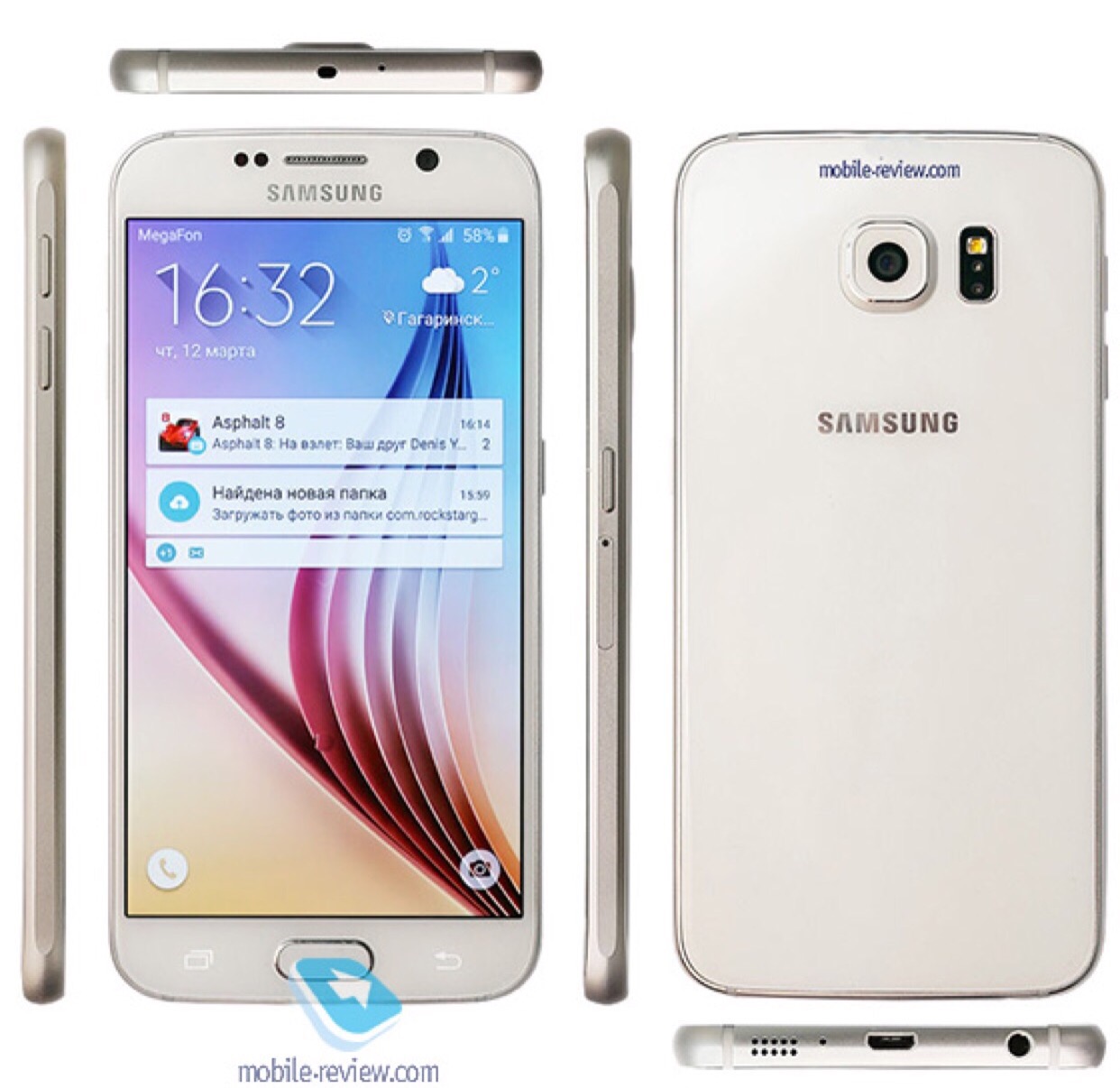
Mobile-Review got their hands on the Samsung Galaxy S7 and revealed everything about it.
Below are the full specs of the Galaxy S7 and S7 edge:
– 5.1-inch and 5.5-inch Quad HD Super AMOLED display
– IP68 certified water and dust protection
– Exynos 8890 and Snapdragon 820 powered variants
– 4GB LPDDR4 RAM
– 32/64GB internal storage, microSD card slot
– 12MP rear camera, 5MP front camera
– 3,000mAh and 3,600mAh non-removable batteries
– Android 6.0.1 Marshmallow
The Galaxy S7 is slightly larger than the Galaxy S6 due to a larger battery and IP68 water and dust resistant certification. This sounds like a positive move by Samsung.
Apparently the 12MP rear camera focuses almost instantly. In addition, Samsung’s BRITCELL technology and an f/1.7 aperture leads to improvements in the low light camera performance.
And then Samsung decided to reveal secrets about the Samsung Galaxy S7 Edge.
Edge Single Mode – The Application for Edge Single Mode is viewed on the Edge(curved) screen area. You can publish one with the cocktail provider, which is added in the Edge screen area. You can enable some Edge Single Modes in Edge Settings, and change them through the revolving action on Edge service.
Edge Single Plus Mode – Edge Single Plus mode is similar with Edge Single Mode, but can provide many contents using the wide UI. Look v1.3.0 supports the options where you can define the variable width and API which can describe the Edge Single Plus mode.
Edge Feeds Mode – Edge Feeds Mode is similar with Edge Single Mode but with simpler information.
Edge Immersive Mode – You can use the extra edge screen as a sub-window for the main activity to offer wider views.
So there you have it. Nearly everything you need to know about these devices, apart from the high price!
Welcome to my review of the LG V10 smartphone. This is the H960 version, which means its the official European/UK model which includes all the LTE bands. My thanks go to Clove Technology for their speedy service in sending the LG V10.
The Key Specifications
– Processor Qualcomm Snapdragon 808 Processor, Adreno 418 GPU
– Main display 5.7-inch QHD IPS Quantum Display 513ppi
– Secondary display 2.1-inch IPS Quantum Display, 160 x 1040, 513ppi
– MIL-STD-810G certified – shock resistant
– Infra Red Blaster
– Memory4GB LPDDR3 RAM / 32GB storage plus microSD
– Rear camera 16MP with F1.8 Aperture/OIS v2.0
– Front camera 5MP Dual Lens 80-degree Standard Angle/120-degree Wide Angle
– Battery 3,000mAh removable
– Operating system Android 5.1.1 Lollipop
– Size 159.6 x 79.3 x 8.6mm
– Weight 192g
– Network LTE-A Cat. 6
– Connectivity Wi-Fi 802.11 a, b, g, n, ac, Bluetooth 4.1, NFC, USB 2.0
– Quick Charge 2 – 50% charge in 40 mins
– Manual mode for video – ISO, Shutter, White Balance, Frame rate, Focus, new 21:9 cinematic mode
– Electronic video stablisation
– Audio extras – 32-bit Hi-Fi DAC electronic processor
– Qualcomm’s QFE2550 closed-loop antenna tuning – first phone to deploy for better voice and network reception
Phone Section
The LG V10 improves upon the LG G4 from the moment you insert your sim, as its takes a nano sim. The G4 used a micro sim. As a phone it is versatile with a user removable battery, micro SD card support up to 2TB and is MIL-STD-810G certified – shock resistant. The V10 is designed to withstand drops. The back cover is grippy which is needed for a phone of this size. In terms of its overall size it is the same size as an iPhone 6S Plus.
The H960 version is made for the European and UK markets and includes all the LTE bands for the UK. For some unknown reason, LG also took it amongst themselves to reduce the internal storage down to 32gb from 64gb. However, you can still add a micro SD card slot. My 200gb Sandisk card works perfectly.
Viewing angles are excellent. Call reception is very good too and callers had no trouble hearing me at the other end of a call. WiFi, NFC and bluetooth all performed admirably. AnTuTu scored 59,106. Performance is smooth across all apps. The V10 has Qualcomm’s QFE2550 closed-loop antenna tuning and is the first phone to deploy this tech for better voice and network reception.
The V10 has a fingerprint sensor on the rear. To activate this you need to press it and hold it at the same time. It isn’t as reliable as the fingerprint sensor on other phones like the iPhone 6S or Huawei Nexus 6P but it is reliable enough to leave it on. 2/10 failed at first attempt to unlock the phone.
In the box are the Quadbeat 3 in ear headphones/headset tuned by AKG. These are better than average headphones.
One of the unique aspects of this phone is the secondary display. When the screen is off, the secondary display is always on. With the display off you can scroll 3 times as shown below.
And when screen is on you get a choice of what options you would like to show.
Now at first some of you might be thinking this is surely a gimmick. Actually it isn’t and becomes very useful in practise. For example, you are in an app, a notification appears on the secondary display. You can read it without having to leave the app you are in. Using the camera pushes extra options on to this section. If you are listening to music, you have the music controls always accessible.
The V10 continues to include a wealth of other features. More than you can ever imagine. Quick Slide apps are mini apps that can be left floating on the screen, resized along with the transparency. Miracast, Dual Screen mode, NFC, Infra Red Remote Control Blaster (for TV, DVD etc) and a Sabre 32 bit HiFi DAC and Amp are all included.
The loudspeaker is located at the rear of the phone. It goes louder than the G4 and is a lot clearer too. I will cover off the headphone quality later on, but needless to say this phone rocks an awesome DAC and headphone amp.
Battery. The battery will last a day with an average of 4-4.5 hours screen on time. Quick charge 2 is available and this works as expected.
The Camera
The V10 camera is phenomenonal. Firstly the secondary display becomes handy for changing main camera modes. The main camera modes are simple (tap screen to take picture), auto, manual photo, manual video and snap mode. Snap mode assembles short video clips into a 60 second short film. From the photos, you will also notice the V10 has 2 front facing 5mp cameras. One is a 80-degree Standard Angle and the 120-degree Wide Angle. If you are using the front facing camera, you decide which one you would prefer to use.
Within Auto mode you gain access to a few shooting modes as shown all of which work really well. Panoramic shots are excellent too.
In terms of photo and video sizes, the options are limited.
If you are in manual photo mode, other options appear in the setting dialogue include a histogram option.
In manual mode you have the option of shooting in RAW format.
Manual video mode introduces even more options in the settings.
And more options.
And more again. Even the bitrate can be changed from High, Medium or Low.
The manual video mode then provides granular controls of all aspects of taking photos. The shutter can stay open for 30 seconds. In all honesty the V10 provides one of the best camera experiences I have ever seen on a smartphone. But even if you just leave it in auto, you will still end up with incredible photos. HDR can be left in Auto and therefore turns on as required.
Camera Samples
Below are just a few samples from the V10 camera. I have taken hundreds of shots and the results are incredible. The photos of my dogs have been the best ever in terms of quality. The below shots were all taken in auto, except for the salt crystals which was snapped in manual mode.
Buildings or large panoramic shots are a breeze for the V10.
As you can see the dogs motion is frozen really well.
Even fog and heavy rain was not too much of an issue for the V10. I use the shot below as my screen saver.
And finally, a macro shot. White on white for the salt crystals. Very good.
I have tested the video too, and it is significantly better than anything else at the moment. Stabilisation has been improved too. Plus there is the ability to use manual controls for video which is such fun.
Audio and Sound Quality
The V10 was not just about everything else mentioned above, but also the sound quality. The loudspeaker is on the bottom of the phone and is above average in quality. Where the V10 shines is with headphones. It has a Sabre 32-bit Hi-Fi DAC electronic processor and regardless to whether I listened to FLAC or MP3 tracks, the quality blew away all other smartphones I have used when it came to headphone quality and volume output. If you like listening via bluetooth, the V10 includes APT-X and produces stunning sound via this method.
The V10 goes one step further. It is compatible with headphones from 50 ohms to 600 ohms. When a headphone is connected in this range, it switches to high impedance mode. So plugging in my Sennheiser HD598 headphones, the V10 switches to high impedance mode and adjusts the volume output to enable the V10 to power these headphones effortlessly and to a very high volume.
Conclusion
At first you may have some belief that this is just a small upgrade to the LG G4 or Flex 2. In fact, the total sum of all its parts ensures it is significantly better in its user experience, camera, audio and so much more. With improvements in durability (drop proof), design, the second screen, the best camera on a smartphone currently for video and photos, fingerprint sensor, Sabre HiFi DAC, Quick Charging 2 and overall feel in the hand, it is my top phone of the year. Now in case you’re thinking that the new flagships from Samsung, LG and others are that coming out next month will surely surpass the LG V10, well that is a possibility. However, I believe that the features and lower cost of the V10 will still keep it at the top of pile.
Extremely recommended by myself.
Once again thanks to Clove Technology for their speedy service. Currently, if you order via Clove you get a pair of bluetooth gloves for free.
Andy Dean asked me if I could share his thoughts on moving from android to an Apple iPhone 6 and then his change to an Apple iPhone 6 Plus. It makes a great read and one that resonates with other people that have switched platforms
The last time I used an iPhone was with a 3GS !!!! I’ve been through so many Android phones since then from every manufacturer (my favorite’s have been Xiaomi, OPPO and Moto). I have probably changed phones about 3 times a year in this time possibly more. Always finding something not quite right or some annoyance (which I have tried to get around / fix).
So with the New Year and new job I decided to give the iPhone 6 ago. It was refreshing just to be able to plug the phone in and come back 40-50 minutes later everything restored, including messages call logs and passwords for apps that needed them. This is quite refreshing after using Android. Xiaomi comes the closest to this experience but it still leaves a lot to be desired when compared to the process of restoring an iPhone.
With having the iPhone 6 my biggest concern was the battery life; after being brained washed by the Android requirement for a huge battery. I would normally have to charge my Android phone mid afternoon (OPPO R7s) when it was down to 30% this had a 3000mah battery compared to the iPhones measly little thing. The battery didn’t appear to drain on the iPhone…I wasn’t using it less either. I returned home with 29% left at 19:04; it was taken off charge at 05:30 in the morning. It had also managed 5 hrs and 30 minutes of SOT (Screen on time) The holy grail for Android devices. I was impressed and it continued like this for the rest of the week. One particular day I managed 8hrs 26mins of SOT and 22% battery left at 21:54 at night. I was seriously impressed with this battery life and especially the screen on time. I was using the phone more and well it was lasting longer than my recent android phones I’d used.
I have since upgraded to the plus version and have now completed my 1st 24hrs with this at work.
The first thing I noticed with plus version is how AMAZING the screen is, sure you can get 2k / 4k screens on Android and amoled ones but the screen on the plus is just amazing, perfect colour reproduction and not washed out at high brightness.
Moving form the 6 to the 6plus took less than 60 minutes. Doing a similar move on Android would have taken longer and a lot more hand holding. I was expecting great things from the battery and this didn’t disappoint!!! I used the phone more listening to music on the way in to and on the way home from work about a 75-90 minute journey one way. I also used the phone as much as I could just to see how much the battery would actually drain. It managed 6hrs 5mins of SOT and 12 hrs 27mins of standby and still had 53% battery left!!!!! I think this is amazing given how much larger the screen is in comparison to the 6.
I have got use to the size of it after 3 days of use. Helped by the thinness, rounded corners and general quality.
Some might be wonder about the software experience as the hardware is so old and low specked…… HaHa this thing has only lagged about once a day for a split second, it’s smooth and fluid, something lacking on the android experience. It’s nice to be able to click on links in emails and open the app up rather than chrome and the sites webpage. The back “button” I actually prefer on the iPhone as it will take you back to the previous app as opposed to previous screens in the current app. It is also nice having the facility to go back in the app by swiping from left to right. Apps are more polished, uniform and overall work better. It’s somehow less hard work to get things done. Sure sharing isn’t the same as it is on Android and you have to adjust your thinking, but it actually makes sense and I’ve been able to get as much sharing done as before just differently.
Camera is excellent, I will say it’s not as good as a Nexus 6p in low light conditions but is on par / better for the point and shoot aspect of things. It seems to be able to nail a quick photo with more accuracy and focus than Android phones do. It’s nice to have playlists in the car again and album art work which I’ve never got with any of the Android phones.
I’m trying to think of things I miss on Android customization a little sure, though I didn’t do much really. However, I am happy with this “sacrifice” for the amazing battery life, app experience and camera and just overall polished uniform OS.
Something, which Android is lacking in, is the ability to manage children’s accounts. It was just easier to get setup on iOS, create iCloud account and designate it for a child. This now enables me to track the kids, confirm or deny their purchases. Phones backed up effortlessly.
Sure some may label me as an Apple fan boy, I have persisted for years with Android. Nothing comes close to the battery life on either device. Sure Android might have “better” hardware but the experience is still lacking that polish and Android does get sluggish / pause for no apparent reason, I have experienced this on all the Android phones I’ve owned. The speed to iOS does make it feel a better specked hardware device. The other thing that’s nice is software updates are rolled out across the board for all hardware that is supported. Sure Nexus devices get this, but not as long as on Apple hardware.
The daughter now has a 5S she doesn’t really use it much but even it has managed 5hrs 14mins SOT and 157 standby with 11% left.
So yes I’m very pleased with the move to Apple and iOS. My head is still trying to get around how good the battery is on both devices but especially the plus device.
Thanks again to Andy for sharing his thoughts on his move from android to iOS.
Next week my review of the LG V10 smartphone, focusing on what’s different to other flagships by LG, namely the LG G4 and LG Flex 2.
Pioneer XDP-100R Digital Audio Player
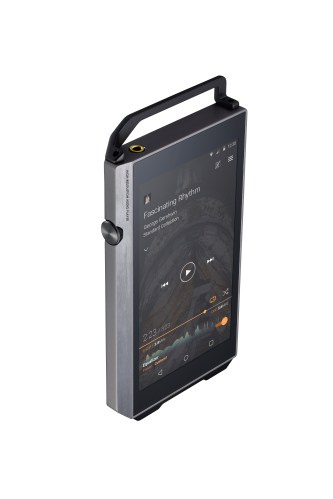
I have been testing the brand new Pioneer XDP-100R Digital Audio Player will have the review of this stunning piece of audio tech ready to publish either by the end of next week or Monday the week after.
Lindy BNX-60 Wireless Headphones
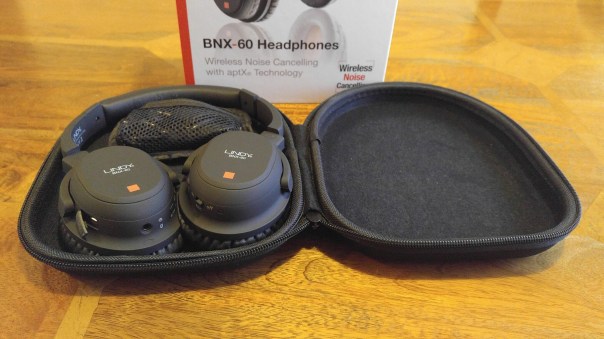
Monday will be the review of the newly announced at CES 2016, the Lindy BNX-60 Wireless headphones.
If you have any questions on any of these items then please let me know and I will attempt to answer them in my reviews.
HTC is due shortly to take the wraps off the One M10 and it should come as no surprise that it is going to feature some of the latest specs.
But there are several surprises which could prove amazing whilst a few sad faces due to one change.
The rumoured specs so far are –
– QHD screen 1440 x 2560
– Amoled Screen
– HTC Sense 8
– Android 6.01
– Snapdragon 820
– Fingerprint sensor on the front below the display
– 4gb ram, 32gb storage, micro sd card support
– Adreno 530 GPU
– No boomsound
– 12mp Ultra pixel rear camera with Optical Image stabilisation (OIS) and laser auto focus
– Front camera will also have OIS
So it seems boomsound is on its way out but the 12mp rear and front cameras with OIS could be very interesting so long as HTC master the software and post processing.
With Mobile World Congress just around the corner, new smartphone leaks are everywhere. By now it should come as no surprise that the next Galaxy, the Samsung Galaxy S7 will have a lower resolution camera, dropping from 16mp to 12mp.
Samsung should be featuring their new “britecell” technology in this new 12mp sensor but I do have some initial concerns. Dropping the mega pixels down to 12mp with a f/1.7 may be a good thing if the pixels are larger and therefore let more light through. The trade off will potentially be with the extra pixel resolution when snapping an outdoor shot in good sunlight. Will you lose the ability to crop tighter into a photo?
Currently, I am testing the LG V10 which has a great 16mp rear camera. This produces high resolution photos that can be cropped and not lose too much information. At 12mp this option might diminish.
What Samsung is trading off is the ability to have a 12mp rear camera that will take stunning photos in low light as well as good lighting. In addition photos will be easier to process/share if the file sizes are smaller due to the rear camera just being 12mp and not 16mp.
I have fond memories of my Nokia Lumia 1020. It had a camera that was in a class of its own. And it has held on to this crown despite being obsolete in smartphone terms.
By today’s standards the Nokia Lumia 1020 is a compromise. It’s runs Windows Phone which despite being one of my favourite operating system lacks the same level of apps in terms of content and quality versus android and iOS, and is extremely slow from shot to shot.
So what phone has de-throned the Nokia Lumia 1020.
Well it’s the LG V10.
I can hear loyal Nokia fans screaming in disbelief. Well facts are facts. Steve Litchfield and I went out armed with our respective phones, Steve with his Lumia 1020 and 950 and myself with my iPhone 6S Plus and LG V10.
Steve went to his favourite church to demonstrate the quality of the 1020 low light shots. The subject matter was a sign/plaque high up on the church wall. So Steve went first and took a great shot of the sign in low light and showed me the level of detail. It was impressive. So I took a shot on the iPhone 6S Plus which was ok and good enough but not as the same level of the 1020. So next I used the LG V10. Well the LG V10 produced a shot significantly better than the 1020. And this was all auto. Surely a one off, so another shot was taken. Same stunning shot and way better than the 1020.
And the story continued with a few other low light shots. However, I do expect the new flagships from LG and Samsung to improve further in the camera department.
One small point, both of Steve’s Lumias (1020,950) both crashed in a space of 30 minutes several times.
PS Steve had a Mozo leather back on his Lumia 950 which looked much better than the default plastic back. But sadly the standard 950 even with a leather back felt cheap and nasty. Shame.
Below is shot from LG V10. It was actually fairly dark inside the church so the V10 did a stellar job. The plaque writing when zoomed in is really visible.
Update – Steve has emailed me his 1020 shot which was taken using xenon flash. Note that’PureView zoom’ was done at capture time, for best quality. Not ‘afterwards’. In my opinion it is still a good shot as I said above but not as good as the LG V10. But do you agree?
Welcome to my review of the Asus Zenfone Zoom. Before I published my review I posted a number of miscellaneous articles that you may wish to view which are connected to the main review. As usual if you have any questions, please ask. With all the photos, clicking on the image will reveal the original.
This review will also be added into the main phone reviews section. Just use the menu, index, reviews. In this review section you can find reviews for over 100 devices.
This phone is special. It has a 3 x optical zoom lens which operates without any moving external parts. The whole mechanism is internal. It also has laser auto focus as well as phase detection. As a smartphone it comes with all the bells and whistles too. See video below for more information on the camera.
So what’s inside the box? The photos below show the contents of the box. I like the fact it comes with a lanyard that attaches securely to the phone. You also get a pair of headphones, quick start guide, UK adapter and micro USB cable.
The key specifications are –
The other specifications based on model ZX551ML –
– Display – 5.5-inch 1080p Full HD, 403ppi, IPS LCD
– Corning Gorilla Glass 4
– Processor – 64-bit 2.5GHz Quad-core Intel Atom Z3590 CPU
– Graphics – PowerVR G6430 GPU
– RAM – 4GB LPDDR3
– Internal Storage – 64GB eMCC Flash or 128GB eMCP Flash
– External Storage – microSD (up to 128GB)
– Cameras – Rear – 13MP Panasonic SmartFSI sensor with a 10-element Hoya 3x optical zoom lens, aperture ranges from f/2.7 to f/4.8
– 5MP front-facing camera
– Software – Android 5.1 with ASUS ZenUI
– Connectivity Wi-Fi 802.11a/b/g/b/ac
– Bluetooth 4.0+ EDR
– Android – 5.0 at launch
– Network Bands – UMTS/WCDMA/FDD-LTE, Data Rate: HSPA+: UL 5.76 / DL 42 Mbps, DC-HSPA+: UL 5.76 / DL 42 Mbps, LTE Cat4:UL 50 / DL 150 Mbps, 2G :GSM : 850MHz/900MHz/1800MHz/1900MHz , 3G :WCDMA :850MHz(5)/850MHz(6)/900MHz(8)/1900MHz(2) /2100MHz(1), 4G :FDD-LTE: (TW/JP version)
2100MHz(1)/1900MHz(2)/1800MHz(3)/850MHz(5)/2600MHz(7)/900MHz(8)/1800MHz(9)/800MHz(18)/850MHz(19)/700MHz(28)
– Navigation – GPS, GLONASS, AGPS & BDS
– Sensors – Accelerator/E-Compass/Gyroscope/Proximity/Ambient Light Sensor/Hall Sensor
– NFC
– micro-USB
– Battery – 3000mAh non-removable Li-Polymer – comes with a rapid charger
– Dimensions – 158.9 x 78.84 x 11.95mm
– Weight – 185g
– Build – aluminium body with a removable leather back cover for accessing the micro SD and Micro SIM slots
The Main Settings and Other Phone Options
Further down I have created a gallery of screen shots of a number of different settings options. Tap on one photo to open the gallery.
The first aspect of the phone I like is the double tap to turn on or off. Other useful aspects are the inclusion of NFC, One Handed Mode (double tap home key to turn on), Power Saving options, Easy Mode and also a kids mode. Are you brave enough to allow your kid to use the phone! Wi-Fi also includes support for Wi-Fi Direct. Bluetooth includes APT-X. Data usage is split between Mobile Data and WiFi as well as details of data usage per app. The display has options for adjusting the colour balance and also activating a blue filter for night time viewing. I have never used a blue filter at night until I got this phone, but it really helped reduce my eyestrain. ZenMotion is a range of motion gestures used as shortcuts for various actions. Double tapping the home key when one handed operation is active, reduces the size of the screen. You can move the screen around too. You can also write on the screen to launch different apps. What is neat is there are options to launch the front camera by scribbling a “S” and a “C” for the rear camera. A decent do not disturb option is available. The lock screen has the option for quick access apps and whether or not to allow the physical keys to turn the camera on. See the screen shots to show all the details. Theming is everywhere with loads of customisations galore for every aspect including resizing the icons on the fly. I see no need to install a third party launcher with the Asus Zenfone Zoom.
Phone, Cellular and Audio
As a phone, the Zenfone Zoom performs really well. Calls were clear and people had no problem hearing me. The phone also has a recording button, again another useful option. Viewing angles were reasonable. Cellular strength and wifi seemed good too. The Zenfone Zoom is single micro sim and then a card slot for micro SD cards up to 128gb. On the LTE front, band 20 is missing. However, I never had an issues with data speeds using the Zenfone Zoom. AnTuTu scored 59,160 which is fairly close to the LG V10.
Audio. The rear loudspeaker is ok, maxing out around 88db. It is on the back, but doesn’t get totally muffled as their is a ridge on the back. Bluetooth APT-X is present and when you connect using a pair of headphones with APT-X, the APT-X logo suddenly appears on the screen and floats away. USB Audio is also supported and works well. The Zenfone Zoom has its own AudioEQ app to help improve the sound quality. It is a little gimmicky but it does work and make a difference. Overall sound quality is average though, slightly better using bluetooth APT-X and good via USB Audio.
The Camera App Interface
Ok, so this is a camera centric phone. So what are the options.
Front Selfie Settings
The front camera has lots of options from a timer that can be made to go off from 1 – 5 secs. To control the length, you just slide the shutter icon into the screen centre. The more you slide, the longer the delay becomes. Beautification is all the rage and the options include cheeks thinning, eyes enhancement, skin softening, blush effect, face/smile tracking. I had a lot of fun with the front selfie camera and was pleased with the shots even in lower light. I lost at least 10 years off my age with the beautification options 🙂
Rear Camera Settings
The rear camera has a feast of options. Or you can just use the auto mode. The operation of the camera is aided by a 2 stage physical shutter button and a physical button for launching video recording. The video button is next to the 2 stage shutter button. The volume keys then act as zoom controls. By default the settings are left to use the 3x optical zoom only and in my tests it bests to avoid using the digital zoom that goes all the way to 12 x zoom. It is better to crop into the 3 x optical zoom shots as the quality will be superior.
When in Auto mode, if a better mode will produce a superior result, the mode icon appears bottom right. Tap on the icon to switch to this mode, or turn off. Typically this appears for HDR or Low Light mode. To give you an idea of the setting ranges in manual mode.
– White Balance – 2500K to 6500K
– EV – -2 to + 2 in intervals 0.3, 0.6 1.0 etc
– ISO 50 to 3200
– Shutter speed – 1/16000 (thats right, its super fast) to 32 seconds for long exposures
– Manual Focus – slider control
– Horizontal Level
– Histogram – on or off when taking photo
In Auto Mode you get the following options which alter if you are using another mode.
– White Balance – Auto, Cloudy, Daylight, Fluorescent, Incandescent
– ISO 50 – 3200
– Photo Optimisations – Auto, Off, Manual – Manual gives fine tuning for saturation, contrast, sharpness, noise reduction, backlight, detail enhancement
– Camera Resolution – 13MP 4:3, 10M 16:9, 8MP 4:3, 6MP 16:9, 5MP 4:3, 4MP 16:9
– Anti Shake enhancement – Auto or Off
– Digital Zoom – on or off
– Image Quality – Fine, Standard
– Timestamp – On or off
– Shooting Mode – Touch Shutter, Self Timer, Burst (off, normal, turbo)
– Focus & Exposure – Smart AF, Infinity
– Metering Mode – Centre, Average
– Touch Auto Exposure – on or off
– Face Detection – On or Off
For Video you get the same options with regards to white balance controls and EV adjustments as stills!
– Video Quality – Full HD, HD and TV (640 x480)
– Video Stabilisation – on or off
– Video Preference – Performance or Quality
– Video Touch Auto Exposure – on or off
Generic settings include smart brightness, guidelines, info screen, review duration, shutter animation, shutter sound on or off, launch by physical buttons options, location, correct photo orientation on or off, anti flickr 50 or 60Hz, Power Saving Mode, Set Volume keys for shutter or zoom, save to internal or SD card and a tutorial.
So what do the different photo modes do?
– Auto – automatically determines the cameras best settings based on the environment
– Manual – You decide
– HDR – Expands the dynamic range
– Beautification -makes you look beautiful
– Super Resolution – Combines multiples shots to create incredible detailed photos
– Low Light – boosts up light sensitivity for a clear and bright low light shot without using the flash. Images are 3mp 16:9.
– Night – Allows a slower shutter speed to capture more light in dark scenes
– Depth of Field – Captures photos of close-up subjects with a soft background
– Effect – applies a range of filters
– Selfie – use the rear camera for a high res shot
– GIF Animation – converts a series of images into a moving image or GIF
– Panorama – Horizontal or Vertical
– Miniature – Creates a photo of life size object and turns it into a small scale model
– Time Rewind – Records images before and after the shutter and allows you to select the best ones
– Smart Remove – removes unwanted moving objects from the background
– All Smiles – Combines each persons best expression from multiple shots into a single perfect group photo
– Slow Motion – records fast moving objects with very high frame rate and plays back in slow speed
– Time Lapse – Time lapse recording.
Each of the above modes often have a few extra options too.
Photo Editing Options
After taking a photo, you can easily check the information of the photo, from the time and date, weather at the time, width, height, file size, device, flash, focal length, white balance, exposure time, storage location, and geo location displayed on a map with the coordinates.
Post processing allows for all the beautification options as mentioned previously, applying over 17 filters, adding frames, cropping, straightening, rotating, mirroring or drawing, or fine tuning the photo (auto, exposure, vignette, grads, contrast, shadows, highlights, vibrancy, sharpness, curves, hue, saturation, BW filter, negative, edges, posterise, blur, feather or relief).
Turbo Burst Mode – This uses a ratio of 16:9 and reduces quality to 3mp.
Normal Burst Mode – Full size photos
Auto Mode Shots. You can see below examples of non zoomed versus 3 x optical zoom. Having the optical zoom really makes such a big difference. I was also surprised how much more appealing the Zenfone shots were over the iPhone 6S Plus.
Shots edited in Snapseed using the HDR Scape filter.
Super Resolution Mode shots.
Video Samples
Camera Quality Opinion
This is the question you have all been asking me. Just how good is the camera and how does it rank amongst the best out there. Lets cut to the chase. It is no LG V10 or Samsung Galaxy S6 Edge Plus killer. The phones on these cameras are better. But none of these phones have 3 x optical zoom and that is the Zenfone’s killer aspect. The Zenfone Zoom does not have 4K, outputs lower resolution panoramic photos than the competition and is not naturally good in low light due to its small pixel size and f/2.7 aperture. Using some of the manual, night or low light modes you can compensate and achieve some reasonable photos, but again they are not a patch on the V10, S6 Edge+. Even the iPhone 6S Plus takes better shots in low light, although the difference is not huge. The front selfie camera is fine. So if you are out and about visiting a tourist attraction, I would have the Zoom with me as the ability to zoom in that extra bit is very useful, especially over something like the iPhone 6S Plus. The Zenfone Zoom surprised me with its burst mode. It is not super fast but it did focus and capture a sharper shot than my iPhone 6S Plus. The Zoom also over saturates shot. This can be changed permanently by using your own shooting profile. Optical image stabilisation worked well in my testing. So how does this compare to the Nokia Lumia 1020, Samsung Galaxy S4 Zoom and Samsung Galaxy K Zoom. Well all of those 3 phones are obsolete now! But from an image quality point of view only and ignoring the smartphone aspects, the 1020 is better, so is the S4 and K Zoom. But remember the Zenfone Zoom has no optical zoom mechanism protruding from the front. My final viewpoint on the Zenfone Zoom is personally I really loved using the camera. I got some smashing shots from it and loved using all the different camera shooting modes. Its somewhat adorable and I don’t know why 🙂
Conclusion
The Asus Zenfone Zoom costs around £350. It comes with some clever engineering in the camera department and as a smartphone is extremely versatile. The camera quality is average and then assisted by the 3 x optical zoom making this phone unique. The 2 stage shutter button is excellent too along with the camera app allowing for some creative photos. As a smartphone it includes everything practically. As an overall package it is recommended.




 Gavin's Gadgets & Photography