Category Archives: Android

Samsung Galaxy S7 Edge – Battery Performance update

image

Without a doubt the battery life of the Samsung Galaxy S7 Edge is far ahead of any other Samsung phone I have owned.

With a few tweaks I am now getting on a bad day 6.5 hours screen on time. Normally with previous Samsung phones the longer you use it the worse the battery becomes.

However the S7 Edge is a different kettle of fish. So how does 10 hours screen on time sound!

Well that’s what I got yesterday.

Now that was with my main sim installed. Push email on 3 accounts. Music streaming. Camera. Facebook. Twitter. Google+  .

Is the LG G5 flawed? – Editorial

I took this photo below yesterday on the Samsung Galaxy S7 Edge. It is a panoramic shot inside Foggintor Quarry, Dartmoor.

Panoramic inside Foggintor Quarry #Dartmoor

This got me thinking about the LG G5 camera setup with one normal 16mp lens and the other a 8mp wide angled lens.

(I will have the LG G5 to compare with the Samsung Galaxy S7 Edge very shortly, and I will have initially the LG Cam and LG HiFi DAC modules to review.)

Quite simply why bother with the wide angled lens. Firstly it’s only 8mp and secondly its f stop is f/2.4 so photos will appear darker. If you flip over to the panoramic mode you can create a high resolution wide view shot without much effort.

The LG V10 and LG G4 took fantastic panoramic shots so this really makes me wonder if the second 8mp a flaw in the design and a waste of time?

Personally, I am in two minds and will reserve judgment until I have had time to test the setup accordingly. My thoughts at the moment are that a wide angled lens takes away the fiddling or sweeping the phone slowly across the screen and level while taking a panoramic and then waiting for the number of photos to be stitched. With a fixed lens you will see before you take the shot what you have captured and might produce some more dramatic looking results. Another bonus is the ability to not have to step back to capture everything in the frame. Sometimes you can’t step back.

Stay tuned for some more coverage.

Samsung Galaxy S7 Edge – Firmware Update – The Changes / Camera Improvements – Details

Two nights ago my Samsung Galaxy S7 Edge received a firmware update. This has been stated as the March security update and some bug fixes. Well I had been playing with the S7 Edge all day yesterday and noticed the following changes and improvements.

– March Security update applied

– Camera Failed Bug – This appears to have gone. Re-activating Smart Stay in the display option of the settings app does not cause the camera to fail.

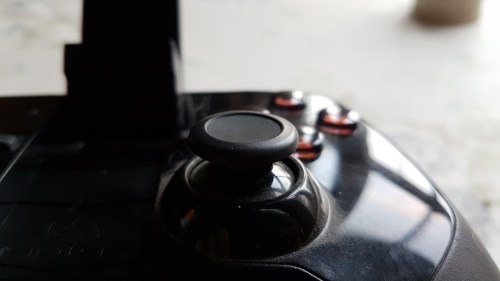
– Camera Post Processing – Samsung is still applying sharpening but it has been reduced. See below.

Hill climbing by Tiggy #Dartmoor

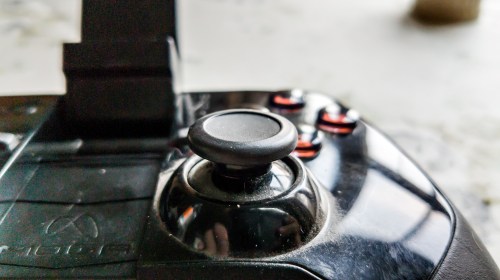
– RAW Shots- Following the changes above, I wondered if RAW photos had been improved. Shot below is a RAW shot that I post processed afterwards of a game controller knob.

PSX_20160322_174002

And below is the original JPG in auto.

20160322_173748-2

– Bluetooth Audio – The S7 Edge has a Hi-Res Bluetooth Codec called UHQ. This has been improved to prevent minor drop outs whilst using this Hi-Res format.

– Misc bug fixes and improved screen sensitivity

So have you found any other improvements or fixes.

Samsung Galaxy S7 Edge – High Speed Photography

I have used my 3 labradors in high speed photography with all my decent flagship phones. The S7 Edge camera is the first phone that took so many burst shots I had fractions of differences between each movement. Truly amazing speed. 100 burst shots took just a few seconds.

George does the Long Jump

Look at all the movement captured by the S7 with all 3 dogs, not just George in the air.

The Long Jump - George & Tiggy at Windy Post,  Dartmoor

River Racing

This was a HDR burst into the sun, so remarkable what came out.

River Races on Dartmoor - Tiggy & Fury

Flying Tiggy

And now for Tiggy in the air.

The Long Jump - George & Tiggy at Windy Post,  Dartmoor

Happy Faces

The Long Jump - George & Tiggy at Windy Post,  Dartmoor

Now all the above photos were before the new firmware received a few days ago. The sharpening has been reduced slightly, so when zooming in the detail in more pleasing.

Big Smiles

And with new firmware, Tiggy is smiling big time.

Hill climbing by Tiggy #Dartmoor

Controversy – Which is better – Android or iOS? – Editorial

Before I start, I want to make something quite clear. This is not a platform bashing editorial, it is a more down to earth look at how I now perceive the two largest mobile operating systems.

I am certain some of you will disagree, rage, cry, smile or weep. But whatever you do, if you leave a comment keep it constructive and factual. As the moderator, I will use my powers if necessary. Hopefully this won’t be necessary.

The background behind this article. To support iOS, I am using the iPhone 6S Plus, Apple TV 4th Gen, Apple Watch, iPad Air and Macbook. To support android, I am using the Samsung Galaxy S7 Edge, Gear S2, Gear VR, Level One Pro Bluetooth headphones and Macbook.

So lets look at iOS first. My observations are tighter integration within the hardware and software across all Apple devices. Apps on the iPhone look better and there is a much wider range of apps across many categories. iMessage and FaceTime are integrated across all Apple devices. Receive a SMS on your phone, reply on your MAC. You get the picture. Seamless. Handoff is another nicety. Viewing a website on your iPad, move to your MAC and continue reading the same page. Other aspects of iOS is Apple Pay. In the UK there is still no other option. 3D Touch is handy on the iPhone.

So now lets look at android. Google services are better integrated as expected. Hardware is leap years ahead. QHD screens, curved screens, ultra battery saving modes, wireless and fast charging, fast wireless charging and much more. No special cables needed for connecting to the phone. Eg for USB On The Go. Connecting cameras, USB sticks and more is standard. Miracast, DNLA and bluetooth and more are not restricted in capabilities as on iOS. iOS will often need apps or workarounds. Background services actually work on android without being stopped after 10 minutes e.g. uploading to flickr or Google Photos. Android flagship phones now take the lead with camera quality especially LG G4 and Samsung S7. Bluetooth audio includes APT-X on phones. This produces a better quality music playback via compatible headphones. Apple include this on the macbook but not iPhone. But then APT-X High Definition is now available. So music playback via headphones is ahead. Virtual Reality has arrived. Where is Apple? The Samsung Gear S2 smartwatch is so fantastic to use. The mode of operation is a breeze and far more logical than the Apple Watch. However the Apple Watch is streaks ahead in developer support and apps. So that means with the Gear S2, so long as it does what you want from day 1 you will be fine. However, neither watch is perfect.

And now lets cover off the subject of apps. I have come to the conclusion if you live on iOS you tend to have more apps. On android you don’t need as many apps. The app gap on popular apps has gone. Speciality apps are still king on iOS. But there are apps on android that don’t exist on iOS and offer more functionality. I was surprised to find that Flickr on android is better than the iOS version. You can add your photo to as many groups on android at once, on iOS it only allows one group at a time.

Gaming. iOS has a better selection of games. BUT you can’t play game emulators on iOS but you can on android. I have bluetooth game controllers for both iOS and android. iOS support is lacklustre at best, whereas on android it is way ahead. This is mainly due to the fact android has better support for bluetooth profiles.

Cloud services goes to android. Even Apple knows how good Google are at the cloud, to the point where Apple are going to start using Google’s cloud service.

So you could say if you want varied hardware designs, want to listen to music in higher quality, experience virtual reality, view everything on the best phone displays in the world, take photos with the best camera, game like a gamer with proper support for game controllers, then use an android flagship phone.

Or if you want polished apps, lots of apps, Apple Pay (UK), 3D Touch, speciality apps, universal use of iMessage and other integrated Apple Services, then use iOS.

At the end of the day it does boil down to personal preference. And sometimes, even if its not the best choice, it might be you’re using a phone that you know how to use and are comfortable with its operation.

There is one last point that for many is really important and that is after sales support and service. This is a one horse race that goes to iOS. Nobody currently beats the Apple after sales support and simultaneous software updates.

So that’s my viewpoint. As to which is better? Depends…

How to Connect a Moga Pro Power Bluetooth Game Controller with the Samsung Galaxy S7

I have owned the Moga Pro Power Bluetooth Game Controller for ages now and used it with loads of different android phones and tablets.

The setup procedure is meant to be as follows. Download the Moga app in the Google Play Store. Go into the Moga app settings and follow the connection setup procedure.

Just one problem, this no longer works and judging by the app comments in the Google Play Store, loads of people cannot get it to connect.

Well good news there is a way to get both Mode A and Mode B working. The trick is not to use the Moga app but you still should install it. So head over to the S7’s setting app. Select bluetooth. Scan. Make sure the Moga Pro is first turned to Mode A. It should show connected after a short while. If it doesn’t scan again, and again if necessary. It will connect. Also, press the button on the game controller next to the LED indicator light. This is top left. Once the S7 shows it as paired, slide the Mode switch on the controller to B and repeat the process. It doesn’t always pair on the first attempt, so keep trying. It took me about 3 attempts on each mode.

When connected and playing you will get a green icon in the status bar.

Game Launcher on the Samsung Galaxy S7 Edge

The more you use the Samsung Galaxy S7 Edge the more you discover. The S7 and S7 Edge has a sandbox type area called Game Launcher. This automatically places all your games into this app. You can manually add or remove games as well.

You then have a range of game playing options, from recording your gameplay, stopping notifications whilst gaming and turning off the capacitive menu keys to prevent accidental presses.

Below are two games I recorded. You can also add you voice to the footage. You will notice the warning message about having the game music too loud and you will also see the icon bottom left to indicate recording.

What’s really impressive is I was able to play the game and record it at 720p. Both games were also connected to my Gear S2 and Moga Pro Bluetooth Game Controller. Just shows how powerful the Exynos processor is.

Samsung Galaxy S7 Edge – My Review update

Just an update on the status of my review on the Samsung Galaxy S7 Edge. I had planned having this ready for Monday but Samsung have let me down. Their courier of choice doesn’t post at the weekends so the extra pieces I wanted to include with my review won’t arrive until Monday. 

So what are these extras? Well firstly the Samsung Gear S2 smartwatch and secondly the Samsung Level One Pro Bluetooth headphones. I also have the Gear VR which will form part of the overall review. 

You might ask why the Samsung Level One Pro headphones. Well these are enabled with Samsung’s Hi-Res Bluetooth codec which is better than APT-X. The Samsung Music app (just updated for the S7) includes an option for UHQ music upscaling. I do recommend using this setting at all times. The UHQ option is for wired headphones and any headphones that support the UHQ Bluetooth codec which include the Level One Pro headphones. 

I have already published many posts on the camera so the other aspects I wanted to explore fully is the sound quality. This is via the loudspeaker, headphone jack and USB Audio. I have already spent hours testing the headphone audio using loads of different types of headphones. I have also used several USB DAC Amps. And to complete the test I have also used several android music apps. So my last part was to see what difference using the Hi-Res Bluetooth codec makes to the audio nirvana.  

I have tested, owned and reviewed all the previous Samsung Gear smart watches. Just use the menu to find them. So I only thought it right to include the Gear S2 in my review of the Edge. And not forgetting the Gear VR. 

So my review is likely to take a slightly different angle to many other reviews and explain the Samsung Galaxy S7 Experience. Because that is what really matters nowawadays. 

The experience is what iOS iPhone users shout about. Well let’s see what Samsung can achieve! 

Stay tuned for a roller coaster of a journey !

Samsung Galaxy S7/Edge – How to change the DPI without root in less than 5 mins

Sometimes little tricks are hidden in plain sight.  This neat trick, courtesy of XDA Developers is superb as it changes the DPI of the Samsung Galaxy S7 and S7 Edge from 640 to 540 without any rooting or complex scripts.

What’s more once this has been completed it stays this way even through software updates and soft resets.

So this is the easy way without any complex code, rooting or using ADB –

– Download Nova Launcher, you do not have to set it as a default, just launch it to access the home screen.
– Go to the Widget Selection window by long pressing on the homescreen and selecting Widgets.
– Choose the “Activities” widget by holding it down and dropping it on a homescreen.
– After the list populates scroll down to “Settings” and then choose .DisplayScalingActivity (it should be the 4th one). It will create a new icon on your desktop.
– Select the icon to open the menu and make your selection from standard or condensed
– Reboot on the confirmation window and go back to your normal launcher after the reboot.

And that is it.

Source – XDA Developers