Category Archives: Android

HTC One – Review Part 9

Over the last week I have written daily reviews of the HTC One, with camera examples, was a guest in a podcast and more. To read everything on the HTC One click here.

In today’s post I am going to cover compatibility with HTC Media Link HD but first I discovered an extra function with the TV app. When I was first using the app, I couldn’t find a button to change the external inputs. Below is a screen shot of the TV app.
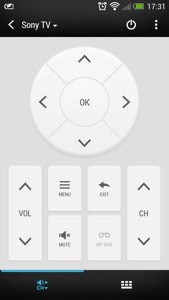
20130404-174607.jpg

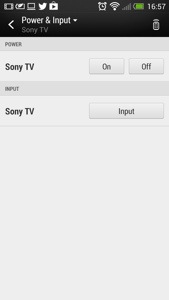
Notice the standby/power icon, top right. You would think this would turn off your TV. It does,but not straight away, as pressing it reveals the following screen.
20130404-180840.jpg

As you can now see the input and power options are available.

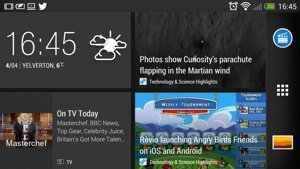
Now on to the HTC Media Link HD. Does this work with the HTC One and do you need it. First up, it does work, but I had a faulty HDMI cable which caused me some grief until I realised I needed a new cable. After a quick pairing, the TV screen is showing you to swipe up on the HTC One with 3 fingers. This connects the two devices. The HTC One screen rotates to landscape and looks as below.
20130404-175544.jpg

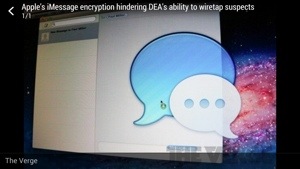
The odd part is how Blinkfeed works connected to the HTC Media Link HD. Tapping on a news item just reveals a photo and no text, as shown below.
20130404-175659.jpg

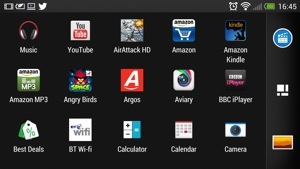
The applications folder switches to alphabetical mode and landscape.
20130404-175742.jpg

Photos and video are all displayed in landscape. Movies did not get played on the HTC One at the same time as watching the TV screen. Gaming doesn’t work very well using the Media Link HD. However, the clarity of the displayed image is awesome.

If you have a wifi enabled/DNLA TV you don’t need this gadget, but I have found that cropped and panoramic photos wouldn’t display via DNLA but were fine with the HTC Media Link HD. I have raised this issue with HTC, so if I get any updates, I will let you know.

From now on each day I am just going to post about my HTC One experience and anything I discover as I undertake my One journey. Feel free to ask questions too.

I have been playing a few podcasts, and the One is fantastic for this as the built in speakers are clear and loud enough to enable me to still listen to the podcast while I move around from room to room. It seems a rather basic thing, decent speakers, but the difference is noticeable.

Any how enough for today, catch up with you all tomorrow.

Details of HTC Desire P & Q

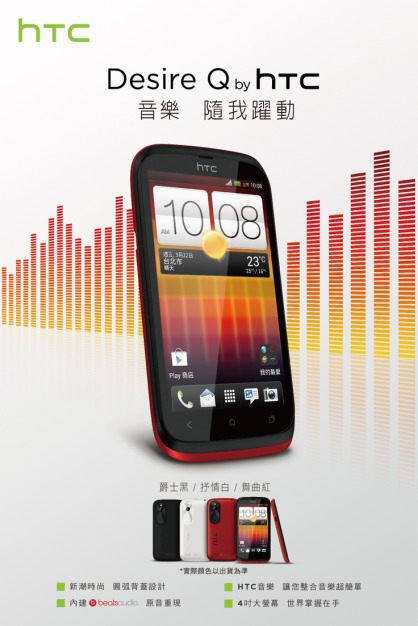
The HTC Desire P (T326h) is a 4.3-inch WVGA display, a dual-core 1GHz processor, 8-megapixel rear camera, and front-facing camera, features Beats Audio technology as well as microSD expansion, offered in at least two color options, red with black and white with black.

image

The HTC Desire Q (T328h) is slightly smaller experience with its 4-inch display.  

image

HTC First and Facebook Home – The Implications

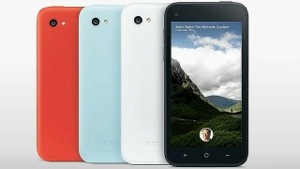
The above announcement of the HTC First, a Facebook phone and an app you can download on Google Play, Facebook Home was a major piece of news yesterday.

Facebook has just thrust itself aggressively into the mobile space and even Facebook declared its future was now firmly in the mobile space.

What was clever about the announcement is that it is a two pronged attack. Hardware and software. The HTC First is a 720p screen, 2000 maH battery, 16gb memory, 1gb ram, available in 4 colours and has Facebook deeply integrated. Facebook Home is a new launcher for a select number of phones.

With all of the above a key fact is Google Search is replaced with Facebook search. Search is essential for Google for its income. What Facebook has done is not only offered a fully inclusive piece of hardware along with a total experience on the software, but offered to convert other devices with a free download and remove Google’s income.

It is possible to being back Google search after installing Facebook home, but it won’t be long before Facebook offers its own App Store and more.

One thing is very certain, the battle for the mobile landscape is really hearing up between amazon, Facebook , Google, Amazon, Samsung and maybe HTC.

20130404-232716.jpg

HTC One – everything so far including reviews, first impressions and more

HTC One Review Parts 1-9 Please note that part 8 is up tomorrow and 9 on Saturday.

HTC One – Camera Sample and also more here.

Comparison review between HTC One vs Samsung S3/S4 Note 2 vs iPhone 5 vs Nokia Lumia 620

HTC One – First Impressions

HTC One – Full Specifications

My guest appearance on Techtalkuk’s podcast discussing the HTC One

Reviews of Note 2 & Nokia Lumia 620 plus other reviews.

HTC One – Review Part 7

Welcome back to my last part of my HTC One review along with my conclusion. To read my other parts on the HTC One click here.

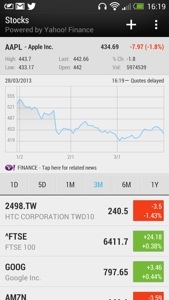
Today, I’m going to cover off the other stuff included by HTC. Firstly you get a full copy of Polaris Office and a PDF Reader. You then get a lovely stocks app, which can also link in to Blinkfeed. See screen shot.

20130401-162914.jpg

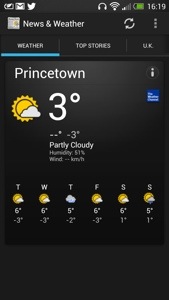
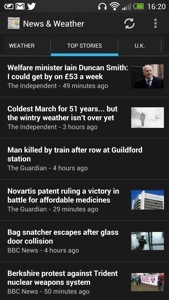
There is also a news and weather app, that can be set up to sync automatically. See below.

20130401-163004.jpg

20130401-163013.jpg

Next up is the Notes app which can be setup to sync with Evernote. You can hand scribble a note in several colours, audio record a note, or add a photo. You can share the note, add it to a calendar event and more. A very good app.

20130401-163518.jpg
Also installed is a Task app which syncs if required to Google Tasks. Again, functionally with the ability to have task categories too.

A rather unusual app is Best Deals. It is like Groupon and can link in to Blinkfeed. It can find local deals and you can setup the parameters to your liking.

20130401-163847.jpg

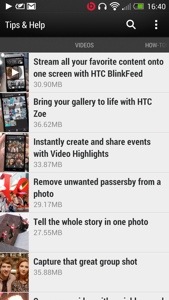
The last app I am going to mention is Tips & Tricks. This gets updated automatically too. It also can be included in to Blinkfeed. It features useful how to videos, guides on using all the phone and has a search option. Such a great app, and it gets updated.

20130401-164212.jpg

20130401-164222.jpg

So in summary the HTC One is unlike any android phone I have ever had. It feels like a totally refreshing user experience. All the software links into each other, syncs with something, interacts with Blinkfeed, and it is the first phone whereby I have only installed 45 apps/games. That’s because it includes so much out of the box. It doesn’t have bloatware just fully functional and useful features and benefits. Everything has a benefit to you the user. The camera is excellent with its various modes, super easy editing, Zoe mode and loads more. The sound and audio are first class. The setup procedure and manual is the best I have ever seen. And the phone is the best looking device available. HTC really have thought about every menu, user interaction and kept it easy to use but still a powerful capable device. Plus the battery will last a day even if you use it a lot. It is also the first android phone that won’t have a new launcher added. All in all, it just works out of the box, like an iPhone but better.

This was going to be the end, but I know you guys and girls are all too addicted to reading about the HTC One, so part 8 is tomorrow.

Amazon cloud service updated to take on dropbox

Amazon updated it’s apps to include desktop sync with it’s android apps.

5Gb of storage is provided for free on Amazon’s Cloud Drive service, with upgrades available for one terabyte of data for $500 per year, which undercuts Dropbox.

The update also brings with it automatic uploading of photos, much like Dropbox or Apple’s Photo Stream services offer. Take a picture or screenshot on an Amazon Cloud Drive-enabled device, like your Android phone, the photo will be automatically uploaded to the cloud, accessible with any of the Cloud Drive apps, desktop or Android. You can also upload photos one at a time, and disable the auto-upload, if you wish.