Category Archives: Android

The Smartphone Experience has changed – so why don’t you!

It could be argued that when you buy a Samsung Galaxy, HTC One, iPhone, Nexus 4 and Nokia Lumia Windows Phone, you are now buying an experience, not just a piece of hardware and software, but a united piece.

Apple have led the way with the iPhone providing unity with the hardware and software. The same could be said when you buy a Samsung with its extra software, own media stores and touchwiz. With the HTC One, Sense 5 creates a unique experience. And the same applies for all the other phones.

We have often paid £500 or more for these devices, so why do some people rip the software off, change the launcher, jail break and more. As the years have progressed, new phones do more out of the box, do more perfectly out of the box too. 2 years ago it would make sense to delete software and change the look and feel.

So when we get a new phone in 2013, why do we still do the same things. Is it habit? Do we go in autopilot thinking we need this app, before we have even tried the new software for at least a few weeks.

I believe we should try and use the software provided by the respective companies before changing anything. It is not uncommon to realise you didn’t need to install that app, as the functionality is now provided as standard.

So here’s my suggestion. If you are going to spend £500 on a smartphone use it for a while as designed. If not buy the cheapest in its class, and redesign the heck out of it

HTC One – Daily Blog – Continuous Shooting

One of the things often forgotten about the HTC One, is its ability to capture motion perfectly. The camera can take 8 photos a second. That’s right 8 photos a second. All you do is press and hold the shutter button.

Now if you do this you get presented with a best shot option. Choose the best shot and the other photos are deleted. However, hit the back key and the batch is saved. Go to the photo editor, tap edit, tap retouch and tap action shot. Select a few photos and tap save and you can get the below affects.

Another way is turning Zoe mode on. And edit as above. Anyway have a look at the two photos below. Look at the old lady and the escalator. Rather cool.

20130407-060852.jpg

20130407-060901.jpg

It features like this that make the HTC One amazing. Also if you are taking photos, power off, when you power on , you are straight back in to camera mode.

HTC announces poor financial results – so here’s a different view point

Right here are HTC’s financial results for the last quarter.

– $2.8 million in unaudited net income — during the first three months of this year vs $173 million in the same quarter of last year, representing a fall of around 98 percent. Underlying revenue dropped by a third to $1.4 billion

Sounds dreadful. It’s not a brilliant position to be in, but its not as bad as it looks. HTC knew this period was going to be bad so they have piled in every bad item into this set of reporting.

We all know the HTC One is now being released, and we already know HTC have achieved some reasonable sales success. The HTC One income is not included in the above declaration. So doesn’t it make sense, that the next quarter results will be much better.

No need for doom and gloom as reported elsewhere.

HTC One – Daily Blog

In my review I mentioned the HTC Music player and how once playing a song it can display all sorts of fancy visualisations and obtain the lyrics for the song playing, but I never attached a screen shot. Well this is the song playing with lyrics.

20130406-101105.jpg

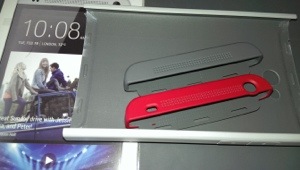
I have been looking at cases and screen protectors. At present the options are limited but I did get the HTC Double Dip hard case and HTC Official screen protector. Whilst the HTC case is fine, I have grown to dislike it. It takes away the beauty of the phone. And the HTC screen protector is crap. It doesn’t fit properly. On both edges the protector is not without air underneath. It just won’t stick down properly. Poor fit. Otherwise its ok. So I’m in two minds now whether to forget using a case and screen protector. I have got a slim silicone case on route so I will decide then.

20130406-104411.jpg

The other thing I noticed after fitting the screen protector is that it affects the capacitive buttons. Sometimes the don’t work first time and it is the screen protector that causes this. So I removed it.

HTC One – Daily Blog

Welcome back. As before click here for my reviews and more on HTC One .

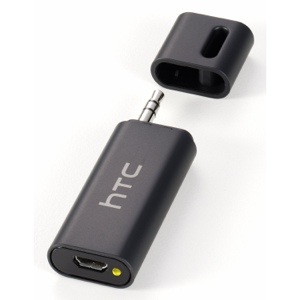
I had ordered via Amazon the HTC A100 Car Bridge adapter.

20130406-093209.jpg

This is a great little piece of tech. Basically if you don’t have a Bluetooth enabled car stereo but you do have an audio input jack, plug this in, then stream your music via Bluetooth from your HTC One to this device and it then plays through your car stereo. Also worth mentioning is the A100 has the apt-x codec for high quality Bluetooth stereo sound, which is handy as the HTC One has this as well. Makes a huge difference to the sound quality. As a point of reference the iPhone 5 doesn’t possess this codec.

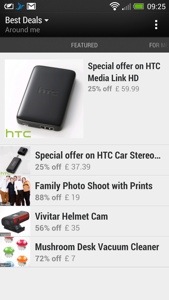
I was quite pleased to buy it from Amazon, as it was £5 cheaper than anywhere else at £45. To my annoyance, I had the Best Deals app (installed as standard on the HTC One) pop up on Blinkfeed with daily deals, and the HTC A100 was £37.99. £7 cheaper than Amazon. So I cancelled my Amazon order and ordered it through the Best Deals app.

20130406-094113.jpg

When I get this, I will let you know how it works.

I used Google Navigation on the One today, and apart from the clarity of the screen, the front speakers are so clear it makes it seem the person is there talking to you.

Seriously you cannot underestimate what a difference the front speakers make to the HTC One experience.

HTC One – Daily Blog

Since I now have reviewed the HTC One in every way possible, I’m just going to do a short post now, noting on new findings and experiences.

First up, here’s the links to all the previous HTC One reviews and more.

I discovered a setting in the default web browser. Go to the web browser settings, accessibility and tick “dim screen while web pages loading”. A nifty battery saving tip.

I have changed the auto brightness off. It’s too bright. I have a manual setting which works just fine.

The HTC One also has USB on the go. So far I have tried connecting a USB memory stick and a small USB hub all of which worked fine. Unlike my Samsung Note 2 you do have to go into settings, storage and tap unmount USB before detaching from the phone.

I also tried connected a Fiio E17 headphone/dac via USB. This worked really well, and I am pleased that the HTC One has USB audio out as a standard feature. As a comparison you can get USB audio out from the iPad Mini, iPhone 5 and older Apple devices, but as Apple control the authentication aspect, any USB DAC subsequently costs a premium due to the royalties Apple charges and their bespoke connectors. At least with the HTC One it is using a worldwide standard micro USB connection.

Connecting the Fiio E17 via USB to the HTC One, and using the DAC on the Fiio you begin to realise just how capable the One is in the audio department. Truly astonishing. And for the full affect you can use the Fiio E17 as a USB DAC only and feed the signal to the Fiio E12 Mont Blanc Portable Headphone amplifier, as shown below.

20130405-224648.jpg

20130405-224722.jpg

Just to clarify for those not as technically minded, plugging the USB on the go cable (thats the small black cable coming out of the One) into the HTC One, then enables you to connect the digital analogue converter, and then that sends the analogue sound to the portable power amp. Your headphones plug into the portable power amp. Using this method bypasses the built headphone amp, DAC & Beats on the HTC One, but does provide a much cleaner and even better audio. No sound comes out of the speakers or headphone jack with this connection setup either.

And the USB on the go cable also allows you to connect USB mouse, keyboard and more. I’ve only tested the USB audio and memory sticks but I’m fairly sure the others will work too.

Nespresso App for android and iOS

Nespresso is a wonderful coffee machine. They have also made ordering more coffee capsules as easy as possible. You can download their free app for android, iPhone and iPad browse at your hearts content, and order your coffee capsules.

Where the app becomes somewhat slick, is that it allows you to browse your previous orders, and then click add previous order to cart, hit pay, and voila. So if you order the same capsules all the time from start to finish takes less than 22 seconds.

But it gets even better.

I ordered using the app at 2.15pm on Bank Holiday Monday. The coffee got delivered at 6.45pm the next day.

If only everything was that quick and easy.

HTC One – Links to everything written, reviews, first impressions, camera and more

HTC One Review Parts 1-9

HTC One – Camera Sample and also more here.

Comparison review between HTC One vs Samsung S3/S4 Note 2 vs iPhone 5 vs Nokia Lumia 620

HTC One – First Impressions

HTC One – Full Specifications

My guest appearance on Techtalkuk’s podcast discussing the HTC One

Reviews of Note 2 & Nokia Lumia 620 plus other reviews.