Huawei Honor V9 looks fabulous being just 6.97mm in thickness and finished in great colours – blue, red, gold and black.
The Huawei Honor V9 comes with the powerful Huawei Kirin 960 octa-core chip,6GB of RAM on board. This along with 64GB / 128GB ROM options make sure that the phone boasts of current flagship grade configuration. On top of that, there is a 5.7-inch 2K screen. Battery is a decent 4,000mAh. Software side it runs Android Nougat with EMUI 5.
The camera – The Huawei Honor V9 features the third generation 12MP f/2.2 dual camera setup which helps take photos with bokeh effect, excellent low light images, and richer images, thanks to the improved black and white sensor which takes up to 3 times more light.
Huawei is also marketing the honor V9 as the first 3D modeling smartphone. The dual cameras setup along with the help of laser focus at the back is capable of capturing 3D creative photos and using this, you can take 3D print outs too.
It seems dual cameras are likely to be the norm this year, apart from the new flagship from Samsung.
What’s nearly as good as holding the LG G6 for yourself. An interview with Torsten Valuer, President of David Lewis Designers, who gives his first impressions of the LG G6.
LG have already created a dedicated webpage for the LG G6 which is blank at the moment, but soon it will have even juicy bit of detail.
LG has confirmed that the LG G6 will have a new dual camera setup on the rear.
It will have two 13MP rear sensors, with one a wide-angled camera with a 125 degree field of view which similar to that of a human eye. Also with the new rear camera setup the wider images will allow for more fit inside a square ratio Instagram photos. The square camera mode will allow for the screen to split in two ,so you can see what you’ve just shot while you line up your next picture.
LG also said the phone would come with a 360-degree panorama mode, as well as a food mode that boosts color saturation.
The front-facing camera gets a new ‘SELFI’ shooting mode, which has filters to help you take the perfect selfie and you’ll also be able to combine between 2 and 100 photos together to create an animated GIF.
I have to say the camera hardware seems exciting with less distortion than the LG G5 wide angle setup. It also seems that the new screen resolution of 18:9 is going to be perfect for the Instagram type shots. This really could be the star of MWC but the Huawei P10 and Samsung Galaxy S8 are both capable of stealing its thunder.
With Mobile World Congress around the corner, many of the hottest phones new flagships from Samsung, Sony, Huawei, LG and others are about to get announced.
Evan Blass (evleaks) on twitter tweeted a smashing teaser on the LG G6, as below.
I intend to give the LG G6 the same treatment as I have done for the LG G3, LG G4 and LG G5. What treatment was that you ask? My LG G5 review ended up being featured on LG’s main website too.
So whilst I have several more devices/gadgets being reviewed and going live next week, I will be focusing on the hottest news that gets announced at Mobile World Congress too.
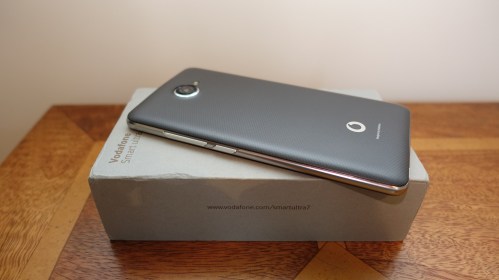
The Vodafone Smart Ultra 7 is a budget packed android phone from Vodafone. This is available on Pay As You Go for £130 and on contract too. This phone was provided by Vodafone for review purposes.
Key Features and Specifications
– Dimensions (mm): 152.2 x 78.12 x 8.68
– Weight (g): 150
– Operating system: Android 6.0 Marshmallow
– Screen: 5.5″ touchscreen, 1080p, IPS
– Camera: 13 megapixels, auto-focus, LED flash, 5mp front
– Nano sim, 4G
– 16gb storage, 2gb ram, micro SD card up to 32gb
– Mediatek MT6755M, Mali T860MP2
– Wi-Fi 802.11 a/b/g/n, dual-band, hotspot
– Bluetooth v4.1, A2DP
– GPS with A-GPS
– Radio FM radio
– USB microUSB v2.0, NFC
– Non-removable Li-Ion 2960 mAh battery
– Extras – Vodafone apps – Call+ and Message+
Phone, Camera and Performance
The Vodafone Ultra 7 runs on Android 6.0 Marshmallow out the box with the a few of Vodafone’s network’s branded apps included. However, apart from these Vodafone apps, which are useful, it is a near stock experience. On the home screen, swiping right is customisable. You can select any app you prefer to launch.
The screen is 5.5-inch IPS LCD which at 401ppi provides good colour reproduction. Viewing angles are reasonable and in direct sunlight the brightness just about suffices.
The processor is an octa-core MediaTek chipset with 2GB of RAM. Due to the stock android approach it operates the phone fairly smoothly. Heavy gaming does result in a few dropped frames.The plus side of using this processor is decent battery life. 4.5 screen on time!
Inside the phone is 16GB of internal storage. However only 9.77GB of that is actually user accessible. This can be bolstered with a microSD up to 32GB.
So how’s the camera. If you take a lot of selfies you will appreciate the front-facing LED flash attached along with the front 5 megapixel camera.
The main camera is 13 megapixels and does a reasonable job of capturing something in all conditions, even low light including HDR. The main problem with both front and rear is the post processing. The detail could look better when zoomed in.
Call quality. Callers had good caller quality. 4G speeds at CAT 4 LTE are available too. Most importantly for a phone at this price, NFC is included, so android pay is possible.
Audio. The phone has a single firing loudspeaker and a FM Radio. The loudspeaker output was reasonable. Bluetooth audio is average too.
Video Review
Conclusion
Overall at this price point, the Vodafone Smart Ultra 7 packs a lot of phone for the money. If you’re on Vodafone and have a limited budget, this is a phone you should check out.
For those who listen to the Tech Addicts Podcast, you will have known I have not been able to record the last 2 weeks due to being poorly.
I picked up some sort of virus that took me out for a few days, but also left my voice rather croaky 🙂
Anyway, I now have several hot gadgets that I have been testing in the background, ready for publishing the reviews and videos.
So coming up for review will be the –
– Huawei Mate 9 – don’t forget to scroll back several weeks to see all the photos taken from this phone.
– Plantronics Backbeat Pro 2 Bluetooth Headphones, the update to the incredible original version. These are the new flagship Bluetooth headphones from Plantronics.
– Austell & Kern XB10 APT-X High Resolution Music Bluetooth Adapter with optional balanced output. This is a dream gadget for going wireless with high quality wired headphones.
– Zecti 70 inch tripod. After reviewing the 50 inch version, Zecti has a new 70 inch model which I bought yesterday. Can’t wait to see this and put it through its paces.
– Vodafone Smart Ultra 7 – great value phone from Vodafone. I reviewed the Smart Ultra 6 a while back, so I am looking forward to this.
– BeatsX Wireless headphones. Just released today. I will see how these compare to the AirPods and other bluetooth headphones.
These will all appear over the next few days to a week or so.
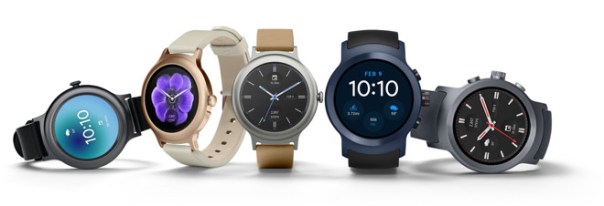
Last night Google announced the new Android Wear 2.0 update and LG announced some new watches that run the new update.
So how does Android Wear 2.0 compare to the Apple Watch?
– Complications are now included in Android Wear. Finally!
– Android Wear now allows switching between the different watch faces like the Apple Watch.
– GPS enabled android wear watches now work standalone, something Apple introduced months ago.
– Android Pay is now included if the watch has NFC
– Now its possible to select which apps are installed on the android wear watch.
– Google Assistant vs Siri – You decide which is better 🙂
– Android Wear now has its own version of the Google Play store
– LTE – Mobile connection on android wear are possible without a phone. The Apple Watch does not offer this.
– Google Fit has been revamped and now has auto workout detection.
Whilst it is clear Google has copied or has been inspired by Apple, it is great to see such big and worthy improvements to the android wear platform.
I sincerely hope android wear is now successful as Apple needs some competition for its Apple Watch.
The Huawei Mate 9 has many features within the default camera app. The default camera app is so extensive and also easy to use that there is no need to fork out on any other third party apps.
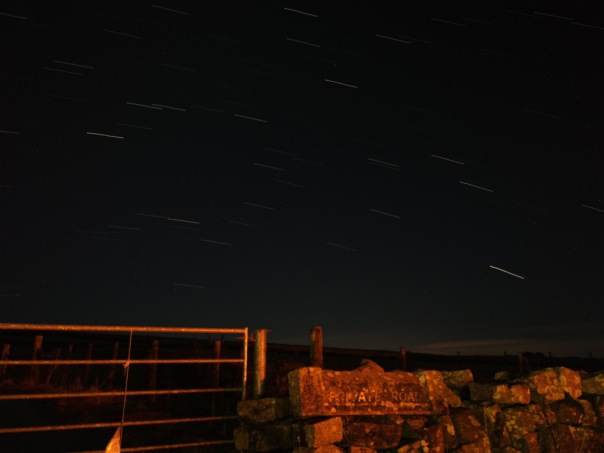
To prove this point, I gave my Mate 9 to my wife Ellie. Her challenge was to shoot a photo of star trails. She was actually out with a group of friends, all of which were using iPhones.
And she did. Completely unedited and shot using the star trails mode. This was a 13 min exposure. It is really cool shot. It was totally pitch black and a torch was needed to setup the tripod! Her friends were equally as impressed and at the same time disappointed at that their iPhone’s camera app couldn’t do the same.
In reality this would have looked so much better if the camera shutter had been left open for 2 hours.
So next time, when I’m feeling better (currently have man flu), I will attempt a long exposure myself.
Imagine being able to control your home automation systems and connected objects from a single and highly customizable interface as I have done above with several of my home devices. An app called Imperihome for android and iOS allows you to do this.
You could for example wall mount a tablet or use your smartphone to control your smart home the way you want and without any required modification on your current installation.
Systems that are linkable include –
– Logitech Harmony hub-based remotes (universal remotes)
– Musaic HiFi speakers (audio HiFi system)
– Fitbit (fitness and health devices)
– XeeConnect (connected car module)
– Sonos (audio HiFi system)
– Kodi (home theater software, formerly known as XBMC)
– LIFX connected bulbs (lighting system)
– Parrot Flower Power (plant sensor)
– Legrand EcoCompteur (energy consumption sensor)
– Myfox Home Control 2 (security and home control system)
– Philips Hue (lighting system)
– Vera, VeraLite (ZWave controller by Micasaverde / Vera Control) UI5, UI6 and UI7
– ZiBase (Multi-protocol controller by Zodianet)
– eedomus (ZWave controller by Connected Object)
– Fibaro Home Center 2 (home control system by Fibaro)
– IPX800 v3 / v4 (Relay controller by GCE Electronics)
– Eco-Devices (Teleinfo energy counter by GCE Electronics)
– Netatmo Weather Station and Thermostat and Welcome Camera
– Zipabox (Multi-protocol controller by Zipato) / Cameras and security features not yet supported
– Systems implementing the ISS API (ImperiHome Standard System)
– MJPEG, MPEG4, h264 IP cameras
– Withings – activity trackers, scales, blood pressure monitors
– Jawbone UP
And more systems are being added constantly.
Options include –
List View – Smartphone optimized portrait layout, ability to hide devices and groups, notion of favorite devices, grouped actions (all on/off)…
Dashboard View – Tablet optimized landscape layout that matches the wall-mounted tablet use case, different layouts fully customizable, place holders for smart widgets, automatic wake-up using camera move detection. The screenshot shown at the start is one of my dashboard views.
Highly Configurable – Devices icons animated and changeable with built-in or personal images, possible customization of sensors units, customizable refresh rates, ability to define a custom name for each device, export/import of your configuration…
Use Power of Your Device – Fast and responsive user interface, voice recognition, NFC Tags (android), shortcuts on Android launcher, Android Wear & Sony Smartwatch 2 integration… Works great on my Huawei Mate 9 for example.
Charts Module – Built-in, generic, compliant with several systems, configurable timeframes, integrated in the different views…
Third Party Integration – ImperiHome Control API (android), integration with Tasker, ImperiHome Standard System for home-made installations
Ultimately, you are only limited by your lack of imagination in many cases. I have used Imperihome for over 2 years and it has been vastly improved in that time. In the screenshot shown at the top I have linked in 4 different connected systems on to one dashboard. From the one dashboard I can see all my security camera footage, adjust all my Philips Hue lights from fading, on/off and colour changes, check all the data from my weather station and much more. Have a view of the video below too, to give you a better idea of what is possible.



 Gavin's Gadgets & Photography