Category Archives: Android

Samsung Gear S – review final conclusion

image

Today I am going to advise you of my final thoughts on the Gear S, and my views versus the competition, Pebble and Android Wear.

Firstly, I know of many people who will be quick to dismiss the Gear S. It’s running a proprietary operating system, Tizen and the watch will only work if you have a Samsung smartphone to initially set it up. Well put those negatives thoughts to one side for a minute. Can any of you see Apple making its Apple Watch compatible on anything but an iPhone? No, nor can I. I can hear the next throwback question. What about apps? Pebble, Android Wear and when the Apple Watch launches all will have a vast app selection. And that’s a valid point to a point. They all have a much better (or will) app eco system. Does it really matter though. Yes and no.

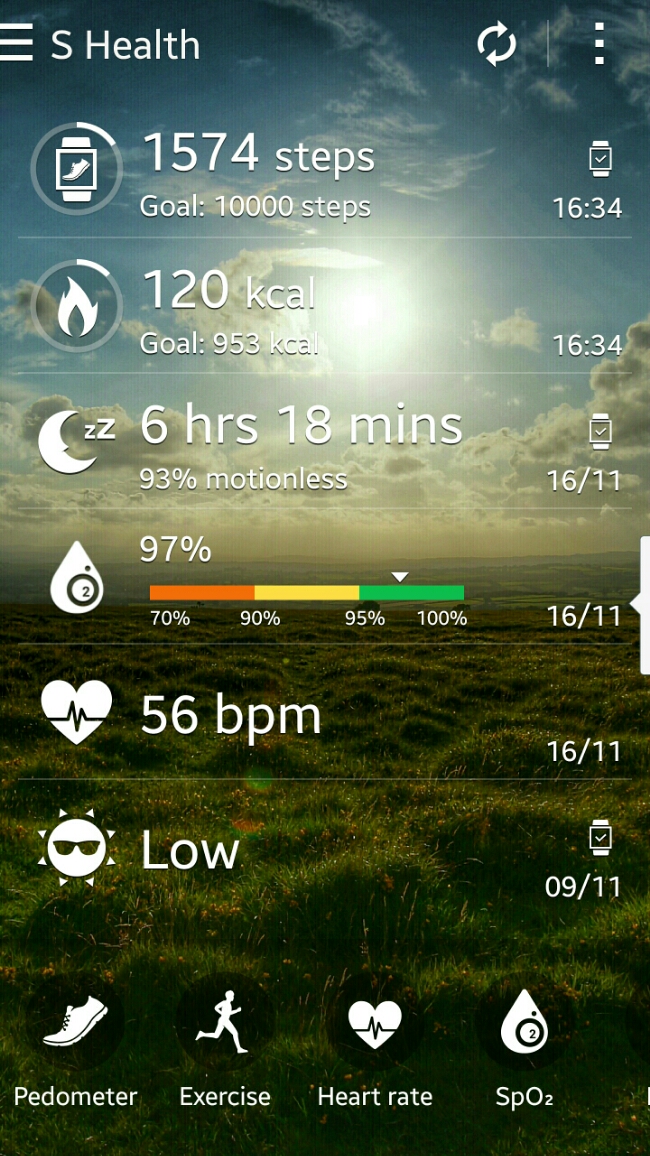
The Gear S is a finished product. It does exactly what it says on the tin. IMO it looks fantastic and futuristic. So that should count for everything surely. Maybe? Well, it is the only watch, let alone smartwatch that I can wear 24/7. It is so comfortable. It also has 2 days worth of battery life, and it’s own sim card, bluetooth, wifi and more. Yep, heart rate sensor, UV sensor, HERE Navigation with the maps pre download and saved on the phone (I have the whole of map of England stored on the Gear S), S Health data, on board music player (so at gym with bluetooth stereo headset you could use the Gear S to listen to music without the need for your Note 4) or music controller for your Phone, apps (phone, contacts, messages, email, schedule, settings, navigator , S Health, Nike+ Running, Music Player, News Briefing, Weather, S Voice, Alarm, Gallery, Find My Device, Timer , Compass, Opera Mini , Find My Car, Stopwatch, Voice Memo, Calculator ). Below is the screen shot from the Note 4 with data retrieved from the Gear S.

As an example of its polish, in sleep mode, the watch goes into do not disturb mode and the screen does not light up during the night unless you press the home button.
image

It is one of the few smart watches that once setup doesn’t need a companion phone to make calls, send texts or emails. You can even browse the Web using Opera Mini. Or if you have a BMW there is an app that works with the car. I’ve not tested it as I don’t drive one. I really like the way the Gear S disconnects the bluetooth if you leave your Samsung phone at home , then sends a signal to the Samsung Phone that turns on call forwarding and also forwards any notifications from your phone to the watch, all remotely. As another example of its polish, remote connection won’t get triggered if the Gear S is not on your wrist. And being able to make phone calls independently is a unique aspect of this device. As it has wifi too, you can use that for data related tasks. Lastly, the 2 inch screen is 300ppi. That makes reading all notifications simple and clear. In fact let’s not forget the iPhone 6 is only 326ppi. One last point, the on screen keyboard or S Voice both work well. I also like the fact that all the notifications are one swipe to the right, in a neat list. You can read them individually and the respective notification is cleared off the phone. All just clear all and again they are removed from the Note 4 as read. Another bonus with the Gear S is the charging cradle is a battery pack, so you could carry this with you on a longer trip and use the cradle to recharge the Gear S.

One issue with S Health is the lack of exporting the data properly out of the Samsung S Health app. It really needs a Web portal. I had setup S Health months ago on my Samsung S5 and when I entered my login details on the Note 4 my information was transferred across. If Samsung opened up S Health, created a web portal, then it would have more value. There are a number of partner apps that work with the Gear S. These include Instructor Live, Nike+ Running, Mapmyrun, Cigna Coach, Workout Trainer, Lark Activity Monitor and Your MD Sympton Checker. Apart from a range of clock faces available in the Samsung Gear App store other notable apps include Deezer, Top Driver (game), Phone Camera Remote, London Underground, Endomondo Sports Tracker, Samsung Wallet, Glympse, Engadget for Gear S, Financial Times, BMW i Remote Gear, Metro (major cities tube maps and planning). The Gear S is brand new so hopefully there will be better apps in the future but in reality you won’t be buying the Gear S to add hundreds of apps.

So welcome to the Gear S paradise. Well hold on, let’s add some reality. The Gear S does do a lot. It’s a great health and fitness device, a phone but with notifications it is not as strong as say android wear. On the Gear S you can only respond/create to emails and text messages. Android Wear apps include support for replying to WhatsApp messages, tweets or even tweeting from the watch. Also, the developer support for android wear and even Pebble is off the charts already. I cannot see the Gear S getting to that point. In fact, it could be a redundant operating system in a few years time. Does that matter? Depends what you want out of your watch. For me the comfort, S Health app, fitness, looks and communications versatility make it a win for now, but I do slightly worry about its longevity. Maybe, Samsung may switch the operating system to android wear in a future update? Wearables is a fast moving platform in terms of software and hardware. It is far from the finished article and it is moving fast, so whatever device you buy will be out of date rapidly. For me, the Gear S is just what I need. I don’t need to fill it with apps as it does nearly everything I need except for the ability to respond to WhatsApp messages and Tweet.
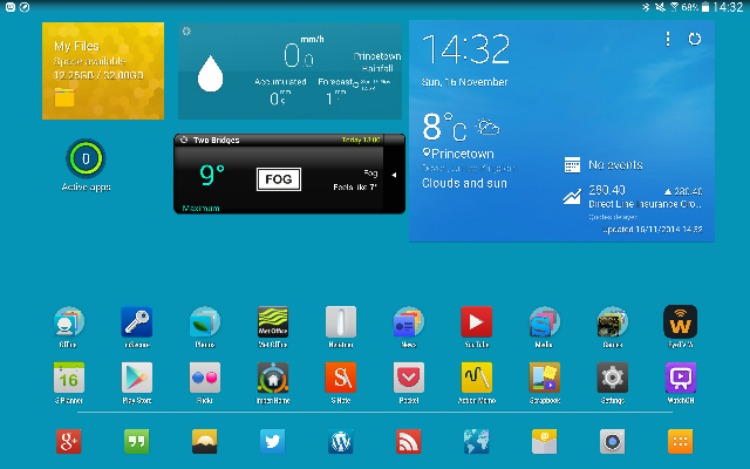
Samsung Note 4 – sunshine and the screen

It’s been really wet and dull weather for ages in my part of the world. But yesterday, the sun appeared in full blossom.

With brightness set on auto, and the sun beaming on to the Note 4 screen, I watched as the brightness level got cranked up high as well as contrast changes. This made the screen visible in direct sunlight and was rather impressive. As the contrast gets altered the screen colours do look a little odd too.

Final verdict on the Samsung NotePro 12.2 tablet

image

As you all know I have got a number of Samsung devices at the moment including the Note 4 and Gear S.  To obtain the NotePro 12.2 tablet I sold my iPad Air which allowed me to buy the NotePro with no extra cost involved.

It wasn’t a match made in heaven at first. Touchwiz seemed to really slow down the tablet and the lag and freeze ups were painfall. However, I installed Nova launcher and now the NotePro not only has an improved home scree it responds much faster. The lag with Nova is reduced so much it feels like a different tablet. If we compare the Samsung to an iPad, the iPad is a slightly faster device with better designed apps for larger screens. However, despite that the NotePro is staying for good. It just offers a better overall solution with its large screen, s-pen, multi windows, multi tasking,  infra red blaster along with decent software for it, lots of connectivity options, 32gb base storage plus micro sd card slot and a fab 12.2 inch screen which makes everything a joy to view. Samsung also include a wealth of useful software and next year in the 2nd quarter the tablet will get android lollipop. Also all text entry on the tablet including this entire post was written using the S-Pen and handwriting recognition!

Addressing the apps. You see that is not such a big issue as a lot of the times I will have the NotePro with more than one window in use. Mainly 2 or 3 in reality. The windows can be split equally or as I like having a messaging app like hangouts open but only taking up 2 inches width of the screen. The other window can be whatever I want.  Therefore with smaller windows open, apps don’t look so bad. In fact most apps look ok on the full wide screen. Also, Samsung has customised many apps like Email. I use this app both on the tablet and Note 4. I do not like the Gmail app. On the tablet you can choice between have 2 or 3 panes open. With 3, you get the folder structure, email list and then the email body in the last pane. These touches are thoughout the device.

Gaming is also a joy on the big screen, as is using my Moga Pro Power game Controller. This is one area where android is currently way ahead of ios with games that support game controllers.

But it is the large screen with all the versatility that makes the NotePro 12.2 tablet a success for me. For some of you it just might be too big and heavy but at its current reduced pricing it is a rather attractive option. Prices via Expansys are around £379 or less.

Living the dream – Samsung Note 4, Gear S and Note Pro 12.2.

So its another 24 hours later. This time I have used the S-Pen to write this entire post. t have managed to write this fairly easily on the Notepro and even easier on the Samsung Note 4. I am left with the original niggle from yesterday over the cell signal. Do I hope that Samsung eventually improve this with an update. I hope so, as I prefer the Note 4 over the iPhone. The 6 Plus is a nicer piece of kit. It just becomes less exciting to use overtime and isn’t as flexible as a device as I would personally prefer.

In terms of using the S-Pen it seems far simpler to use on the Note 4 if you are holding the Note 4 in the hand to the stylus. I will be honest though and say that using swipe is fastest method of data entry. However , using the pen is a lovely feeling.

I’ve realised that the Gear S battery is good for 2 days. It is without a doubt the best watch for my needs that I have used so far.

In terms of overall package the three devices are a good combination providing you need the pen. S Health is also excellent but the main problem is the competition are catching up.

Below is a sample note that you can create.

image

Living the Samsung Nightmare – Note 4, Gear S and NotePro 12.2

Some balance to all the glow from the last few days and for some you may not like reading my comments below. But unlike some reviews, I am not in the pockets of the manufacturers so will say it how it is.

Before I get to the Note 4, I used the NotePro 12.2 with Chrome and the Internet Browser both open in multitasking mode side by side, so I could compare images of 2 different vehicles. The iPad really needs some form of multi window.

The Gear S has been faultless. Battery at the end of the night before bedtime was at 65%. I have also discovered that call forwarding charges vary from network to network. Three UK don’t charge. They simply take the cost from your allowance. EE charge through the roof unless a business customer. I believe the charge is around 60p per minute. I will double check this cost again from EE as it seems totally out of sync with Three UK.

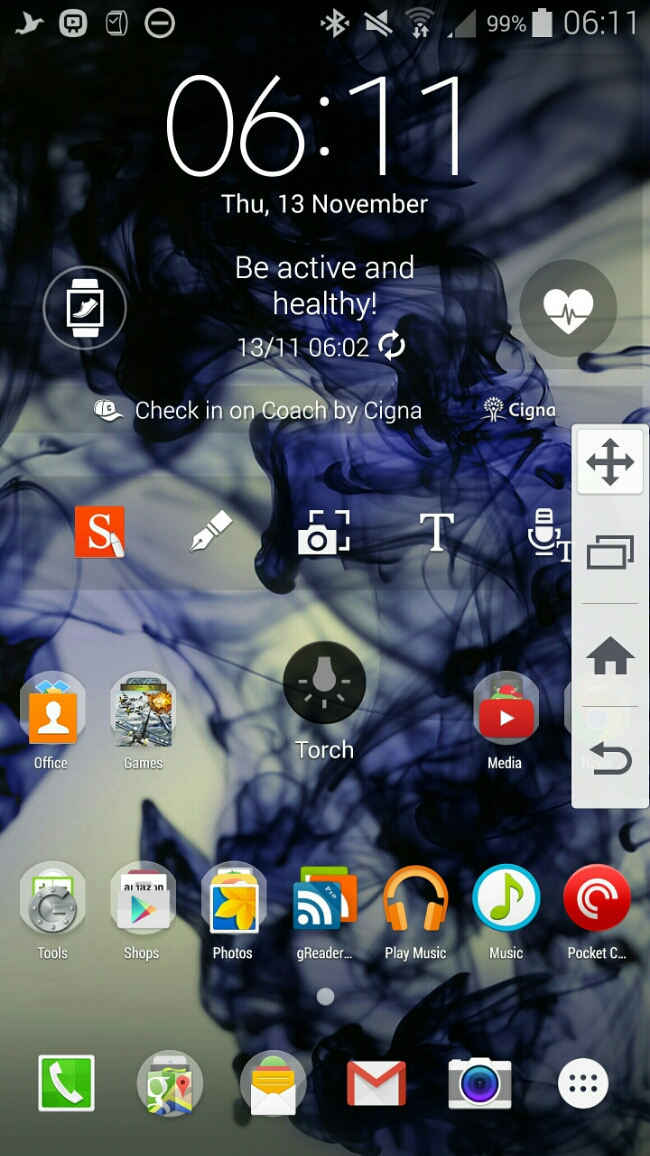
And now to the nightmare scenery with the Note 4. To recap it has sensors galore – heart rate, oxygen levels, UV. A very good camera. S-Pen. Multitasking. QHD screen. And so much more. In fact it’s removed the toolbox gimmick found on the S5 and replaced it with Side Key Panel. See screen shot. Basically you get the bottom capacitive and home key on the left or right edge. It hides when not in use. Flick to bring out. You can move it to your preferred position.

image

But stripping it back to basics it still is a phone that can send SMS messages. And this is where it fails miserably. It has really poor signal strength. I live in a rural location. Reception downstairs has always been flaky on Three UK but it for the iPhone 6 Plus it was still able to make/receive phone calls/SMS. The BlackBerry Passport had no issues with grasping on the reception. And now to the Note 4. Downstairs the Note 4 “cannot” make or receive any phone calls or SMS. It cannot pull a signal. I have noticed in many different areas outside of my house, weaker cell coverage too. Problem is if I cannot get the basics from the Note 4, I will have to return it along with the Gear S, as the Gear S only works with a Samsung phone.

Some background. I have been with Three UK for quite some time. I have tried O2, Vodafone and T-Mobile and all were rubbish. However, reader “Jah” suggested I look into EE and I got hold of a EE pay as you go sim to test. Low and behold the Note 4 did have signal downstairs, albeit at the lowest signal thresholds. EE could be a solution, so long as call forwarding is not charged at 60p per minute when calls get forwarded from the Note 4 to the Gear S.

Just to make sure my signal issues weren’t unique to myself, I started a thread on XDA Developers and it appears many people are also experiencing poor signal strength. Maybe we shouldn’t have asked Samsung to build a metal phone!

Update – I went online and chatted to EE who stated call forwarding is not charged. Uses your allowance.

Living the Samsung Dream – Note 4, Gear S and Samsung NotePro 12.2 Tablet

Another day and a load more thoughts, issues and observations. So lets start with the least used item today, that being the NotePro tablet. That is mainly as I have been busy with work, and the time I have had outside of work has been exploring the Note 4 and Gear S, and do you blame me!

So the Samsung NotePro 12.2 seems to have a memory issue. Web browsing whether via Chrome or Samsung’s own internet app, just stops after 30 mins or so and freezes. Normally takes a reboot or clear all running apps. Weird. Not a deal breaker but it is there. It does not always happen either. Maybe tech websites are heavy on graphics? Apart from that the only other aspect I have noticed is its general speed. It is no iPad Air 2 switching between apps. I think we call this lag. But then once you’re in the app do you care!

Screenshot_2014-11-11-19-55-10

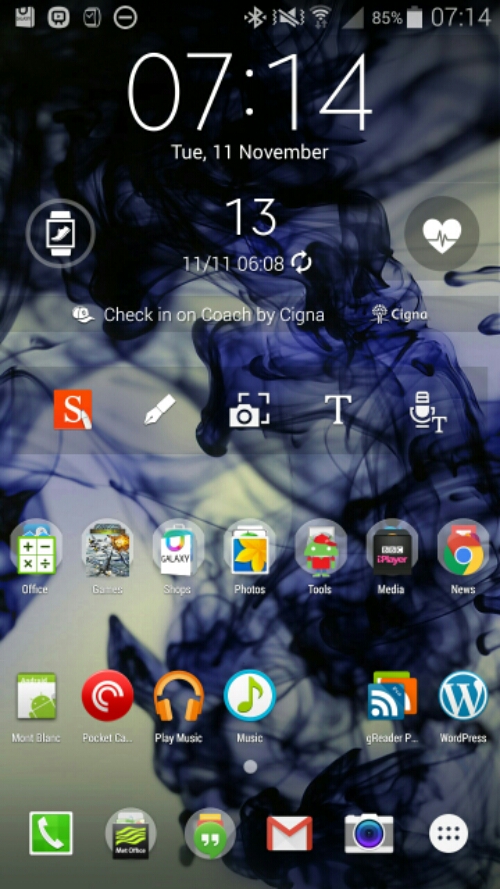
So next lets talk about the Note 4 and Gear S. Above is screenshot from my Note 4. I have settled for just one home screen. And Touchwiz is crap on the Note 4 with its QHD screen. Such a waste of space. Don’t get me wrong, I really like Touchwiz but there was too much free space. Anyway, Apex launcher is installed. From top to bottom. Samsung clock widget, Coach Pedometer widget, S-Note widget, middle is the torch widget and then a load of apps and folders. Everything now is in its neat place. During the night I setoff 40 of my android games to install and for some reason every few minutes or so the Note 4 screen kept turning on. This was after all the games installed too. The Note 4 was on charge using the fast charger. But before you ask, I did disconnect the charger but the screen kept popping on. Annoying in a dark room. I will try again tonight to see if the same thing happens. I also had the Gear S monitoring my sleep overnight. I have to say the Gear S battery really isn’t too shabby considering everything it does. I have had loads of notifications pour through and taken several calls via the watch. And I cannot stress how comfy I have found the Gear S. One useless feature of the Gear S is the UV sensor. Yes, aim your watch at the sun, and it will tell you if you need to cover up and more. Or option B, using your common sense. However, joking aside, it is still a feature that may be useful for some. This UV sensor also exists on the Note 4.

What I am noticing with the Note 4 is that I am activating apps on the edge of the screen too much. No wonder touchwiz left large gaps. Also, coming from the iPhone 6 Plus I really do miss the swipe up from the bottom for control centre. That is such a logical place and having quick access to items like the timer, camera, torch and calculator make perfect sense. Just look at the torch widget on my home screen. It is so ugly. And I also miss Touch ID. Apple really nailed the secure way to access your phone. The Note 4 fingerprint scanner works 95% of the time and I am even able to get one handed operation 60% of the time. Maybe next week I will be able to unlock my Note 4 with no hands. Well, maybe that’s coming in the Note 5. But thanks to Jeff’s comment yesterday, the Note 4 does allow access to “OK Google” all the time including the lock screen. Just turn it on in Google Now settings. Neat! I hope Google updates “OK Google” to be better than Siri and Cortana. I now have all my photos, music and videos on the Note 4. For my music I used iSyncr to copy music across from iTunes. 1,000 songs transferred over in 5+ mins. Seemed much quicker than other devices. Videos and photos I used a memory stick. Copied everything from my mac to the memory stick. The using the USB OTG cable, connected the memory stick to the Note 4 and copied across all the photos and videos.

So my final paragraph for today. Is the music quality through the headphone port any good. Is it better than the iPhone 6 Plus? First up the iPhone 6 Plus has excellent audio quality and a decent loudspeaker. The 6 Plus can also power all my big over the ear headphones and sounds excellent over bluetooth even though it doesn’t have APT-X high quality bluetooth codec which is present in the Note 4. So I am sure we all know the Note 4 loudspeaker is lame. But it is clear, just lacks volume. Despite that I was able to conduct a phone call in the car using the loudspeaker and my friend Dave of UKMobileTech was able to hear me just fine. The bluetooth sound is excellent and uses the APT-X codec. I had a problem initially with bluetooth music dropping out occasionally. That was day one. Since then it has not re-appeared. Plugging in headphones using a cable and its OMFG. Well nearly. The Note 4 doesn’t have such a powerful headphone amp as the iPhone 6 Plus, but what is pumps out is of a much higher quality. In fact, I have been listening to my music via the Note 4 as I typed this post. The musicality, separation, soundstage and overall presentation is such a delight. Your choice of headphone is going to be important though. A too demanding headphone will need a headphone amp. I have connected the Note 4 into my car sounds system and its such a full clean sound. For guidance, all my music is ripped at 320mp3 bit rate.

And that’s it folks for today. Any questions please fire away 🙂 Tomorrow’s post is entitled living the Samsung Nightmare. In this post I will describe a massive flaw with the Note 4.

And one last thing. The screen didn’t keep turning on during the night. I used the Gear S charger as though. However, blocking mode still allowed the notification led to blink.

This is Magic Stuff – How to install the exclusive Mont Blanc content for Samsung Note 4 – free

Mont Blanc and Samsung teamed up together to create a few exclusive Mont Blanc flip leather cases and pens. If you buy the case you get access to extra digital content. However, there is another way to get the content installed on your Note 4. The extra content includes 2 wallpapers, and in S Note 5 extra Mont Blanc fountain pens types. This is how. First install Nova Launcher. Long press on the home screen. Select in pop up menu Shortcuts.

Next select Activities, then scroll all the way down to you get to PopupuiReceiver. Screen shot below.

image

Next select Mont Blanc. Below shows icon that will appear on home screen. Note wallpaper is one of the 2 free new wallpapers you will receive.

image

The Mont Blanc icon appears bottom left. Tap. You will be taken to the Samsung App store. Install and open S Note. The wallpapers are installed in the normal wallpaper section.

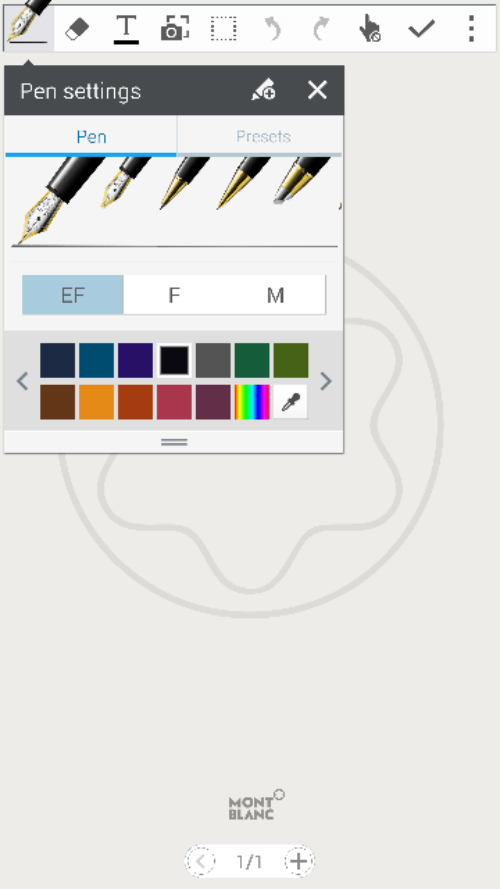
S Note now has Mont Blanc fountain nibs selection.

image

And that folks is the magic way to get the Mont Blanc digital content.

Living the Samsung Dream – Note 4, Gear S and Samsung NotePro 12.2 tablet

Today I’m not going to talk about each device separately but how the work in unison with each other.

First up its Monday night and I’m typing my thoughts for this post using the NotePro tablet and it really is a joy with its large on screen keyboard and display. I won’t get much time with it otherwise so there isn’t much to say except it was on standby for 15 hours and lost 18% battery.

So today at lunchtime I was able to sort out moving my sim from my iPhone 6 Plus to the Note 4 and getting a nano SIM for the Gear S. Fortunately, there was a Samsung expert in the Three store helping flog Samsung phones for the Three store staff. He also new exactly how to setup the Note 4 with the Gear S. So my main sim went into the Note 4 and a Three pay as you go 321 or 123 sim went into the Gear S.

But before I get to the master setup, I wore the Gear S last night and turned on the sleep mode. During sleep mode, the watch also activates do not disturb mode . This means no bright screens awakening your partner. The sleep data is synced across to the Note 4. It showed my total sleep was 6 hours and 10 minutes and that I was motionless for 94% of the time, that is for 5 hours and 47 mins. I intend to wear this every night now so I can build up average sleep data patterns. Now, the Gear S was at 50% at the end of Sunday evening, so while I went to the bathroom I quickly charged the watch up to 75%. While I am typing this I have put it back on  charge. It’s 8pm and the battery including tracking me while I slept and all the way to 8pm had only dropped to 51%. Not bad. During the day notifications have been pumping out of the Gear S and I can honestly say reading them on a 2 inch screen is great on the eyes. Also, if you select clear all notifications it also clears them on the Note 4. S Voice works really well on the Gear S. S Voice was able to recognise correctly all the commands and people’s names that I asked it to dial. I had my mum call me and took the call on my Gear S using its loudspeaker. It’s not very loud but I suppose that is a good point in some ways in that the whole world won’t get to hear your conversation.  But in a noisy room it may be difficult to use in this way. Bluetooth headphones might come in useful. I asked my mum if she could hear me on her end. She had no trouble hearing me.

I then asked my mum to call me again. This time I started the call on the watch and pressed the on screen button to transfer call back to the Note 4. That worked just fine. Just clarifying how the relationship between the Note 4 works with the Gear S. Standard use is via a bluetooth connection. In this mode notifications are received over bluetooth from the Note 4 to the Gear S. Phone calls and text messages placed from the watch use the Note 4 to activate the call. Now, with a nano SIM in the Gear S and allow remote access ticked in the Gear Manager app, the following is possible. You decide to leave the Note 4 at home. As you exit your home, the bluetooth connection is broken between the Note 4 and Gear S. The Gear S switches over to being it’s own phone. It also pings a command back to the Note 4 which activate call forwarding to the Gear S. Notifications from the Note 4 are also sent to the Gear S. For this to occur you have to be signed in to your Samsung account.

So how was the Note 4 now that it has my main sim in use. The screen has been the standout feature all day. And yesterday the S Health app has been good too. Fingerprint scanner works really well, but Apple’s Touch ID is still the best. I have now managed one handed unlocking on the Note 4. When locked with fingerprint security I cannot use S Voice or Ok Google unless I have unlocked the phone. As an example with the iPhone 6 Plus plugged into a charger I can say “hey siri ” and then “any notifications “. Siri will then read all my notifications. Can’t do that on the Note 4. Also, Touch wiz only allows 21 icons on a screen. The iPhone 6 Plus can show many more. It seems to maximise the screen I am going to have to use Nova or Apex launcher but at the cost of losing some of the Samsung widgets. I seem to be suffering from wifi dropping out from time to time. Might be because there is a storm outside or its not working correctly. Cell signal seems fairly strong on par with the iPhone 6 Plus.

So that’s all to report today. More tomorrow.

PS. Don’t forget to read my other post today about how to get the Mont Blanc digital content for free.

Samsung Note 4 – thoughts from the weekend

Ok, I got a chance to use the Note 4 some more and it started to grow on me just a little bit more than I expected. I got a chance to use the camera and even managed a shot of the moon. In contrast, the iPhone 6 Plus had to be fooled in to taking anything worth while and even then the end result was only 7.3kb in file size.

Below are some sample shots from the Note 4 taken at the weekend. What I have noticed compared to the Note 3 and Samsung S5 is there were hardly and wasted shots. The Note 4 got the shot first time and quickly from an off position. Annoyingly my iPhone uses a nano SIM and I didn’t get a chance to get a micro sim at the weekend. This meant not being able to use all of the Note 4 features.

Some shots. All unedited. Not full size. Click through to flickr, change settings to original to view full size version.

Tree logs stacked in style at Bellever Forest #SamsungNote4 #unedited

Another.

Sunrise at Bellever Forest thru the Trees #SamsungNote4 #unedited

Action shot.

Fast action shots - Tiggy looking at George in the water #SamsungNote4 #unedited

And one last thing. That screen and S Pen and S Health. And the fingerprint scanner actually works every time.