All posts by Gavin Fabiani-Laymond

Unknown's avatar

About Gavin Fabiani-Laymond

President, CEO & Editor of https://gavinsgadgets.com Reviews & News of Technology

HTC One – everything so far including reviews, first impressions and more

HTC One Review Parts 1-9 Please note that part 8 is up tomorrow and 9 on Saturday.

HTC One – Camera Sample and also more here.

Comparison review between HTC One vs Samsung S3/S4 Note 2 vs iPhone 5 vs Nokia Lumia 620

HTC One – First Impressions

HTC One – Full Specifications

My guest appearance on Techtalkuk’s podcast discussing the HTC One

Reviews of Note 2 & Nokia Lumia 620 plus other reviews.

HTC One – Review Part 7

Welcome back to my last part of my HTC One review along with my conclusion. To read my other parts on the HTC One click here.

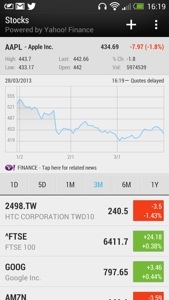
Today, I’m going to cover off the other stuff included by HTC. Firstly you get a full copy of Polaris Office and a PDF Reader. You then get a lovely stocks app, which can also link in to Blinkfeed. See screen shot.

20130401-162914.jpg

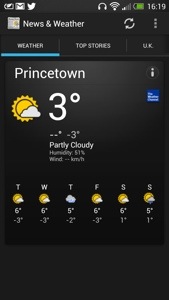
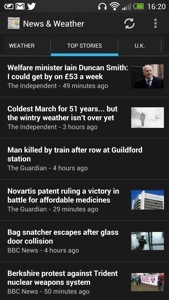
There is also a news and weather app, that can be set up to sync automatically. See below.

20130401-163004.jpg

20130401-163013.jpg

Next up is the Notes app which can be setup to sync with Evernote. You can hand scribble a note in several colours, audio record a note, or add a photo. You can share the note, add it to a calendar event and more. A very good app.

20130401-163518.jpg
Also installed is a Task app which syncs if required to Google Tasks. Again, functionally with the ability to have task categories too.

A rather unusual app is Best Deals. It is like Groupon and can link in to Blinkfeed. It can find local deals and you can setup the parameters to your liking.

20130401-163847.jpg

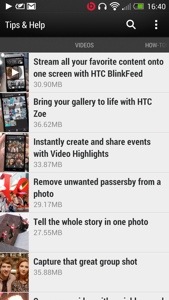
The last app I am going to mention is Tips & Tricks. This gets updated automatically too. It also can be included in to Blinkfeed. It features useful how to videos, guides on using all the phone and has a search option. Such a great app, and it gets updated.

20130401-164212.jpg

20130401-164222.jpg

So in summary the HTC One is unlike any android phone I have ever had. It feels like a totally refreshing user experience. All the software links into each other, syncs with something, interacts with Blinkfeed, and it is the first phone whereby I have only installed 45 apps/games. That’s because it includes so much out of the box. It doesn’t have bloatware just fully functional and useful features and benefits. Everything has a benefit to you the user. The camera is excellent with its various modes, super easy editing, Zoe mode and loads more. The sound and audio are first class. The setup procedure and manual is the best I have ever seen. And the phone is the best looking device available. HTC really have thought about every menu, user interaction and kept it easy to use but still a powerful capable device. Plus the battery will last a day even if you use it a lot. It is also the first android phone that won’t have a new launcher added. All in all, it just works out of the box, like an iPhone but better.

This was going to be the end, but I know you guys and girls are all too addicted to reading about the HTC One, so part 8 is tomorrow.

Speck sue counterfeit company for millions

Last week, Speck filed a multi-million-dollar lawsuit against Katinkas USA, a Utah company it says has been selling fake Speck cases.

Personally I’m not impressed with Speck and their heavy handed enforcement practices. Advertise an owned Speck case on eBay, and you are likely not only have it removed on Specks request with no warning but you will also receive a black mark against your eBay account.

Amazon cloud service updated to take on dropbox

Amazon updated it’s apps to include desktop sync with it’s android apps.

5Gb of storage is provided for free on Amazon’s Cloud Drive service, with upgrades available for one terabyte of data for $500 per year, which undercuts Dropbox.

The update also brings with it automatic uploading of photos, much like Dropbox or Apple’s Photo Stream services offer. Take a picture or screenshot on an Amazon Cloud Drive-enabled device, like your Android phone, the photo will be automatically uploaded to the cloud, accessible with any of the Cloud Drive apps, desktop or Android. You can also upload photos one at a time, and disable the auto-upload, if you wish.

The Retail buying experience is sickening – except in Apple stores

First up, the only place where it is enjoyable to buy anything is in an Apple store, regardless if it is a new release or not. If they have the stock, they will sell the phone sim free or with a contract with zero fuss. They will then help set it up.

So, what is it like on the rest of the high street. Well two words. It sucks. A new phone is available, lets use the HTC One as an example. It is offered on Phones4U, Three UK, Vodafone, EE, O2 and Carphonewarehouse as available on contract or sim free or pay as you go, dependant on the company.

So how does a typical shopping experience go outside of Apple. Well, you ask if they have a HTC One. You will next be asked if you are buying on contract or not. If you say not because you have a contract or sim only deal, and therefore you want to buy it either pay as you go, or sim free, miraculously there is no stock.

Or, when you ask if they have stock, they spend the next 30 minutes convincing you to take a contract out, when you have clearly told them you will not. At which point, exhausted and frustrated, they turn around and tell you they won’t sell one to you. What!

Their respective websites offer the phone off contract or pay as you go. What’s going on. Well if the retail stores want people to shop online and then look saddened when they have to close due to lack of trade, they are going about it the right way. As I mentioned above this would NEVER happen in an Apple store. And why should the retail experience differ from the website. It’s the same company.

If Samsung, HTC and others want their devices to receive the same happy buying experience as their competitor Apple, they need to put pressure on the respective companies to stop these tactics.

In the end, after visiting several mobile phone shops I did pick up a HTC on pay as you go via a Three store. I have a Three sim only deal, so used that sim instead. I am a long standing customer of Three but the measures I had to go through to buy one on pay as you go we’re dreadful.

As stated above, the sales assistant kept wanting to sell a contract. I said I had spoken to customer services who said I could buy it pay as you go that morning and to visit the store. That was a lie but I wanted to see what difference it made. The assistant spoke to his manager and then came back to try and still sell me a 2 year contract that I didn’t want. Is this how Three treat existing customers!

Anyway, the assistant and store manager appeared, and the manager said the retail stores at present have no way to process the phone on pay as you go. And then the Area Manager appeared, wondering what was going on. I explained again I had spoken to customer services, travelled a long way (20 miles) and the Area Manager said to the manager to process the order, and he would sign whatever was needed. The manager had a face like a slapped arse.

Question is should anybody have to go through the above lengths just to buy a phone. In my view this should never happen. It time for change.

Google Reader is closing due to lack of use – really?

So Google Reader is being closed down due to lack of use. That’s odd.

Feedly, the RSS feed-reading client has launched new versions of its Feedly Mobile client for iPhone, iPad, iPod touch, and Android phones and tablets. This update, built in response to user feedback, is focused on improving search, productivity, discovery, and sharing. But the feature which is likely to appeal to ex-Google Reader users the most is the new “title only” mode, designed to make headline scanning more efficient.

Why have Feedly launched the apps. Well since Google made the announcement to close its Reader service, Feedly has now got 3 million new users.

HTC One – Review Part 6

Further to my earlier HTC One review posts I will cover off the settings available on the HTC One. Just to recap, I’ve now have one home screen Blinkfeed, the camera is proving excellent with fun results using Zoe mode as well as all the pre and post editing of stills and video, the sound output via the speakers is loud and clear, the sound output via the headphones is exceptionally high quality and loud and the enjoyment factor has just increased. And this phone looks damn good.

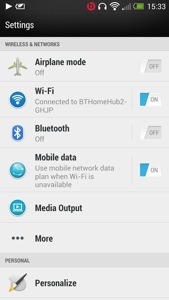
The settings can be accessed via the notification centre or from the settings app. In the notification centre there is top right a settings icon. There are no toggles for settings. The design of the settings is a lovely white background. See below.

20130401-155315.jpg

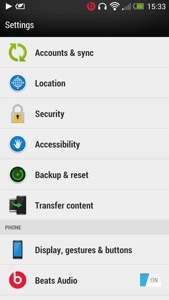
20130401-155323.jpg

20130401-155330.jpg

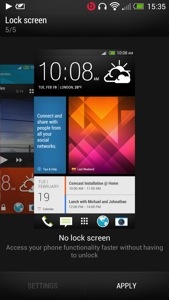
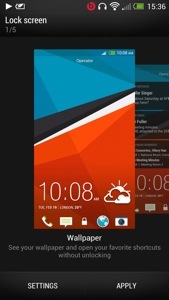
It is a very simple process to adjust the different settings. This I found is due to the fact you are not overwhelmed by options as you would be in a Samsung Galaxy device. The settings app works in portrait or landscape which is a neat touch. Under media output is more. This has further options for usage , VPN, mobile network sharing and NFC. The battery life on the One is strong enough to leave wifi and GPS enabled. I would do the same with Bluetooth if I used it. The One offers many options to personalise your phone. Tap the personalise setting menu and there are further options available. You can change the default lock screens from no lock screen (genius idea), wallpaper, productivity, photo album and music. See below.

20130401-155945.jpg

20130401-155959.jpg

20130401-160014.jpg

The HTC One has three home screens enabled but you can add or delete them except for Blinkfeed. You can however make any home screen your default. Trust me that its worth just having Blinkfeed and nothing else. You will need to make sure you have setup Blinkfeed correctly and if you have it will serve you well. I have also been using no lock screen mode. It is so much faster . Why do we need a lock screen ? If you like widgets and apps on your home screen you can add them to your hearts content.

20130401-160518.jpg
From the personalise screen you can change your tones. The next option is accounts and sync. I love the way you can integrate contacts from other services into your people app. You can sync twitter, Facebook, Flickr , Dropbox, google, HTC , LinkedIn, news, stocks, tips & help (very useful app), Watch, weather and more. You can also control what get synced and displayed. Location manages location services and gps. Accessibility is for people with slight disabilities to help make the device easier to use. Backup and Reset. This enables you to backup to either Google or HTC . This backs up your settings, accounts, passwords, bookmarks, and apps daily over wifi. If you select HTC the backup is stored on Dropbox. You get 23gb free storage for 2 years with Dropbox too. Display, gestures and buttons . Here you can select to auto rotate screen on or off, keep the screen awake or select auto sleep, change font size, brightness or auto brightness , notification flash settings, turn on 3 finger gestures for sharing and other stuff and calibrate the G Sensor. You have the manage app options, storage menu plus the ability to clear storage space, select options for the language and keyboard including slide input and alter the date and time. There are developer options and software update on or off too.

Tomorrow I will cover off some miscellaneous items and summarise my key thoughts about the HTC One.