All posts by Gavin Fabiani-Laymond

Unknown's avatar

About Gavin Fabiani-Laymond

President, CEO & Editor of https://gavinsgadgets.com Reviews & News of Technology

HTC One – Daily Blog

Since I now have reviewed the HTC One in every way possible, I’m just going to do a short post now, noting on new findings and experiences.

First up, here’s the links to all the previous HTC One reviews and more.

I discovered a setting in the default web browser. Go to the web browser settings, accessibility and tick “dim screen while web pages loading”. A nifty battery saving tip.

I have changed the auto brightness off. It’s too bright. I have a manual setting which works just fine.

The HTC One also has USB on the go. So far I have tried connecting a USB memory stick and a small USB hub all of which worked fine. Unlike my Samsung Note 2 you do have to go into settings, storage and tap unmount USB before detaching from the phone.

I also tried connected a Fiio E17 headphone/dac via USB. This worked really well, and I am pleased that the HTC One has USB audio out as a standard feature. As a comparison you can get USB audio out from the iPad Mini, iPhone 5 and older Apple devices, but as Apple control the authentication aspect, any USB DAC subsequently costs a premium due to the royalties Apple charges and their bespoke connectors. At least with the HTC One it is using a worldwide standard micro USB connection.

Connecting the Fiio E17 via USB to the HTC One, and using the DAC on the Fiio you begin to realise just how capable the One is in the audio department. Truly astonishing. And for the full affect you can use the Fiio E17 as a USB DAC only and feed the signal to the Fiio E12 Mont Blanc Portable Headphone amplifier, as shown below.

20130405-224648.jpg

20130405-224722.jpg

Just to clarify for those not as technically minded, plugging the USB on the go cable (thats the small black cable coming out of the One) into the HTC One, then enables you to connect the digital analogue converter, and then that sends the analogue sound to the portable power amp. Your headphones plug into the portable power amp. Using this method bypasses the built headphone amp, DAC & Beats on the HTC One, but does provide a much cleaner and even better audio. No sound comes out of the speakers or headphone jack with this connection setup either.

And the USB on the go cable also allows you to connect USB mouse, keyboard and more. I’ve only tested the USB audio and memory sticks but I’m fairly sure the others will work too.
Nespresso App for android and iOS

Nespresso is a wonderful coffee machine. They have also made ordering more coffee capsules as easy as possible. You can download their free app for android, iPhone and iPad browse at your hearts content, and order your coffee capsules.

Where the app becomes somewhat slick, is that it allows you to browse your previous orders, and then click add previous order to cart, hit pay, and voila. So if you order the same capsules all the time from start to finish takes less than 22 seconds.

But it gets even better.

I ordered using the app at 2.15pm on Bank Holiday Monday. The coffee got delivered at 6.45pm the next day.

If only everything was that quick and easy.

HTC One – Links to everything written, reviews, first impressions, camera and more

HTC One Review Parts 1-9

HTC One – Camera Sample and also more here.

Comparison review between HTC One vs Samsung S3/S4 Note 2 vs iPhone 5 vs Nokia Lumia 620

HTC One – First Impressions

HTC One – Full Specifications

My guest appearance on Techtalkuk’s podcast discussing the HTC One

Reviews of Note 2 & Nokia Lumia 620 plus other reviews.

HTC One – Review Part 9

Over the last week I have written daily reviews of the HTC One, with camera examples, was a guest in a podcast and more. To read everything on the HTC One click here.

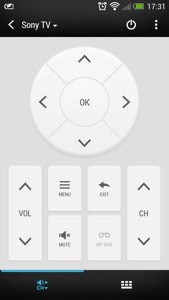
In today’s post I am going to cover compatibility with HTC Media Link HD but first I discovered an extra function with the TV app. When I was first using the app, I couldn’t find a button to change the external inputs. Below is a screen shot of the TV app.

20130404-174607.jpg

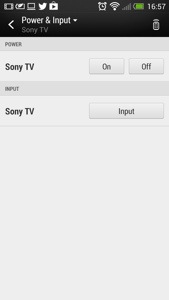
Notice the standby/power icon, top right. You would think this would turn off your TV. It does,but not straight away, as pressing it reveals the following screen.

20130404-180840.jpg

As you can now see the input and power options are available.

Now on to the HTC Media Link HD. Does this work with the HTC One and do you need it. First up, it does work, but I had a faulty HDMI cable which caused me some grief until I realised I needed a new cable. After a quick pairing, the TV screen is showing you to swipe up on the HTC One with 3 fingers. This connects the two devices. The HTC One screen rotates to landscape and looks as below.

20130404-175544.jpg

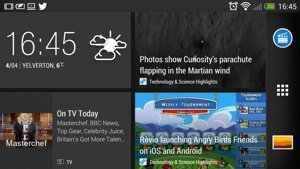
The odd part is how Blinkfeed works connected to the HTC Media Link HD. Tapping on a news item just reveals a photo and no text, as shown below.

20130404-175659.jpg

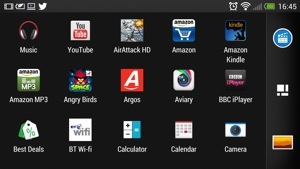
The applications folder switches to alphabetical mode and landscape.

20130404-175742.jpg

Photos and video are all displayed in landscape. Movies did not get played on the HTC One at the same time as watching the TV screen. Gaming doesn’t work very well using the Media Link HD. However, the clarity of the displayed image is awesome.

If you have a wifi enabled/DNLA TV you don’t need this gadget, but I have found that cropped and panoramic photos wouldn’t display via DNLA but were fine with the HTC Media Link HD. I have raised this issue with HTC, so if I get any updates, I will let you know.

From now on each day I am just going to post about my HTC One experience and anything I discover as I undertake my One journey. Feel free to ask questions too.

I have been playing a few podcasts, and the One is fantastic for this as the built in speakers are clear and loud enough to enable me to still listen to the podcast while I move around from room to room. It seems a rather basic thing, decent speakers, but the difference is noticeable.

Any how enough for today, catch up with you all tomorrow.

HTC First and Facebook Home – The Implications

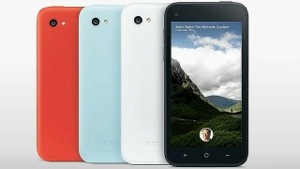
The above announcement of the HTC First, a Facebook phone and an app you can download on Google Play, Facebook Home was a major piece of news yesterday.

Facebook has just thrust itself aggressively into the mobile space and even Facebook declared its future was now firmly in the mobile space.

What was clever about the announcement is that it is a two pronged attack. Hardware and software. The HTC First is a 720p screen, 2000 maH battery, 16gb memory, 1gb ram, available in 4 colours and has Facebook deeply integrated. Facebook Home is a new launcher for a select number of phones.

With all of the above a key fact is Google Search is replaced with Facebook search. Search is essential for Google for its income. What Facebook has done is not only offered a fully inclusive piece of hardware along with a total experience on the software, but offered to convert other devices with a free download and remove Google’s income.

It is possible to being back Google search after installing Facebook home, but it won’t be long before Facebook offers its own App Store and more.

One thing is very certain, the battle for the mobile landscape is really hearing up between amazon, Facebook , Google, Amazon, Samsung and maybe HTC.

20130404-232716.jpg

HTC One – Review Part 8

Today will be the final part. I have covered off as much of the HTC One as possible. I am still learning little gems about this phone but without a doubt it is a marvel.

As I have mentioned before HTC having included a decent array of software but not bloatware. I useful app included is Flashlight. Open the app and you are faced with a picture of a torch. Tap 3 times to scroll through the torch light strengths.

20130402-152245.jpg

Next up in the calculator. It is a very basic calculator with a few more options in landscape mode. See screen shots below.

20130402-152343.jpg

20130402-152350.jpg

Next up is the voice recorder. The One records crisp quality audio and with the recording app you can share, set as ringtone and change the quality. Simple but effective app.

20130402-152714.jpg

20130402-152722.jpg

Lastly there is the car mode app. This brings up large buttons and some voice control options. The voice options include call, play, radio on, listen to station , check for new messages, find and help.

20130402-153008.jpg

20130402-153015.jpg

You can also add your own apps to the interface.

Some neat touches. If you tap the weather icon on the Sense clock it brings up an animated today forecast. You can swipe left to reveal hourly and daily forecast too. Once again HTC have thought of everything.

You’re half asleep an the alarm goes off. You swipe one of the alarm icons, but you can’t recall if you snoozed the alarm of stopped it. Have no fear, since if you did snooze it a notification will appear in the notification centre. Tapping the notification stops the snooze.

Ok, so finally I have covered off over 8 days, plus first impressions and camera effects and samples everything about the HTC One.

If you are interested in the design process of the HTC One, check out this from HTC

As I summarised yesterday, this is a superb phone. Software and hardware gel together. The HTC One is unlike any android phone I have ever had. It feels like a totally refreshing user experience. All the software links into each other, syncs with something, interacts with Blinkfeed, and it is the first phone whereby I have only installed 45 apps/games. That’s because it includes so much out of the box. It doesn’t have bloatware just fully functional and useful features and benefits. Everything has a benefit to you the user. The camera is excellent with its various modes, super easy editing, Zoe mode and loads more. The sound and audio are first class. The setup procedure and manual is the best I have ever seen. And the phone is the best looking device available. HTC really have thought about every menu, user interaction and kept it easy to use but still a powerful capable device. Plus the battery will last a day even if you use it a lot. It is also the first android phone that won’t have a new launcher added. All in all, it just works out of the box, like an iPhone but better.

20130403-062658.jpg

PS. There will be more 🙂