All posts by Gavin Fabiani-Laymond

Unknown's avatar

About Gavin Fabiani-Laymond

President, CEO & Editor of https://gavinsgadgets.com Reviews & News of Technology

Sony’s new flagship to receive a new camera – details

z5

For many years now the Sony Xperia Z flagships have all had Sony 20.7mp G Sensor. Despite this huge sensor and all the manual options, it hasn’t beaten the best of the best, especially in auto mode. This is rather bizarre as all the best phones with cameras use a Sony sensor including the iPhone 6 and Samsung Galaxy S6.

But now that looks like it is all about to change with a new 23mp sensor in the new Xperia Z5 flagship. I just hope the pixels and included Sony software can now integrate tightly to create great photos in full auto mode. Also the addition of optical image stabilisation would be a much needed addition too.

Sources – xperiablog.net / pocketnow.com

Android Wear update v1.3 is a disaster – details

I was very excited to receive the new firmware on my LG Watch Urbane a few days ago. New features included interactive faces and more. 

Except another new feature or should I say disaster was massive battery drain. How bad is this battery drain. Off charge at 7am and dead flat at 2pm. That’s 5 hours usage. It’s not happened everyday, but it’s happened twice now. 

So a quick google revealed its affecting every brand of android wear smartwatch. Just how on earth did Goolge allow this update to get released in this condition is beyond me!

I now have a useless watch too 
Source –  https://productforums.google.com/forum/m/#!topic/android-wear/SulEHMS1ETk

It’s real – it’s S-Pen gate – its caught out even the best! – details

Samsung is in the news for all the wrong reasons regarding the Note 5. The latest is over its design implementation of the stylus (S-Pen) for the Note 5.

Basically, if you insert the stylus the wrong way, it gets stuck and stops the pen detection working again.

Leo Laporte from the TWIT network was live last night trying to disprove that it was even an issue, except before he knew it, his S-Pen got stuck!

https://twitter.com/reneritchie/status/636255239469858816

The story has been published on the BBC News too – http://www.bbc.co.uk/news/technology-34051994 and other top tech websites.

For comparison purposes, it was not possible to make this error/mistake on the Note, Note 2, Note 3 or Note 4!

This is the Samsung Gear S2 – My views

gears2

Samsung has released a teaser photo of its upcoming Gear S2 smartwatch. What we can see from this photo is a good looking watch which clearly has a number of smart functions. If Samsung follows tradition, this will continue to run Tizen and work only with a handful of Samsung phones.

When I owned the Samsung Note 4, I also had the Gear S which also ran Tizen. However, despite the lack of apps, it was a pretty decent smartwatch and fitness device, albeit tied to the Samsung eco system.

With the next iteration, the Gear S2 looks like a lovely piece of jewellery and not a prison tag. I do hope though that Samsung opens up its S Health application so it becomes far more useful and is accessible via a web browser.

Source – http://www.androidcentral.com

LG G4 – How to add Qi Wireless Charging in less than 2 mins

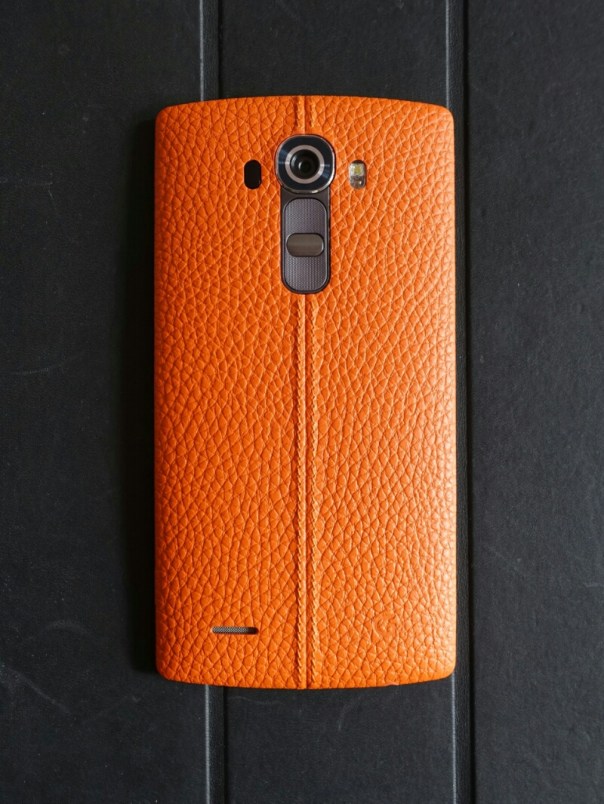
wpid-wp-1440244002032.jpg

Before I start to describe how to add Qi Wireless charging to the LG G4, please remember that if you use the method I used with the original back cover that came with your phone, you will void your warranty.

So I decided to add the Qi Wireless charging to my beautiful orange leather back. The first decision I had to make was which brand of Qi Wireless Sticker to choose. I read lots of reviews and looked at the various installations required and decided to buy the G4 SlimPWRpatch Qi Receiver for LG G4 by Fonesalesman. At the time of purchase you didn’t have to buy the bundle, just the Qi sticker.

The process is so simple. Use the pick to ease of the current NFC sticker from inside the battery back cover. Next, lay Qi wireless card over the battery and use the small stickers to hold in position over the metal pins. Put back cover on and test to make sure you have aligned card. If ok, peel off 3m sticker, replace back cover. Leave a few minutes. Take off back cover, remove small round stickers used to position. Job done. The printed instructions are probably simpler to understand than my explanation, or you can view the video produced by Fonesalesman.

I cannot stress how simple the installation using the Fonesalesman product. There is no guesswork involved in alignment and you align prior to fixing.

So does it work? Yes and that’s despite its curved back. I use it on my Samsung Note 4 Qi Wireless pad and my 2 x Nokia Qi Wireless puck. The NFC chip is also included in this product too.

image

Link to Amazon UK for – the G4 SlimPWRpatch Qi Receiver for LG G4 by Fonesalesman

Acer Liquid J Smartphone – review

Acer-smartphone-Liquid-Jade-Z-Black-main

Welcome to my review of the Acer Liquid J Smartphone. This is a slightly more expensive budget style phone from Acer compared to my recent review of the Acer Go (Liquid Z220), retailing around £149.

Specifications

– MediaTek MT6732 Quad-core 1.50 GHz
– 5″HD (1280 x 720) screen
– 13 Megapixel (Rear Camera) f/1.8, 5 Megapixel f/2.2 (Front Camera)
– 8gb storage, 1 GB RAM
– Sensors – Ambient Light Sensor, G-sensor, Proximity Sensor, eCompass
– Dual SIM Size – Nano or Nano/Micro SD combination
– FM Radio include
– Micro SD up to 32gb
– Android 4.4 KitKat
– Cellular – GPRS,HSPA+, LTE
– Bluetooth 4.0
– Wireless LAN
– Battery 2,300mAh
– Battery Talk Time 7 Hour, Battery Standby Time 400 Hour
– Dimensions – Height 143.5 mm, Width 69.8 mm, Depth 7.9 mm
– Weight (Approximate) 110 g

Profile Shots

Below are profile shots of the phone. Click on a photo to enlarge image. Due to the design of the phone, the depth of 7.9mm often looks even slimmer. The profile equates to a phone that is really great to hold in the hand and use one handed.

Phone Basics

The Acer Liquid J is running android 4.4.4. The Acer skin is using a relatively stock Google experience but Acer does add to this in many ways. Acer adds 13 of its own apps in to the equation including abDocs, abFiles, abMusic, abPhoto and abVideo. These 5 apps allow you to access media and files on your computer and stream them to the phone. AcerExtend is an app that allows you to view and control your Acer phone from your computer via USB or WiFi. Other Acer apps include Acer SnapNote, Easy hotspot, LiveScreen, Quick Mode, System Doctor and Quick Guide. AcerNav is a offline turn by turn navigation app, with the service and maps by TomTom. Other useful apps included are a FM Radio, Flashlight, File Manager, Quick Mode for changing to an easier to use home screen layout and then there are the bloatware apps. Bloatware includes the following – Skype, Real Football 2015, Puzzle Pets, Polaris Office 5, eBay, Clean Master, Acer Suggests, Amazon Appstore, Barcode Scanner, 50+ games and Booking.com.

In terms of the phones radios, WiFi, Bluetooth and cellular all worked well. Call quality and the 720p screen visibility, viewing angles were all reasonable. The screen features zero air gap technology which is similar to that used on the iPhone. This means that the screen on the Acer is pretty decent.

Like all manufacturers today, there is a race to produce slimmer phones. And the Liquid Jade Z is super thin at the expense of battery life. I managed to last a day but only just. However, I can’t deny the slim design and profile was comfortable to hold in the hand, and at 110g is extremely light.

Performance. The Liquid Acer Jade Z was nimble and smooth phone in use. This was replicated by an AnTuTu score of 30,831. The phone comes with 1gb ram and 8gb storage, which is as really low. A better option would have been 2gb/16gb storage in my opinion. Fortunately, you can add a micro SD card up to 32gb. If you don’t need to use the micro SD card slot, you can add another sim card.

Camera and Audio

Below is a sample HDR shot from the rear 13mp f/1.8 camera. The photos generally were better than most phones around this price point. This is helped by its f/1.8 rear camera but it is not at the level of the Samsung Galaxy S6 or LG G4.

Acer Liquid Jade Z HDR

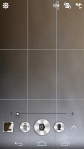
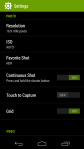
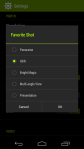
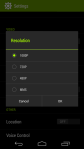
The camera interface is fairly straightforward, with other options available by hitting the settings icon. See screen shots below.

The loudspeaker is on the rear and projects a clear undistorted sound maxing out at 80db. This is not as high as other phones I have recently tested which as an average maxed out at around 83db – 88db. Headphone output is good and you can tailor the sound using the DTS Audio options. USB Audio is not supported. A FM Radio is included.

Conclusion

The Acer Liquid Jade Z feels great to use with just one hand, due to its slim profile and narrow width. Acer install a lot of useful apps but then ruin the experience slightly with a large amount of bloatware. I found it was possible to uninstall some of these apps but not all of them. You could disable the remaining apps in the phone settings, which made them no longer visible in the app drawer. 1gb ram and 8gb storage have the potential for performance/memory issues further down the line. At a suggested retail price of £149, the Acer Liquid Jade J has fierce competition. I was surprised to see that this phone is running android 4.4.4 which and not android lollipop. Its dual sim setup is handy but overall its a crowded market place around the £150 and there are some better alternatives at this price point although none are as slim as the Acer Liquid Jade J. So if overall thinness is a key consideration then maybe take a look at this phone.

More info – http://www.acer.co.uk/ac/en/GB/content/series/liquidjadez

Sony looks to be focusing on its cameras for its new flagship phones – details

In less than a week, Sony is due to take the wraps off its new smartphones, revealing all at its press conference on 2nd September 2015 at IFA 2015.

Based on the tweet below, it appears all eyes will be focused on its smartphone cameras. Let’s hope that they change and improve upon the sensor used on previous Xperia Z flagships. Sony provides its camera sensors in many flagship phone, including those from Apple and Samsung. It is about time, Sony used there own optics to produce a class leading camera on a phone!

https://twitter.com/sonyxperiagb/status/635851614083878912

Is Microsoft taking over android? – details

Microsoft seems to be taking a new path recently, trying to push its services across all platforms. If you buy a new Samsung phone, Microsoft apps are pre installed with 100gb One Drive storage for 2 years.

With Microsoft pushing its mobile services like One Drive, Office 365, Bing and Cortana for android, how much longer will it be before Microsoft could offer its own android phone without the need for any Google services? As another example, Bing can now be activated instead of Google Now on the long press of the home button.

So what do you think? Is this Microsoft’s plan for the future?