Tag Archives: HTC One

HTC One – Review Part 8

Today will be the final part. I have covered off as much of the HTC One as possible. I am still learning little gems about this phone but without a doubt it is a marvel.

As I have mentioned before HTC having included a decent array of software but not bloatware. I useful app included is Flashlight. Open the app and you are faced with a picture of a torch. Tap 3 times to scroll through the torch light strengths.

20130402-152245.jpg

Next up in the calculator. It is a very basic calculator with a few more options in landscape mode. See screen shots below.

20130402-152343.jpg

20130402-152350.jpg

Next up is the voice recorder. The One records crisp quality audio and with the recording app you can share, set as ringtone and change the quality. Simple but effective app.

20130402-152714.jpg

20130402-152722.jpg

Lastly there is the car mode app. This brings up large buttons and some voice control options. The voice options include call, play, radio on, listen to station , check for new messages, find and help.

20130402-153008.jpg

20130402-153015.jpg

You can also add your own apps to the interface.

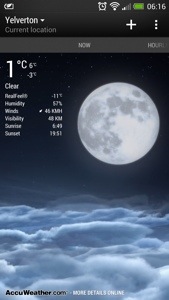
Some neat touches. If you tap the weather icon on the Sense clock it brings up an animated today forecast. You can swipe left to reveal hourly and daily forecast too. Once again HTC have thought of everything.

You’re half asleep an the alarm goes off. You swipe one of the alarm icons, but you can’t recall if you snoozed the alarm of stopped it. Have no fear, since if you did snooze it a notification will appear in the notification centre. Tapping the notification stops the snooze.

Ok, so finally I have covered off over 8 days, plus first impressions and camera effects and samples everything about the HTC One.

If you are interested in the design process of the HTC One, check out this from HTC

As I summarised yesterday, this is a superb phone. Software and hardware gel together. The HTC One is unlike any android phone I have ever had. It feels like a totally refreshing user experience. All the software links into each other, syncs with something, interacts with Blinkfeed, and it is the first phone whereby I have only installed 45 apps/games. That’s because it includes so much out of the box. It doesn’t have bloatware just fully functional and useful features and benefits. Everything has a benefit to you the user. The camera is excellent with its various modes, super easy editing, Zoe mode and loads more. The sound and audio are first class. The setup procedure and manual is the best I have ever seen. And the phone is the best looking device available. HTC really have thought about every menu, user interaction and kept it easy to use but still a powerful capable device. Plus the battery will last a day even if you use it a lot. It is also the first android phone that won’t have a new launcher added. All in all, it just works out of the box, like an iPhone but better.

20130403-062658.jpg

PS. There will be more 🙂

HTC One – everything so far including reviews, first impressions and more

HTC One Review Parts 1-9 Please note that part 8 is up tomorrow and 9 on Saturday.

HTC One – Camera Sample and also more here.

Comparison review between HTC One vs Samsung S3/S4 Note 2 vs iPhone 5 vs Nokia Lumia 620

HTC One – First Impressions

HTC One – Full Specifications

My guest appearance on Techtalkuk’s podcast discussing the HTC One

Reviews of Note 2 & Nokia Lumia 620 plus other reviews.

HTC One – Review Part 7

Welcome back to my last part of my HTC One review along with my conclusion. To read my other parts on the HTC One click here.

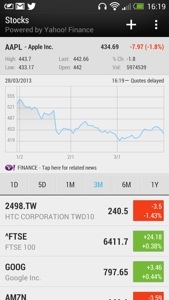
Today, I’m going to cover off the other stuff included by HTC. Firstly you get a full copy of Polaris Office and a PDF Reader. You then get a lovely stocks app, which can also link in to Blinkfeed. See screen shot.

20130401-162914.jpg

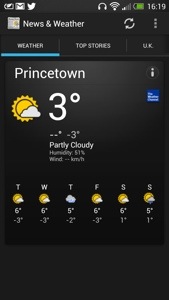
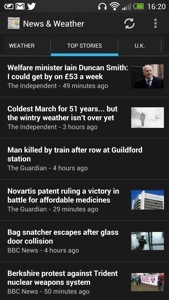
There is also a news and weather app, that can be set up to sync automatically. See below.

20130401-163004.jpg

20130401-163013.jpg

Next up is the Notes app which can be setup to sync with Evernote. You can hand scribble a note in several colours, audio record a note, or add a photo. You can share the note, add it to a calendar event and more. A very good app.

20130401-163518.jpg
Also installed is a Task app which syncs if required to Google Tasks. Again, functionally with the ability to have task categories too.

A rather unusual app is Best Deals. It is like Groupon and can link in to Blinkfeed. It can find local deals and you can setup the parameters to your liking.

20130401-163847.jpg

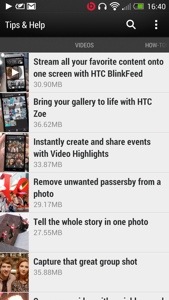
The last app I am going to mention is Tips & Tricks. This gets updated automatically too. It also can be included in to Blinkfeed. It features useful how to videos, guides on using all the phone and has a search option. Such a great app, and it gets updated.

20130401-164212.jpg

20130401-164222.jpg

So in summary the HTC One is unlike any android phone I have ever had. It feels like a totally refreshing user experience. All the software links into each other, syncs with something, interacts with Blinkfeed, and it is the first phone whereby I have only installed 45 apps/games. That’s because it includes so much out of the box. It doesn’t have bloatware just fully functional and useful features and benefits. Everything has a benefit to you the user. The camera is excellent with its various modes, super easy editing, Zoe mode and loads more. The sound and audio are first class. The setup procedure and manual is the best I have ever seen. And the phone is the best looking device available. HTC really have thought about every menu, user interaction and kept it easy to use but still a powerful capable device. Plus the battery will last a day even if you use it a lot. It is also the first android phone that won’t have a new launcher added. All in all, it just works out of the box, like an iPhone but better.

This was going to be the end, but I know you guys and girls are all too addicted to reading about the HTC One, so part 8 is tomorrow.

HTC One – Review Part 6

Further to my earlier HTC One review posts I will cover off the settings available on the HTC One. Just to recap, I’ve now have one home screen Blinkfeed, the camera is proving excellent with fun results using Zoe mode as well as all the pre and post editing of stills and video, the sound output via the speakers is loud and clear, the sound output via the headphones is exceptionally high quality and loud and the enjoyment factor has just increased. And this phone looks damn good.

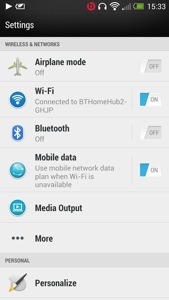
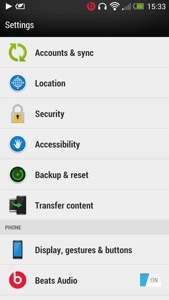
The settings can be accessed via the notification centre or from the settings app. In the notification centre there is top right a settings icon. There are no toggles for settings. The design of the settings is a lovely white background. See below.

20130401-155315.jpg

20130401-155323.jpg

20130401-155330.jpg

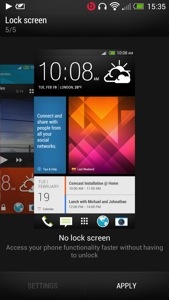
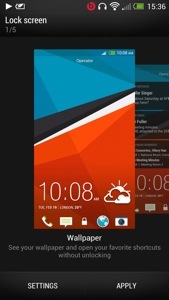
It is a very simple process to adjust the different settings. This I found is due to the fact you are not overwhelmed by options as you would be in a Samsung Galaxy device. The settings app works in portrait or landscape which is a neat touch. Under media output is more. This has further options for usage , VPN, mobile network sharing and NFC. The battery life on the One is strong enough to leave wifi and GPS enabled. I would do the same with Bluetooth if I used it. The One offers many options to personalise your phone. Tap the personalise setting menu and there are further options available. You can change the default lock screens from no lock screen (genius idea), wallpaper, productivity, photo album and music. See below.

20130401-155945.jpg

20130401-155959.jpg

20130401-160014.jpg

The HTC One has three home screens enabled but you can add or delete them except for Blinkfeed. You can however make any home screen your default. Trust me that its worth just having Blinkfeed and nothing else. You will need to make sure you have setup Blinkfeed correctly and if you have it will serve you well. I have also been using no lock screen mode. It is so much faster . Why do we need a lock screen ? If you like widgets and apps on your home screen you can add them to your hearts content.

20130401-160518.jpg
From the personalise screen you can change your tones. The next option is accounts and sync. I love the way you can integrate contacts from other services into your people app. You can sync twitter, Facebook, Flickr , Dropbox, google, HTC , LinkedIn, news, stocks, tips & help (very useful app), Watch, weather and more. You can also control what get synced and displayed. Location manages location services and gps. Accessibility is for people with slight disabilities to help make the device easier to use. Backup and Reset. This enables you to backup to either Google or HTC . This backs up your settings, accounts, passwords, bookmarks, and apps daily over wifi. If you select HTC the backup is stored on Dropbox. You get 23gb free storage for 2 years with Dropbox too. Display, gestures and buttons . Here you can select to auto rotate screen on or off, keep the screen awake or select auto sleep, change font size, brightness or auto brightness , notification flash settings, turn on 3 finger gestures for sharing and other stuff and calibrate the G Sensor. You have the manage app options, storage menu plus the ability to clear storage space, select options for the language and keyboard including slide input and alter the date and time. There are developer options and software update on or off too.

Tomorrow I will cover off some miscellaneous items and summarise my key thoughts about the HTC One.

HTC One vs iPhone 5 vs Samsung Galaxy S3 vs S4 vs Note 2 vs Nokia Lumia 620

Now if you are expecting a blow by blow specification review, go read any other review out there that states the obvious. Apart from the Samsung Galaxy S4 I have owned personally all the above phones. I currently use the HTC One as my main driver, with the Nokia Lumia 620 as my backup now. So what am I going to write about. Well my personal view and strengths of each phone from a real user experience. Having a phone with a heap loads of features and specifications are useless if they provide no real benefits or simply never get used.

Hopefully from my comparisons of each you can decide which phone is for you. This is more of a birds eye view looking down. So lets start with my current phone.

HTC One – key benefits is its design and looks. You will feel proud to have this in your possession. Whatever it cost you, you will always feel it was worth it. It makes other phones including the iPhone 5 look inferior. The lengths HTC have gone to make setting this up simple and transferring your stuff from any phone or even an iPhone is commendable. Also the manual is one of the best written and easiest to understand. The camera will always capture that moment first time. And the sound quality is superb, probably the best I have heard on any phone through the speakers or headphones. It also comes with a modest software suite that means you will actually find time to use most things provided. It’s focus is on its solid build, media, photo, sound and vision. As it has a slight curve on the back, it is fairly comfortable to hold. The screen is the best in class at present too. Truly fabulous screen. I think somebody at HTC thought what features does a phone really need to provide the best benefits to its customers. And that’s why the user experience is so satisfying. It is the first android phone I have used that doesn’t need tweaking, doesn’t need changing the launcher away from Sense and just works out of the box.

iPhone 5 – a compact phone but its aluminium is susceptible to being scratched. It’s angular edges also make it not that comfortable to hold but with a case that becomes not so much a problem. It is also the lightest of all the phones, and feels if I’m honest too light. It runs iOS which looks tired, as it appears not to have changed from a visual point of view that much since 2007, is actually in fact, very capable. iOS advantage is on the gaming apps. I don’t think the advantage is there anymore on the apps as android has caught up, and in several cases exceeds iOS. This is mainly due to the fact android has better sharing and multitasking. However, despite the iPhone 5 feeling tired, it is anything but that. It is a very competent phone, great call clarity, a camera so basic yet still very good even despite the competition. And if you don’t have a clue about phones you can’t go wrong with the iPhone 5. If you have other Apple products, then the iPhone 5 comes into its own sharing photos and apps between devices. However, I do feel the new HTC One steals the crown away as it is just as easy to use, and looks and feels like the new iPhone should have. However a new iPhone can’t be too far away, so maybe it might steal the thunder back. Another point to remember is if you have a problem with your phone, you can visit your local Apple store and walk out 10 mins later with the problem normally resolved. No other company offers such a brilliant after sales service.

Samsung S3 and S4 – I’m going to lump these two together as they are similar and based on each other. What you get is a slim powerhouse of Samsung software and hardware with more features than your kitchen sink. And that’s the downside as well as the upside. If you want to show off features like pop up video player, multiview screens or any of the gestures, the crazy amount of software, S Voice (Apple Siri clone ) and so much more, than this phone is for you. The camera and audio are good too, with loads of options. But remember in reality you won’t use a fraction of the stuff let alone remember how to use it all. I’ve seen many friends with an S3 and only using it to make phone calls and take photos or videos. Sacrilege I know but that’s reality. It’s also made of plastic, so unlike the iPhone and HTC One it looks cheap. However, that does mean you get removable batteries and memory card expansion. The memory card can only be used for photos, music and documents and not storing apps. Personally with the move towards more stylish phones I think Samsung should have upped their game and not used plastic. Some might say that with the functions of the S4 including software like S Health it really is a game changer. I doubt it. And remember it is bad enough company’s knowing a lot about you, but with S Health you are potentially providing information about your fitness and more. Too much data provided in my opinion.

Samsung Note 2 – it’s too big for most people due to its massive size. The HTC One is a better compromise in screen size and overall phone size. However its monster size does lend for ease of viewing anything. Multiview is a good feature too. As its big, so is the battery that will give you 2 days use with relative ease. It also features the kitchen sink like the S3 and a decent camera again. But Samsung realise the phone is a bit complicated so they feature another launcher option called easy mode. Goes back to my original comment that most people won’t use half the features. The features are mainly there to help sell the phone. However despite it size it’s a popular device. It also has a stylus just to slow you down even more. Well it does look cool. So if you want big, 2 days battery life and something that does everything the Note 2 is ideal.

Nokia Lumia 620 – this was my main phone for a week until I got the HTC One. However, I really loved this phone. It’s runs windows phone 8 so works on the concept the home screen is live tiles of your life, updating accordingly. And you know it really works well. Nokia provide a good suite of software from turn by turn Satnav , maps, music streaming and more and all free that make the 620 a bargain. It costs nearly 4 times less than any of the above phones. However windows phone 8 lacks apps and games, especially games, so it no good if you need a specific app that’s not available on the windows platform. But if that is not an issue, its the best option vs cost than all the others. It also features removable and changeable coloured backs, and a water proof back is available soon. The screen and battery life are good too, plus it comes with a reasonable camera. It’s the only phone I wouldn’t fit with a screen protector or use a case with. It’s feels the best in the hand over all the above phones, and the sort of phone you could mistreat more than the others and not feel worried.

Being totally biased if I had to chose one phone it would be the HTC One. Stunning looks and screen. Great software and hardware too. And it’s the first phone I feel I could keep longer than normal.

HTC One – Review Part 5

Welcome to my fifth part of the HTC One review. It has been an interesting 5 days with the phone and an experience that keeps on improving. As mentioned before I’ve started to embrace the phone the way HTC envisioned. Blinkfeed is my only home screen. It provides information on everything I need.

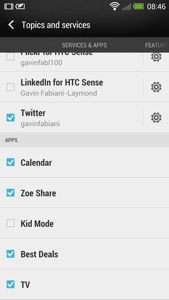
Blinkfeed has options to incorporate Facebook, Flickr, LinkedIn, twitter, your calendar, Zoe share, kid mode, best deals, and TV guide. The categories for fetching news include trending topics, business, design, entertainment, environment, gaming, lifestyle, music, politics, sports, Tecnhology and science, travel, and world. That’s a lot of stuff. But what’s good is it will show your latest calendar entry, a TV programme coming up that you want to watch, your social media updates and any other topic you have selected. Part of the Blinkfeed includes the clock, weather, date, the ability to search, respond, and select the category or social service only to be displayed. See screen shots below.

20130401-085034.jpg

20130401-085041.jpg

20130401-085047.jpg

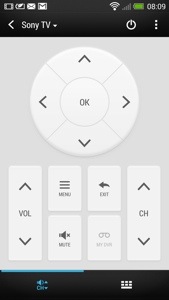
A feature I haven’t touched upon is the infra red sensor built into the power button. Combined with the TV app, you can set it up to control your TV and other devices. You also on first opening chose a few selections of preferred TV and then each time you open it, the app shows either your favourite programmes, recommended and what’s up now and next , next week and what programme you have scheduled. The time sensitive information can be added to Blinkfeed. Once setup the screens will look li

20130401-085441.jpg

20130401-085503.jpg

You also get basic controls in the notification menu and if app is active and the phone turns off, lifting the phone up turns the phone back on automatica

20130401-085616.jpg

20130401-085623.jpg

All once again very impressive and cross integrated into the features and functions of the HTC One.

Tomorrow I will have a look at the setting options and gesture support.