AirPods – Is Apple now the Number One Headphone Manufacturer in the World? – The Data is In!

AirPods

I recently reviewed the new AirPods from Apple. To read the review, Click HERE to find out why I was blown away by these and still am.

Tim Cook went on record to say AirPods were a runaway success and based on my views and others, it does not surprise me that these are so successful.

“Now according to a report by Slice, the AirPods made up 75% of all sales in the USA in December 2016. Before the launch on December 13, Beats occupied 24.1 percent of online revenue for wireless headphone sales, according to the report, with Bose following behind with 10.5 percent, then Plantronics and Jaybird with 7.8 percent and 7.45 percent respectively.

For the period after the launch, Apple suddenly became the dominant wireless headphones brand, moving from having no share at all to occupying 26 percent of the market. Revenue derived from Beats wireless headphones dropped down to a 15.4 percent market share during the same time, and though Jaybird and Plantronics dropped down to below 3 percent each, Bose managed to improve its standing to 16.1 percent.”

So it seems and comes as no surprise that out of nowhere, Apple is likely to soon be, if it isn’t already the number one headphone manufacturer in the world!

Source – Appleinsider

A Smart Hairbrush – With Microphones, Sensors and an App – Seriously?

hairbrush-kv

Experience the world’s first smart hairbrush that empowers you to track and improve hair health over time. This product results from a collaboration between Kérastase and L’Oréal, who bring worldwide hair expertise, and Withings, which brings state of the art sensors and app connectivity to everyday products. The resulting innovation is a brush that syncs seamlessly to your smartphone to provide valuable insights that can help revolutionize the home beauty routine.

Withings has developed the world’s first smart hairbrush that provides a holistic hair assessment. Integrating the best of hairbrush design with an array of high-tech sensors, Hair Coach sends all data automatically to the dedicated app, where you can view trends and get valuable advice on how to better care for your hair.

Unfortunately this is just the start of everyday items that will have an app and connect to the internet. I just don’t see the point of this. do you??

Source & More Info – Withings

Apple Watch – Make it a Nike Style Apple Watch for under £20 – Comparisons

Apple Series 2 Nike TP Straps

Over Christmas I had time to experiment with different Apple Watch straps. I wanted to make my plain Series 2 watch more like the Apple Nike Watch. So I bought 2 different brand Apple Watch straps that claimed to look identical to the official versions.

Apple Series 2 Nike TP Straps

So what I did was go for a black/yellow finish and the same Nike looking style strap, but in a colour not offered by Apple officially. I picked the red/black finish.

My observations are the plastic used in the third party straps are not of the same quality as Apple original straps, but they do costs over £30 less. As the straps have holes, they are slightly lighter,  and they allow your skin breathe more.

To give you a better perspective, I have filmed a short video capturing more of the differences, comparisons with official Apple straps and showing the straps against some cases, for that perfect colour coordinated look.

Video Review

In my video review, I am hoping you get a better perspective of the different straps, the quality versus and Apple original strap and some colour coordination with some official Apple iPhone cases.

Conclusion

My little experiment in discovering Nike style Apple Watch straps was a huge success. I personally prefer the black/yellow mix although I at times I like switching back to the red/black strap. The Nike looking straps looks gorgeous!

Useful Links

iMiWell Black/Green Nike Style Apple Watch – Click HERE.
Elobeth Nike Red Style Apple Watch Strap – Click HERE.

Other colours and mixes of straps are shown on using above links.

Help support gavinsgadgets when you shop on Amazon UK – http://amzn.to/2i4YFEY
Donations – https://www.paypal.me/gavinsgadgets

It’s a New Year and I’m using my Apple Watch to help me get fitter!

Apple Watch Fitness

Apple created a new achievement award for 2017. It’s goal was to help people kick start and get back on track with their health and fitness activity. To achieve this new achievement award, you have to clear all 3 activity rings on the Apple Watch from a Monday to Sunday. In addition to receiving the reward, you also received new stickers in the messages app.

So I wondered whether I could focus and hit this new award. In the first week I hit the target. In fact on most days I exceeded the required elements for each activity ring. This also meant I lost 3 lbs. On some days to make sure I hit the minimum 30 mins exercise I did do a fast paced walk on the spot.

So my goal for 2017 is to undo the damage done over Christmas and New Year and continue my quest to get slimmer and healthier.

Remember, you don’t need an Apple Watch to stay fit, in fact you don’t need any fitness device, but if you do have a tracking device of any kind, I have found it has helped to share my progress with a friend. In my case, I am sharing my data with my wife. When either one of us clears a ring, the other is notified. The end result is it keeps both of us on track in a friendly competitive way.

So whatever your plans for 2017, good luck, stay fit and healthy. At the end of this month, I will update you on my progress. Hopefully, it continues the way it started.

Zecti 5 in 1 Collapsible Multi-Disc Light Reflector – My Review

71jtisu6aal-_sl1095_

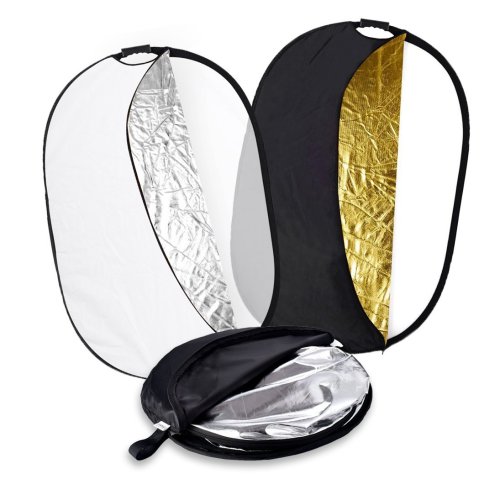
Welcome to my review of the Zecti 5 in 1 Collapsible Multi-Disc Light Reflector. The Zecti 5 in 1 Light Reflector costs £26.99.

The Key Features –

– The light reflector comes with different reflective surfaces that can be used to fill in, reflect, diffuse, absorb or soften light
– Made with durable and flexible galvanised steel frame
– Fairly easily spread and folded into small size and it is easy for you to carry it from one location to another
– Comes with an anti-slip handle which has a 1/4″ screw hole in the handle allow it to fit most of the standard reflector holders/tripods
– Choose from five colours translucent, gold, white, silver and black

61nm7gqa6tl-_sl1420_

In Use

The first time I unzipped the Zecti black carry/protective bag, I had a slight surprise as the reflector sprung open and was considerably larger than the small bag it had been stored in.

I like the fact is collapses into the bag for portability but it is a bit awkward trying to get it to fold initially. The 1/4 inch tripod screw mount is handy too.

To be honest the only way you can appreciate how compact this collapses and then how large it becomes is by watching the short video below. So now enjoy the video.

Video Review

Conclusion

I have always wanted light reflectors and I must admit the portability and flexibility of the Zecti 5 in 1 set is ideal. It is also competitively priced which is a bonus.

Useful Links

To save £4 on the light reflector use code HDKY7XLD. This will expire in a few weeks.

More information on the Zecti 5 in 1 Light Reflector – Click HERE.

Help Support the Channel when shopping on Amazon UK – http://amzn.to/2i4YFEY
Donations – https://www.paypal.me/gavinsgadgets

Tidal Music Streaming Service just integrated MQA into its service – High Quality Streaming Becomes a Reality – Full Details & Explanation

TIDAL_2

TIDAL have just integrated MQA into it’s service.

I’m not sure how much you all know about MQA but in a nutshell, it’s a new audio format that plays back in extreme high res, 24bit, as opposed to 16bit. It’s designed to play back in studio-like quality and just as the artist intended. So far, the entire Warner Music catalogue has been integrated, so that’s thousands of songs. Apart from the enhanced quality, MQA uses a lot less data to stream as the audio file sizes are smaller than traditional FLAC audio files. In laymans terms, the MQA audio files are zipped in to a smaller file, streamed over the air, and then unzipped at the other end. Neat.

What is TIDAL Masters?

TIDAL has partnered with MQA (Master Quality Authenticated) to deliver guaranteed master-quality recordings directly from the master source – an audio experience that the artist intended.

What is the difference between HiFi quality and Master quality?

HiFi audio is a superior sound, but is still limited in its resolution—44.1 kHz /16 bit. Yet TIDAL has partnered with MQA to deliver something infinitely better: an authenticated and unbroken version (typically 96 kHz / 24 bit) with the highest-possible resolution—as flawless as it sounded in the mastering suite. And exactly as the artist intended it to sound.

I’m already a TIDAL user, what do I do?

Premium Members: As a Premium member, you will need to upgrade to a TIDAL HiFi Member and use the
desktop application in order to enjoy TIDAL Masters audio feature. HiFi Members: All you need is your TIDAL HiFi membership to access thousands of master-quality albums only through the TIDAL desktop application. When you are in TIDAL desktop application, go to “What’s New” and select “Masters” in the Albums section. If you don’t have the TIDAL desktop application, you can find it here: http://tidal.com/us/download .

How can I listen to TIDAL Masters (master-quality recordings)?

All you need is a TIDAL HiFi membership to access thousands of master-quality albums only through the TIDAL desktop application. When you are in TIDAL desktop application, go to “What’s New” and select “Masters” in the Albums section. To get the best quality, make sure to select “HiFi/Master” quality in “Settings” and then select “Streaming”. If you don’t have the TIDAL desktop application, you can find it here: http://tidal.com/us/download .

Where do I find a list of available master-quality albums and tracks?

TIDAL HiFi members can access our growing catalog of master-quality albums and tracks only through the TIDAL desktop application. Go to “What’s New” and select “Masters” in the Albums section.
Master-quality albums and tracks will be available on mobile and web application at a later date.

What will it cost?

We are introducing this to all TIDAL HiFi members at no additional charge.
How much music is available in Master quality?

We have music over 30,000 tracks from Warner Music Group, our TIDAL artist owners and key independent labels. We will continue to add more master-quality content over time.

Tech Addicts Podcast – The Next Episode is Live – Six times the Honor, Five times the Hosts

techadditcs

Tech Addicts Podcast is back again with a new episode starring Gareth Myles, Jay Garrett, Leila Gregory, Brenda Arndt and myself. Tech Addicts is released every week. Twitter: @garethmyles ; @gavinfabiani ; @GadgetyNewsCom ; @JayGarrett ; @swanny ; @girlsngadgets ; @wildlime

To listen to the latest episode subscribe by searching “Tech Addicts” within your favourite podcast app, iTunes, Google Play Music Podcasts or use the URL “mobiletechaddicts.libsyn.com/rss” to add directly.

Or you can listen directly below –

Honor 6X – Style and a Camera Bokeh Mode & more all for £224.99 – Detailed Camera Specs & Where To Order Now

Honor 6X - Grey (4)

Honor is back with its new Honor 6X. The Honor 6X has a dual camera setup. The main sensor (a Sony IMX386 sensor), is 12 megapixels, equipped with phase autofocus and LED flash, and a secondary 2 megapixel sensor, that helps deliver pro photography: Even in low light, noise levels are kept to a minimum thanks to Deep Trench Isolation, which isolates pixels to suppress blur. The result? A sharper picture quality with better colour reproduction, and no more challenges getting subjects in focus. The 12mp sensor has a 1.25um pixel size and can lock on focus in 0.3 seconds.

The 8mp front camera has a Prism ISP for superb selfies. The 8mp front camera has a 77 degree angle, and intelligent software that is self-adaptive for skin tone and can auto touch up faces.

The lens system consists of six layers to enhance uniformity of light and reduce screen distortion significantly. To add to this, Phase Detection Autofocus Technology (PDAF) promises camera focus on a rapid 0.3 seconds, guaranteeing moments won’t be missed. Wide Aperture mode sets the user up with a host of photographic effects with the ability to adjust f/0.95 – f/16, including watermarks, whilst guaranteeing a simple-to-use editing.

Honor 6X - Grey (2)

The other key specs start with its gorgeous looks using 2.5D glass and a metal frosted design. It comes equipped with a Kirin 655 processor (4 cores at 2.1GHz and 4 at 1.7GHz), 3,400 mAh battery, 5.5-inch screen 1080p Full-HD resolution (403 pixels-per-inch) 450nits brightness, 32gb rom, 3gb ram, micro SD cards up to 128gb, Micro USB faster charging at 5V 2A, a finger print sensor and a 3.5mm headphone jack.

Where to Buy

The Honor 6X is available from January 4th in Grey, Gold and Silver on Honor’s vMall and Amazon for an incredible price of just £224.99, and with Three at the end of January, the exclusive provider for Honor.

More information at Amazon UK – Click HERE.
Honor 8 in blue is currently on offer – Click HERE

Flying and buying a drone – stuff retailers don’t tell you and should!

I recently attended a drone session and was left gobsmacked by what I learnt. Despite witnessing what a £4,500 DJI drone can do, which is flipping amazing, I came away from the event completely certain that I would NOT be buying a drone.

Why?

For starters, you need to be aware of the Drone Code. If you haven’t seen this then have a look here – http://dronesafe.uk/drone-code/ .

I then discovered you need the landowners permission to fly a drone. I wanted to capture some drone photography of Dartmoor National Park. However, the DNPA do not grant permission. Maybe a farmer that owned some land might grant me permission but there is no guarantee.

I can fly a drone in my back garden though. But unless you own acres of land, I cannot see the point of flying a drone in your back garden, other than to fly it into a tree.

If you do own a drone, another other aspect is accidents that can occur if a drone hit a person or property. The propellers on the drone can slice skin fairly easily too.

Now I know a lot of people still fly the drones without the correct permissions. I just don’t see the point of spending a lot of money on an item that is quickly being clamped down by codes and ultimately to come will be legislation.

The Drone Code currently states –

1 – Keep the drone in sight at all times
2 – Stay below 400ft
3 – Every time you fly the drone must follow the manufacturers guidelines
4 – Keep the right distance from people and property – 150ft away from people and houses, 500ft away from build up areas and crowds
5 – You are responsible for each flight. Legal liability and responsibility lies with you. Failure to fly responsibly could end up in a criminal prosecution.

If you decide to buy a drone, just make sure you are aware of the facts.

Useful Links

More information on the different types of drones – Click HERE.

The Drone Code Website – Click HERE

Converting all my house lights to a wireless setup using Philips Hue & Apple HomeKit – the highs and lows

For nearly 2 years my living room lights were all controlled via an app. These were the Belkin WeMo Smart Lights. These were on an Amazon Black Friday deal in December 2014. 
At the time, the Philips Hue lights were also discounted but they were nearly three times the price, so economics became the deciding factor. Belkin did promise to update the system to provide HomeKit but 2 years down the line they have renegaded on that promise or are asleep at the wheel!

So I decided to bit the bullet a few weeks ago, sell my Belkin WeMo Smart Light system, and acquire a few pieces from the Philips Hue system that work with Apple’s HomeKit and nearly all other systems on the market, including Amazon Echo and Samsung Smart Things. 

It is quite handy buying the lights around Christmas time, as often there are some decent deals available. If you are buying into the Philips Hue system make sure you buy the Philips Hue Hub v2 and upwards as this is when HomeKit support was added. If you have the original Hub, you can just go out and buy the newer version hubs. The same goes for the Hue lights. There are now 3 versions. Version 1 are the white bulbs that don’t change colours, version 2 added rgb colours and the brand new ones , version 3 go slightly brighter and have richer blues and greens. However, there is nothing wrong with version 2 or 1 bulbs as these work just fine. Also the extra brightness obtainable in version 3 bulbs is only possible with certain white hues. So buy the older versions and save some money. That is what I did. I decided I would not need every room to have colour changing bulbs.

So the first change I did was to place the Philips Hue version 2 bulbs into my living room. To use with Apple HomeKit is a simple setup. You will need two factor authentication on your iCloud account and for remote access either an iPad left in your home or an Apple TV 4th edition. Fortunately , I have two factor authentication already setup and the latest Apple TV. 

To start using Apple HomeKit, you simply open the Home app on your iPhone, search  for the bulbs, then scan the HomeKit code on the Philips Hue box or Hub sticker. You can add the bulbs first using the Philips Hue app, which I would recommend doing, as the app will update the firmware. So with HomeKit enabled, activating the lights using Siri is now live. So using Siri  via my Apple Watch or iPhone, I have full control of the lights, turning them on or off, setting a scene, adjusting the brightness or changing the colours. Now the real test became with my wife. Could she get used to using Siri to operate the lights or would she get totally p*ssed off with the technology. 

Once I had set up HomeKit on my iPhone, added some scenes and a few other settings, from the home app, I invited my wife into the HomeKit setup. She accepted on her iPhone 6S. So when she came into the room, I told her to ask Siri to turn on the lights using her Apple Watch. I then asked my wife to ask Siri to change the colour of the lights to a colour of her choice. She did this and was genuinely suprised at how cool and easy it was to operate the lights. This then gave me the go ahead to start changing more and more of the bulbs around the home, and include a few motion sensors and add some automation to the setup. 

Now in case you’re wondering, you don’t need Siri to operate the lights.  Flicking up on the iPhone to bring up the control centre, scroll left twice and your in the home scenes and accessories tab. Here you can turn the lights on or off, adjust the brightness or colours. 3D Touch is used on the icons. I will embed a video to show this and a load more options. You really should watch this video to see how Apple have produced such a great home application. 

So after nearly a month, I have automated the lights in the upstairs hall landing, master bedroom, living room, kitchen and dining room. If I leave the house or return home, certain sequences of lights turn on or off, at particular levels of brightness and colours. If I move around the house and trigger one of the motion sensors, certain lights are turned on or off.  The automated procedures are smart enough also to know that the lights only need come on after sunset as well (if you select this to occur). All this slick functionality is a joy to experience as a tech geek. Also being able to control the lights from the Apple Watch is cool. You don’t even need to use Siri on the Watch, as the home app with dock enables you to control the lights as needed. In the kitchen I added some Philips Hue light strips. These provide superb mood lighting. Green is the favourite colour with these. The light strips are hidden too. They have 3M sticky tape on the strip to secure them properly. If you buy version 1 light strips, these are not extendable. Version 2 can be extended. Version 1 strips do have changing colours though. I have used version 1 strips as they were long enough for my needs and saved money too.

Sounds like a dream doesn’t it. Well, it’s not quite that. These are the lows or things to think about. Unless you live alone, then the below points are not as important or relevant. If you change all the lights or a high percentage, you may not always have your iPhone or Apple Watch on you. My wife is a good example of this. So that means you really need to think about installing the Philips Hue switches in certain rooms to be able to manually control the lights just in case you haven’t got any Apple devices nearby. I would recommend having these switches in the main living areas e.g. Living room, kitchen and main hallway. I haven’t got these installed, so am trying to see if with the aid of motion sensors and automation processes I can avoid installing these. I might not be successful here, as my wife may not enjoy the inability just to walk into the living room and press a switch to turn the lights on which is simple and less effort sometimes. It’s all a fine balance. 

Like all uses of technology it has to make life simpler and more enjoyable. I believe I have reached that balance, but if I go the next step and change every single light bulb, I will need to also invest in the Philip Hue light switches. Problem is, going to the next level is very expensive. I also am very pleased with the moderate setup which adds automation, mood lighting and a certain cool factor. 

Just some final thoughts. I wish in the UK, that the Apple HomeKit hardware was more extensive. I imagine in the coming months there will be more products coming out though. However, I am prepared to wait patiently as Apple’s HomeKit system is the most secure available. This is really important point as I can tell you I don’t fancy my home lights and other internet connected devices being hacked. 

Useful Links

More information and the latest pricing on Philips Hue range of lights, sensors and switches – Click HERE.