Category Archives: Wearables

LG Watch Urbane – Beauty and Disaster – First Impressions

image

So yesterday my steel LG Watch Urbane arrived. My wife watched my open the box to reveal the Urbane, and her first words were “Ooh that’s rather lovely, much nicer than that prison tag thing you had” (FYI the prison tag referencing is the Samsung Gear S).

image

In fact the Urbane is gorgeous and the black leather strap matches it really well. As you can see I have been playing with watch faces, and apart from some of the included watch faces from LG, I have also installed Rolex and other brand watch faces with ease.

17 of my existing apps also offered some form of extra service on the Urbane. Wrist flicking to scroll through notifications works well. As does replying and deleting stuff or asking Google for information.

One aspect of the Urbane is its heart rate monitor. I can perform manual checks. I can tell LG Health app on the phone that I am starting an exercise or walking and it tracks everything, and displays your heart rate during your activity.

But how the f*** do you get the Urbane to transfer the heart rate data to your phone is beyond me. Google Fit is not displaying anything. LG Health app isn’t either even though it is meant to.

So I called LG support who have phoned me back twice and have yet to find a resolution. Let’s hope it is simply an app update or firmware fix.

So in one hand I was delighted with the Urbane’s look and feel only to feel aggrieved at its useless ability to not save heart rate data.

I have also ordered a watch strap tool remover, an orange sports strap and a brown leather strap. More to follow on my Urbane adventure in the coming weeks.

Asus announces the ZenWatch 2

ASUS-ZenWatch-2-940x539

ASUS announced ZenWatch 2, the update to its original ZenWatch. The ZenWatch 2 is powered by Android Wear.

-ZenWatch 2 is available in 2 sizes & 3 case colours with 18 different strap & colour combinations, and users can create custom watch faces

– ZenWatch 2 works with the next-gen Wellness smartphone app to provide a comprehensive solution for managing fitness and overall wellness

This is clearly “inspired by the Apple Watch in more ways than one. I really can’t say much more than that. Asus introduces a “crown” and a new “magnetic charger”, 2 different sizes, 3 case colours and 18 strap combinations. It looks good. But what do you think of the ZenWatch 2?”

From Asus –

“ZenWatch 2 builds upon the original ZenWatch, offering an even more refined design, an improved user
experience, and the introduction of completely new functionality. ZenWatch 2 now includes a metal watch
crown, enhancing the user experience by a providing new way to interact with the watch. It also comes
with an all-new magnetic charger that features effortless attachment and dramatically improved battery
recharge times.

Combining sophisticated sensors with all-day comfort, ZenWatch 2 works together with the all-new
Wellness smartphone app to serve as a personal activity and fitness manager to help users keep their
lives in balance and achieve personal fitness goals.

ZenWatch 2 features a durable stainless-steel case available in two sizes —— and attractive Silver, Gunmetal and Rose Gold colours to comfortably fit anyone’s wrist and sense of style.

ZenWatch 2 is available with a wide-range of straps in a variety of materials and colours for further
personalization. A tough yet supple rubber strap comes in Blue, Orange, Red, and Taupe colours, and is
the perfect choice for athletes, people with active lifestyles, or those who like a more casual look. A soft, premium leather strap is available in Khaki, Brown, Gray, Blue, and Orange colours, providing an elegant look that fits any situation. A stainless-steel link bracelet comes in Silver, Gunmetal or Rose Gold colours to perfectly match ZenWatch 2’s case colours for a bold, luxury watch look and feel. ASUS has also partnered with Swarovski® Professional to produce a gorgeous leather strap with an embossed diamond pattern and tastefully accented with Swarovski crystals.

Complementing its physical design, ZenWatch 2 comes with instantly-changeable software watch faces.
The variety of available designs lets users easily customize their watch to fit any style, mood, or occasion, such as using a traditional, elegant watch face for work or a night out, or changing to a more playful design for use during leisure time. Wearers can even create their own custom watch faces in the new Watch Face Land app for a truly personal and unique ZenWatch 2 experience.

SPECIFICATIONS

-Processor: Qualcomm® processor
-Operating System: Android Wear
-Display: AMOLED
-Cover Lens: 2.5D curved Corning® Gorilla® Glass 3
-Charging: Magnet charger cable
-Water Resistance: IP67
-Body Colours: Silver, Gunmetal, Rose-Gold
-Strap: 22mm (Rubber, Leather, Metal) smaller size 18mm
-Mobile power bank : Chargeback
-Dimensions: 49 x 41mm Smaller size 45 x 37mm

Sources – Asus PR/ Image via Cultofandroid.com

Today is “Apple Watch” Day – Share you Thoughts and View “11 How To” Videos + More

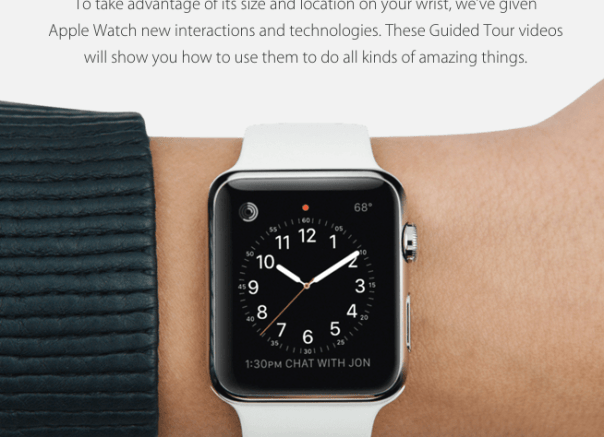
Below are a number of “How To” videos from Apple showing you how to use your new Apple Watch. If you Apple Watch did get delivered today, so share your first thoughts in the comments.

In case you want to play with a few apps, according to Apple on launch day there will be 3,000 apps supporting the Apple Watch. Sounds like a success already!

Android Wear responds to the Apple Watch – details

Apple is dispatching its new Apple Watch to some lucky folks this Friday along with some neat features. Google is not going to let Apple take all the thunder, although it is rumoured Apple sold over 3m watches in the first weekend alone.

In response, Android Wear is receiving a large update which includes –

– Wrist Flicking Gestures – Flick your wrist away from you to view the next card or notification; flick towards you to go back.

– Emoji Drawing – Want to reply quickly to a notification? If an emoji or two will suffice, you can now just draw it.

– A New Interface Flow – Up until now, launching third party apps built for Android Wear has been kind of a pain — you either had to do it by voice, or by swiping and tapping through a bunch of menus. Now they’re the focus. Swiping to the left from the idle/watch screen will bring up a list of your apps. Swiping left again will show you contacts. Swiping left a third time shows a list of actions like “Take a note” or “Set a timer”, primarily meant to remind you of things you can do with your voice through the “Ok, Google” command.

– Always On Apps – Apps can now elect to keep the screen alive as long as it’s open,

– Wi-Fi Support – Android Wear watches actually have Wi-Fi built-in but the chip has just been inactive. With the update, your phone can actually be miles away — as long as your phone has data and your watch is connected to Wi-Fi, and your notifications and replies will pass between them. This feature is already present in the Samsung Gear S running Tizen OS.

If Google can get an Android Wear watch to work with iOS then this could be a decent option for a cross platform smartwatch.

Source – http://www.techcrunch.com

“Phones Show Chat” , “One More Thing” & “Gav & Dave’s Tech” Podcasts updates

As you all know, I co-host “Gav & Dave’s Tech Podcast”. From next month, and monthly thereafter, I will be a regular co-host on the “Phones Show Chat” podcast.

“Phones Show Chat” Episode 248 was recorded yesterday with host Steve Litchfield and myself, in which we discussed the Samsung Galaxy S6, HTC One M9 and 7 other phones. For more information on the Phones Show Chat podcast, click here – http://stevelitchfield.com/sshow/chat.html

My Co-Host Dave on “Gav & Dave’s Tech Podcast” has just started a new Apple only podcast with Jason Green, called “One More Thing”. Episode 1 went live yesterday, so go give it a listen. Click here – http://www.onemorething.audio/

Don’t forget that the next episode of “Gav & Dave’s Tech Podcast” will be out within the next 2 weeks. So that’s 3 podcasts to subscribe too!

Apple Watch – My 15 mins Hands On Experience

During my lunch break, I ventured out of the office to grab a sandwich and happened to trip in to the Apple Store.

Inside, behind glass on one of the tables, were a large selection of the different Apple Watches/strap combos with one side showing the larger 42mm Apple Watch options and then the other side the smaller 38mm sized Watch.

In person the Apple Watch looks really elegant up to a point. As I was browsing I was approached by an Apple employee who asked if I would like to try on some of the watches. The sales assistant explained that there was a 15 min time limit and that at present the wait would be no more than 5 mins before a time slot would be free. So reluctantly, I said yes.

For starters the smaller Apple Watch did not suit my wrist, but it was still a positive step to see an option for those that don’t want a huge chunk on their wrist. I thought the larger Apple Watch was a decent size and actually did not look too big. I tried the Apple Watch Sport first of all. This was the black strap with a grey aluminium shell. Gorgeous piece of technology and out of all of these options, this is the version I would choose, if I was buying one. I would also add a white sport band strap which cost an extra £39 on top of the £339. The other straps that I really liked were the leather loop and milanese loop. I actually preferred the Apple Watch with a stainless steel casing but at around £500 this becomes to expensive, especially as I would then choose the leather loop strap which takes the price to £599. The metal straps were not my cup of tea.

All the Apple Watches were in a demo mode, so I did not get to actually try using one for real. However, some of the screens and watch faces looked stunning. The taptic feedback is simple but genius as only you would know of new notifications ,and not the whole world if it worked using vibrations.

But my overall takeaway was how well executed/designed/manufactured the new Apple Watch was, along with the huge wealth of options. My only problem is that I don’t have an iPhone but I can tell you this, seeing the Watch in person really makes you want one, even if there is no real reason for one. It is probably the ultimate gadget.

As the Apple Watch was running in demo mode, I have answered questions still exist around what will be battery life be and how smooth will it be to operate the Watch. Also of a surprise was how many free try on areas were empty. Plus my 15 mins did extend slightly longer, not that I was complaining.

The Hottest Reviews/Editorials – Oppo HA-2 & PM-2, Nexus 9, Samsung Galaxy A5, HTC One M9, Samsung Galaxy S6 & S6 Edge, Lumia 535, Acer Aspire 11& Iconia 8, Sony SBH80 & 50 more

If you have been busy over the last 10 days, don’t worry. Below are the reviews and special editorial pieces that have been published on Gavin’s Gadgets.

And stay tuned for more reviews over the next few weeks including HTC One M9, Samsung Galaxy S6 Edge 128gb, Official Samsung Galaxy Note 4 S Charger Kit, Oppo PM-2 Headphones, HTC Desire 820, Nokia Lumia 830 and the next episode of “Gav & Dave’s Tech Podcast”.

Tablets/Notebooks

Samsung Galaxy Tab S 10.5 Tablet review
Samsung Galaxy NotePro 12.2 – 9 Part Review
Acer V15 Nitro Windows 8.1 laptop review
Acer C720 Chromebook review
Acer Aspire Switch 11 review
Nvidia Shield Tablet – 7 Part review
Acer Iconia 8 Android Tablet review

Smartphones

Samsung Galaxy S6 and S6 Edge – Hands On
Yotaphone 2 – 4 Part review
Samsung Galaxy A5 review
Samsung Note Edge – 14 Part Review
Samsung Note 4 – 17 Part Review
BlackBerry Passport 10 Part Mammoth review
Apple iPhone 6 Plus – 24 Part Review
Amazon Fire Phone – 2 Part review
LG G3 review – 31 Part Review
HTC Desire Eye – 13 Part Review
HTC One M8 – 11 Part review
Acer S55 review – 6 Part Review
Honor Holly – 4 Part review
Honor 6 – 12 Part Review
Microsoft Lumia 535 review
Nokia Lumia 1520 – 6 Part review

Wearables/Virtual Reality Headsets/Fitness Trackers

Samsung Gear VR – Virtual Reality Headset – Review
FitBit Charge HR review
Acer Liquid Heap Smartband review
Samsung Gear S – 9 Part Review
LG G Watch R – review

Audio Reviews

Oppo PM-2 Headphones – First Impressions after 100 hours
V-Moda Crossfade M100 headphone review
Plantronics BackBeat Pro bluetooth headphones review
Fiio RC-HD1 Headphone cable review
Sennheiser HD518 Headphone review
Philips Fidelio M1BT Headphone review
AKG K845 Bluetooth Headphone review
Sony SBH80 Bluetooth headphones review
Sony XBA-H1 Headphone Review
Logitech UE Headphones – 3 part Master review
Audio Technica ATH-AD900x Headphone review

Oppo HA -2 Portable Amplifier and DAC review
Cayin C5 Portable Headphone amplifier review
Fiio E12 – master review
HiFiMeDIY Sabre Android USB DAC review
Little Dot MKIV Tube Headphone Amplifier review

The Internet of Things

Belkin WeMo Smart light Bulb starter kit review
Mipow Playbulb Rainbow review
Mipow Playbulb review

Editorials

Technology working in Harmony
HTC One M9 Camera vs Samsung Note 4
The Myths of High End Audio Blown Apart – Plus Photos of a £100,000 system

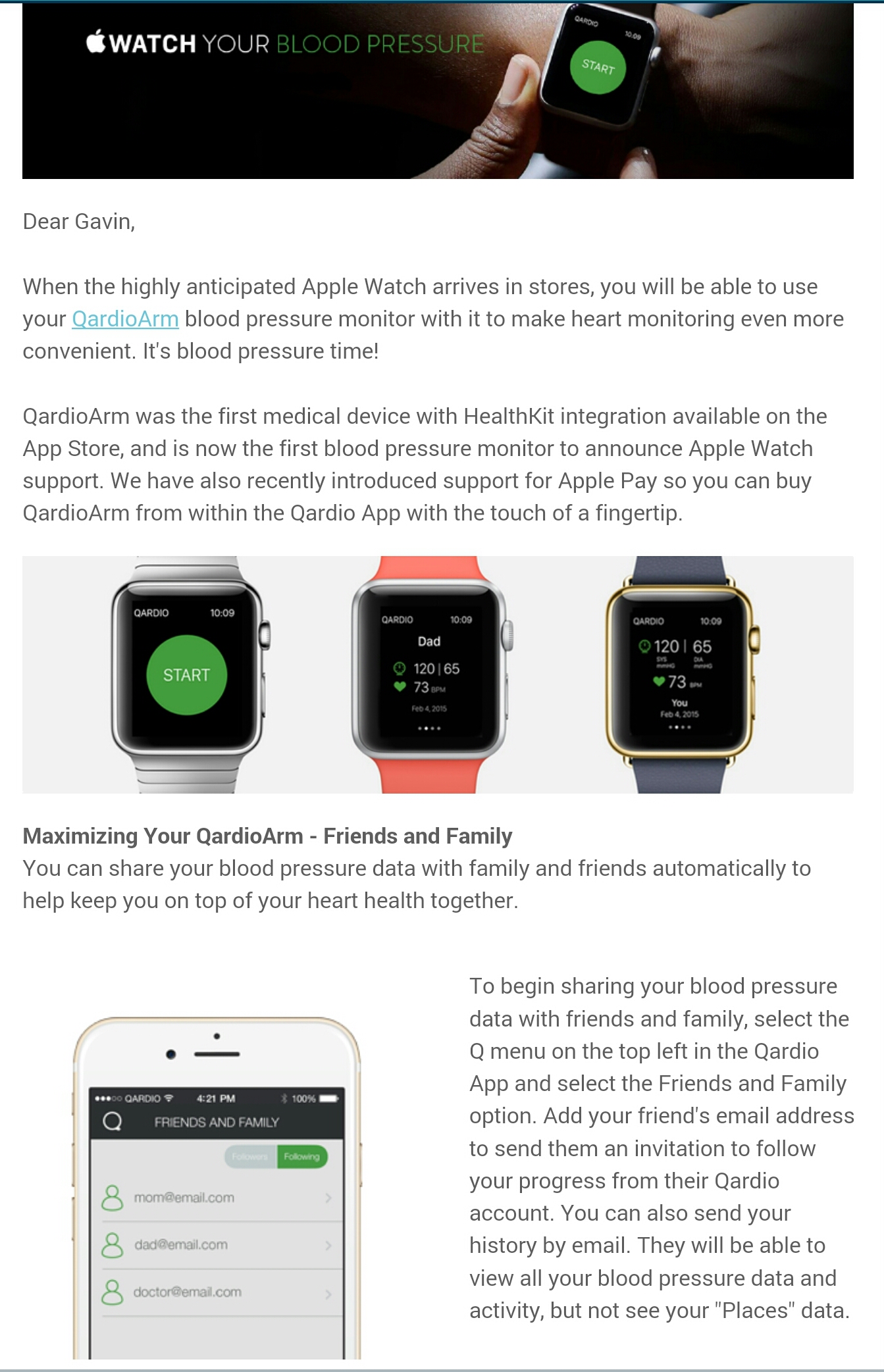
Qardio to support Apple Watch

image

Above is the screen shot from an email I received from Qardio regarding their Blood Pressure kit.  The bluetooth enabled blood pressure kit is fantastic. It works on Android too.

But now it can work via your Apple Watch. Neat. For sure. Pointless too.

Surely it makes more sense to use the larger screen on your phone than the Apple Watch. Also,  if you have many apps running on your Apple Watch, your battery will be dying really fast.