Category Archives: Tech News

LG G Flex – First Impressions

So currently I have the Samsung Galaxy S5 which I like a lot. However over the weekend, whilst browsing I noticed the LG G Flex had been reduced considerably at Asda Direct to £379, so I decided it was worth seeing what all the fuss was about and whether it was a novelty or useful piece of tech.

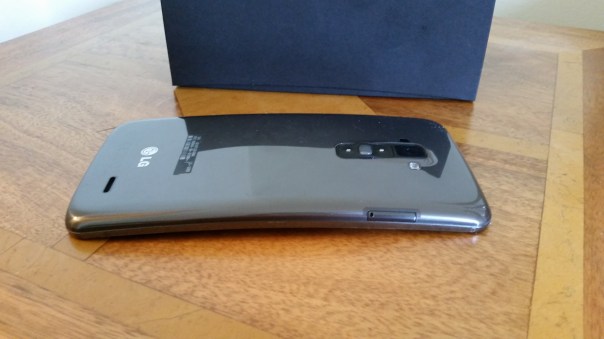
So, after ordering it arrived the next day in the post. The box is curved inwards at the topside which is a neat touch highlighting the fact that you are about to hold your first curved phone, that is able to bend and has a self healing back. And before anyone asks, it does go flat. Freaky or what.
2014-05-05 14.28.08

The next oddity is the physical buttons. They are on the back. Sounds weird and for the first hour they are oddly placed, but I grew to find them really handy and easy to use. It meant that despite the large screen size I didn’t have to fumble to a button on the top.
2014-05-05 14.28.32

These buttons on the back have the volume up and down keys, power and notification light built into the power key. Screen shots are really simple too as you hold down the power and volume down key together. If you are taking a selfie using the rear camera, the notification light changes colour when your face is lined up properly.

The G Flex does not have android kitkat yet, although it is due to roll up in about 3-4 weeks time. The differences are minor but it will still be worth updating.

The screen is only 720p for a 225ppi resolution. If you have the Samsung S5 next to you, then the difference is obvious. But like anything you soon get used to the screen. LG have a custom skin and launcher which can be themed to your hearts content by accessing a number of free themes in the LG Smart World. You can also get themes to change the look of the LG Keyboard. At the bottom you have soft menu keys. Again, you can change the positioning and have either 3 or 4 on screen menu keys. Then there are the quick apps, small apps that you can have floating on the screen. You can also have up to 3 apps just swiped off to the side using 3 fingers, ready to bring back as and when needed.

The LG G Flex also has double tap to unlock and lock. Kit kat update adds code unlock.

The LG built in keyboard was very good, with optional swipe too and a permanent row for the numbers. Symbol shortcuts were also possible on a number of the keys.

That curve. My wife said it looks like you have had an accident and bent your phone. And if you did not know any better then you would think that. But it weirdly does makes media more engaging. Even games felt great on that large screen.

The 32gb G Flex has 24gb user storage available. Despite such a large amount taken for all the LG skinning, the Flex is super nippy. I could not slow it down so far, despite installing loads of apps and games. The G Flex has a snapdragon 800 processor and 2gb ram, and a standby battery that seems to last me nearly 2 days. Crazy good.

The infra red blaster in on the back next to the camera module. So just hold your phone upright and use the remote software on screen to control your TV etc… And the Quickremote app works very well and it feels far more logical and easier to lift phone upright slightly to operate your devices.

So far so good and all I can think is at £379 this is a great value 6 inch smartphone, that happens to have a flexible screen and body and a self healing back. Also, with this phone there is no reason to opt for a tablet as well. But when it cost £800 it was not worth that amount of money.

Samsung Galaxy S5 Camera lag and tips for a fast response

I have had the S5 for 3 weeks plus and the one thing that really annoys me is the random lag. Sometimes it takes ages for the camera to fire up and shoot its first shot, by which time the moment is lost.

So I have been experimenting with various combinations to try and get the quickest first shot time. So what you have to do is install nothing. Well, it felt like that at first.

So, first up, in home screen, press recent apps list and select close all. In settings, lockscreen remove the weather, help, pedometer options and anything else which will need the phone to find other information from other apps. Under security select no security, swipe. Select include camera shortcut in lockscreen. Now this isn’t ideal having no security so in the long term this is not really recommended.

Open camera, press home key. Make sure camera is in auto mode with HDR off and the same for picture stablisation. You can always turns these back on.

Now, from the lock screen you can swipe the camera shortcut, and 9 times out of 10, the camera will be open and focused in less than a half a second.

Episode 14 – Gav & Dave’s Tech Podcast is alive – Please RT

As you know, I co-host a weekly podcast with David from UKMobileTech called Gav & Dave’s Tech Podcast. It is a light hearted tech podcast broadcast bi-weekly. To subscribe click here for iTunes or copy and paste this link into your favourite podcast app.

Episode 14 is now live for your listening pleasure.

The Amazon Smartphone – or is it an iPhone?

amazon

From http://www.bgr.com .

“The Amazon Smartphone is a 4.7-inch display with 720p HD resolution, a quad-core Qualcomm Snapdragon processor, 2GB of RAM, six individual camera modules and a highly customized version of Google’s Android operating system similar to the one seen on Amazon’s various Kindle Fire tablets. It will rely on Amazon’s own mobile app store for third-party software distribution.The first Amazon smartphone will also feature a novel interface with 3D effects enabled by four front-facing infrared cameras that track the position of the user’s head in relation to the device’s screen. Coupled with some additional sensors, these cameras also facilitate unique gesture-based controls used to access menus and additional information.One of the handset’s key selling points will be a special data plan Amazon refers to as “Prime Data.”

Look like an iPhone clone. Maybe we will see thermo nuclear war between Amazon and Apple.

First Impressions of the Sony Xperia Z2

Firstly, I would like to thank my neighbour who lent me their new Xperia Z2, for a temporary swap for my Samsung Galaxy S5. I had a day with the Z2, at the end of which my neighbour was so relived to get back his phone and return my S5. And in one day, I can fully understand why.

So, for me the differences between the S5 and Z2 are huge. The Z2 is speedy to use, no lag like the S5. Great camera that does need software optimisations still, but its starting base is so much better than the Z1 and Z1 Compact. I used the Z2 is auto mode and also switched to manual to see what more I could tweak out of the camera shots. The photos were generally all very impressive and if you were to ask which phone had the best camera the S5 or Z2, it really is a close call. But my winner is the S5 for more natural looking shots, a great HDR mode and 16mp shots as standard versus the 8mp Sony Z2. But it really is a close call, and at times the Z2 took the better shot.

The industrial design of the Z2 is superb, much nicer than the S5. But a fingerprint magnet. The screen was gorgeous, but weirdly I preferred the S5 screen. The Z2 has a much better loudspeaker, in fact it has stereo front facing speakers. Also whilst the S5 is water and dust resistant, the Z2 is water and dust “proof”.

Sony’s software skin is gorgeous on the Z2 and there is a lot to like when using this phone. It makes me feel engaged and happy to use it. The S5 inflicts no emotion whatsoever although it is technically superior and ultimately that wins the day for me.

I really enjoyed using the Z2, and I just cannot get over how much faster it is to use the the lag fest Samsung S5. In reality, if you did not have another phone to compare the S5 to, it is fine but at times it seems to lag too much. Maybe that’s why Sony fitted 3gb of ram, whereas Samsung only has 2gb in the S5!

Samsung Galaxy S5 Free Gifts Issues – Latest Update

See previous posts by click here https://gavinsgadgets.wordpress.com/2014/04/25/free-samsung-s5-galaxy-gifts-update-on-more-gift-claiming-issues-and-via-samsung/ .

There are 3 aspects to this Free Gift Saga.

1. Different deals from wherever you purchased the Samsung Galaxy S5. Certain networks or stores might have their own special deal on top of Samsung’s Galaxy Gifts (apps). For example if you bought the S5 from Carphone Warehouse between 21st April – 30th April you would have been entitled via Samsung’s website to claim a free gift on top of the free app offers. But you would get nothing as a free gift from CPW if you bought the S5 on launch on 11th April.

2. Let’s knock Dropbox on the head straight away. Simply, if you have ever redeemed free storage on your account “2 years free 50gb storage”, you cannot redeem this offer again. So the only option as suggested by Dropbox themselves was to use a different email to register. The only issue you might have is if you already had fixed amounts of storage with dropbox.

3. Samsung Galaxy Gifts. If you login via Samsung Apps on your PC or via the Samsung Apps app on the S5, categories , Galaxy Gifts, you will find around 10 offers worth supposedly £500. Some of these are limited subscriptions, and maybe worth a shot. For example Deezer provides 6 months premium music streaming. The terms vary from 3, 6 or 12 months, and some apps are included free of charge. As a side point it is worth pointing out the other category in Samsung Apps, Galaxy Essentials. There are a few nice pieces of software in this section. Anyway, back to the free offers of which 2 are not working. These are Box and the free 10gb of data for 2 years and a 6 months free subscription to the Wall Street Journal.

I made contact with Samsung and Wall Street Journal. In the end WSJ asked me to contact Samsung to resolve. Samsung have spoken to me several times trying to resolve this. Apparently, the WSJ offer is only for US residents. So I asked them why it’s showing as available in the UK? The saga continues.

The issue with not receiving the free storage with Box is unresolved, but I think it is a similar position to Dropbox. When I joined Box via my iPhone I got 50gb for life so maybe you can’t redeem any more free offers on that account.

More soon hopefully.