Category Archives: Tech News

LG G4 – Specification update

Following my LG G4 First Impressions post https://gavinsgadgets.com/2015/04/28/my-hands-on-with-the-lg-g4-plus-first-impressions/ , I remarked that the LG G4 does not have Quick Charging v2, but simply a faster charge due to its 1.8amp 5V charger.

However, in a rather bizarre turn of events, LG has now contradicted itself and stated the following –

“As LG explains to us, while the company didn’t specifically engineer the G4 with the intent of it supporting Quick Charge, the system is built in to the phone’s Snapdragon 808 SoC in such a way that it’s fully functional in the finished G4.

While the power adapter the G4 ships with isn’t a Quick Charge-compatible unit, if you pair the phone with a suitable third-party Quick Charge 2.0 adapter, the G4 should be more than capable of taking advantage of its fast-charging tech.”

I find the above statement so bizarre as at the LG G4 launch I asked 4 separate people if QC2 was supported and they all said “no”.

Source – Pocketnow.com/LG

Updated – Samsung Galaxy S6 Edge – UK Sim Free – Firmware Update now live – details – new features added!

Morning everyone.

If you have a Samsung Galaxy S6 Edge, UK Sim Free and unlocked, check manually for a software update and you should be able to download a new firmware. This is 150.50mb in size.

After downloading the description of the software update reveals that it includes many stability improvements, performance improvements and new features.

– Improved Fingerprint recognition process
– Improved compatibility with accessories
– Enhanced interface of email, music, s planner and other apps
– New feature in photo editor

After the update, firmware is still based on androd 5.0.2, build changes to XXU1AOE3.

Screen shots are more to follow.

image

image

Update – I have now used the S6 Edge for a working day with the new firmware and it is a lot snappier, themes do not slow down the phone. However, I have still received one error message that an app had closed, so clearly the memory bug is only partically fixed. I believe lollipop 5.1 will fix the memory bug and add new features to the camera.

Honor 6+ – More camera comparisons

Ok, some more photos from the Honor 6+ and then shots from the Samsung S6 Edge and Sony Xperia Z3.

First up a selection from the Honor 6+. Original shots uploaded and unedited.

image

Non hdr below.

image

image

image

Hdr above. Non hdr below.

image

image

image

image

image

image

What I have noticed with the Honor 6+ is it is very consistent and reliable at capturing the scene first time. The above shots were only taken once.

Now some comparisons using the Sony Xperia Z3 Compact. These are all in manual mode. Auto mode is a waste of space.

image

image

Now hdr below.

image

image

The Sony Z3 Compact did a great shot of the pony above.

Below shots from the Samsung Galaxy S6 Edge. All in auto hdr.

image

image

image

So which phone photos do you prefer? In all honesty any of the phones camera shots would be just fine, and if you didn’t quite like the finished article, a quick edit and voila. The S6 Edge is one incredible auto shooter. No need to understand anything about photography, it just translates the scene and captures it really well. Video recording is superb and goes up to 4K. The Honor 6+ takes decent shots but with moving objects in low light it will bring in some blur. In good light, using its burst mode moving objects are not so much of an issue. Then you have the supernight and wide aperture modes that open new options for taking photographs. Like the S6 Edge it has a good front camera for selfies. Lastly my view of the Sony Xperia Z3 Compact is that it has the worst auto mode I have ever seen. Just do not use it. Switch to manual and change the file resolution down to 8mp. Even if you do not select any other settings/scenes you will get a better shot than using auto. The Z3C is capable of taking really fast burst shots, meaning moving targets in focus are more likely. It also offers a huge range of shooting modes (more than your kitchen sink) and even more extra to download.

Personally, there are aspects of each phone that I would like to combine to create my perfect device, but manufacturers will never create that phone. If they did, we would never buy another one!

Episode 35 – F 18 Human Antenna – Gav & Dave’s Tech Podcast is live – Pls RT

As you know, I co-host a monthly podcast with David from UKMobileTech called Gav & Dave’s Tech Podcast. It is a light hearted tech podcast broadcast.

To subscribe click here for iTunes or copy and paste this link into your favourite podcast app.

Episode 35, “F 18 Human Antenna ” is now live for your listening pleasure.

If you have enjoyed the podcast, please leave a 5 star review in iTunes. It helps others find our podcast. Go now and leave a review !

If you have any comments, questions or feedback, please drop a line at feedback@gdtpodcast.com or in the comments below.

And finally, our thanks to Audible as today’s podcast is supported by Audible- get a FREE audiobook download and 30 day free trial at http://www.audibletrial.com/GavDave . Over 150,000 titles to choose from for your iPhone, Android, Kindle or mp3 player. No obligation.

It’s a free trial so give it a go if you haven’t already.

If you are buying anything on Amazon, please use the link below. This will help support Gavin’s Gadgets with some of the running costs and using the link won’t cost you anymore. Thanks in advance.

GavGadgets@Amazon

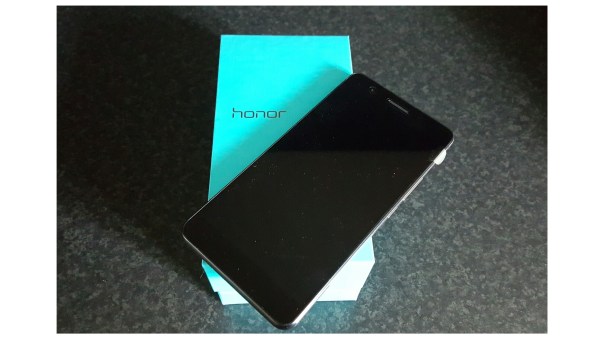
Honor 6+ – Review after 5 Days

wpid-psx_20150504_145718.jpg

So far I have had the Honor 6+ for 5 days. Below are my thoughts on the phone so far.

The Honor 6+ comes with its own launcher called EMUI v3. The extra options and settings provided by this launcher are excellent, but the icons/themes available are not finished cosmetically as well as they could be. Green halos exist around some of the icons and the themes look too a bit naff. If a fresh looking theme was developed and finished properly then EMUI would be stunning. The other noticeable difference is the lack of an app drawer, which doesn’t bother me at all. Very iPhone like!

The other surprise was that the firmware was based on android 4.4.2, although EMUI v3 is skinned to look like lollipop in places. I do have it on good authority that lollipop is arriving in July 2015. To be honest, with lollipop’s current memory bug, waiting a few more weeks in no hardship to ensure we continue to get a stable phone.

So that is the negatives out of the way. Now to the more appealing aspects of the phone. Battery – with its 3,600maH battery on board you will easily get one days heavy use from the Honor 6+. I have never been able to kill the battery yet in a single day. I don’t even bother to connect the car charger when using Google Maps turn by turn navigation which is used for about 3 hours a day. It is just that good. With all the radios switched on, location services on high, full brightness and GPS running, if I do try and charge it in the car with the car charger it only adds 5% to the battery in an hour. Without GPS running and the screen on full, the charging is slightly faster but not by much. There appears to be no quick charging present. I simply recharge it overnight.

With regards to the radios the Honor 6+ is nothing short of a miracle. I have had the Samsung Galaxy S6 Edge side by side and connected to the same network as the 6+. The Honor 6+ signal strength is permanently stronger by a significant margin, even in very weak signal areas. As an example, yesterday, the 6+ had 4 bars of 4G, whereas the S6 Edge is still on H+. Also, the Honor 6+ has the option of dual sims or using the second sim slot for a micro SD card. WiFi, bluetooth and GPS radios are equally as strong.

The loudspeaker is positioned on the rear and knocks out around 87db of sound. Loud enough for podcasts.

The screen is readable in sunlight but not the best screen I have used in sunlight. The 1080p IPS 5.5 inch screen is really good. The camera is proving to take some decent shots in all lighting conditions. The IR blaster is a handy feature. Double knock to turn on works just fine. Drawing gestures to open apps is present too eg screen is off, draw a C, camera opens. The one handed mode pushes the keyboard either over to the the left or right, the on screen buttons get squashed over again to the left or right, and the same for the phone dialler.

Overall the Honor 6+ experience is a positive one. With its dual rear 8mp cameras and the trickery that can produce along with the supernight mode, this is one phone that I have decided to keep for years and years (Gavin Years).

If you have any questions, please ask me in the usual way.

If you are interested in learning more about the Honor 6+, it is available from Amazon UK, click here – Honor 6 Plus 4G Dual Sim in Black or White £299

Honor 6+ – Camera Shootout vs Samsung Galaxy S6 Edge and Sony Xperia Z3 Compact – 38 photos

Welcome to my 38 photo camera shootout with the Honor 6+. This post is to give you an idea of the Honor 6+ camera quality using the Samsung Galaxy S6 Edge and Xperia Z3 Compact as benchmarks. I have provided examples of some of the different shooting modes available on the Honor 6+ including normal, HDR, panorama, wide aperture and supernight. These photos were particularly tricky to take as the wind was gusting and in a few cases nearly blew my tripod over!

If you want to view the full size version, just click on each photo and it will take you to the shot on my Flickr page. Then select “view original” size. None of these shots have been altered either. If you want to view all 38 shots taken, which includes some not shown in this post, then head over to my Flickr album – https://www.flickr.com/photos/gavinfabl100/sets/72157650078106663/

Church Shot 1

First shot taken with the Samsung Galaxy S6 Edge –

Samsung Galaxy S6 Edge photos

Now with the Honor 6+, with HDR off.

Honor 6+

Again with the Honor 6 + with HDR on.

Honor 6+

And now with the Sony Xperia Z3 Compact.

Sony Xperia Z3 Compact

And the Z3 Compact again with HDR.

Sony Xperia Z3 Compact

Okay, now lets look at another angle of with church.

Church Shot 2 – Panorama

First up the Samsung Galaxy S6 Edge. This is around 11mb is file size.

Samsung Galaxy S6 Edge photos

Next from the Honor 6+, again around 11mb in file size.

Honor 6+

And lastly from the Sony Xperia Z3, which is a disaster as its only manages to output a file of 600kb. But can you tell just from looking at your computer screen?

Sony Xperia Z3 Compact

So which phone do you prefer so far? Remember the price points. The Samsung Galaxy S6 Edge is a £600+ flagship, the Sony Xperia Z3 Compact around £300 now but was on sale originally circa £500. And the Honor 6+ costs £299.

Ok, lets move on with some more shots.

Honor 6+ Wide Aperture Mode

These next 4 shots are all using the Wide Aperture Mode on the 6+. Take a shot, adjust the F stop from F/0.9 to about F/16. After the shot, you can readjust the F stop and change the focus point. This is due to the dual 8mp cameras on the rear of this phone. Using this mode carefully, allows for some creative pictures. This is what can be achieved.

The tree on the right is in focus.

Honor 6+

All in focus now.

Honor 6+

Just the cross in focus.

Honor 6+

More background visible now ie less blurred.

Honor 6+

All the above 4 shots were created from just one wide aperture mode photo.

The Mechanism Shot

First up the photo from the Samsung Galaxy S6 Edge.

Samsung Galaxy S6 Edge photos

Next from the Honor 6+ but shot using the wide aperture mode, so below are 3 versions. First up, all in focus.

Honor 6+

Front cog in focus from the Honor 6+

Honor 6+

Now the rear of the photo is in focus.

Honor 6+

Remember, these 3 photos are created from just one shot.

Next up let’s see how the Sony Xperia Z3 performed.

Sony Xperia Z3 Compact

Close Up

Next I am just going to use Samsung Galaxy S6 Edge and Honor 6+. The Sony Xperia Z3 is not consistent with its shots and ends up with a mix of good and poor shots. In comparison the S6 Edge gets it right first time every time and so does the Honor 6+.

First up, the Samsung Galaxy S6 Edge. 2 shots below. Notice how the bokeh effect is created automatically by the S6 Edge.

Samsung Galaxy S6 Edge

And now even closer with the S6 Edge.

Samsung Galaxy S6 Edge

So let’s move on to the Honor 6+.

Honor 6+ samples

And again Honor 6+.

Honor 6+ samples

And using the wide aperture mode to create a bokeh of the grass behind the latch.

Honor 6+ samples

Classic Dartmoor Bridge Shot

First up the shot from the Samsung Galaxy S6 Edge. The S6 Edge was always in auto HDR mode.

Samsung Galaxy S6 Edge

Next let’s see what the Honor 6+ can snap.

Honor 6+ samples

Clapper Bridge Shot

And the final shot of this post is of a Clapper Bridge. First shot again is from the Samsung Galaxy S6 Edge.

Samsung Galaxy S6 Edge

And now the Honor 6+, first normal and then in HDR mode.

Honor 6+ samples

Honor 6+ samples

The Honor 6+ really brings up the lighting and colours in HDR mode.

Supernight Mode Shot

The Honor 6+ has a mode called “supernight”. It really is fantastic. To illustrate its prowess, below is a shot of my local church at night using the Samsung Galaxy S6 Edge. The S6 Edge was on a tripod, and this was shot using its Pro Mode.

Samsung Galaxy S6 Edge - pro mode

And now for the Honor 6+, using its “supernight” mode. The 6+ was on a tripod for both of these shots. Same church, same time, same level of darkness.

First Honor 6+ shot is using a 32 second exposure and an ISO of only 200!

Honor 6+ - Supernight mode

Same exposure of 32 seconds, but this time using an ISO of just 100.

Honor 6+ - Supernight mode

Currently, the S6 Edge can only manage 1/7s versus the Honor 6+ at 32s. A vast difference. In supernight mode on the Honor 6+ you can use it in Auto or adjust the ISO and length yourself. In practice, I would have used a 10 second shutter exposure on the Honor 6+, but before I had a chance to do this, the wind picked up (gale force) and heavy rain started.

So don’t forget, to check out the full album of 38 photos – https://www.flickr.com/photos/gavinfabl100/sets/72157650078106663/

One last thing, the Honor 6+ has a 8mp front camera, and whilst I haven’t shared any selfies, it does take some really good shots from its front camera.

So what is your verdict on these photos? My full review of the Honor 6+ will be available next week.

Honor 6+ – Setting up home screens

image

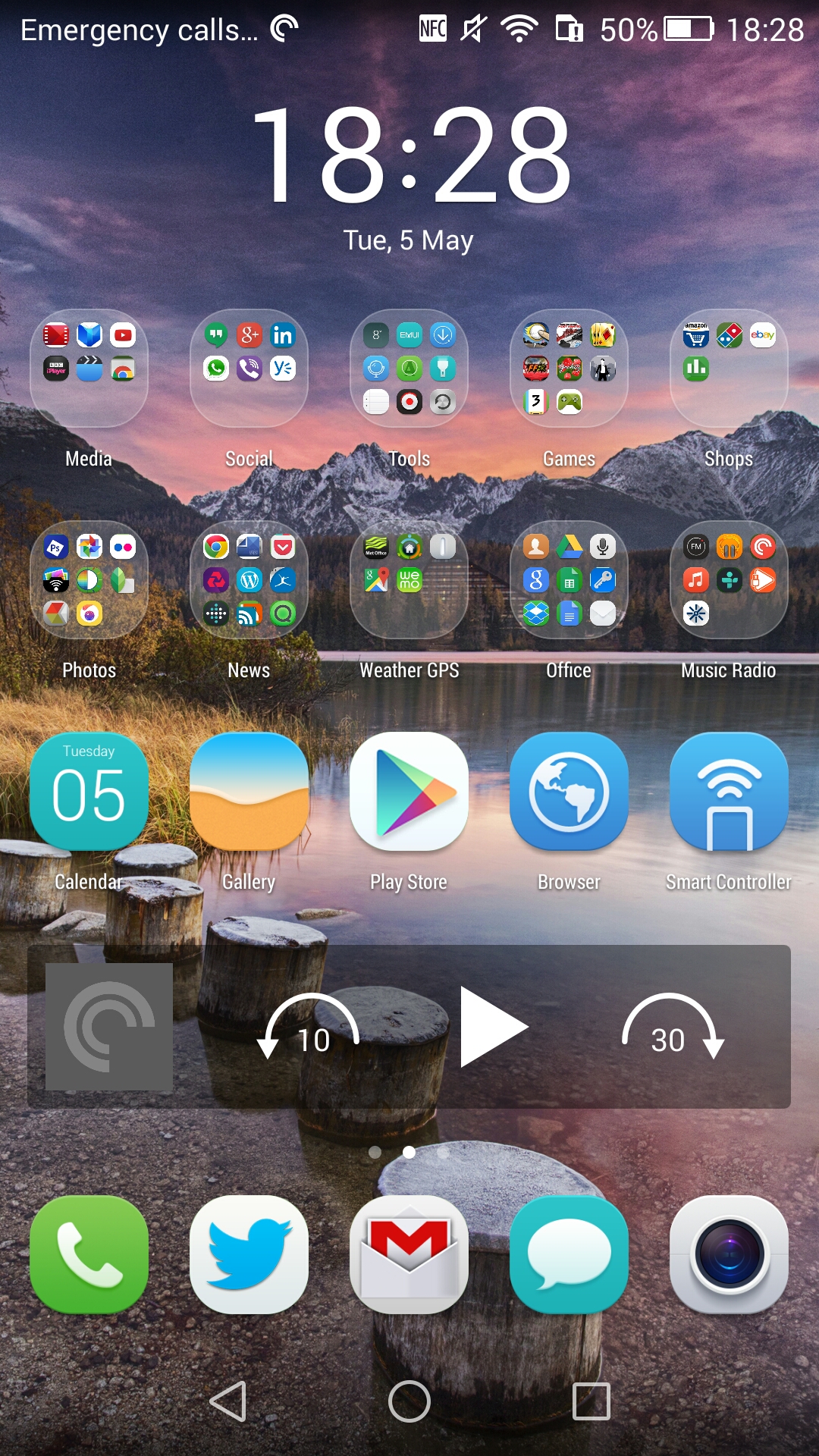
I’ve been experimenting with the Honor 6+ and it’s launcher. It’s different as it doesn’t use an app drawer and to be honest there is no reason to have one. All you need to do is have a home screen on one side for apps in folders if required.

So far the above is my created look. Below are my other screens. I have found the icons a little large for my liking but there are plenty of themes to choose from. A solution to the look and feel would be to use Nova or Google launcher but for the time being I want to experience the Honor setup.

image

image

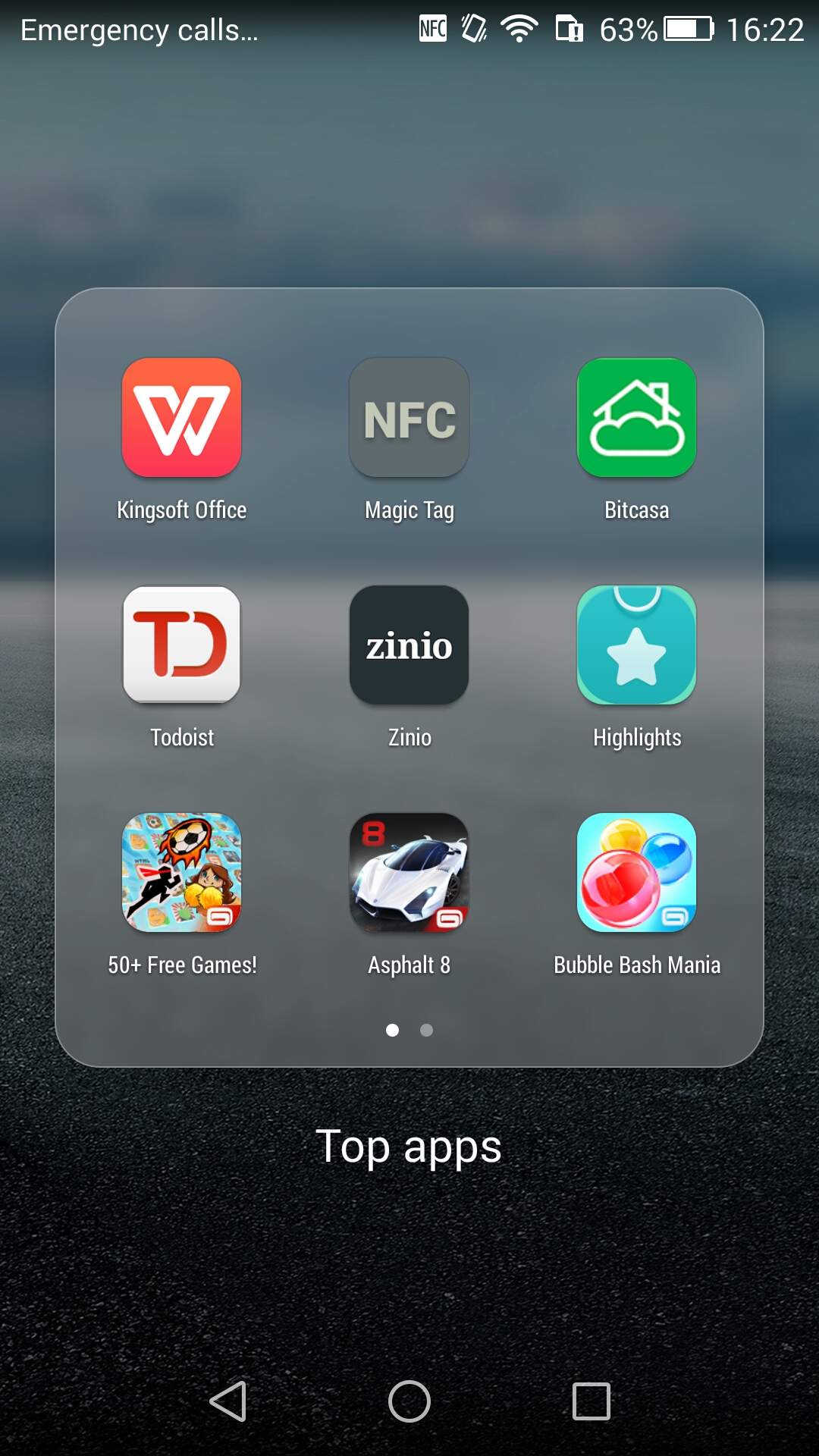
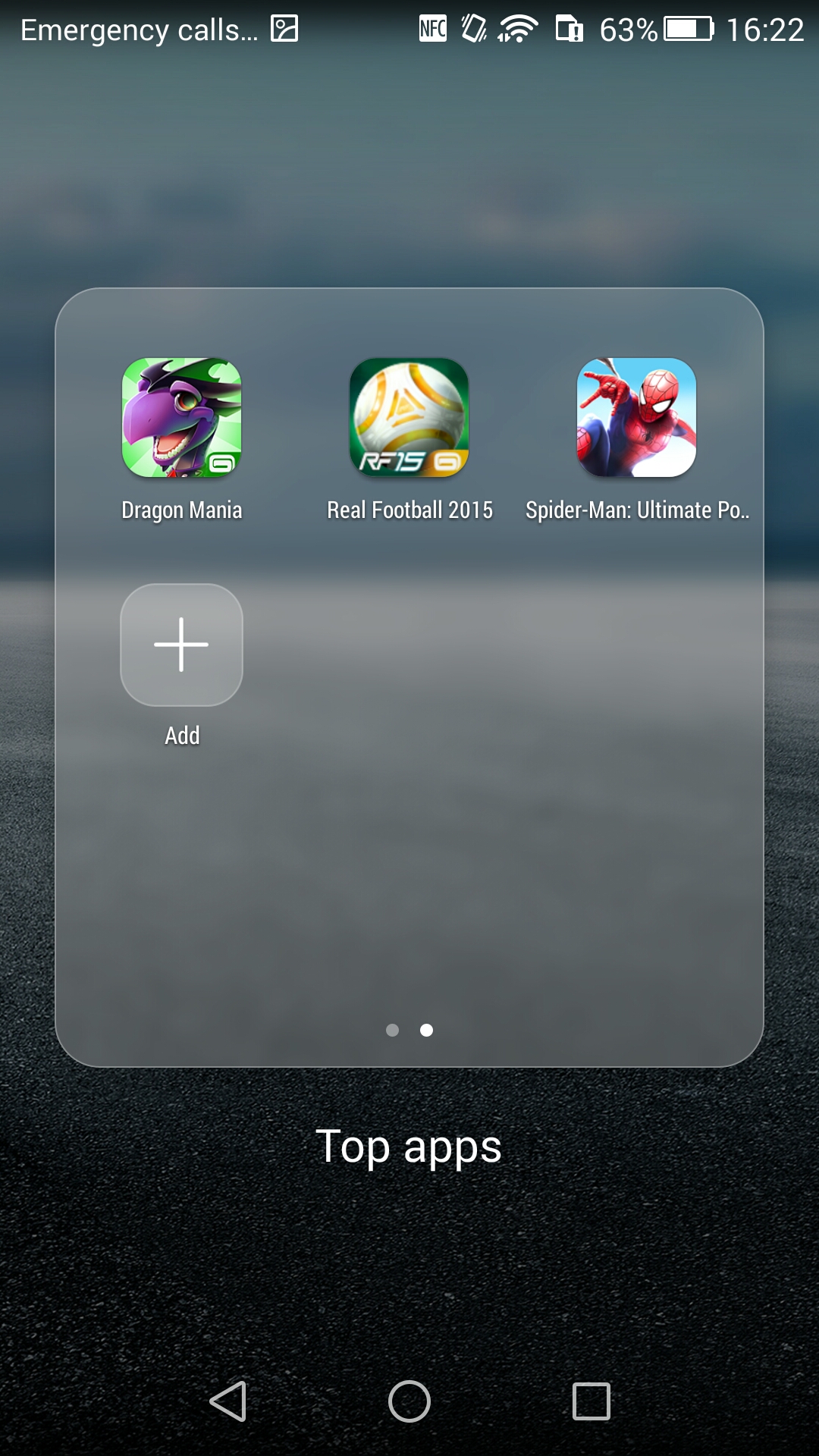
The one aspect that did annoy me was the folder as free trials. See below.

image

image

That’s 12 apps/games. I’ve removed all but the NFC app. Fortunately you can completely uninstall them. That’s the negative.

In terms of positives there are so many little software tweaks which I will try and cover off in my main review.

Since I’ve started adding my apps and more I am now going to insert 2 sims. A 3 UK and a Vodafone sim to see how the dual sim management works.

So far this is a superb piece of kit.

Read my reviews of the latest 50+ Smartphones & more – S6, G4, M9, 830, Z3 and on

Tablets/Laptops/Chromebooks

Nexus 9 – First Impressions
Nexus 9 Tablet review
Samsung Galaxy Tab S 10.5 Tablet review
Samsung Galaxy NotePro 12.2 – 9 Part Review
Sony Xperia Z Tablet – 12 Part Review
Nvidia Shield Tablet – 7 Part review
Acer V15 Nitro Windows 8.1 laptop review
Acer C720 Chromebook review
Acer Aspire Switch 11 review
Acer Iconia 8 Android Tablet review

Amazon Devices

Amazon Fire Phone – 2 Part review

Apple Phones

Apple iPhone 6 Plus – 24 Part Review

BlackBerry Phones

BlackBerry Passport 10 Part Mammoth review

Android Phones

Samsung Galaxy S6 and S6 Edge review
Samsung Galaxy S6 and S6 Edge – Hands On
Samsung Galaxy A5 review
Samsung Note Edge – 14 Part Review
Samsung Note 4 – lollipop review
Samsung Note 4 – 17 Part Review
Samsung Galaxy Alpha – 2 Part review
Samsung Galaxy K Zoom – 26 Part Review
Samsung Galaxy S5 – 17 Part Review
Samsung Note 3 – 16 Part review
Samsung Galaxy S4 Zoom – 18 Part Review
Samsung Note 2 – 8 Part review

LG G4 full review coming soon

LG G4 – Hands on and First Impressions
LG G3 review – 31 Part Review
LG G Flex – 3 Part Review

HTC One M9 review
HTC Desire 820 review
HTC Desire Eye – 13 Part Review
HTC One M8 – 11 Part review
HTC One M7 – 20 Part Review

Acer S55 review – 6 Part Review

Yotaphone 2 – 4 Part review

Oneplus One – review

Honor 6+ review coming soon

Honor Holly – 4 Part review
Honor 6 – 12 Part Review
Huawei Ascend P6 Review

Sony Xperia Z3 review coming soon

Sony Xperia Z1 Compact review
Sony Z Ultra views and Camera Samples
Sony Xperia Z1 – 10 Part Review

Motorola Moto X – 4 Part review
Motorola Moto G – 8 Part review

Windows Phone

Nokia Lumia 830 vs Samsung Note 4 camera
Nokia Lumia 830 – First Impressions / What App Shortages?
Microsoft Lumia 535 review
Nokia Lumia 1520 – 6 Part review
Nokia Lumia 820 – 5 Part review
Nokia Lumia 1020 – 10 Part review
Nokia Lumia 925 – 9 Part review
Nokia Lumia 620 – 7 Part review

Other

ZTE Open Review – Firefox OS

If you are buying anything on Amazon, please use the link below. This will help support Gavin’s Gadgets with all the running costs and more and won’t be any different in cost. Thanks in advance.

GavGadgets@Amazon

Quick Camera Head to Head – Samsung Galaxy S6 Edge vs Honor 6+ vs Sony Xperia Z3 Compact

Just a quick camera comparison.

Same shot. 3 phones.  Cropped in on mug.

First shot from the Honor 6+.

image

Next from the Sony Xperia Z3 Compact.

image

And lastly Samsung Galaxy S6 Edge.

image

So which one is best. Personally, I prefer the Honor 6+. But what about you?

A more detailed camera comparison will follow shortly between all of the phones too.