Category Archives: Reviews

Reviews coming soon – updated

Just a quick heads up and some new reviews coming shortly.

From HTC, the HTC One M9 and the HTC Desire 816.

Tablets – Google Nexus 9

Samsung – Samsung Galaxy S6 Edge and also the Samsung Galaxy A5.

Honor – new devices from Honor

Misc – stuff under NDA

If you have any questions for these devices, please let me know as soon as possible.

HTC One M9 – All the Reviews

HTC One M9 Review embargoes have lifted and all the major websites have released their review of the One M9. The camera came under fire in most, as did the battery life. However, like every other previous HTC phone, the camera is a social camera, and therefore Michael Fisher of Pocketnow made a specific point of all the fun options that come with the camera software. These seem to have been glossed over by many of the reviews. ZDNet created a Flickr album comparing the M9, M8, Z3, and iPhone 6 Plus with a few Blackberry Passport shots. Worth viewing those shots as this is a more realistic comparison than most. Only one website highlighted the fact the M9 had the best audio quality experience both from its speakers and headphone output. So are you waiting to order the new HTC One M9

http://www.anandtech.com/show/9102/the-htc-one-m9-review-part-1/

http://gizmodo.com/htc-one-m9-review-a-great-phone-that-cant-keep-up-1692880041

http://www.engadget.com/2015/03/22/htc-one-m9-review/

http://www.technobuffalo.com/reviews/htc-one-m9-review/

http://www.theverge.com/2015/3/22/8272727/htc-one-m9-review

HTC One M9 review

http://www.gsmarena.com/htc_one_m9-review-1230.php

http://www.phonearena.com/reviews/HTC-One-M9-Review_id3956

http://www.stuff.tv/htc/one-m9/review

http://www.zdnet.com/article/htc-one-m9-review-iconic-metal-dual-tone-design-with-focus-on-personalization/

HTC One M9 review

http://www.trustedreviews.com/htc-one-m9-review

http://www.techspot.com/review/980-htc-one-m9/

http://www.slashgear.com/htc-one-m9-review-counting-on-quality-22374718/

http://pocketnow.com/2015/03/22/htc-one-m9-review

http://www.pocket-lint.com/review/133290-htc-one-m9-review-distracted-by-refinement

http://www.androidcentral.com/htc-one-m9-review

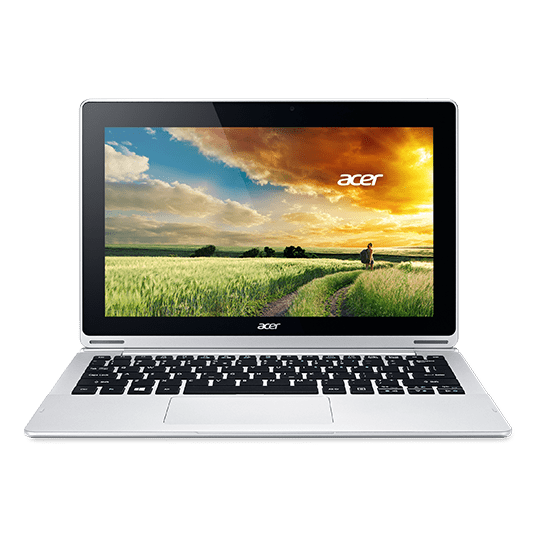
Acer Aspire Switch 11- A Hybrid Laptop/Tablet – Is this the answer?

acer 1

acer 2

I am currently experimenting with an Acer Aspire Switch 11 which is a convertible notebook pc.

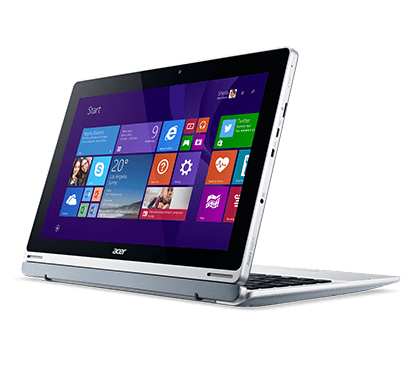
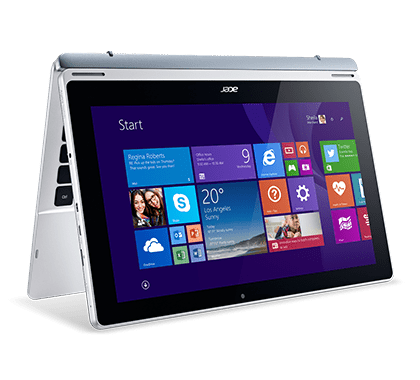
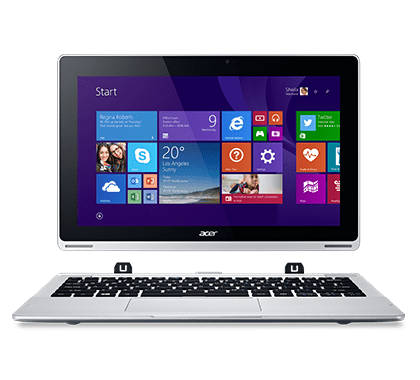
The Aspire 11 is priced around the £325, and for that you get an Intel Atom Z3745 1.33GHz, 2GB RAM, WLAN, Windows 8.1 and 32gb SSD. You can pay more money and get faster processors and more storage. There is an optional pen for this notebook too. It comes with a comfortable keyboard and touchpad and the hinge allows for easy flip, rotate, or detaching in a snap; the Aspire Switch 11’s unique Acer Snap Hinge uses the invisible force of magnetism to provide a latch-less docking solution that lets you smoothly snap the tablet and keyboard apart, and back together again.

acer 3

acer 4

So in case you haven’t grasped what this device is all about, it is simple. It looks like a laptop. But the screen section simply pulls off, leaving the keyboard separated. You now have a tablet, albeit a full windows 8.1 PC tablet operated via touchscreen. The screen has Gorilla Glass 3. In terms of others specs it includes Bluetooth 4.0, GPS, Micro SD, Micro USB, Micro HDMI, 500gb hard drive, WiFi b/g/n, microphone, graphics is LPDDR3, 8,550mAH battery, weight 860g (tablet only or 1.5kg with keyboard), and a USB port. The screen is a 11.6″ LCD HD (1366 x 768). There is a more upmarket version with a 1080p screen, 4gb ram and 60gb SSD. Lastly, the Aspire Switch 11 has a 2mp front facing camera and mediocre stereo speakers. From what I can fathom, the optical hard drive is fitted inside the keyboard.

The screen/tablet section simply pulls off. Once off you can rotate it and push it back on the other way around as per the photos above. You can also use it in cinema/presentation mode or just in a semi raised position. The flexibility of this device is really something not to be overlooked. My usage pattern would be type a few posts including this review in laptop mode. When finished, detach the screen from the keyboard and use it as tablet. Unlike the new super expensive MacBook, this device has plenty of ports to connect up whatever you need, and not just a single USB-C port!

The Acer Switch has been excellent to type with using the physical keyboard and I really love the on screen touch keyboard. As this was a full Windows 8.1 PC, I have been able to install proper PC apps. Battery life varies but typically I am getting around 7 hours with web browsing, YouTube videos and typing. This is the first Windows 8.1 device I have actually enjoyed using. So are they any negatives. Yes predominately its heavy when you have to carry it as a laptop. 1.5kg. And it is relatively heavy at 860g as a tablet and somewhat bulky.

As I have mentioned before, my MacBook Pro is about to quit life as we know it, and end up in its final resting place. When that time finally arrives, this is the type of device I will look to buy. It offers the flexibility/power of a laptop and tablet.

My thanks to Acer for being patient and sending me a variety of laptop types to experiment/trial from their Acer V15 Nitro Black Edition (Gaming Powerhouse laptop) to their Acer C720 Chromebook. Both of these reviews can be found here – https://gavinsgadgets.com/review-links/smartphonetabletlaptop-reviews/ . Now that I have used all 3, the V15 Nitro was too big, the Acer Chromebook was crazy good as the battery never died, but this Acer Aspire Switch is perfect as it gives me a full Windows PC and tablet in one device.

For more information on the Acer Aspire Switch 11 – Click Here

Acer Iconia 8 Tablet (A1-840) – Review

image

Welcome to my review of the Acer Iconia 8 Tablet. This comes with a 8 inch screen and 16gb storage/1gb ram all wrapped in a aluminium body. The build quality is one of the first things that you notice about this tablet. Just look at the photos.

image

image

Due to its size and slight curves, the tablet fits nicely in your hand. For times when you need a camera, it comes equipped with dual cameras and microSD™ card slot, dual speakers, producing a good sound experience. The Intel® Atom™ processor with 7.5 hours of battery life has allowed me to use this all day and with a reasonable nippy response when jumping from app to app.

Key Specifications –

– Android™ 4.4.4
– Intel Atom Z3735G Quad-core 1.33 GHz
– DDR3L SDRAM
– Micro SD card support
– 20.3 cm (8″) WXGA (1280 x 800), Active Matrix TFT Colour LCD
– Wi-Fi
– 1 GB ram, 16 GB Flash Memory
– Connectivity – GPS, WiFi, LAN, IEEE 802.11b/g/n, Bluetooth 4.0, Microphone
– Battery – 4,600maH, Video playback 7.5 hours
– 2MP Front camera, 8MP rear camera
– HDMI (mini) port

The screen is only WXGA and I can notice the lack of resolution compared to some far more expensive tablets that have 1080p and above screens, but then again those tablets costs a lot more money. For many people the WXGA won’t matter. It does mean however, that there are less pixels to push so the tablet generally runs fairly fast in use. Rather unusual is a separate connection for a mini hdmi port as shown in the photos.

The Acer Iconia 8 is based on a near stock experience, but it does have some software tricks for turning on the device. Laying all 5 fingers on the screen allows you to turn on device or turn on with a selected app of your choice. You can do the same thing using 2 thumbs. Both these features can be turned off too. The tablet also features a split screen mode which is so simple to use. Say your using Chrome, tap the split screen icon bottom and the you can choose from a number of apps which support this mode. There were a decent selection of apps supported too from Chrome, Play Store, all Acer apps, accuweather, Amazon, audible, Amazon app store, astro file manager, calculator, eBay, email, Gmail, Evernote, maps, people, play books, officesuite, play movies, play music and youtube. Another neat option is Acer Intellispin. This makes rotation smarter. When you rotate the tablet the screen image can automatically rotate to match the new orientation, even if the tablet is lying flat. In addition you can add users which each have their own profile.

Acer installs many apps as standard. All those mentioned above and Acer cloud apps for docs, files, music, photos, and videos. By installing the same apps on your home computer you can access everything via the cloud on the tablet. Acer assessories, Acer portal, Acer suggests, Amazon Kindle, Amazon Local, Amazon Music, barcode scanner, booking.com hotels, Wild Tangent games portal, istorytime, Skype, top HD games, Tunein Radio and Zinio are also installed. Apart from that it is a near stock experience. The keyboard is Google Keyboard. You can uninstall several of the apps and or disable them if you want.

It is also preloaded with far too much extra software in my opinion. Some of it is useful, but perhaps Acer would have been better to include optional download links. The 16 storage model have just under 9gb free to the user. The loudspeaker goes fairly loud. Sound through the headphones is reasonable too. The camera takes ok photos in good light but does have many options from picture collage, various capture modes (normal, HDR, continuous, panoramic, presentation capturing), scenes (barcode, fireworks, landscape, night, night portrait, sports), white balance, timer, EV, ISO (auto, 100-800), metering, scale, resolution, Touch shutter, camcorder settings include time lapse, mute, 1080p, 720p & 480, storage, location, grid and a tutorial. In fact there are so many options in the camera that you should be able to photograph many scenarios.

The Acer Iconia 8 is available from Amazon currently for £139.58, Acer Iconia Tab 8 deal at Amazon UK which makes it fairly good value.

USB Audio Player Pro received major update, Oppo HA-2, AKG K702 headphones

image

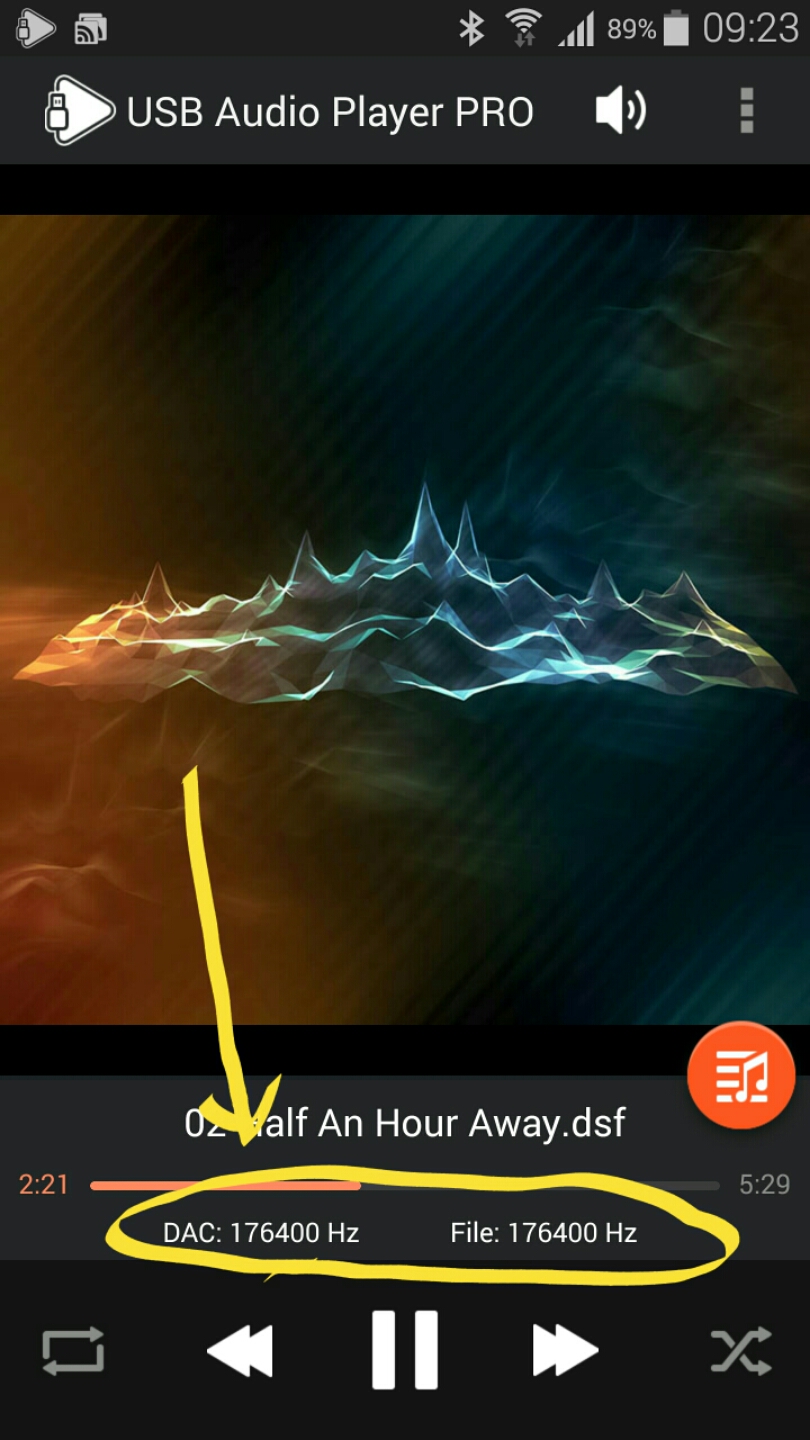
Listening to DSD audio files at 176400Hz vs traditional 320 bit mp3 audio files at 44100Hz.

The difference in playback quality is like chalk and cheese. The DSD audio files are on a different planet sonically.

Also note the above screen shot is the new interface for USB Audio Player Pro that just received a major update. 

The UAPP app is running on my Note 4, the Note 4 has the Oppo HA-2 Portable Amplifier and DAC connected, with a pair of AKG K702 headphones connected, providing the ultimate portable experience IMO. (providing you like huge looking headphones)

For the review of the Oppo HA-2 scroll down a few posts for the review link.

Newest Smartphones, Latest Trackers, Bluetooth Headphones, Amps, DACs, Connected Bulbs and more – all reviewed

Below are some of the top reviews of the month so far –

FitBit Charge HR review

Samsung Gear S – 9 Part Review

LG G Watch R – review

LG G Watch – 9 Part Review

Honor Holly – 4 Part review

Honor 6 – 12 Part Review

Apple iPhone 6 Plus – 24 Part Review

Yotaphone 2 – 4 Part review

Samsung Note Edge – 14 Part Review

Samsung Note 4 – 17 Part Review

Samsung Galaxy Alpha – 2 Part review

LG G3 review – 31 Part Review

Microsoft Lumia 535 review

HTC One M8 review

V-Moda Crossfade M100 headphone review

Plantronics BackBeat Pro bluetooth headphones review

Philips Fidelio M1BT Headphone review

AKG K845 Bluetooth Headphone review

Sony SBH80 Bluetooth headphones review

Oppo HA -2 Portable Amplifier and DAC review

Cayin C5 Portable Headphone amplifier review

Fiio E12 – master review

HiFiMeDIY Sabre Android USB DAC review

Belkin WeMo Smart light Bulb starter kit review

Mipow Playbulb Rainbow review

Microsoft Lumia 535 – review

image

image

Welcome to my review of the Microsoft Lumia 535. The Lumia 535 has a 5 inch IPS 960×540 screen, 9mm thick,  140x73x8.8mm and weighs 146g. The screen has 220ppi and is covered with Gorilla Glass 3. Microsoft include a quad-core Snapdragon 200 CPU running at 1.2GHz with 1GB of RAM. 1gb of RAM on a Windows Phone is plenty for most tasks as the operating system is not resource heavy. You get 8GB of storage with just over 4GB user available, but expandable with a micro SD card by up to 128GB. Finishing off the specs,  the 535 has 802.11n Wi-Fi, Bluetooth 4, GPS,  ambient light and proximity sensors but just 3g coverage.  There is no 4g.

Windows Phone has many strengths. It has now been over 14 months since I last had a Windows Phone. Since returning to the platform I have noticed a number of improvements which now make this phone and the platform so much better to use.  The first pleasant surprise was being asked would I like to restore from my last backup some 14 months ago. I opted to go down this route and all just like that I was back in business. I have always liked the home screen tiles, that display all your information at a glance. But now there are home screen folders, a notification centre,  Cortana, Skype baked in,  and all the usual Microsoft Office,  OneDrive,  Here Drive offline navigation and more. Cortana really is a clever piece virtual assistant that so far has been marvellous. The 535 has 5mp cameras front (wide angled) and back and in good light they are able to capture some lovely shots. See samples below. 

Random photos taken with the Microsoft Lumia 535 #Lumia535 #unedited

Random photos taken with the Microsoft Lumia 535 #Lumia535 #unedited

Random photos taken with the Microsoft Lumia 535 #Lumia535 #unedited

Random photos taken with the Microsoft Lumia 535 #Lumia535 #unedited

Random photos taken with the Microsoft Lumia 535 #Lumia535 #unedited

Random photos taken with the Microsoft Lumia 535 #Lumia535 #unedited

I did find the shutter speed not to be the quickest but I was surprised by the output. The phone comes with the Lumia Camera app which squeezes everything possible out of the optics.  Manual modes are present too. Additional camera modes or lenses include Panorama, Refocus,  Selfie,  Storyteller and for editing you have Lumia Creative Studio. Other included apps are FM Radio,  Microsoft Health & Fitness,  MixRadio,  Podcasts,  Microsoft Sport,  Travel, Weather and News. A Wallet app is included for keeping track of boarding passes, tickets,  deals and more. The auto brightness did not adjust the back light enough in bright sunshine but manually adjusting brightness to max made the screen readable.

The loudspeaker is ok. It goes loud but is a little tinny. The speaker grill is located on the back of the phone. Sound via the headphone socket was above average and had a decent volume too.

We all know Windows Phone has fewer third party apps than android or iOS , but this time with the improved software and services, new apps to the platform and decent third party alternatives,  I managed just fine with day to day activities on the 535. It was great to see Fitbit had arrived,  along with BBC iPlayer, 4oD, ITV Player, Demand 5,  Domino’s Pizza, and instagram. Even more specialist apps I use like Netatmo and WordPress were available. Microsoft have a page where they highlight some of the key apps for Lumia – http://www.microsoft.com/en-gb/mobile/apps/lumia/

The Microsoft Lumia 535 is currently available for £59.95 on Pay as You Go, which for some will be ideal.

Belkin WeMo Range – Special offer 30% off Deal of the Day

wemo

wemoligh

This morning I noticed Amazon had on their deal of the day 30% off the Belkin WeMo range which includes the Belkin Home Automation switch and Smart Lights. I personally use both of these products. The Home Automation switch is a wireless plug that you can turn on and off via the Belkin app both whilst at home and when away from your home. I reviewed the Smart Lights https://gavinsgadgets.com/2015/01/01/belkin-wemo-smart-light-bulb-starter-kit-review/ on the 1st January 2015, and I still use these everyday in my lounge. As I said, all the range is 30% for today only. To see everything and learn more click below –

Belkin Wemo Range 30% off deals

Samsung Gear VR (Virtual Reality Headset) – First Impressions

vr2

The Samsung Gear VR (Virtual Reality) headset arrived over a week ago. I have been keen to try this out for ages to see what all the fuss is about.

The Gear VR sits comfortably on your head. The controls are simple. You have a trackpad on the side, a back button and an adjustment for the screen on top. Before you purchase/use the Gear VR, Samsung provides the longest document warning you of all the potential dangers of using this product, the importance of short sessions and plenty of breaks, sickness and all the potential side effects. Enough warnings to put you off using the product!

The Gear VR costs £169 or £199 with the Samsung Game Controller which you will need for some of the games. Starting off you have a screen in front of your eyes giving you access to the special VR store and all the options/games/apps available.

It is really easy to control and select different games and so, just by using the track pad on the Gear VR and/or moving your head.

The experience of using the Gear VR is out of this world. Virtual Reality is clearly the future of gaming. It is hard to describe how dramatic the vision is and how real it feels. At times, I felt like I did not want to move as I would fall off the cliff edge!

But there are the negatives. My Note 4 battery life had the juice sucked out of it at a rapid rate. You really will be using the fast charging mode on the Note 4. The Note 4 does get hot but nothing that worried me. The Note Edge does not fit/work with the Gear VR. Side effects. Samsung mentions sickness as a potential side effect. Temple Run VR is awesome to play, but OMG its super vomit territory. It is one of the worst games for side effects. If you manage to play for 5 minutes without at least feeling really sick, you deserve a gold star. One of my twitter friends James Burland, suggested I tried Titans of Space. That was a great recommendation, so be sure to play that game yourself if you do get one a Gear VR.

At the moment, it really is a developing product and it is definitely one I am excited about. Just note the side effects might impact your enjoyment.

Microsoft Lumia 535 – camera samples

My full review of the Microsoft Lumia 535 will come next week. This is a phone available for £49 plus a £10 top up on pay as you go from several places.  So how good is the camera from a £50 phone? Let me know what you think.  All the below photos are unedited. If you want to see exif data or pixel peek click on the photo to go to my Flickr account.

Random photos taken with the Microsoft Lumia 535 #Lumia535 #unedited

Random photos taken with the Microsoft Lumia 535 #Lumia535 #unedited

Random photos taken with the Microsoft Lumia 535 #Lumia535 #unedited

Random photos taken with the Microsoft Lumia 535 #Lumia535 #unedited

Random photos taken with the Microsoft Lumia 535 #Lumia535 #unedited

Random photos taken with the Microsoft Lumia 535 #Lumia535 #unedited