Category Archives: Apple

Taylor Swift wins compensation for artists during 3 month Apple Music Trial

Over the weekend Taylor Swift wrote an open letter saying Apple was wrong not to be paying artists any royalties during the 3 month Apple Music trial. She said she could afford to take this stance, but other new or upcoming artists would be too scared to take on the might of Apple.

Well surprise surprise Apple have backed down and confirmed they will pay money to artists during the trial music. I’m sure Taylor Swift did extremely well out of this, since the amount of publicity for her was off the charts.

Next questions, does Taylor Swift use an iPhone, if not I’m sure a MacBook, iPhone, Apple Watch Gold and iPad are all on there way to her!

Episode 37 – Gav & Dave’s Tech Podcast – WWDC 2015 Special

As you know, I co-host a monthly podcast with David Rich called Gav & Dave’s Tech Podcast. It is a light hearted tech podcast broadcast.

Episode 37, “Apple WWDC 2015 Special ” is now live for your listening pleasure. Head over to http://www.gdtpodcast.com or listen in your favourite podcast app.

If you have any comments, questions or feedback, please drop a line at feedback@gdtpodcast.com or in the comments below.

And finally, our thanks to Audible as today’s podcast is supported by Audible- get a FREE audiobook download and 30 day free trial at http://www.audibletrial.com/GavDave . Over 150,000 titles to choose from for your iPhone, Android, Kindle or mp3 player. No obligation.

It’s a free trial so give it a go if you haven’t already.

Apple is allowing pirated apps, side loading and emulators on the iPhone

I find this hard to believe, but by using the latest Xcode 7, you don’t need to go through the App Store to install apps now. Cultofmac.com discovered –

The newest version of Xcode, Apple’s integrated development tool/environment for OS X and iOS, allows anyone to install apps on their iOS device. Even if it hasn’t been approved by Apple and you’re not a developer.

The Xcode website boasts that it’s now “easier for everyone to build apps and run them directly on their Apple devices. Program membership is not required.” Apple previously required that you pay a $99 per year development fee to install unapproved apps on devices. The change was intended to allow more people to code apps without a price barrier.

Apple didn’t tout the new feature onstage Monday at WWDC, but it opens the door for developers to distribute their apps outside of the App Store. It could lead to easy piracy of decrypted apps, notes iOS developer Steve Smith, while also letting users install everything from emulators and torrent clients to banned games – basically anything Apple doesn’t want in the App Store.

One developer has already discovered that it’s fairly easy to sideload GameBoy emulators like GBA4iOS using Xcode 7.

Surely Apple is not going to allow this to continue, but for the time being is it open season!

Apple rocked WWDC 2015 – Copied or Revolutionised? My Thoughts plus announcements

Apple spent hours revealing its new OS X, El Capitan, iOS 9, watchOS 2, Apple Music and more.

Here are some of the key highlights –

– Apple Pay coming to the UK next month.
– iOS 9 available in beta to download
– OS X El Capitan beta available to download
– watch OS 2 beta

– Apple Watch to allow native apps, use known WiFi to get data for the apps, deactivation lock, complications available to developers, night stand mode

– OS X El Capitan – improved performance due to Metal for mac, and tweaking the experience. Split screen, improved Notes app, and around 30 other key tweaks.

– iOS 9 – Updated Notes app, Proactive Siri, special battery saving mode for an extra 3 hours life, Passbook renamed to Wallet to allow for store cards, Apple Pay coming to UK next month, Maps to get transit directions, News app created, iPad gets proper multitasking with multi screen or split screen, wireless carplay and another 30 key tweaks. New app Move, to allow people to Move data from an android phone to an iPhone.

– Apple Music – launching on OS X, iOS and android (3 months away). First 3 months free usage. Family plans available. Beats 1 live radio station from 3 countries. Social connection with artists.

– Swift to go open source

– Homekit and Healthkit evolve with new features. Siri gets more powerful too as able to control more devices.

Reading social media there was criticism that Apple copied features from other companies. Scandalous apparently. Well get real. Everybody copies everybody. Some more blatant than others. I am not an Apple fanboy, I just love and appreciate good tech.

From what I can see, Apple have addressed all aspects of what people wanted or needed tweaking with both OS X and iOS 9 and resolved many of the complaints. eg iPad multitasking with split screen or multi screen. Apple Watch is going to get a huge update and make apps a big part of its appeal. My concern is its a tiny screen for running apps, so usefulness is vital. Too many apps will kill the battery.

Apple Music. Its not revolutionary as such, but it should offer a broader experience to other services. One day the iTunes app will be killed off permanently. The fact it will be available as an app on android shows how important the overall service is to Apple.

Overall, taking a holistic top view down, all the little and big things Apple announced will make a big difference. For Apple fans it was a good day at the office!

Links – iOS 9 – http://www.apple.com/ios/ios9-preview/
OS X El Capitan – http://www.apple.com/osx/elcapitan-preview/
Apple Music – http://www.apple.com/music/

Apple Pay is coming to the UK – Announcement at WWDC – details

Tomorrow Apple holds it World Wide Developer Conference and one of the big announcements will be for the UK.

Apple is planning to introduce its mobile payment system, Apple Pay, to the UK in a few months. It will be interesting to see once Apple Pay goes live what actually can be bought and where. Apple has been in talks with banks and retailers for over a year.

Sources – http://www.Telegraph.co.uk/www.Reuters.com

Is Apple trying to kill Pebble’s Time Smart Watch?

time

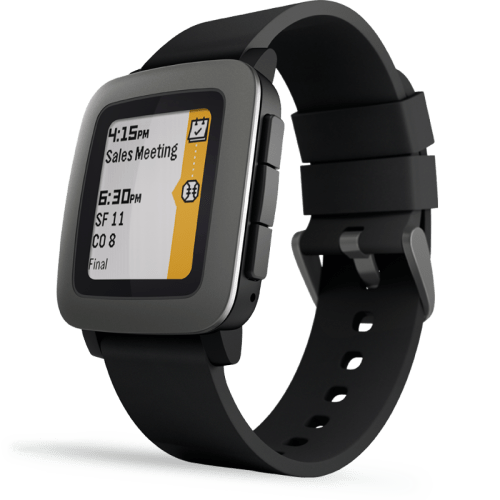
Anyone who wants to pair their new Pebble Time Smart Watch with an iPhone is going to need a friend with an android device. Why? Somehow, Apple has not yet approved the new app needed for the Pebble Time watch. Apparently, Pebble have been waiting for over a month now for approval.

That’s why, Pebble suggests finding a friend with an Android phone to complete the initial setup. However, this is not a proper solution as the watch is not connected with any apps etc.. Pebble watch owners have taken to social media to vent their frustration at Apple.

So this could mean several things. Apple is trying to strangle Pebble out of business or Pebble are crying fowl just to create some publicity over their watch. Does Apple really need to squeeze Pebble? Surely the Apple Watch will kill off the Pebble naturally? Or is the Pebble Time a real threat due to its long battery live, sunlight visibility and slick operation? Maybe, at WWDC, Apple has new software for their watch and doesn’t want to approve Pebble’s app until afterwards?

Whatever the reason(s), Apple being gate keeper of the App Store leaves it in a very powerful position! What do you think?

Apple’s iMessage Bug can render your iPhone, Apple Watch and more inoperable – Apple Support Dialogue plus workaround solution

Whenever you read about bugs or issues hitting devices, I remain fairly sceptical that it is an isolated incident. But when somebody you know can’t use their iPhone, Apple Watch and more because they received an iMessage then it time to take notice.

Below is the transcript from their call to Apple Support, with just the names changed to protect the my friend’s privacy.

Apple – Thanks for contacting AppleCare chat support. My name is Martha. How can I help you?

Wilson – Hello I have received a message from a spam number containing characters that activate a bug in iMessage. Every time I go to open iMessage it force closes. This has affected my iPhone and my iPod Touch. It came through to the Watch but that is ok. Do you have a solution as I would rather not reset my phone and iPod?

Apple – Martha – Thanks for chatting in, Wilson! Not to worry, this is actually an issue Apple is aware of. We are working to solve it and have some preliminary troubleshooting we could do if you would like to try it. I know its important to get your Messages working.

Wilson – Please

Apple – Did you receive the text from one specific person?

Wilson – Yes but I don’t recognise the number so think it is spam

Apple – Let’s go into your photos app and pick a random photo. It can be anything even a blurry one.

Wilson – I don’t know the number as I deleted it off my mac. I think I know what you are going to suggest. I will check my other mac see if it is on there still. It crashes my Apple Watch as well by the way.

Apple – It will do that to any device. Right now, we need to work on the phone, that’s the one we can fix. The others Apple is working diligently on, assured to come up with a solution in the next few days. Thank you for your patience!

Wilson – Ok so what do I do now?

Apple – The solution that has been working for customers is going to a backup before that message got to your phone or doing a restore and then adding your iCloud backup later on.

Wilson – But that is a long process to get the iPhone working.

Apple – I agree it can take a few hours, Wilson, that is the only proven solution as the matter is recent and is still being worked on.

Wilson – I got the number off the mac upstairs and did the photo trick. Have my devices been compromised? Is this a security issue? What is the solution for the watch as this crashes too?

Apple – This is not a security issue, Wilson. You didn’t download anything nor does it have any access to your personal information. It’s merely a message that affects the app itself. The Watch solution is still being worked on. You could try the photo solution at this time.

Wilson – can’t do that from the watch, so I’m going to have a watch that does not forward messages

Apple – Not for long, Wilson. The Watch has recently come out so they are already hard at work on the solution for it. Rest assured, you will have it back up and working in no time. I will even send you a case number if you want to chat back in and inquire about it.

Wilson – but even a day is a bit of a long time isn’t it to be honest

Apple – I understand, I know you spent a lot of money to get it! If this was a simple solution, I could troubleshoot it. There are times when issues like this emerge where we just have to let the solution be worked on lest it cause more of an issue.

Wilson – I have just found a solution for the watch do you want to know it to help others?

Apple – Any information you find online would be a great help! I know people are working fervently to get it solved so any input would be appreciated.

Wilson – create a contact on the phone with the number the message is from. Add that as a favourite in the watch app on the phone, go to the watch select favourites and send a text to that number from the watch, then go back into messages and that should be at the top of the list able to delete now

Apple – That’s a really good troubleshoot! Essentially it is doing what we did by sending the photo to the number which seems to be fixing the issue.

Wilson – my only issue with these solutions and something I feel Apple should be concerned with that the solution you suggest involves sending a reply to the number. If i was a spammer or wanted to collect a nice list of iPhone owners and iMessage numbers then I would have a lovely list of people who messaged me beck. Now thats a security concern. I would appreciate a call from someone to discuss this

So a simple text message can cause a lot of grief. Have you been affected by this issue?
Read my reviews of the latest 50+ Smartphones & more – S6, G4, M9, 830, Z3 and on

Tablets/Laptops/Chromebooks

Nexus 9 – First Impressions
Nexus 9 Tablet review
Samsung Galaxy Tab S 10.5 Tablet review
Samsung Galaxy NotePro 12.2 – 9 Part Review
Sony Xperia Z Tablet – 12 Part Review
Nvidia Shield Tablet – 7 Part review
Acer V15 Nitro Windows 8.1 laptop review
Acer C720 Chromebook review
Acer Aspire Switch 11 review
Acer Iconia 8 Android Tablet review

Amazon Devices

Amazon Fire Phone – 2 Part review

Apple Phones

Apple iPhone 6 Plus – 24 Part Review

BlackBerry Phones

BlackBerry Passport 10 Part Mammoth review

Android Phones

Samsung Galaxy S6 and S6 Edge review
Samsung Galaxy S6 and S6 Edge – Hands On
Samsung Galaxy A5 review
Samsung Note Edge – 14 Part Review
Samsung Note 4 – lollipop review
Samsung Note 4 – 17 Part Review
Samsung Galaxy Alpha – 2 Part review
Samsung Galaxy K Zoom – 26 Part Review
Samsung Galaxy S5 – 17 Part Review
Samsung Note 3 – 16 Part review
Samsung Galaxy S4 Zoom – 18 Part Review
Samsung Note 2 – 8 Part review

LG G4 full review coming soon

LG G4 – Hands on and First Impressions
LG G3 review – 31 Part Review
LG G Flex – 3 Part Review

HTC One M9 review
HTC Desire 820 review
HTC Desire Eye – 13 Part Review
HTC One M8 – 11 Part review
HTC One M7 – 20 Part Review

Acer S55 review – 6 Part Review

Yotaphone 2 – 4 Part review

Oneplus One – review

Honor 6+ review coming soon

Honor Holly – 4 Part review
Honor 6 – 12 Part Review
Huawei Ascend P6 Review

Sony Xperia Z3 review coming soon

Sony Xperia Z1 Compact review
Sony Z Ultra views and Camera Samples
Sony Xperia Z1 – 10 Part Review

Motorola Moto X – 4 Part review
Motorola Moto G – 8 Part review

Windows Phone

Nokia Lumia 830 vs Samsung Note 4 camera
Nokia Lumia 830 – First Impressions / What App Shortages?
Microsoft Lumia 535 review
Nokia Lumia 1520 – 6 Part review
Nokia Lumia 820 – 5 Part review
Nokia Lumia 1020 – 10 Part review
Nokia Lumia 925 – 9 Part review
Nokia Lumia 620 – 7 Part review

Other

ZTE Open Review – Firefox OS

If you are buying anything on Amazon, please use the link below. This will help support Gavin’s Gadgets with all the running costs and more and won’t be any different in cost. Thanks in advance.

GavGadgets@Amazon

Today is “Apple Watch” Day – Share you Thoughts and View “11 How To” Videos + More

Below are a number of “How To” videos from Apple showing you how to use your new Apple Watch. If you Apple Watch did get delivered today, so share your first thoughts in the comments.

In case you want to play with a few apps, according to Apple on launch day there will be 3,000 apps supporting the Apple Watch. Sounds like a success already!

Should you upgrade your Note 4 or iPhone 6 Plus for the Samsung Galaxy S6?

I have been asked my several people the above question? Should I upgrade my Note 4 or iPhone 6 Plus for a Samsung Galaxy S6/S6 Edge?

I have a Note 4, and I am changing it for a S6 Edge. I currently have the standard S6 but am moving to the gold S6 Edge. Why I am changing?

1. Design of the gold S6 Edge – personally I think it looks gorgeous
2. Speed of operation – its fast at everything
3. No more memory card/batteries to worry about
4. Audio quality – headphone output is both better than the Note 4 and louder
5. Camera – it just is superb
6. Size – easier to manage one handed

Now some balance. If you can manage with the Note 4 size, it still is a fabulous phone. Lovely large screen, stylus and still a good camera, just not as fast as the S6 or as good in low light. It is also cheaper and therefore represents better value for money.

What about if you own the iPhone 6 Plus. Firstly, it world’s apart as a device. If you use FaceTime or iMessage with family and friends, then maybe a change is not a good idea. Also, the 8mp camera on the iPhone is a good shooter and the 6 Plus is half way through it product cycle, so hopefully in 6 months time, it will receive the next world’s best camera on a smartphone. The 6 Plus has better battery life than the S6. So I would be cautious of any change.

If logic plays no part then its happy days 🙂

The